WEL COME
PRAVEEN M JIGAJINNI
PGT (Computer Science)
MCA, MSc[IT], MTech[IT],MPhil (Comp.Sci), PGDCA, ADCA,
Dc. Sc. & Engg.
Reference Book
CLASS XI
By
Sumita Arora
CHAPTER 8
OPERATORS
AND
EXPRESSION
S IN C++
OPERATORS
The operations (specific task) are
represented by operators and the objects
of the operation(s) are referred to as
operands.
OPERATORS
• Of the rich set of operators c++ provides
here we shall learn some. They are:--
1. Arithmetic operators
2. Increment/decrement operators
3. Relational operators
4. Logical operators
5. Conditional operators
6. Some other operators
1) ARITHMETIC
OPERATORS
C++ provides operators for five (5) basic
arithmetic operations :-
1.Addition (+)
2.Subtraction (-)
3.Multiplication (*)
4.Division (/)
5.Remainder (%)
ARITHMETIC
OPERATORS
NOTE: Each of these is a binary operator
i.e., it requires two values to (operands) to
calculate a final answer.
But there are two unary arithmetic
operators (that requires one operand or
value) viz.
Unary +
Unary -
UNARY OPERATORS
Operators that act on one operand are
referred to as unary operators.
UNARY +
The operator unary ‘+’
precedes an operand. The operand (the
value on which the operator operates) of
the unary + operator must have arithmetic
or pointer type and the result is the value
of the argument.
For ex:-
If a=5 then +a means 5.
If a=0then +a means 0.
If a=-4 then +a means -4.
UNARY -
The operator unary ‘–’ precedes an
operand. The operand of an unary – operator
must have arithmetic type and the result is
the negation of its operand’s value.
For ex:-If a=5 then -a means -5.
If a=0then -a means 0 (there is no
quantity mnown as –0).
If a=-4 then a means 4.
This operator reverses the sign of the
operand’s value.
BINARY OPERATORS
Operators that act upon two
operands are referred to as binary
operators.
Note :The operands of a binary
operator are distinguished as the left
or right operand. Together, the
operator and its operands constitute
an expression.
ADDITION OPERATOR
+
• The arithmetic binary operator + adds
values of its operands and the result is the
sum of the values of its two operands.
• For ex:-
• 4+20 results in 24.
• a+5(a=2) results in 7.
• a+b(a=4, b=6) results in 10.
• Its operands may be integer or float type.
SUBTRACTION
OPERATOR -
• The - operator subtracts the second
operand from first operand. For ex:-
• 14-3 results in 11.
• a-b(a=10, b=5) results in 5.
• The operands may be integer or float
types.
MULTIPLICATION
OPERATOR *
• The * operator multiplies the values of its
operands. For ex :--
• 3*3results in 12.
• b*8 (b=2) results in 16.
• a*b (a=5, b=10) results in 50.
• The operand may be integer or float types.
DIVISION OPERATOR /
• The / operator divides its first operand by
the second.
• For ex:--
• 100/5 evaluates to 20.
• a/2 (a=16) evaluates to 8.
• a/b (a=125, b= 25) results in 5.
• The operands may be integer, float or
double types.
MODULUS OPERATOR
%
• The % operator finds the modulus of the
modulus of the first operand relative to the
second. That is it produces remainder of
dividing the first by the second operand.
• For ex:--
• 19%6 results in1.
• Operands must be integer types.
INCREMENT/DECREMENT
OPERATORS(++, --)
The c++ name itself is influenced by the
increment operator ++. The operator ++
adds 1 to its operand , and – subtracts
one.
In other words,
a=a+1; is same as ++a; or a++;
and
a=a-1; is same as
--a; or a--;
INCREMENT/DECREMENT
OPERATORS(++, --)
Both the increment and
decrement operators come in two versions
viz.
1.Prefix version
2.Postfix version
Though both of them have same effect
on the operand, but they differ when they
take place in an expression.
PREFIX VERSION
• When an increment or decrement operator
precedes an operand we refer to it as
prefix version (of the respective
increment/decrement operator).
• When c++ encounters a prefix version it
performs the increment/decrement
operation before using the value of the
operand.
EXAMPLE
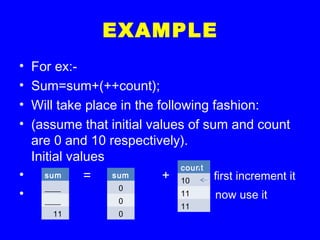
• For ex:-
• Sum=sum+(++count);
• Will take place in the following fashion:
• (assume that initial values of sum and count
are 0 and 10 respectively).
Initial values
• = + first increment it
• now use it
sum
____
____
11
sum
0
0
0
count
10
11
11
NOTE
The prefix increment or decrement
operators follow change-then-use rule.
They first change (increment/decrement)
the value of their operand. Then use the
new values in evaluating the expression.
POSTFIX VERSION
• When an increment/decrement operator
follows its operand we refer to it as postfix
version (of the increment/decrement
operator).
• When c++ faces a postfix operator it uses
its value first and then performs
increment/decrement operation upon the
operand.
EXAMPLE
• Sum=sum + count++ ;
• Insert a table later on
POSTFIX INCREMENT /
DECREMENT
OPERATOR
The postfix increment/decrement
operators follow use-then-change rule.
They first use the value and then
increments/decrements the operand’s
value.
MIND YOU!
The overall effect (as you must noticed
by now) on the operand’s value is the
same in both the cases of prefix/postfix
versions.
The increment/decrement operators
are unary operators.
Postfix operators enjoy higher precedence
over prefix operators.
PREFIX OPERATORS
• In turbo C++, firstly all prefix operators
are evaluated prior to expression
evaluation. The resultant value of prefix
operator is planted in the expression and
the expression is evaluated.
• Ex:-insert an example later on.
INCREMENT/DECREMENT
OPERATORS
After being aware of the use of
the increment/decrement operators (and
of course the operators itself) you should
not make multiple use of these two
operators as it produces different results
on different systems and is purely
implementation dependent.
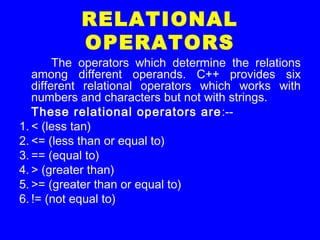
RELATIONAL
OPERATORS
The operators which determine the relations
among different operands. C++ provides six
different relational operators which works with
numbers and characters but not with strings.
These relational operators are:--
1. < (less tan)
2. <= (less than or equal to)
3. == (equal to)
4. > (greater than)
5. >= (greater than or equal to)
6. != (not equal to)
KILL YOUR DOUBTS
You should never ever confuse between =
and == operators. This is the most common
mistake while working with relational
operators.
You should avoid getting stuck with silly
results. Just you need to know that = is an
assignment operator (which assigns a value
to the variable it follows) while == is a
relational operator ( which compares two
values characters or numbers).
TIP
Avoid equality comparisons on floating-
point numbers.
Floating-point arithmetic is not so exact
and accurate as the integer arithmetic is.
After any calculation involving floating-
point numbers there may be a small
residue error. Beause of this error you
should avoid equality and inequality
operations between floating-point
numbers.
TIP
Avoid comparing signed and unsigned
values.
It is because if you compare signed
and unsigned values the compiler treats a
signed value as unsigned. So problem
arises when comparison involves any
negative value. The results can be as
different as you can think for yourself.
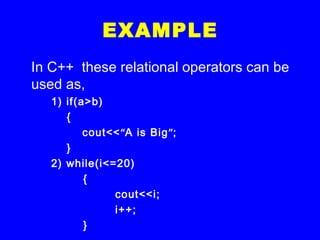
EXAMPLE
In C++ these relational operators can be
used as,
1) if(a>b)
{
cout<<“A is Big”;
}
2) while(i<=20)
{
cout<<i;
i++;
}
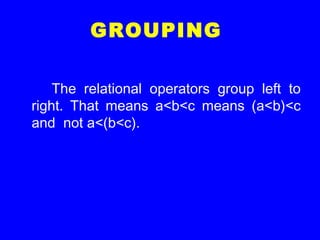
GROUPING
The relational operators group left to
right. That means a<b<c means (a<b)<c
and not a<(b<c).
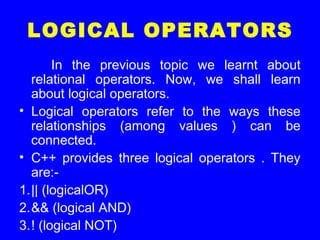
LOGICAL OPERATORS
In the previous topic we learnt about
relational operators. Now, we shall learn
about logical operators.
• Logical operators refer to the ways these
relationships (among values ) can be
connected.
• C++ provides three logical operators . They
are:-
1.|| (logicalOR)
2.&& (logical AND)
3.! (logical NOT)
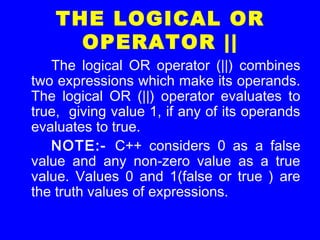
THE LOGICAL OR
OPERATOR ||
The logical OR operator (||) combines
two expressions which make its operands.
The logical OR (||) operator evaluates to
true, giving value 1, if any of its operands
evaluates to true.
NOTE:- C++ considers 0 as a false
value and any non-zero value as a true
value. Values 0 and 1(false or true ) are
the truth values of expressions.
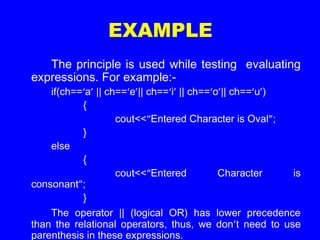
EXAMPLE
The principle is used while testing evaluating
expressions. For example:-
if(ch==‘a’ || ch==‘e’|| ch==‘i’ || ch==‘o’|| ch==‘u’)
{
cout<<“Entered Character is Oval”;
}
else
{
cout<<“Entered Character is
consonant”;
}
The operator || (logical OR) has lower precedence
than the relational operators, thus, we don’t need to use
parenthesis in these expressions.
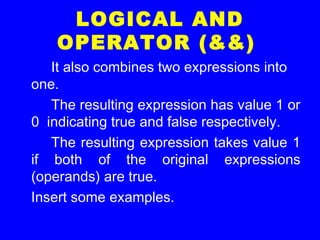
LOGICAL AND
OPERATOR (&&)
It also combines two expressions into
one.
The resulting expression has value 1 or
0 indicating true and false respectively.
The resulting expression takes value 1
if both of the original expressions
(operands) are true.
Insert some examples.
LOGICAL AND
OPERATOR (&&)
The logical operator AND ( && ) has
lower precedence over the relational
operators.
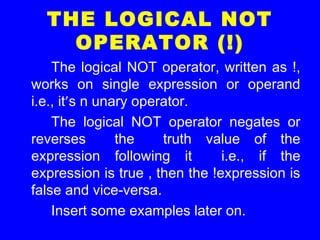
THE LOGICAL NOT
OPERATOR (!)
The logical NOT operator, written as !,
works on single expression or operand
i.e., it’s n unary operator.
The logical NOT operator negates or
reverses the truth value of the
expression following it i.e., if the
expression is true , then the !expression is
false and vice-versa.
Insert some examples later on.
THE LOGICAL NOT
OPERATOR (!)
• The logical negation operator(!) has a
higher precedence over all other
arithmetical and relational operators.
Therefore, to negate an expression, you
must enclose the expression in
parentheses.
TIP
• The unary negation operator is useful as a
test for zero.
• Thus, the condition if(check==0) can be
replaced by if(!check).
SOME FACTS ABOUT
LOGICAL OPERATORS
• The precedence order among logical
operators is NOT, AND and OR (!, &&, ||).
CONDITIONAL
OPERATOR ?:
• C++ offers a conditional operator (?:) that stores a
value depending upon a condition.
• The operator is ternary operator meaning it
requires three operands.
• The general form :-
• Expression1 ? Expression2: Expression3
• If expression1 evaluates to true i.e.1, then the
value of whole expression is the value of
expression2, otherwise, the value of the whole
expression is the value o0f the exspression3.
• Insert an example later on.
BEWARE!!!
• You will enjoy working with the conditional
operator except that you must know that:-
The conditional operator has a low
precedence.
• The conditional operator has a lower
precedence than most other operators
that may produce unexpected results at
times.
• Insert an example later on.
CONDITIONAL
OPERATOR ?:
• The conditional operator can be nested
also i.e., any of the expression2 or
expression3 can be other conditional
operator.
• Give an example later on.
CONDITIONAL
OPERATOR ?:
• The conditional operator is allowed on left
side of the expression.
CONDITIONAL
OPERATOR ?:
In C++, the result of the conditional
operator ?: is an lvalue, provided that the
two alternatives ( true part alternative, false
part alternative) are themselves values of the
same type.
As you already know, an lvalue is an
expression to which you can assign a value.
There must be an lvalue on the left side of an
assignment operator. This means that you
can assign a value to a conditional
expression.
SOME OTHER
OPERATORS
In this section, we discuss two of many
other operators (in C++) which are of
greater relevance to us at the moment.
They are :
1.The compile-time operator sizeof
2.The comma operator
sizeof OPERATOR
It is a unary compile-time operator that
returns the length (in bytes) of the variable
or parenthesized type-Specifier that it
precedes.that is, it can be used in two
forms :
1.sizeof var (where var is declared variable)
2.sizeof(type) (where type is a C++ data
type)
THE COMMA
OPERATOR
A comma operator is used to string
together several expressions.
The group of expressions separated by
commas(,) is evaluated left-to-right in
sequence and the result of the right-most
expression becomes the value of the total
comma-separated expression.
• For ex:-
• b=(a=3,a=1);
NOTE
The parentheses are necessary
because the comma operator has a lower
precedence than the assignment operator.
The comma operator has lowest
precedence to all these operators.
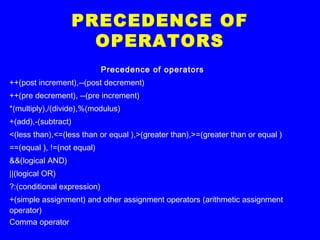
PRECEDENCE OF
OPERATORS
Precedence of operators
++(post increment),--(post decrement)
++(pre decrement), --(pre increment)
*(multiply),/(divide),%(modulus)
+(add),-(subtract)
<(less than),<=(less than or equal ),>(greater than),>=(greater than or equal )
==(equal ), !=(not equal)
&&(logical AND)
||(logical OR)
?:(conditional expression)
+(simple assignment) and other assignment operators (arithmetic assignment
operator)
Comma operator
EXPRESSIONS
An expression in C++ is any valid
combination of operators, constants and
variables.
EXPRESSION
The expression in C++ can be of any
type i.e., relational, logical etc.
Type of operators used in an
expression determines the type of
expression.
ARITHMETIC
EXPRESSIONS
Arithmetic expression can either be
integer or real expressions.
Sometimes a mixed expression can
also be formed which is a mixture of real
and integer expressions.
INTEGER
EXPRESSIONS
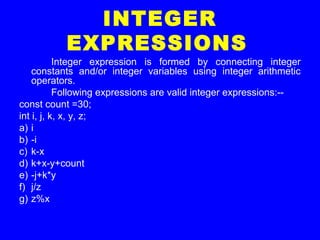
Integer expression is formed by connecting integer
constants and/or integer variables using integer arithmetic
operators.
Following expressions are valid integer expressions:--
const count =30;
int i, j, k, x, y, z;
a) i
b) -i
c) k-x
d) k+x-y+count
e) -j+k*y
f) j/z
g) z%x
REAL EXPRESSIONS
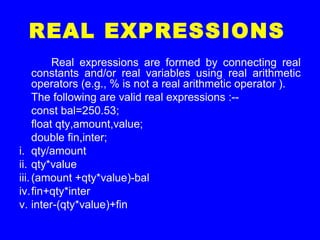
Real expressions are formed by connecting real
constants and/or real variables using real arithmetic
operators (e.g., % is not a real arithmetic operator ).
The following are valid real expressions :--
const bal=250.53;
float qty,amount,value;
double fin,inter;
i. qty/amount
ii. qty*value
iii.(amount +qty*value)-bal
iv.fin+qty*inter
v. inter-(qty*value)+fin
RULE
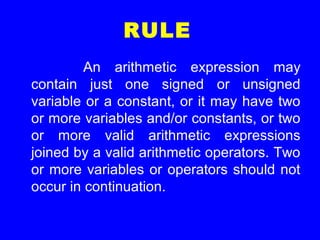
An arithmetic expression may
contain just one signed or unsigned
variable or a constant, or it may have two
or more variables and/or constants, or two
or more valid arithmetic expressions
joined by a valid arithmetic operators. Two
or more variables or operators should not
occur in continuation.
REAL EXPRESSIONS
CONTD..
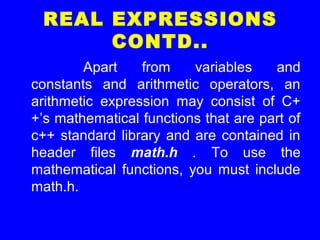
Apart from variables and
constants and arithmetic operators, an
arithmetic expression may consist of C+
+’s mathematical functions that are part of
c++ standard library and are contained in
header files math.h . To use the
mathematical functions, you must include
math.h.
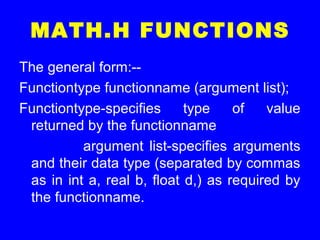
MATH.H FUNCTIONS
The general form:--
Functiontype functionname (argument list);
Functiontype-specifies type of value
returned by the functionname
argument list-specifies arguments
and their data type (separated by commas
as in int a, real b, float d,) as required by
the functionname.
MATHEMATICAL
FUNCTIONS IN math.h
s.
no.
func
tion
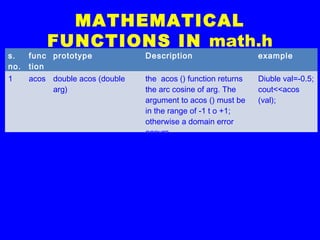
prototype Description example
1 acos double acos (double
arg)
the acos () function returns
the arc cosine of arg. The
argument to acos () must be
in the range of -1 t o +1;
otherwise a domain error
occurs.
Diuble val=-0.5;
cout<<acos
(val);
MATHEMATICAL
FUNCTIONS IN math.h
s.
no.
func
tion
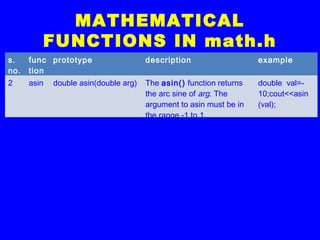
prototype description example
2 asin double asin(double arg) The asin() function returns
the arc sine of arg. The
argument to asin must be in
the range -1 to 1.
double val=-
10;cout<<asin
(val);
MATHEMATICAL
FUNCTIONS IN math.h
s.
no.
func
tion
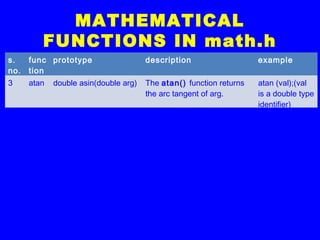
prototype description example
3 atan double asin(double arg) The atan() function returns
the arc tangent of arg.
atan (val);(val
is a double type
identifier)
MATHEMATICAL
FUNCTIONS IN math.h
s.
no.
Func
tion
prototype description example
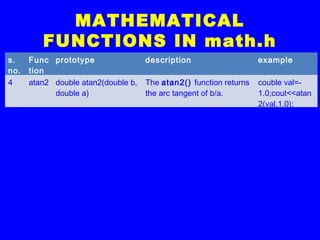
4 atan2 double atan2(double b,
double a)
The atan2() function returns
the arc tangent of b/a.
couble val=-
1.0;cout<<atan
2(val,1.0);
MATHEMATICAL
FUNCTIONS IN math.h
s.
no.
func
tion
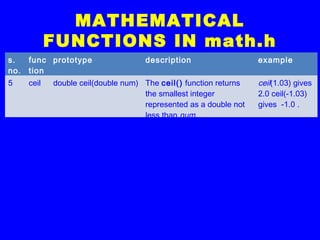
prototype description example
5 ceil double ceil(double num) The ceil() function returns
the smallest integer
represented as a double not
less than num.
ceil(1.03) gives
2.0 ceil(-1.03)
gives -1.0 .
MATHEMATICAL
FUNCTIONS IN math.h
s.
no.
func
tion
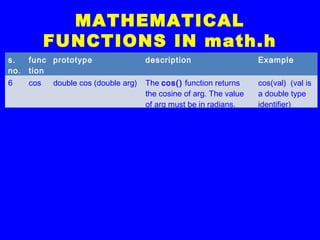
prototype description Example
6 cos double cos (double arg) The cos() function returns
the cosine of arg. The value
of arg must be in radians.
cos(val) (val is
a double type
identifier)
MATHEMATICAL
FUNCTIONS IN math.h
s.
no.
func
tion
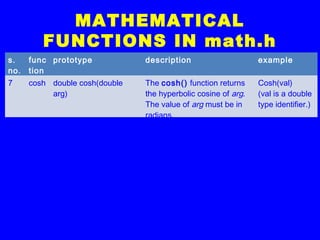
prototype description example
7 cosh double cosh(double
arg)
The cosh() function returns
the hyperbolic cosine of arg.
The value of arg must be in
radians.
Cosh(val)
(val is a double
type identifier.)
MATHEMATICAL
FUNCTIONS IN math.h
s.
no.
Fun
ctio
n
prototype Description example
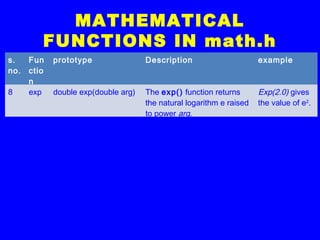
8 exp double exp(double arg) The exp() function returns
the natural logarithm e raised
to power arg.
Exp(2.0) gives
the value of e2
.
MATHEMATICAL
FUNCTIONS IN math.h
s.
no.
func
tion
prototype description Example.
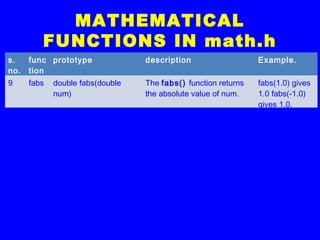
9 fabs double fabs(double
num)
The fabs() function returns
the absolute value of num.
fabs(1.0) gives
1.0 fabs(-1.0)
gives 1.0.
MATHEMATICAL
FUNCTIONS IN math.h
s.
no.
func
tion
prototype description example
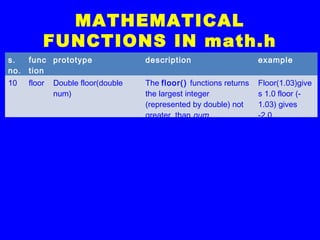
10 floor Double floor(double
num)
The floor() functions returns
the largest integer
(represented by double) not
greater than num.
Floor(1.03)give
s 1.0 floor (-
1.03) gives
-2.0.
MATHEMATICAL
FUNCTIONS IN math.h
s.
no.
func
tion
prototype description example
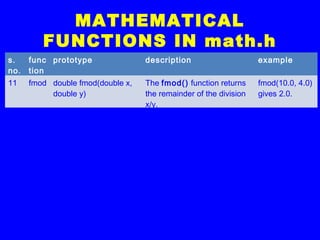
11 fmod double fmod(double x,
double y)
The fmod() function returns
the remainder of the division
x/y.
fmod(10.0, 4.0)
gives 2.0.
MATHEMATICAL
FUNCTIONS IN math.h
s.
no.
func
tion
prototype description example
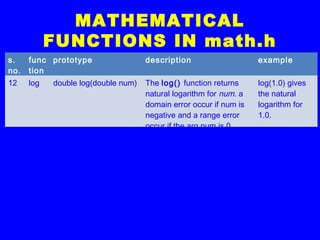
12 log double log(double num) The log() function returns
natural logarithm for num. a
domain error occur if num is
negative and a range error
occur if the arg num is 0.
log(1.0) gives
the natural
logarithm for
1.0.
MATHEMATICAL
FUNCTIONS IN math.h
s.
no.
func
tion
prototype description example
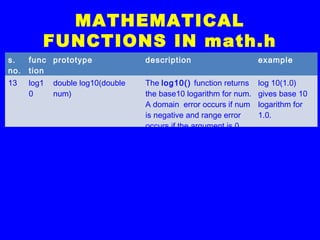
13 log1
0
double log10(double
num)
The log10() function returns
the base10 logarithm for num.
A domain error occurs if num
is negative and range error
occurs if the argument is 0.
log 10(1.0)
gives base 10
logarithm for
1.0.
MATHEMATICAL
FUNCTIONS IN math.h
s.
no.
func
tion
prototype description example
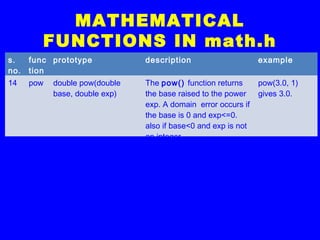
14 pow double pow(double
base, double exp)
The pow() function returns
the base raised to the power
exp. A domain error occurs if
the base is 0 and exp<=0.
also if base<0 and exp is not
an integer.
pow(3.0, 1)
gives 3.0.
MATHEMATICAL
FUNCTIONS IN math.h
s.
no.
func
tion
prototype description example
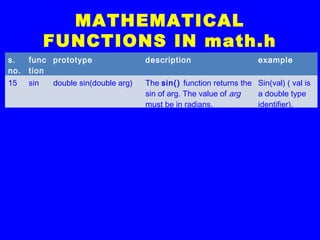
15 sin double sin(double arg) The sin() function returns the
sin of arg. The value of arg
must be in radians.
Sin(val) ( val is
a double type
identifier).
MATHEMATICAL
FUNCTIONS IN math.h
s.
no.
func
tion
prototype description example
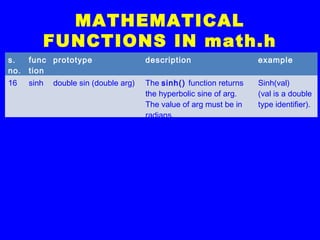
16 sinh double sin (double arg) The sinh() function returns
the hyperbolic sine of arg.
The value of arg must be in
radians.
Sinh(val)
(val is a double
type identifier).
MATHEMATICAL
FUNCTIONS IN math.h
s.
no.
func
tion
prototype description example
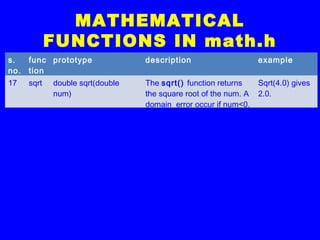
17 sqrt double sqrt(double
num)
The sqrt() function returns
the square root of the num. A
domain error occur if num<0.
Sqrt(4.0) gives
2.0.
MATHEMATICAL
FUNCTIONS IN math.h
s.
no.
func
tion
prototype description example
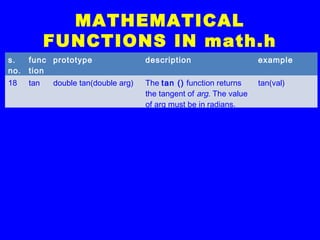
18 tan double tan(double arg) The tan () function returns
the tangent of arg. The value
of arg must be in radians.
tan(val)
MATHEMATICAL
FUNCTIONS IN math.h
s.
no.
func
tion
prototype description example
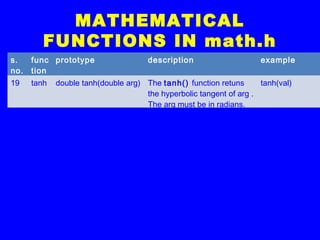
19 tanh double tanh(double arg) The tanh() function retuns
the hyperbolic tangent of arg .
The arg must be in radians.
tanh(val)
TYPE CONVERSION
Def…
The process of converting one
predefined data type to another is
called Type Conversion.
TYPE CONVERSION
C++ facilitates the type conversion in
two forms:---
1)Implicit type conversion
2)Explicit type conversion
IMPLICIT TYPE
CONVERSION
It’s a conversion performed by the
compiler without any intervention of the
user.
Applied generally whenever differing
data types are intermixed in an expression
(mixed mode expression), so as not to
lose information.
IMPLICIT TYPE
CONVERSION
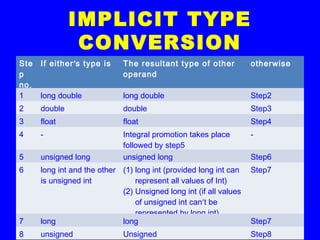
The C++ compiler converts all
operands upto the type of the largest
operand, which is called Type promotion.
IMPLICIT TYPE
CONVERSION
Ste
p
no.
If either’s type is The resultant type of other
operand
otherwise
1 long double long double Step2
2 double double Step3
3 float float Step4
4 - Integral promotion takes place
followed by step5
-
5 unsigned long unsigned long Step6
6 long int and the other
is unsigned int
(1) long int (provided long int can
represent all values of Int)
(2) Unsigned long int (if all values
of unsigned int can’t be
represented by long int)
Step7
7 long long Step7
8 unsigned Unsigned Step8
EXPLICIT TYPE
CONVERSION
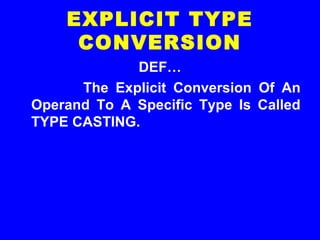
DEF…
The Explicit Conversion Of An
Operand To A Specific Type Is Called
TYPE CASTING.
EXPLICIT TYPE
CONVERSION
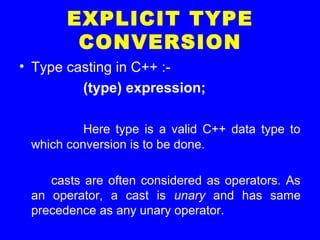
• Type casting in C++ :-
(type) expression;
Here type is a valid C++ data type to
which conversion is to be done.
casts are often considered as operators. As
an operator, a cast is unary and has same
precedence as any unary operator.
EXPRESSION
EVALUATION
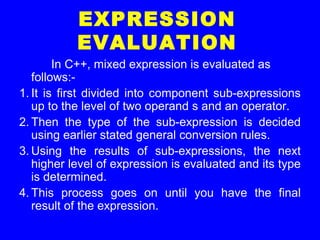
In C++, mixed expression is evaluated as
follows:-
1. It is first divided into component sub-expressions
up to the level of two operand s and an operator.
2. Then the type of the sub-expression is decided
using earlier stated general conversion rules.
3. Using the results of sub-expressions, the next
higher level of expression is evaluated and its type
is determined.
4. This process goes on until you have the final
result of the expression.
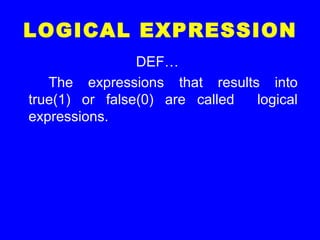
LOGICAL EXPRESSION
DEF…
The expressions that results into
true(1) or false(0) are called logical
expressions.
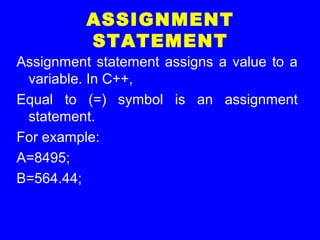
ASSIGNMENT
STATEMENT
Assignment statement assigns a value to a
variable. In C++,
Equal to (=) symbol is an assignment
statement.
For example:
A=8495;
B=564.44;
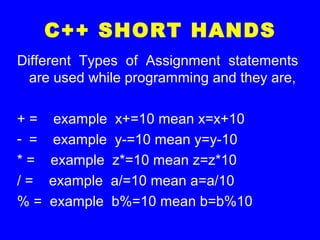
C++ SHORT HANDS
Different Types of Assignment statements
are used while programming and they are,
+ = example x+=10 mean x=x+10
- = example y-=10 mean y=y-10
* = example z*=10 mean z=z*10
/ = example a/=10 mean a=a/10
% = example b%=10 mean b=b%10
THANK
YOU

Operators and Expressions in C++

  • 1.
    WEL COME PRAVEEN MJIGAJINNI PGT (Computer Science) MCA, MSc[IT], MTech[IT],MPhil (Comp.Sci), PGDCA, ADCA, Dc. Sc. & Engg.
  • 2.
  • 3.
  • 4.
    OPERATORS The operations (specifictask) are represented by operators and the objects of the operation(s) are referred to as operands.
  • 5.
    OPERATORS • Of therich set of operators c++ provides here we shall learn some. They are:-- 1. Arithmetic operators 2. Increment/decrement operators 3. Relational operators 4. Logical operators 5. Conditional operators 6. Some other operators
  • 6.
    1) ARITHMETIC OPERATORS C++ providesoperators for five (5) basic arithmetic operations :- 1.Addition (+) 2.Subtraction (-) 3.Multiplication (*) 4.Division (/) 5.Remainder (%)
  • 7.
    ARITHMETIC OPERATORS NOTE: Each ofthese is a binary operator i.e., it requires two values to (operands) to calculate a final answer. But there are two unary arithmetic operators (that requires one operand or value) viz. Unary + Unary -
  • 8.
    UNARY OPERATORS Operators thatact on one operand are referred to as unary operators.
  • 9.
    UNARY + The operatorunary ‘+’ precedes an operand. The operand (the value on which the operator operates) of the unary + operator must have arithmetic or pointer type and the result is the value of the argument. For ex:- If a=5 then +a means 5. If a=0then +a means 0. If a=-4 then +a means -4.
  • 10.
    UNARY - The operatorunary ‘–’ precedes an operand. The operand of an unary – operator must have arithmetic type and the result is the negation of its operand’s value. For ex:-If a=5 then -a means -5. If a=0then -a means 0 (there is no quantity mnown as –0). If a=-4 then a means 4. This operator reverses the sign of the operand’s value.
  • 11.
    BINARY OPERATORS Operators thatact upon two operands are referred to as binary operators. Note :The operands of a binary operator are distinguished as the left or right operand. Together, the operator and its operands constitute an expression.
  • 12.
    ADDITION OPERATOR + • Thearithmetic binary operator + adds values of its operands and the result is the sum of the values of its two operands. • For ex:- • 4+20 results in 24. • a+5(a=2) results in 7. • a+b(a=4, b=6) results in 10. • Its operands may be integer or float type.
  • 13.
    SUBTRACTION OPERATOR - • The- operator subtracts the second operand from first operand. For ex:- • 14-3 results in 11. • a-b(a=10, b=5) results in 5. • The operands may be integer or float types.
  • 14.
    MULTIPLICATION OPERATOR * • The* operator multiplies the values of its operands. For ex :-- • 3*3results in 12. • b*8 (b=2) results in 16. • a*b (a=5, b=10) results in 50. • The operand may be integer or float types.
  • 15.
    DIVISION OPERATOR / •The / operator divides its first operand by the second. • For ex:-- • 100/5 evaluates to 20. • a/2 (a=16) evaluates to 8. • a/b (a=125, b= 25) results in 5. • The operands may be integer, float or double types.
  • 16.
    MODULUS OPERATOR % • The% operator finds the modulus of the modulus of the first operand relative to the second. That is it produces remainder of dividing the first by the second operand. • For ex:-- • 19%6 results in1. • Operands must be integer types.
  • 17.
    INCREMENT/DECREMENT OPERATORS(++, --) The c++name itself is influenced by the increment operator ++. The operator ++ adds 1 to its operand , and – subtracts one. In other words, a=a+1; is same as ++a; or a++; and a=a-1; is same as --a; or a--;
  • 18.
    INCREMENT/DECREMENT OPERATORS(++, --) Both theincrement and decrement operators come in two versions viz. 1.Prefix version 2.Postfix version Though both of them have same effect on the operand, but they differ when they take place in an expression.
  • 19.
    PREFIX VERSION • Whenan increment or decrement operator precedes an operand we refer to it as prefix version (of the respective increment/decrement operator). • When c++ encounters a prefix version it performs the increment/decrement operation before using the value of the operand.
  • 20.
    EXAMPLE • For ex:- •Sum=sum+(++count); • Will take place in the following fashion: • (assume that initial values of sum and count are 0 and 10 respectively). Initial values • = + first increment it • now use it sum ____ ____ 11 sum 0 0 0 count 10 11 11
  • 21.
    NOTE The prefix incrementor decrement operators follow change-then-use rule. They first change (increment/decrement) the value of their operand. Then use the new values in evaluating the expression.
  • 22.
    POSTFIX VERSION • Whenan increment/decrement operator follows its operand we refer to it as postfix version (of the increment/decrement operator). • When c++ faces a postfix operator it uses its value first and then performs increment/decrement operation upon the operand.
  • 23.
    EXAMPLE • Sum=sum +count++ ; • Insert a table later on
  • 24.
    POSTFIX INCREMENT / DECREMENT OPERATOR Thepostfix increment/decrement operators follow use-then-change rule. They first use the value and then increments/decrements the operand’s value.
  • 25.
    MIND YOU! The overalleffect (as you must noticed by now) on the operand’s value is the same in both the cases of prefix/postfix versions. The increment/decrement operators are unary operators. Postfix operators enjoy higher precedence over prefix operators.
  • 26.
    PREFIX OPERATORS • Inturbo C++, firstly all prefix operators are evaluated prior to expression evaluation. The resultant value of prefix operator is planted in the expression and the expression is evaluated. • Ex:-insert an example later on.
  • 27.
    INCREMENT/DECREMENT OPERATORS After being awareof the use of the increment/decrement operators (and of course the operators itself) you should not make multiple use of these two operators as it produces different results on different systems and is purely implementation dependent.
  • 28.
    RELATIONAL OPERATORS The operators whichdetermine the relations among different operands. C++ provides six different relational operators which works with numbers and characters but not with strings. These relational operators are:-- 1. < (less tan) 2. <= (less than or equal to) 3. == (equal to) 4. > (greater than) 5. >= (greater than or equal to) 6. != (not equal to)
  • 29.
    KILL YOUR DOUBTS Youshould never ever confuse between = and == operators. This is the most common mistake while working with relational operators. You should avoid getting stuck with silly results. Just you need to know that = is an assignment operator (which assigns a value to the variable it follows) while == is a relational operator ( which compares two values characters or numbers).
  • 30.
    TIP Avoid equality comparisonson floating- point numbers. Floating-point arithmetic is not so exact and accurate as the integer arithmetic is. After any calculation involving floating- point numbers there may be a small residue error. Beause of this error you should avoid equality and inequality operations between floating-point numbers.
  • 31.
    TIP Avoid comparing signedand unsigned values. It is because if you compare signed and unsigned values the compiler treats a signed value as unsigned. So problem arises when comparison involves any negative value. The results can be as different as you can think for yourself.
  • 32.
    EXAMPLE In C++ theserelational operators can be used as, 1) if(a>b) { cout<<“A is Big”; } 2) while(i<=20) { cout<<i; i++; }
  • 33.
    GROUPING The relational operatorsgroup left to right. That means a<b<c means (a<b)<c and not a<(b<c).
  • 34.
    LOGICAL OPERATORS In theprevious topic we learnt about relational operators. Now, we shall learn about logical operators. • Logical operators refer to the ways these relationships (among values ) can be connected. • C++ provides three logical operators . They are:- 1.|| (logicalOR) 2.&& (logical AND) 3.! (logical NOT)
  • 35.
    THE LOGICAL OR OPERATOR|| The logical OR operator (||) combines two expressions which make its operands. The logical OR (||) operator evaluates to true, giving value 1, if any of its operands evaluates to true. NOTE:- C++ considers 0 as a false value and any non-zero value as a true value. Values 0 and 1(false or true ) are the truth values of expressions.
  • 36.
    EXAMPLE The principle isused while testing evaluating expressions. For example:- if(ch==‘a’ || ch==‘e’|| ch==‘i’ || ch==‘o’|| ch==‘u’) { cout<<“Entered Character is Oval”; } else { cout<<“Entered Character is consonant”; } The operator || (logical OR) has lower precedence than the relational operators, thus, we don’t need to use parenthesis in these expressions.
  • 37.
    LOGICAL AND OPERATOR (&&) Italso combines two expressions into one. The resulting expression has value 1 or 0 indicating true and false respectively. The resulting expression takes value 1 if both of the original expressions (operands) are true. Insert some examples.
  • 38.
    LOGICAL AND OPERATOR (&&) Thelogical operator AND ( && ) has lower precedence over the relational operators.
  • 39.
    THE LOGICAL NOT OPERATOR(!) The logical NOT operator, written as !, works on single expression or operand i.e., it’s n unary operator. The logical NOT operator negates or reverses the truth value of the expression following it i.e., if the expression is true , then the !expression is false and vice-versa. Insert some examples later on.
  • 40.
    THE LOGICAL NOT OPERATOR(!) • The logical negation operator(!) has a higher precedence over all other arithmetical and relational operators. Therefore, to negate an expression, you must enclose the expression in parentheses.
  • 41.
    TIP • The unarynegation operator is useful as a test for zero. • Thus, the condition if(check==0) can be replaced by if(!check).
  • 42.
    SOME FACTS ABOUT LOGICALOPERATORS • The precedence order among logical operators is NOT, AND and OR (!, &&, ||).
  • 43.
    CONDITIONAL OPERATOR ?: • C++offers a conditional operator (?:) that stores a value depending upon a condition. • The operator is ternary operator meaning it requires three operands. • The general form :- • Expression1 ? Expression2: Expression3 • If expression1 evaluates to true i.e.1, then the value of whole expression is the value of expression2, otherwise, the value of the whole expression is the value o0f the exspression3. • Insert an example later on.
  • 44.
    BEWARE!!! • You willenjoy working with the conditional operator except that you must know that:- The conditional operator has a low precedence. • The conditional operator has a lower precedence than most other operators that may produce unexpected results at times. • Insert an example later on.
  • 45.
    CONDITIONAL OPERATOR ?: • Theconditional operator can be nested also i.e., any of the expression2 or expression3 can be other conditional operator. • Give an example later on.
  • 46.
    CONDITIONAL OPERATOR ?: • Theconditional operator is allowed on left side of the expression.
  • 47.
    CONDITIONAL OPERATOR ?: In C++,the result of the conditional operator ?: is an lvalue, provided that the two alternatives ( true part alternative, false part alternative) are themselves values of the same type. As you already know, an lvalue is an expression to which you can assign a value. There must be an lvalue on the left side of an assignment operator. This means that you can assign a value to a conditional expression.
  • 48.
    SOME OTHER OPERATORS In thissection, we discuss two of many other operators (in C++) which are of greater relevance to us at the moment. They are : 1.The compile-time operator sizeof 2.The comma operator
  • 49.
    sizeof OPERATOR It isa unary compile-time operator that returns the length (in bytes) of the variable or parenthesized type-Specifier that it precedes.that is, it can be used in two forms : 1.sizeof var (where var is declared variable) 2.sizeof(type) (where type is a C++ data type)
  • 50.
    THE COMMA OPERATOR A commaoperator is used to string together several expressions. The group of expressions separated by commas(,) is evaluated left-to-right in sequence and the result of the right-most expression becomes the value of the total comma-separated expression. • For ex:- • b=(a=3,a=1);
  • 51.
    NOTE The parentheses arenecessary because the comma operator has a lower precedence than the assignment operator. The comma operator has lowest precedence to all these operators.
  • 52.
    PRECEDENCE OF OPERATORS Precedence ofoperators ++(post increment),--(post decrement) ++(pre decrement), --(pre increment) *(multiply),/(divide),%(modulus) +(add),-(subtract) <(less than),<=(less than or equal ),>(greater than),>=(greater than or equal ) ==(equal ), !=(not equal) &&(logical AND) ||(logical OR) ?:(conditional expression) +(simple assignment) and other assignment operators (arithmetic assignment operator) Comma operator
  • 53.
    EXPRESSIONS An expression inC++ is any valid combination of operators, constants and variables.
  • 54.
    EXPRESSION The expression inC++ can be of any type i.e., relational, logical etc. Type of operators used in an expression determines the type of expression.
  • 55.
    ARITHMETIC EXPRESSIONS Arithmetic expression caneither be integer or real expressions. Sometimes a mixed expression can also be formed which is a mixture of real and integer expressions.
  • 56.
    INTEGER EXPRESSIONS Integer expression isformed by connecting integer constants and/or integer variables using integer arithmetic operators. Following expressions are valid integer expressions:-- const count =30; int i, j, k, x, y, z; a) i b) -i c) k-x d) k+x-y+count e) -j+k*y f) j/z g) z%x
  • 57.
    REAL EXPRESSIONS Real expressionsare formed by connecting real constants and/or real variables using real arithmetic operators (e.g., % is not a real arithmetic operator ). The following are valid real expressions :-- const bal=250.53; float qty,amount,value; double fin,inter; i. qty/amount ii. qty*value iii.(amount +qty*value)-bal iv.fin+qty*inter v. inter-(qty*value)+fin
  • 58.
    RULE An arithmetic expressionmay contain just one signed or unsigned variable or a constant, or it may have two or more variables and/or constants, or two or more valid arithmetic expressions joined by a valid arithmetic operators. Two or more variables or operators should not occur in continuation.
  • 59.
    REAL EXPRESSIONS CONTD.. Apart fromvariables and constants and arithmetic operators, an arithmetic expression may consist of C+ +’s mathematical functions that are part of c++ standard library and are contained in header files math.h . To use the mathematical functions, you must include math.h.
  • 60.
    MATH.H FUNCTIONS The generalform:-- Functiontype functionname (argument list); Functiontype-specifies type of value returned by the functionname argument list-specifies arguments and their data type (separated by commas as in int a, real b, float d,) as required by the functionname.
  • 61.
    MATHEMATICAL FUNCTIONS IN math.h s. no. func tion prototypeDescription example 1 acos double acos (double arg) the acos () function returns the arc cosine of arg. The argument to acos () must be in the range of -1 t o +1; otherwise a domain error occurs. Diuble val=-0.5; cout<<acos (val);
  • 62.
    MATHEMATICAL FUNCTIONS IN math.h s. no. func tion prototypedescription example 2 asin double asin(double arg) The asin() function returns the arc sine of arg. The argument to asin must be in the range -1 to 1. double val=- 10;cout<<asin (val);
  • 63.
    MATHEMATICAL FUNCTIONS IN math.h s. no. func tion prototypedescription example 3 atan double asin(double arg) The atan() function returns the arc tangent of arg. atan (val);(val is a double type identifier)
  • 64.
    MATHEMATICAL FUNCTIONS IN math.h s. no. Func tion prototypedescription example 4 atan2 double atan2(double b, double a) The atan2() function returns the arc tangent of b/a. couble val=- 1.0;cout<<atan 2(val,1.0);
  • 65.
    MATHEMATICAL FUNCTIONS IN math.h s. no. func tion prototypedescription example 5 ceil double ceil(double num) The ceil() function returns the smallest integer represented as a double not less than num. ceil(1.03) gives 2.0 ceil(-1.03) gives -1.0 .
  • 66.
    MATHEMATICAL FUNCTIONS IN math.h s. no. func tion prototypedescription Example 6 cos double cos (double arg) The cos() function returns the cosine of arg. The value of arg must be in radians. cos(val) (val is a double type identifier)
  • 67.
    MATHEMATICAL FUNCTIONS IN math.h s. no. func tion prototypedescription example 7 cosh double cosh(double arg) The cosh() function returns the hyperbolic cosine of arg. The value of arg must be in radians. Cosh(val) (val is a double type identifier.)
  • 68.
    MATHEMATICAL FUNCTIONS IN math.h s. no. Fun ctio n prototypeDescription example 8 exp double exp(double arg) The exp() function returns the natural logarithm e raised to power arg. Exp(2.0) gives the value of e2 .
  • 69.
    MATHEMATICAL FUNCTIONS IN math.h s. no. func tion prototypedescription Example. 9 fabs double fabs(double num) The fabs() function returns the absolute value of num. fabs(1.0) gives 1.0 fabs(-1.0) gives 1.0.
  • 70.
    MATHEMATICAL FUNCTIONS IN math.h s. no. func tion prototypedescription example 10 floor Double floor(double num) The floor() functions returns the largest integer (represented by double) not greater than num. Floor(1.03)give s 1.0 floor (- 1.03) gives -2.0.
  • 71.
    MATHEMATICAL FUNCTIONS IN math.h s. no. func tion prototypedescription example 11 fmod double fmod(double x, double y) The fmod() function returns the remainder of the division x/y. fmod(10.0, 4.0) gives 2.0.
  • 72.
    MATHEMATICAL FUNCTIONS IN math.h s. no. func tion prototypedescription example 12 log double log(double num) The log() function returns natural logarithm for num. a domain error occur if num is negative and a range error occur if the arg num is 0. log(1.0) gives the natural logarithm for 1.0.
  • 73.
    MATHEMATICAL FUNCTIONS IN math.h s. no. func tion prototypedescription example 13 log1 0 double log10(double num) The log10() function returns the base10 logarithm for num. A domain error occurs if num is negative and range error occurs if the argument is 0. log 10(1.0) gives base 10 logarithm for 1.0.
  • 74.
    MATHEMATICAL FUNCTIONS IN math.h s. no. func tion prototypedescription example 14 pow double pow(double base, double exp) The pow() function returns the base raised to the power exp. A domain error occurs if the base is 0 and exp<=0. also if base<0 and exp is not an integer. pow(3.0, 1) gives 3.0.
  • 75.
    MATHEMATICAL FUNCTIONS IN math.h s. no. func tion prototypedescription example 15 sin double sin(double arg) The sin() function returns the sin of arg. The value of arg must be in radians. Sin(val) ( val is a double type identifier).
  • 76.
    MATHEMATICAL FUNCTIONS IN math.h s. no. func tion prototypedescription example 16 sinh double sin (double arg) The sinh() function returns the hyperbolic sine of arg. The value of arg must be in radians. Sinh(val) (val is a double type identifier).
  • 77.
    MATHEMATICAL FUNCTIONS IN math.h s. no. func tion prototypedescription example 17 sqrt double sqrt(double num) The sqrt() function returns the square root of the num. A domain error occur if num<0. Sqrt(4.0) gives 2.0.
  • 78.
    MATHEMATICAL FUNCTIONS IN math.h s. no. func tion prototypedescription example 18 tan double tan(double arg) The tan () function returns the tangent of arg. The value of arg must be in radians. tan(val)
  • 79.
    MATHEMATICAL FUNCTIONS IN math.h s. no. func tion prototypedescription example 19 tanh double tanh(double arg) The tanh() function retuns the hyperbolic tangent of arg . The arg must be in radians. tanh(val)
  • 80.
    TYPE CONVERSION Def… The processof converting one predefined data type to another is called Type Conversion.
  • 81.
    TYPE CONVERSION C++ facilitatesthe type conversion in two forms:--- 1)Implicit type conversion 2)Explicit type conversion
  • 82.
    IMPLICIT TYPE CONVERSION It’s aconversion performed by the compiler without any intervention of the user. Applied generally whenever differing data types are intermixed in an expression (mixed mode expression), so as not to lose information.
  • 83.
    IMPLICIT TYPE CONVERSION The C++compiler converts all operands upto the type of the largest operand, which is called Type promotion.
  • 84.
    IMPLICIT TYPE CONVERSION Ste p no. If either’stype is The resultant type of other operand otherwise 1 long double long double Step2 2 double double Step3 3 float float Step4 4 - Integral promotion takes place followed by step5 - 5 unsigned long unsigned long Step6 6 long int and the other is unsigned int (1) long int (provided long int can represent all values of Int) (2) Unsigned long int (if all values of unsigned int can’t be represented by long int) Step7 7 long long Step7 8 unsigned Unsigned Step8
  • 85.
    EXPLICIT TYPE CONVERSION DEF… The ExplicitConversion Of An Operand To A Specific Type Is Called TYPE CASTING.
  • 86.
    EXPLICIT TYPE CONVERSION • Typecasting in C++ :- (type) expression; Here type is a valid C++ data type to which conversion is to be done. casts are often considered as operators. As an operator, a cast is unary and has same precedence as any unary operator.
  • 87.
    EXPRESSION EVALUATION In C++, mixedexpression is evaluated as follows:- 1. It is first divided into component sub-expressions up to the level of two operand s and an operator. 2. Then the type of the sub-expression is decided using earlier stated general conversion rules. 3. Using the results of sub-expressions, the next higher level of expression is evaluated and its type is determined. 4. This process goes on until you have the final result of the expression.
  • 88.
    LOGICAL EXPRESSION DEF… The expressionsthat results into true(1) or false(0) are called logical expressions.
  • 89.
    ASSIGNMENT STATEMENT Assignment statement assignsa value to a variable. In C++, Equal to (=) symbol is an assignment statement. For example: A=8495; B=564.44;
  • 90.
    C++ SHORT HANDS DifferentTypes of Assignment statements are used while programming and they are, + = example x+=10 mean x=x+10 - = example y-=10 mean y=y-10 * = example z*=10 mean z=z*10 / = example a/=10 mean a=a/10 % = example b%=10 mean b=b%10
  • 91.