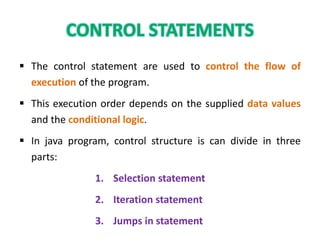
ď‚§ The control statement are used to control the flow of
execution of the program.
ď‚§ This execution order depends on the supplied data values
and the conditional logic.
ď‚§ In java program, control structure is can divide in three
parts:
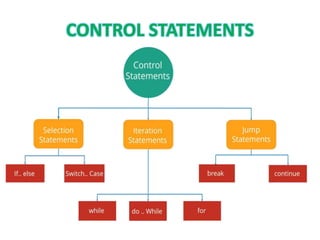
1. Selection statement
2. Iteration statement
3. Jumps in statement
• Selection statement is also called as Decision making
statements.
• Because it provides the decision making capabilities to the
statements.
• In selection statement, there are two types:
1. if statement
2. Switch statement.
• The Java if statement is used to test the condition.
• It checks Boolean condition: true or false.
• There are various types of if statement in java.
1. if statement
2. if-else statement
3. Nested if-else statement
4. if-else-if ladder
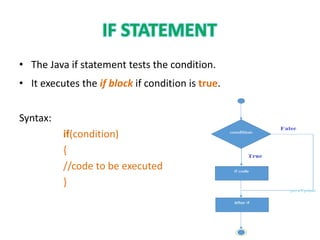
• The Java if statement tests the condition.
• It executes the if block if condition is true.
Syntax:
if(condition)
{
//code to be executed
}
Example:
public class IfExample
{
public static void main(String[] arg)
{
int age=20;
if(age>18)
{
System.out.print("Age is greater than 18");
}
}}
Output: Age is greater than 18
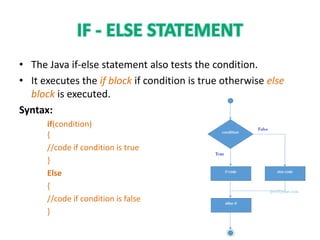
• The Java if-else statement also tests the condition.
• It executes the if block if condition is true otherwise else
block is executed.
Syntax:
if(condition)
{
//code if condition is true
}
Else
{
//code if condition is false
}
public class IfElseExample
{
public static void main(String[] args)
{
int number=13;
if(number%2==0)
{
System.out.println("even number");
}
Else
{
System.out.println("odd number");
} }}
Output: odd number
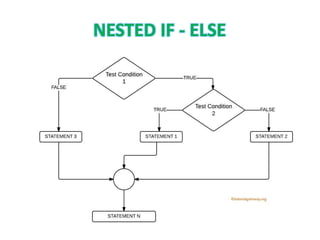
• The Nested if-else statement executes one if or else if
statement inside another if or else if statement.
Syntax:
if(Boolean_expression 1)
{
// Executes when the Boolean expression 1 is true
if(Boolean_expression 2)
{
// Executes when the Boolean expression 2 is true
}
}
public class Test
{
public static void main(String args[])
{
int x = 30;
int y = 10;
if( x == 30 )
{
if( y == 10 )
{
System.out.print("X = 30 and Y = 10");
}
}}}
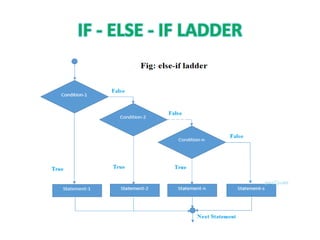
• The if-else-if ladder statement executes one condition from multiple
statements.
Syntax:
if(condition1)
{
//code to be executed if condition1 is true
}
else if(condition2)
{
//code to be executed if condition2 is true
}
else if(condition3)
{
//code to be executed if condition3 is true
}
...
Else
{
//code to be executed if all the conditions are false
}
public class IfElseIfExample
{
public static void main(String[] args)
{
int marks=65;
if(marks<50)
{
System.out.println("fail");
}
else if(marks>=50 && marks<60)
{
System.out.println("D grade");
}
else if(marks>=60 && marks<70)
{
System.out.println("C grade");
}
else if(marks>=70 && marks<80)
{
System.out.println("B grade");
}
else if(marks>=80 && marks<90)
{
System.out.println("A grade");
}
else if(marks>=90 && marks<100)
{
System.out.println("A+ grade");
}
else
{
System.out.println("Invalid!");
}}}
Output: C grade
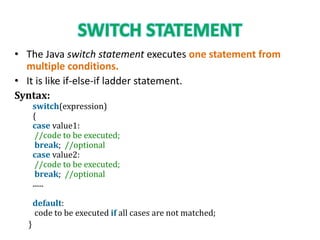
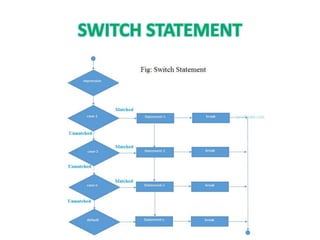
• The Java switch statement executes one statement from
multiple conditions.
• It is like if-else-if ladder statement.
Syntax:
switch(expression)
{
case value1:
//code to be executed;
break; //optional
case value2:
//code to be executed;
break; //optional
......
default:
code to be executed if all cases are not matched;
}
public class SwitchExample
{
public static void main(String[] args)
{
int number=20;
switch(number)
{
case 10: System.out.println("10");break;
case 20: System.out.println("20");break;
case 30: System.out.println("30");break;
default:System.out.println("Not in 10, 20 or 30");
}}}
Output: 20
• Looping is also called as iterations.
• The process of repeatedly executing a statements and is
called as looping.
• The statements may be executed multiple times.
• If a loop executing continuous then it is called as Infinite
loop.
• In Iteration statement, there are three types of operation:
1. for loop
2. while loop
3. do-while loop
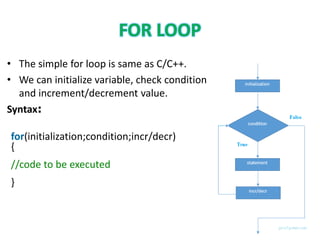
• The simple for loop is same as C/C++.
• We can initialize variable, check condition
and increment/decrement value.
Syntax:
for(initialization;condition;incr/decr)
{
//code to be executed
}
public class ForExample
{
public static void main(String[] args)
{
for(int i=1;i<=10;i++)
{
System.out.print(i);
}
}
}
Output:
12345678910
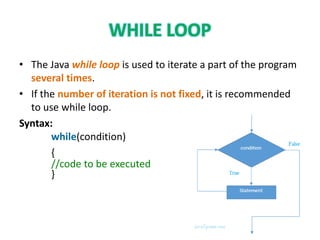
• The Java while loop is used to iterate a part of the program
several times.
• If the number of iteration is not fixed, it is recommended
to use while loop.
Syntax:
while(condition)
{
//code to be executed
}
public class WhileExample
{
public static void main(String[] args)
{
int i=1;
while(i<=10)
{
System.out.println(i);
i++;
}
} }
Output:
12345678910
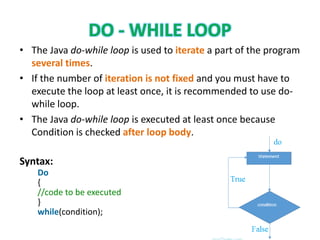
• The Java do-while loop is used to iterate a part of the program
several times.
• If the number of iteration is not fixed and you must have to
execute the loop at least once, it is recommended to use do-
while loop.
• The Java do-while loop is executed at least once because
Condition is checked after loop body.
Syntax:
Do
{
//code to be executed
}
while(condition);
public class DoWhileExample
{
public static void main(String[] args)
{
int i=1;
do
{
System.out.print(i);
i++;
}
while(i<=8);
}
}
Output:
12345678

Control structures in java

  • 2.
    ď‚§ The controlstatement are used to control the flow of execution of the program. ď‚§ This execution order depends on the supplied data values and the conditional logic. ď‚§ In java program, control structure is can divide in three parts: 1. Selection statement 2. Iteration statement 3. Jumps in statement
  • 5.
    • Selection statementis also called as Decision making statements. • Because it provides the decision making capabilities to the statements. • In selection statement, there are two types: 1. if statement 2. Switch statement.
  • 7.
    • The Javaif statement is used to test the condition. • It checks Boolean condition: true or false. • There are various types of if statement in java. 1. if statement 2. if-else statement 3. Nested if-else statement 4. if-else-if ladder
  • 8.
    • The Javaif statement tests the condition. • It executes the if block if condition is true. Syntax: if(condition) { //code to be executed }
  • 9.
    Example: public class IfExample { publicstatic void main(String[] arg) { int age=20; if(age>18) { System.out.print("Age is greater than 18"); } }} Output: Age is greater than 18
  • 10.
    • The Javaif-else statement also tests the condition. • It executes the if block if condition is true otherwise else block is executed. Syntax: if(condition) { //code if condition is true } Else { //code if condition is false }
  • 11.
    public class IfElseExample { publicstatic void main(String[] args) { int number=13; if(number%2==0) { System.out.println("even number"); } Else { System.out.println("odd number"); } }} Output: odd number
  • 12.
    • The Nestedif-else statement executes one if or else if statement inside another if or else if statement. Syntax: if(Boolean_expression 1) { // Executes when the Boolean expression 1 is true if(Boolean_expression 2) { // Executes when the Boolean expression 2 is true } }
  • 14.
    public class Test { publicstatic void main(String args[]) { int x = 30; int y = 10; if( x == 30 ) { if( y == 10 ) { System.out.print("X = 30 and Y = 10"); } }}}
  • 15.
    • The if-else-ifladder statement executes one condition from multiple statements. Syntax: if(condition1) { //code to be executed if condition1 is true } else if(condition2) { //code to be executed if condition2 is true } else if(condition3) { //code to be executed if condition3 is true } ... Else { //code to be executed if all the conditions are false }
  • 17.
    public class IfElseIfExample { publicstatic void main(String[] args) { int marks=65; if(marks<50) { System.out.println("fail"); } else if(marks>=50 && marks<60) { System.out.println("D grade"); } else if(marks>=60 && marks<70) { System.out.println("C grade"); } else if(marks>=70 && marks<80) { System.out.println("B grade"); } else if(marks>=80 && marks<90) { System.out.println("A grade"); } else if(marks>=90 && marks<100) { System.out.println("A+ grade"); } else { System.out.println("Invalid!"); }}} Output: C grade
  • 19.
    • The Javaswitch statement executes one statement from multiple conditions. • It is like if-else-if ladder statement. Syntax: switch(expression) { case value1: //code to be executed; break; //optional case value2: //code to be executed; break; //optional ...... default: code to be executed if all cases are not matched; }
  • 21.
    public class SwitchExample { publicstatic void main(String[] args) { int number=20; switch(number) { case 10: System.out.println("10");break; case 20: System.out.println("20");break; case 30: System.out.println("30");break; default:System.out.println("Not in 10, 20 or 30"); }}} Output: 20
  • 23.
    • Looping isalso called as iterations. • The process of repeatedly executing a statements and is called as looping. • The statements may be executed multiple times. • If a loop executing continuous then it is called as Infinite loop. • In Iteration statement, there are three types of operation: 1. for loop 2. while loop 3. do-while loop
  • 25.
    • The simplefor loop is same as C/C++. • We can initialize variable, check condition and increment/decrement value. Syntax: for(initialization;condition;incr/decr) { //code to be executed }
  • 26.
    public class ForExample { publicstatic void main(String[] args) { for(int i=1;i<=10;i++) { System.out.print(i); } } } Output: 12345678910
  • 28.
    • The Javawhile loop is used to iterate a part of the program several times. • If the number of iteration is not fixed, it is recommended to use while loop. Syntax: while(condition) { //code to be executed }
  • 29.
    public class WhileExample { publicstatic void main(String[] args) { int i=1; while(i<=10) { System.out.println(i); i++; } } } Output: 12345678910
  • 31.
    • The Javado-while loop is used to iterate a part of the program several times. • If the number of iteration is not fixed and you must have to execute the loop at least once, it is recommended to use do- while loop. • The Java do-while loop is executed at least once because Condition is checked after loop body. Syntax: Do { //code to be executed } while(condition);
  • 32.
    public class DoWhileExample { publicstatic void main(String[] args) { int i=1; do { System.out.print(i); i++; } while(i<=8); } } Output: 12345678