Parts of C++ Program
Prepared By
Mr. Hule Kuldeep(ME-CSE)
Unit-O
2
Thursday, December 28, 2023
Fundamentals of Object-Oriented
Programming
Unit Objectives
1. To introduce basic C++ Program.
2. To explain input & output operations.
3. To introduce Tokens
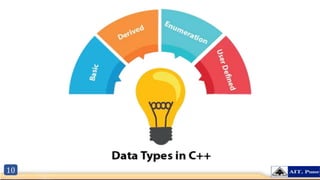
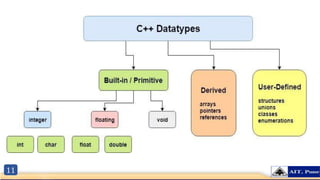
4. To explain Basic Datatypes.
5. To explain Operators
6. To explain Decision Making statements.
7. To explain Looping Control Statements.
8. To explain Branching Statements.
Unit Contents
1. Basic C++ Program
2. Input & Output Operation
3. Tokens
4. Basic Datatypes
5. C++ Operators
6. Decision Making Statements
7. Looping Control Statements
8. Branching Statements
3
Thursday, December 28, 2023
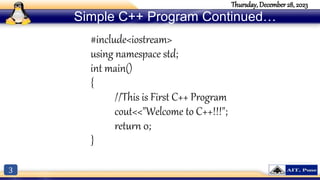
Simple C++ Program Continued…
#include<iostream>
using namespace std;
int main()
{
//This is First C++ Program
cout<<"Welcome to C++!!!";
return 0;
}
4
Thursday, December 28, 2023
Simple C++ Program Continued…
5
Thursday, December 28, 2023
To explain Basic Input/ Output
 C++ I/O operation is using the stream concept.
 Stream is the sequence of bytes or flow of data. It makes the performance fast.
 If bytes flow from main memory to device like printer, display screen, or a network connection, etc, this is
called as output operation.
 If bytes flow from device like printer, display screen, or a network connection, etc to main memory, this is
called as input operation.
6
Thursday, December 28, 2023
I/O Library Header Files
Header File Function and Description
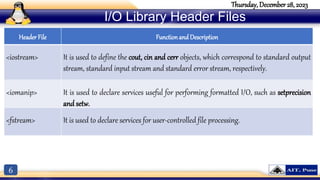
<iostream> It is used to define the cout, cin and cerr objects, which correspond to standard output
stream, standard input stream and standard error stream, respectively.
<iomanip> It is used to declare services useful for performing formatted I/O, such as setprecision
and setw.
<fstream> It is used to declare services for user-controlled file processing.
7
Thursday, December 28, 2023
Standard output stream (cout)
 Concept: Use the cout object to display information on the computer’s screen.
 cout is a predefined object of ostream class.
 It is connected with the standard output device, which is usually a display screen.
 The cout is used in conjunction with stream insertion operator (<<) to display the output on a console
 Let's see the simple example of standard output stream (cout):
#include <iostream>
using namespace std;
int main( )
{
char ary[] = "Welcome to C++";
cout << "Value of ary is: " << ary << endl;
}
Output: Value of ary is: Welcome to C++
8
Thursday, December 28, 2023
#include <iostream>
using namespace std;
int main( )
{
int age;
cout << "Enter your age: ";
cin >> age;
cout << "Your age is: " << age << endl;
}
Output: Enter your age: 22
Your age is: 22
Standard Input stream (cin)
• Standard input stream (cin)
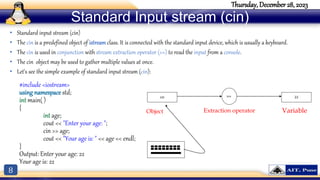
• The cin is a predefined object of istream class. It is connected with the standard input device, which is usually a keyboard.
• The cin is used in conjunction with stream extraction operator (>>) to read the input from a console.
• The cin object may be used to gather multiple values at once.
• Let's see the simple example of standard input stream (cin):
cin >> 22
Object Extraction operator Variable
9
Thursday, December 28, 2023
Tokens in C++
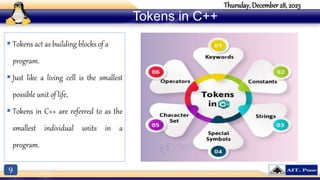
 Tokens act as building blocks of a
program.
 Just like a living cell is the smallest
possible unit of life,
 Tokens in C++ are referred to as the
smallest individual units in a
program.
10
11
12
Thursday, December 28, 2023
Basic Datatypes
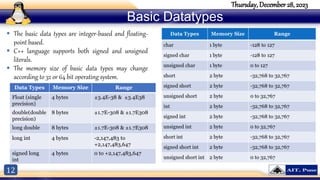
 The basic data types are integer-based and floating-
point based.
 C++ language supports both signed and unsigned
literals.
 The memory size of basic data types may change
according to 32 or 64 bit operating system.
Data Types Memory Size Range
Float (single
precision)
4 bytes ±3.4E-38 & ±3.4E38
double(double
precision)
8 bytes ±1.7E-308 & ±1.7E308
long double 8 bytes ±1.7E-308 & ±1.7E308
long int 4 bytes -2,147,483 to
+2,147,483,647
signed long
int
4 bytes 0 to +2,147,483,647
13
Thursday, December 28, 2023
C++ Variable
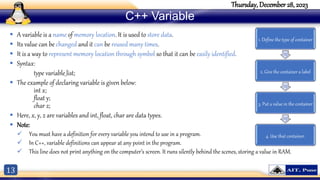
 A variable is a name of memory location. It is used to store data.
 Its value can be changed and it can be reused many times.
 It is a way to represent memory location through symbol so that it can be easily identified.
 Syntax:
type variable_list;
 The example of declaring variable is given below:
int x;
float y;
char z;
 Here, x, y, z are variables and int, float, char are data types.
 Note:
 You must have a definition for every variable you intend to use in a program.
 In C++, variable definitions can appear at any point in the program.
 This line does not print anything on the computer’s screen. It runs silently behind the scenes, storing a value in RAM.
1. Define the type of container
2. Give the container a label
3. Put a value in the container
4. Use that container.
14
Thursday, December 28, 2023
C++ Operators
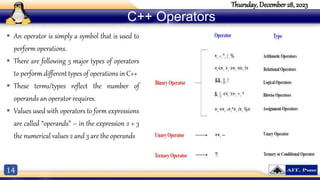
 An operator is simply a symbol that is used to
perform operations.
 There are following 3 major types of operators
to perform different types of operations in C++
 These terms/types reflect the number of
operands an operator requires.
 Values used with operators to form expressions
are called “operands” – in the expression 2 + 3
the numerical values 2 and 3 are the operands
15
Thursday, December 28, 2023
Unary Operators
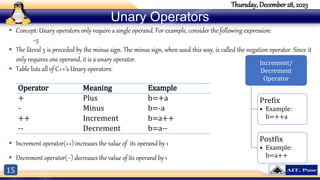
 Concept: Unary operators only require a single operand. For example, consider the following expression:
−5
 The literal 5 is preceded by the minus sign. The minus sign, when used this way, is called the negation operator. Since it
only requires one operand, it is a unary operator.
 Table lists all of C++’s Unary operators:
 Increment operator(++) increases the value of its operand by 1
 Decrement operator(--) decreases the value of its operand by 1
Operator Meaning Example
+ Plus b=+a
- Minus b=-a
++ Increment b=a++
-- Decrement b=a--
Increment/
Decrement
Operator
Prefix
• Example:
b=++a
Postfix
• Example:
b=a++
16
Thursday, December 28, 2023
Arithmetic Operators
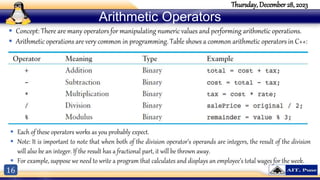
 Concept: There are many operators for manipulating numeric values and performing arithmetic operations.
 Arithmetic operations are very common in programming. Table shows a common arithmetic operators in C++:
 Each of these operators works as you probably expect.
 Note: It is important to note that when both of the division operator’s operands are integers, the result of the division
will also be an integer. If the result has a fractional part, it will be thrown away.
 For example, suppose we need to write a program that calculates and displays an employee’s total wages for the week.
17
Thursday, December 28, 2023
Relational Operators
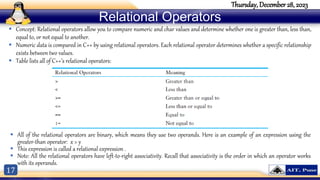
 Concept: Relational operators allow you to compare numeric and char values and determine whether one is greater than, less than,
equal to, or not equal to another.
 Numeric data is compared in C++ by using relational operators. Each relational operator determines whether a specific relationship
exists between two values.
 Table lists all of C++’s relational operators:
 All of the relational operators are binary, which means they use two operands. Here is an example of an expression using the
greater-than operator: x > y
 This expression is called a relational expression .
 Note: All the relational operators have left-to-right associativity. Recall that associativity is the order in which an operator works
with its operands.
18
Thursday, December 28, 2023
Relational Operators
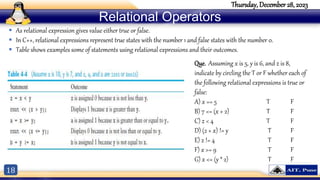
 As relational expression gives value either true or false.
 In C++, relational expressions represent true states with the number 1 and false states with the number 0.
 Table shows examples some of statements using relational expressions and their outcomes.
Que. Assuming x is 5, y is 6, and z is 8,
indicate by circling the T or F whether each of
the following relational expressions is true or
false:
A) x == 5 T F
B) 7 <= (x + 2) T F
C) z < 4 T F
D) (2 + x) != y T F
E) z != 4 T F
F) x >= 9 T F
G) x <= (y * 2) T F
19
Thursday, December 28, 2023
Logical Operators
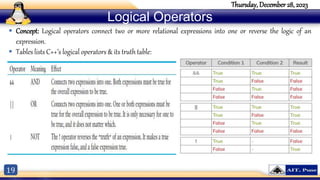
 Concept: Logical operators connect two or more relational expressions into one or reverse the logic of an
expression.
 Tables lists C++’s logical operators & its truth table:
20
Thursday, December 28, 2023
Logical Operators
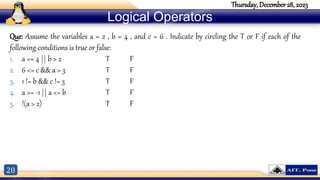
Que: Assume the variables a = 2 , b = 4 , and c = 6 . Indicate by circling the T or F if each of the
following conditions is true or false:
1. a == 4 || b > 2 T F
2. 6 <= c && a > 3 T F
3. 1 != b && c != 3 T F
4. a >= -1 || a <= b T F
5. !(a > 2) T F
21
Ternary or Conditional Operator
 Concept: This operator first evaluates an expression for a true or false condition then returns one of two specified values
depending on the result of the evaluation.
 It provides a shorthand method of expressing a simple if/else statement.
 The operator consists of the question-mark (?) and the colon (:). Its format is:
expression ? expression : expression;
 Example:
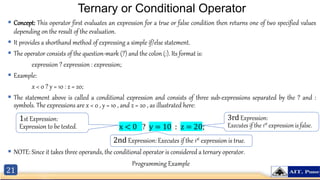
x < 0 ? y = 10 : z = 20;
 The statement above is called a conditional expression and consists of three sub-expressions separated by the ? and :
symbols. The expressions are x < 0 , y = 10 , and z = 20 , as illustrated here:
x < 0 ? y = 10 : z = 20;
 NOTE: Since it takes three operands, the conditional operator is considered a ternary operator.
1st Expression:
Expression to be tested.
3rd Expression:
Executes if the 1st expression is false.
2nd Expression: Executes if the 1st expression is true.
Programming Example
22
Thursday, December 28, 2023
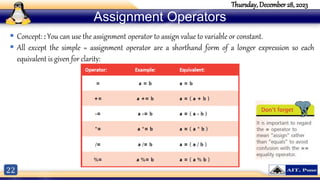
Assignment Operators
 Concept: : You can use the assignment operator to assign value to variable or constant.
 All except the simple = assignment operator are a shorthand form of a longer expression so each
equivalent is given for clarity:
23
Thursday, December 28, 2023
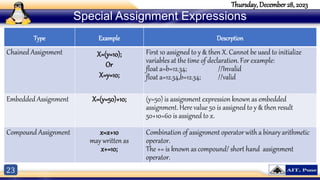
Special Assignment Expressions
Type Example Descrption
Chained Assignment X=(y=10);
Or
X=y=10;
First 10 assigned to y & then X. Cannot be used to initialize
variables at the time of declaration. For example:
float a=b=12.34; //Invalid
float a=12.34,b=12.34; //valid
Embedded Assignment X=(y=50)+10; (y=50) is assignment expression known as embedded
assignment. Here value 50 is assigned to y & then result
50+10=60 is assigned to x.
Compound Assignment x=x+10
may written as
x+=10;
Combination of assignment operator with a binary arithmetic
operator.
The += is known as compound/ short hand assignment
operator.
24
Thursday, December 28, 2023
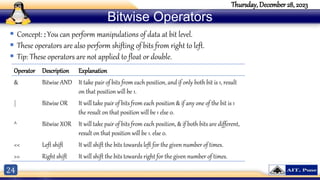
Bitwise Operators
 Concept: : You can perform manipulations of data at bit level.
 These operators are also perform shifting of bits from right to left.
 Tip: These operators are not applied to float or double.
Operator Description Explanation
& Bitwise AND It take pair of bits from each position, and if only both bit is 1, result
on that position will be 1.
| Bitwise OR It will take pair of bits from each position & if any one of the bit is 1
the result on that position will be 1 else 0.
^ Bitwise XOR It will take pair of bits from each position, & if both bits are different,
result on that position will be 1. else 0.
<< Left shift It will shift the bits towards left for the given number of times.
>> Right shift It will shift the bits towards right for the given number of times.
25
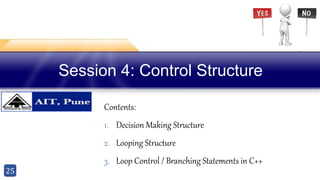
Session 4: Control Structure
Contents:
1. Decision Making Structure
2. Looping Structure
3. Loop Control / Branching Statements in C++
26
Thursday, December 28, 2023
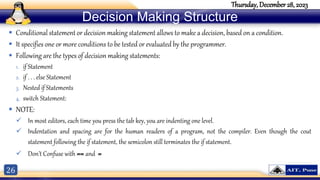
Decision Making Structure
 Conditional statement or decision making statement allows to make a decision, based on a condition.
 It specifies one or more conditions to be tested or evaluated by the programmer.
 Following are the types of decision making statements:
1. if Statement
2. if . . . else Statement
3. Nested if Statements
4. switch Statement:
 NOTE:
 In most editors, each time you press the tab key, you are indenting one level.
 Indentation and spacing are for the human readers of a program, not the compiler. Even though the cout
statement following the if statement, the semicolon still terminates the if statement.
 Don’t Confuse with == and =
27
Thursday, December 28, 2023
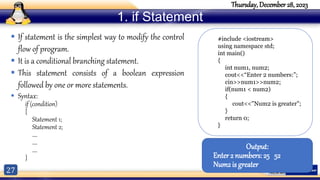
1. if Statement
 If statement is the simplest way to modify the control
flow of program.
 It is a conditional branching statement.
 This statement consists of a boolean expression
followed by one or more statements.
 Syntax:
if (condition)
{
Statement 1;
Statement 2;
….
….
….
}
#include <iostream>
using namespace std;
int main()
{
int num1, num2;
cout<<“Enter 2 numbers:”;
cin>>num1>>num2;
if(num1 < num2)
{
cout<<"Num2 is greater";
}
return 0;
}
Output:
Enter 2 numbers:25 52
Num2 is greater
28
Thursday, December 28, 2023
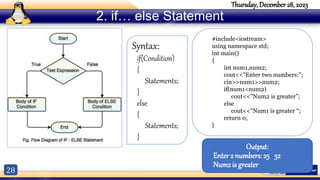
2. if… else Statement
#include<iostream>
using namespace std;
int main()
{
int num1,num2;
cout<<"Enter two numbers:";
cin>>num1>>num2;
if(num1<num2)
cout<<"Num2 is greater”;
else
cout<<"Num1 is greater “;
return 0;
}
Output:
Enter 2 numbers:25 52
Num2 is greater
Syntax:
if(Condition)
{
Statements;
}
else
{
Statements;
}
29
Thursday, December 28, 2023
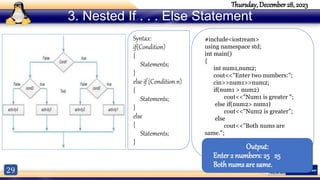
3. Nested If . . . Else Statement
#include<iostream>
using namespace std;
int main()
{
int num1,num2;
cout<<"Enter two numbers:";
cin>>num1>>num2;
if(num1 > num2)
cout<<"Num1 is greater ";
else if(num2> num1)
cout<<"Num2 is greater”;
else
cout<<"Both nums are
same.";
return 0;
} Output:
Enter 2 numbers:25 25
Both nums are same.
Syntax:
if(Condition)
{
Statements;
}
else if (Condition n)
{
Statements;
}
else
{
Statements;
}
30
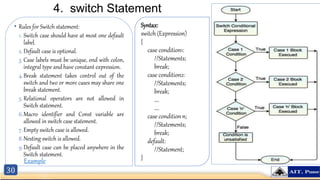
4. switch Statement
• Rules for Switch statement:
1. Switch case should have at most one default
label.
2. Default case is optional.
3. Case labels must be unique, end with colon,
integral type and have constant expression.
4.Break statement takes control out of the
switch and two or more cases may share one
break statement.
5. Relational operators are not allowed in
Switch statement.
6.Macro identifier and Const variable are
allowed in switch case statement.
7.Empty switch case is allowed.
8.Nesting switch is allowed.
9.Default case can be placed anywhere in the
Switch statement.
Syntax:
switch (Expression)
{
case condition1:
//Statements;
break;
case condition2:
//Statements;
break;
….
….
case condition n;
//Statements;
break;
default:
//Statement;
}
Example
31
Thursday, December 28, 2023
Looping Structure
 Looping structure allows to execute a statement or group of statements multiple times.
 It provides the following types of loops to handle the looping requirements:
1. while Loop
2. do . . . While Loop
3. For Loop
 Concept of Counter: a counter is variable that is regularly incremented or decremented each
time a loop iterate.
32
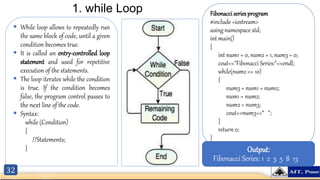
1. while Loop
 While loop allows to repeatedly run
the same block of code, until a given
condition becomes true.
 It is called an entry-controlled loop
statement and used for repetitive
execution of the statements.
 The loop iterates while the condition
is true. If the condition becomes
false, the program control passes to
the next line of the code.
 Syntax:
while (Condition)
{
//Statements;
}
Fibonacci series program
#include <iostream>
using namespace std;
int main()
{
int num1 = 0, num2 = 1, num3 = 0;
cout<<"Fibonacci Series:"<<endl;
while(num2 <= 10)
{
num3 = num1 + num2;
num1 = num2;
num2 = num3;
cout<<num3<<“ “;
}
return 0;
}
Output:
Fibonacci Series: 1 2 3 5 8 13
33
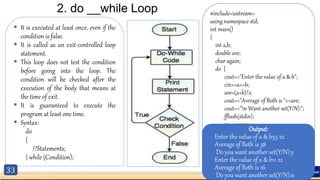
2. do __while Loop
 It is executed at least once, even if the
condition is false.
 It is called as an exit-controlled loop
statement.
 This loop does not test the condition
before going into the loop. The
condition will be checked after the
execution of the body that means at
the time of exit.
 It is guaranteed to execute the
program at least one time.
 Syntax:
do
{
//Statements;
} while (Condition);
#include<iostream>
using namespace std;
int main()
{
int a,b;
double ave;
char again;
do {
cout<<"Enter the value of a & b";
cin>>a>>b;
ave=(a+b)/2;
cout<<"Average of Both is "<<ave;
cout<<"n Want another set(Y/N):";
fflush(stdin);
cin>>again;
}while(again=='y'||again=='Y’);
return 0;
}
Output:
Enter the value of a & b55 22
Average of Both is 38
Do you want another set(Y/N):y
Enter the value of a & b11 22
Average of Both is 16
Do you want another set(Y/N):n
34
3. for Loop
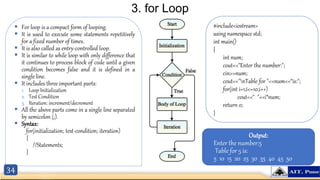
 For loop is a compact form of looping.
 It is used to execute some statements repetitively
for a fixed number of times.
 It is also called as entry-controlled loop.
 It is similar to while loop with only difference that
it continues to process block of code until a given
condition becomes false and it is defined in a
single line.
 It includes three important parts:
1. Loop Initialization
2. Test Condition
3. Iteration: increment/decrement
 All the above parts come in a single line separated
by semicolon (;).
 Syntax:
for(initialization; test-condition; iteration)
{
//Statements;
}
#include<iostream>
using namespace std;
int main()
{
int num;
cout<<"Enter the number:";
cin>>num;
cout<<"nTable for "<<num<<“is:";
for(int i=1;i<=10;i++)
cout<<" "<<i*num;
return 0;
}
Output:
Enter the number:5
Table for 5 is:
5 10 15 20 25 30 35 40 45 50
35
Thursday, December 28, 2023
Loop Control / Branching Statements in C++
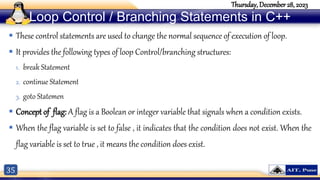
 These control statements are used to change the normal sequence of execution of loop.
 It provides the following types of loop Control/branching structures:
1. break Statement
2. continue Statement
3. goto Statemen
 Concept of flag: A flag is a Boolean or integer variable that signals when a condition exists.
 When the flag variable is set to false , it indicates that the condition does not exist. When the
flag variable is set to true , it means the condition does exist.
36
Thursday, December 28, 2023
1. break Statement
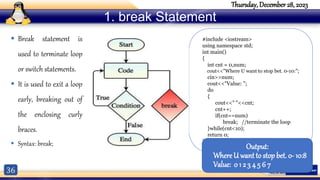
 Break statement is
used to terminate loop
or switch statements.
 It is used to exit a loop
early, breaking out of
the enclosing curly
braces.
 Syntax: break;
#include <iostream>
using namespace std;
int main()
{
int cnt = 0,num;
cout<<"Where U want to stop bet. 0-10:";
cin>>num;
cout<<"Value: ";
do
{
cout<<" "<<cnt;
cnt++;
if(cnt==num)
break; //terminate the loop
}while(cnt<10);
return 0;
}
Output:
Where U want to stop bet. 0- 10:8
Value: 0 1 2 3 4 5 6 7
37
Thursday, December 28, 2023
1. break Statement
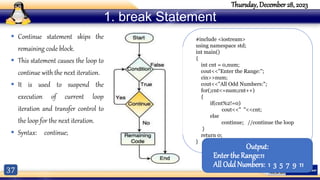
 Continue statement skips the
remaining code block.
 This statement causes the loop to
continue with the next iteration.
 It is used to suspend the
execution of current loop
iteration and transfer control to
the loop for the next iteration.
 Syntax: continue;
#include <iostream>
using namespace std;
int main()
{
int cnt = 0,num;
cout<<"Enter the Range:";
cin>>num;
cout<<"All Odd Numbers:";
for(;cnt<=num;cnt++)
{
if(cnt%2!=0)
cout<<" "<<cnt;
else
continue; //continue the loop
}
return 0;
}
Output:
Enter the Range:11
All Odd Numbers: 1 3 5 7 9 11
38
Thursday, December 28, 2023
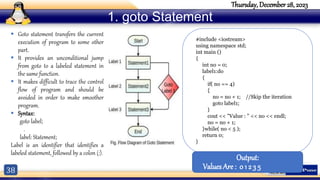
1. goto Statement
 Goto statement transfers the current
execution of program to some other
part.
 It provides an unconditional jump
from goto to a labeled statement in
the same function.
 It makes difficult to trace the control
flow of program and should be
avoided in order to make smoother
program.
 Syntax:
goto label;
.
label: Statement;
Label is an identifier that identifies a
labeled statement, followed by a colon (:).
#include <iostream>
using namespace std;
int main ()
{
int no = 0;
label1:do
{
if( no == 4)
{
no = no + 1; //Skip the iteration
goto label1;
}
cout << "Value : " << no << endl;
no = no + 1;
}while( no < 5 );
return 0;
}
Output:
Values Are : 0 1 2 3 5
For any query: Email: kuldeephule@aitpune.edu.in
Contact No:8668277166
Web portal: www.hulekuldeep.weebly.com
Thursday, December 28, 2023

additional.pptx

  • 1.
    Parts of C++Program Prepared By Mr. Hule Kuldeep(ME-CSE) Unit-O
  • 2.
    2 Thursday, December 28,2023 Fundamentals of Object-Oriented Programming Unit Objectives 1. To introduce basic C++ Program. 2. To explain input & output operations. 3. To introduce Tokens 4. To explain Basic Datatypes. 5. To explain Operators 6. To explain Decision Making statements. 7. To explain Looping Control Statements. 8. To explain Branching Statements. Unit Contents 1. Basic C++ Program 2. Input & Output Operation 3. Tokens 4. Basic Datatypes 5. C++ Operators 6. Decision Making Statements 7. Looping Control Statements 8. Branching Statements
  • 3.
    3 Thursday, December 28,2023 Simple C++ Program Continued… #include<iostream> using namespace std; int main() { //This is First C++ Program cout<<"Welcome to C++!!!"; return 0; }
  • 4.
    4 Thursday, December 28,2023 Simple C++ Program Continued…
  • 5.
    5 Thursday, December 28,2023 To explain Basic Input/ Output  C++ I/O operation is using the stream concept.  Stream is the sequence of bytes or flow of data. It makes the performance fast.  If bytes flow from main memory to device like printer, display screen, or a network connection, etc, this is called as output operation.  If bytes flow from device like printer, display screen, or a network connection, etc to main memory, this is called as input operation.
  • 6.
    6 Thursday, December 28,2023 I/O Library Header Files Header File Function and Description <iostream> It is used to define the cout, cin and cerr objects, which correspond to standard output stream, standard input stream and standard error stream, respectively. <iomanip> It is used to declare services useful for performing formatted I/O, such as setprecision and setw. <fstream> It is used to declare services for user-controlled file processing.
  • 7.
    7 Thursday, December 28,2023 Standard output stream (cout)  Concept: Use the cout object to display information on the computer’s screen.  cout is a predefined object of ostream class.  It is connected with the standard output device, which is usually a display screen.  The cout is used in conjunction with stream insertion operator (<<) to display the output on a console  Let's see the simple example of standard output stream (cout): #include <iostream> using namespace std; int main( ) { char ary[] = "Welcome to C++"; cout << "Value of ary is: " << ary << endl; } Output: Value of ary is: Welcome to C++
  • 8.
    8 Thursday, December 28,2023 #include <iostream> using namespace std; int main( ) { int age; cout << "Enter your age: "; cin >> age; cout << "Your age is: " << age << endl; } Output: Enter your age: 22 Your age is: 22 Standard Input stream (cin) • Standard input stream (cin) • The cin is a predefined object of istream class. It is connected with the standard input device, which is usually a keyboard. • The cin is used in conjunction with stream extraction operator (>>) to read the input from a console. • The cin object may be used to gather multiple values at once. • Let's see the simple example of standard input stream (cin): cin >> 22 Object Extraction operator Variable
  • 9.
    9 Thursday, December 28,2023 Tokens in C++  Tokens act as building blocks of a program.  Just like a living cell is the smallest possible unit of life,  Tokens in C++ are referred to as the smallest individual units in a program.
  • 10.
  • 11.
  • 12.
    12 Thursday, December 28,2023 Basic Datatypes  The basic data types are integer-based and floating- point based.  C++ language supports both signed and unsigned literals.  The memory size of basic data types may change according to 32 or 64 bit operating system. Data Types Memory Size Range Float (single precision) 4 bytes ±3.4E-38 & ±3.4E38 double(double precision) 8 bytes ±1.7E-308 & ±1.7E308 long double 8 bytes ±1.7E-308 & ±1.7E308 long int 4 bytes -2,147,483 to +2,147,483,647 signed long int 4 bytes 0 to +2,147,483,647
  • 13.
    13 Thursday, December 28,2023 C++ Variable  A variable is a name of memory location. It is used to store data.  Its value can be changed and it can be reused many times.  It is a way to represent memory location through symbol so that it can be easily identified.  Syntax: type variable_list;  The example of declaring variable is given below: int x; float y; char z;  Here, x, y, z are variables and int, float, char are data types.  Note:  You must have a definition for every variable you intend to use in a program.  In C++, variable definitions can appear at any point in the program.  This line does not print anything on the computer’s screen. It runs silently behind the scenes, storing a value in RAM. 1. Define the type of container 2. Give the container a label 3. Put a value in the container 4. Use that container.
  • 14.
    14 Thursday, December 28,2023 C++ Operators  An operator is simply a symbol that is used to perform operations.  There are following 3 major types of operators to perform different types of operations in C++  These terms/types reflect the number of operands an operator requires.  Values used with operators to form expressions are called “operands” – in the expression 2 + 3 the numerical values 2 and 3 are the operands
  • 15.
    15 Thursday, December 28,2023 Unary Operators  Concept: Unary operators only require a single operand. For example, consider the following expression: −5  The literal 5 is preceded by the minus sign. The minus sign, when used this way, is called the negation operator. Since it only requires one operand, it is a unary operator.  Table lists all of C++’s Unary operators:  Increment operator(++) increases the value of its operand by 1  Decrement operator(--) decreases the value of its operand by 1 Operator Meaning Example + Plus b=+a - Minus b=-a ++ Increment b=a++ -- Decrement b=a-- Increment/ Decrement Operator Prefix • Example: b=++a Postfix • Example: b=a++
  • 16.
    16 Thursday, December 28,2023 Arithmetic Operators  Concept: There are many operators for manipulating numeric values and performing arithmetic operations.  Arithmetic operations are very common in programming. Table shows a common arithmetic operators in C++:  Each of these operators works as you probably expect.  Note: It is important to note that when both of the division operator’s operands are integers, the result of the division will also be an integer. If the result has a fractional part, it will be thrown away.  For example, suppose we need to write a program that calculates and displays an employee’s total wages for the week.
  • 17.
    17 Thursday, December 28,2023 Relational Operators  Concept: Relational operators allow you to compare numeric and char values and determine whether one is greater than, less than, equal to, or not equal to another.  Numeric data is compared in C++ by using relational operators. Each relational operator determines whether a specific relationship exists between two values.  Table lists all of C++’s relational operators:  All of the relational operators are binary, which means they use two operands. Here is an example of an expression using the greater-than operator: x > y  This expression is called a relational expression .  Note: All the relational operators have left-to-right associativity. Recall that associativity is the order in which an operator works with its operands.
  • 18.
    18 Thursday, December 28,2023 Relational Operators  As relational expression gives value either true or false.  In C++, relational expressions represent true states with the number 1 and false states with the number 0.  Table shows examples some of statements using relational expressions and their outcomes. Que. Assuming x is 5, y is 6, and z is 8, indicate by circling the T or F whether each of the following relational expressions is true or false: A) x == 5 T F B) 7 <= (x + 2) T F C) z < 4 T F D) (2 + x) != y T F E) z != 4 T F F) x >= 9 T F G) x <= (y * 2) T F
  • 19.
    19 Thursday, December 28,2023 Logical Operators  Concept: Logical operators connect two or more relational expressions into one or reverse the logic of an expression.  Tables lists C++’s logical operators & its truth table:
  • 20.
    20 Thursday, December 28,2023 Logical Operators Que: Assume the variables a = 2 , b = 4 , and c = 6 . Indicate by circling the T or F if each of the following conditions is true or false: 1. a == 4 || b > 2 T F 2. 6 <= c && a > 3 T F 3. 1 != b && c != 3 T F 4. a >= -1 || a <= b T F 5. !(a > 2) T F
  • 21.
    21 Ternary or ConditionalOperator  Concept: This operator first evaluates an expression for a true or false condition then returns one of two specified values depending on the result of the evaluation.  It provides a shorthand method of expressing a simple if/else statement.  The operator consists of the question-mark (?) and the colon (:). Its format is: expression ? expression : expression;  Example: x < 0 ? y = 10 : z = 20;  The statement above is called a conditional expression and consists of three sub-expressions separated by the ? and : symbols. The expressions are x < 0 , y = 10 , and z = 20 , as illustrated here: x < 0 ? y = 10 : z = 20;  NOTE: Since it takes three operands, the conditional operator is considered a ternary operator. 1st Expression: Expression to be tested. 3rd Expression: Executes if the 1st expression is false. 2nd Expression: Executes if the 1st expression is true. Programming Example
  • 22.
    22 Thursday, December 28,2023 Assignment Operators  Concept: : You can use the assignment operator to assign value to variable or constant.  All except the simple = assignment operator are a shorthand form of a longer expression so each equivalent is given for clarity:
  • 23.
    23 Thursday, December 28,2023 Special Assignment Expressions Type Example Descrption Chained Assignment X=(y=10); Or X=y=10; First 10 assigned to y & then X. Cannot be used to initialize variables at the time of declaration. For example: float a=b=12.34; //Invalid float a=12.34,b=12.34; //valid Embedded Assignment X=(y=50)+10; (y=50) is assignment expression known as embedded assignment. Here value 50 is assigned to y & then result 50+10=60 is assigned to x. Compound Assignment x=x+10 may written as x+=10; Combination of assignment operator with a binary arithmetic operator. The += is known as compound/ short hand assignment operator.
  • 24.
    24 Thursday, December 28,2023 Bitwise Operators  Concept: : You can perform manipulations of data at bit level.  These operators are also perform shifting of bits from right to left.  Tip: These operators are not applied to float or double. Operator Description Explanation & Bitwise AND It take pair of bits from each position, and if only both bit is 1, result on that position will be 1. | Bitwise OR It will take pair of bits from each position & if any one of the bit is 1 the result on that position will be 1 else 0. ^ Bitwise XOR It will take pair of bits from each position, & if both bits are different, result on that position will be 1. else 0. << Left shift It will shift the bits towards left for the given number of times. >> Right shift It will shift the bits towards right for the given number of times.
  • 25.
    25 Session 4: ControlStructure Contents: 1. Decision Making Structure 2. Looping Structure 3. Loop Control / Branching Statements in C++
  • 26.
    26 Thursday, December 28,2023 Decision Making Structure  Conditional statement or decision making statement allows to make a decision, based on a condition.  It specifies one or more conditions to be tested or evaluated by the programmer.  Following are the types of decision making statements: 1. if Statement 2. if . . . else Statement 3. Nested if Statements 4. switch Statement:  NOTE:  In most editors, each time you press the tab key, you are indenting one level.  Indentation and spacing are for the human readers of a program, not the compiler. Even though the cout statement following the if statement, the semicolon still terminates the if statement.  Don’t Confuse with == and =
  • 27.
    27 Thursday, December 28,2023 1. if Statement  If statement is the simplest way to modify the control flow of program.  It is a conditional branching statement.  This statement consists of a boolean expression followed by one or more statements.  Syntax: if (condition) { Statement 1; Statement 2; …. …. …. } #include <iostream> using namespace std; int main() { int num1, num2; cout<<“Enter 2 numbers:”; cin>>num1>>num2; if(num1 < num2) { cout<<"Num2 is greater"; } return 0; } Output: Enter 2 numbers:25 52 Num2 is greater
  • 28.
    28 Thursday, December 28,2023 2. if… else Statement #include<iostream> using namespace std; int main() { int num1,num2; cout<<"Enter two numbers:"; cin>>num1>>num2; if(num1<num2) cout<<"Num2 is greater”; else cout<<"Num1 is greater “; return 0; } Output: Enter 2 numbers:25 52 Num2 is greater Syntax: if(Condition) { Statements; } else { Statements; }
  • 29.
    29 Thursday, December 28,2023 3. Nested If . . . Else Statement #include<iostream> using namespace std; int main() { int num1,num2; cout<<"Enter two numbers:"; cin>>num1>>num2; if(num1 > num2) cout<<"Num1 is greater "; else if(num2> num1) cout<<"Num2 is greater”; else cout<<"Both nums are same."; return 0; } Output: Enter 2 numbers:25 25 Both nums are same. Syntax: if(Condition) { Statements; } else if (Condition n) { Statements; } else { Statements; }
  • 30.
    30 4. switch Statement •Rules for Switch statement: 1. Switch case should have at most one default label. 2. Default case is optional. 3. Case labels must be unique, end with colon, integral type and have constant expression. 4.Break statement takes control out of the switch and two or more cases may share one break statement. 5. Relational operators are not allowed in Switch statement. 6.Macro identifier and Const variable are allowed in switch case statement. 7.Empty switch case is allowed. 8.Nesting switch is allowed. 9.Default case can be placed anywhere in the Switch statement. Syntax: switch (Expression) { case condition1: //Statements; break; case condition2: //Statements; break; …. …. case condition n; //Statements; break; default: //Statement; } Example
  • 31.
    31 Thursday, December 28,2023 Looping Structure  Looping structure allows to execute a statement or group of statements multiple times.  It provides the following types of loops to handle the looping requirements: 1. while Loop 2. do . . . While Loop 3. For Loop  Concept of Counter: a counter is variable that is regularly incremented or decremented each time a loop iterate.
  • 32.
    32 1. while Loop While loop allows to repeatedly run the same block of code, until a given condition becomes true.  It is called an entry-controlled loop statement and used for repetitive execution of the statements.  The loop iterates while the condition is true. If the condition becomes false, the program control passes to the next line of the code.  Syntax: while (Condition) { //Statements; } Fibonacci series program #include <iostream> using namespace std; int main() { int num1 = 0, num2 = 1, num3 = 0; cout<<"Fibonacci Series:"<<endl; while(num2 <= 10) { num3 = num1 + num2; num1 = num2; num2 = num3; cout<<num3<<“ “; } return 0; } Output: Fibonacci Series: 1 2 3 5 8 13
  • 33.
    33 2. do __whileLoop  It is executed at least once, even if the condition is false.  It is called as an exit-controlled loop statement.  This loop does not test the condition before going into the loop. The condition will be checked after the execution of the body that means at the time of exit.  It is guaranteed to execute the program at least one time.  Syntax: do { //Statements; } while (Condition); #include<iostream> using namespace std; int main() { int a,b; double ave; char again; do { cout<<"Enter the value of a & b"; cin>>a>>b; ave=(a+b)/2; cout<<"Average of Both is "<<ave; cout<<"n Want another set(Y/N):"; fflush(stdin); cin>>again; }while(again=='y'||again=='Y’); return 0; } Output: Enter the value of a & b55 22 Average of Both is 38 Do you want another set(Y/N):y Enter the value of a & b11 22 Average of Both is 16 Do you want another set(Y/N):n
  • 34.
    34 3. for Loop For loop is a compact form of looping.  It is used to execute some statements repetitively for a fixed number of times.  It is also called as entry-controlled loop.  It is similar to while loop with only difference that it continues to process block of code until a given condition becomes false and it is defined in a single line.  It includes three important parts: 1. Loop Initialization 2. Test Condition 3. Iteration: increment/decrement  All the above parts come in a single line separated by semicolon (;).  Syntax: for(initialization; test-condition; iteration) { //Statements; } #include<iostream> using namespace std; int main() { int num; cout<<"Enter the number:"; cin>>num; cout<<"nTable for "<<num<<“is:"; for(int i=1;i<=10;i++) cout<<" "<<i*num; return 0; } Output: Enter the number:5 Table for 5 is: 5 10 15 20 25 30 35 40 45 50
  • 35.
    35 Thursday, December 28,2023 Loop Control / Branching Statements in C++  These control statements are used to change the normal sequence of execution of loop.  It provides the following types of loop Control/branching structures: 1. break Statement 2. continue Statement 3. goto Statemen  Concept of flag: A flag is a Boolean or integer variable that signals when a condition exists.  When the flag variable is set to false , it indicates that the condition does not exist. When the flag variable is set to true , it means the condition does exist.
  • 36.
    36 Thursday, December 28,2023 1. break Statement  Break statement is used to terminate loop or switch statements.  It is used to exit a loop early, breaking out of the enclosing curly braces.  Syntax: break; #include <iostream> using namespace std; int main() { int cnt = 0,num; cout<<"Where U want to stop bet. 0-10:"; cin>>num; cout<<"Value: "; do { cout<<" "<<cnt; cnt++; if(cnt==num) break; //terminate the loop }while(cnt<10); return 0; } Output: Where U want to stop bet. 0- 10:8 Value: 0 1 2 3 4 5 6 7
  • 37.
    37 Thursday, December 28,2023 1. break Statement  Continue statement skips the remaining code block.  This statement causes the loop to continue with the next iteration.  It is used to suspend the execution of current loop iteration and transfer control to the loop for the next iteration.  Syntax: continue; #include <iostream> using namespace std; int main() { int cnt = 0,num; cout<<"Enter the Range:"; cin>>num; cout<<"All Odd Numbers:"; for(;cnt<=num;cnt++) { if(cnt%2!=0) cout<<" "<<cnt; else continue; //continue the loop } return 0; } Output: Enter the Range:11 All Odd Numbers: 1 3 5 7 9 11
  • 38.
    38 Thursday, December 28,2023 1. goto Statement  Goto statement transfers the current execution of program to some other part.  It provides an unconditional jump from goto to a labeled statement in the same function.  It makes difficult to trace the control flow of program and should be avoided in order to make smoother program.  Syntax: goto label; . label: Statement; Label is an identifier that identifies a labeled statement, followed by a colon (:). #include <iostream> using namespace std; int main () { int no = 0; label1:do { if( no == 4) { no = no + 1; //Skip the iteration goto label1; } cout << "Value : " << no << endl; no = no + 1; }while( no < 5 ); return 0; } Output: Values Are : 0 1 2 3 5
  • 39.
    For any query:Email: kuldeephule@aitpune.edu.in Contact No:8668277166 Web portal: www.hulekuldeep.weebly.com Thursday, December 28, 2023

Editor's Notes

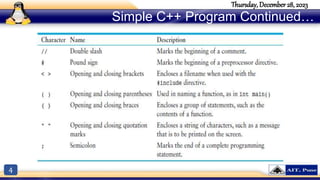
  • #4 In the sample program you encountered several sets of special characters. Table provides a short summary of how they were used.
  • #5 In the sample program you encountered several sets of special characters. Table provides a short summary of how they were used.
  • #10 As we need to use proper grammar to form a meaningful sentence, we need to be well-acquainted with the syntax of C++ to instruct the compiler what to do. If these statements are not formed in a logical manner, they would sound gibberish and you would get a compilation error. 
  • #12 CONCEPT: There are many different types of data. Variables are classified according to their data type, which determines the kind of information that may be stored in them.
  • #13 Apart from the above datatypes we have bool data type which supports Boolean values. Expressions that have a true or false value are called Boolean expressions. Bool datatype allows you to create small integer variables that are suitable for holding true or false values.
  • #14 Computer have large memory spaces. But a programmers, we need to utilize this space effectively. Unlike our refrigerator, we don’t want this space to look messed up! Right. Hence we use the concept of storing stuff in containers. Which is similar to how we keep food in containers inside the refrigerator. These containers make it easy to access the stuff/food whenever we need it. Now, let’s assume you need to store something in your computer memory. For this, you need a container, just like the one you have in your refrigerator. In programming, this storage container is called the variable. To understand it better , let’s compare the steps of storing food in container to store data in a variable: Identify one container- define the type of variable Give the container a label- assign a name to the variable Put food in the container- put a value in the variable
  • #15 Unary operators work with one operand. Binary operators work with two operands. The assignment operator is in this category also. Ternary operators, as you may have guessed, require three operands.
  • #16 Of course, we understand this represents the value negative five.
  • #17 The addition operator returns the sum of its two operands. The subtraction operator returns the value of its right operand subtracted from its left operand. The multiplication operator returns the product of its two operands. The division operator returns the quotient of its left operand divided by its right operand. The modulus operator, which only works with integer operands, returns the remainder of an integer division.
  • #18 So far, the programs you have written follow this simple scheme: • Gather input from the user. • Perform one or more calculations. • Display the results on the screen. Computers are good at performing calculations, but they are also quite adept at comparing values to determine if one is greater than, less than, or equal to the other. These types of operations are valuable for tasks such as examining sales figures, determining profit and loss, checking a number to ensure it is within an acceptable range, and validating the input given by a user.
  • #19 So far, the programs you have written follow this simple scheme: • Gather input from the user. • Perform one or more calculations. • Display the results on the screen. Computers are good at performing calculations, but they are also quite adept at comparing values to determine if one is greater than, less than, or equal to the other. These types of operations are valuable for tasks such as examining sales figures, determining profit and loss, checking a number to ensure it is within an acceptable range, and validating the input given by a user.
  • #21 So far, the programs you have written follow this simple scheme: • Gather input from the user. • Perform one or more calculations. • Display the results on the screen. Computers are good at performing calculations, but they are also quite adept at comparing values to determine if one is greater than, less than, or equal to the other. These types of operations are valuable for tasks such as examining sales figures, determining profit and loss, checking a number to ensure it is within an acceptable range, and validating the input given by a user.
  • #22 C++ programmer’s most favorite test operator is the ?: “ternary” operator. For this reason it is also known as the “conditional” operator.
  • #23 The operators that are used in C++ programming to assign values are listed in the table below.
  • #25 The operators that are used in C++ programming to assign values are listed in the table below.
  • #26 Welcome to the exciting world of C++ programming. This session demonstrates how to create a simple C++ program and how to store data within a program. Also demonstrates how to perform basic arithmetic & logical operations.
  • #29 It is a two-way decision making statement. When the boolean expression becomes false then else block will be executed. It is used to make decisions and execute statements conditionally.
  • #30 Nested If . . . Else statements allow the use of one if or else if statement inside another if or else statements. This statement is like performing another if condition for true or false boolean value.
  • #31 Switch statement is used to perform different actions on different conditions. This statement compares the same expression to several different values. NOTE: The expression following the word case must be an integer literal or constant. It cannot be a variable, and it cannot be an expression such as x < 22 or n == 50 .
  • #39 It is used to exit from deeply nested looping statements. If we avoid the goto statement, it forces a number of additional tests to be performed.