Go	
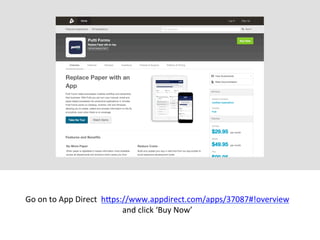
  on	
  to	
  App	
  Direct	
  	
  h.ps://www.appdirect.com/apps/37087#!overview	
  
and	
  click	
  ‘Buy	
  Now’	
  
You	
  will	
  then	
  be	
  asked	
  to	
  sign	
  up	
  or	
  login.	
  
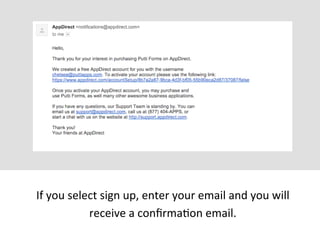
If	
  you	
  select	
  sign	
  up,	
  enter	
  your	
  email	
  and	
  you	
  will	
  
receive	
  a	
  confirmaMon	
  email.	
  
Click	
  the	
  confirmaMon	
  link	
  on	
  the	
  email	
  and	
  you	
  will	
  be	
  
directed	
  to	
  the	
  ‘acMvate	
  your	
  account’	
  page.	
  Fill	
  out	
  your	
  
details	
  and	
  click	
  conMnue.	
  
You	
  will	
  then	
  be	
  directed	
  to	
  the	
  buy	
  now	
  page	
  where	
  you	
  need	
  to	
  
select	
  your	
  desired	
  plan	
  and	
  a	
  design	
  package	
  if	
  required.	
  Then	
  
click	
  conMnue.	
  
You	
  will	
  then	
  be	
  directed	
  to	
  the	
  ‘buy	
  now’	
  page.	
  Select	
  your	
  
desired	
  plan	
  and	
  a	
  design	
  package,	
  if	
  required.	
  Then	
  click	
  conMnue.	
  
On	
  the	
  next	
  page,	
  enter	
  your	
  payment	
  details,	
  PayPal	
  or	
  Credit	
  
Card.	
  Then	
  click	
  conMnue.	
  (Clicking	
  PayPal	
  will	
  redirect	
  you	
  to	
  
PayPal	
  payment	
  screen).	
  	
  
Once	
  your	
  details	
  have	
  been	
  added	
  you	
  need	
  accept	
  the	
  Ts	
  &	
  Cs	
  
and	
  click	
  to	
  place	
  the	
  order	
  	
  
Once	
  the	
  order	
  has	
  been	
  placed	
  you	
  will	
  receive	
  an	
  order	
  receipt.	
  
On	
  this	
  page	
  click	
  to	
  go	
  to	
  ApplicaMons.	
  	
  
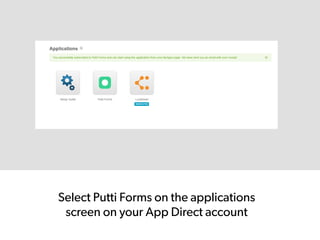
Select Putti Forms on the applications
screen on your App Direct account
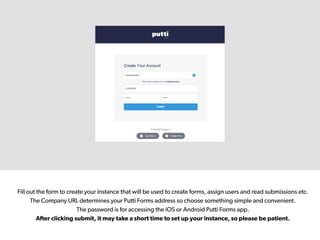
Fill out the form to create your instance that will be used to create forms, assign users and read submissions etc.
The Company URL determines your Putti Forms address so choose something simple and convenient.
The password is for accessing the iOS or Android Putti Forms app.
After clicking submit, it may take a short time to set up your instance, so please be patient.
Once your instance has been created you, will be taken to your Putti Forms
dashboard. Here holds the information regarding how many forms, users etc you
have, which will depend on the plan you selected.
From the dashboard you can start creating your forms by clicking
the forms tab on the top menu bar
Buy Putti Forms

Buy Putti Forms

  • 1.
    Go  on  to  App  Direct    h.ps://www.appdirect.com/apps/37087#!overview   and  click  ‘Buy  Now’  
  • 2.
    You  will  then  be  asked  to  sign  up  or  login.  
  • 3.
    If  you  select  sign  up,  enter  your  email  and  you  will   receive  a  confirmaMon  email.  
  • 4.
    Click  the  confirmaMon  link  on  the  email  and  you  will  be   directed  to  the  ‘acMvate  your  account’  page.  Fill  out  your   details  and  click  conMnue.  
  • 5.
    You  will  then  be  directed  to  the  buy  now  page  where  you  need  to   select  your  desired  plan  and  a  design  package  if  required.  Then   click  conMnue.  
  • 6.
    You  will  then  be  directed  to  the  ‘buy  now’  page.  Select  your   desired  plan  and  a  design  package,  if  required.  Then  click  conMnue.  
  • 7.
    On  the  next  page,  enter  your  payment  details,  PayPal  or  Credit   Card.  Then  click  conMnue.  (Clicking  PayPal  will  redirect  you  to   PayPal  payment  screen).    
  • 8.
    Once  your  details  have  been  added  you  need  accept  the  Ts  &  Cs   and  click  to  place  the  order    
  • 9.
    Once  the  order  has  been  placed  you  will  receive  an  order  receipt.   On  this  page  click  to  go  to  ApplicaMons.    
  • 10.
    Select Putti Formson the applications screen on your App Direct account
  • 11.
    Fill out theform to create your instance that will be used to create forms, assign users and read submissions etc. The Company URL determines your Putti Forms address so choose something simple and convenient. The password is for accessing the iOS or Android Putti Forms app. After clicking submit, it may take a short time to set up your instance, so please be patient.
  • 12.
    Once your instancehas been created you, will be taken to your Putti Forms dashboard. Here holds the information regarding how many forms, users etc you have, which will depend on the plan you selected.
  • 13.
    From the dashboardyou can start creating your forms by clicking the forms tab on the top menu bar