Bullhorn Job Posting Process for Marketplace Integrators
Overview This slide show provides a simple workflow example of how the Bullhorn API’s can be used to publish jobs to your Job Distribution Network via a branded tab on the Bullhorn job record. What you’ll need to get started: Bullhorn API Documentation: http://developer.bullhorn.com/doc/ Partner API Key – contact Bullhorn Business Development Bullhorn User Credentials – contact Bullhorn Business Development
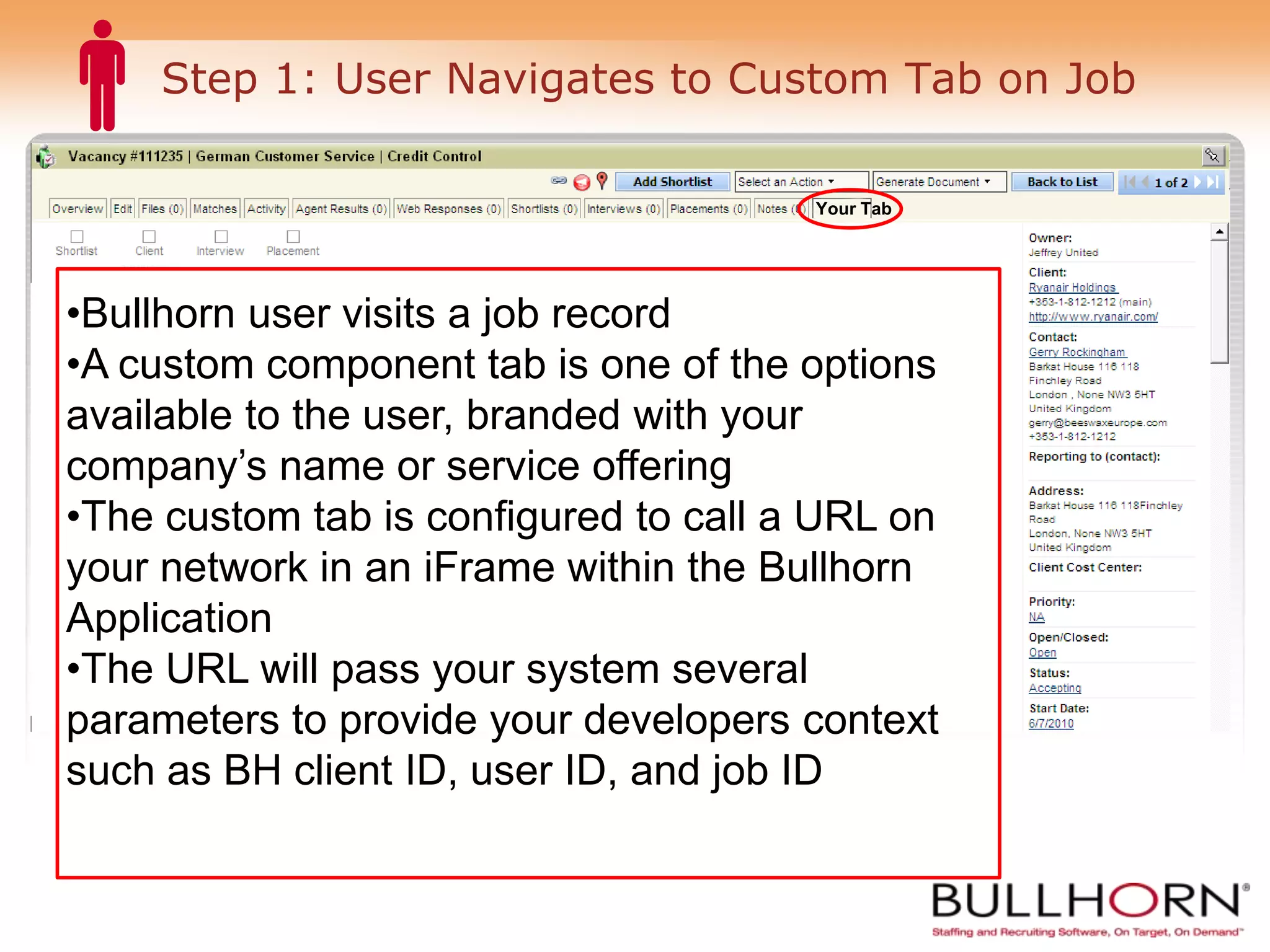
Step 1: User Navigates to Custom Tab on Job Your Tab Bullhorn user visits a job record A custom component tab is one of the options available to the user, branded with your company’s name or service offering The custom tab is configured to call a URL on your network in an iFrame within the Bullhorn Application The URL will pass your system several parameters to provide your developers context such as BH client ID, user ID, and job ID
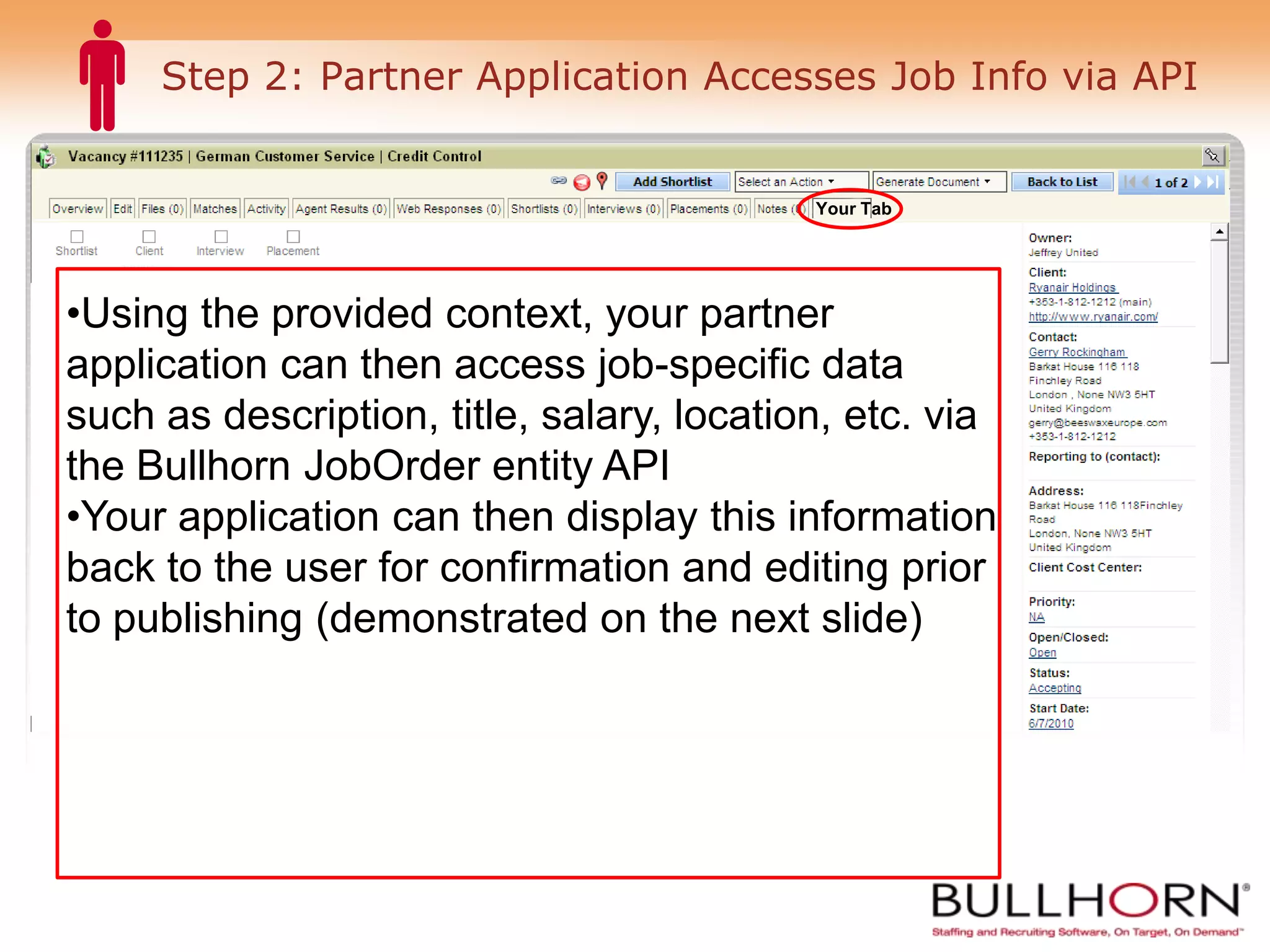
Step 2: Partner Application Accesses Job Info via API Your Tab Using the provided context, your partner application can then access job-specific data such as description, title, salary, location, etc. via the Bullhorn JobOrder entity API Your application can then display this information back to the user for confirmation and editing prior to publishing (demonstrated on the next slide)
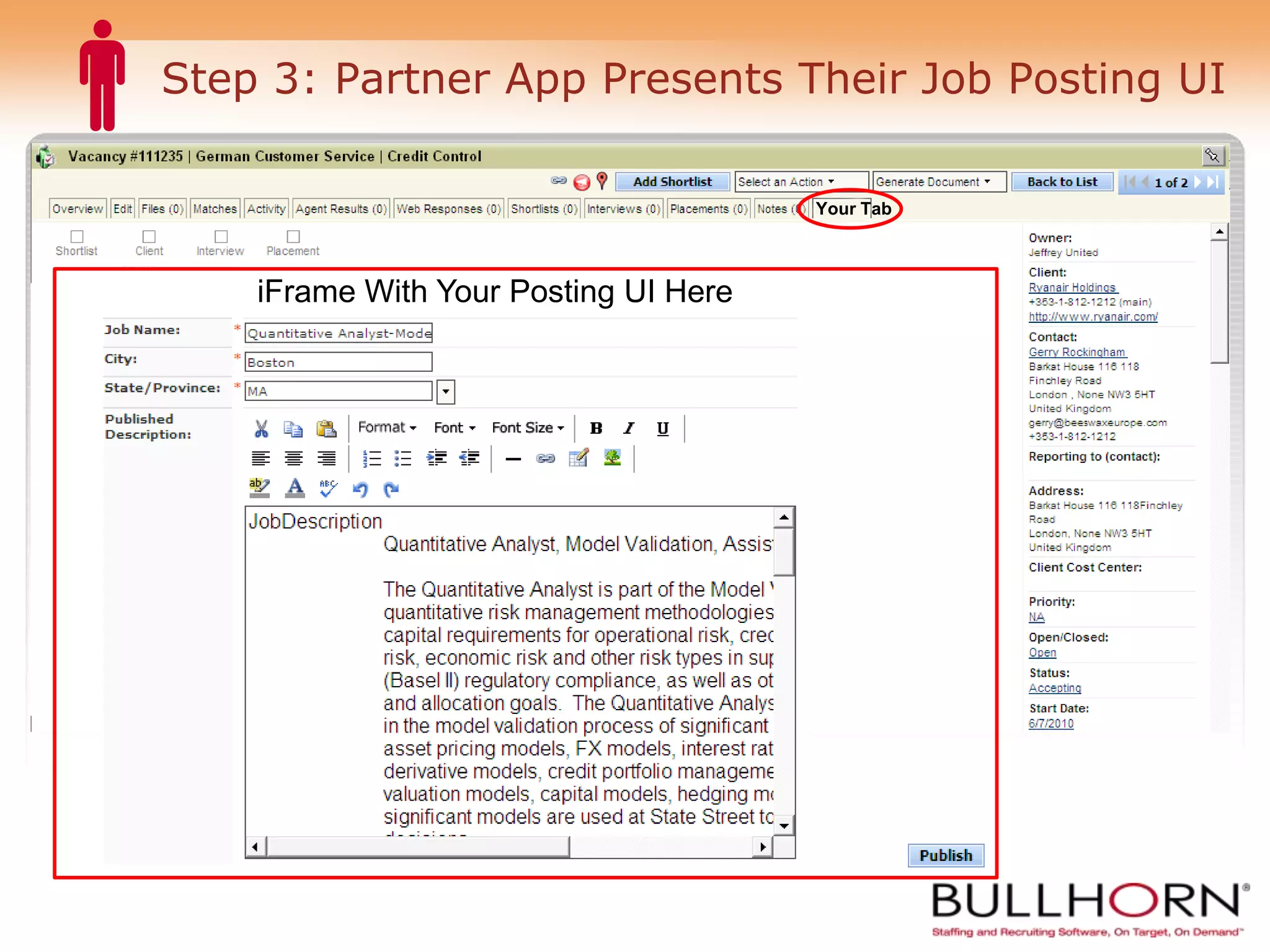
Step 3: Partner App Presents Their Job Posting UI Your Tab iFrame With Your Posting UI Here User clicks here to publish
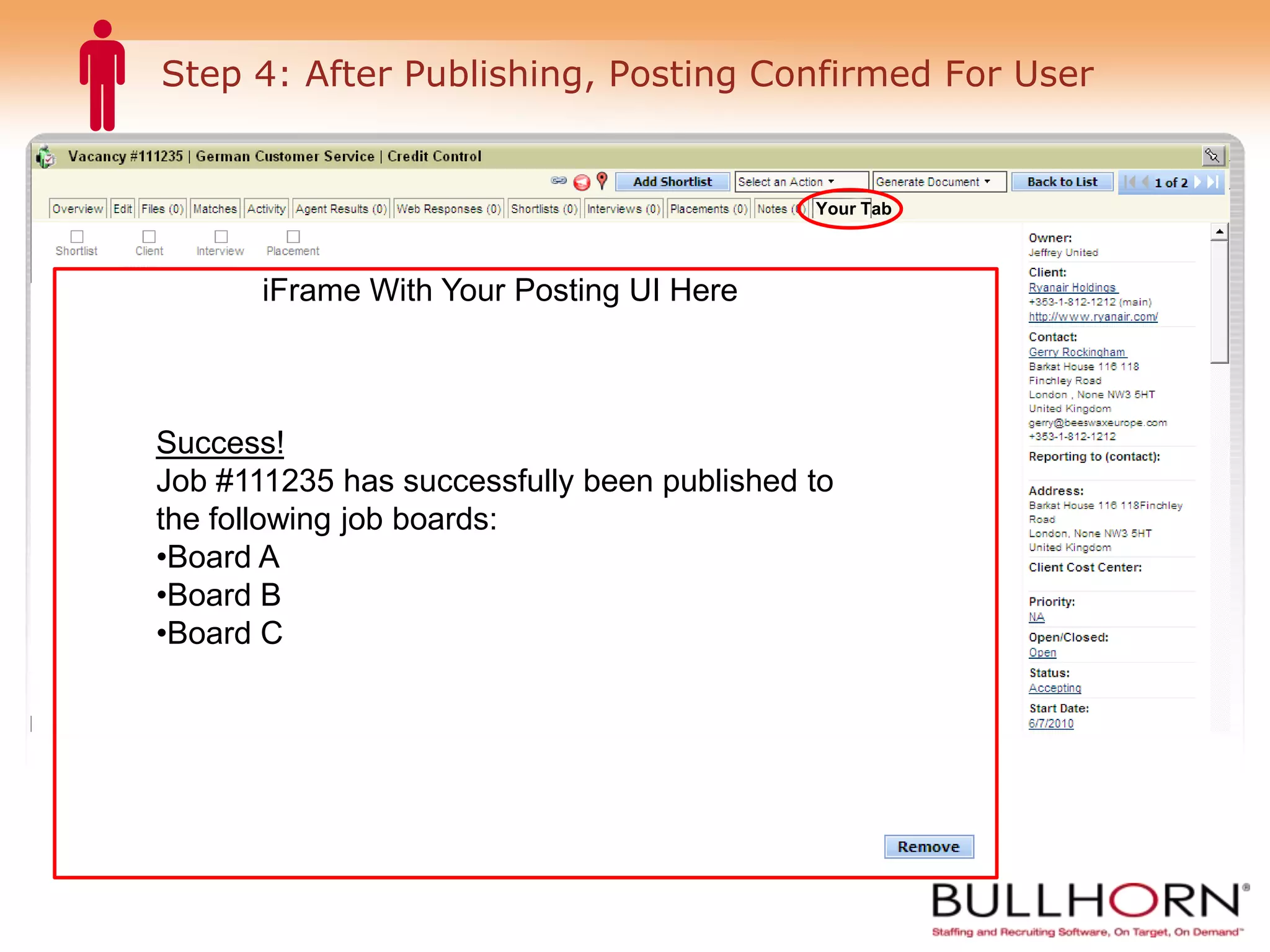
Step 4: After Publishing, Posting Confirmed For User Your Tab iFrame With Your Posting UI Here Success! Job #111235 has successfully been published to the following job boards: Board A Board B Board C
Job Closures Two instances may lead to the user wanting the job to be unpublished: 1) Manual: The user decides to unpublish the job manually after X amount of time 2) Automatic: The job is automatically unpublished when the job is closed (typically due to a Placement being made or a lost opportunity).
Manual Closure: User Returns to Your Tab to Unpublish Job Your Tab iFrame With Your Posting UI Here Status:  Published Job #111235 is currently published on the following job boards: Board A Board B Board C Click ‘Remove’ below to unpublish this job. User clicks here to unpublish
Automated Closure: Event Listener 1) Create an Event Listener Subscription to the JobOrder entity for both UPDATE and DELETE entityEventTypes 2) When the isOpen field on a JobOrder record is set to 0 (false) or a JobOrder is deleted, your application should automatically unpublish the job from your distribution network.
For More Information Visit developer.bullhorn.com for API documentation and sample code Questions? Contact: Jim Lynch Bullhorn Product Management [email_address]
 

Marketplace - Job Publishing Workflow

  • 1.
    Bullhorn Job PostingProcess for Marketplace Integrators
  • 2.
    Overview This slideshow provides a simple workflow example of how the Bullhorn API’s can be used to publish jobs to your Job Distribution Network via a branded tab on the Bullhorn job record. What you’ll need to get started: Bullhorn API Documentation: http://developer.bullhorn.com/doc/ Partner API Key – contact Bullhorn Business Development Bullhorn User Credentials – contact Bullhorn Business Development
  • 3.
    Step 1: UserNavigates to Custom Tab on Job Your Tab Bullhorn user visits a job record A custom component tab is one of the options available to the user, branded with your company’s name or service offering The custom tab is configured to call a URL on your network in an iFrame within the Bullhorn Application The URL will pass your system several parameters to provide your developers context such as BH client ID, user ID, and job ID
  • 4.
    Step 2: PartnerApplication Accesses Job Info via API Your Tab Using the provided context, your partner application can then access job-specific data such as description, title, salary, location, etc. via the Bullhorn JobOrder entity API Your application can then display this information back to the user for confirmation and editing prior to publishing (demonstrated on the next slide)
  • 5.
    Step 3: PartnerApp Presents Their Job Posting UI Your Tab iFrame With Your Posting UI Here User clicks here to publish
  • 6.
    Step 4: AfterPublishing, Posting Confirmed For User Your Tab iFrame With Your Posting UI Here Success! Job #111235 has successfully been published to the following job boards: Board A Board B Board C
  • 7.
    Job Closures Twoinstances may lead to the user wanting the job to be unpublished: 1) Manual: The user decides to unpublish the job manually after X amount of time 2) Automatic: The job is automatically unpublished when the job is closed (typically due to a Placement being made or a lost opportunity).
  • 8.
    Manual Closure: UserReturns to Your Tab to Unpublish Job Your Tab iFrame With Your Posting UI Here Status: Published Job #111235 is currently published on the following job boards: Board A Board B Board C Click ‘Remove’ below to unpublish this job. User clicks here to unpublish
  • 9.
    Automated Closure: EventListener 1) Create an Event Listener Subscription to the JobOrder entity for both UPDATE and DELETE entityEventTypes 2) When the isOpen field on a JobOrder record is set to 0 (false) or a JobOrder is deleted, your application should automatically unpublish the job from your distribution network.
  • 10.
    For More InformationVisit developer.bullhorn.com for API documentation and sample code Questions? Contact: Jim Lynch Bullhorn Product Management [email_address]
  • 11.