

Lai Yoong Seng
Systems Engineer & Inside Solution Architect (ASEAN)
Yoongseng.lai@veeam.com
Ransomware Resiliency,
Recoverability & Availability
Ransomware –
The Big Picture
What is Ransomware?
‒ Spreads via cryptovirology
‒ Encrypts and holds ransom sensitive data
‒ Sometimes threatens to leak sensitive
information
‒ Combines asymmetric and symmetric encryption
to lock out user from managed file transfer (MFT)
or specific directories or files
A type of malicious software (malware) which restricts
access to a computer and/or the files on a computer until a
ransom amount is paid.
Everyone,
Every Sector
and Vertical
is at risk...
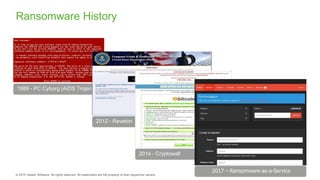
2012 - Reveton
2014 - Cryptowall
2017 – Ransomware-as-a-Service
Ransomware History
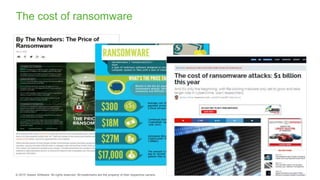
The cost of ransomware
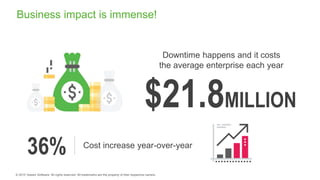
Downtime happens and it costs
the average enterprise each year
Cost increase year-over-year
36%
$21.8MILLION
Business impact is immense!
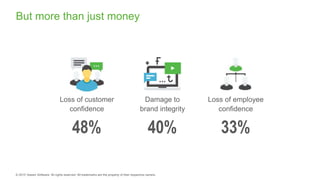
But more than just money
Loss of customer
confidence
Damage to
brand integrity
Loss of employee
confidence
48% 40% 33%
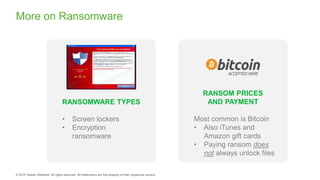
RANSOM PRICES
AND PAYMENT
Most common is Bitcoin
• Also iTunes and
Amazon gift cards
• Paying ransom does
not always unlock files
More on Ransomware
RANSOMWARE TYPES
• Screen lockers
• Encryption
ransomware
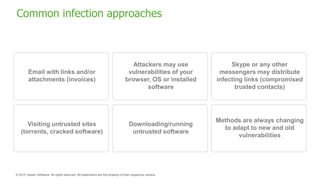
Common infection approaches
Email with links and/or
attachments (invoices)
Visiting untrusted sites
(torrents, cracked software)
Attackers may use
vulnerabilities of your
browser, OS or installed
software
Downloading/running
untrusted software
Methods are always changing
to adapt to new and old
vulnerabilities
Skype or any other
messengers may distribute
infecting links (compromised
trusted contacts)
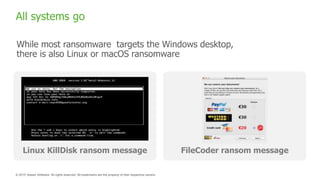
All systems go
While most ransomware targets the Windows desktop,
there is also Linux or macOS ransomware
Linux KillDisk ransom message FileCoder ransom message
Ransomware
Preparedness
Better safe, than sorry!
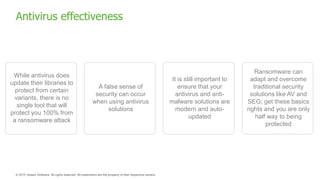
Antivirus effectiveness
While antivirus does
update their libraries to
protect from certain
variants, there is no
single tool that will
protect you 100% from
a ransomware attack
A false sense of
security can occur
when using antivirus
solutions
It is still important to
ensure that your
antivirus and anti-
malware solutions are
modern and auto-
updated
Ransomware can
adapt and overcome
traditional security
solutions like AV and
SEG; get these basics
rights and you are only
half way to being
protected
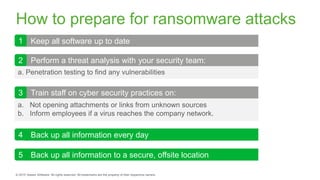
How to prepare for ransomware attacks
a. Penetration testing to find any vulnerabilities
a. Not opening attachments or links from unknown sources
b. Inform employees if a virus reaches the company network.
4 Back up all information every day
5 Back up all information to a secure, offsite location
Keep all software up to date
Perform a threat analysis with your security team:
Train staff on cyber security practices on:
1
2
3
Master 3-2-1 Rule
Tip
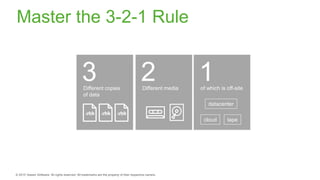
Master the 3-2-1 Rule
2Different media
3Different copies
of data
1of which is off-site
cloud tape
datacenter
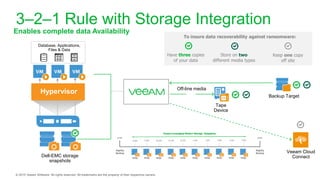
3–2–1 Rule with Storage Integration
Enables complete data Availability
Tape
Device
Backup Target
To insure data recoverability against ransomware:
Dell-EMC storage
snapshots
Have three copies
of your data
Store on two
different media types
Keep one copy
off site
Off-line media
Veeam Cloud
Connect
Database, Applications,
Files & Data
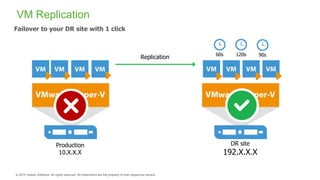
Failover
VM Replication
Failover to your DR site with 1 click
Replication
Production
10.X.X.X
DR site
192.X.X.X
60s 120s 90s
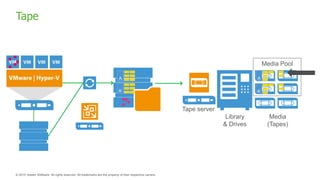
Tape
Tape server
Library
& Drives
Media
(Tapes)
Media Pool
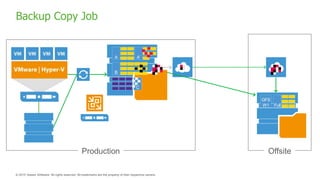
Backup Copy Job
Production Offsite
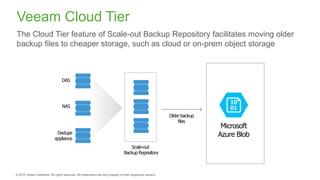
Veeam Cloud Tier
The Cloud Tier feature of Scale-out Backup Repository facilitates moving older
backup files to cheaper storage, such as cloud or on-prem object storage
Scale-out
Backup Repository
Older backup
files
DAS
NAS
Dedupe
appliance
Microsoft
Azure Blob
Ransomware Remediation
and Recovery
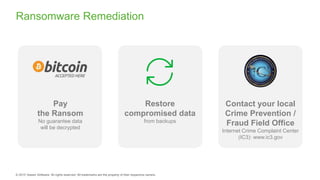
Ransomware Remediation
Pay
the Ransom
No guarantee data
will be decrypted
Contact your local
Crime Prevention /
Fraud Field Office
Internet Crime Complaint Center
(IC3): www.ic3.gov
Restore
compromised data
from backups
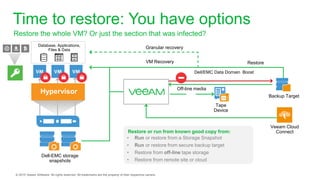
Restore or run from known good copy from:
Time to restore: You have options
Restore the whole VM? Or just the section that was infected?
Tape
Device
Backup Target
Dell-EMC storage
snapshots
Restore
Veeam Cloud
Connect
Database, Applications,
Files & Data
Dell/EMC Data Domain Boost
• Run or restore from a Storage Snapshot
• Run or restore from secure backup target
• Restore from off-line tape storage
• Restore from remote site or cloud
VM Recovery
Off-line media
Granular recovery
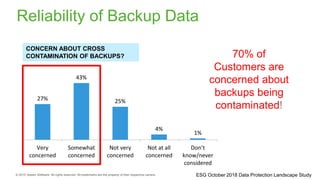
Reliability of Backup Data
27%
43%
25%
4%
1%
Very
concerned
Somewhat
concerned
Not very
concerned
Not at all
concerned
Don’t
know/never
considered
CONCERN ABOUT CROSS
CONTAMINATION OF BACKUPS? 70% of
Customers are
concerned about
backups being
contaminated!
ESG October 2018 Data Protection Landscape Study
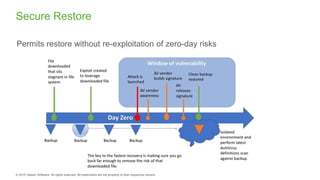
Permits restore without re-exploitation of zero-day risks
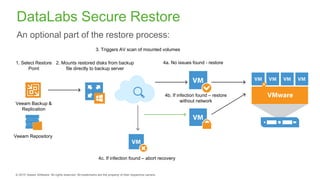
Secure Restore
DataLabs Secure Restore
An optional part of the restore process:
Veeam Backup &
Replication
Veeam Repository
1. Select Restore
Point
2. Mounts restored disks from backup
file directly to backup server
3. Triggers AV scan of mounted volumes
4c. If infection found – abort recovery
4a. No issues found - restore
4b. If infection found – restore
without network
Endpoint devices and
Non-virtualized systems
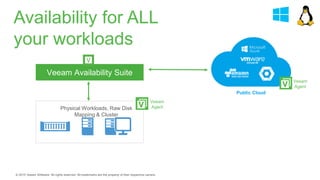
Veeam Availability Suite
Physical Workloads, Raw Disk
Mapping & Cluster
Public Cloud
Veeam
Agent
Veeam
Agent
Availability for ALL
your workloads
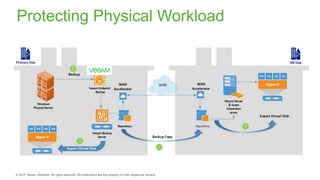
Protecting Physical Workload
Thank you

Ransomware Resiliency, Recoverability and Availability

  • 1.
    Lai Yoong Seng SystemsEngineer & Inside Solution Architect (ASEAN) Yoongseng.lai@veeam.com Ransomware Resiliency, Recoverability & Availability
  • 2.
  • 3.
    What is Ransomware? ‒Spreads via cryptovirology ‒ Encrypts and holds ransom sensitive data ‒ Sometimes threatens to leak sensitive information ‒ Combines asymmetric and symmetric encryption to lock out user from managed file transfer (MFT) or specific directories or files A type of malicious software (malware) which restricts access to a computer and/or the files on a computer until a ransom amount is paid.
  • 4.
  • 5.
    2012 - Reveton 2014- Cryptowall 2017 – Ransomware-as-a-Service Ransomware History
  • 6.
    The cost ofransomware
  • 7.
    Downtime happens andit costs the average enterprise each year Cost increase year-over-year 36% $21.8MILLION Business impact is immense!
  • 8.
    But more thanjust money Loss of customer confidence Damage to brand integrity Loss of employee confidence 48% 40% 33%
  • 9.
    RANSOM PRICES AND PAYMENT Mostcommon is Bitcoin • Also iTunes and Amazon gift cards • Paying ransom does not always unlock files More on Ransomware RANSOMWARE TYPES • Screen lockers • Encryption ransomware
  • 10.
    Common infection approaches Emailwith links and/or attachments (invoices) Visiting untrusted sites (torrents, cracked software) Attackers may use vulnerabilities of your browser, OS or installed software Downloading/running untrusted software Methods are always changing to adapt to new and old vulnerabilities Skype or any other messengers may distribute infecting links (compromised trusted contacts)
  • 11.
    All systems go Whilemost ransomware targets the Windows desktop, there is also Linux or macOS ransomware Linux KillDisk ransom message FileCoder ransom message
  • 12.
  • 13.
    Antivirus effectiveness While antivirusdoes update their libraries to protect from certain variants, there is no single tool that will protect you 100% from a ransomware attack A false sense of security can occur when using antivirus solutions It is still important to ensure that your antivirus and anti- malware solutions are modern and auto- updated Ransomware can adapt and overcome traditional security solutions like AV and SEG; get these basics rights and you are only half way to being protected
  • 14.
    How to preparefor ransomware attacks a. Penetration testing to find any vulnerabilities a. Not opening attachments or links from unknown sources b. Inform employees if a virus reaches the company network. 4 Back up all information every day 5 Back up all information to a secure, offsite location Keep all software up to date Perform a threat analysis with your security team: Train staff on cyber security practices on: 1 2 3
  • 15.
  • 16.
    Master the 3-2-1Rule 2Different media 3Different copies of data 1of which is off-site cloud tape datacenter
  • 17.
    3–2–1 Rule withStorage Integration Enables complete data Availability Tape Device Backup Target To insure data recoverability against ransomware: Dell-EMC storage snapshots Have three copies of your data Store on two different media types Keep one copy off site Off-line media Veeam Cloud Connect Database, Applications, Files & Data
  • 18.
    Failover VM Replication Failover toyour DR site with 1 click Replication Production 10.X.X.X DR site 192.X.X.X 60s 120s 90s
  • 19.
  • 20.
  • 21.
    Veeam Cloud Tier TheCloud Tier feature of Scale-out Backup Repository facilitates moving older backup files to cheaper storage, such as cloud or on-prem object storage Scale-out Backup Repository Older backup files DAS NAS Dedupe appliance Microsoft Azure Blob
  • 22.
  • 23.
    Ransomware Remediation Pay the Ransom Noguarantee data will be decrypted Contact your local Crime Prevention / Fraud Field Office Internet Crime Complaint Center (IC3): www.ic3.gov Restore compromised data from backups
  • 24.
    Restore or runfrom known good copy from: Time to restore: You have options Restore the whole VM? Or just the section that was infected? Tape Device Backup Target Dell-EMC storage snapshots Restore Veeam Cloud Connect Database, Applications, Files & Data Dell/EMC Data Domain Boost • Run or restore from a Storage Snapshot • Run or restore from secure backup target • Restore from off-line tape storage • Restore from remote site or cloud VM Recovery Off-line media Granular recovery
  • 25.
    Reliability of BackupData 27% 43% 25% 4% 1% Very concerned Somewhat concerned Not very concerned Not at all concerned Don’t know/never considered CONCERN ABOUT CROSS CONTAMINATION OF BACKUPS? 70% of Customers are concerned about backups being contaminated! ESG October 2018 Data Protection Landscape Study
  • 26.
    Permits restore withoutre-exploitation of zero-day risks Secure Restore
  • 27.
    DataLabs Secure Restore Anoptional part of the restore process: Veeam Backup & Replication Veeam Repository 1. Select Restore Point 2. Mounts restored disks from backup file directly to backup server 3. Triggers AV scan of mounted volumes 4c. If infection found – abort recovery 4a. No issues found - restore 4b. If infection found – restore without network
  • 28.
  • 29.
    Veeam Availability Suite PhysicalWorkloads, Raw Disk Mapping & Cluster Public Cloud Veeam Agent Veeam Agent Availability for ALL your workloads
  • 30.
  • 31.