Hyper-V In Windows
Server 2012
  Lai Yoong Seng (MVP Virtual Machine)
  www.ms4u.info | laiys@redynamics.com
  Redynamics Asia System Management


                                         1
Session Objective and Takeaway

                                   Key Takeaway
Session Objective
                                   • Understand why use Hyper-V in
• Provide key features on what’s
                                     Windows Server 2012 as the
   coming in Windows Server 2012
                                     foundation of the Private Cloud
   for Hyper-V


                                                                       2
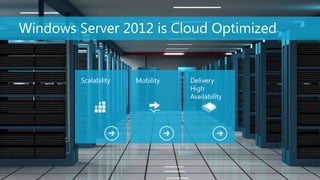
Windows Server 2012 is Cloud Optimized


         Scalability   Mobility   Delivery
                                  High
                                  Availability


                                                 3
Windows Server 2012


        Scalability   Mobility   Delivery
                                 High
                                 Availability


                                                4
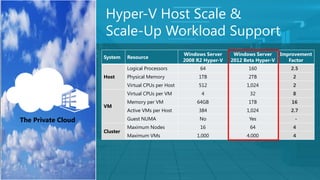
Hyper-V Host Scale &
                    Scale-Up Workload Support
                                                      Windows Server     Windows Server     Improvement
                    System    Resource
                                                      2008 R2 Hyper-V   2012 Beta Hyper-V      Factor
                              Logical Processors            64                160              2.5
                    Host      Physical Memory              1TB                2TB               2
                              Virtual CPUs per Host        512                1,024             2
                              Virtual CPUs per VM           4                  32               8
                              Memory per VM                64GB               1TB               16
                    VM
                              Active VMs per Host          384                1,024            2.7

The Private Cloud             Guest NUMA                    No                 Yes               -
                              Maximum Nodes                 16                 64               4
                    Cluster
                              Maximum VMs                  1,000              4,000             4


                                                                                                      5
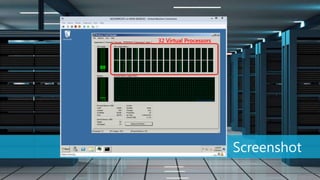
Screenshot
             6
Windows Server 2012


        Scalability   Mobility   Delivery
                                 High
                                 Availability


                                                7
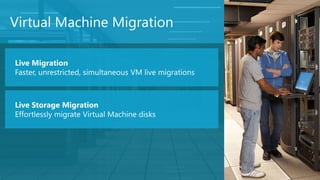
Virtual Machine Migration

Live Migration
Faster, unrestricted, simultaneous VM live migrations


Live Storage Migration
Effortlessly migrate Virtual Machine disks
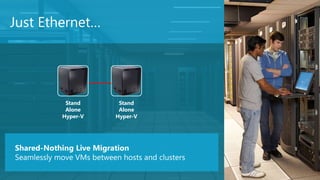
Just Ethernet…


             Stand          Stand
             Alone          Alone
            Hyper-V        Hyper-V


Shared-Nothing Live Migration
Seamlessly move VMs between hosts and clusters
                                                 9
Demo Live Migration
                      10
Windows Server 2012


        Scalability   Mobility   Delivery
                                 High
                                 Availability


                                                11
Failover Clustering

Unmatched Scale
Failover Clusters support 64 Nodes and 4000 VMs

Flexible VM Guest Clustering
iSCSI, Virtual Fiber Channel & SMB 2.2 clustering support

Failover Prioritization
Control the order in which VMs fail over or start
Demo Failover Prioritization
                               13
Networking


             Network Quality of
             Services (QOS)
             Ability to control the
             throughput of the network
             and network bandwidth
             control.
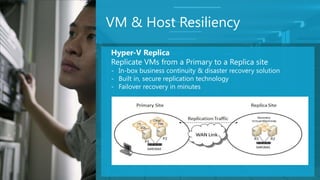
VM & Host Resiliency
Hyper-V Replica
Replicate VMs from a Primary to a Replica site
- In-box business continuity & disaster recovery solution
- Built in, secure replication technology
- Failover recovery in minutes


                                                            15
Demo Hyper-V Replica
                       16
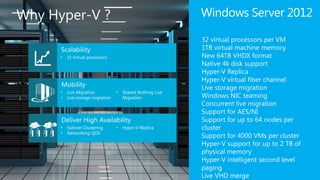
Why Hyper-V ?   Windows Server 2012

                32 virtual processors per VM
                1TB virtual machine memory
                New 64TB VHDX format
                Native 4k disk support
                Hyper-V Replica
                Hyper-V virtual fiber channel
                Live storage migration
                Windows NIC teaming
                Concurrent live migration
                Support for AES/NI
                Support for up to 64 nodes per
                cluster
                Support for 4000 VMs per cluster
                Hyper-V support for up to 2 TB of
                physical memory
                Hyper-V intelligent second level
                paging
                Live VHD merge
Resources
            • Lai Blog – www.ms4u.info
            • Join us MVUG – “Malaysia Virtualization User
              Group” @ Facebook
            • Windows 8 Blog:- http://blogs.msdn.com/b/b8/
            • Download:- http://technet.microsoft.com/en-
              us/evalcenter/hh670538


                                                             18
Q&A
Questions & Answers
        • Virtual Lai
        • www.ms4u.info | laiys@redynamics.com

Hyper V in Windows Server 2012

  • 1.
    Hyper-V In Windows Server2012 Lai Yoong Seng (MVP Virtual Machine) www.ms4u.info | laiys@redynamics.com Redynamics Asia System Management 1
  • 2.
    Session Objective andTakeaway Key Takeaway Session Objective • Understand why use Hyper-V in • Provide key features on what’s Windows Server 2012 as the coming in Windows Server 2012 foundation of the Private Cloud for Hyper-V 2
  • 3.
    Windows Server 2012is Cloud Optimized Scalability Mobility Delivery High Availability 3
  • 4.
    Windows Server 2012 Scalability Mobility Delivery High Availability 4
  • 5.
    Hyper-V Host Scale& Scale-Up Workload Support Windows Server Windows Server Improvement System Resource 2008 R2 Hyper-V 2012 Beta Hyper-V Factor Logical Processors 64 160 2.5 Host Physical Memory 1TB 2TB 2 Virtual CPUs per Host 512 1,024 2 Virtual CPUs per VM 4 32 8 Memory per VM 64GB 1TB 16 VM Active VMs per Host 384 1,024 2.7 The Private Cloud Guest NUMA No Yes - Maximum Nodes 16 64 4 Cluster Maximum VMs 1,000 4,000 4 5
  • 6.
  • 7.
    Windows Server 2012 Scalability Mobility Delivery High Availability 7
  • 8.
    Virtual Machine Migration LiveMigration Faster, unrestricted, simultaneous VM live migrations Live Storage Migration Effortlessly migrate Virtual Machine disks
  • 9.
    Just Ethernet… Stand Stand Alone Alone Hyper-V Hyper-V Shared-Nothing Live Migration Seamlessly move VMs between hosts and clusters 9
  • 10.
  • 11.
    Windows Server 2012 Scalability Mobility Delivery High Availability 11
  • 12.
    Failover Clustering Unmatched Scale FailoverClusters support 64 Nodes and 4000 VMs Flexible VM Guest Clustering iSCSI, Virtual Fiber Channel & SMB 2.2 clustering support Failover Prioritization Control the order in which VMs fail over or start
  • 13.
  • 14.
    Networking Network Quality of Services (QOS) Ability to control the throughput of the network and network bandwidth control.
  • 15.
    VM & HostResiliency Hyper-V Replica Replicate VMs from a Primary to a Replica site - In-box business continuity & disaster recovery solution - Built in, secure replication technology - Failover recovery in minutes 15
  • 16.
  • 17.
    Why Hyper-V ? Windows Server 2012 32 virtual processors per VM 1TB virtual machine memory New 64TB VHDX format Native 4k disk support Hyper-V Replica Hyper-V virtual fiber channel Live storage migration Windows NIC teaming Concurrent live migration Support for AES/NI Support for up to 64 nodes per cluster Support for 4000 VMs per cluster Hyper-V support for up to 2 TB of physical memory Hyper-V intelligent second level paging Live VHD merge
  • 18.
    Resources • Lai Blog – www.ms4u.info • Join us MVUG – “Malaysia Virtualization User Group” @ Facebook • Windows 8 Blog:- http://blogs.msdn.com/b/b8/ • Download:- http://technet.microsoft.com/en- us/evalcenter/hh670538 18
  • 19.
    Q&A Questions & Answers • Virtual Lai • www.ms4u.info | laiys@redynamics.com

Editor's Notes

  • #5 There are 3 key area:-ScalabilityMobilityDeliver High Availability
  • #8 That’s concludes my talk on Scalability. Let’s move on now to discuss Mobility.
  • #9 3 features allow to perform VM Migration1.LMWin2k8 R2 perform a single migration at a time. Windows 8 allow multiple VM to migrate at a time.2. Live Storage Migration..Allow to migrate VM from one storage to another storage without any downtime. Useful when:Perform storage upgradePerform moving a small storage to bigger storage3. Shared NothingYou can even LM VM between 2 Hyper-V Host without Shared Storage. VM can move without any downtime.
  • #10 3 features allow to perform VM Migration1.LMWin2k8 R2 perform a single migration at a time. Windows 8 allow multiple VM to migrate at a time.2. Live Storage Migration..Allow to migrate VM from one storage to another storage without any downtime. Useful when:Perform storage upgradePerform moving a small storage to bigger storage3. Shared NothingYou can even LM VM between 2 Hyper-V Host without Shared Storage. VM can move without any downtime.
  • #15 There are numerous improvement to Hyper-V clustering in Windows 8 Backup ImprovementSupport for backup up virtual machine with Windows Server Backup and incremental backup.2. Hyper-V ReplicaReplicate running virtual machine to a secondary site for disaster recovery purpose
  • #16 There are numerous improvement to Hyper-V clustering in Windows 8 Backup ImprovementSupport for backup up virtual machine with Windows Server Backup and incremental backup.2. Hyper-V ReplicaReplicate running virtual machine to a secondary site for disaster recovery purpose
  • #18 I just touch the surface of few hyper-v new features and there are 100+ more for Hyper-V in Windows Server 2012.