Learn from the Expert
Get Started with Microsoft Azure Virtual
Machine
Lai Yoong Seng
MVP Hyper-V | www.ms4u.info
ericlaiys@outlook.com
Agenda
 Infrastructure As A Service
 Storage
 Network
 Compute
 Summary & Wrap Up
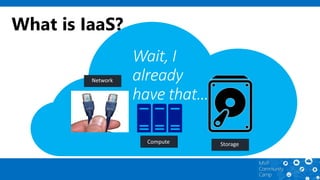
What is IaaS?
Wait, I
already
have that…
Major datacenter
CDN node
Live sub-region
Announced sub-region
Partner-operated sub-region
1st
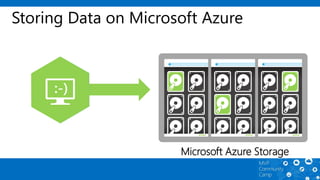
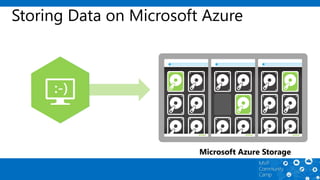
Microsoft Azure Storage
Storing Data on Microsoft Azure
Microsoft Azure Storage
Storing Data on Microsoft Azure
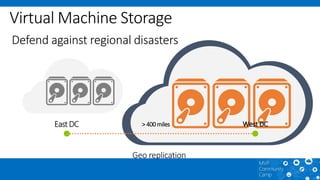
West DCEast DC > 400 miles
Defend against regional disasters
Geo replication
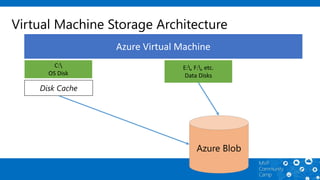
Virtual Machine Storage Architecture
Azure Virtual Machine
C:
OS Disk
E:, F:, etc.
Data Disks
Disk Cache
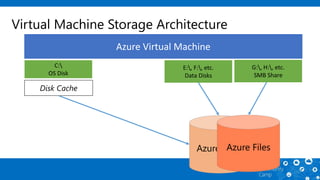
Virtual Machine Storage Architecture
Azure Virtual Machine
C:
OS Disk
E:, F:, etc.
Data Disks
Disk Cache
G:, H:, etc.
SMB Share
Premium storage
Up to 32 TB of storage per VM
>50,000 IOPS per VM
Less than 1ms read latency
Learn from the Expert
Demo – Creating Storage
2nd
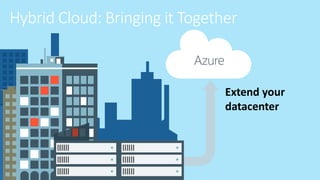
Azure
Hybrid Cloud: Bringing it Together
Extend your
datacenter
Options for On-Premises VPN Gateways
Extend your infrastructure
Existing
Datacenter
Active
Directory
SharePoint SQL
Server
Windows
Azure
Branch
Datacenter
Active
Directory
SharePoint SQL
Server
Windows
Azure
Point-to-Site VPN
For Remote Users
Introducing ExpressRoute
Virtual Network- Computeonly.
ExpressRoute- Provides customerchoice andinclude access to
compute,storage,and otherAzure services.
Public
internet
Public
internet
Public
internet
a775T4R*
Learn from the Expert
Demo – Creating Virtual Network
Virtual Network
3rd
Disaster Recovery Scenario
80/443
Cloud Service
VPN Tunnel
SQL DB Mirroring / AlwaysOn
Distributed Filesystem Replication ( DFS-R )
Xcopy / Robocopy based Deployments
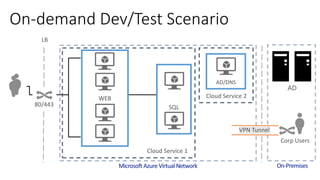
On-demand Dev/Test Scenario
LB
80/443
Cloud Service 1
Cloud Service 2WEB
SQL
AD/DNS
Corp Users
VPN Tunnel
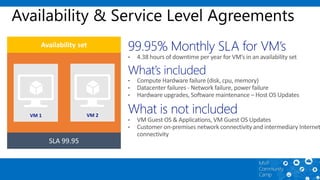
Availability & Service Level Agreements
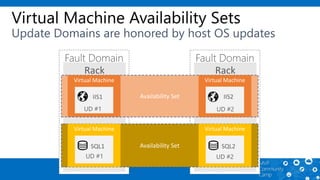
Virtual Machine Availability Sets
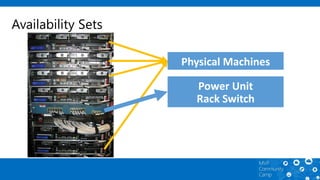
Availability Sets
Availability Sets
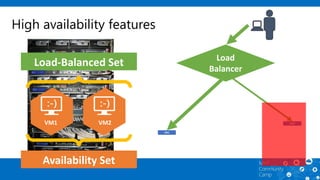
High availability features
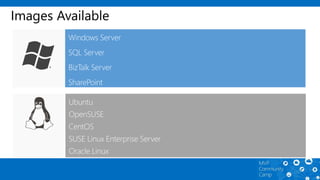
Images Available
The A family
Highest value VM Size
Basic and Standard Sizes
General Purpose and High Memory
High Performance A8/A9 (RDMA)
A
The D family
60% faster CPU
Up to 112 GB Memory
Local SSD storageD
The G family
Optimized for data workloads
Up to 32 CPU cores, 448 GB RAM, 6.5
TB local SSD
Latest generation Intel processor
G
Disk Mobility
Bring Your Own Server/VHD
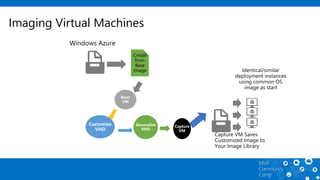
Imaging Virtual Machines
Data Import and Export Service (Import)
Ship data on 3.5" SATA Drives
(up to 4 TB per drive)
Data Import and Export Service (Export)
Ship empty 3.5" SATA Drives
(up to 4 TB per drive)
Data is shipped back to you on
your own disks.
Learn from the Expert
Demo – Creating Virtual Machine
Wrap up…
Microsoft
Azure IaaS
Must View Resources
Microsoft Virtual Academy:
• Establish the Foundation: Core IaaS Infrastructure
Technical Fundamentals – Click here
• Dive Deep into Networking, Storage, and Disaster
Recovery - Click here
• Embrace Open Source Technologies to Accelerate
and Scale Solutions - Click here
Get started With Microsoft Azure Virtual Machine

Get started With Microsoft Azure Virtual Machine

Editor's Notes

  • #2 Title:- Get started with Microsoft Azure Virtual Machine Synopsis: In this session, we will explore the fundamental of building Microsoft Azure Virtual Machine as the first step to embark the journey to the cloud.
  • #7 How it work? We store data is 3 disk – like mirror
  • #8 If die, it is durable. Azure will mark as die and create another copy
  • #10 Azure Storage Page Blobs, 3 copies VHD disks, 1 TB per disk (16 TB total) 500 IOPs (8000 IOPS total)
  • #11 SMB 2.1
  • #16 One of option to bridge on-premise to Azure. We have supported list Generic VPN device will work as long it support IKE, AES, SHA
  • #17 1st- Site to Site VPN -setup a vpn tunnel- 2nd – Site to Multisite VPN 3rd – Vnet to Vnet 4th – Point to site VPN -client computer can connect using certificate (protected connection)
  • #18 Another option without using site to site vpn is Use Express Route Rely on Exchange provider – another leased line Equinex, Singtel (10GB link) Leased line to their datacenter & your data center 2. Use MPLS -Can be part of your existing MPLS network -Give 1GBps connection (MPLS connection) -currently available in US Cloud on your MPLS VPN Avoid risks from exposure to Internet Avoid complexity and added costs Provides lower latency, higher bandwidth and greater availability
  • #23 Slide Objective: Discuss how to achieve an SLA of 99.95% for VMs 99.9% for single role instances 8.75 hours of downtime per year Key Talking Points: Configuring at least two VMs performing the same workload in the same availability set provides a 99.95% SLA Virtual Network SLA = 99.9% VMs in same availability set are automatically placed in separate upgrade and failure domains ( racks ) within a datacenter. Azure SLA is more granular than competition – mapped to availability of specific infrastructure components that are hosting VMs, instead of generically mapped to edge of a datacenter region SLA for VM’s based on monthly availability instead of annual availability ( most of competition ). Complete SLA for VMs available at http://www.microsoft.com/en-us/download/details.aspx?id=38427
  • #24 Fault Domains Represent groups of resources anticipated to fail together i.e. Same rack, same server Fabric spreads instances across fault at least 2 fault domains Update Domains Represents groups of resources that will be updated together Host OS updates honour service update domains Specified in service definition Default of 5 (up to 20)
  • #28 Cloud Service acts as a network and security boundary for virtual machines. Cloud service URL is mapped to a public IP when there is at least one active virtual machine. http://contosvc.cloudapp.net = 137.135.67.36 All external traffic to virtual machines uses this IP.
  • #33 Base OS image for new Virtual Machines Sys-Prepped/Generalized/Read Only Created by uploading or by capture
  • #36 Management Interface Users can choose one of the following methods to interface with Windows Azure Import/Export service: Windows Azure Management Portal Interface to manage jobs. REST Interface Encryption Mandatory requirement to encrypt data in the drive with a BitLocker key Supported Device 3.5 inch SATA II hard drives Note: You can easily transfer your data from your machine via USB to a SATA II drive by using one of the SATA to USB adaptors: Anker 68UPSATAA-02BU Anker 68UPSHHDS-BU Startech SATADOCK22UE Supported Maximum Disk Capacity 4 TB Maximum Number of Jobs per subscription 20 Maximum number of drives per job 10 Supported file format NTFS Shipping The following shipping options are available: Packages(s) for an import job can be shipped either with FedEx Express or FedEx Ground. Return shipping is free and provided via FedEx Ground.
  • #37 Virtual Machines can be generally scaled in two directions Horizontal Duplicate Virtual Machine instances are added Vertical Virtual Machine tiers can be changed for a current instance. Virtual Machines in an Availability Set can be auto-scaled horizontally Scaling rules are assigned to a schedule Target CPU When the average utilization of the CPU is above a certain threshold, new instances are created. When it is below the floor, instances are removed. Queue You can establish a target amount of queue messages per instance. New instances will be created to handle additional messages.
  • #39 To wrap up about our session today We have covered about the pieces of Iaas such as Highly durable & scalable storage Hybrid, cross premise networking to extend your datacenter to different network Last but not least, we can easily select different VM images to hold your workload