Session I Introduction  The Mathematics of 3D Triangulation  3D Scanning with Swept-Planes  Camera and Swept-Plane Light Source Calibration Reconstruction and Visualization using Point Clouds Course Schedule TexPoint fonts used in EMF.  Read the TexPoint manual before you delete this box.:  A A A A A A A A A A
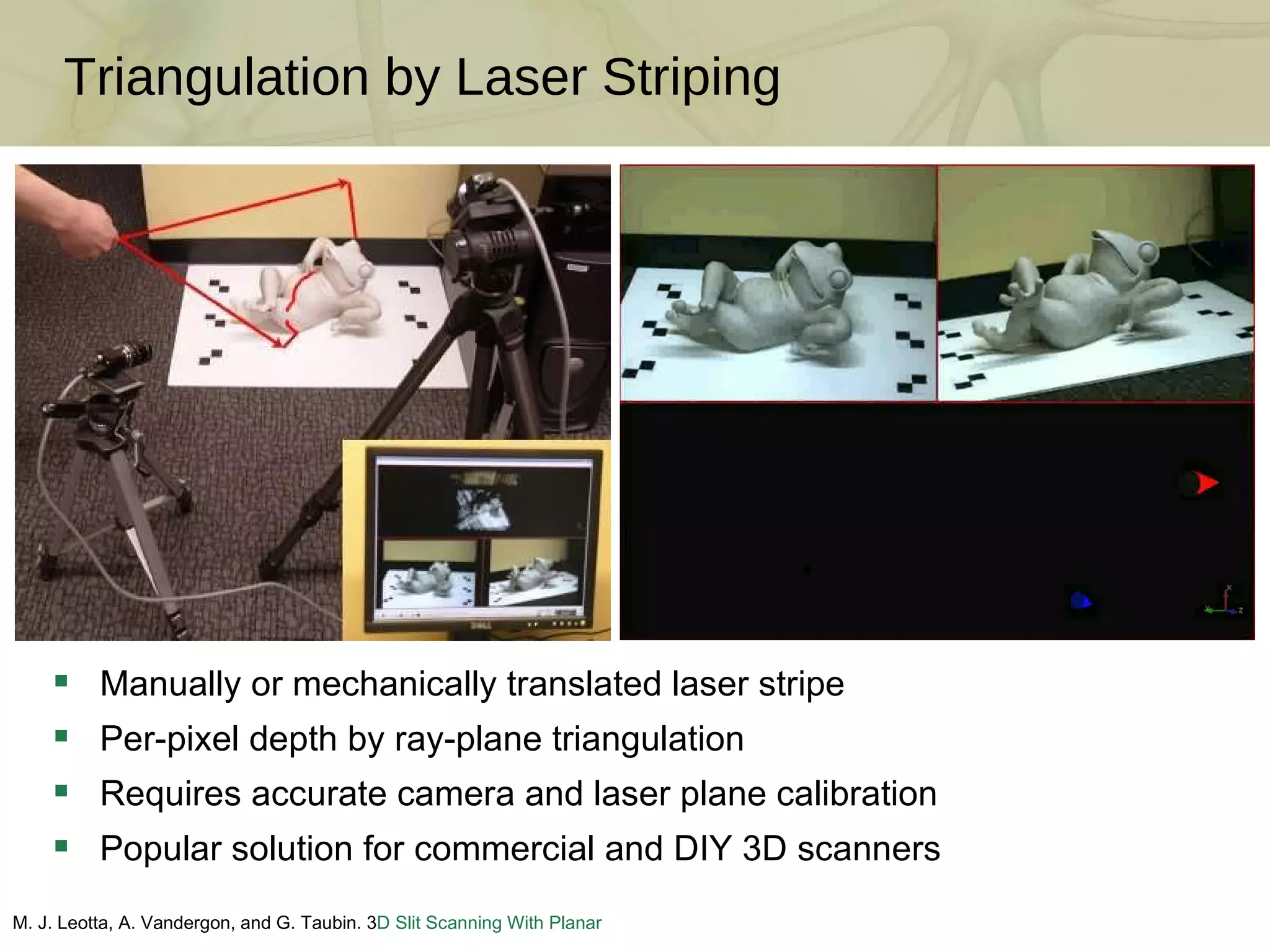
Triangulation by Laser Striping M. J. Leotta, A. Vandergon, and G. Taubin. 3 D Slit Scanning With Planar Constraints .  Computer Graphics Forum , 2008 Manually or mechanically translated laser stripe Per-pixel depth by ray-plane triangulation Requires accurate camera and laser plane calibration Popular solution for commercial and DIY 3D scanners
3D Photography on Your Desk: Bouguet and Perona [ICCV 1998] J.-Y. Bouguet and P. Perona.  3D photography on your desk .  Intl. Conf. Comp. Vision , 1998  DIY scanner using only a camera, a halogen lamp, and a stick Per-pixel depth by ray-plane triangulation Requires accurate camera and shadow plane calibration
Assembling Your Own Scanner Parts: camera (QuickCam 9000), lamp, stick, two planar objects [~$100] Step 1: Build the calibration boards (include fiducials and chessboard) Step 2: Build the point light source (remove reflector and place in scene) Step 3: Arrange the camera, light source, and calibration boards
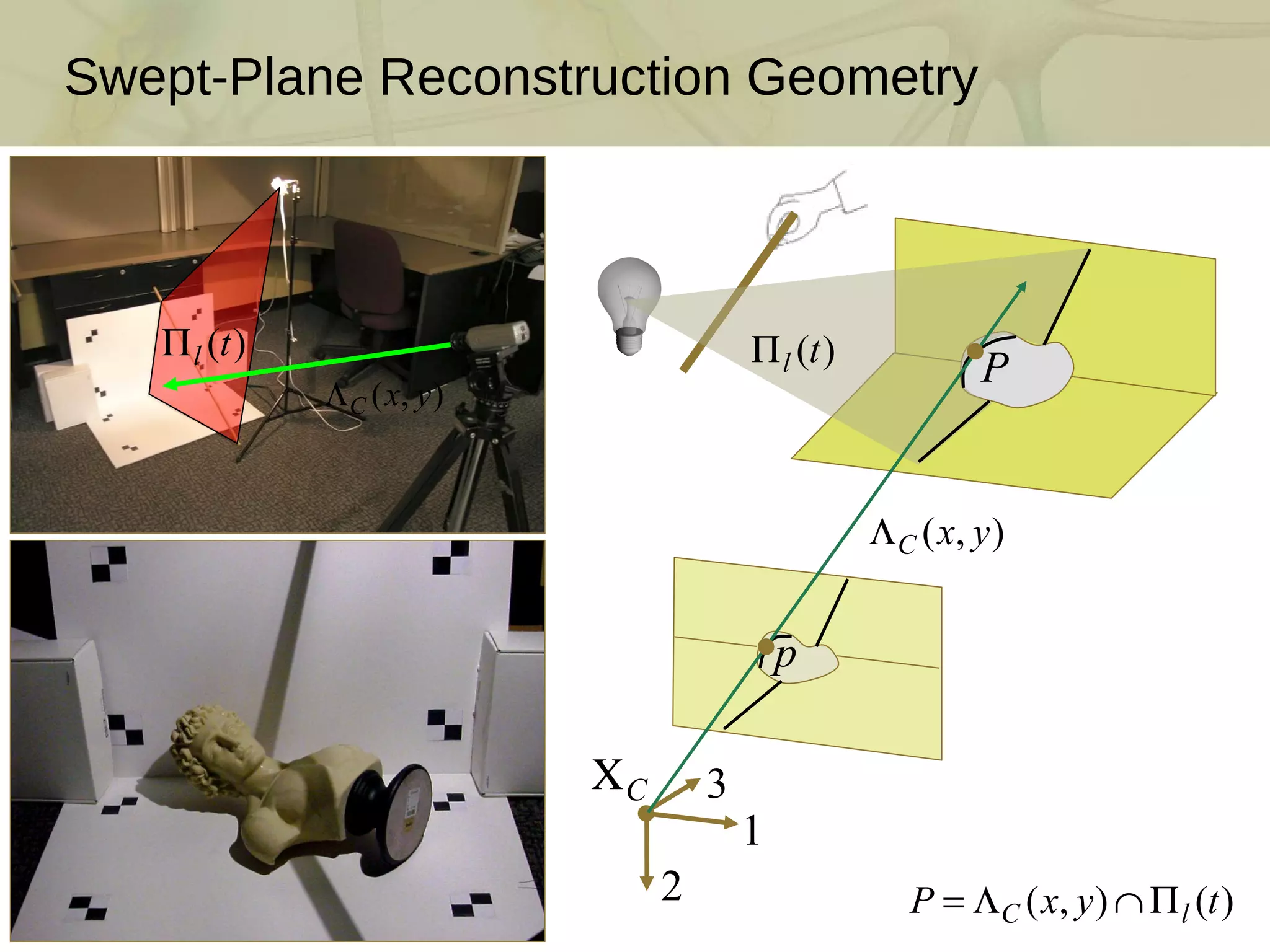
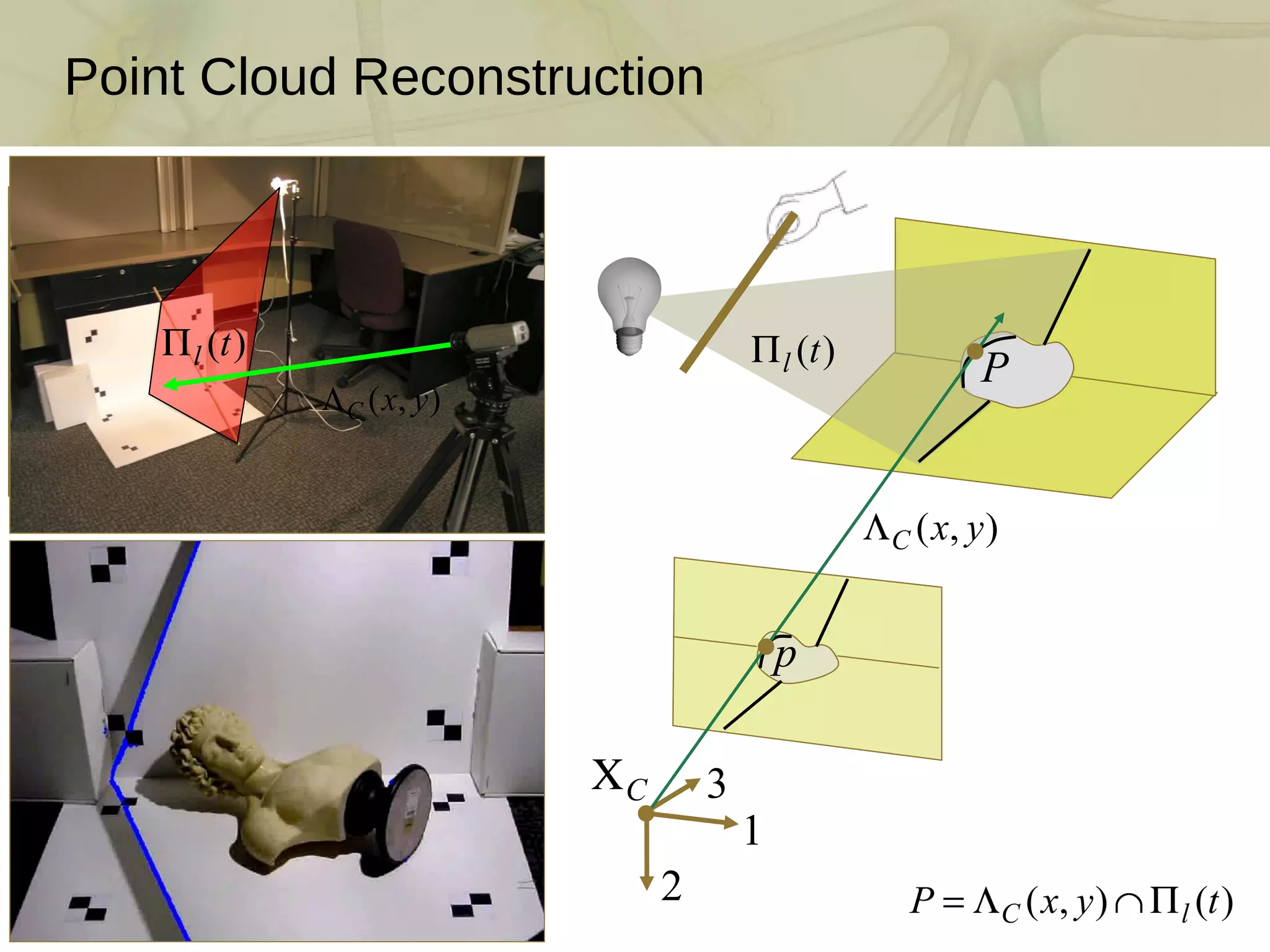
Swept-Plane Reconstruction Geometry
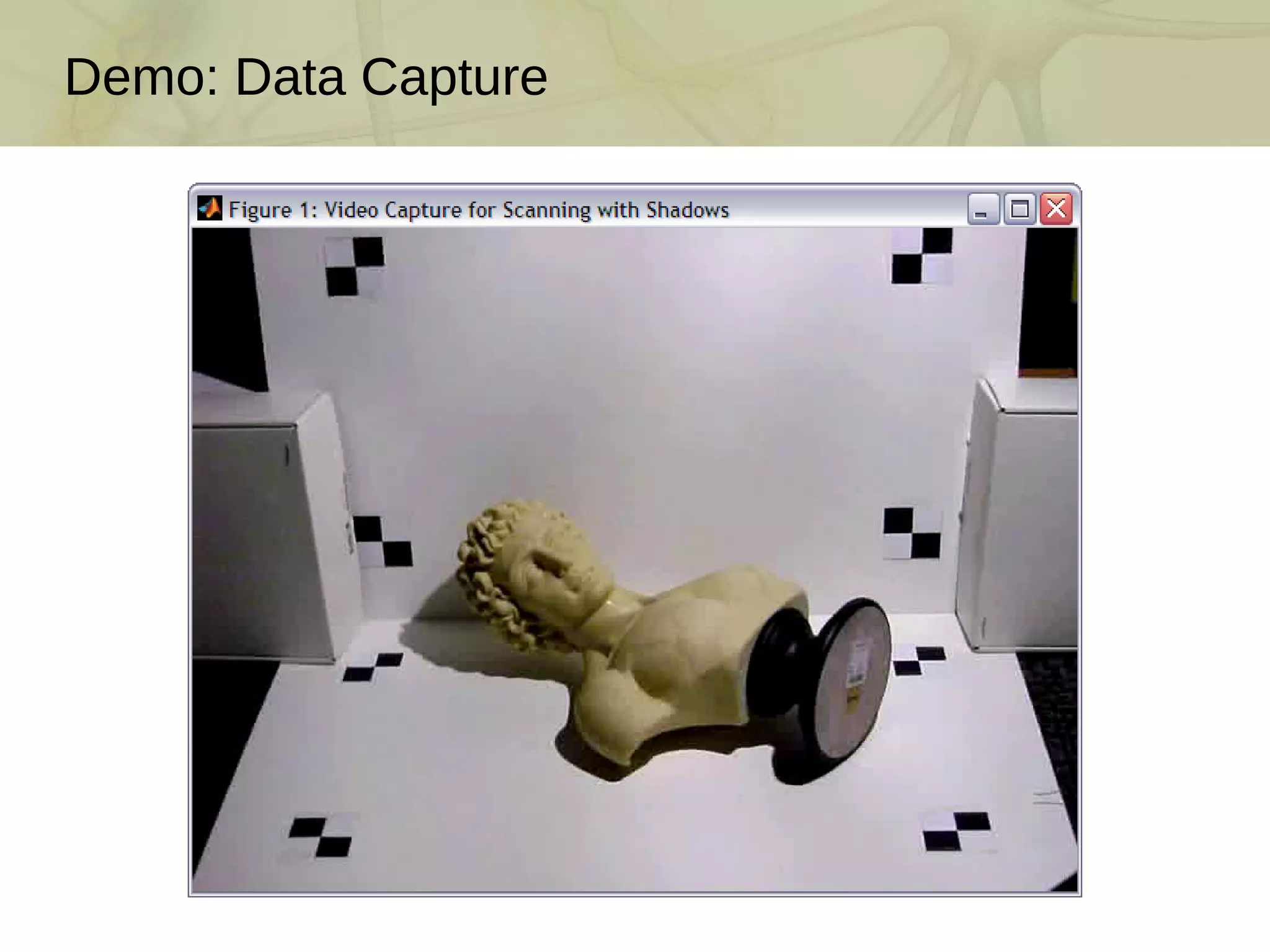
Demo: Data Capture
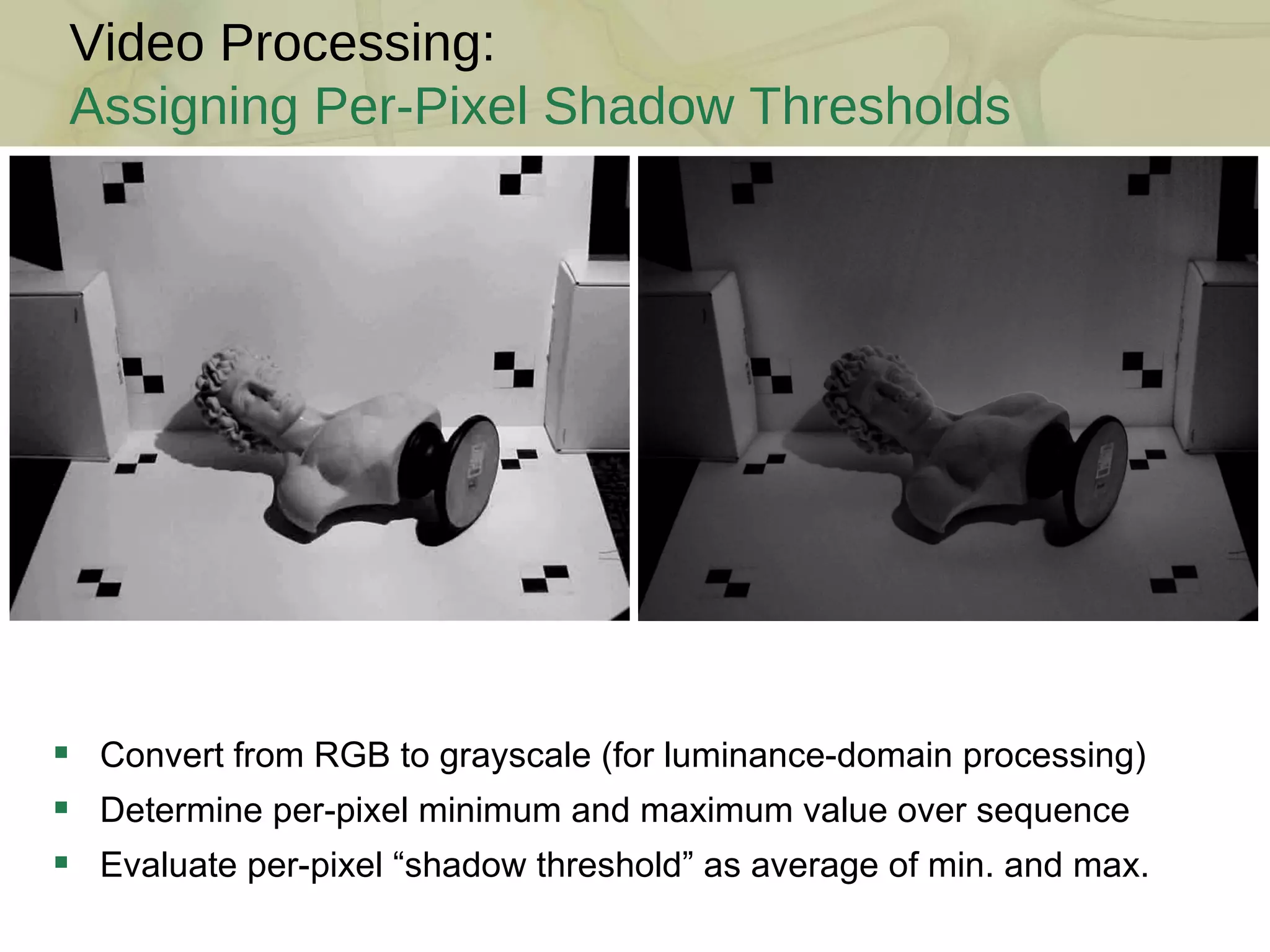
Convert from RGB to grayscale (for luminance-domain processing) Determine per-pixel minimum and maximum value over sequence Evaluate per-pixel “shadow threshold” as average of min. and max. Video Processing: Assigning Per-Pixel Shadow Thresholds
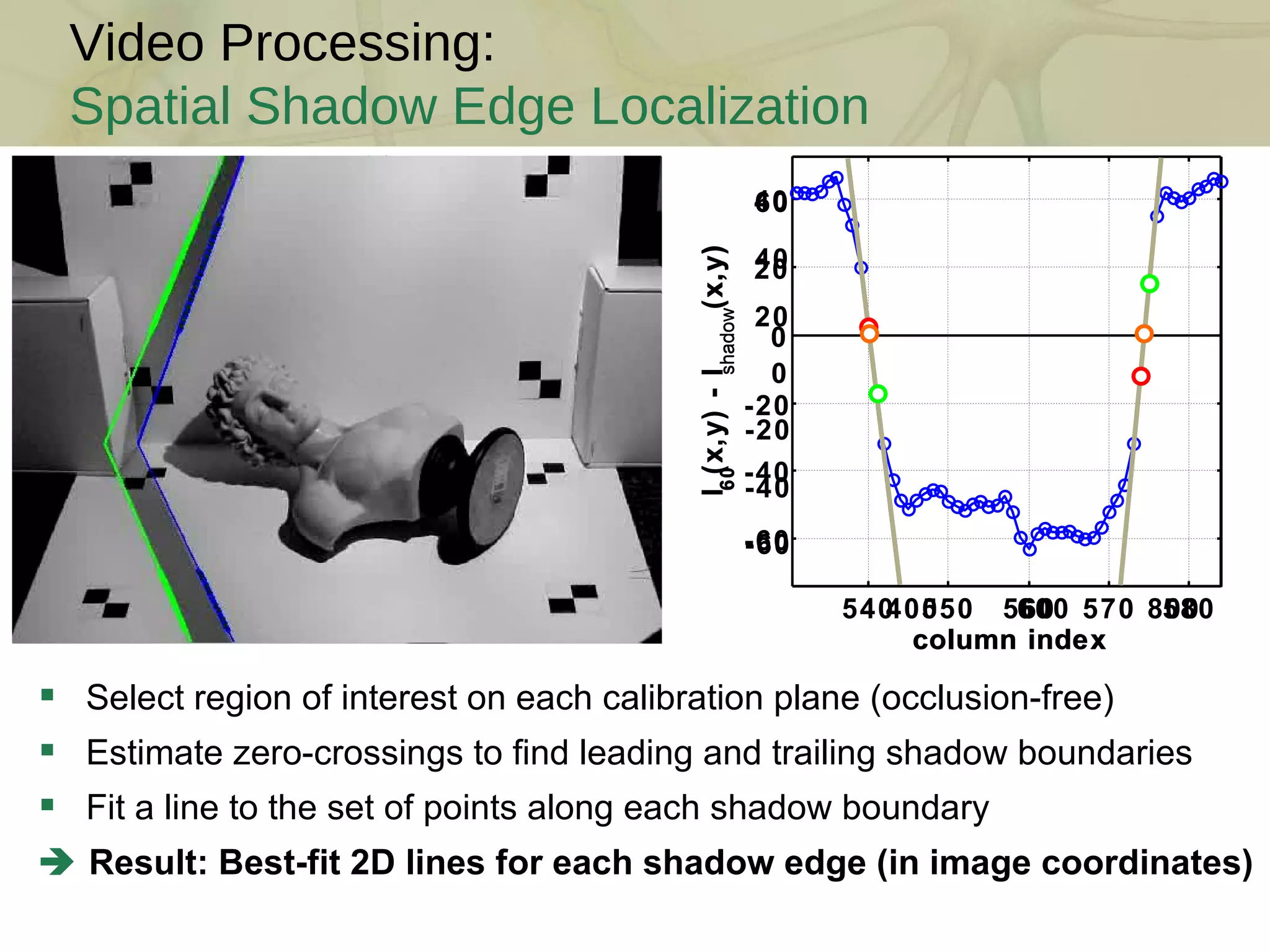
Video Processing: Spatial Shadow Edge Localization Select region of interest on each calibration plane (occlusion-free) Estimate zero-crossings to find leading and trailing shadow boundaries Fit a line to the set of points along each shadow boundary    Result: Best-fit 2D lines for each shadow edge (in image coordinates) 400 600 800 -60 -40 -20 0 20 40 60 column index I 60 (x,y) - I shadow (x,y) 540 550 560 570 580 -60 -40 -20 0 20 40 column index I 60 (x,y) - I shadow (x,y)
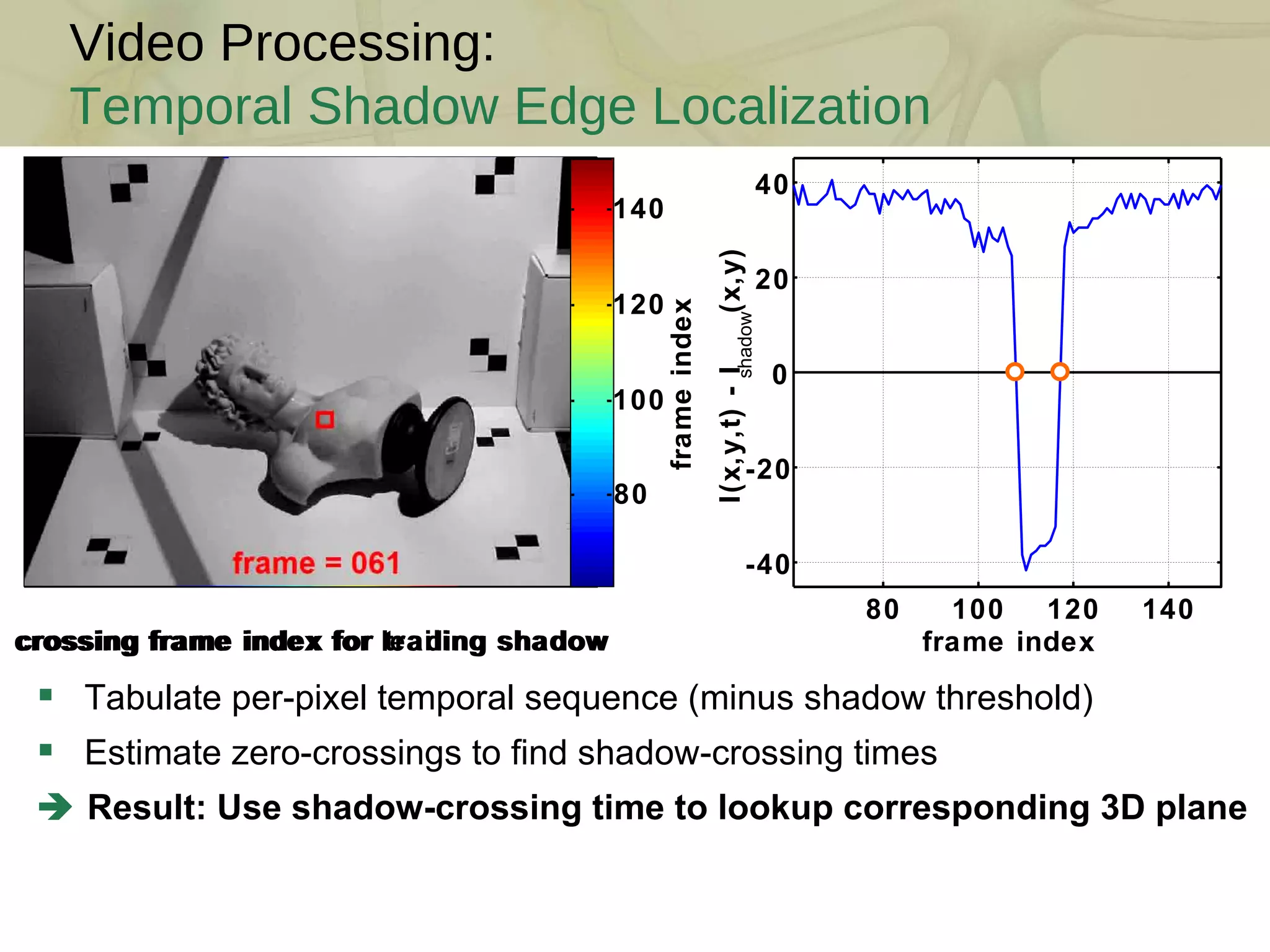
Video Processing: Temporal Shadow Edge Localization Tabulate per-pixel temporal sequence (minus shadow threshold) Estimate zero-crossings to find shadow-crossing times    Result: Use shadow-crossing time to lookup corresponding 3D plane 80 100 120 140 -40 -20 0 20 40 frame index I(x,y,t) - I shadow (x,y) crossing frame index for leading shadow crossing frame index for trailing shadow frame index 80 100 120 140
Session I Introduction  The Mathematics of 3D Triangulation  3D Scanning with Swept-Planes  Camera and Swept-Plane Light Source Calibration Reconstruction and Visualization using Point Clouds Course Schedule
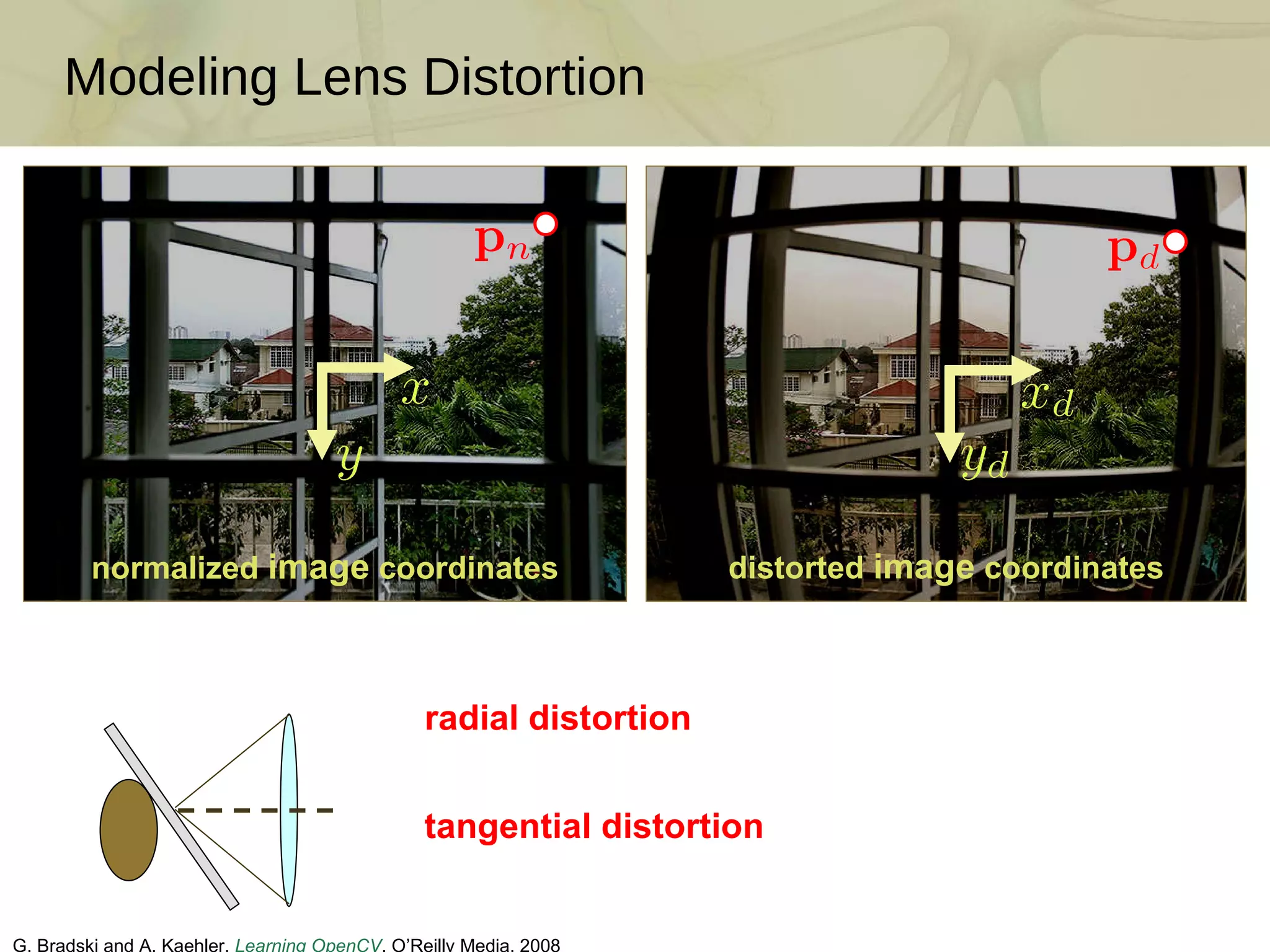
Modeling Lens Distortion G. Bradski and A. Kaehler.  Learning OpenCV . O’Reilly Media, 2008  radial distortion tangential distortion normalized  image  coordinates distorted  image  coordinates
Intrinsic Camera Calibration Camera Calibration Input How to estimate intrinsic parameters and distortion model?  (unknowns: focal length, skew, scale, principal point, and distortion coeffs.) Popular solution: Observe a known calibration object (Zhang [2000]) Each 2D chessboard corner yields two constraints on the 6-11 unknowns But, must also find 6 extrinsic parameters per image (rotation/translation)    Result: Two or more images of a chessboard are sufficient 1 1 1 1 1 1 2 2 2 2 2 2 3 3 3 3 4 4 4 5 5 6 6 7 Estimated Camera Lens Distortion Map camera coordinate system world coordinate system intrinsic parameters extrinsic parameters
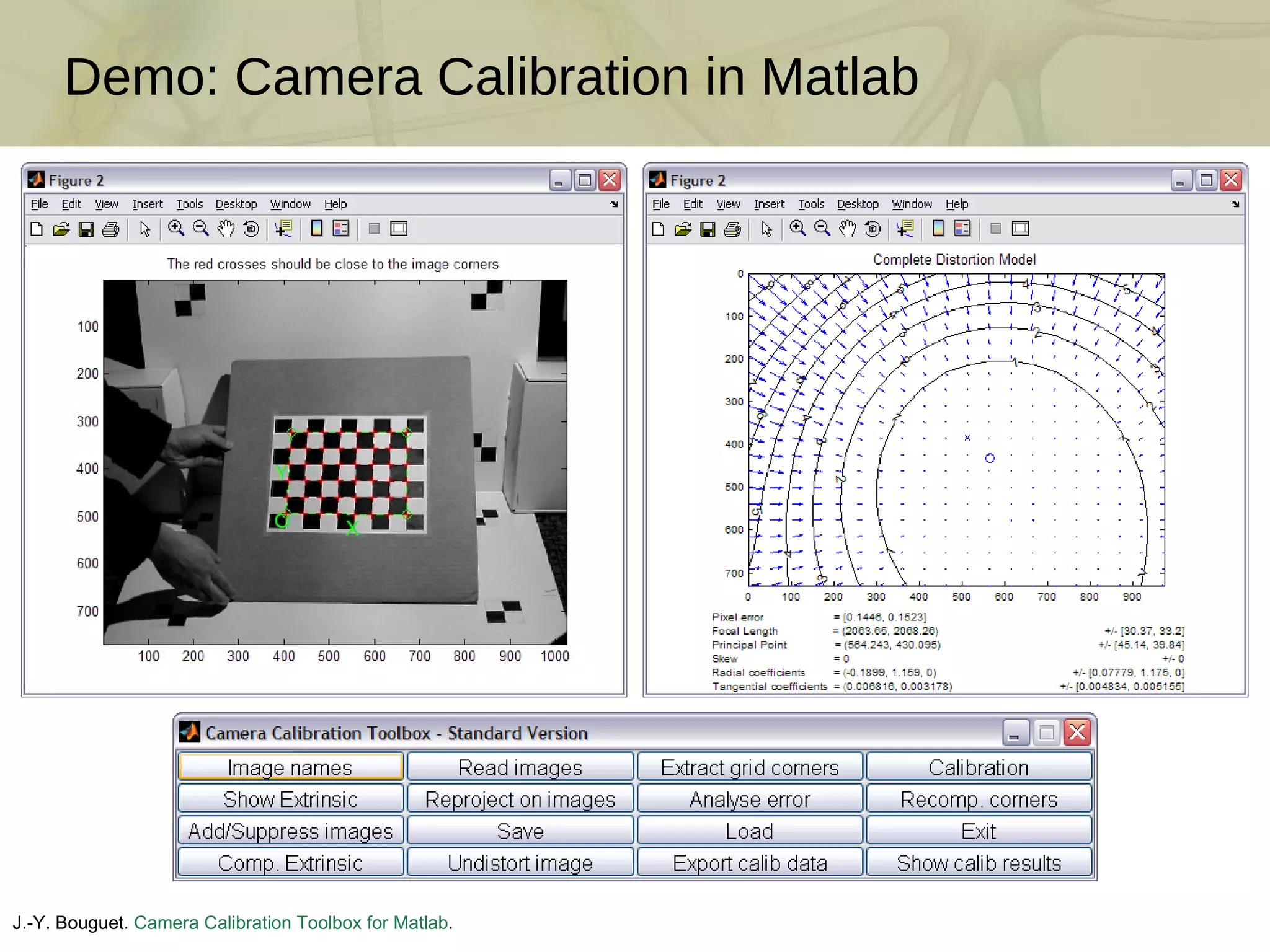
Demo: Camera Calibration in Matlab J.-Y. Bouguet.  Camera Calibration Toolbox for Matlab . http://www.vision.caltech.edu/bouguetj/calib_doc/
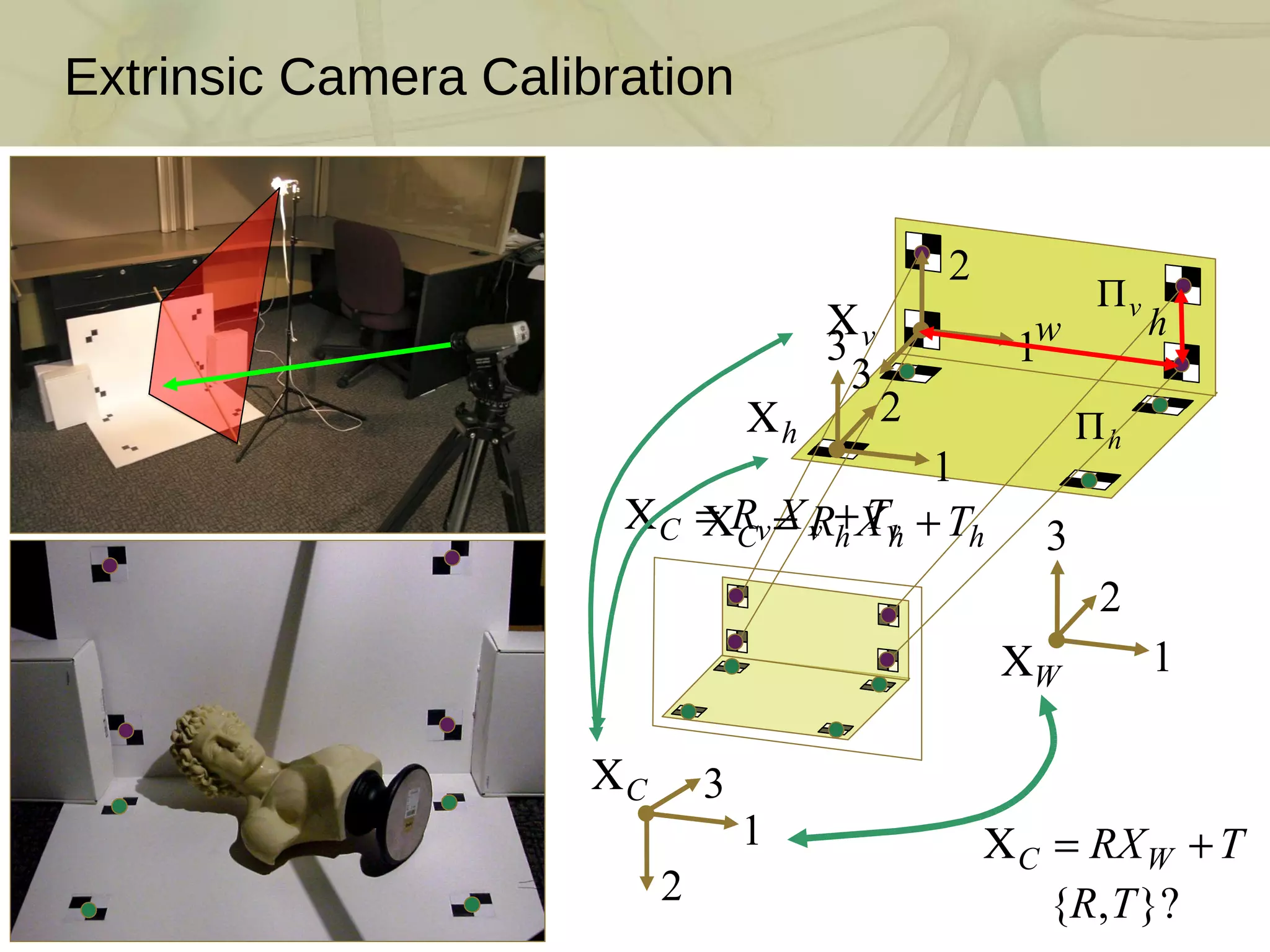
Extrinsic Camera Calibration
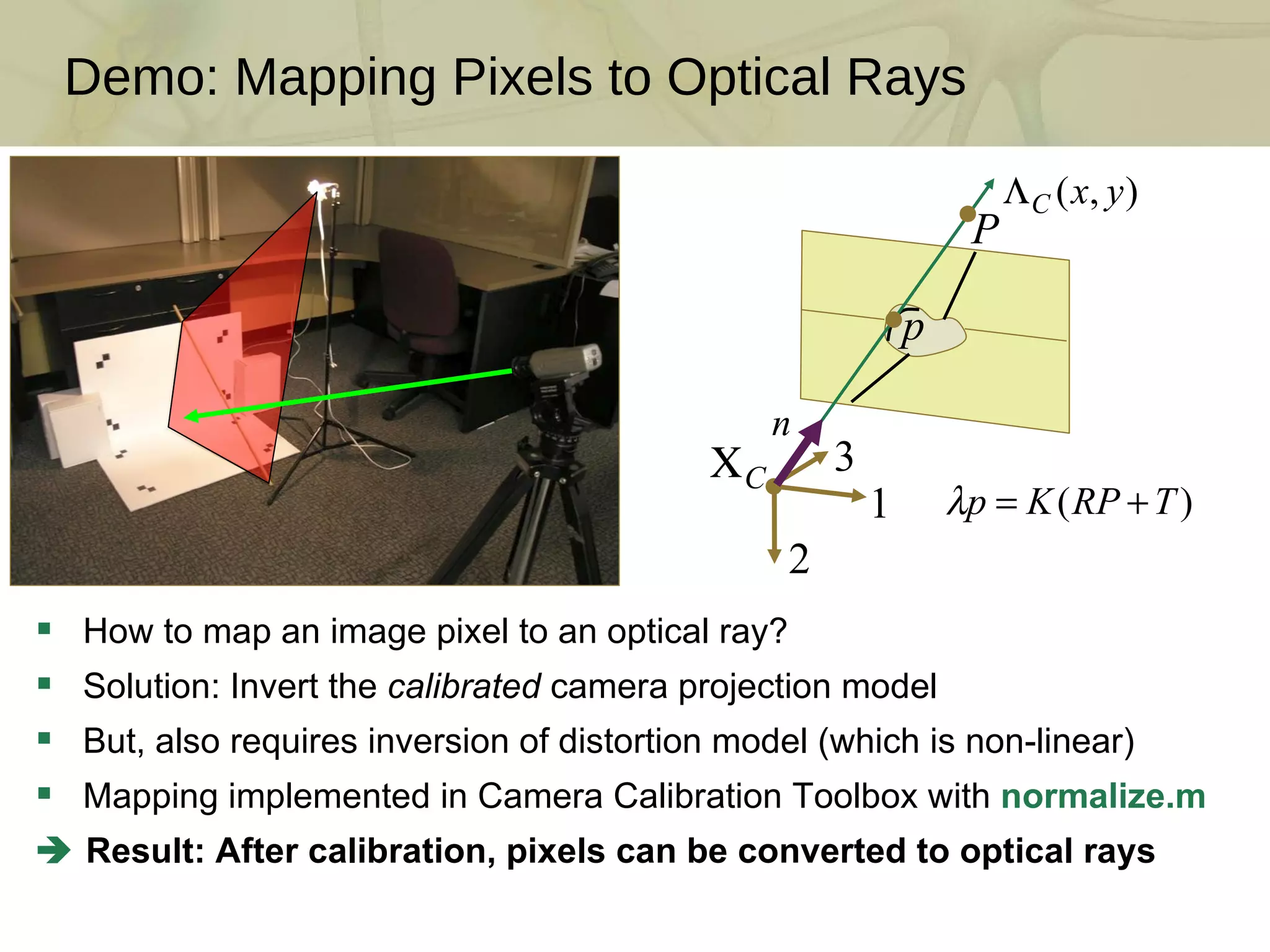
Demo: Mapping Pixels to Optical Rays How to map an image pixel to an optical ray? Solution: Invert the  calibrated  camera projection model But, also requires inversion of distortion model (which is non-linear) Mapping implemented in Camera Calibration Toolbox with  normalize.m    Result: After calibration, pixels can be converted to optical rays
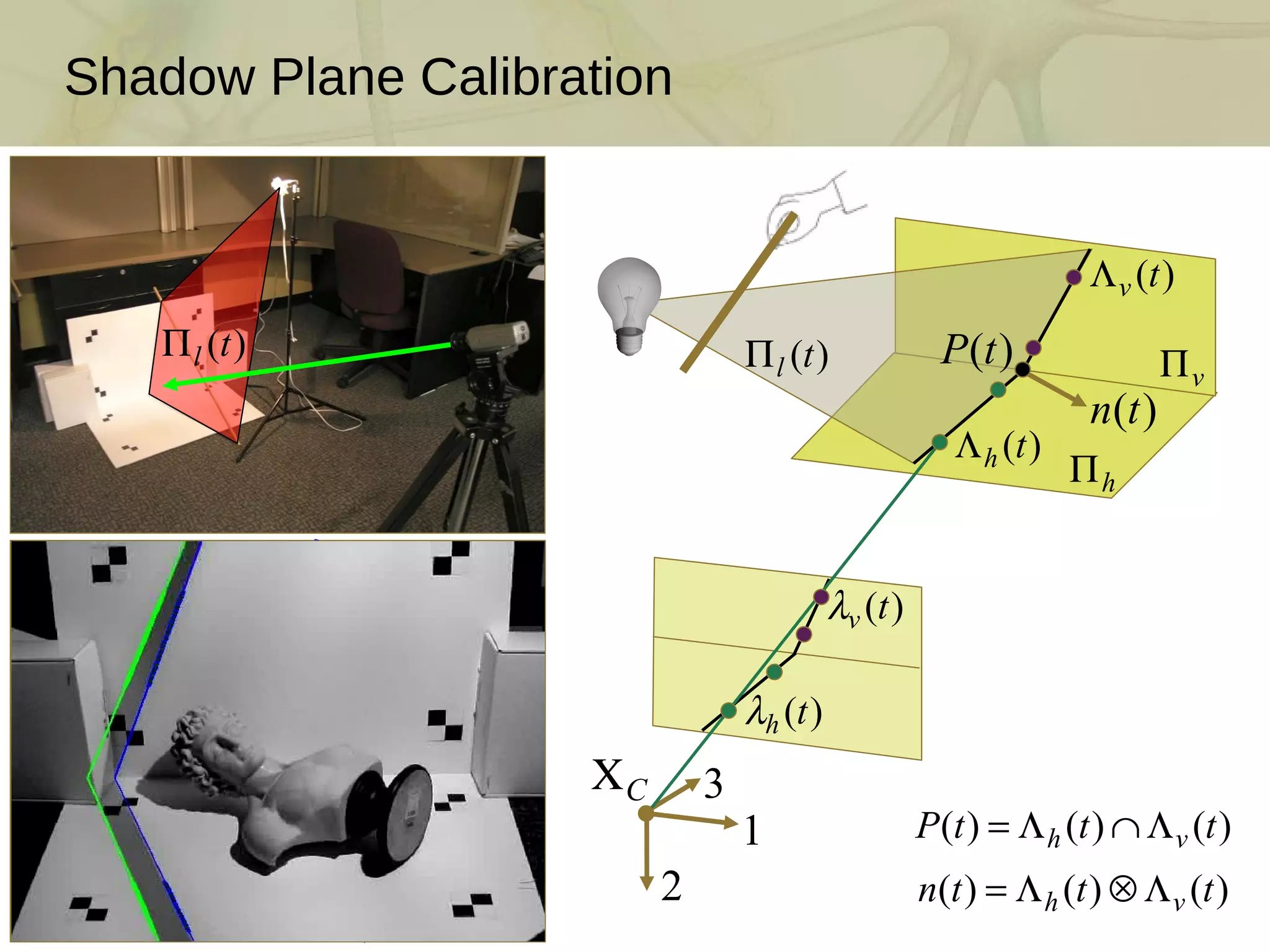
Shadow Plane Calibration
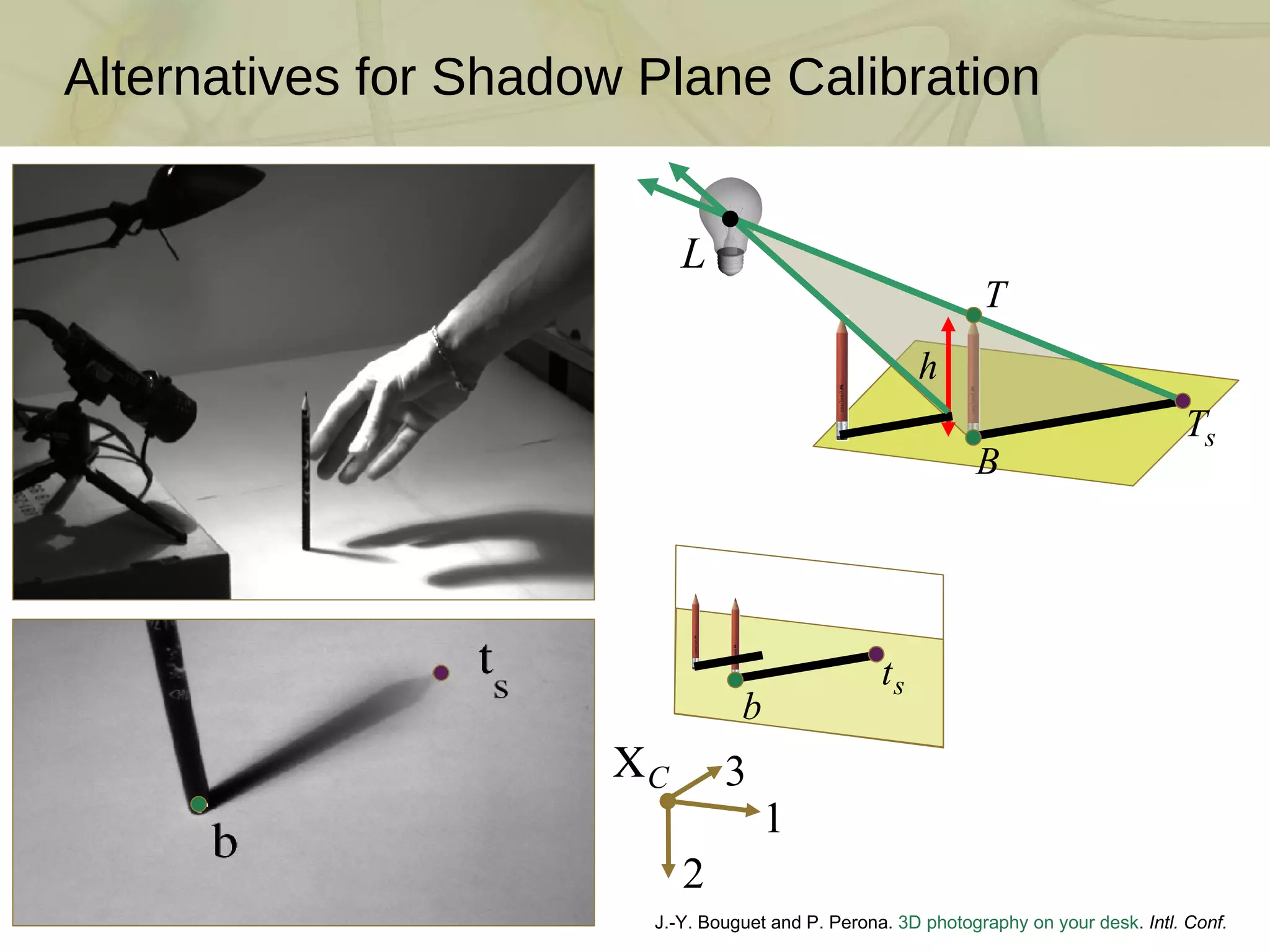
Alternatives for Shadow Plane Calibration J.-Y. Bouguet and P. Perona.  3D photography on your desk .  Intl. Conf. Comp. Vision , 1998
Session I Introduction  The Mathematics of 3D Triangulation  3D Scanning with Swept-Planes  Camera and Swept-Plane Light Source Calibration Reconstruction and Visualization using Point Clouds Course Schedule
Point Cloud Reconstruction
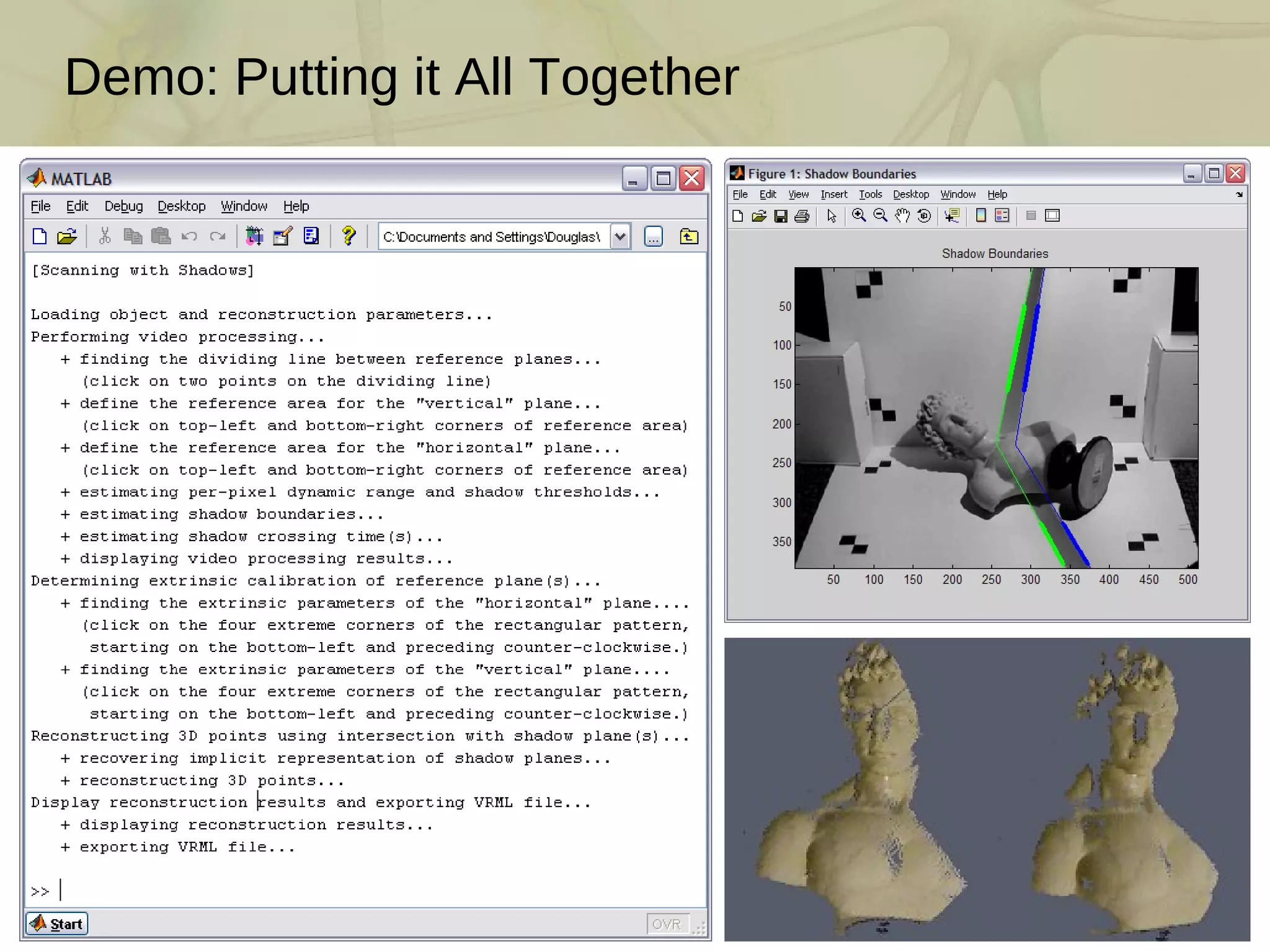
Demo: Putting it All Together
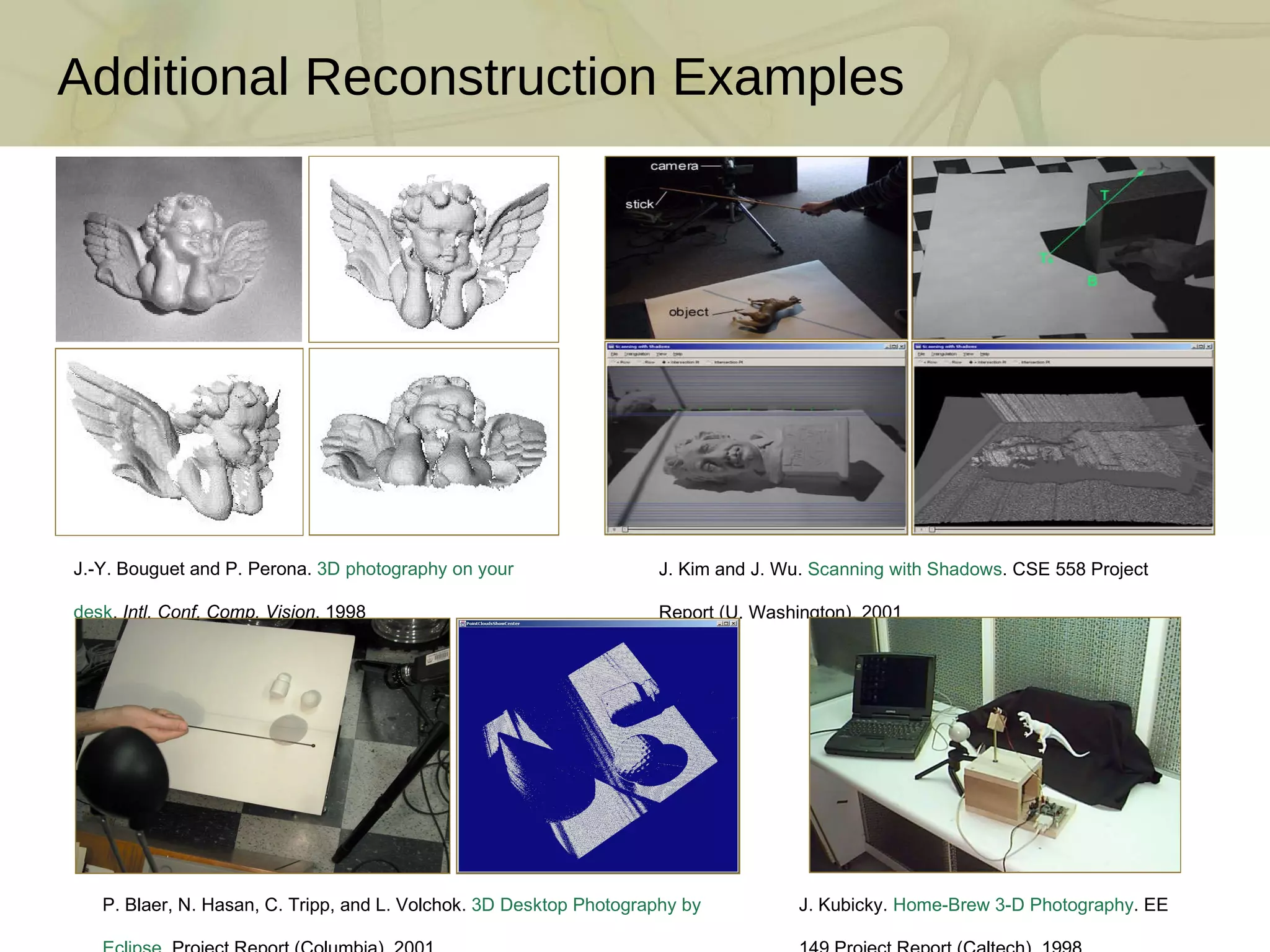
Additional Reconstruction Examples J.-Y. Bouguet and P. Perona.  3D photography on your desk .  Intl. Conf. Comp. Vision , 1998  J. Kim and J. Wu.  Scanning with Shadows . CSE 558 Project Report (U. Washington), 2001 P. Blaer, N. Hasan, C. Tripp, and L. Volchok.  3D Desktop Photography by Eclipse . Project Report (Columbia), 2001 J. Kubicky.  Home-Brew 3-D Photography . EE 149 Project Report (Caltech), 1998
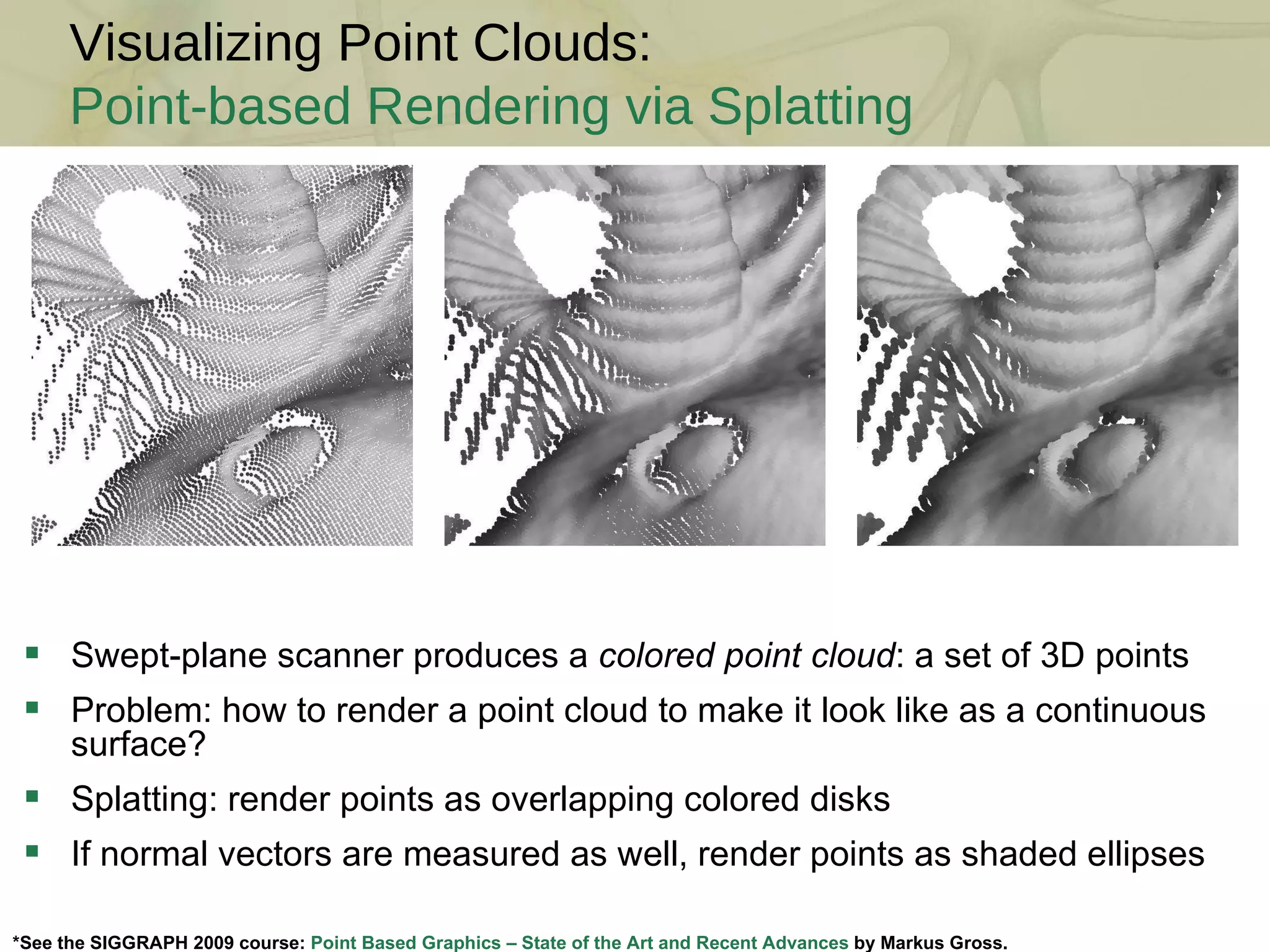
Visualizing Point Clouds: Point-based Rendering via Splatting *See the SIGGRAPH 2009 course:  Point Based Graphics – State of the Art and Recent Advances  by Markus Gross. Swept-plane scanner produces a  colored point cloud : a set of 3D points Problem: how to render a point cloud to make it look like as a continuous surface? Splatting: render points as overlapping colored disks If normal vectors are measured as well, render points as shaded ellipses
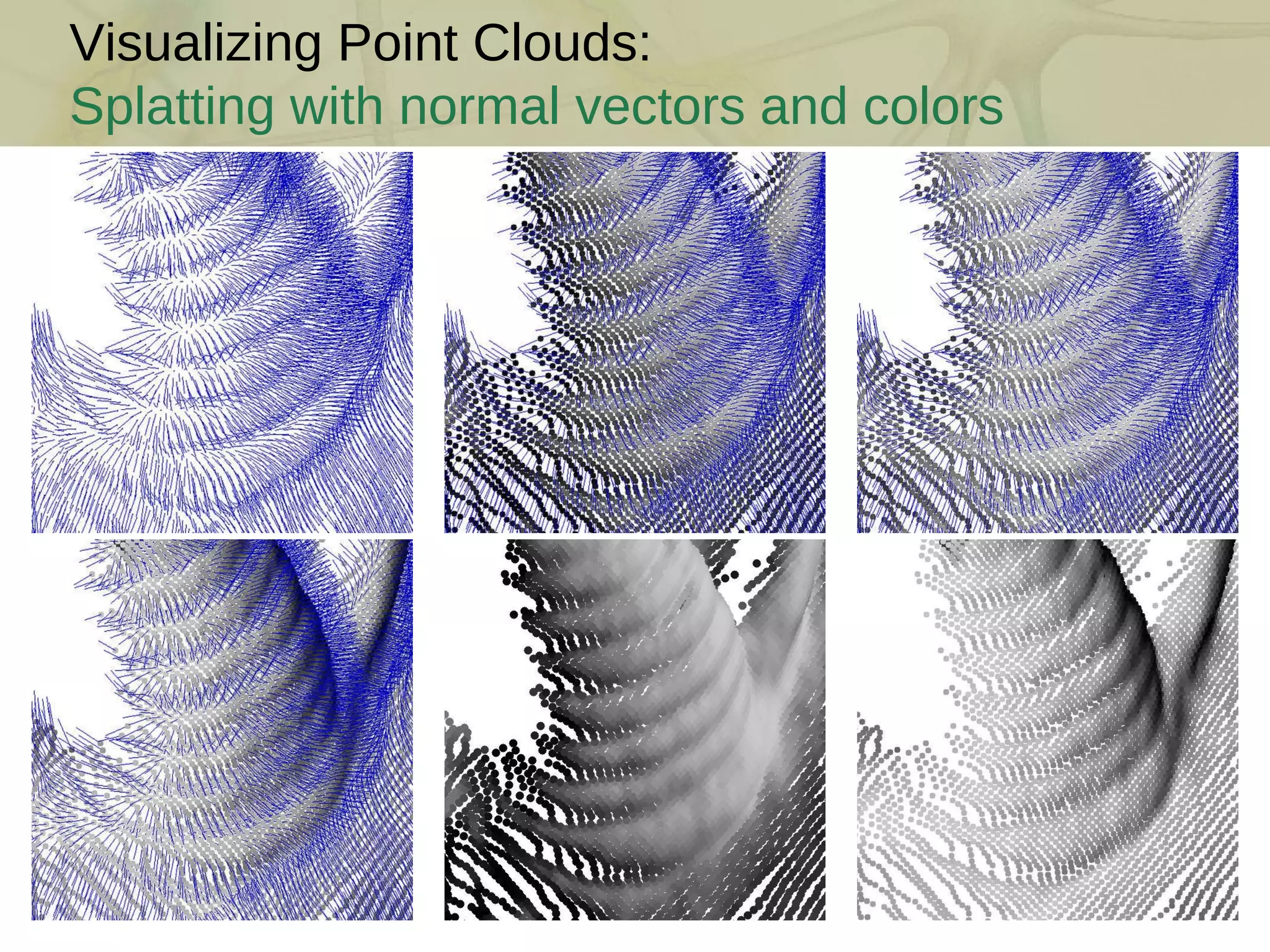
Visualizing Point Clouds: Splatting with normal vectors and colors
Visualizing Point Clouds: File Formats No standard file format to store point clouds Point = (x,y,z) plus (R,G,B) and/or (Nx,Ny,Nz) It is easy to create an ad-hoc file format  Scene graph based file format: VRML International standard: ISO/IEC 14772-1:97 VRML’97 PointSet node includes coordinates (x,y,z) and optional colors (R,G,B), but no normals PointSet { coord Coordinate { point [ 0 -1  2,  1  0  0,  -2  3 -1 ] } color Color { color [ 1 0 0,  0 1 0,  1 1 0 ] } }
Visualizing Point Clouds: File Formats IndexedFaceSet node designed to store a polygon mesh can be used to store point clouds with optional colors and/or normal vectors Store point coordinates as vertices Store point colors as colors per vertex Store point normal vectors as normals per vertex Degenerate polygon mesh with no faces is valid VRML syntax IndexedFaceSet { coord Coordinate { point [ 0 -1  2, 1  0  0, -2  3 -1 ] } colorPerVertex TRUE color Color { color [ 1 0 0, 0 1 0, 1 1 0 ] } normalPerVertex TRUE normal Normal { vector [ 1 0 0, 0 1 0, 0 0 1 ] } }
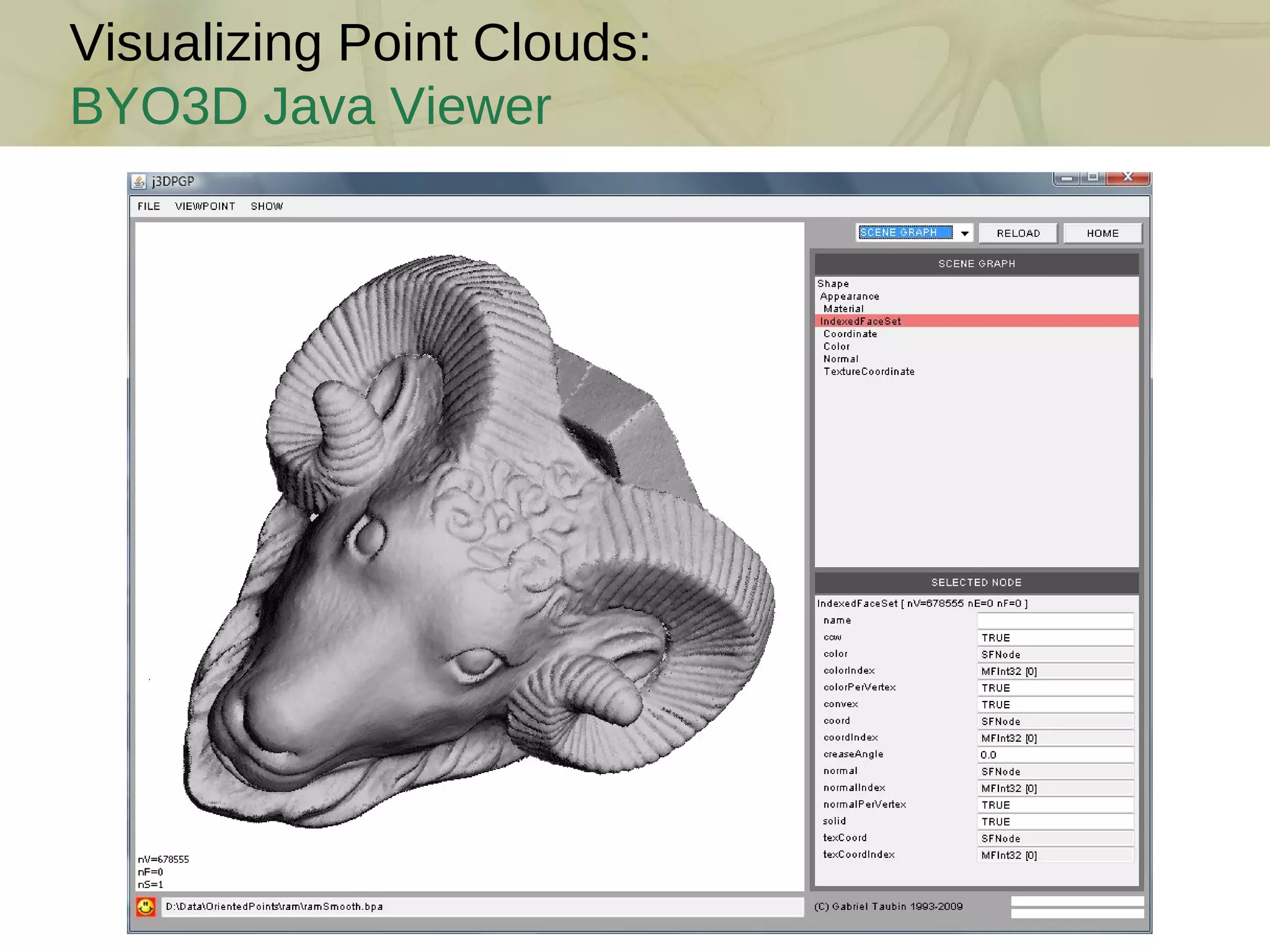
Visualizing Point Clouds: BYO3D Java Viewer
Visualizing Point Clouds: Pointshop 3D [ Zwicker et al. 2002] M. Zwicker, M. Pauly, O. Knoll, M. Gross.  Pointshop 3D: An Interactive System for Point-Based Surface Editing . ACM SIGGRAPH, 2002
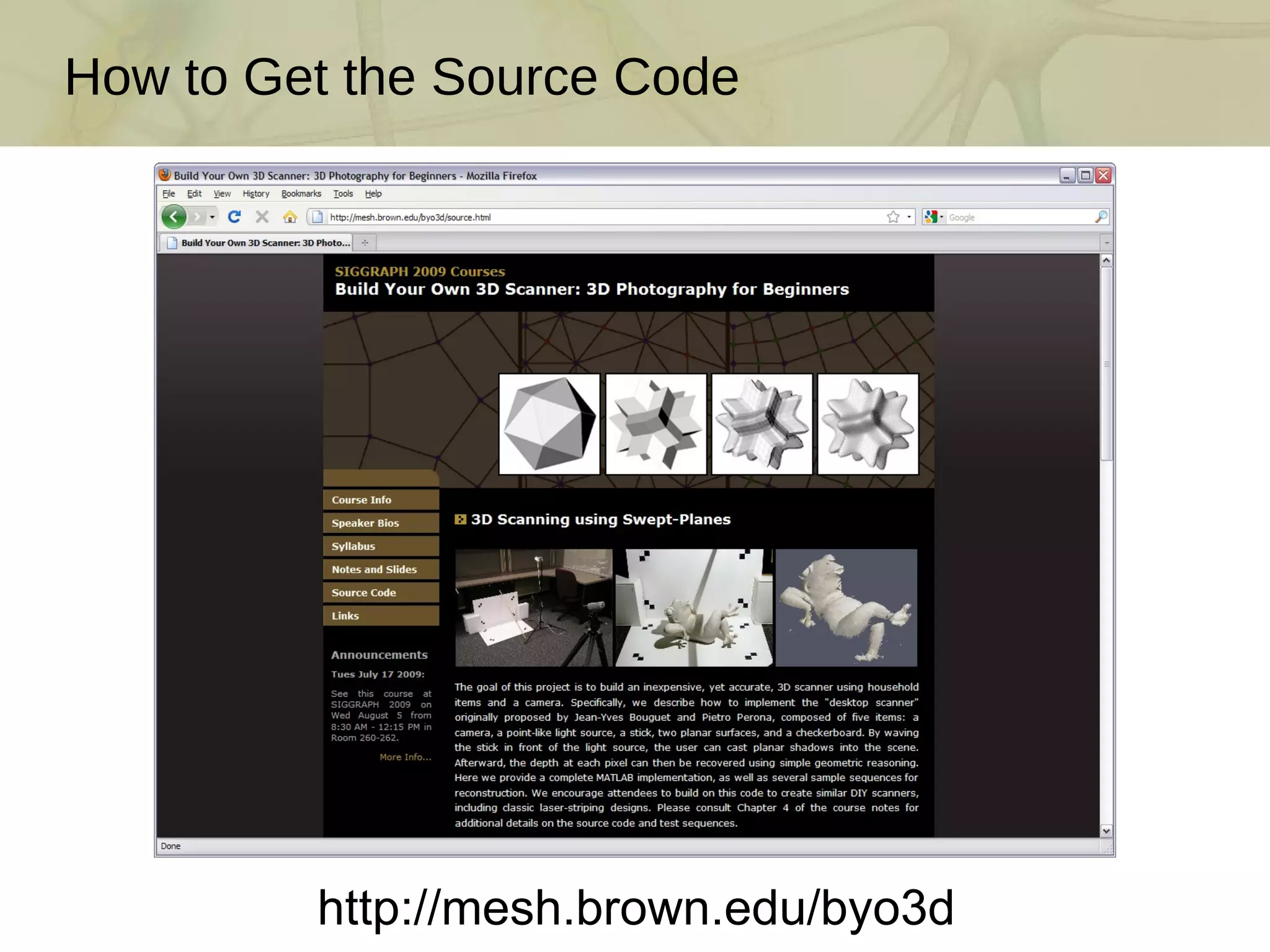
How to Get the Source Code http://mesh.brown.edu/byo3d
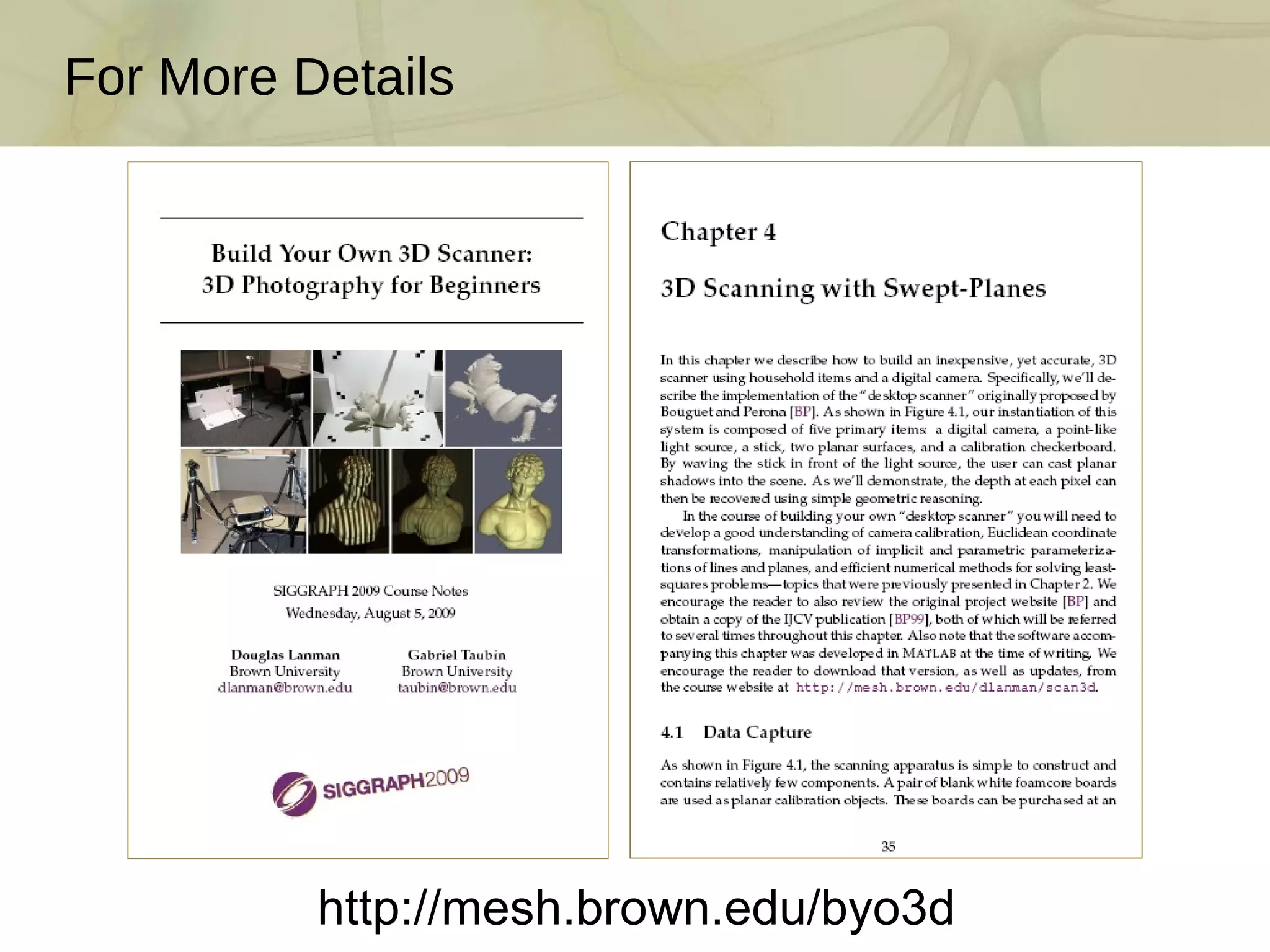
For More Details http://mesh.brown.edu/byo3d
Break Next Session: Structured Lighting and Mesh Processing http://mesh.brown.edu/byo3d

Build Your Own 3D Scanner: 3D Scanning with Swept-Planes

  • 1.
    Session I Introduction The Mathematics of 3D Triangulation 3D Scanning with Swept-Planes Camera and Swept-Plane Light Source Calibration Reconstruction and Visualization using Point Clouds Course Schedule TexPoint fonts used in EMF. Read the TexPoint manual before you delete this box.: A A A A A A A A A A
  • 2.
    Triangulation by LaserStriping M. J. Leotta, A. Vandergon, and G. Taubin. 3 D Slit Scanning With Planar Constraints . Computer Graphics Forum , 2008 Manually or mechanically translated laser stripe Per-pixel depth by ray-plane triangulation Requires accurate camera and laser plane calibration Popular solution for commercial and DIY 3D scanners
  • 3.
    3D Photography onYour Desk: Bouguet and Perona [ICCV 1998] J.-Y. Bouguet and P. Perona. 3D photography on your desk . Intl. Conf. Comp. Vision , 1998 DIY scanner using only a camera, a halogen lamp, and a stick Per-pixel depth by ray-plane triangulation Requires accurate camera and shadow plane calibration
  • 4.
    Assembling Your OwnScanner Parts: camera (QuickCam 9000), lamp, stick, two planar objects [~$100] Step 1: Build the calibration boards (include fiducials and chessboard) Step 2: Build the point light source (remove reflector and place in scene) Step 3: Arrange the camera, light source, and calibration boards
  • 5.
  • 6.
  • 7.
    Convert from RGBto grayscale (for luminance-domain processing) Determine per-pixel minimum and maximum value over sequence Evaluate per-pixel “shadow threshold” as average of min. and max. Video Processing: Assigning Per-Pixel Shadow Thresholds
  • 8.
    Video Processing: SpatialShadow Edge Localization Select region of interest on each calibration plane (occlusion-free) Estimate zero-crossings to find leading and trailing shadow boundaries Fit a line to the set of points along each shadow boundary  Result: Best-fit 2D lines for each shadow edge (in image coordinates) 400 600 800 -60 -40 -20 0 20 40 60 column index I 60 (x,y) - I shadow (x,y) 540 550 560 570 580 -60 -40 -20 0 20 40 column index I 60 (x,y) - I shadow (x,y)
  • 9.
    Video Processing: TemporalShadow Edge Localization Tabulate per-pixel temporal sequence (minus shadow threshold) Estimate zero-crossings to find shadow-crossing times  Result: Use shadow-crossing time to lookup corresponding 3D plane 80 100 120 140 -40 -20 0 20 40 frame index I(x,y,t) - I shadow (x,y) crossing frame index for leading shadow crossing frame index for trailing shadow frame index 80 100 120 140
  • 10.
    Session I Introduction The Mathematics of 3D Triangulation 3D Scanning with Swept-Planes Camera and Swept-Plane Light Source Calibration Reconstruction and Visualization using Point Clouds Course Schedule
  • 11.
    Modeling Lens DistortionG. Bradski and A. Kaehler. Learning OpenCV . O’Reilly Media, 2008 radial distortion tangential distortion normalized image coordinates distorted image coordinates
  • 12.
    Intrinsic Camera CalibrationCamera Calibration Input How to estimate intrinsic parameters and distortion model? (unknowns: focal length, skew, scale, principal point, and distortion coeffs.) Popular solution: Observe a known calibration object (Zhang [2000]) Each 2D chessboard corner yields two constraints on the 6-11 unknowns But, must also find 6 extrinsic parameters per image (rotation/translation)  Result: Two or more images of a chessboard are sufficient 1 1 1 1 1 1 2 2 2 2 2 2 3 3 3 3 4 4 4 5 5 6 6 7 Estimated Camera Lens Distortion Map camera coordinate system world coordinate system intrinsic parameters extrinsic parameters
  • 13.
    Demo: Camera Calibrationin Matlab J.-Y. Bouguet. Camera Calibration Toolbox for Matlab . http://www.vision.caltech.edu/bouguetj/calib_doc/
  • 14.
  • 15.
    Demo: Mapping Pixelsto Optical Rays How to map an image pixel to an optical ray? Solution: Invert the calibrated camera projection model But, also requires inversion of distortion model (which is non-linear) Mapping implemented in Camera Calibration Toolbox with normalize.m  Result: After calibration, pixels can be converted to optical rays
  • 16.
  • 17.
    Alternatives for ShadowPlane Calibration J.-Y. Bouguet and P. Perona. 3D photography on your desk . Intl. Conf. Comp. Vision , 1998
  • 18.
    Session I Introduction The Mathematics of 3D Triangulation 3D Scanning with Swept-Planes Camera and Swept-Plane Light Source Calibration Reconstruction and Visualization using Point Clouds Course Schedule
  • 19.
  • 20.
    Demo: Putting itAll Together
  • 21.
    Additional Reconstruction ExamplesJ.-Y. Bouguet and P. Perona. 3D photography on your desk . Intl. Conf. Comp. Vision , 1998 J. Kim and J. Wu. Scanning with Shadows . CSE 558 Project Report (U. Washington), 2001 P. Blaer, N. Hasan, C. Tripp, and L. Volchok. 3D Desktop Photography by Eclipse . Project Report (Columbia), 2001 J. Kubicky. Home-Brew 3-D Photography . EE 149 Project Report (Caltech), 1998
  • 22.
    Visualizing Point Clouds:Point-based Rendering via Splatting *See the SIGGRAPH 2009 course: Point Based Graphics – State of the Art and Recent Advances by Markus Gross. Swept-plane scanner produces a colored point cloud : a set of 3D points Problem: how to render a point cloud to make it look like as a continuous surface? Splatting: render points as overlapping colored disks If normal vectors are measured as well, render points as shaded ellipses
  • 23.
    Visualizing Point Clouds:Splatting with normal vectors and colors
  • 24.
    Visualizing Point Clouds:File Formats No standard file format to store point clouds Point = (x,y,z) plus (R,G,B) and/or (Nx,Ny,Nz) It is easy to create an ad-hoc file format Scene graph based file format: VRML International standard: ISO/IEC 14772-1:97 VRML’97 PointSet node includes coordinates (x,y,z) and optional colors (R,G,B), but no normals PointSet { coord Coordinate { point [ 0 -1 2, 1 0 0, -2 3 -1 ] } color Color { color [ 1 0 0, 0 1 0, 1 1 0 ] } }
  • 25.
    Visualizing Point Clouds:File Formats IndexedFaceSet node designed to store a polygon mesh can be used to store point clouds with optional colors and/or normal vectors Store point coordinates as vertices Store point colors as colors per vertex Store point normal vectors as normals per vertex Degenerate polygon mesh with no faces is valid VRML syntax IndexedFaceSet { coord Coordinate { point [ 0 -1 2, 1 0 0, -2 3 -1 ] } colorPerVertex TRUE color Color { color [ 1 0 0, 0 1 0, 1 1 0 ] } normalPerVertex TRUE normal Normal { vector [ 1 0 0, 0 1 0, 0 0 1 ] } }
  • 26.
    Visualizing Point Clouds:BYO3D Java Viewer
  • 27.
    Visualizing Point Clouds:Pointshop 3D [ Zwicker et al. 2002] M. Zwicker, M. Pauly, O. Knoll, M. Gross. Pointshop 3D: An Interactive System for Point-Based Surface Editing . ACM SIGGRAPH, 2002
  • 28.
    How to Getthe Source Code http://mesh.brown.edu/byo3d
  • 29.
    For More Detailshttp://mesh.brown.edu/byo3d
  • 30.
    Break Next Session:Structured Lighting and Mesh Processing http://mesh.brown.edu/byo3d

Editor's Notes

  • #2 Build Your Own 3D Scanner 2/18/2009
  • #3 Build Your Own 3D Scanner 2/18/2009 Image sources: http://www.lems.brown.edu/~mleotta/project/lightplane.php
  • #4 Build Your Own 3D Scanner 2/18/2009 Image sources: http://www.vision.caltech.edu/bouguetj/ICCV98/
  • #5 Build Your Own 3D Scanner 2/18/2009
  • #6 Build Your Own 3D Scanner 2/18/2009 Image sources derived from: http://www.vision.caltech.edu/bouguetj/ICCV98/
  • #7 Build Your Own 3D Scanner 2/18/2009
  • #8 Build Your Own 3D Scanner 2/18/2009
  • #9 Build Your Own 3D Scanner 2/18/2009
  • #10 Build Your Own 3D Scanner 2/18/2009
  • #11 Build Your Own 3D Scanner 2/18/2009
  • #12 Build Your Own 3D Scanner 2/18/2009 Image sources: http://www.photos-of-the-year.com/articles/barrel-distortion/ http://www.vision.caltech.edu/bouguetj/ICCV98/
  • #13 Build Your Own 3D Scanner 2/18/2009 Image sources: http://www.vision.caltech.edu/bouguetj/ICCV98/
  • #14 Build Your Own 3D Scanner 2/18/2009
  • #15 Build Your Own 3D Scanner 2/18/2009
  • #16 Build Your Own 3D Scanner 2/18/2009
  • #17 Build Your Own 3D Scanner 2/18/2009
  • #18 Build Your Own 3D Scanner 2/18/2009 Image sources derived from: http://www.vision.caltech.edu/bouguetj/ICCV98/
  • #19 Build Your Own 3D Scanner 2/18/2009
  • #20 Build Your Own 3D Scanner 2/18/2009 Image sources derived from: http://www.vision.caltech.edu/bouguetj/ICCV98/
  • #21 Build Your Own 3D Scanner 2/18/2009
  • #22 Build Your Own 3D Scanner 2/18/2009 Image sources: http://robotics.cs.columbia.edu/~pblaer/eclipse/ http://www.multires.caltech.edu/teaching/courses/3DP/presentations/Kubicky/ee148.htm
  • #23 Build Your Own 3D Scanner 2/18/2009
  • #24 Build Your Own 3D Scanner 2/18/2009
  • #25 Build Your Own 3D Scanner 2/18/2009
  • #26 Build Your Own 3D Scanner 2/18/2009
  • #27 Build Your Own 3D Scanner 2/18/2009
  • #28 Build Your Own 3D Scanner 2/18/2009
  • #29 Build Your Own 3D Scanner 2/18/2009
  • #30 Build Your Own 3D Scanner 2/18/2009
  • #31 Build Your Own 3D Scanner 2/18/2009 Thanks for attending the first session; We'll break now for 15 minutes. After the break we'll describe how to build 3D scanners using camera-projector pairs and also cover methods to extract high-quality meshes from the raw point cloud data produced by these homemade scanners.