

OpenStreetMap in 3D
   current developments


                                 Arne Schilling
                   3rd Internation MapWindow
                Open-Source GIS Conference
            Velp, The Netherlands, 06/26/2012
Outline
• Part 1
   –   What is OpenStreetMap 3D?
   –   3D Community
   –   Data Capturing
   –   Data Editing & Processing

• Part 2:
   –   OSM-3D Project
   –   As Browser Plugin
   –   Database Statistics
   –   Web Frontend
   –   External Authoring Interface
   –   As Standalone Application
   –   Open Service based Infrastructure
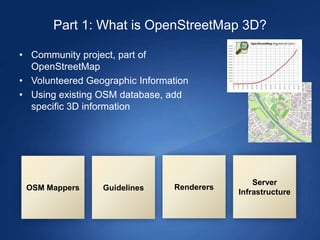
Part 1: What is OpenStreetMap 3D?

• Community project, part of
  OpenStreetMap
• Volunteered Geographic Information
• Using existing OSM database, add
  specific 3D information


                                                 Server
 OSM Mappers     Guidelines      Renderers
                                             Infrastructure
3D Community

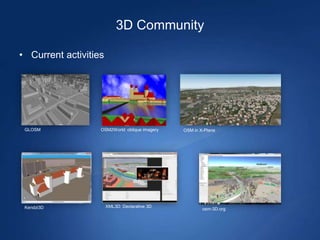
• Current activities


 GLOSM             OSM2World: oblique imagery   OSM in X-Plane


 Kendzi3D              XML3D: Declarative 3D
                                                        osm-3D.org
3D Community

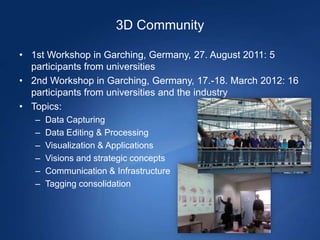
• 1st Workshop in Garching, Germany, 27. August 2011: 5
  participants from universities
• 2nd Workshop in Garching, Germany, 17.-18. March 2012: 16
  participants from universities and the industry
• Topics:
   –   Data Capturing
   –   Data Editing & Processing
   –   Visualization & Applications
   –   Visions and strategic concepts
   –   Communication & Infrastructure
   –   Tagging consolidation
Data Capturing

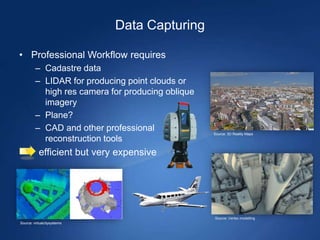
• Professional Workflow requires
         – Cadastre data
         – LIDAR for producing point clouds or
           high res camera for producing oblique
           imagery
         – Plane?
         – CAD and other professional              Source: 3D Reality Maps
           reconstruction tools
      - efficient but very expensive


                                                   Source: Vertex modelling
Source: virtualcitysystems
Data Capturing

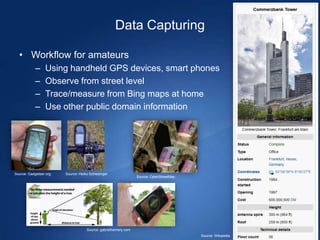
  • Workflow for amateurs
           –     Using handheld GPS devices, smart phones
           –     Observe from street level
           –     Trace/measure from Bing maps at home
           –     Use other public domain information


Source: Gadgeteer.org   Source: Heiko Schlesinger
                                                                Source: OpenStreetMap


                                    Source: gabrielhemery.com
                                                                                        Source: Wikipedia
Data Editing & Processing

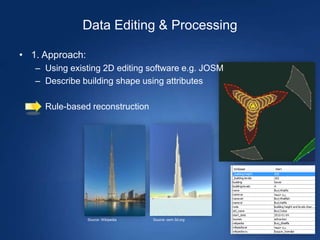
• 1. Approach:
   – Using existing 2D editing software e.g. JOSM
   – Describe building shape using attributes

   – Rule-based reconstruction


                 Source: Wikipedia   Source: osm-3d.org
Data Editing & Processing

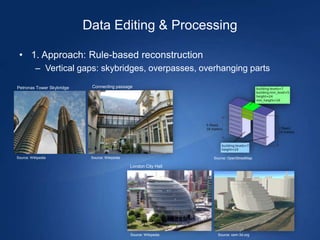
 • 1. Approach: Rule-based reconstruction
          – Vertical gaps: skybridges, overpasses, overhanging parts

Petronas Tower Skybridge    Connecting passage


Source: Wikipedia           Source: Wikipedia                       Source: OpenStreetMap

                                                London City Hall


                                                Source: Wikipedia     Source: osm-3d.org
Data Editing & Processing

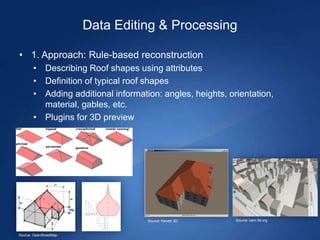
• 1. Approach: Rule-based reconstruction
       • Describing Roof shapes using attributes
       • Definition of typical roof shapes
       • Adding additional information: angles, heights, orientation,
         material, gables, etc.
       • Plugins for 3D preview


                                    Source: Kendzi 3D      Source: osm-3d.org


Source: OpenStreetMap
Data Editing & Processing

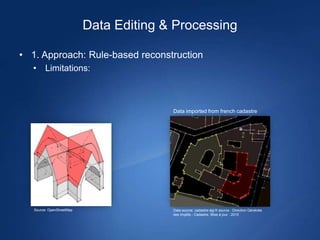
• 1. Approach: Rule-based reconstruction
   • Limitations:


                                         Data imported from french cadastre


   Source: OpenStreetMap                 Data source: cadastre-dgi-fr source : Direction Générale
                                         des Impôts - Cadastre. Mise à jour : 2010
Data Editing & Processing

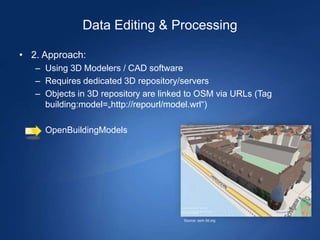
• 2. Approach:
   – Using 3D Modelers / CAD software
   – Requires dedicated 3D repository/servers
   – Objects in 3D repository are linked to OSM via URLs (Tag
     building:model=„http://repourl/model.wrl“)

   – OpenBuildingModels


                                       Source: osm-3d.org
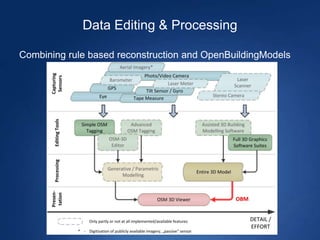
Data Editing & Processing

Combining rule based reconstruction and OpenBuildingModels
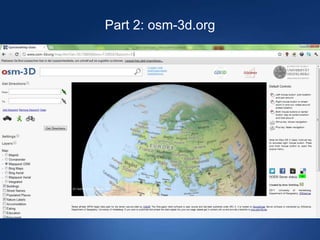
Part 2: osm-3d.org
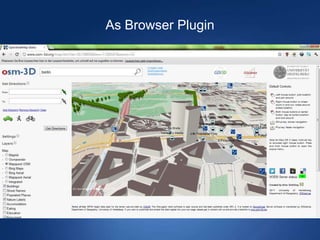
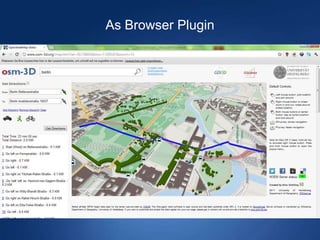
As Browser Plugin
As Browser Plugin
As Browser Plugin

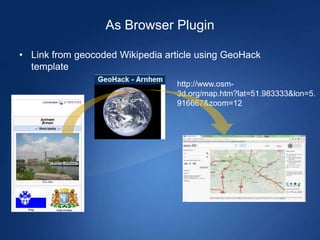
• Link from geocoded Wikipedia article using GeoHack
  template
                                 http://www.osm-
                                 3d.org/map.htm?lat=51.983333&lon=5.
                                 916667&zoom=12
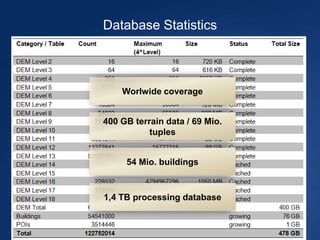
Database Statistics


    Worlwide coverage


400 GB terrain data / 69 Mio.
           tuples


     54 Mio. buildings


1,4 TB processing database
Web Front End

• Technology:
   – Mix of Javascript and Java Applet
   – Rendering based on OpenGL / JOGL
   – Address Search and Routing functionality provided by
     OpenRouteService
   – Java Applet has External Authoring Interface
External Authoring Interface

Java Applet methods can be called from Javascript using
  LiveConnect
Functions available for
- Adding own markers (waypoints) with custom text and icons
- Controlling camera, adding viewpoints
- Enabling/disabling layers
- Computing routes
- loading custom models stored locally
- Replacing Geocoder or Route Service
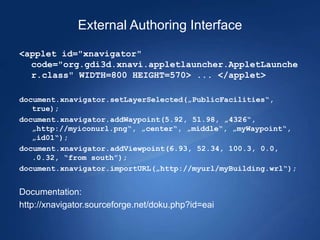
External Authoring Interface

<applet id="xnavigator"
  code="org.gdi3d.xnavi.appletlauncher.AppletLaunche
  r.class" WIDTH=800 HEIGHT=570> ... </applet>

document.xnavigator.setLayerSelected(„PublicFacilities“,
   true);
document.xnavigator.addWaypoint(5.92, 51.98, „4326“,
   „http://myiconurl.png“, „center“, „middle“, „myWaypoint“,
   „id01“);
document.xnavigator.addViewpoint(6.93, 52.34, 100.3, 0.0,
   .0.32, “from south”);
document.xnavigator.importURL(„http://myurl/myBuilding.wrl“);


Documentation:
http://xnavigator.sourceforge.net/doku.php?id=eai
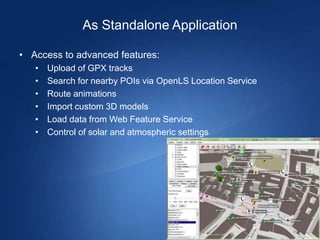
As Standalone Application

• Access to advanced features:
   •   Upload of GPX tracks
   •   Search for nearby POIs via OpenLS Location Service
   •   Route animations
   •   Import custom 3D models
   •   Load data from Web Feature Service
   •   Control of solar and atmospheric settings
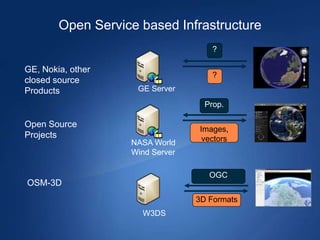
Open Service based Infrastructure
                                     ?

GE, Nokia, other
                                     ?
closed source
Products            GE Server
                                   Prop.

Open Source
                                 Images,
Projects                          vectors
                   NASA World
                   Wind Server

                                    OGC
OSM-3D
                                 3D Formats
                     W3DS
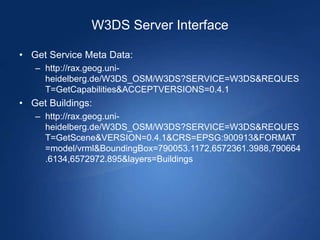
W3DS Server Interface

• Get Service Meta Data:
   – http://rax.geog.uni-
     heidelberg.de/W3DS_OSM/W3DS?SERVICE=W3DS&REQUES
     T=GetCapabilities&ACCEPTVERSIONS=0.4.1
• Get Buildings:
   – http://rax.geog.uni-
     heidelberg.de/W3DS_OSM/W3DS?SERVICE=W3DS&REQUES
     T=GetScene&VERSION=0.4.1&CRS=EPSG:900913&FORMAT
     =model/vrml&BoundingBox=790053.1172,6572361.3988,790664
     .6134,6572972.895&layers=Buildings
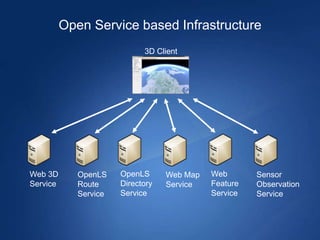
Open Service based Infrastructure
                             3D Client


Web 3D       OpenLS    OpenLS      Web Map   Web       Sensor
Service      Route     Directory   Service   Feature   Observation
             Service   Service               Service   Service
Conclusions

• OpenStreetMap contains a lot of hidden information that is
  useful for various purposes. Map -> spatial database
• Concepts and guidelines on how to map 3D information in
  OpenStreetMap are still under development


• The osm-3d.org web page provides already a usable service
• The architecture is very flexible and can be used for other
  projects as well, it is not tailored for OpenStreetMap
The End

• Any questions?


                                          Arne Schilling
                            3rd Internation MapWindow
                         Open-Source GIS Conference
                     Velp, The Netherlands, 06/26/2012
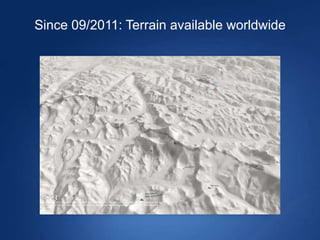
Since 09/2011: Terrain available worldwide
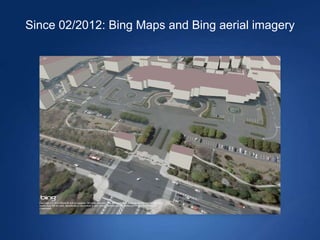
Since 02/2012: Bing Maps and Bing aerial imagery
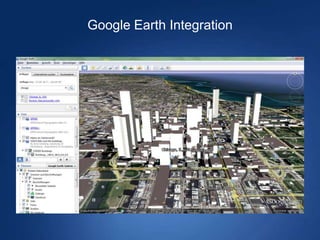
Google Earth Integration
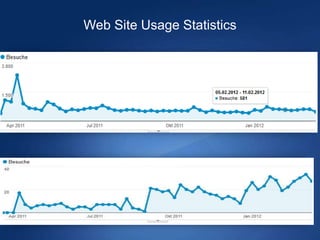
Web Site Usage Statistics


Unique visitors per week of http://osm-3d.org


  Traffic from Wikipedia / GeoHack
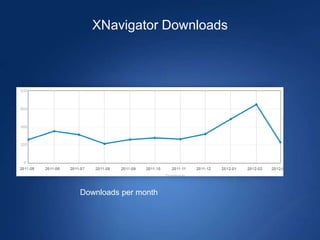
XNavigator Downloads


Downloads per month
Server Interface

• OSM-3D data can be accessed without credentials
• Interface based on Web 3D Service: http://w3ds.org
• Output formats: VRML, X3D, KML, COLLADA, XML3D
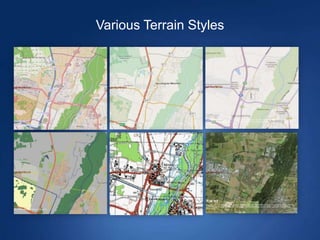
Various Terrain Styles
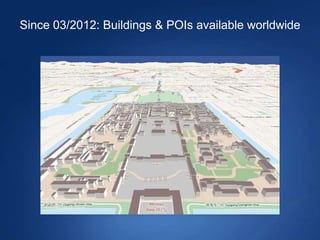
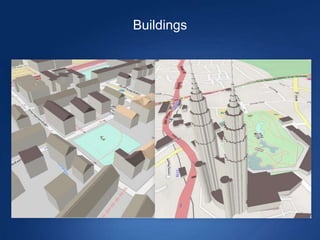
Since 03/2012: Buildings & POIs available worldwide
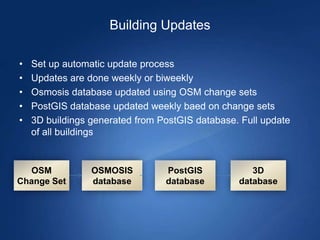
Building Updates

•   Set up automatic update process
•   Updates are done weekly or biweekly
•   Osmosis database updated using OSM change sets
•   PostGIS database updated weekly baed on change sets
•   3D buildings generated from PostGIS database. Full update
    of all buildings


  OSM            OSMOSIS         PostGIS            3D
Change Set       database        database        database
Buildings
The End

• Thank you.

OpenStreetMap in 3D - current developments

  • 1.
    OpenStreetMap in 3D current developments Arne Schilling 3rd Internation MapWindow Open-Source GIS Conference Velp, The Netherlands, 06/26/2012
  • 2.
    Outline • Part 1 – What is OpenStreetMap 3D? – 3D Community – Data Capturing – Data Editing & Processing • Part 2: – OSM-3D Project – As Browser Plugin – Database Statistics – Web Frontend – External Authoring Interface – As Standalone Application – Open Service based Infrastructure
  • 3.
    Part 1: Whatis OpenStreetMap 3D? • Community project, part of OpenStreetMap • Volunteered Geographic Information • Using existing OSM database, add specific 3D information Server OSM Mappers Guidelines Renderers Infrastructure
  • 4.
    3D Community • Currentactivities GLOSM OSM2World: oblique imagery OSM in X-Plane Kendzi3D XML3D: Declarative 3D osm-3D.org
  • 5.
    3D Community • 1stWorkshop in Garching, Germany, 27. August 2011: 5 participants from universities • 2nd Workshop in Garching, Germany, 17.-18. March 2012: 16 participants from universities and the industry • Topics: – Data Capturing – Data Editing & Processing – Visualization & Applications – Visions and strategic concepts – Communication & Infrastructure – Tagging consolidation
  • 6.
    Data Capturing • ProfessionalWorkflow requires – Cadastre data – LIDAR for producing point clouds or high res camera for producing oblique imagery – Plane? – CAD and other professional Source: 3D Reality Maps reconstruction tools - efficient but very expensive Source: Vertex modelling Source: virtualcitysystems
  • 7.
    Data Capturing • Workflow for amateurs – Using handheld GPS devices, smart phones – Observe from street level – Trace/measure from Bing maps at home – Use other public domain information Source: Gadgeteer.org Source: Heiko Schlesinger Source: OpenStreetMap Source: gabrielhemery.com Source: Wikipedia
  • 8.
    Data Editing &Processing • 1. Approach: – Using existing 2D editing software e.g. JOSM – Describe building shape using attributes – Rule-based reconstruction Source: Wikipedia Source: osm-3d.org
  • 9.
    Data Editing &Processing • 1. Approach: Rule-based reconstruction – Vertical gaps: skybridges, overpasses, overhanging parts Petronas Tower Skybridge Connecting passage Source: Wikipedia Source: Wikipedia Source: OpenStreetMap London City Hall Source: Wikipedia Source: osm-3d.org
  • 10.
    Data Editing &Processing • 1. Approach: Rule-based reconstruction • Describing Roof shapes using attributes • Definition of typical roof shapes • Adding additional information: angles, heights, orientation, material, gables, etc. • Plugins for 3D preview Source: Kendzi 3D Source: osm-3d.org Source: OpenStreetMap
  • 11.
    Data Editing &Processing • 1. Approach: Rule-based reconstruction • Limitations: Data imported from french cadastre Source: OpenStreetMap Data source: cadastre-dgi-fr source : Direction Générale des Impôts - Cadastre. Mise à jour : 2010
  • 12.
    Data Editing &Processing • 2. Approach: – Using 3D Modelers / CAD software – Requires dedicated 3D repository/servers – Objects in 3D repository are linked to OSM via URLs (Tag building:model=„http://repourl/model.wrl“) – OpenBuildingModels Source: osm-3d.org
  • 13.
    Data Editing &Processing Combining rule based reconstruction and OpenBuildingModels
  • 14.
  • 15.
  • 16.
  • 17.
    As Browser Plugin •Link from geocoded Wikipedia article using GeoHack template http://www.osm- 3d.org/map.htm?lat=51.983333&lon=5. 916667&zoom=12
  • 18.
    Database Statistics Worlwide coverage 400 GB terrain data / 69 Mio. tuples 54 Mio. buildings 1,4 TB processing database
  • 19.
    Web Front End •Technology: – Mix of Javascript and Java Applet – Rendering based on OpenGL / JOGL – Address Search and Routing functionality provided by OpenRouteService – Java Applet has External Authoring Interface
  • 20.
    External Authoring Interface JavaApplet methods can be called from Javascript using LiveConnect Functions available for - Adding own markers (waypoints) with custom text and icons - Controlling camera, adding viewpoints - Enabling/disabling layers - Computing routes - loading custom models stored locally - Replacing Geocoder or Route Service
  • 21.
    External Authoring Interface <appletid="xnavigator" code="org.gdi3d.xnavi.appletlauncher.AppletLaunche r.class" WIDTH=800 HEIGHT=570> ... </applet> document.xnavigator.setLayerSelected(„PublicFacilities“, true); document.xnavigator.addWaypoint(5.92, 51.98, „4326“, „http://myiconurl.png“, „center“, „middle“, „myWaypoint“, „id01“); document.xnavigator.addViewpoint(6.93, 52.34, 100.3, 0.0, .0.32, “from south”); document.xnavigator.importURL(„http://myurl/myBuilding.wrl“); Documentation: http://xnavigator.sourceforge.net/doku.php?id=eai
  • 22.
    As Standalone Application •Access to advanced features: • Upload of GPX tracks • Search for nearby POIs via OpenLS Location Service • Route animations • Import custom 3D models • Load data from Web Feature Service • Control of solar and atmospheric settings
  • 23.
    Open Service basedInfrastructure ? GE, Nokia, other ? closed source Products GE Server Prop. Open Source Images, Projects vectors NASA World Wind Server OGC OSM-3D 3D Formats W3DS
  • 24.
    W3DS Server Interface •Get Service Meta Data: – http://rax.geog.uni- heidelberg.de/W3DS_OSM/W3DS?SERVICE=W3DS&REQUES T=GetCapabilities&ACCEPTVERSIONS=0.4.1 • Get Buildings: – http://rax.geog.uni- heidelberg.de/W3DS_OSM/W3DS?SERVICE=W3DS&REQUES T=GetScene&VERSION=0.4.1&CRS=EPSG:900913&FORMAT =model/vrml&BoundingBox=790053.1172,6572361.3988,790664 .6134,6572972.895&layers=Buildings
  • 25.
    Open Service basedInfrastructure 3D Client Web 3D OpenLS OpenLS Web Map Web Sensor Service Route Directory Service Feature Observation Service Service Service Service
  • 26.
    Conclusions • OpenStreetMap containsa lot of hidden information that is useful for various purposes. Map -> spatial database • Concepts and guidelines on how to map 3D information in OpenStreetMap are still under development • The osm-3d.org web page provides already a usable service • The architecture is very flexible and can be used for other projects as well, it is not tailored for OpenStreetMap
  • 27.
    The End • Anyquestions? Arne Schilling 3rd Internation MapWindow Open-Source GIS Conference Velp, The Netherlands, 06/26/2012
  • 28.
    Since 09/2011: Terrainavailable worldwide
  • 29.
    Since 02/2012: BingMaps and Bing aerial imagery
  • 30.
  • 31.
    Web Site UsageStatistics Unique visitors per week of http://osm-3d.org Traffic from Wikipedia / GeoHack
  • 32.
  • 33.
    Server Interface • OSM-3Ddata can be accessed without credentials • Interface based on Web 3D Service: http://w3ds.org • Output formats: VRML, X3D, KML, COLLADA, XML3D
  • 34.
  • 35.
    Since 03/2012: Buildings& POIs available worldwide
  • 36.
    Building Updates • Set up automatic update process • Updates are done weekly or biweekly • Osmosis database updated using OSM change sets • PostGIS database updated weekly baed on change sets • 3D buildings generated from PostGIS database. Full update of all buildings OSM OSMOSIS PostGIS 3D Change Set database database database
  • 37.
  • 38.