3D Scanner 
Using kinect Mehdi Saman Booy 
Supervisor : Dr. Karimi
/ 32 
Contents 
• Introduction 
• 3D importance 
• Technologies 
• Kinect 
• PCL 
• Drivers 
• Implementation 
• Filtering 
• Registration 
1
/ 32 
Introduction 
2
/ 32 
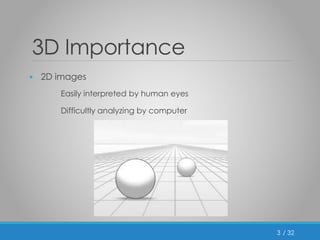
3D Importance 
• 2D images 
Easily interpreted by human eyes 
Difficultly analyzing by computer 
3
/ 32 
3D Importance (cont’d) 
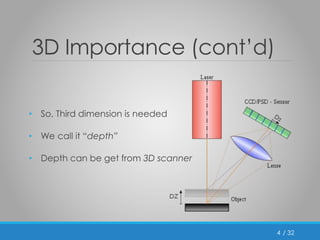
• So, Third dimension is needed 
• We call it “depth” 
• Depth can be get from 3D scanner 
4
/ 32 
3D Scanner Applications 
• Motion capture 
• Animations 
• Video games 
• Industrial 
• Reverse engineering 
• Quality check 
• Virtual reality 
• … 
5
/ 32 
Technologies 
6
/ 32 
Kinect 
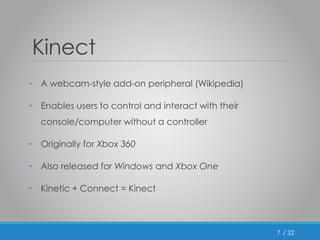
• A webcam-style add-on peripheral (Wikipedia) 
• Enables users to control and interact with their 

console/computer without a controller 
• Originally for Xbox 360 
• Also released for Windows and Xbox One 
• Kinetic + Connect = Kinect 
7
Feb 
2012 
/ 32 
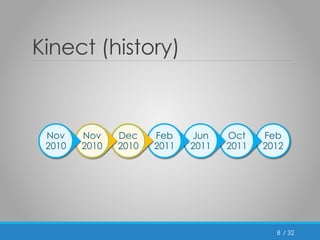
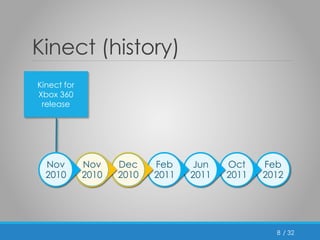
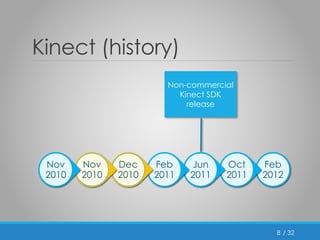
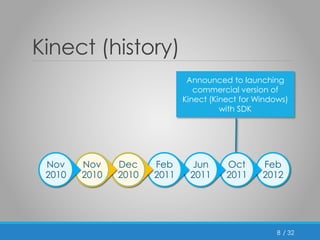
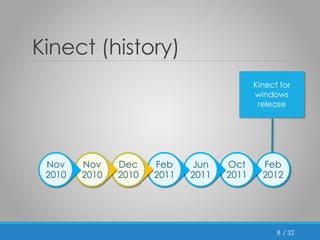
Kinect (history) 
8 
Oct 
2011 
Jun 
2011 
Feb 
2011 
Dec 
2010 
Nov 
2010 
Nov 
2010
/ 32 
Kinect (history) 
8 
Kinect for 
Xbox 360 
release 
Feb 
2012 
Oct 
2011 
Jun 
2011 
Feb 
2011 
Dec 
2010 
Nov 
2010 
Nov 
2010
/ 32 
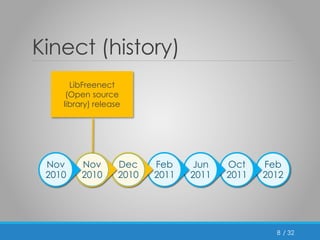
Kinect (history) 
Feb 
2012 
Oct 
2011 
Jun 
2011 
Feb 
2011 
Dec 
2010 
Nov 
2010 
Nov 
2010 
8 
LibFreenect 
(Open source 
library) release
/ 32 
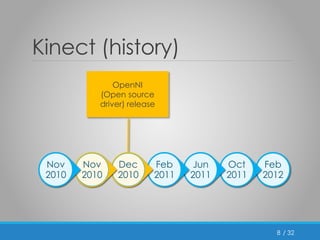
Kinect (history) 
8 
OpenNI 
(Open source 
driver) release 
Feb 
2012 
Oct 
2011 
Jun 
2011 
Feb 
2011 
Dec 
2010 
Nov 
2010 
Nov 
2010
/ 32 
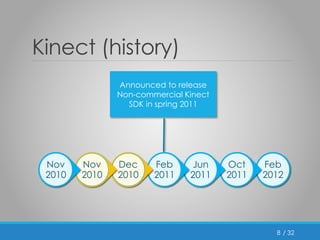
Kinect (history) 
8 
Announced to release 
Non-commercial Kinect 
SDK in spring 2011 
Feb 
2012 
Oct 
2011 
Jun 
2011 
Feb 
2011 
Dec 
2010 
Nov 
2010 
Nov 
2010
/ 32 
Kinect (history) 
8 
Non-commercial 
Kinect SDK 
release 
Feb 
2012 
Oct 
2011 
Jun 
2011 
Feb 
2011 
Dec 
2010 
Nov 
2010 
Nov 
2010
Feb 
2012 
/ 32 
Kinect (history) 
8 
Oct 
2011 
Jun 
2011 
Feb 
2011 
Dec 
2010 
Nov 
2010 
Nov 
2010 
Announced to launching 
commercial version of 
Kinect (Kinect for Windows) 
with SDK
Feb 
2012 
/ 32 
Kinect (history) 
8 
Oct 
2011 
Jun 
2011 
Feb 
2011 
Dec 
2010 
Nov 
2010 
Nov 
2010 
Kinect for 
windows 
release
/ 32 
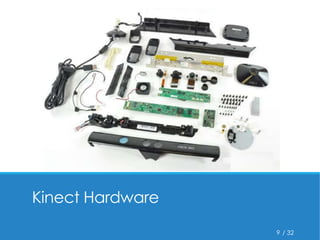
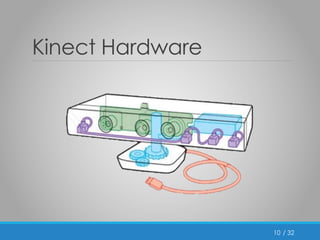
Kinect Hardware 
9
/ 32 
Kinect Hardware 
10
/ 32 
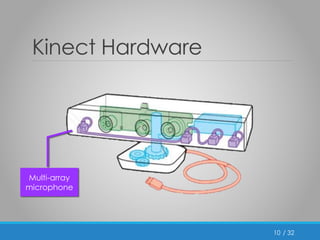
Kinect Hardware 
10 
Multi-array 
microphone
/ 32 
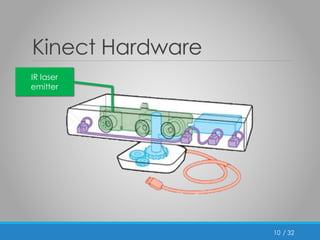
Kinect Hardware 
10 
IR laser 
emitter
/ 32 
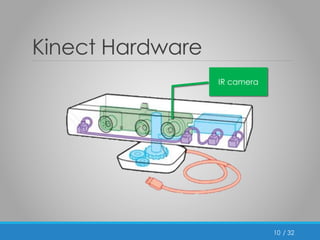
Kinect Hardware 
10 
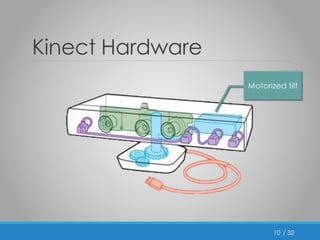
IR camera
Motorized tilt 
/ 32 
Kinect Hardware 
10
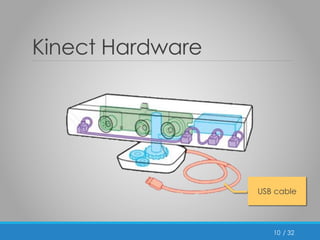
USB cable 
/ 32 
Kinect Hardware 
10
/ 32 
Kinect Hardware 
10 
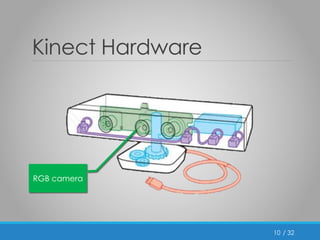
RGB camera
/ 32 
PCL (Point Cloud Library) 
• Point Cloud: 
A set of data points in some coordinate system 
• PCL: 
A library to works with point clouds 
• Has a lots of functions for registration, filtering , … 
11
/ 32 
Other Technologies 
• Geomagic Studio 
Good to works with 3D scanner outputs 
• OpenNI (Open Natural Interaction) 
Used to interact between Kinect and OS 
• Other drivers such as Microsoft official driver and Libfreenect 
12
/ 32 
Use Kinect for Xbox 360 
• As before said, Kinect is originally for Xbox 360 
• Connect Kinect for Xbox 360 to PC is not easy 
• USB cable 
• Additional Driver 
• A lots of properties 
13
/ 32 
Implementation 
14
/ 32 
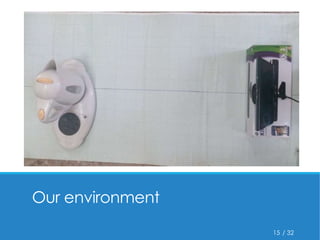
Our environment 
15
/ 32 
Implementation 
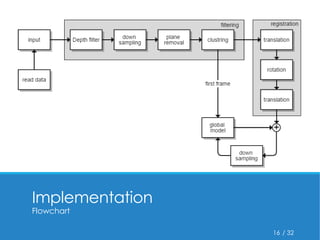
Flowchart 
16
/ 32 
Read data 
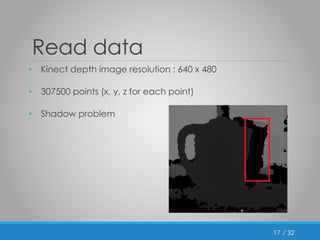
• Kinect depth image resolution : 640 x 480 
• 307500 points (x, y, z for each point) 
• Shadow problem 
17
/ 32 
Depth filtering 
• Kinect depth range : 50cm – 15m 
• Use passthrough filter 
• On z-axis between 1.5 , 15 
18
/ 32 
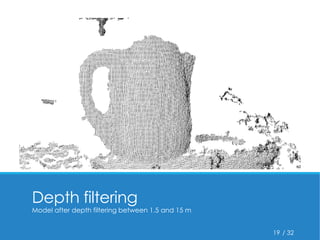
Depth filtering 
Model after depth filtering between 1.5 and 15 m 
19
/ 32 
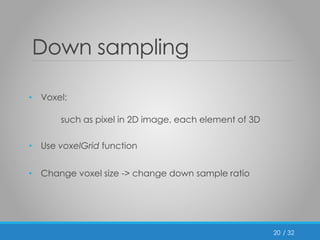
Down sampling 
• Voxel: 
such as pixel in 2D image, each element of 3D 
• Use voxelGrid function 
• Change voxel size -> change down sample ratio 
20
/ 32 
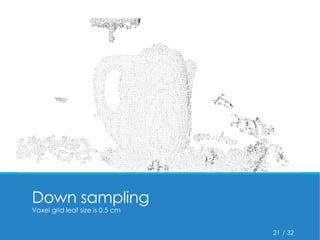
Down sampling 
Voxel grid leaf size is 0.5 cm 
21
/ 32 
Plane removal 
• With RANSAC algorithm we can fit a mathematical model 
to set of points 
• Models : circle, sphere, plane, … 
• Fit a plane and delete that points 
22
/ 32 
Cluster extraction 
• Still other objects or noises are exist 
• Points with distance lower than a threshold is a cluster 
• Delete all clusters except the biggest 
23
/ 32 
Cluster extraction 
Clear object after filtering 
24
/ 32 
Registration 
• Definition 
Aligning two or more images of the same scene 
One reference image 
Transform other images 
• The most important step 
25
/ 32 
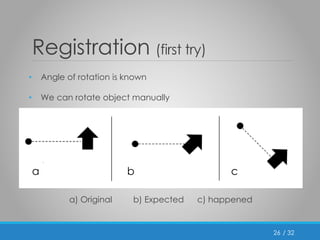
Registration (first try) 
• Angle of rotation is known 
• We can rotate object manually 
a) Original b) Expected c) happened 
26 
a b c
/ 32 
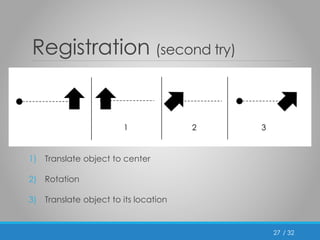
Registration (second try) 
27 
1 2 3 
1) Translate object to center 
2) Rotation 
3) Translate object to its location
/ 32 
Registration (cont’d) 
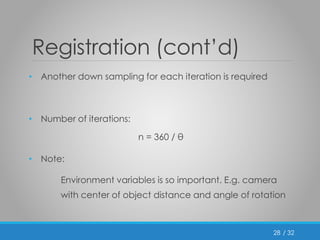
• Another down sampling for each iteration is required 
• Number of iterations: 
n = 360 / θ 
• Note: 
Environment variables is so important. E.g. camera 
with center of object distance and angle of rotation 
28
/ 32 
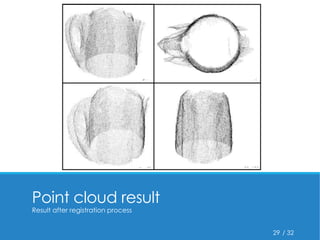
Point cloud result 
Result after registration process 
29
/ 32 
Work with Geomagic 
• Better point cloud with Geomagic studio 
• Reduce noise 
• Refinement 
• Polygon mesh 
• Fill holes 
• Smoothness 
30
/ 32 
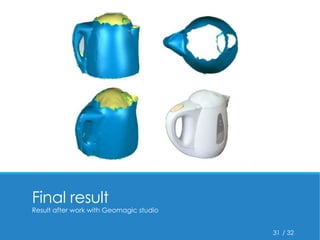
Final result 
Result after work with Geomagic studio 
31
/ 32 
Specially thanks to Dr. Karimi 
32 
Thank you

3D scanner using kinect

  • 1.
    3D Scanner Usingkinect Mehdi Saman Booy Supervisor : Dr. Karimi
  • 2.
    / 32 Contents • Introduction • 3D importance • Technologies • Kinect • PCL • Drivers • Implementation • Filtering • Registration 1
  • 3.
  • 4.
    / 32 3DImportance • 2D images Easily interpreted by human eyes Difficultly analyzing by computer 3
  • 5.
    / 32 3DImportance (cont’d) • So, Third dimension is needed • We call it “depth” • Depth can be get from 3D scanner 4
  • 6.
    / 32 3DScanner Applications • Motion capture • Animations • Video games • Industrial • Reverse engineering • Quality check • Virtual reality • … 5
  • 7.
  • 8.
    / 32 Kinect • A webcam-style add-on peripheral (Wikipedia) • Enables users to control and interact with their console/computer without a controller • Originally for Xbox 360 • Also released for Windows and Xbox One • Kinetic + Connect = Kinect 7
  • 9.
    Feb 2012 /32 Kinect (history) 8 Oct 2011 Jun 2011 Feb 2011 Dec 2010 Nov 2010 Nov 2010
  • 10.
    / 32 Kinect(history) 8 Kinect for Xbox 360 release Feb 2012 Oct 2011 Jun 2011 Feb 2011 Dec 2010 Nov 2010 Nov 2010
  • 11.
    / 32 Kinect(history) Feb 2012 Oct 2011 Jun 2011 Feb 2011 Dec 2010 Nov 2010 Nov 2010 8 LibFreenect (Open source library) release
  • 12.
    / 32 Kinect(history) 8 OpenNI (Open source driver) release Feb 2012 Oct 2011 Jun 2011 Feb 2011 Dec 2010 Nov 2010 Nov 2010
  • 13.
    / 32 Kinect(history) 8 Announced to release Non-commercial Kinect SDK in spring 2011 Feb 2012 Oct 2011 Jun 2011 Feb 2011 Dec 2010 Nov 2010 Nov 2010
  • 14.
    / 32 Kinect(history) 8 Non-commercial Kinect SDK release Feb 2012 Oct 2011 Jun 2011 Feb 2011 Dec 2010 Nov 2010 Nov 2010
  • 15.
    Feb 2012 /32 Kinect (history) 8 Oct 2011 Jun 2011 Feb 2011 Dec 2010 Nov 2010 Nov 2010 Announced to launching commercial version of Kinect (Kinect for Windows) with SDK
  • 16.
    Feb 2012 /32 Kinect (history) 8 Oct 2011 Jun 2011 Feb 2011 Dec 2010 Nov 2010 Nov 2010 Kinect for windows release
  • 17.
    / 32 KinectHardware 9
  • 18.
    / 32 KinectHardware 10
  • 19.
    / 32 KinectHardware 10 Multi-array microphone
  • 20.
    / 32 KinectHardware 10 IR laser emitter
  • 21.
    / 32 KinectHardware 10 IR camera
  • 22.
    Motorized tilt /32 Kinect Hardware 10
  • 23.
    USB cable /32 Kinect Hardware 10
  • 24.
    / 32 KinectHardware 10 RGB camera
  • 25.
    / 32 PCL(Point Cloud Library) • Point Cloud: A set of data points in some coordinate system • PCL: A library to works with point clouds • Has a lots of functions for registration, filtering , … 11
  • 26.
    / 32 OtherTechnologies • Geomagic Studio Good to works with 3D scanner outputs • OpenNI (Open Natural Interaction) Used to interact between Kinect and OS • Other drivers such as Microsoft official driver and Libfreenect 12
  • 27.
    / 32 UseKinect for Xbox 360 • As before said, Kinect is originally for Xbox 360 • Connect Kinect for Xbox 360 to PC is not easy • USB cable • Additional Driver • A lots of properties 13
  • 28.
  • 29.
    / 32 Ourenvironment 15
  • 30.
    / 32 Implementation Flowchart 16
  • 31.
    / 32 Readdata • Kinect depth image resolution : 640 x 480 • 307500 points (x, y, z for each point) • Shadow problem 17
  • 32.
    / 32 Depthfiltering • Kinect depth range : 50cm – 15m • Use passthrough filter • On z-axis between 1.5 , 15 18
  • 33.
    / 32 Depthfiltering Model after depth filtering between 1.5 and 15 m 19
  • 34.
    / 32 Downsampling • Voxel: such as pixel in 2D image, each element of 3D • Use voxelGrid function • Change voxel size -> change down sample ratio 20
  • 35.
    / 32 Downsampling Voxel grid leaf size is 0.5 cm 21
  • 36.
    / 32 Planeremoval • With RANSAC algorithm we can fit a mathematical model to set of points • Models : circle, sphere, plane, … • Fit a plane and delete that points 22
  • 37.
    / 32 Clusterextraction • Still other objects or noises are exist • Points with distance lower than a threshold is a cluster • Delete all clusters except the biggest 23
  • 38.
    / 32 Clusterextraction Clear object after filtering 24
  • 39.
    / 32 Registration • Definition Aligning two or more images of the same scene One reference image Transform other images • The most important step 25
  • 40.
    / 32 Registration(first try) • Angle of rotation is known • We can rotate object manually a) Original b) Expected c) happened 26 a b c
  • 41.
    / 32 Registration(second try) 27 1 2 3 1) Translate object to center 2) Rotation 3) Translate object to its location
  • 42.
    / 32 Registration(cont’d) • Another down sampling for each iteration is required • Number of iterations: n = 360 / θ • Note: Environment variables is so important. E.g. camera with center of object distance and angle of rotation 28
  • 43.
    / 32 Pointcloud result Result after registration process 29
  • 44.
    / 32 Workwith Geomagic • Better point cloud with Geomagic studio • Reduce noise • Refinement • Polygon mesh • Fill holes • Smoothness 30
  • 45.
    / 32 Finalresult Result after work with Geomagic studio 31
  • 46.
    / 32 Speciallythanks to Dr. Karimi 32 Thank you

Editor's Notes

  • #9 یک قطعه جانبی به سبک وب کم که اضافه میشه
  • #19 See more detail at each part
  • #20 See more detail at each part
  • #21 See more detail at each part
  • #22 See more detail at each part
  • #23 See more detail at each part
  • #24 See more detail at each part
  • #25 See more detail at each part
  • #32 Human eyes example
  • #37 RANdom SAmple Consensus