AIUM 2012 «ARCHEOLOGY INTERNATIONAL UNIVERSITY MEETING» 8th-10th NOVEMBER 2012


              An Open Source solution for
           Three-Dimensional documentation:
               archaeological applications


Giulio Bigliardi
CGT-Centro di GeoTecnologie (Univ. di Siena)
bigliardi2@unisi.it

Marta Bottacchi
CGT-Centro di GeoTecnologie (Univ. di Siena)
bottacchi@unisi.it

Sara Cappelli
CGT-Centro di GeoTecnologie (Univ. di Siena)
cappelli11@unisi.it

Leonardo Carmignani
Dipartimento di Archeologia e Storia delle Arti –
Sezione di Preistoria e Protostoria (Univ. di Siena)
leocarmignani@msn.com
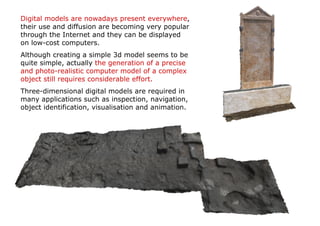
Digital models are nowadays present everywhere,
their use and diffusion are becoming very popular
through the Internet and they can be displayed
on low-cost computers.
Although creating a simple 3d model seems to be
quite simple, actually the generation of a precise
and photo-realistic computer model of a complex
object still requires considerable effort.
Three-dimensional digital models are required in
many applications such as inspection, navigation,
object identification, visualisation and animation.
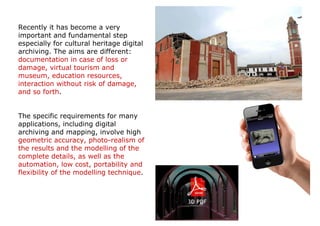
Recently it has become a very
important and fundamental step
especially for cultural heritage digital
archiving. The aims are different:
documentation in case of loss or
damage, virtual tourism and
museum, education resources,
interaction without risk of damage,
and so forth.


The specific requirements for many
applications, including digital
archiving and mapping, involve high
geometric accuracy, photo-realism of
the results and the modelling of the
complete details, as well as the
automation, low cost, portability and
flexibility of the modelling technique.
Three-dimensional modelling of objects
and scenes is an intensive and long-
lasting research problem in the graphic,
vision and photogrammetric
communities.
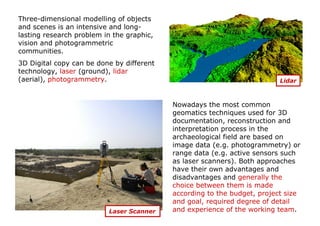
3D Digital copy can be done by different
technology, laser (ground), lidar
(aerial), photogrammetry.                                                 Lidar


                                           Nowadays the most common
                                           geomatics techniques used for 3D
                                           documentation, reconstruction and
                                           interpretation process in the
                                           archaeological field are based on
                                           image data (e.g. photogrammetry) or
                                           range data (e.g. active sensors such
                                           as laser scanners). Both approaches
                                           have their own advantages and
                                           disadvantages and generally the
                                           choice between them is made
                                           according to the budget, project size
                                           and goal, required degree of detail
                          Laser Scanner    and experience of the working team.
Image-Based Modelling and Structure from Motion

Nowadays 3D scanners are also becoming a
standard source for input data in many
application areas, but the modern techniques
of Structure from Motion (SfM) and Image-
Based Modelling (IBM) open new perspectives
in the field of archaeological documentation,
providing a simple and accurate way in
recording three-dimensional data.


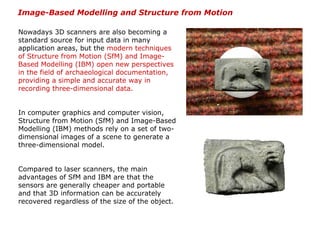
In computer graphics and computer vision,
Structure from Motion (SfM) and Image-Based
Modelling (IBM) methods rely on a set of two-
dimensional images of a scene to generate a
three-dimensional model.


Compared to laser scanners, the main
advantages of SfM and IBM are that the
sensors are generally cheaper and portable
and that 3D information can be accurately
recovered regardless of the size of the object.
Python Photogrammetry Toolbox (PPT)
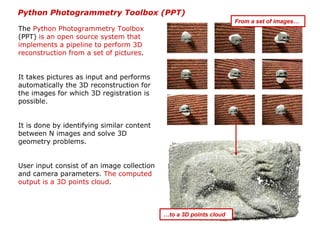
                                                                    From a set of images…
The Python Photogrammetry Toolbox
(PPT) is an open source system that
implements a pipeline to perform 3D
reconstruction from a set of pictures.


It takes pictures as input and performs
automatically the 3D reconstruction for
the images for which 3D registration is
possible.


It is done by identifying similar content
between N images and solve 3D
geometry problems.


User input consist of an image collection
and camera parameters. The computed
output is a 3D points cloud.


                                            …to a 3D points cloud
Python Photogrammetry Toolbox (PPT) and its Graphical User Interface (PPT-GUI) is
developed by Alessandro Bezzi (ArcTeam – Trento, Italy) and Pier Moulon
(IMAGINE/LIGM, University Paris Est & Mikros Image).
The suite Python Photogrammetry Toolbox (PPT) is composed of python scripts that
automate the different steps of the workflow. The entire process is reduced in two
commands: camera calibration and dense 3D points cloud reconstruction.


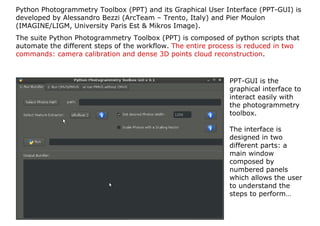
                                                             PPT-GUI is the
                                                             graphical interface to
                                                             interact easily with
                                                             the photogrammetry
                                                             toolbox.

                                                             The interface is
                                                             designed in two
                                                             different parts: a
                                                             main window
                                                             composed by
                                                             numbered panels
                                                             which allows the user
                                                             to understand the
                                                             steps to perform…
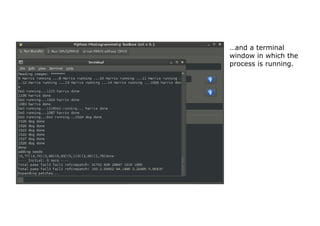
…and a terminal
window in which the
process is running.
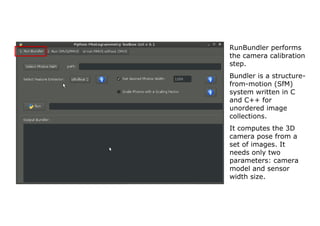
RunBundler performs
the camera calibration
step.
Bundler is a structure-
from-motion (SfM)
system written in C
and C++ for
unordered image
collections.
It computes the 3D
camera pose from a
set of images. It
needs only two
parameters: camera
model and sensor
width size.
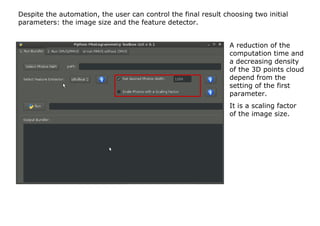
Despite the automation, the user can control the final result choosing two initial
parameters: the image size and the feature detector.


                                                                A reduction of the
                                                                computation time and
                                                                a decreasing density
                                                                of the 3D points cloud
                                                                depend from the
                                                                setting of the first
                                                                parameter.
                                                                It is a scaling factor
                                                                of the image size.
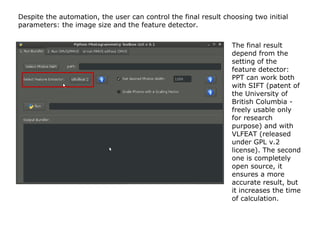
Despite the automation, the user can control the final result choosing two initial
parameters: the image size and the feature detector.


                                                                The final result
                                                                depend from the
                                                                setting of the
                                                                feature detector:
                                                                PPT can work both
                                                                with SIFT (patent of
                                                                the University of
                                                                British Columbia -
                                                                freely usable only
                                                                for research
                                                                purpose) and with
                                                                VLFEAT (released
                                                                under GPL v.2
                                                                license). The second
                                                                one is completely
                                                                open source, it
                                                                ensures a more
                                                                accurate result, but
                                                                it increases the time
                                                                of calculation.
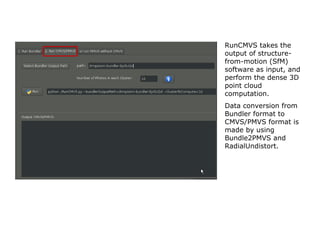
RunCMVS takes the
output of structure-
from-motion (SfM)
software as input, and
perform the dense 3D
point cloud
computation.
Data conversion from
Bundler format to
CMVS/PMVS format is
made by using
Bundle2PMVS and
RadialUndistort.
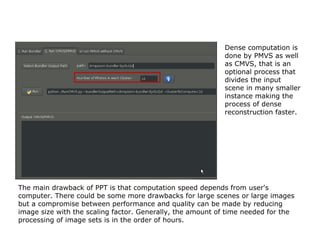
Dense computation is
                                                           done by PMVS as well
                                                           as CMVS, that is an
                                                           optional process that
                                                           divides the input
                                                           scene in many smaller
                                                           instance making the
                                                           process of dense
                                                           reconstruction faster.


The main drawback of PPT is that computation speed depends from user's
computer. There could be some more drawbacks for large scenes or large images
but a compromise between performance and quality can be made by reducing
image size with the scaling factor. Generally, the amount of time needed for the
processing of image sets is in the order of hours.
MeshLab
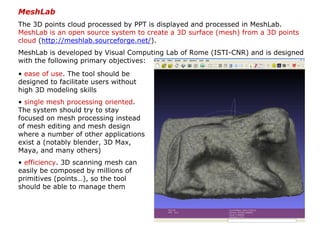
The 3D points cloud processed by PPT is displayed and processed in MeshLab.
MeshLab is an open source system to create a 3D surface (mesh) from a 3D points
cloud (http://meshlab.sourceforge.net/).
MeshLab is developed by Visual Computing Lab of Rome (ISTI-CNR) and is designed
with the following primary objectives:
• ease of use. The tool should be
designed to facilitate users without
high 3D modeling skills
• single mesh processing oriented.
The system should try to stay
focused on mesh processing instead
of mesh editing and mesh design
where a number of other applications
exist a (notably blender, 3D Max,
Maya, and many others)
• efficiency. 3D scanning mesh can
easily be composed by millions of
primitives (points…), so the tool
should be able to manage them
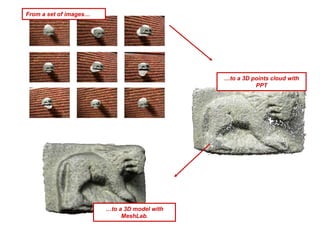
From a set of images…


                                              …to a 3D points cloud with
                                                        PPT


                        …to a 3D model with
                             MeshLab.
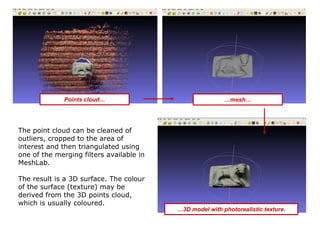
Points cloud…                               …mesh…


The point cloud can be cleaned of
outliers, cropped to the area of
interest and then triangulated using
one of the merging filters available in
MeshLab.

The result is a 3D surface. The colour
of the surface (texture) may be
derived from the 3D points cloud,
which is usually coloured.
                                          …3D model with photorealistic texture.
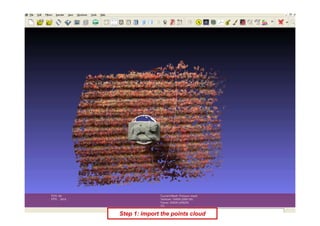
Step 1: import the points cloud
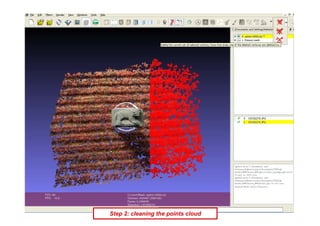
Step 2: cleaning the points cloud
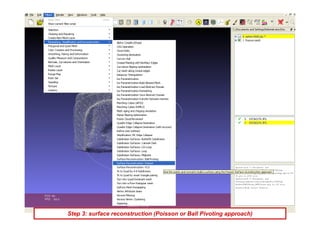
Step 3: surface reconstruction (Poisson or Ball Pivoting approach)
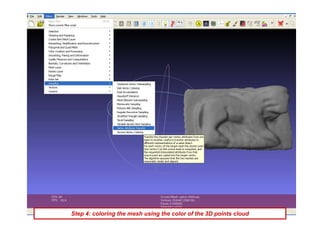
Step 4: coloring the mesh using the color of the 3D points cloud
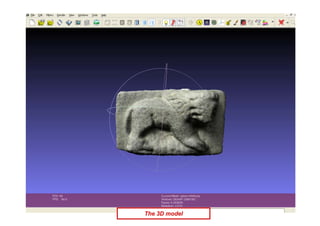
The 3D model
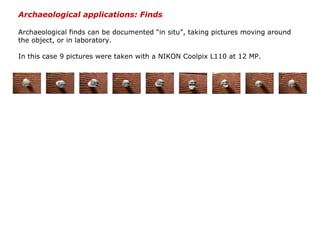
Archaeological applications: Finds

Archaeological finds can be documented “in situ”, taking pictures moving around
the object, or in laboratory.

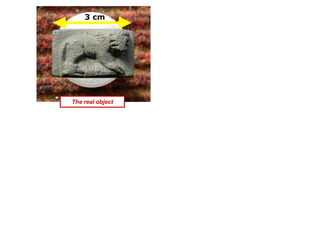
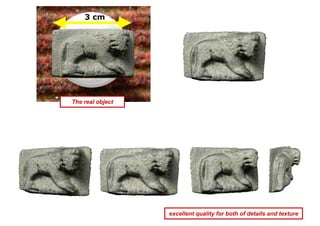
In this case 9 pictures were taken with a NIKON Coolpix L110 at 12 MP.
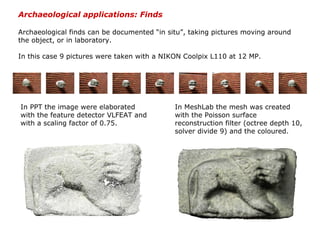
Archaeological applications: Finds

Archaeological finds can be documented “in situ”, taking pictures moving around
the object, or in laboratory.

In this case 9 pictures were taken with a NIKON Coolpix L110 at 12 MP.


In PPT the image were elaborated             In MeshLab the mesh was created
with the feature detector VLFEAT and         with the Poisson surface
with a scaling factor of 0.75.               reconstruction filter (octree depth 10,
                                             solver divide 9) and the coloured.
3 cm


The real object
3 cm


The real object


                  excellent quality for both of details and texture
Archaeological applications: Layers

Archaeological field activity is mainly a working process which ends, in most
cases, with the complete destruction of the site. Since most of the interpretation
is performed in a second stage, it is necessary to collect a massive amount of
documentation (images, sketches, notes, measurements).

In the lack of particular expensive equipment (laser scanner, calibrated camera)
or software (photogrammetric applications), field documentation is composed by
pictures, manual drawings, total station measurements and photo-mosaics. While
3D scanning technologies are able to precisely capture the geometry of the
excavation, their cost and operational time discourage an intensive field use.

The alternative is represented by Image-Based Modelling and Structure from
Motion technologies, which are able to obtain a 3D model of an element starting
from a set of images. Using the same instruments of standard archaeological
documentation (digital camera and total station) it is possible to record also the
morphology of the level. The data acquisition is fast and simple and it consists
exclusively in taking pictures of the area of interest. The same rules of the
traditional photography are to be followed: centre the desired object in each
picture, avoid extreme contrast shadow/sun, use a tripod in low-light condition.
There are no limits about the number of images: but it depends on the complexity
of the surface and on the power of the hardware (RAM) which will process the
data.
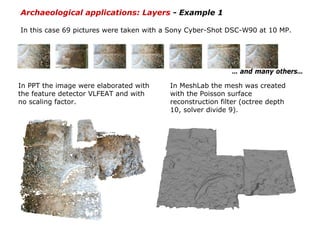
Archaeological applications: Layers - Example 1

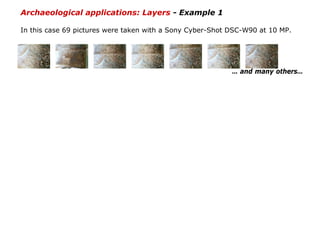
In this case 69 pictures were taken with a Sony Cyber-Shot DSC-W90 at 10 MP.


                                                           … and many others…
Archaeological applications: Layers - Example 1

In this case 69 pictures were taken with a Sony Cyber-Shot DSC-W90 at 10 MP.


                                                           … and many others…

In PPT the image were elaborated with    In MeshLab the mesh was created
the feature detector VLFEAT and with     with the Poisson surface
no scaling factor.                       reconstruction filter (octree depth
                                         10, solver divide 9).
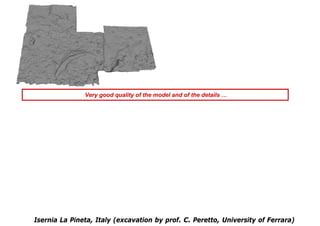
Very good quality of the model and of the details …


Isernia La Pineta, Italy (excavation by prof. C. Peretto, University of Ferrara)
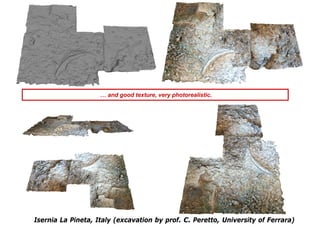
… and good texture, very photorealistic.


Isernia La Pineta, Italy (excavation by prof. C. Peretto, University of Ferrara)
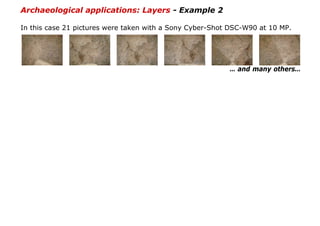
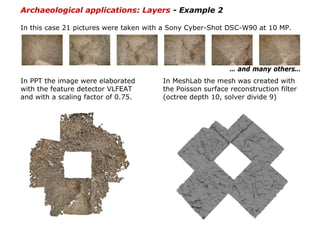
Archaeological applications: Layers - Example 2

In this case 21 pictures were taken with a Sony Cyber-Shot DSC-W90 at 10 MP.


                                                          … and many others…
Archaeological applications: Layers - Example 2

In this case 21 pictures were taken with a Sony Cyber-Shot DSC-W90 at 10 MP.


                                                           … and many others…
In PPT the image were elaborated       In MeshLab the mesh was created with
with the feature detector VLFEAT       the Poisson surface reconstruction filter
and with a scaling factor of 0.75.     (octree depth 10, solver divide 9)
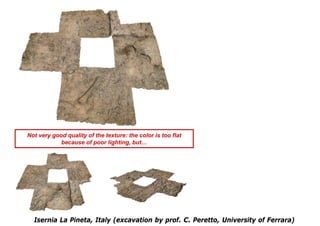
Not very good quality of the texture: the color is too flat
            because of poor lighting, but…


  Isernia La Pineta, Italy (excavation by prof. C. Peretto, University of Ferrara)
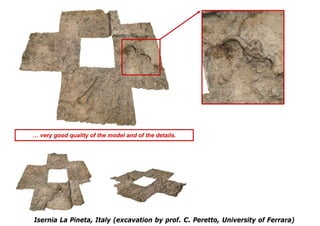
… very good quality of the model and of the details.


Isernia La Pineta, Italy (excavation by prof. C. Peretto, University of Ferrara)
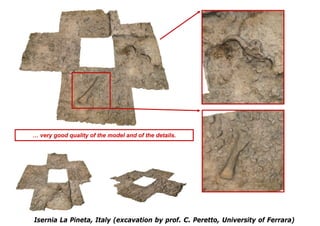
… very good quality of the model and of the details.


Isernia La Pineta, Italy (excavation by prof. C. Peretto, University of Ferrara)
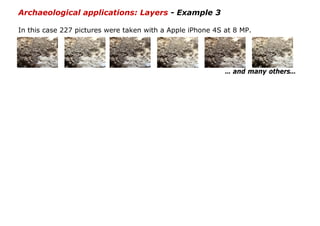
Archaeological applications: Layers - Example 3

In this case 227 pictures were taken with a Apple iPhone 4S at 8 MP.


                                                            … and many others…
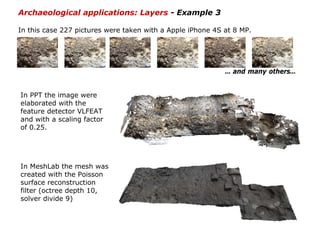
Archaeological applications: Layers - Example 3

In this case 227 pictures were taken with a Apple iPhone 4S at 8 MP.


                                                            … and many others…


In PPT the image were
elaborated with the
feature detector VLFEAT
and with a scaling factor
of 0.25.


In MeshLab the mesh was
created with the Poisson
surface reconstruction
filter (octree depth 10,
solver divide 9)
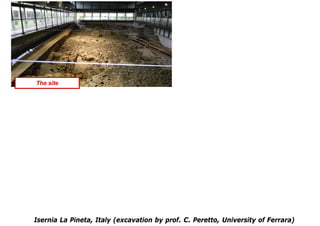
The site


Isernia La Pineta, Italy (excavation by prof. C. Peretto, University of Ferrara)
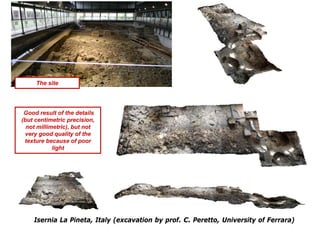
The site


 Good result of the details
(but centimetric precision,
  not millimetric), but not
 very good quality of the
 texture because of poor
            light


    Isernia La Pineta, Italy (excavation by prof. C. Peretto, University of Ferrara)
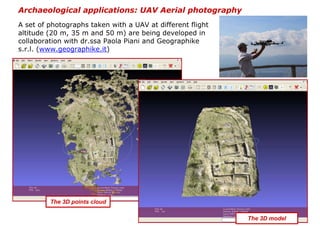
Archaeological applications: UAV Aerial photography
A set of photographs taken with a UAV at different flight
altitude (20 m, 35 m and 50 m) are being developed in
collaboration with dr.ssa Paola Piani and Geographike
s.r.l. (www.geographike.it)


         The 3D points cloud

                                                            The 3D model
Conclusions


These experiments demonstrated the possibility to document, in three dimensions
and with a very low budget, archaeological sites and finds.

Advantages:
•fast acquisition and processing
•good scalability, both small and huge model can be acquired
•non-expert users can create his/her 3D model
•cheap
•it needs only the equipment which is normally used in an excavation (digital
camera and total station)
•easily portable hardware components allow archaeologists to work under critical
or extreme conditions (e.g. in high mountain, underwater or inside a cave)

Disadvantages:
•accuracy depends on some factors, in particular the lighting conditions and the
performance of the PC used in the processing
•the texture obtained by the points cloud is very good for objects of small
dimensions, but less for the large models
On-line resource

                            opentechne.wordpress.com

                            This is our blog where you can find and read tutorials and case
                            studies about the use of open source applications in archeology
                            and cultural heritage.
                            In the download section is possible to download some of our
                            papers, posters, presentations ...
                            and this presentation is available for download too.

References
•Gonizzi Barsanti S., Gherdevich D., Degrassi D., 2011. Use Of Low Cost UAV Systems In Archaeological
Research And Disclosure, ISPRS WG V/2 York, UK, Workshop (17 -19 August 2011)
www.academia.edu/1122557/USE_OF_LOW_COST_UAV_SYSTEMS_IN_ARCHEAOLOGICAL_RESEARCH_AND_DISCLOSURE


•Callieri M., Dell'Unto N., Dellepiane M., Scopigno R., Soderberg B., Larsson L. 2011. Documentation and
Interpretation of an Archeological Excavation: an Experience with Dense Stereo Reconstruction Tools.
VAST11: The 12th International Symposium on Virtual Reality, Archaeology and Intelligent Cultural
Heritage: 33-40
http://vcg.isti.cnr.it/Publications/2011/CDDSSL11/Callieri_etAl_Documenting.pdf


•Moulon P., Bezzi A., 2011. Python Photogrammetry Toolbox: una soluzione libera per la documentazione
tridimensionale, Archeofoss 2011. Open Source, Free Software e Open Format nei processi di ricerca
archeologica VI Workshop (Napoli, 9/10 giugno 2011)
http://imagine.enpc.fr/publications/papers/ARCHEOFOSS.pdf (english version)

                            This work is licensed under the Creative Commons Attribution-Non Commercial–No Derivs 3.0 Unported License.

An Open Source solution for Three-Dimensional documentation: archaeological applications

  • 1.
    AIUM 2012 «ARCHEOLOGYINTERNATIONAL UNIVERSITY MEETING» 8th-10th NOVEMBER 2012 An Open Source solution for Three-Dimensional documentation: archaeological applications Giulio Bigliardi CGT-Centro di GeoTecnologie (Univ. di Siena) bigliardi2@unisi.it Marta Bottacchi CGT-Centro di GeoTecnologie (Univ. di Siena) bottacchi@unisi.it Sara Cappelli CGT-Centro di GeoTecnologie (Univ. di Siena) cappelli11@unisi.it Leonardo Carmignani Dipartimento di Archeologia e Storia delle Arti – Sezione di Preistoria e Protostoria (Univ. di Siena) leocarmignani@msn.com
  • 2.
    Digital models arenowadays present everywhere, their use and diffusion are becoming very popular through the Internet and they can be displayed on low-cost computers. Although creating a simple 3d model seems to be quite simple, actually the generation of a precise and photo-realistic computer model of a complex object still requires considerable effort. Three-dimensional digital models are required in many applications such as inspection, navigation, object identification, visualisation and animation.
  • 3.
    Recently it hasbecome a very important and fundamental step especially for cultural heritage digital archiving. The aims are different: documentation in case of loss or damage, virtual tourism and museum, education resources, interaction without risk of damage, and so forth. The specific requirements for many applications, including digital archiving and mapping, involve high geometric accuracy, photo-realism of the results and the modelling of the complete details, as well as the automation, low cost, portability and flexibility of the modelling technique.
  • 4.
    Three-dimensional modelling ofobjects and scenes is an intensive and long- lasting research problem in the graphic, vision and photogrammetric communities. 3D Digital copy can be done by different technology, laser (ground), lidar (aerial), photogrammetry. Lidar Nowadays the most common geomatics techniques used for 3D documentation, reconstruction and interpretation process in the archaeological field are based on image data (e.g. photogrammetry) or range data (e.g. active sensors such as laser scanners). Both approaches have their own advantages and disadvantages and generally the choice between them is made according to the budget, project size and goal, required degree of detail Laser Scanner and experience of the working team.
  • 5.
    Image-Based Modelling andStructure from Motion Nowadays 3D scanners are also becoming a standard source for input data in many application areas, but the modern techniques of Structure from Motion (SfM) and Image- Based Modelling (IBM) open new perspectives in the field of archaeological documentation, providing a simple and accurate way in recording three-dimensional data. In computer graphics and computer vision, Structure from Motion (SfM) and Image-Based Modelling (IBM) methods rely on a set of two- dimensional images of a scene to generate a three-dimensional model. Compared to laser scanners, the main advantages of SfM and IBM are that the sensors are generally cheaper and portable and that 3D information can be accurately recovered regardless of the size of the object.
  • 6.
    Python Photogrammetry Toolbox(PPT) From a set of images… The Python Photogrammetry Toolbox (PPT) is an open source system that implements a pipeline to perform 3D reconstruction from a set of pictures. It takes pictures as input and performs automatically the 3D reconstruction for the images for which 3D registration is possible. It is done by identifying similar content between N images and solve 3D geometry problems. User input consist of an image collection and camera parameters. The computed output is a 3D points cloud. …to a 3D points cloud
  • 7.
    Python Photogrammetry Toolbox(PPT) and its Graphical User Interface (PPT-GUI) is developed by Alessandro Bezzi (ArcTeam – Trento, Italy) and Pier Moulon (IMAGINE/LIGM, University Paris Est & Mikros Image). The suite Python Photogrammetry Toolbox (PPT) is composed of python scripts that automate the different steps of the workflow. The entire process is reduced in two commands: camera calibration and dense 3D points cloud reconstruction. PPT-GUI is the graphical interface to interact easily with the photogrammetry toolbox. The interface is designed in two different parts: a main window composed by numbered panels which allows the user to understand the steps to perform…
  • 8.
    …and a terminal windowin which the process is running.
  • 9.
    RunBundler performs the cameracalibration step. Bundler is a structure- from-motion (SfM) system written in C and C++ for unordered image collections. It computes the 3D camera pose from a set of images. It needs only two parameters: camera model and sensor width size.
  • 10.
    Despite the automation,the user can control the final result choosing two initial parameters: the image size and the feature detector. A reduction of the computation time and a decreasing density of the 3D points cloud depend from the setting of the first parameter. It is a scaling factor of the image size.
  • 11.
    Despite the automation,the user can control the final result choosing two initial parameters: the image size and the feature detector. The final result depend from the setting of the feature detector: PPT can work both with SIFT (patent of the University of British Columbia - freely usable only for research purpose) and with VLFEAT (released under GPL v.2 license). The second one is completely open source, it ensures a more accurate result, but it increases the time of calculation.
  • 12.
    RunCMVS takes the outputof structure- from-motion (SfM) software as input, and perform the dense 3D point cloud computation. Data conversion from Bundler format to CMVS/PMVS format is made by using Bundle2PMVS and RadialUndistort.
  • 13.
    Dense computation is done by PMVS as well as CMVS, that is an optional process that divides the input scene in many smaller instance making the process of dense reconstruction faster. The main drawback of PPT is that computation speed depends from user's computer. There could be some more drawbacks for large scenes or large images but a compromise between performance and quality can be made by reducing image size with the scaling factor. Generally, the amount of time needed for the processing of image sets is in the order of hours.
  • 14.
    MeshLab The 3D pointscloud processed by PPT is displayed and processed in MeshLab. MeshLab is an open source system to create a 3D surface (mesh) from a 3D points cloud (http://meshlab.sourceforge.net/). MeshLab is developed by Visual Computing Lab of Rome (ISTI-CNR) and is designed with the following primary objectives: • ease of use. The tool should be designed to facilitate users without high 3D modeling skills • single mesh processing oriented. The system should try to stay focused on mesh processing instead of mesh editing and mesh design where a number of other applications exist a (notably blender, 3D Max, Maya, and many others) • efficiency. 3D scanning mesh can easily be composed by millions of primitives (points…), so the tool should be able to manage them
  • 15.
    From a setof images… …to a 3D points cloud with PPT …to a 3D model with MeshLab.
  • 16.
    Points cloud… …mesh… The point cloud can be cleaned of outliers, cropped to the area of interest and then triangulated using one of the merging filters available in MeshLab. The result is a 3D surface. The colour of the surface (texture) may be derived from the 3D points cloud, which is usually coloured. …3D model with photorealistic texture.
  • 17.
    Step 1: importthe points cloud
  • 18.
    Step 2: cleaningthe points cloud
  • 19.
    Step 3: surfacereconstruction (Poisson or Ball Pivoting approach)
  • 20.
    Step 4: coloringthe mesh using the color of the 3D points cloud
  • 21.
  • 22.
    Archaeological applications: Finds Archaeologicalfinds can be documented “in situ”, taking pictures moving around the object, or in laboratory. In this case 9 pictures were taken with a NIKON Coolpix L110 at 12 MP.
  • 23.
    Archaeological applications: Finds Archaeologicalfinds can be documented “in situ”, taking pictures moving around the object, or in laboratory. In this case 9 pictures were taken with a NIKON Coolpix L110 at 12 MP. In PPT the image were elaborated In MeshLab the mesh was created with the feature detector VLFEAT and with the Poisson surface with a scaling factor of 0.75. reconstruction filter (octree depth 10, solver divide 9) and the coloured.
  • 24.
  • 25.
    3 cm The realobject excellent quality for both of details and texture
  • 26.
    Archaeological applications: Layers Archaeologicalfield activity is mainly a working process which ends, in most cases, with the complete destruction of the site. Since most of the interpretation is performed in a second stage, it is necessary to collect a massive amount of documentation (images, sketches, notes, measurements). In the lack of particular expensive equipment (laser scanner, calibrated camera) or software (photogrammetric applications), field documentation is composed by pictures, manual drawings, total station measurements and photo-mosaics. While 3D scanning technologies are able to precisely capture the geometry of the excavation, their cost and operational time discourage an intensive field use. The alternative is represented by Image-Based Modelling and Structure from Motion technologies, which are able to obtain a 3D model of an element starting from a set of images. Using the same instruments of standard archaeological documentation (digital camera and total station) it is possible to record also the morphology of the level. The data acquisition is fast and simple and it consists exclusively in taking pictures of the area of interest. The same rules of the traditional photography are to be followed: centre the desired object in each picture, avoid extreme contrast shadow/sun, use a tripod in low-light condition. There are no limits about the number of images: but it depends on the complexity of the surface and on the power of the hardware (RAM) which will process the data.
  • 27.
    Archaeological applications: Layers- Example 1 In this case 69 pictures were taken with a Sony Cyber-Shot DSC-W90 at 10 MP. … and many others…
  • 28.
    Archaeological applications: Layers- Example 1 In this case 69 pictures were taken with a Sony Cyber-Shot DSC-W90 at 10 MP. … and many others… In PPT the image were elaborated with In MeshLab the mesh was created the feature detector VLFEAT and with with the Poisson surface no scaling factor. reconstruction filter (octree depth 10, solver divide 9).
  • 29.
    Very good qualityof the model and of the details … Isernia La Pineta, Italy (excavation by prof. C. Peretto, University of Ferrara)
  • 30.
    … and goodtexture, very photorealistic. Isernia La Pineta, Italy (excavation by prof. C. Peretto, University of Ferrara)
  • 31.
    Archaeological applications: Layers- Example 2 In this case 21 pictures were taken with a Sony Cyber-Shot DSC-W90 at 10 MP. … and many others…
  • 32.
    Archaeological applications: Layers- Example 2 In this case 21 pictures were taken with a Sony Cyber-Shot DSC-W90 at 10 MP. … and many others… In PPT the image were elaborated In MeshLab the mesh was created with with the feature detector VLFEAT the Poisson surface reconstruction filter and with a scaling factor of 0.75. (octree depth 10, solver divide 9)
  • 33.
    Not very goodquality of the texture: the color is too flat because of poor lighting, but… Isernia La Pineta, Italy (excavation by prof. C. Peretto, University of Ferrara)
  • 34.
    … very goodquality of the model and of the details. Isernia La Pineta, Italy (excavation by prof. C. Peretto, University of Ferrara)
  • 35.
    … very goodquality of the model and of the details. Isernia La Pineta, Italy (excavation by prof. C. Peretto, University of Ferrara)
  • 36.
    Archaeological applications: Layers- Example 3 In this case 227 pictures were taken with a Apple iPhone 4S at 8 MP. … and many others…
  • 37.
    Archaeological applications: Layers- Example 3 In this case 227 pictures were taken with a Apple iPhone 4S at 8 MP. … and many others… In PPT the image were elaborated with the feature detector VLFEAT and with a scaling factor of 0.25. In MeshLab the mesh was created with the Poisson surface reconstruction filter (octree depth 10, solver divide 9)
  • 38.
    The site Isernia LaPineta, Italy (excavation by prof. C. Peretto, University of Ferrara)
  • 39.
    The site Goodresult of the details (but centimetric precision, not millimetric), but not very good quality of the texture because of poor light Isernia La Pineta, Italy (excavation by prof. C. Peretto, University of Ferrara)
  • 40.
    Archaeological applications: UAVAerial photography A set of photographs taken with a UAV at different flight altitude (20 m, 35 m and 50 m) are being developed in collaboration with dr.ssa Paola Piani and Geographike s.r.l. (www.geographike.it) The 3D points cloud The 3D model
  • 41.
    Conclusions These experiments demonstratedthe possibility to document, in three dimensions and with a very low budget, archaeological sites and finds. Advantages: •fast acquisition and processing •good scalability, both small and huge model can be acquired •non-expert users can create his/her 3D model •cheap •it needs only the equipment which is normally used in an excavation (digital camera and total station) •easily portable hardware components allow archaeologists to work under critical or extreme conditions (e.g. in high mountain, underwater or inside a cave) Disadvantages: •accuracy depends on some factors, in particular the lighting conditions and the performance of the PC used in the processing •the texture obtained by the points cloud is very good for objects of small dimensions, but less for the large models
  • 42.
    On-line resource opentechne.wordpress.com This is our blog where you can find and read tutorials and case studies about the use of open source applications in archeology and cultural heritage. In the download section is possible to download some of our papers, posters, presentations ... and this presentation is available for download too. References •Gonizzi Barsanti S., Gherdevich D., Degrassi D., 2011. Use Of Low Cost UAV Systems In Archaeological Research And Disclosure, ISPRS WG V/2 York, UK, Workshop (17 -19 August 2011) www.academia.edu/1122557/USE_OF_LOW_COST_UAV_SYSTEMS_IN_ARCHEAOLOGICAL_RESEARCH_AND_DISCLOSURE •Callieri M., Dell'Unto N., Dellepiane M., Scopigno R., Soderberg B., Larsson L. 2011. Documentation and Interpretation of an Archeological Excavation: an Experience with Dense Stereo Reconstruction Tools. VAST11: The 12th International Symposium on Virtual Reality, Archaeology and Intelligent Cultural Heritage: 33-40 http://vcg.isti.cnr.it/Publications/2011/CDDSSL11/Callieri_etAl_Documenting.pdf •Moulon P., Bezzi A., 2011. Python Photogrammetry Toolbox: una soluzione libera per la documentazione tridimensionale, Archeofoss 2011. Open Source, Free Software e Open Format nei processi di ricerca archeologica VI Workshop (Napoli, 9/10 giugno 2011) http://imagine.enpc.fr/publications/papers/ARCHEOFOSS.pdf (english version) This work is licensed under the Creative Commons Attribution-Non Commercial–No Derivs 3.0 Unported License.