BTEC
Certificate

UNIT 10

Digital
Photography
for a Media Product

By
K McCabe
Booklet 1
2013
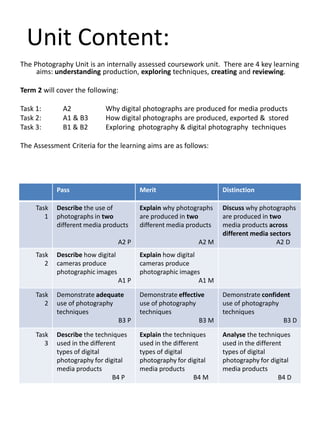
Unit Content:
The Photography Unit is an internally assessed coursework unit. There are 4 key learning
aims: understanding production, exploring techniques, creating and reviewing.
Term 2 will cover the following:
Task 1:
Task 2:
Task 3:

A2
A1 & B3
B1 & B2

Why digital photographs are produced for media products
How digital photographs are produced, exported & stored
Exploring photography & digital photography techniques

The Assessment Criteria for the learning aims are as follows:

Pass
Task
1

Merit

Distinction

Describe the use of
photographs in two
different media products

Explain why photographs
are produced in two
different media products

Discuss why photographs
are produced in two
media products across
different media sectors
A2 D

A2 P

A2 M

A1 P

Explain how digital
cameras produce
photographic images
A1 M

Task
2

Demonstrate adequate
use of photography
techniques
B3 P

Demonstrate effective
use of photography
techniques
B3 M

Demonstrate confident
use of photography
techniques
B3 D

Task
3

Describe the techniques
used in the different
types of digital
photography for digital
media products
B4 P

Explain the techniques
used in the different
types of digital
photography for digital
media products
B4 M

Analyse the techniques
used in the different
types of digital
photography for digital
media products
B4 D

Task
2

Describe how digital
cameras produce
photographic images
Why are digital photographs
produced ?
Photographs are visual
communication
Look at the Image.
What is the purpose of
the image in the
media product?
Why is it in Black &
White?
What does the miseen-scene
communicate?
What does it
communicate
about both the
magazine and the
film?
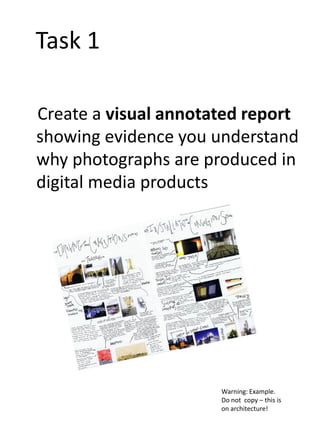
Task 1
Create a visual annotated report
showing evidence you understand
why photographs are produced in
digital media products

Warning: Example.
Do not copy – this is
on architecture!
Key Word Bank
for Task 1
• Shorthand communication – of colour, lighting
etc.
• Mise-en-scene
• To anchor text
• To enhance text
• To market products
• Impact on audience
How are digital photographs
produced ?
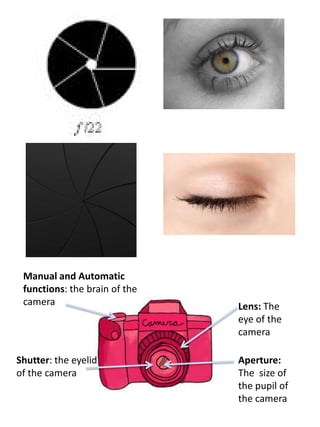
Manual and Automatic
functions: the brain of the
camera

Shutter: the eyelid
of the camera

Lens: The
eye of the
camera
Aperture:
The size of
the pupil of
the camera
Other elements
of Digital Images
Flash: provides an instant light
source for the image
Lights: Artificial - Fluorescent
(appears whiteish) Tungsten
(appears yellowish) Natural from daylight, Sun, Moon

Image sensor:
Converts light into
electronic messages

Exposure: the
quantity of light
reaching the image
sensor

Colour Temperature: different light
sources produce different coloured
light. For example, a candle emits a
reddish light, while the midday sun's
rays have a blue tint. These different
colours can be expressed using a
number, and this number is known as
the colour temperature.
Colour temperature is measured
on the Kelvin scale, which is denoted
by the letter "K" or the word "kelvin"
after the number.
White balance: Our eyes automatically make
whites white . But the camera sees white
depending on the tempertaure of the light
source – so whites can be tinted with orange or
blue. The white balance needs to be adjusted to
reduce or increase the colour temperature
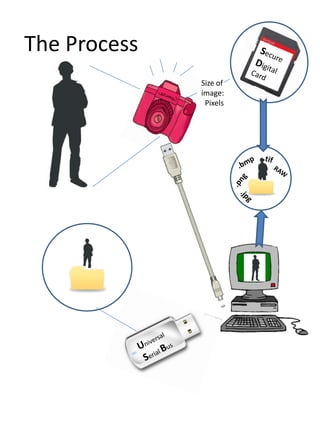
The Process
Size of
image:
Pixels
Task 2
• Create a guide to show you
understand the production and
process of digital photography
Key Word Bank
for Task 2
•
•
•
•
•
•
•
•
•
•
•
•
•
•
•
•

Manual Mode (SLR)
Automatic Mode
Viewfinder
Lens
Image Sensor
Aperture (f stops, small, large)
Shutter (speed – fast, slow)
Memory (SD , Compact Flash etc.)
Flash
Exposure (under exposed, over exposed)
Colour Temperature (warm, cold)
White balance
Lights (tungsten, fluorescent, natural, artificial)
File Size
File type
File Storage
Exploring
Photography
• Techniques
• Framing
• Angle
• Composition
• Focus
• Types & Genres
• Locations
• Studio
• Events
• Night
• Action (moving objects)
• Portraits
What are the main elements within the frame?

What might have been left out, outside of the
frame?

Photographs do not need to show the FACTS of the view,
they are a representation of what the Photographer SEES

1.Framing
Elements of
Framing
• Distance & Size – close-up, macro,
medium shot, medium long shot,
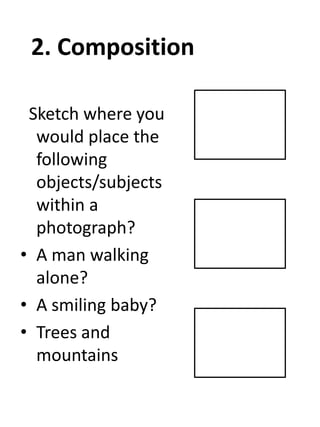
2. Composition
Sketch where you
would place the
following
objects/subjects
within a
photograph?
• A man walking
alone?
• A smiling baby?
• Trees and
mountains
Elements of
Composition
Rule of Thirds How
does it work?
(Remember Photographers
often like to break rules.
Why?)

Focal point
How does it work?

Foreground
Background

Eve Arnold
Balance
The eyes naturally
seek balance and
symmetry
....but balance is not
always interesting in
an image
3. Line
Horizontal lines
are the most
powerful in
images
• Straight
• Sloping
• Broken
• Travelling through an image – what
order do you look at the elements
in this image?

Steve McCurry
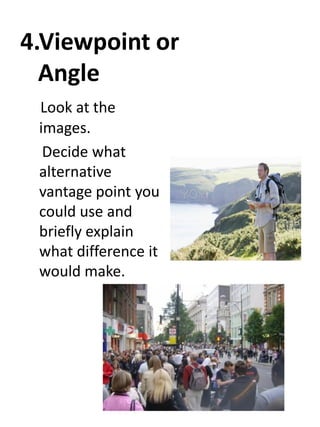
4.Viewpoint or
Angle
Look at the
images.
Decide what
alternative
vantage point you
could use and
briefly explain
what difference it
would make.
5. Depth
Where is the focal point in this
image?
What are the other significant
points of interest in this image?
How has this been achieved?

Ian Berry
6. Light
The word Photography comes from Greek (Photo and
Graph translate as Light Writing)
Light is essential for an image
What is significant is:
•What type of light is being used? (natural or artificial)
•Where is it coming from?
•What impact or effect does it have on the subject and
background in terms of contrast?

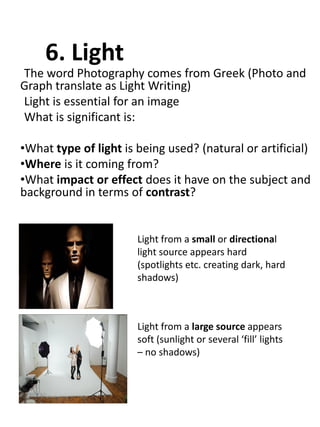
Light from a small or directional
light source appears hard
(spotlights etc. creating dark, hard
shadows)

Light from a large source appears
soft (sunlight or several ‘fill’ lights
– no shadows)
What impact does the light
have in terms of contrast?
• Images are a series of tones – light and dark.
• A high contrast image includes more tones at
either end of the spectrum (black and white)
whereas a low contrast image contains more
mid-tones (greys etc.)
• Directional light increases contrast (high
contrast) whereas more natural, large light can
minimise contrast (low contrast)
What type of light? Why? With what impact?
7.Speed and
Movement
Changing the shutter speed (the eyelid)
means the motion speed of the image is
changed.
A fast shutter speed (eyelid open and closing
at a fraction of a second) captures an image
frozen in time

A slow shutter speed (eyelid opening and
closing very slowly) captures an image of
movement
Which kinds of photography might use fast or
slow shutter speeds? What difficulties might the
photographer have taking an image with fast or
slow shutter speeds?
8. Depth of Field
• A shallow depth of field allows for a small area of
the image to be in focus
• A large depth of field allows for the whole image
to be in focus.
• Depth of field is created by controlling the
Aperture (the size of the eye – the hole through
which light enters the camera) .
• Aperture is measured in F numbers. The lower
the number, the widest aperture and a shallow
depth of field . The higher the number, the
smallest aperture and a large depth of field.
Name the depth of
field and the impact.
Genres of
Photography
Look at the list of photography genres/locations.
What might be the issues/ techniques needed
to take good shots in these locations or
conditions?
Location
Exterior Location
Shots
Studio
Event photography
Night shots
Action shots

Portraits

Issues/Difficulties/techniques needed
Task 3
• Create a visual report on different
photography techniques and how
they relate to the location,
conditions and genre of
photography.
Key Word Bank
for Task 3
• Photography techniques o Framing – macro, landscape, shot size (medium,
close-up, long shot etc.)
o angle – high, canted, low, wide
o composition - rule of thirds, focal point, balance,
line
o Focus – large and shallow depth of field
o Zoom
o Shutter Speed – fast and slow
o Aperture – small and large
o High and low Contrast
o Soft and harsh tones
o Lighting – natural, artificial, directional lighting
o Exposure
o Colour temperature
o White balance
• Types of shots - Exterior location shot, studio, events,
night, action, portraits
• Practical considerations
• Impact on audience
Still to do...
• Create your own digital
photographs for a media product
based upon a brief
• Develop concepts
• Show evidence of understanding of
practical considerations
• Produce photographs
• Edit images

• Review and self-evaluate your
digital photography skills in
terms of technical skills and
creative fulfilment of brief.

BTEC Level 2 Creative Digital Media Production: Photography Booklet

  • 1.
    BTEC Certificate UNIT 10 Digital Photography for aMedia Product By K McCabe Booklet 1 2013
  • 2.
    Unit Content: The PhotographyUnit is an internally assessed coursework unit. There are 4 key learning aims: understanding production, exploring techniques, creating and reviewing. Term 2 will cover the following: Task 1: Task 2: Task 3: A2 A1 & B3 B1 & B2 Why digital photographs are produced for media products How digital photographs are produced, exported & stored Exploring photography & digital photography techniques The Assessment Criteria for the learning aims are as follows: Pass Task 1 Merit Distinction Describe the use of photographs in two different media products Explain why photographs are produced in two different media products Discuss why photographs are produced in two media products across different media sectors A2 D A2 P A2 M A1 P Explain how digital cameras produce photographic images A1 M Task 2 Demonstrate adequate use of photography techniques B3 P Demonstrate effective use of photography techniques B3 M Demonstrate confident use of photography techniques B3 D Task 3 Describe the techniques used in the different types of digital photography for digital media products B4 P Explain the techniques used in the different types of digital photography for digital media products B4 M Analyse the techniques used in the different types of digital photography for digital media products B4 D Task 2 Describe how digital cameras produce photographic images
  • 3.
    Why are digitalphotographs produced ? Photographs are visual communication Look at the Image. What is the purpose of the image in the media product? Why is it in Black & White? What does the miseen-scene communicate? What does it communicate about both the magazine and the film?
  • 4.
    Task 1 Create avisual annotated report showing evidence you understand why photographs are produced in digital media products Warning: Example. Do not copy – this is on architecture!
  • 7.
    Key Word Bank forTask 1 • Shorthand communication – of colour, lighting etc. • Mise-en-scene • To anchor text • To enhance text • To market products • Impact on audience
  • 8.
    How are digitalphotographs produced ?
  • 9.
    Manual and Automatic functions:the brain of the camera Shutter: the eyelid of the camera Lens: The eye of the camera Aperture: The size of the pupil of the camera
  • 10.
    Other elements of DigitalImages Flash: provides an instant light source for the image Lights: Artificial - Fluorescent (appears whiteish) Tungsten (appears yellowish) Natural from daylight, Sun, Moon Image sensor: Converts light into electronic messages Exposure: the quantity of light reaching the image sensor Colour Temperature: different light sources produce different coloured light. For example, a candle emits a reddish light, while the midday sun's rays have a blue tint. These different colours can be expressed using a number, and this number is known as the colour temperature. Colour temperature is measured on the Kelvin scale, which is denoted by the letter "K" or the word "kelvin" after the number. White balance: Our eyes automatically make whites white . But the camera sees white depending on the tempertaure of the light source – so whites can be tinted with orange or blue. The white balance needs to be adjusted to reduce or increase the colour temperature
  • 11.
  • 12.
    Task 2 • Createa guide to show you understand the production and process of digital photography
  • 15.
    Key Word Bank forTask 2 • • • • • • • • • • • • • • • • Manual Mode (SLR) Automatic Mode Viewfinder Lens Image Sensor Aperture (f stops, small, large) Shutter (speed – fast, slow) Memory (SD , Compact Flash etc.) Flash Exposure (under exposed, over exposed) Colour Temperature (warm, cold) White balance Lights (tungsten, fluorescent, natural, artificial) File Size File type File Storage
  • 16.
    Exploring Photography • Techniques • Framing •Angle • Composition • Focus • Types & Genres • Locations • Studio • Events • Night • Action (moving objects) • Portraits
  • 17.
    What are themain elements within the frame? What might have been left out, outside of the frame? Photographs do not need to show the FACTS of the view, they are a representation of what the Photographer SEES 1.Framing
  • 18.
    Elements of Framing • Distance& Size – close-up, macro, medium shot, medium long shot,
  • 19.
    2. Composition Sketch whereyou would place the following objects/subjects within a photograph? • A man walking alone? • A smiling baby? • Trees and mountains
  • 20.
    Elements of Composition Rule ofThirds How does it work? (Remember Photographers often like to break rules. Why?) Focal point How does it work? Foreground Background Eve Arnold
  • 21.
    Balance The eyes naturally seekbalance and symmetry ....but balance is not always interesting in an image
  • 22.
    3. Line Horizontal lines arethe most powerful in images • Straight • Sloping • Broken
  • 23.
    • Travelling throughan image – what order do you look at the elements in this image? Steve McCurry
  • 24.
    4.Viewpoint or Angle Look atthe images. Decide what alternative vantage point you could use and briefly explain what difference it would make.
  • 25.
    5. Depth Where isthe focal point in this image? What are the other significant points of interest in this image? How has this been achieved? Ian Berry
  • 26.
    6. Light The wordPhotography comes from Greek (Photo and Graph translate as Light Writing) Light is essential for an image What is significant is: •What type of light is being used? (natural or artificial) •Where is it coming from? •What impact or effect does it have on the subject and background in terms of contrast? Light from a small or directional light source appears hard (spotlights etc. creating dark, hard shadows) Light from a large source appears soft (sunlight or several ‘fill’ lights – no shadows)
  • 27.
    What impact doesthe light have in terms of contrast? • Images are a series of tones – light and dark. • A high contrast image includes more tones at either end of the spectrum (black and white) whereas a low contrast image contains more mid-tones (greys etc.) • Directional light increases contrast (high contrast) whereas more natural, large light can minimise contrast (low contrast) What type of light? Why? With what impact?
  • 28.
    7.Speed and Movement Changing theshutter speed (the eyelid) means the motion speed of the image is changed. A fast shutter speed (eyelid open and closing at a fraction of a second) captures an image frozen in time A slow shutter speed (eyelid opening and closing very slowly) captures an image of movement Which kinds of photography might use fast or slow shutter speeds? What difficulties might the photographer have taking an image with fast or slow shutter speeds?
  • 29.
    8. Depth ofField • A shallow depth of field allows for a small area of the image to be in focus • A large depth of field allows for the whole image to be in focus. • Depth of field is created by controlling the Aperture (the size of the eye – the hole through which light enters the camera) . • Aperture is measured in F numbers. The lower the number, the widest aperture and a shallow depth of field . The higher the number, the smallest aperture and a large depth of field.
  • 30.
    Name the depthof field and the impact.
  • 31.
    Genres of Photography Look atthe list of photography genres/locations. What might be the issues/ techniques needed to take good shots in these locations or conditions? Location Exterior Location Shots Studio Event photography Night shots Action shots Portraits Issues/Difficulties/techniques needed
  • 32.
    Task 3 • Createa visual report on different photography techniques and how they relate to the location, conditions and genre of photography.
  • 35.
    Key Word Bank forTask 3 • Photography techniques o Framing – macro, landscape, shot size (medium, close-up, long shot etc.) o angle – high, canted, low, wide o composition - rule of thirds, focal point, balance, line o Focus – large and shallow depth of field o Zoom o Shutter Speed – fast and slow o Aperture – small and large o High and low Contrast o Soft and harsh tones o Lighting – natural, artificial, directional lighting o Exposure o Colour temperature o White balance • Types of shots - Exterior location shot, studio, events, night, action, portraits • Practical considerations • Impact on audience
  • 36.
    Still to do... •Create your own digital photographs for a media product based upon a brief • Develop concepts • Show evidence of understanding of practical considerations • Produce photographs • Edit images • Review and self-evaluate your digital photography skills in terms of technical skills and creative fulfilment of brief.