LEARN PHOTOGRAPHY BASICS
Visionary Media Productions
Basics of Equipment
•Megapixel Myth
•Photography Jargons Explained
•Concepts: Aperture, Depth of Field, Shutter Speed, ISO,
Noise
•Understanding Digital Photography
•Styles/Modes of Photography
•Tools & Techniques of Composition
Choosing the Best Camera

•Not a once in a lifetime purchase anymore.
•Select one which can do the job you want
Today and as per your future requirement
•Some kinds of cameras do.
some kinds of things better or more easily
e.g., Sports photography vs. Close-up portraits.
•Price isn‟t the best indicator.
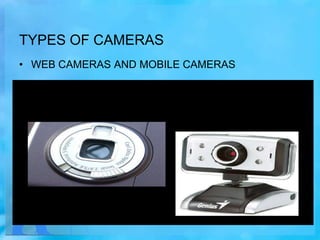
TYPES OF CAMERAS
• WEB CAMERAS AND MOBILE CAMERAS
POINT AND SHOOT CAMERAS
ADVANCED CONSUMER MODEL
PROSUMER DSLR models
Professional cameras
MEGAPIXEL MYTH

How much do you need?
•Often, cameras are categorized by the no. of
Megapixels they can capture .
•As if that resolution figure is the only measure
of the camera‟s value.
•This value can be quite misleading.
ZOOM: OPTICAL AND DIGITAL
Optical vs. Digital Zoom
•An optical zoom uses the optics (lens) of the digital
camera to move you closer to your subject.
•A digital zoom simply enlarges the existing image
digitally. It is not really zoom, in the strictest definition
of the term.
•Enlarging the image digitally reduces picture quality,
and should therefore usually be avoided
.
•Some manufacturers label their lenses with the "total
zoom" by multiplying the optical with the digital.
Ignore It.
•When comparing digital cameras:
Go for higher optical zoom. Digital zoom can always be
achieved later in an image editing software.
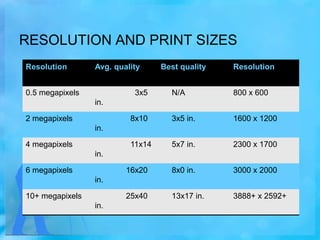
RESOLUTION AND PRINT SIZES
Resolution

Avg. quality

0.5 megapixels

3x5

Best quality

Resolution

N/A

800 x 600

8x10

3x5 in.

1600 x 1200

11x14

5x7 in.

2300 x 1700

16x20

8x0 in.

3000 x 2000

25x40

13x17 in.

3888+ x 2592+

in.
2 megapixels
in.
4 megapixels

in.
6 megapixels
in.
10+ megapixels
in.
PHOTOGRAPHY TECHNICALITY
Anti-Blur
Anti-Shake
Image Stabilization
Vibration Reduction

•A technology that stabilizes the lens to
effectively reduce blur due to camera shake
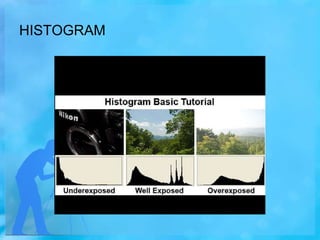
HISTOGRAM
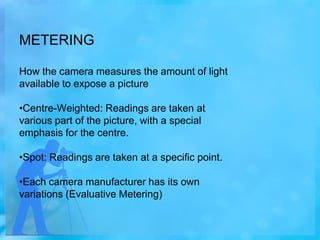
METERING
How the camera measures the amount of light
available to expose a picture
•Centre-Weighted: Readings are taken at
various part of the picture, with a special
emphasis for the centre.
•Spot: Readings are taken at a specific point.
•Each camera manufacturer has its own
variations (Evaluative Metering)
WHITE BALANCE
The ability to adjust colours based on white as
a reference colour to give as true a white as
possible
•All other colours are corrected accordingly
•Auto WB (AWB): the camera determines and
selects the correct colour temperature for
white.
WHITE BALANCE
Some preset white balance settings are
daylight, cloudy, tungsten, or fluorescent.
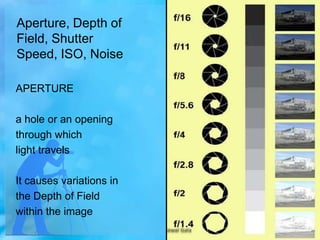
Aperture, Depth of
Field, Shutter
Speed, ISO, Noise
APERTURE
a hole or an opening
through which
light travels
It causes variations in
the Depth of Field
within the image
Shutter Speed
•Amount of time the
picture is exposed

•Short/Fast shutter speed
•Long/Slow shutter speed
RESULTS OF VARYING SHUTTER SPEED
ISO

•the measure of a digital camera sensor‟s
sensitivity to light
•a higher number indicates higher sensitivity
•This is usually expressed as a range,
e.g. ISO 100 - 1600.
•A higher sensitivity allows us to take pictures
in low light without using flash

•Higher ISO causes more "noise" than lower
ISO
Shutter Priority
Allows you to decide the shutter speed (e.g. fast at 1/500
sec. for stop action photography, or slow at 2 sec. for
night photography), and the camera decides the best
aperture.
Aperture Priority

Allows you to choose the aperture (e.g. large
at F1.8 for portrait, of small at F16 for
landscapes).
Manual
You have complete creative control in selecting
both the shutter and aperture.
Auto
All digital cameras usually have an Auto mode:
the camera decides for you the best shutter
speed/aperture settings.
Landscape photography
Primary function is to allow a large depth of field.
Landscape mode tells the camera to default to a
large Depth of Field (Small Aperture)–f16.
Portrait Photography

This mode is not well suited for full-length
portraits or groups of people
Portrait mode tells the camera to default to a:
•Small Depth of Field (Large Aperture)– f1.8
Sports/Action Photography
tells the camera to default its settings toward
capturing images faster
This is done by:
•Increasing Shutter Speed
•Increasing ISO
Night Photography

This preset slows down the shutter speed to
allow a lot of light into the camera.
•Both the foreground and background of the
image are properly exposed.
•very useful in taking low-light
images where you do not want
the background to be black
Macro Photography
This setting works with your camera
lens to allow it to focus from a very
short distance.
•Depth of Field becomes very Small
(Large Aperture)– f1.8

•Does not have a lot of alternative
uses.
Why compose your images?
Create the picture.
Decide what is in and what is left out.

“Convince” the eye to glance at it moment longer.
“Composition" means "Putting Together"
Rule
Of
Thirds
Rule of thirds
The theory is that your photo becomes more
balanced and will enable a viewer of the
image to interact with it more naturally.
People‟s eyes usually go to one of the
intersection points most naturally rather than
the centre of the shot.
It works with this natural way of viewing an
image rather than working against it
Important to experiment to overcome the
natural
tendency to centre everything.
•But, sometimes you may find situations where it's
difficult to follow the rule of thirds.
•If you know why you're doing it -feel free!

•But when you're first starting out it's a good idea
to try to follow it whenever you can.
Converging composition
leads the viewer‟s eye into the depth of the
Photo.
Usually, centre it and create a symmetrical
composition leading to the centre.
Camera lens filters still have many uses in digital
photography, and should be an important part of any
photographer's camera bag....
Here is the major filters and their function...

1 - Protective Filters
UV Filters - Absorbs ultraviolet rays. Gives cleaner, sharper pictures
with less haze. Also serves as a permanent lens protector.
Personally, i have a UV filter on every lens :)
EXIF (exchangeable image
file)
• EXIF (exchangeable image file) data is a record of what
camera settings were used to take a photograph.
EXIF data stores information like camera model,
exposure, aperture, ISO, what camera mode was used
.....
To interpret this EXIF data, you will need an EXIF
viewer. There are many ways to go about this. Your
image processing program should provide that
functionality within the program.
For beginners, reading an images EXIF data can be a
very useful learning tool....
Night photography
Take a number of shots at different shutter speed/aperture combinations.

Ensure your LCD brightness is set to Normal, not Bright, for a truer
representation of your recorded image.
A good aperture to start with is F4.0 or F5.6 (for greatest depth of field),
and adjust shutter speed up or down until you're satisfied with the shot.
Always bring and use a tripod. It's quite common to have exposures of an
entire second or more during night-time photography.
Bring along a flashlight. A pocket flashlight is essential when you're doing
photography at night.
Minimalistic photography
Minimalistic photos is creating „empty‟ spaces in the photograph....

The eye of the person looking at the image can‟t help but be drawn
to the element of the image you‟ve taken.... the subject!
“make your subject the strongest point of your photo even though it
might take up only a small part of the overall image”....

When I‟m attempting to take a show with a minimalist feel to it I keep
those words in mind.
pick subjects wisely
experiment with color
use depth of field
crop out distractions
Zoom In or out...

Learn basic photography in detail

  • 1.
  • 2.
    Basics of Equipment •MegapixelMyth •Photography Jargons Explained •Concepts: Aperture, Depth of Field, Shutter Speed, ISO, Noise •Understanding Digital Photography •Styles/Modes of Photography •Tools & Techniques of Composition
  • 3.
    Choosing the BestCamera •Not a once in a lifetime purchase anymore. •Select one which can do the job you want Today and as per your future requirement •Some kinds of cameras do. some kinds of things better or more easily e.g., Sports photography vs. Close-up portraits. •Price isn‟t the best indicator.
  • 4.
    TYPES OF CAMERAS •WEB CAMERAS AND MOBILE CAMERAS
  • 5.
  • 6.
  • 7.
  • 8.
  • 9.
    MEGAPIXEL MYTH How muchdo you need? •Often, cameras are categorized by the no. of Megapixels they can capture . •As if that resolution figure is the only measure of the camera‟s value. •This value can be quite misleading.
  • 10.
    ZOOM: OPTICAL ANDDIGITAL Optical vs. Digital Zoom •An optical zoom uses the optics (lens) of the digital camera to move you closer to your subject. •A digital zoom simply enlarges the existing image digitally. It is not really zoom, in the strictest definition of the term. •Enlarging the image digitally reduces picture quality, and should therefore usually be avoided . •Some manufacturers label their lenses with the "total zoom" by multiplying the optical with the digital. Ignore It. •When comparing digital cameras: Go for higher optical zoom. Digital zoom can always be achieved later in an image editing software.
  • 11.
    RESOLUTION AND PRINTSIZES Resolution Avg. quality 0.5 megapixels 3x5 Best quality Resolution N/A 800 x 600 8x10 3x5 in. 1600 x 1200 11x14 5x7 in. 2300 x 1700 16x20 8x0 in. 3000 x 2000 25x40 13x17 in. 3888+ x 2592+ in. 2 megapixels in. 4 megapixels in. 6 megapixels in. 10+ megapixels in.
  • 12.
    PHOTOGRAPHY TECHNICALITY Anti-Blur Anti-Shake Image Stabilization VibrationReduction •A technology that stabilizes the lens to effectively reduce blur due to camera shake
  • 13.
  • 14.
    METERING How the camerameasures the amount of light available to expose a picture •Centre-Weighted: Readings are taken at various part of the picture, with a special emphasis for the centre. •Spot: Readings are taken at a specific point. •Each camera manufacturer has its own variations (Evaluative Metering)
  • 15.
    WHITE BALANCE The abilityto adjust colours based on white as a reference colour to give as true a white as possible •All other colours are corrected accordingly •Auto WB (AWB): the camera determines and selects the correct colour temperature for white.
  • 16.
    WHITE BALANCE Some presetwhite balance settings are daylight, cloudy, tungsten, or fluorescent.
  • 17.
    Aperture, Depth of Field,Shutter Speed, ISO, Noise APERTURE a hole or an opening through which light travels It causes variations in the Depth of Field within the image
  • 21.
    Shutter Speed •Amount oftime the picture is exposed •Short/Fast shutter speed •Long/Slow shutter speed
  • 22.
    RESULTS OF VARYINGSHUTTER SPEED
  • 23.
    ISO •the measure ofa digital camera sensor‟s sensitivity to light •a higher number indicates higher sensitivity •This is usually expressed as a range, e.g. ISO 100 - 1600. •A higher sensitivity allows us to take pictures in low light without using flash •Higher ISO causes more "noise" than lower ISO
  • 24.
    Shutter Priority Allows youto decide the shutter speed (e.g. fast at 1/500 sec. for stop action photography, or slow at 2 sec. for night photography), and the camera decides the best aperture.
  • 25.
    Aperture Priority Allows youto choose the aperture (e.g. large at F1.8 for portrait, of small at F16 for landscapes).
  • 26.
    Manual You have completecreative control in selecting both the shutter and aperture.
  • 27.
    Auto All digital camerasusually have an Auto mode: the camera decides for you the best shutter speed/aperture settings.
  • 28.
    Landscape photography Primary functionis to allow a large depth of field. Landscape mode tells the camera to default to a large Depth of Field (Small Aperture)–f16.
  • 29.
    Portrait Photography This modeis not well suited for full-length portraits or groups of people Portrait mode tells the camera to default to a: •Small Depth of Field (Large Aperture)– f1.8
  • 30.
    Sports/Action Photography tells thecamera to default its settings toward capturing images faster This is done by: •Increasing Shutter Speed •Increasing ISO
  • 31.
    Night Photography This presetslows down the shutter speed to allow a lot of light into the camera. •Both the foreground and background of the image are properly exposed. •very useful in taking low-light images where you do not want the background to be black
  • 32.
    Macro Photography This settingworks with your camera lens to allow it to focus from a very short distance. •Depth of Field becomes very Small (Large Aperture)– f1.8 •Does not have a lot of alternative uses.
  • 33.
    Why compose yourimages? Create the picture. Decide what is in and what is left out. “Convince” the eye to glance at it moment longer. “Composition" means "Putting Together"
  • 34.
  • 35.
    Rule of thirds Thetheory is that your photo becomes more balanced and will enable a viewer of the image to interact with it more naturally. People‟s eyes usually go to one of the intersection points most naturally rather than the centre of the shot. It works with this natural way of viewing an image rather than working against it
  • 36.
    Important to experimentto overcome the natural tendency to centre everything. •But, sometimes you may find situations where it's difficult to follow the rule of thirds. •If you know why you're doing it -feel free! •But when you're first starting out it's a good idea to try to follow it whenever you can.
  • 37.
    Converging composition leads theviewer‟s eye into the depth of the Photo. Usually, centre it and create a symmetrical composition leading to the centre.
  • 38.
    Camera lens filtersstill have many uses in digital photography, and should be an important part of any photographer's camera bag.... Here is the major filters and their function... 1 - Protective Filters UV Filters - Absorbs ultraviolet rays. Gives cleaner, sharper pictures with less haze. Also serves as a permanent lens protector. Personally, i have a UV filter on every lens :)
  • 39.
    EXIF (exchangeable image file) •EXIF (exchangeable image file) data is a record of what camera settings were used to take a photograph. EXIF data stores information like camera model, exposure, aperture, ISO, what camera mode was used ..... To interpret this EXIF data, you will need an EXIF viewer. There are many ways to go about this. Your image processing program should provide that functionality within the program. For beginners, reading an images EXIF data can be a very useful learning tool....
  • 40.
    Night photography Take anumber of shots at different shutter speed/aperture combinations. Ensure your LCD brightness is set to Normal, not Bright, for a truer representation of your recorded image. A good aperture to start with is F4.0 or F5.6 (for greatest depth of field), and adjust shutter speed up or down until you're satisfied with the shot. Always bring and use a tripod. It's quite common to have exposures of an entire second or more during night-time photography. Bring along a flashlight. A pocket flashlight is essential when you're doing photography at night.
  • 41.
    Minimalistic photography Minimalistic photosis creating „empty‟ spaces in the photograph.... The eye of the person looking at the image can‟t help but be drawn to the element of the image you‟ve taken.... the subject! “make your subject the strongest point of your photo even though it might take up only a small part of the overall image”.... When I‟m attempting to take a show with a minimalist feel to it I keep those words in mind. pick subjects wisely experiment with color use depth of field crop out distractions Zoom In or out...