Jadson Santos
Computing Engineer
What is Bootstrap?
•  Bootstrap is a free front-end framework (HTML and
CSS) for faster and easier web development
•  Bootstrap is famous for being developed with
components that have the ability to follow the
property of responsive designs
•  Responsive Design is about using CSS and HTML to resize,
hide, shrink, enlarge, or move the content to make it look
good on any screen
•  Responsive Design allow your page works for computer,
tablets and mobile phones.
19/03/17 Bootstrap 2
What is Bootstrap?
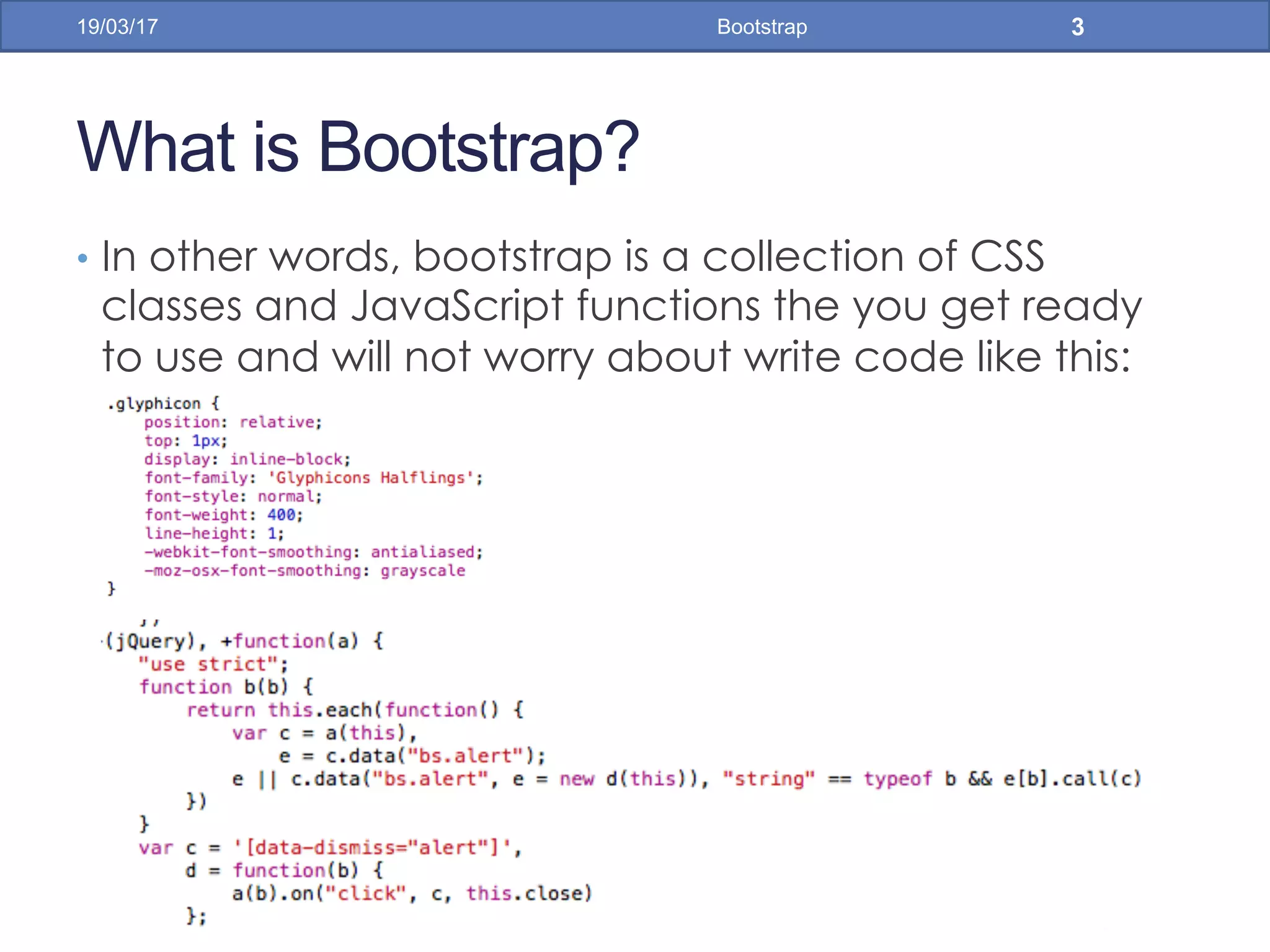
•  In other words, bootstrap is a collection of CSS
classes and JavaScript functions the you get ready
to use and will not worry about write code like this:
19/03/17 Bootstrap 3
First Bootstrap Page
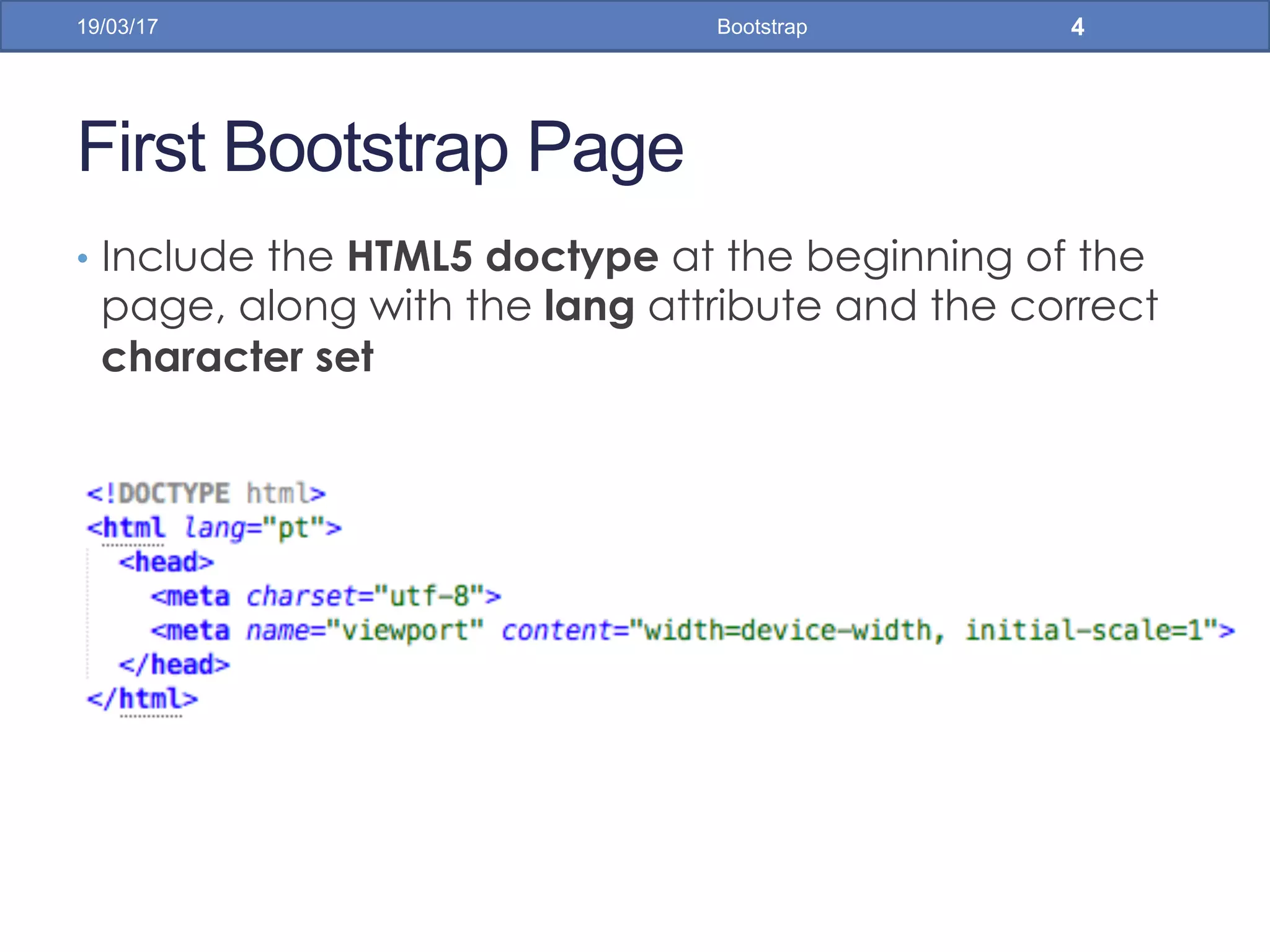
•  Include the HTML5 doctype at the beginning of the
page, along with the lang attribute and the correct
character set
19/03/17 Bootstrap 4
First Bootstrap Page
•  Meta viewport tag ensure proper rendering and
touch zooming
•  Width of the page to follow the screen-width of the
device and initial zoom level to default zoom level of
device
•  User will have a better experience, thus will not need
zoom the page to view page information
19/03/17 Bootstrap 5
First Bootstrap Page
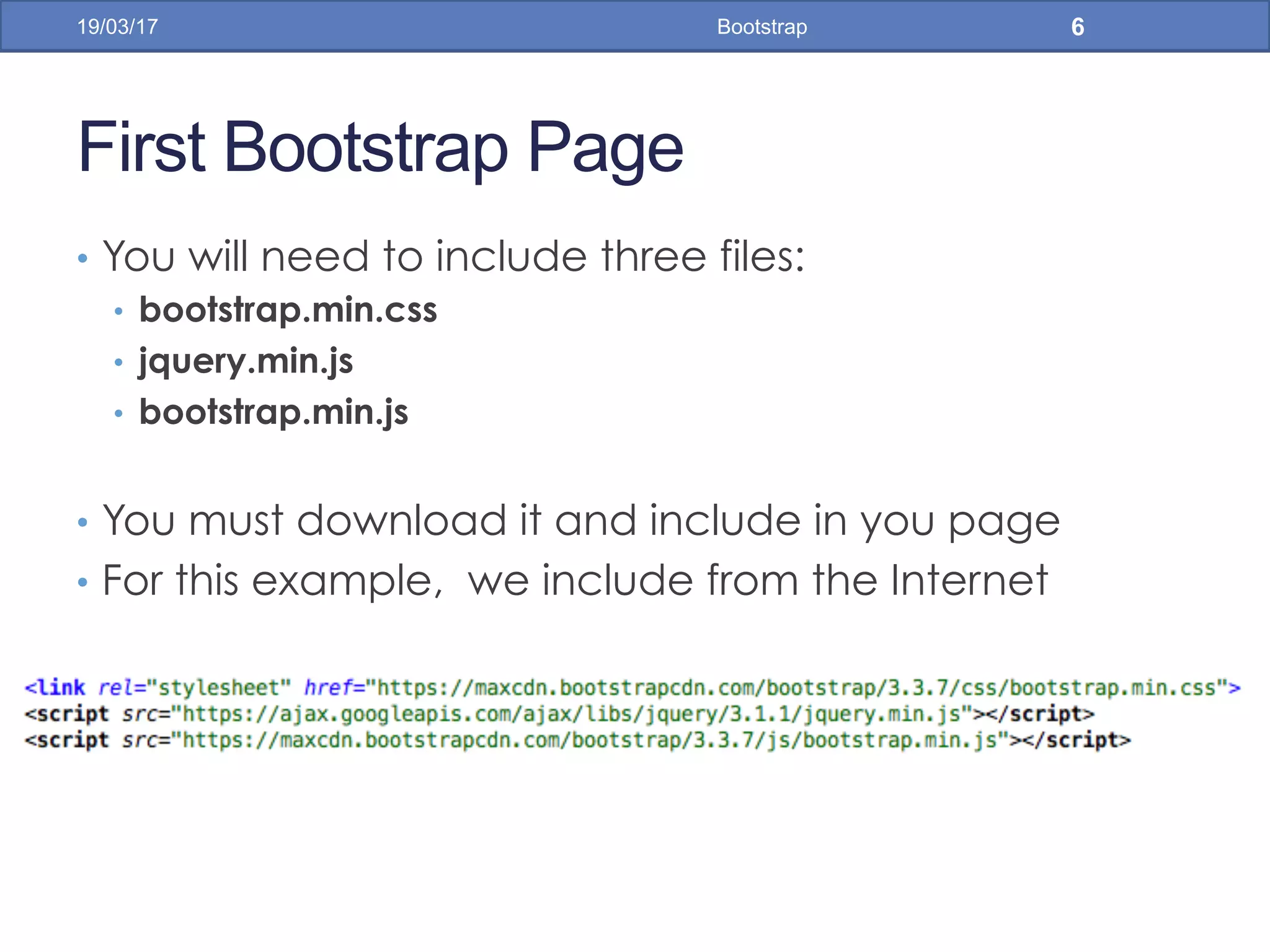
•  You will need to include three files:
•  bootstrap.min.css
•  jquery.min.js
•  bootstrap.min.js
•  You must download it and include in you page
•  For this example, we include from the Internet
19/03/17 Bootstrap 6
First Bootstrap Page
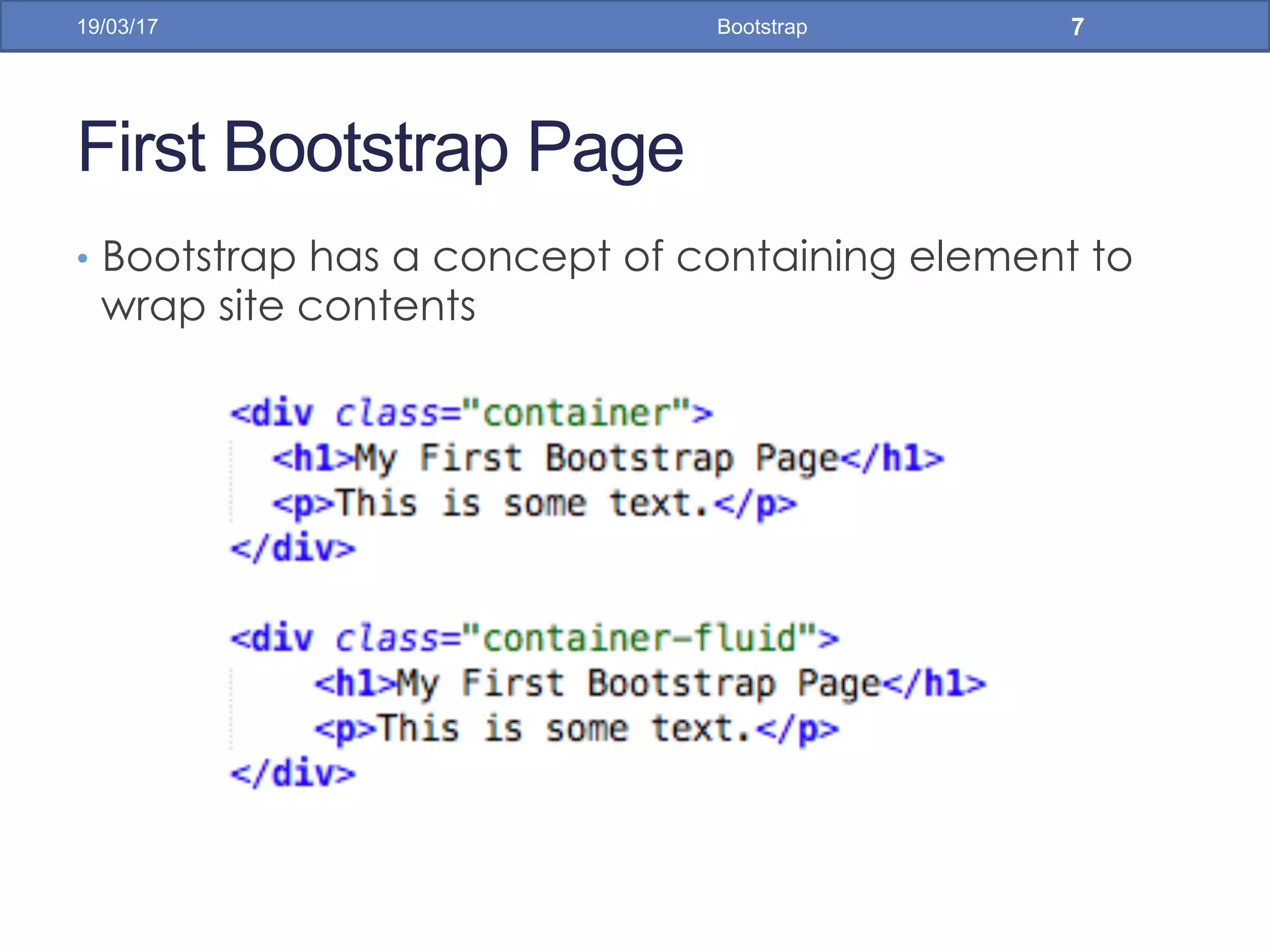
•  Bootstrap has a concept of containing element to
wrap site contents
19/03/17 Bootstrap 7
Bootstrap Grids
•  Bootstrap's grid system allows up to 12 columns
across the page
•  You can divide the container in rows and each row
in columns with space multiple of the 12
19/03/17 Bootstrap 8
Bootstrap Grids
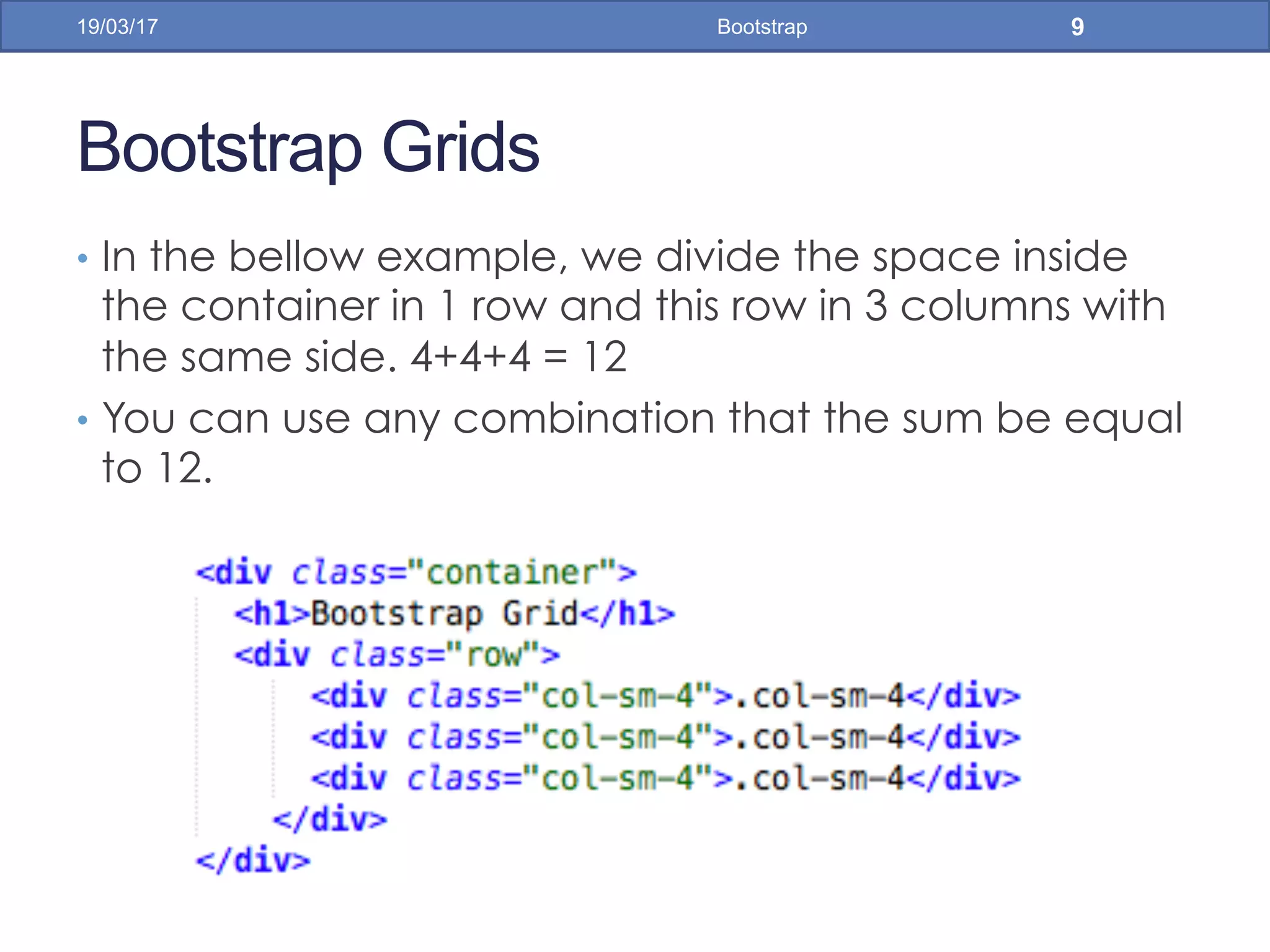
•  In the bellow example, we divide the space inside
the container in 1 row and this row in 3 columns with
the same side. 4+4+4 = 12
•  You can use any combination that the sum be equal
to 12.
19/03/17 Bootstrap 9
Bootstrap Grids
•  Responsive Bootstrap's grid system with 3 columns
19/03/17 Bootstrap 10
small screens big screens
Bootstrap Table
•  4 main classes:
•  .table
•  .table-striped
•  .table-bordered
•  .table-hover
•  5 contextual classes:
•  .active
•  .success
•  .info
•  .warning
•  .danger
19/03/17 Bootstrap 11
Bootstrap Tables
19/03/17 Bootstrap 12
Bootstrap Tables
19/03/17 Bootstrap 13
Bootstrap Images
•  3 main classes:
•  . img-rounded
•  . img-circle
•  . img-thumbnail
19/03/17 Bootstrap 14
Bootstrap Images
19/03/17 Bootstrap 15
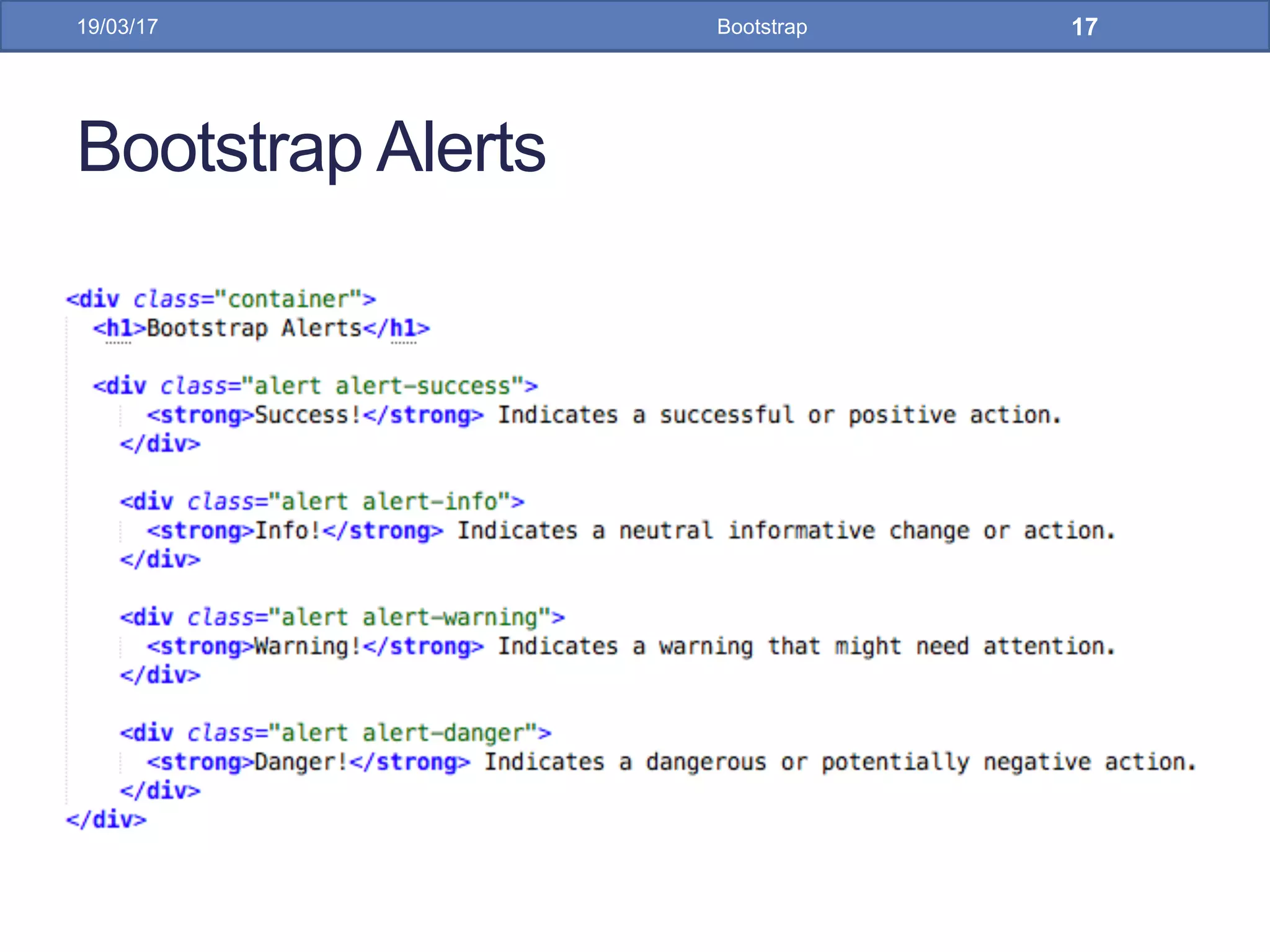
Bootstrap Alerts
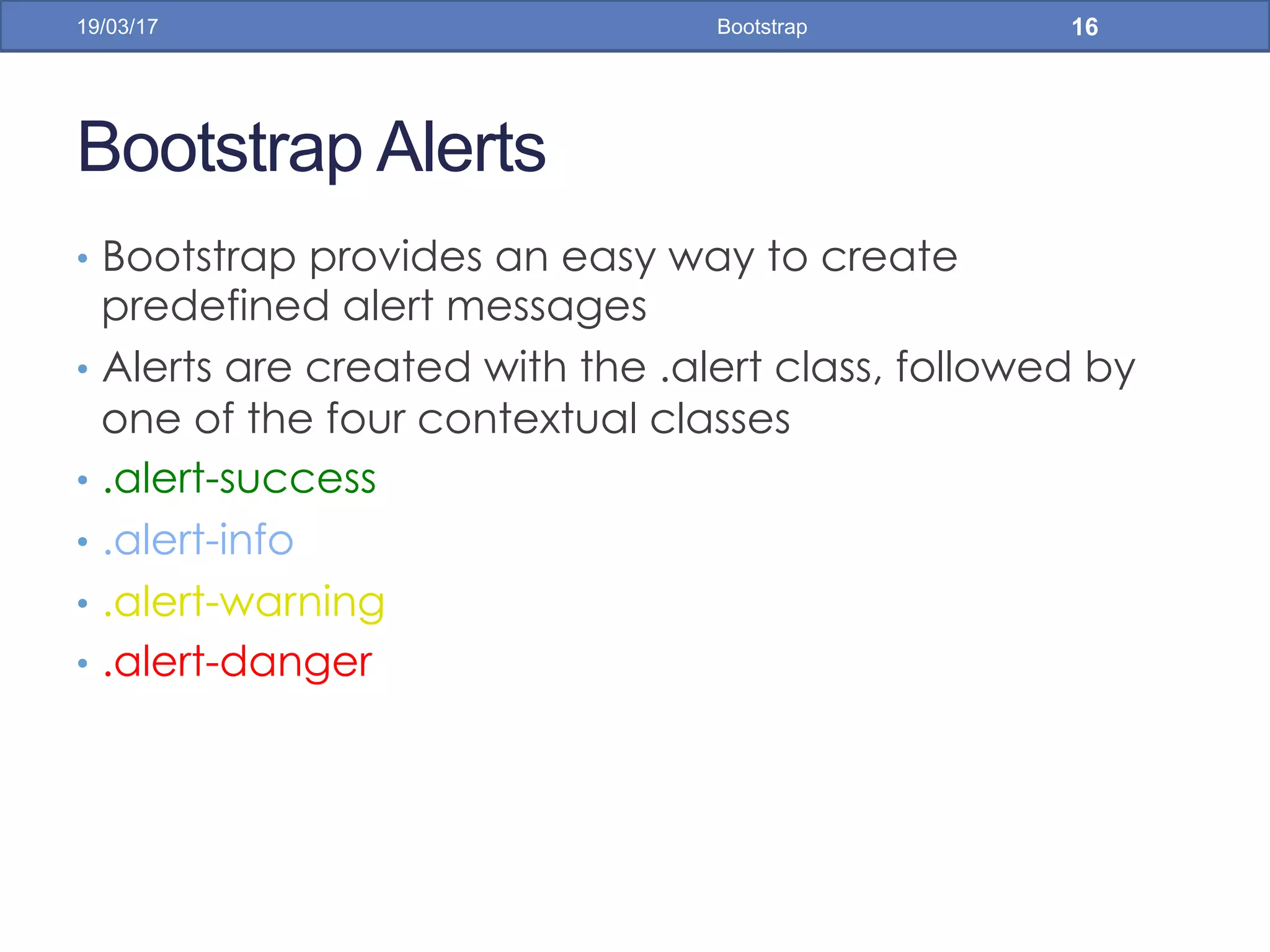
•  Bootstrap provides an easy way to create
predefined alert messages
•  Alerts are created with the .alert class, followed by
one of the four contextual classes
•  .alert-success
•  .alert-info
•  .alert-warning
•  .alert-danger
19/03/17 Bootstrap 16
Bootstrap Alerts
19/03/17 Bootstrap 17
Bootstrap Alerts
19/03/17 Bootstrap 18
Bootstrap Buttons
•  Bootstrap provides seven styles of buttons:
•  To achieve the button styles above, Bootstrap has
the following contextual classes:
•  .btn-default
•  .btn-primary
•  .btn-success
•  .btn-info
•  .btn-warning
•  .btn-danger
•  .btn-link
19/03/17 Bootstrap 19
Bootstrap Buttons
19/03/17 Bootstrap 20
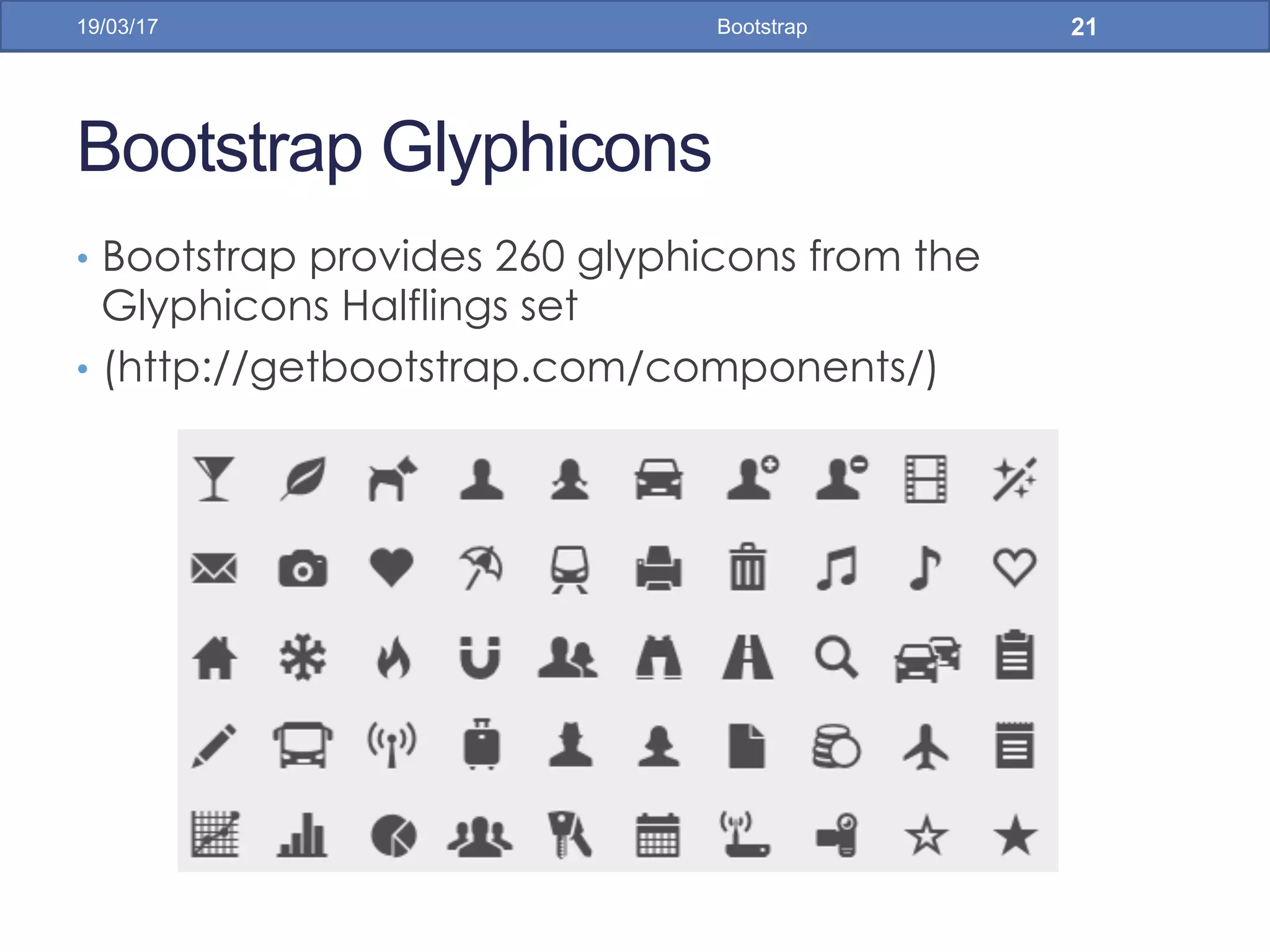
Bootstrap Glyphicons
•  Bootstrap provides 260 glyphicons from the
Glyphicons Halflings set
•  (http://getbootstrap.com/components/)
19/03/17 Bootstrap 21
Bootstrap Glyphicons
19/03/17 Bootstrap 22
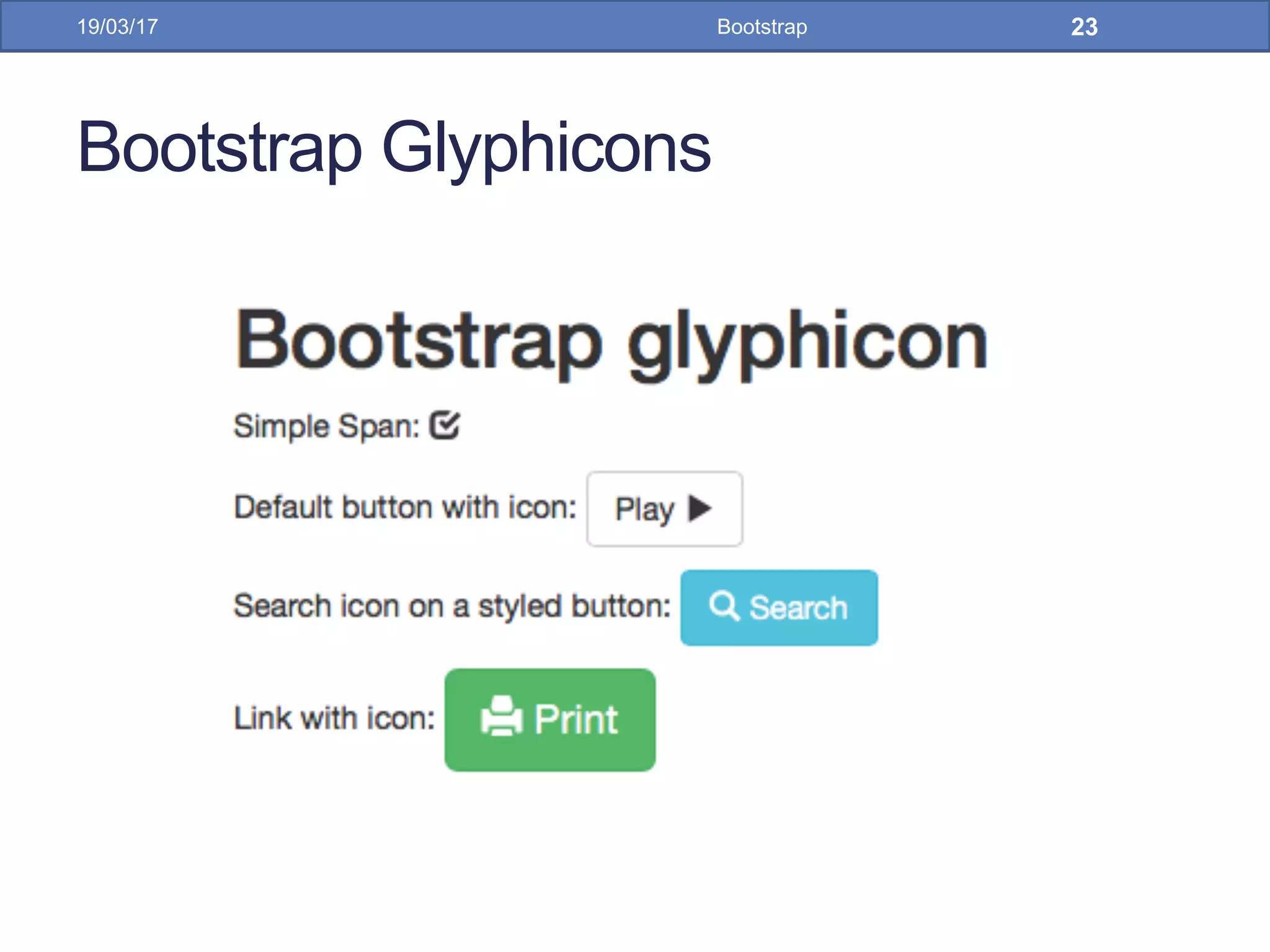
Bootstrap Glyphicons
19/03/17 Bootstrap 23
Bootstrap Labels
19/03/17 Bootstrap 24
•  Labels are used to provide information about
something
•  Bootstrap create labels with colorful backgrounds to
highlight the text inside de label
•  Use the .label class, followed by one of the six
contextual classes .label-default, .label-
primary, .label-success, .label-info, .label-warning
or .label-danger
Bootstrap Labels
19/03/17 Bootstrap 25
Bootstrap Panels
19/03/17 Bootstrap 26
•  A panel in bootstrap is a bordered box with some
padding around its content that can be use to
highlight or separated some information
•  Like other bootstrap elements panel has contextual
classes also (.panel-default, .panel-primary, .panel-
success, .panel-info, .panel-warning, or .panel-
danger)
Bootstrap Panels
19/03/17 Bootstrap 27
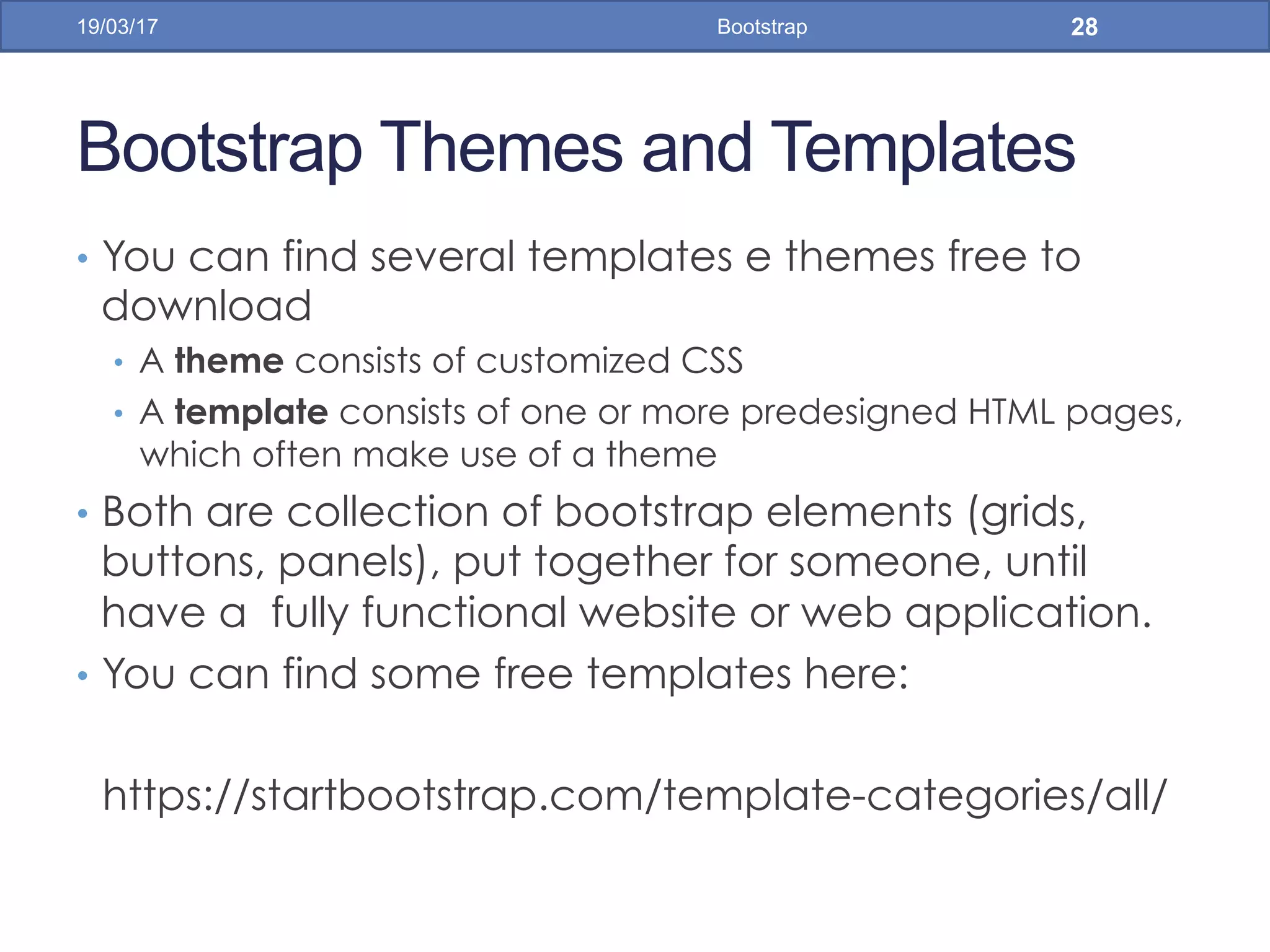
Bootstrap Themes and Templates
•  You can find several templates e themes free to
download
•  A theme consists of customized CSS
•  A template consists of one or more predesigned HTML pages,
which often make use of a theme
•  Both are collection of bootstrap elements (grids,
buttons, panels), put together for someone, until
have a fully functional website or web application.
•  You can find some free templates here:
https://startbootstrap.com/template-categories/all/
19/03/17 Bootstrap 28
Bootstrap Themes and Templates
•  For web application SB Admin 2 template is
appropriate. It has forms, tables, charts and other
useful components
19/03/17 Bootstrap 29
Bootstrap Themes and Templates
•  Download SB Admin 2 template for your computer
and open the /pages/index.html in your web
browser
•  Start to customize it, instead write you application
design from scratch
19/03/17 Bootstrap 30
Bootstrap Themes and Templates
19/03/17 Bootstrap 31
Bootstrap19/03/17 32
• References
• w3schools. Bootstrap 3 Tutorial. https://
www.w3schools.com/bootstrap/
• Source Code
• https://github.com/jadsonjs/bootstrap

Bootstrap

  • 1.
  • 2.
    What is Bootstrap? • Bootstrap is a free front-end framework (HTML and CSS) for faster and easier web development •  Bootstrap is famous for being developed with components that have the ability to follow the property of responsive designs •  Responsive Design is about using CSS and HTML to resize, hide, shrink, enlarge, or move the content to make it look good on any screen •  Responsive Design allow your page works for computer, tablets and mobile phones. 19/03/17 Bootstrap 2
  • 3.
    What is Bootstrap? • In other words, bootstrap is a collection of CSS classes and JavaScript functions the you get ready to use and will not worry about write code like this: 19/03/17 Bootstrap 3
  • 4.
    First Bootstrap Page • Include the HTML5 doctype at the beginning of the page, along with the lang attribute and the correct character set 19/03/17 Bootstrap 4
  • 5.
    First Bootstrap Page • Meta viewport tag ensure proper rendering and touch zooming •  Width of the page to follow the screen-width of the device and initial zoom level to default zoom level of device •  User will have a better experience, thus will not need zoom the page to view page information 19/03/17 Bootstrap 5
  • 6.
    First Bootstrap Page • You will need to include three files: •  bootstrap.min.css •  jquery.min.js •  bootstrap.min.js •  You must download it and include in you page •  For this example, we include from the Internet 19/03/17 Bootstrap 6
  • 7.
    First Bootstrap Page • Bootstrap has a concept of containing element to wrap site contents 19/03/17 Bootstrap 7
  • 8.
    Bootstrap Grids •  Bootstrap'sgrid system allows up to 12 columns across the page •  You can divide the container in rows and each row in columns with space multiple of the 12 19/03/17 Bootstrap 8
  • 9.
    Bootstrap Grids •  Inthe bellow example, we divide the space inside the container in 1 row and this row in 3 columns with the same side. 4+4+4 = 12 •  You can use any combination that the sum be equal to 12. 19/03/17 Bootstrap 9
  • 10.
    Bootstrap Grids •  ResponsiveBootstrap's grid system with 3 columns 19/03/17 Bootstrap 10 small screens big screens
  • 11.
    Bootstrap Table •  4main classes: •  .table •  .table-striped •  .table-bordered •  .table-hover •  5 contextual classes: •  .active •  .success •  .info •  .warning •  .danger 19/03/17 Bootstrap 11
  • 12.
  • 13.
  • 14.
    Bootstrap Images •  3main classes: •  . img-rounded •  . img-circle •  . img-thumbnail 19/03/17 Bootstrap 14
  • 15.
  • 16.
    Bootstrap Alerts •  Bootstrapprovides an easy way to create predefined alert messages •  Alerts are created with the .alert class, followed by one of the four contextual classes •  .alert-success •  .alert-info •  .alert-warning •  .alert-danger 19/03/17 Bootstrap 16
  • 17.
  • 18.
  • 19.
    Bootstrap Buttons •  Bootstrapprovides seven styles of buttons: •  To achieve the button styles above, Bootstrap has the following contextual classes: •  .btn-default •  .btn-primary •  .btn-success •  .btn-info •  .btn-warning •  .btn-danger •  .btn-link 19/03/17 Bootstrap 19
  • 20.
  • 21.
    Bootstrap Glyphicons •  Bootstrapprovides 260 glyphicons from the Glyphicons Halflings set •  (http://getbootstrap.com/components/) 19/03/17 Bootstrap 21
  • 22.
  • 23.
  • 24.
    Bootstrap Labels 19/03/17 Bootstrap24 •  Labels are used to provide information about something •  Bootstrap create labels with colorful backgrounds to highlight the text inside de label •  Use the .label class, followed by one of the six contextual classes .label-default, .label- primary, .label-success, .label-info, .label-warning or .label-danger
  • 25.
  • 26.
    Bootstrap Panels 19/03/17 Bootstrap26 •  A panel in bootstrap is a bordered box with some padding around its content that can be use to highlight or separated some information •  Like other bootstrap elements panel has contextual classes also (.panel-default, .panel-primary, .panel- success, .panel-info, .panel-warning, or .panel- danger)
  • 27.
  • 28.
    Bootstrap Themes andTemplates •  You can find several templates e themes free to download •  A theme consists of customized CSS •  A template consists of one or more predesigned HTML pages, which often make use of a theme •  Both are collection of bootstrap elements (grids, buttons, panels), put together for someone, until have a fully functional website or web application. •  You can find some free templates here: https://startbootstrap.com/template-categories/all/ 19/03/17 Bootstrap 28
  • 29.
    Bootstrap Themes andTemplates •  For web application SB Admin 2 template is appropriate. It has forms, tables, charts and other useful components 19/03/17 Bootstrap 29
  • 30.
    Bootstrap Themes andTemplates •  Download SB Admin 2 template for your computer and open the /pages/index.html in your web browser •  Start to customize it, instead write you application design from scratch 19/03/17 Bootstrap 30
  • 31.
    Bootstrap Themes andTemplates 19/03/17 Bootstrap 31
  • 32.
    Bootstrap19/03/17 32 • References • w3schools. Bootstrap3 Tutorial. https:// www.w3schools.com/bootstrap/ • Source Code • https://github.com/jadsonjs/bootstrap