Eng. MSc. Jadson Santos
Gradle
14/01/2017 Gradle 2
• Gradle is an advanced build tool of general
purpose base on Groovy
Why use a build tool?
14/01/2017 Gradle 3
Why do not use Eclipse to build a system?
14/01/2017 Gradle 4
• You can not build automatically from everywhere
with Eclipse
• You will always need a person to build
Make
• Makefile is used to compile, linking, assembly
among other tasks such as cleaning up
temporary files, executing commands, etc.
14/01/2017 Gradle 5
Apache ANT
• The first widely build tool of the Java world
• Ant is extremely flexible and does not impose
coding conventions or directory layouts to the
Java projects
14/01/2017 Gradle 6
Apache ANT
• Example
14/01/2017 Gradle 7
Apache ANT
• Example
14/01/2017 Gradle 8
Apache ANT
• Example
14/01/2017 Gradle 9
Apache ANT
• Apache Ant cons
• Too flexible
• Write a lot of thing to do a simple build
• The projects have no a standard structure,
everyone create your own structure
14/01/2017 Gradle 10
Apache Maven
• Simple project setup that follows best practices
- get a new project or module started in
seconds
• Convention over Configuration
• Superior dependency management including
automatic updating, dependency closures (also
known as transitive dependencies)
14/01/2017 Gradle 11
Apache Maven
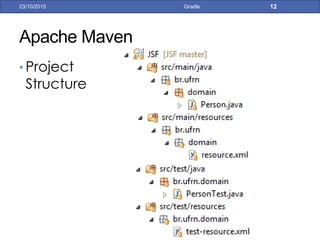
• Project
Structure
14/01/2017 Gradle 12
Apache Maven
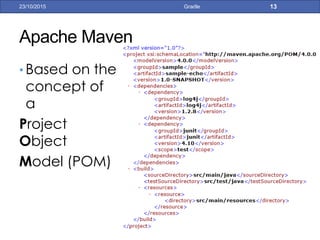
• Based on the
concept of a
Project Object
Model (POM)
14/01/2017 Gradle 13
Apache Maven
• Maven has a central repository
14/01/2017 Gradle 14
http://mvnrepository.com/
Apache Maven
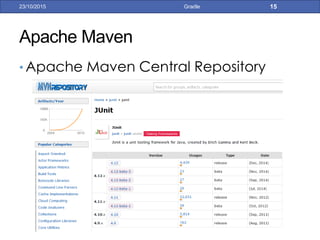
• Apache Maven Central Repository
14/01/2017 Gradle 15
Apache Maven
• Apache Maven Central Repository
14/01/2017 Gradle 16
Apache Maven
• Apache Maven Central Repository
14/01/2017 Gradle 17
Central Repository
Exist?
1º
2º
3º
2º / 4º
Local Repository
Apache Maven
• Apache Maven cons
• Too hard / rigid
• Use of XML in the build file
• Maven works great for 90% of the most
common things, but complicates a lot for those
10% of specifics things of your project
14/01/2017 Gradle 18
Apache Maven
• Apache Maven
cons
14/01/2017 Gradle 19
Why Gradle?
• Gradle combines good parts of both tools and
builds on top of them with DSL and other
improvements
• It has Ant’s power and flexibility
• Maven’s life-cycle and ease of use
14/01/2017 Gradle 20
Why Gradle?
14/01/2017 Gradle 21
Why Gradle?
14/01/2017 Gradle 22
Why Gradle?
14/01/2017 Gradle 23
Why Gradle?
14/01/2017 Gradle 24
• https://gradle.org/maven_vs_gradle/
Who is using Gradle?
14/01/2017 Gradle 25
Who is using Gradle?
14/01/2017 Gradle 26
Gradle Introduction
• The script of the Gradle is a groovy script with a
DSL to facilitated the tasks necessary to build
• Instead with groovy language of “fors” and “ifs”,
the Gradle DSL helps you
14/01/2017 Gradle 27
DSL = Domain Specific Language
• Small languages to solve a very specific problem
• Example: SQL
• SQL is an easer way to recovery data, instead use generic
languages:
for(int i = 0 ; i < qtdDiscente; i++){
if(discenteCollection[i].getMatricula() == 2013106430)
discentes.add(new Object[].{discenteCollection[i].getId(),
discenteCollection[i].getMatricula(),
discenteCollection[i].getAnoIngresso()});
}
return discentes;
14/01/2017 Gradle 28
Gradle DSL
• https://docs.gradle.org/current/dsl/
14/01/2017 Gradle 29
Gradle Introduction
• Gradle is composed of two concepts: Projects
and Tasks
• A Project may represent the creation of a jar or a
deploy of an application on the server. Each
project is composed of several Tasks
• Tasks represent some atomic job.
14/01/2017 Gradle 30
Gradle Introduction
• Example of a gradle task
14/01/2017 Gradle 31
Gradle Introduction
• Like ANT, it allows you to setup default tasks and
dependencies between tasks.
14/01/2017 Gradle 32
Gradle Introduction
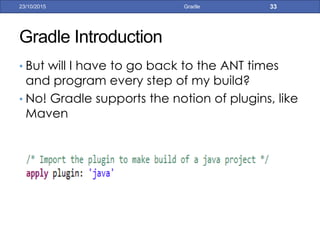
• But will I have to go back to the ANT times and
program every step of my build?
• No! Gradle supports the notion of plugins, like Maven
14/01/2017 Gradle 33
Gradle Introduction
• Tasks of the Java Plugin
14/01/2017 Gradle 34
Gradle Introduction
• Like Maven, Gradle uses Convention over
Configuration
• Imagine… What is the Gradle project Structure?
• The same of Maven 
14/01/2017 Gradle 35
Gradle Introduction
• Dependency management is a critical feature of
every build
• Transitive dependency management
• Support for non-managed dependencies
• Support for custom dependency definitions
• Full Compatibility with Maven and Ivy
• Integration with existing dependency management
infrastructure
14/01/2017 Gradle 36
Gradle Simple Java Project
• Project Structure
14/01/2017 Gradle 37
Gradle Simple Java Project
• Project Build File
14/01/2017 Gradle 38
Apply Java Plugin
Declare the repository to
download de dependencies
Declare the dependencies
of your application
Gradle Simple Web Project
• Project Structure
14/01/2017 Gradle 39
Gradle Simple Web Project
• Project Build File
14/01/2017 Gradle 40
Apply Java and War Plugin
Declare the directory of
web application files
Gradle
• Group and Version of your application
14/01/2017 Gradle 41
Gradle
• Information about source code
14/01/2017 Gradle 42
Include source lines and
vars at the .jar generated
Gradle
• Declare others repositories
14/01/2017 Gradle 43
Gradle
• Plugins to configure your application to your
preferred IDE.
14/01/2017 Gradle 44
Gradle Eclipse Plugin
• Windows -> Eclipse Market -> Gradle ->
Buildship Gradle Integration + Minimalist
Gradle Editor
14/01/2017 Gradle 45
Gradle Eclipse Plugin
• Importing project as a Gradle Project
• Import as -> Select “Gradle Project”
14/01/2017 Gradle 46
Gradle Eclipse Plugin
• Importing project as a Gradle Project
• Select the project location
14/01/2017 Gradle 47
Gradle Eclipse Plugin
• Importing project
as a Gradle
Project
• Use the Gradle
wrapper inside de
project or select
the gradle local
instalation
14/01/2017 Gradle 48
Gradle Eclipse Plugin
• Buildship Gradle Integration plugin does not come with a
good editor
• Change the default Gradle editor
14/01/2017 Gradle 49
Gradle Eclipse Plugin
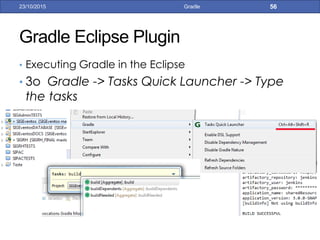
• Executing Gradle in the Eclipse
• Gradle Tasks tab -> Select the tasks -> double click in it
14/01/2017 Gradle 50
Gradle Eclipse Plugin
• Executing Gradle in the Eclipse
• Usually when you import a Java project as a Gradle Project we
have compilation errors.
• So we need to run the “eclipse” task to Gradle generate the
.classpath e .project files.
• The compilation errors will disappear
14/01/2017 Gradle 51
Gradle Multiple Projects
• Real applications usually consist in many projects
with dependences between theses projects, for
example a common project that contains common
code used by others projects
• Gradle supports this structure.
14/01/2017 Gradle 52
Gradle Multiple Projects
• Define a root project that consist of 3 projects
• app
• api
• build.gradle
• impl
• build.gradle
• common
• build.gradle
• build.gradle
• settings.gradle
14/01/2017 Gradle 53
Gradle Multiple Projects
• File settings.gradle of the root project
14/01/2017 Gradle 54
Gradle Multiple Projects
• With the buildship plugin, when you import the
root project, all subprojects are imported
14/01/2017 Gradle 55
Gradle Multiple Projects
• In the build.gradle of the root project you can
apply general configuration for all projects or all
subprojects
14/01/2017 Gradle 56
Gradle Multiple Projects
• Dependence between projects
• impl project depend of common and api project
• So you can declare theses dependence in build.gradle of impl
project
14/01/2017 Gradle 57
Gradle Multiple Projects
• Dependence between projects
• impl project depend of common and api project
• So you can declare theses dependence in build.gradle of impl
project
14/01/2017 Gradle 58
Eclipse plugin configure the projects
as dependence
Gradle Composite builds (3.3)
• “A composite build is simply a build that includes other
builds. In many ways a composite build is similar to a
Gradle multi-project build, except that instead of including
single projects, complete builds are included”.
• https://docs.gradle.org/current/userguide/composite_builds.html
14/01/2017 Gradle 59
Gradle Composite builds (3.3)
• Your application has several modules, and you change a
module, usually you need build the module, publish the jar
to a repository and update other modules to have the
changes
• Composite builds helps us the split up the project into
smaller, independent builds. You can now quick-fix the
dependency and see the result right away.
14/01/2017 Gradle 60
Gradle Composite builds (3.3)
• In the settings.gradle file of the root project you can
include others projects build
14/01/2017 Gradle 61
Gradle Composite builds (3.3)
• Or include all projects under de “modules” directory.
14/01/2017 Gradle 62
Gradle in the GIT
• .gitignore file for Gradle projects
14/01/2017 Gradle 63
Converting Maven projects to Gradle
• Execute:
gradle init --type pom
• on the command line that Gradle will generate a
build.gradle from pom.xml file if all used Maven
plug-ins are known by Gradle
14/01/2017 Gradle 64
Gradle Integration with Jenkins
• Jenkins is an award-winning, cross-platform, continuous
integration and continuous delivery application that
increases your productivity.
• Use Jenkins to build and test your software projects
continuously making it easier for developers to integrate
changes to the project
14/01/2017 Gradle 65
Gradle Integration with Jenkins
• Jenkins basically schedule jobs (threads) to execute
some task
14/01/2017 Gradle 66
http://jenkins.info.ufrn.br/
Gradle Integration with Jenkins
14/01/2017 Gradle 67
First, we need to install
the Jenkins Gradle
plugin
Gradle Integration with Jenkins
14/01/2017 Gradle 68
• After install the plugin, in the Jenkins job, select “Invoke
Gradle script” and then write the tasks to be invoked
Gradle Integration with Jenkins
14/01/2017 Gradle 69
• Projects that generated a JAR to be publish in artefactory
Gradle Integration with Jenkins
14/01/2017 Gradle 70
• Projects that generated a EAR are deployed in JBOSS
surl.server.deploy.com
user
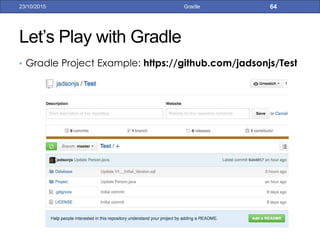
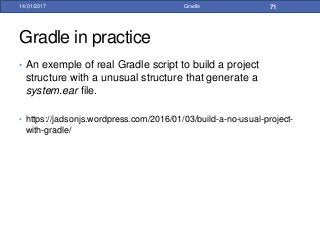
Gradle in practice
14/01/2017 Gradle 71
• An exemple of real Gradle script to build a project
structure with a unusual structure that generate a
system.ear file.
• https://jadsonjs.wordpress.com/2016/01/03/build-a-no-usual-project-
with-gradle/
Gradle in practice
14/01/2017 Gradle 72
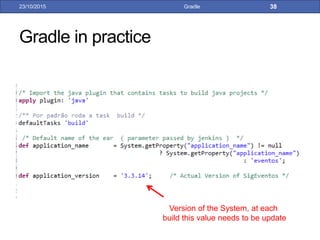
Version of the System, at each
build this value needs to be update
Gradle in practice
14/01/2017 Gradle 73
Information about the source code
Group and Version
of the artifact generated
Gradle in practice
14/01/2017 Gradle 74
Source Folders of your application
Gradle in practice
14/01/2017 Gradle 75
Maven Central Repository
Others Repositories
Gradle in practice
14/01/2017 Gradle 76
Creating 4 own configurations
Some configuration include the
dependences of others
No cache this dependences
Gradle in practice
14/01/2017 Gradle 77
Our system
dependences
Our own dependences
Dependences
Copied to deploy in JBOSS
Dependences
Can not be Copied to JBOSS
Gradle in practice
14/01/2017 Gradle 78
To generated an EAR from
complex project structure, it was
created some tasks
Here we define the order how
theses tasks will execute
Gradle in practice
14/01/2017 Gradle 79
Create the “sigeventos.war”
Copy to the EAR the
dependences and META-INF
directory
Gradle in practice
14/01/2017 Gradle 80
The power of Gradle: make specific tasks that just exists in your systems
Gradle in practice
14/01/2017 Gradle 81
Configure the Eclipse class path. Configure Build Path any more!
Gradle in practice
14/01/2017 Gradle 82
Dependence of the Gradle script
Gradle in practice
14/01/2017 Gradle 83
Use the org.hidetake.ssh plugin to system deploy:
You can deploy in several serves
Can execute something
Gradle in practice
14/01/2017 Gradle 84
Information of the JAR in the
repository
Use the org.jfrog.artifactory plugin to publish in our
internal repository:
Gradle in practice
14/01/2017 Gradle 85
Use the org.flywaydb.flyway plugin to execute SQL
scripts automatically
Want to learn more?
• Initial Tutorial:
• http://www.vogella.com/tutorials/Gradle/article.html
• The complete build script:
• https://jadsonjs.wordpress.com/2016/01/03/build-a-no-usual-
project-with-gradle/
14/01/2017 Gradle 86
Gradle
• Pictures taken from
• https://pt.wikibooks.org/wiki/Programar_em_C/Makefiles
• https://solidsoft.wordpress.com/category/tricks-tips/
• http://pt.slideshare.net/tomek_k/convention-over-configuration-
maven-3-polyglot-maven-gradle-and-ant
• https://kamaondev.wordpress.com/2013/09/16/porque-voce-deve-
trocar-o-maven-pelo-gradle/
14/01/2017 Gradle 87
14/01/2017 Gradle 88

Gradle

  • 1.
  • 2.
    Gradle 14/01/2017 Gradle 2 •Gradle is an advanced build tool of general purpose base on Groovy
  • 3.
    Why use abuild tool? 14/01/2017 Gradle 3
  • 4.
    Why do notuse Eclipse to build a system? 14/01/2017 Gradle 4 • You can not build automatically from everywhere with Eclipse • You will always need a person to build
  • 5.
    Make • Makefile isused to compile, linking, assembly among other tasks such as cleaning up temporary files, executing commands, etc. 14/01/2017 Gradle 5
  • 6.
    Apache ANT • Thefirst widely build tool of the Java world • Ant is extremely flexible and does not impose coding conventions or directory layouts to the Java projects 14/01/2017 Gradle 6
  • 7.
  • 8.
  • 9.
  • 10.
    Apache ANT • ApacheAnt cons • Too flexible • Write a lot of thing to do a simple build • The projects have no a standard structure, everyone create your own structure 14/01/2017 Gradle 10
  • 11.
    Apache Maven • Simpleproject setup that follows best practices - get a new project or module started in seconds • Convention over Configuration • Superior dependency management including automatic updating, dependency closures (also known as transitive dependencies) 14/01/2017 Gradle 11
  • 12.
  • 13.
    Apache Maven • Basedon the concept of a Project Object Model (POM) 14/01/2017 Gradle 13
  • 14.
    Apache Maven • Mavenhas a central repository 14/01/2017 Gradle 14 http://mvnrepository.com/
  • 15.
    Apache Maven • ApacheMaven Central Repository 14/01/2017 Gradle 15
  • 16.
    Apache Maven • ApacheMaven Central Repository 14/01/2017 Gradle 16
  • 17.
    Apache Maven • ApacheMaven Central Repository 14/01/2017 Gradle 17 Central Repository Exist? 1º 2º 3º 2º / 4º Local Repository
  • 18.
    Apache Maven • ApacheMaven cons • Too hard / rigid • Use of XML in the build file • Maven works great for 90% of the most common things, but complicates a lot for those 10% of specifics things of your project 14/01/2017 Gradle 18
  • 19.
    Apache Maven • ApacheMaven cons 14/01/2017 Gradle 19
  • 20.
    Why Gradle? • Gradlecombines good parts of both tools and builds on top of them with DSL and other improvements • It has Ant’s power and flexibility • Maven’s life-cycle and ease of use 14/01/2017 Gradle 20
  • 21.
  • 22.
  • 23.
  • 24.
    Why Gradle? 14/01/2017 Gradle24 • https://gradle.org/maven_vs_gradle/
  • 25.
    Who is usingGradle? 14/01/2017 Gradle 25
  • 26.
    Who is usingGradle? 14/01/2017 Gradle 26
  • 27.
    Gradle Introduction • Thescript of the Gradle is a groovy script with a DSL to facilitated the tasks necessary to build • Instead with groovy language of “fors” and “ifs”, the Gradle DSL helps you 14/01/2017 Gradle 27
  • 28.
    DSL = DomainSpecific Language • Small languages to solve a very specific problem • Example: SQL • SQL is an easer way to recovery data, instead use generic languages: for(int i = 0 ; i < qtdDiscente; i++){ if(discenteCollection[i].getMatricula() == 2013106430) discentes.add(new Object[].{discenteCollection[i].getId(), discenteCollection[i].getMatricula(), discenteCollection[i].getAnoIngresso()}); } return discentes; 14/01/2017 Gradle 28
  • 29.
  • 30.
    Gradle Introduction • Gradleis composed of two concepts: Projects and Tasks • A Project may represent the creation of a jar or a deploy of an application on the server. Each project is composed of several Tasks • Tasks represent some atomic job. 14/01/2017 Gradle 30
  • 31.
    Gradle Introduction • Exampleof a gradle task 14/01/2017 Gradle 31
  • 32.
    Gradle Introduction • LikeANT, it allows you to setup default tasks and dependencies between tasks. 14/01/2017 Gradle 32
  • 33.
    Gradle Introduction • Butwill I have to go back to the ANT times and program every step of my build? • No! Gradle supports the notion of plugins, like Maven 14/01/2017 Gradle 33
  • 34.
    Gradle Introduction • Tasksof the Java Plugin 14/01/2017 Gradle 34
  • 35.
    Gradle Introduction • LikeMaven, Gradle uses Convention over Configuration • Imagine… What is the Gradle project Structure? • The same of Maven  14/01/2017 Gradle 35
  • 36.
    Gradle Introduction • Dependencymanagement is a critical feature of every build • Transitive dependency management • Support for non-managed dependencies • Support for custom dependency definitions • Full Compatibility with Maven and Ivy • Integration with existing dependency management infrastructure 14/01/2017 Gradle 36
  • 37.
    Gradle Simple JavaProject • Project Structure 14/01/2017 Gradle 37
  • 38.
    Gradle Simple JavaProject • Project Build File 14/01/2017 Gradle 38 Apply Java Plugin Declare the repository to download de dependencies Declare the dependencies of your application
  • 39.
    Gradle Simple WebProject • Project Structure 14/01/2017 Gradle 39
  • 40.
    Gradle Simple WebProject • Project Build File 14/01/2017 Gradle 40 Apply Java and War Plugin Declare the directory of web application files
  • 41.
    Gradle • Group andVersion of your application 14/01/2017 Gradle 41
  • 42.
    Gradle • Information aboutsource code 14/01/2017 Gradle 42 Include source lines and vars at the .jar generated
  • 43.
    Gradle • Declare othersrepositories 14/01/2017 Gradle 43
  • 44.
    Gradle • Plugins toconfigure your application to your preferred IDE. 14/01/2017 Gradle 44
  • 45.
    Gradle Eclipse Plugin •Windows -> Eclipse Market -> Gradle -> Buildship Gradle Integration + Minimalist Gradle Editor 14/01/2017 Gradle 45
  • 46.
    Gradle Eclipse Plugin •Importing project as a Gradle Project • Import as -> Select “Gradle Project” 14/01/2017 Gradle 46
  • 47.
    Gradle Eclipse Plugin •Importing project as a Gradle Project • Select the project location 14/01/2017 Gradle 47
  • 48.
    Gradle Eclipse Plugin •Importing project as a Gradle Project • Use the Gradle wrapper inside de project or select the gradle local instalation 14/01/2017 Gradle 48
  • 49.
    Gradle Eclipse Plugin •Buildship Gradle Integration plugin does not come with a good editor • Change the default Gradle editor 14/01/2017 Gradle 49
  • 50.
    Gradle Eclipse Plugin •Executing Gradle in the Eclipse • Gradle Tasks tab -> Select the tasks -> double click in it 14/01/2017 Gradle 50
  • 51.
    Gradle Eclipse Plugin •Executing Gradle in the Eclipse • Usually when you import a Java project as a Gradle Project we have compilation errors. • So we need to run the “eclipse” task to Gradle generate the .classpath e .project files. • The compilation errors will disappear 14/01/2017 Gradle 51
  • 52.
    Gradle Multiple Projects •Real applications usually consist in many projects with dependences between theses projects, for example a common project that contains common code used by others projects • Gradle supports this structure. 14/01/2017 Gradle 52
  • 53.
    Gradle Multiple Projects •Define a root project that consist of 3 projects • app • api • build.gradle • impl • build.gradle • common • build.gradle • build.gradle • settings.gradle 14/01/2017 Gradle 53
  • 54.
    Gradle Multiple Projects •File settings.gradle of the root project 14/01/2017 Gradle 54
  • 55.
    Gradle Multiple Projects •With the buildship plugin, when you import the root project, all subprojects are imported 14/01/2017 Gradle 55
  • 56.
    Gradle Multiple Projects •In the build.gradle of the root project you can apply general configuration for all projects or all subprojects 14/01/2017 Gradle 56
  • 57.
    Gradle Multiple Projects •Dependence between projects • impl project depend of common and api project • So you can declare theses dependence in build.gradle of impl project 14/01/2017 Gradle 57
  • 58.
    Gradle Multiple Projects •Dependence between projects • impl project depend of common and api project • So you can declare theses dependence in build.gradle of impl project 14/01/2017 Gradle 58 Eclipse plugin configure the projects as dependence
  • 59.
    Gradle Composite builds(3.3) • “A composite build is simply a build that includes other builds. In many ways a composite build is similar to a Gradle multi-project build, except that instead of including single projects, complete builds are included”. • https://docs.gradle.org/current/userguide/composite_builds.html 14/01/2017 Gradle 59
  • 60.
    Gradle Composite builds(3.3) • Your application has several modules, and you change a module, usually you need build the module, publish the jar to a repository and update other modules to have the changes • Composite builds helps us the split up the project into smaller, independent builds. You can now quick-fix the dependency and see the result right away. 14/01/2017 Gradle 60
  • 61.
    Gradle Composite builds(3.3) • In the settings.gradle file of the root project you can include others projects build 14/01/2017 Gradle 61
  • 62.
    Gradle Composite builds(3.3) • Or include all projects under de “modules” directory. 14/01/2017 Gradle 62
  • 63.
    Gradle in theGIT • .gitignore file for Gradle projects 14/01/2017 Gradle 63
  • 64.
    Converting Maven projectsto Gradle • Execute: gradle init --type pom • on the command line that Gradle will generate a build.gradle from pom.xml file if all used Maven plug-ins are known by Gradle 14/01/2017 Gradle 64
  • 65.
    Gradle Integration withJenkins • Jenkins is an award-winning, cross-platform, continuous integration and continuous delivery application that increases your productivity. • Use Jenkins to build and test your software projects continuously making it easier for developers to integrate changes to the project 14/01/2017 Gradle 65
  • 66.
    Gradle Integration withJenkins • Jenkins basically schedule jobs (threads) to execute some task 14/01/2017 Gradle 66 http://jenkins.info.ufrn.br/
  • 67.
    Gradle Integration withJenkins 14/01/2017 Gradle 67 First, we need to install the Jenkins Gradle plugin
  • 68.
    Gradle Integration withJenkins 14/01/2017 Gradle 68 • After install the plugin, in the Jenkins job, select “Invoke Gradle script” and then write the tasks to be invoked
  • 69.
    Gradle Integration withJenkins 14/01/2017 Gradle 69 • Projects that generated a JAR to be publish in artefactory
  • 70.
    Gradle Integration withJenkins 14/01/2017 Gradle 70 • Projects that generated a EAR are deployed in JBOSS surl.server.deploy.com user
  • 71.
    Gradle in practice 14/01/2017Gradle 71 • An exemple of real Gradle script to build a project structure with a unusual structure that generate a system.ear file. • https://jadsonjs.wordpress.com/2016/01/03/build-a-no-usual-project- with-gradle/
  • 72.
    Gradle in practice 14/01/2017Gradle 72 Version of the System, at each build this value needs to be update
  • 73.
    Gradle in practice 14/01/2017Gradle 73 Information about the source code Group and Version of the artifact generated
  • 74.
    Gradle in practice 14/01/2017Gradle 74 Source Folders of your application
  • 75.
    Gradle in practice 14/01/2017Gradle 75 Maven Central Repository Others Repositories
  • 76.
    Gradle in practice 14/01/2017Gradle 76 Creating 4 own configurations Some configuration include the dependences of others No cache this dependences
  • 77.
    Gradle in practice 14/01/2017Gradle 77 Our system dependences Our own dependences Dependences Copied to deploy in JBOSS Dependences Can not be Copied to JBOSS
  • 78.
    Gradle in practice 14/01/2017Gradle 78 To generated an EAR from complex project structure, it was created some tasks Here we define the order how theses tasks will execute
  • 79.
    Gradle in practice 14/01/2017Gradle 79 Create the “sigeventos.war” Copy to the EAR the dependences and META-INF directory
  • 80.
    Gradle in practice 14/01/2017Gradle 80 The power of Gradle: make specific tasks that just exists in your systems
  • 81.
    Gradle in practice 14/01/2017Gradle 81 Configure the Eclipse class path. Configure Build Path any more!
  • 82.
    Gradle in practice 14/01/2017Gradle 82 Dependence of the Gradle script
  • 83.
    Gradle in practice 14/01/2017Gradle 83 Use the org.hidetake.ssh plugin to system deploy: You can deploy in several serves Can execute something
  • 84.
    Gradle in practice 14/01/2017Gradle 84 Information of the JAR in the repository Use the org.jfrog.artifactory plugin to publish in our internal repository:
  • 85.
    Gradle in practice 14/01/2017Gradle 85 Use the org.flywaydb.flyway plugin to execute SQL scripts automatically
  • 86.
    Want to learnmore? • Initial Tutorial: • http://www.vogella.com/tutorials/Gradle/article.html • The complete build script: • https://jadsonjs.wordpress.com/2016/01/03/build-a-no-usual- project-with-gradle/ 14/01/2017 Gradle 86
  • 87.
    Gradle • Pictures takenfrom • https://pt.wikibooks.org/wiki/Programar_em_C/Makefiles • https://solidsoft.wordpress.com/category/tricks-tips/ • http://pt.slideshare.net/tomek_k/convention-over-configuration- maven-3-polyglot-maven-gradle-and-ant • https://kamaondev.wordpress.com/2013/09/16/porque-voce-deve- trocar-o-maven-pelo-gradle/ 14/01/2017 Gradle 87
  • 88.