
Jadson Santos
Software Engineer
CONTINUOUS
DELIVERY
Continuous Integration
• Continuous Integration is a software development practice where
members of a team integrate their work frequently, usually each person
integrates at least daily - leading to multiple integrations per day. Each
integration is verified by an automated build (including test) to detect
integration errors as quickly as possible. Many teams find that this
approach leads to significantly reduced integration problems and allows
a team to develop cohesive software more rapidly. This article is a quick
overview of Continuous Integration summarizing the technique and its
current usage.
27/11/2020 Continuous Delivery 2
Continuous Delivery and Deployment
• Continuous Delivery is a software development discipline where you
build software in such a way that the software can be released to
production at any time.
• Continuous Delivery is sometimes confused with Continuous
Deployment. Continuous Deployment means that every change goes
through the pipeline and automatically gets put into production, resulting
in many production deployments every day. Continuous Delivery just
means that you are able to do frequent deployments but may choose
not to do it, usually due to businesses preferring a slower rate of
deployment. In order to do Continuous Deployment you must be doing
Continuous Delivery.
27/11/2020 Continuous Delivery 3
Jenkins
Continuous Integration Server
27/11/2020 Continuous Delivery 4
Jenkins Introduction
• Jenkins an open source automation server which enables
developers around the world to reliably build, test, and
deploy their software.
• Jenkins works with the Job concept.
• A job is an execution that is created when an event is triggered. Be
it a commit, a period of time or even manually by the developer.
27/11/2020 Continuous Delivery 5
root
12345678
Jenkins Introduction
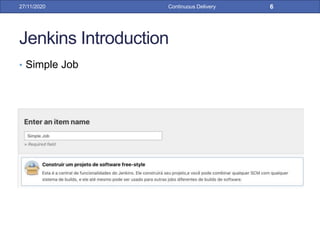
• Simple Job
27/11/2020 Continuous Delivery 6
Jenkins Introduction
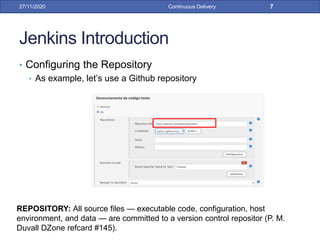
• Configuring the Repository
• As example, let’s use a Github repository
27/11/2020 Continuous Delivery 7
REPOSITORY: All source files — executable code, configuration, host
environment, and data — are committed to a version control repositor (P. M.
Duvall DZone refcard #145).
Jenkins Introduction
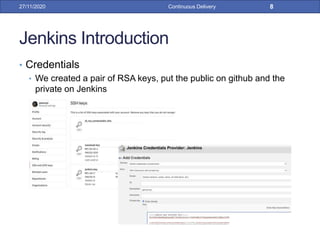
• Credentials
• We created a pair of RSA keys, put the public on github and the
private on Jenkins
27/11/2020 Continuous Delivery 8
Jenkins Introduction
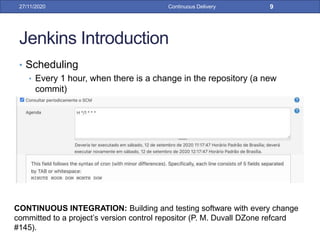
• Scheduling
• Every 1 hour, when there is a change in the repository (a new
commit)
27/11/2020 Continuous Delivery 9
CONTINUOUS INTEGRATION: Building and testing software with every change
committed to a project’s version control repositor (P. M. Duvall DZone refcard
#145).
Jenkins Introduction
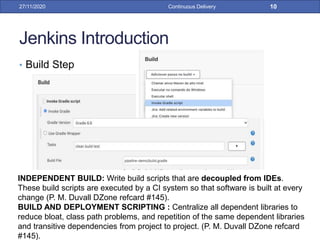
• Build Step
27/11/2020 Continuous Delivery 10
INDEPENDENT BUILD: Write build scripts that are decoupled from IDEs.
These build scripts are executed by a CI system so that software is built at every
change (P. M. Duvall DZone refcard #145).
BUILD AND DEPLOYMENT SCRIPTING : Centralize all dependent libraries to
reduce bloat, class path problems, and repetition of the same dependent libraries
and transitive dependencies from project to project. (P. M. Duvall DZone refcard
#145).
Jenkins Introduction
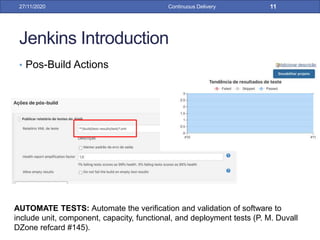
• Pos-Build Actions
27/11/2020 Continuous Delivery 11
AUTOMATE TESTS: Automate the verification and validation of software to
include unit, component, capacity, functional, and deployment tests (P. M. Duvall
DZone refcard #145).
Jenkins Introduction
• Pos-Build Actions
27/11/2020 Continuous Delivery 12
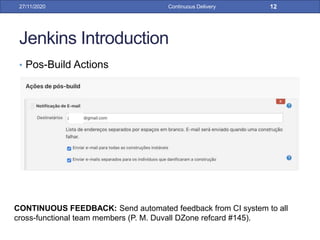
CONTINUOUS FEEDBACK: Send automated feedback from CI system to all
cross-functional team members (P. M. Duvall DZone refcard #145).
Jenkins Introduction
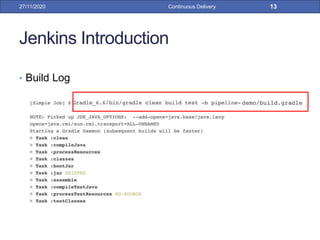
• Build Log
27/11/2020 Continuous Delivery 13
Jenkins Introduction
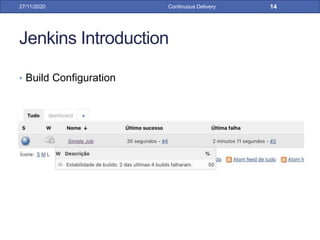
• Build Configuration
27/11/2020 Continuous Delivery 14
Jenkins Introduction
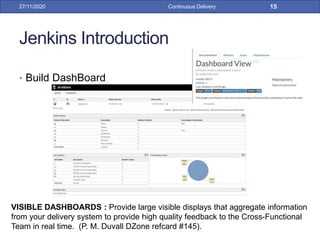
• Build DashBoard
27/11/2020 Continuous Delivery 15
VISIBLE DASHBOARDS : Provide large visible displays that aggregate information
from your delivery system to provide high quality feedback to the Cross-Functional
Team in real time. (P. M. Duvall DZone refcard #145).
Jenkins Introduction
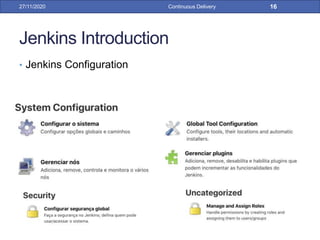
• Jenkins Configuration
27/11/2020 Continuous Delivery 16
Jenkins Introduction
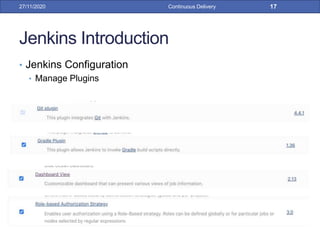
• Jenkins Configuration
• Manage Plugins
27/11/2020 Continuous Delivery 17
Jenkins Introduction
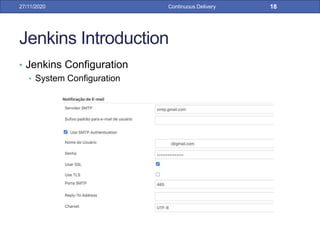
• Jenkins Configuration
• System Configuration
27/11/2020 Continuous Delivery 18
Jenkins Introduction
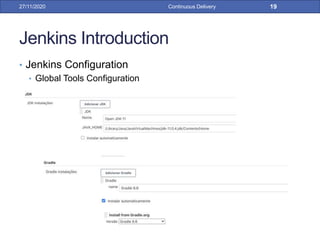
• Jenkins Configuration
• Global Tools Configuration
27/11/2020 Continuous Delivery 19
Jenkins Introduction
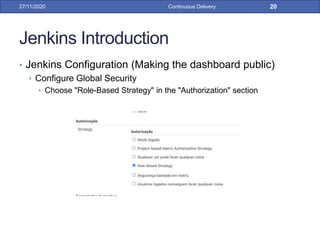
• Jenkins Configuration (Making the dashboard public)
• Configure Global Security
• Choose "Role-Based Strategy" in the "Authorization" section
27/11/2020 Continuous Delivery 20
Jenkins Introduction
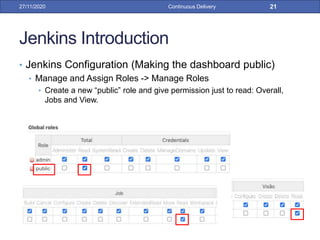
• Jenkins Configuration (Making the dashboard public)
• Manage and Assign Roles -> Manage Roles
• Create a new “public” role and give permission just to read: Overall,
Jobs and View.
27/11/2020 Continuous Delivery 21
Jenkins Introduction
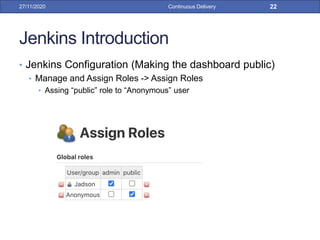
• Jenkins Configuration (Making the dashboard public)
• Manage and Assign Roles -> Assign Roles
• Assing “public” role to “Anonymous” user
27/11/2020 Continuous Delivery 22
Jenkins Introduction
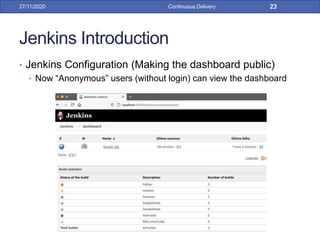
• Jenkins Configuration (Making the dashboard public)
• Now “Anonymous” users (without login) can view the dashboard
27/11/2020 Continuous Delivery 23
Pipeline
27/11/2020 Continuous Delivery 24
DEPLOYMENT PIPELINE: A deployment pipeline is an automated implementation
of your application’s build, test, deploy, and release process. (P. M. Duvall DZone
refcard #145).
Continuous Delivery Pipeline
• Pipeline is a concept to avoid waste in the software
development process and is used to provide quick
feedback to the team during the deployment process.
28/09/16 Continuous Delivery 25
Continuous Delivery Pipeline
• How does it works?
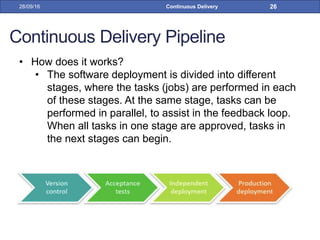
• The software deployment is divided into different
stages, where the tasks (jobs) are performed in each
of these stages. At the same stage, tasks can be
performed in parallel, to assist in the feedback loop.
When all tasks in one stage are approved, tasks in
the next stages can begin.
28/09/16 Continuous Delivery 26
Continuous Delivery Pipeline
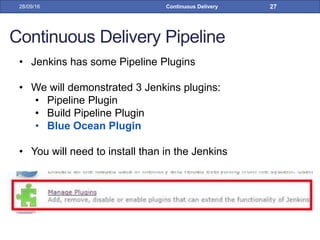
• Jenkins has some Pipeline Plugins
• We will demonstrated 3 Jenkins plugins:
• Pipeline Plugin
• Build Pipeline Plugin
• Blue Ocean Plugin
• You will need to install than in the Jenkins
28/09/16 Continuous Delivery 27
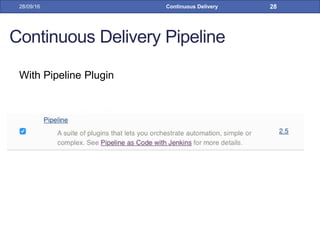
Continuous Delivery Pipeline
With Pipeline Plugin
28/09/16 Continuous Delivery 28
Continuous Delivery Pipeline
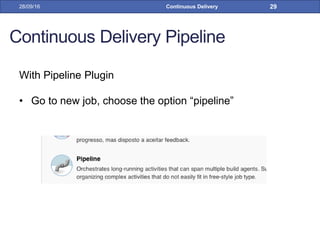
With Pipeline Plugin
• Go to new job, choose the option “pipeline”
28/09/16 Continuous Delivery 29
Continuous Delivery Pipeline
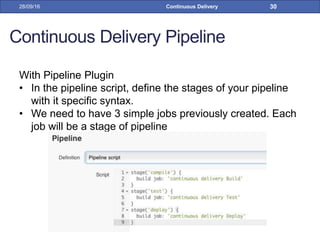
With Pipeline Plugin
• In the pipeline script, define the stages of your pipeline
with it specific syntax.
• We need to have 3 simple jobs previously created. Each
job will be a stage of pipeline
28/09/16 Continuous Delivery 30
Continuous Delivery Pipeline
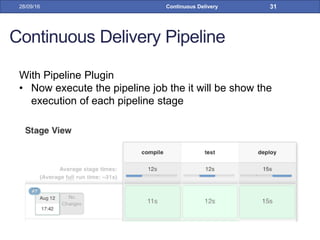
With Pipeline Plugin
• Now execute the pipeline job the it will be show the
execution of each pipeline stage
28/09/16 Continuous Delivery 31
Continuous Delivery Pipeline
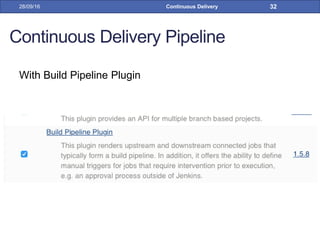
With Build Pipeline Plugin
28/09/16 Continuous Delivery 32
Continuous Delivery Pipeline
With Build Pipeline Plugin
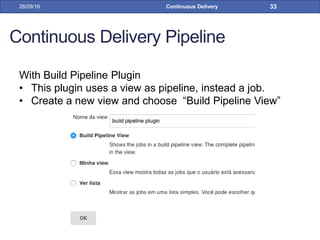
• This plugin uses a view as pipeline, instead a job.
• Create a new view and choose “Build Pipeline View”
28/09/16 Continuous Delivery 33
Continuous Delivery Pipeline
With Build Pipeline Plugin
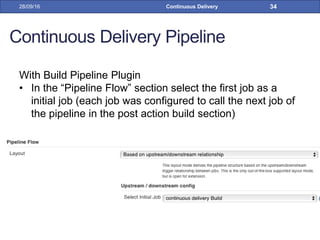
• In the “Pipeline Flow” section select the first job as a
initial job (each job was configured to call the next job of
the pipeline in the post action build section)
28/09/16 Continuous Delivery 34
Continuous Delivery Pipeline
With Build Pipeline Plugin
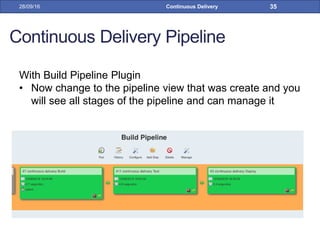
• Now change to the pipeline view that was create and you
will see all stages of the pipeline and can manage it
28/09/16 Continuous Delivery 35
Continuous Delivery Pipeline
These pipelines only show the execution of existing Jobs in
the form of a pipeline.
That is, they organize the visualization of Jobs in sequence.
But it's still just Jobs running in sequence
28/09/16 Continuous Delivery 36
Blue Ocean
27/11/2020 Continuous Delivery 37
Blue Ocean Introduction
• Blue Ocean rethinks the user experience of Jenkins.
Designed from the ground up for Jenkins Pipeline, but still
compatible with freestyle jobs, Blue Ocean reduces clutter
and increases clarity for every member of the team.
• Sophisticated visualizations
• Pipeline editor
• Personalization
27/11/2020 Continuous Delivery 38
Blue Ocean Introduction
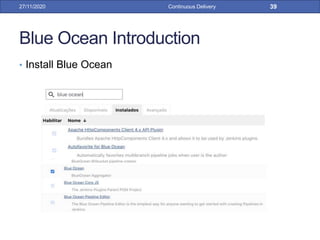
• Install Blue Ocean
27/11/2020 Continuous Delivery 39
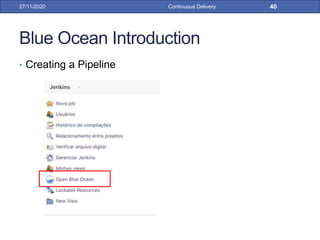
Blue Ocean Introduction
• Creating a Pipeline
27/11/2020 Continuous Delivery 40
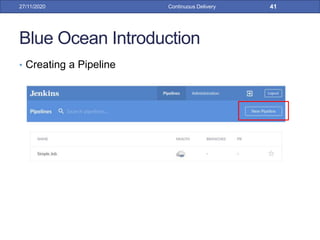
Blue Ocean Introduction
• Creating a Pipeline
27/11/2020 Continuous Delivery 41
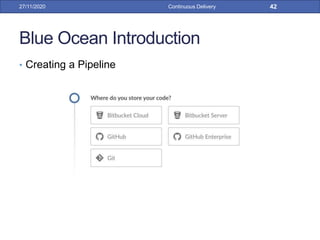
Blue Ocean Introduction
• Creating a Pipeline
27/11/2020 Continuous Delivery 42
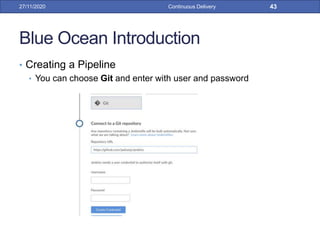
Blue Ocean Introduction
• Creating a Pipeline
• You can choose Git and enter with user and password
27/11/2020 Continuous Delivery 43
Blue Ocean Introduction
• Creating a Pipeline
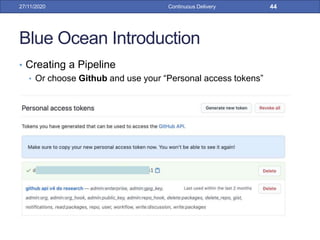
• Or choose Github and use your “Personal access tokens”
27/11/2020 Continuous Delivery 44
Blue Ocean Introduction
• Creating a Pipeline
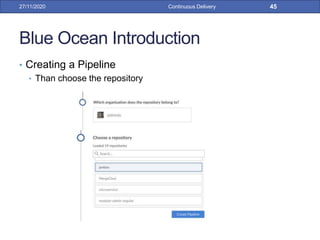
• Than choose the repository
27/11/2020 Continuous Delivery 45
Blue Ocean Introduction
• Creating a Pipeline
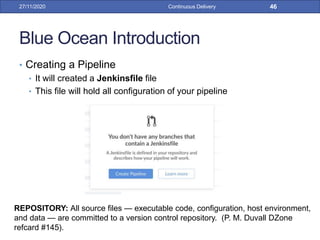
• It will created a Jenkinsfile file
• This file will hold all configuration of your pipeline
27/11/2020 Continuous Delivery 46
REPOSITORY: All source files — executable code, configuration, host environment,
and data — are committed to a version control repository. (P. M. Duvall DZone
refcard #145).
Blue Ocean Introduction
• Infrastructure as code, ou IaC
27/11/2020 Continuous Delivery 47
Blue Ocean Introduction
• Infrastructure as code, ou IaC
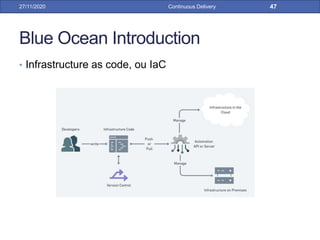
• It is na automating process the management and provisioning of
the IT infrastructure using configuration files, rather than physical
hardware configurations or interactive configuration tools.
• This automation eliminates the need for developers to manually
provision and manage servers, operating systems, databases, and
other infrastructure elements
27/11/2020 Continuous Delivery 48
Blue Ocean Introduction
• Infrastructure as code, ou IaC
• Benefits.
• Uniform Configuration for All Environments
• Protection against churn
• Faster and more efficient development
• Faster time to market
• Lower costs
27/11/2020 Continuous Delivery 49
Blue Ocean Introduction
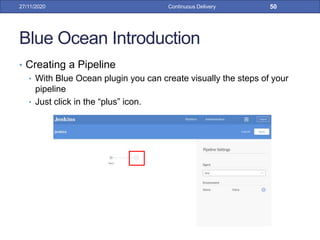
• Creating a Pipeline
• With Blue Ocean plugin you can create visually the steps of your
pipeline
• Just click in the “plus” icon.
27/11/2020 Continuous Delivery 50
Blue Ocean Introduction
• Creating a Pipeline
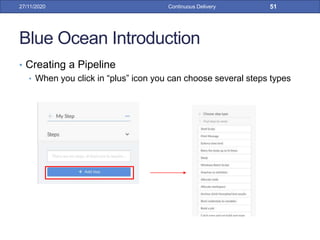
• When you click in “plus” icon you can choose several steps types
27/11/2020 Continuous Delivery 51
Blue Ocean Introduction
• Creating a Pipeline
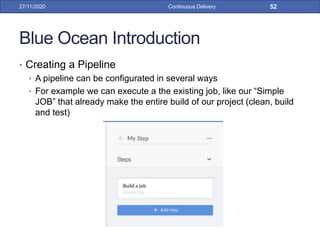
• A pipeline can be configurated in several ways
• For example we can execute a the existing job, like our “Simple
JOB” that already make the entire build of our project (clean, build
and test)
27/11/2020 Continuous Delivery 52
Blue Ocean Introduction
• Creating a Pipeline
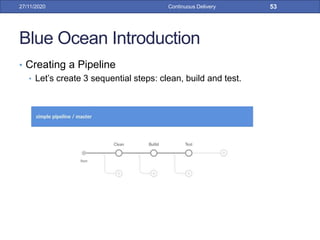
• Let’s create 3 sequential steps: clean, build and test.
27/11/2020 Continuous Delivery 53
Blue Ocean Introduction
• Creating a Pipeline
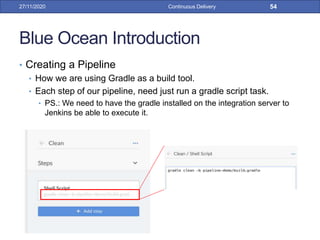
• How we are using Gradle as a build tool.
• Each step of our pipeline, need just run a gradle script task.
• PS.: We need to have the gradle installed on the integration server to
Jenkins be able to execute it.
27/11/2020 Continuous Delivery 54
Blue Ocean Introduction
• Creating a Pipeline
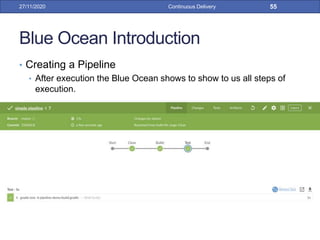
• After execution the Blue Ocean shows to show to us all steps of
execution.
27/11/2020 Continuous Delivery 55
Blue Ocean Introduction
• Creating a Pipeline
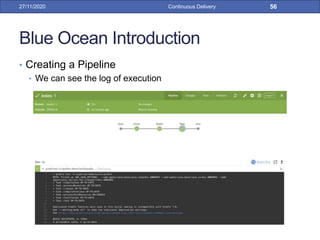
• We can see the log of execution
27/11/2020 Continuous Delivery 56
Blue Ocean Introduction
• Creating a Pipeline
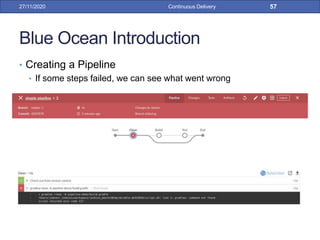
• If some steps failed, we can see what went wrong
27/11/2020 Continuous Delivery 57
Blue Ocean Introduction
• Creating a Pipeline
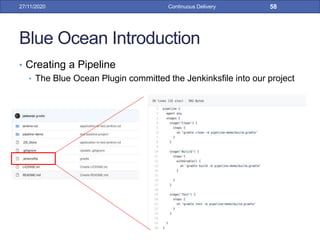
• The Blue Ocean Plugin committed the Jenkinksfile into our project
27/11/2020 Continuous Delivery 58
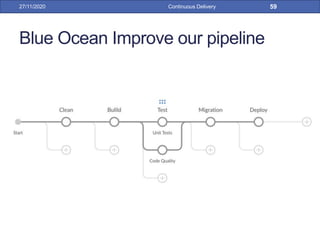
Blue Ocean Improve our pipeline
27/11/2020 Continuous Delivery 59
Blue Ocean Improve our pipeline
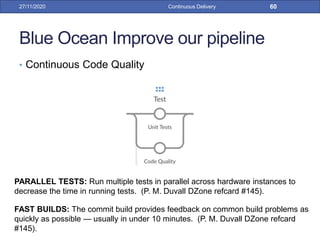
• Continuous Code Quality
27/11/2020 Continuous Delivery 60
PARALLEL TESTS: Run multiple tests in parallel across hardware instances to
decrease the time in running tests. (P. M. Duvall DZone refcard #145).
FAST BUILDS: The commit build provides feedback on common build problems as
quickly as possible — usually in under 10 minutes. (P. M. Duvall DZone refcard
#145).
Blue Ocean Improve our pipeline
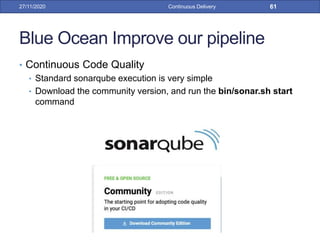
• Continuous Code Quality
• Standard sonarqube execution is very simple
• Download the community version, and run the bin/sonar.sh start
command
27/11/2020 Continuous Delivery 61
Blue Ocean Improve our pipeline
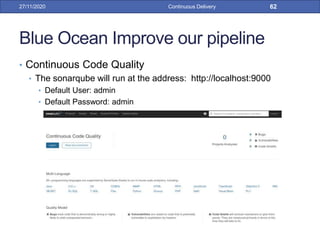
• Continuous Code Quality
• The sonarqube will run at the address: http://localhost:9000
• Default User: admin
• Default Password: admin
27/11/2020 Continuous Delivery 62
Blue Ocean Improve our pipeline
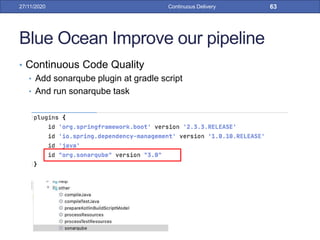
• Continuous Code Quality
• Add sonarqube plugin at gradle script
• And run sonarqube task
27/11/2020 Continuous Delivery 63
Blue Ocean Improve our pipeline
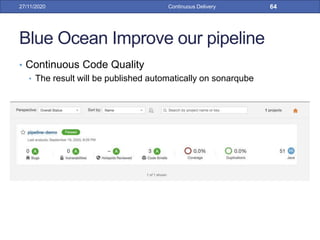
• Continuous Code Quality
• The result will be published automatically on sonarqube
27/11/2020 Continuous Delivery 64
Blue Ocean Improve our pipeline
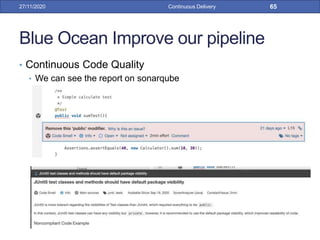
• Continuous Code Quality
• We can see the report on sonarqube
27/11/2020 Continuous Delivery 65
Blue Ocean Improve our pipeline
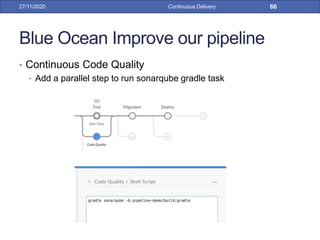
• Continuous Code Quality
• Add a parallel step to run sonarqube gradle task
27/11/2020 Continuous Delivery 66
Blue Ocean Improve our pipeline
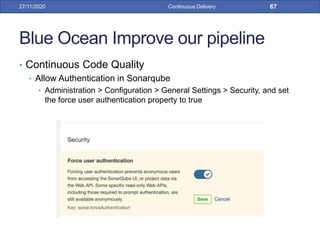
• Continuous Code Quality
• Allow Authentication in Sonarqube
• Administration > Configuration > General Settings > Security, and set
the force user authentication property to true
27/11/2020 Continuous Delivery 67
Blue Ocean Improve our pipeline
• Continuous Code Quality
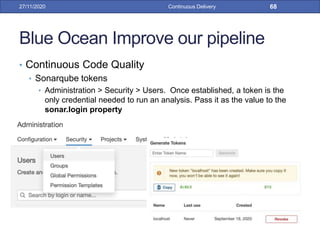
• Sonarqube tokens
• Administration > Security > Users. Once established, a token is the
only credential needed to run an analysis. Pass it as the value to the
sonar.login property
27/11/2020 Continuous Delivery 68
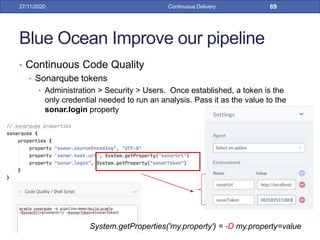
Blue Ocean Improve our pipeline
• Continuous Code Quality
• Sonarqube tokens
• Administration > Security > Users. Once established, a token is the
only credential needed to run an analysis. Pass it as the value to the
sonar.login property
27/11/2020 Continuous Delivery 69
System.getProperties('my.property') = -D my.property=value
Blue Ocean Improve our pipeline
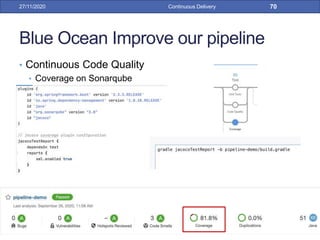
• Continuous Code Quality
• Coverage on Sonarqube
27/11/2020 Continuous Delivery 70
Blue Ocean Improve our pipeline
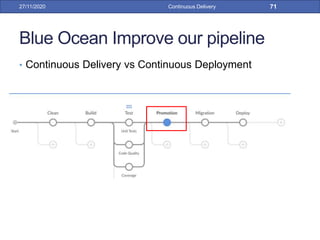
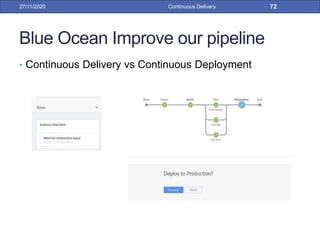
• Continuous Delivery vs Continuous Deployment
27/11/2020 Continuous Delivery 71
Blue Ocean Improve our pipeline
• Continuous Delivery vs Continuous Deployment
27/11/2020 Continuous Delivery 72
Blue Ocean Improve our pipeline
• DataBase Migration
• Flyway: Version control for your database. Robust schema
evolution across all your environments. With ease, pleasure and
plain SQL.
27/11/2020 Continuous Delivery 73
SCRIPTED DATABASE: Script all database actions as part of the build process. (P.
M. Duvall DZone refcard #145).
DATABASE UPGRADE: Use scripts to apply incremental changes in each target
environment to a database schema and data. (P. M. Duvall DZone refcard #145).
Blue Ocean Improve our pipeline
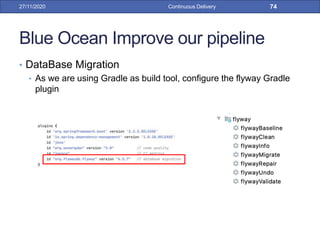
• DataBase Migration
• As we are using Gradle as build tool, configure the flyway Gradle
plugin
27/11/2020 Continuous Delivery 74
Blue Ocean Improve our pipeline
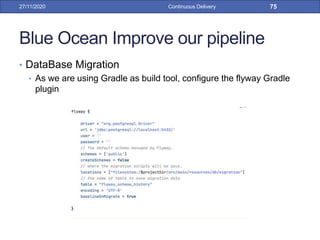
• DataBase Migration
• As we are using Gradle as build tool, configure the flyway Gradle
plugin
27/11/2020 Continuous Delivery 75
Blue Ocean Improve our pipeline
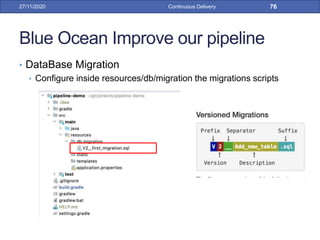
• DataBase Migration
• Configure inside resources/db/migration the migrations scripts
27/11/2020 Continuous Delivery 76
Blue Ocean Improve our pipeline
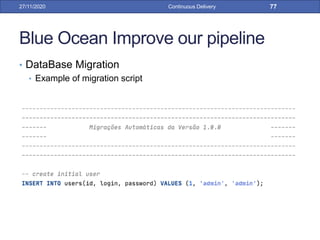
• DataBase Migration
• Example of migration script
27/11/2020 Continuous Delivery 77
Blue Ocean Improve our pipeline
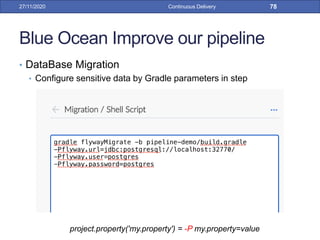
• DataBase Migration
• Configure sensitive data by Gradle parameters in step
27/11/2020 Continuous Delivery 78
project.property('my.property') = -P my.property=value
Blue Ocean Improve our pipeline
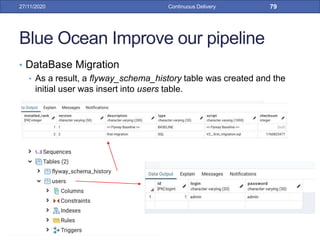
• DataBase Migration
• As a result, a flyway_schema_history table was created and the
initial user was insert into users table.
27/11/2020 Continuous Delivery 79
Blue Ocean Improve our pipeline
• Deploy
27/11/2020 Continuous Delivery 80
BLUE-GREEN DEPLOYMENTS: Deploy software to a non-production environment
(call it blue) while production continues to run. Once it’s deployed and “warmed up,”
switch production (green) to non-production and blue to green simultaneously. (P.
M. Duvall DZone refcard #145).
PRODUCTION-LIKE ENVIRONMENTS: Target environments are as similar to
production as possible. (P. M. Duvall DZone refcard #145).
Blue Ocean Improve our pipeline
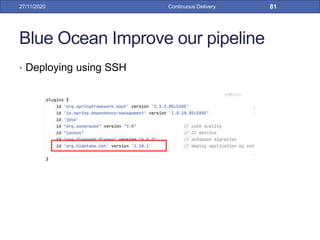
• Deploying using SSH
27/11/2020 Continuous Delivery 81
Blue Ocean Improve our pipeline
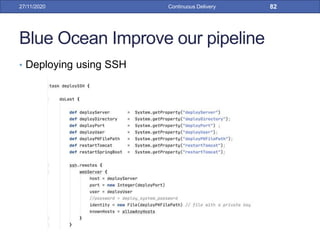
• Deploying using SSH
27/11/2020 Continuous Delivery 82
Blue Ocean Improve our pipeline
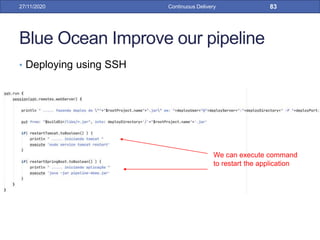
• Deploying using SSH
27/11/2020 Continuous Delivery 83
We can execute command
to restart the application
Blue Ocean Improve our pipeline
• Deploying to Heroku
• Heroku is a PaaS (Platform as a Service) that allows you to host up
to 5 applications for free
27/11/2020 Continuous Delivery 84
Blue Ocean Improve our pipeline
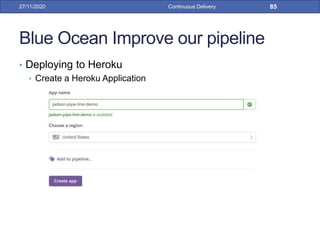
• Deploying to Heroku
• Create a Heroku Application
27/11/2020 Continuous Delivery 85
Blue Ocean Improve our pipeline
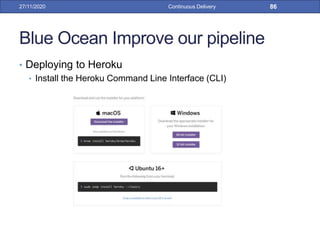
• Deploying to Heroku
• Install the Heroku Command Line Interface (CLI)
27/11/2020 Continuous Delivery 86
Blue Ocean Improve our pipeline
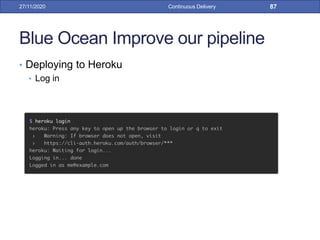
• Deploying to Heroku
• Log in
27/11/2020 Continuous Delivery 87
Blue Ocean Improve our pipeline
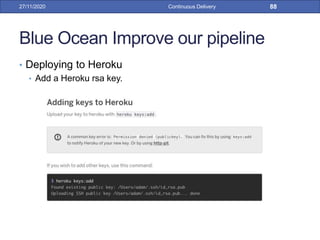
• Deploying to Heroku
• Add a Heroku rsa key.
27/11/2020 Continuous Delivery 88
Blue Ocean Improve our pipeline
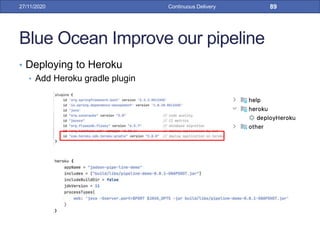
• Deploying to Heroku
• Add Heroku gradle plugin
27/11/2020 Continuous Delivery 89
Blue Ocean Improve our pipeline
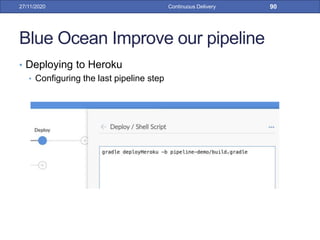
• Deploying to Heroku
• Configuring the last pipeline step
27/11/2020 Continuous Delivery 90
Blue Ocean Improve our pipeline
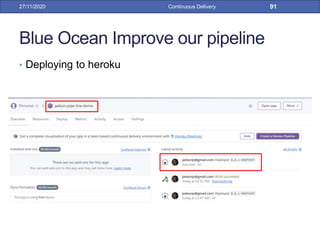
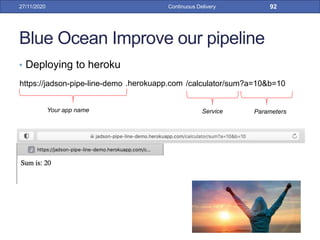
• Deploying to heroku
27/11/2020 Continuous Delivery 91
Blue Ocean Improve our pipeline
• Deploying to heroku
27/11/2020 Continuous Delivery 92
https://jadson-pipe-line-demo /calculator/sum?a=10&b=10.herokuapp.com
Your app name Service Parameters
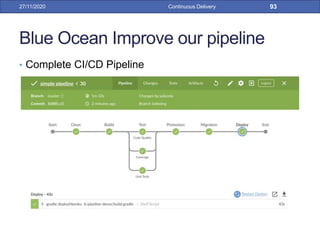
Blue Ocean Improve our pipeline
• Complete CI/CD Pipeline
27/11/2020 Continuous Delivery 93
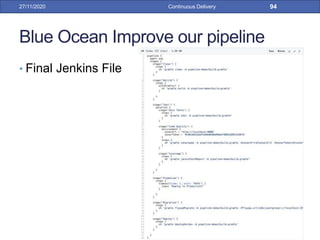
Blue Ocean Improve our pipeline
• Final Jenkins File
27/11/2020 Continuous Delivery 94
References
• Fowler, M., Continuous Integration
https://martinfowler.com/articles/continuousIntegration.html,
Published at May 2006. Last access at Aug. 2020.
• P. M. Duvall. Continuous delivery: Patterns and
antipatterns in the software life cycle -
https://dzone.com/refcardz/continuous-delivery-patterns.
DZone refcard #145, 2011.
• Dashboard View Plugin
• https://plugins.jenkins.io/dashboard-view/. Last access at Aug.
2020
• Jenkinks User Documentation Home. Blue Ocean
https://www.jenkins.io/doc/book/blueocean/. Last access at
Aug. 2020
27/11/2020 Continuous Delivery 95
References
• Gradle build. https://gradle.org/releases/. Last access at
Aug. 2020.
• Build pipelines with Jenkins 2 by example.
https://bmuschko.com/blog/jenkins-build-pipeline/.
Published 30, 2017. Last access at Aug. 2020.
• Song, Matthew. Building a CI pipeline with Blue Ocean.
https://medium.com/ecs-digital/building-a-ci-pipeline-with-
blue-ocean-6bb9b02788eb. Jan, 2019. Last access at
Aug. 2020.
27/11/2020 Continuous Delivery 96
References
• Jenkins User Documentation Home. Using a Jenkinsfile.
https://www.jenkins.io/doc/book/pipeline/jenkinsfile/. Last
access at Aug. 2020.
• Lloyd, Caleb. Jenkins Screencast Part 1: Setup
Jenkins Blue Ocean with Docker.
https://boxboat.com/2017/06/20/jenkins-screencast-setup-
blue-ocean-docker/. Jun, 2017. Last access at Aug. 2020.
27/11/2020 Continuous Delivery 97
Continuous Delivery27/11/2020 98

Continuous Delivery with Jenkins

  • 1.
  • 2.
    Continuous Integration • ContinuousIntegration is a software development practice where members of a team integrate their work frequently, usually each person integrates at least daily - leading to multiple integrations per day. Each integration is verified by an automated build (including test) to detect integration errors as quickly as possible. Many teams find that this approach leads to significantly reduced integration problems and allows a team to develop cohesive software more rapidly. This article is a quick overview of Continuous Integration summarizing the technique and its current usage. 27/11/2020 Continuous Delivery 2
  • 3.
    Continuous Delivery andDeployment • Continuous Delivery is a software development discipline where you build software in such a way that the software can be released to production at any time. • Continuous Delivery is sometimes confused with Continuous Deployment. Continuous Deployment means that every change goes through the pipeline and automatically gets put into production, resulting in many production deployments every day. Continuous Delivery just means that you are able to do frequent deployments but may choose not to do it, usually due to businesses preferring a slower rate of deployment. In order to do Continuous Deployment you must be doing Continuous Delivery. 27/11/2020 Continuous Delivery 3
  • 4.
  • 5.
    Jenkins Introduction • Jenkinsan open source automation server which enables developers around the world to reliably build, test, and deploy their software. • Jenkins works with the Job concept. • A job is an execution that is created when an event is triggered. Be it a commit, a period of time or even manually by the developer. 27/11/2020 Continuous Delivery 5 root 12345678
  • 6.
    Jenkins Introduction • SimpleJob 27/11/2020 Continuous Delivery 6
  • 7.
    Jenkins Introduction • Configuringthe Repository • As example, let’s use a Github repository 27/11/2020 Continuous Delivery 7 REPOSITORY: All source files — executable code, configuration, host environment, and data — are committed to a version control repositor (P. M. Duvall DZone refcard #145).
  • 8.
    Jenkins Introduction • Credentials •We created a pair of RSA keys, put the public on github and the private on Jenkins 27/11/2020 Continuous Delivery 8
  • 9.
    Jenkins Introduction • Scheduling •Every 1 hour, when there is a change in the repository (a new commit) 27/11/2020 Continuous Delivery 9 CONTINUOUS INTEGRATION: Building and testing software with every change committed to a project’s version control repositor (P. M. Duvall DZone refcard #145).
  • 10.
    Jenkins Introduction • BuildStep 27/11/2020 Continuous Delivery 10 INDEPENDENT BUILD: Write build scripts that are decoupled from IDEs. These build scripts are executed by a CI system so that software is built at every change (P. M. Duvall DZone refcard #145). BUILD AND DEPLOYMENT SCRIPTING : Centralize all dependent libraries to reduce bloat, class path problems, and repetition of the same dependent libraries and transitive dependencies from project to project. (P. M. Duvall DZone refcard #145).
  • 11.
    Jenkins Introduction • Pos-BuildActions 27/11/2020 Continuous Delivery 11 AUTOMATE TESTS: Automate the verification and validation of software to include unit, component, capacity, functional, and deployment tests (P. M. Duvall DZone refcard #145).
  • 12.
    Jenkins Introduction • Pos-BuildActions 27/11/2020 Continuous Delivery 12 CONTINUOUS FEEDBACK: Send automated feedback from CI system to all cross-functional team members (P. M. Duvall DZone refcard #145).
  • 13.
    Jenkins Introduction • BuildLog 27/11/2020 Continuous Delivery 13
  • 14.
    Jenkins Introduction • BuildConfiguration 27/11/2020 Continuous Delivery 14
  • 15.
    Jenkins Introduction • BuildDashBoard 27/11/2020 Continuous Delivery 15 VISIBLE DASHBOARDS : Provide large visible displays that aggregate information from your delivery system to provide high quality feedback to the Cross-Functional Team in real time. (P. M. Duvall DZone refcard #145).
  • 16.
    Jenkins Introduction • JenkinsConfiguration 27/11/2020 Continuous Delivery 16
  • 17.
    Jenkins Introduction • JenkinsConfiguration • Manage Plugins 27/11/2020 Continuous Delivery 17
  • 18.
    Jenkins Introduction • JenkinsConfiguration • System Configuration 27/11/2020 Continuous Delivery 18
  • 19.
    Jenkins Introduction • JenkinsConfiguration • Global Tools Configuration 27/11/2020 Continuous Delivery 19
  • 20.
    Jenkins Introduction • JenkinsConfiguration (Making the dashboard public) • Configure Global Security • Choose "Role-Based Strategy" in the "Authorization" section 27/11/2020 Continuous Delivery 20
  • 21.
    Jenkins Introduction • JenkinsConfiguration (Making the dashboard public) • Manage and Assign Roles -> Manage Roles • Create a new “public” role and give permission just to read: Overall, Jobs and View. 27/11/2020 Continuous Delivery 21
  • 22.
    Jenkins Introduction • JenkinsConfiguration (Making the dashboard public) • Manage and Assign Roles -> Assign Roles • Assing “public” role to “Anonymous” user 27/11/2020 Continuous Delivery 22
  • 23.
    Jenkins Introduction • JenkinsConfiguration (Making the dashboard public) • Now “Anonymous” users (without login) can view the dashboard 27/11/2020 Continuous Delivery 23
  • 24.
    Pipeline 27/11/2020 Continuous Delivery24 DEPLOYMENT PIPELINE: A deployment pipeline is an automated implementation of your application’s build, test, deploy, and release process. (P. M. Duvall DZone refcard #145).
  • 25.
    Continuous Delivery Pipeline •Pipeline is a concept to avoid waste in the software development process and is used to provide quick feedback to the team during the deployment process. 28/09/16 Continuous Delivery 25
  • 26.
    Continuous Delivery Pipeline •How does it works? • The software deployment is divided into different stages, where the tasks (jobs) are performed in each of these stages. At the same stage, tasks can be performed in parallel, to assist in the feedback loop. When all tasks in one stage are approved, tasks in the next stages can begin. 28/09/16 Continuous Delivery 26
  • 27.
    Continuous Delivery Pipeline •Jenkins has some Pipeline Plugins • We will demonstrated 3 Jenkins plugins: • Pipeline Plugin • Build Pipeline Plugin • Blue Ocean Plugin • You will need to install than in the Jenkins 28/09/16 Continuous Delivery 27
  • 28.
    Continuous Delivery Pipeline WithPipeline Plugin 28/09/16 Continuous Delivery 28
  • 29.
    Continuous Delivery Pipeline WithPipeline Plugin • Go to new job, choose the option “pipeline” 28/09/16 Continuous Delivery 29
  • 30.
    Continuous Delivery Pipeline WithPipeline Plugin • In the pipeline script, define the stages of your pipeline with it specific syntax. • We need to have 3 simple jobs previously created. Each job will be a stage of pipeline 28/09/16 Continuous Delivery 30
  • 31.
    Continuous Delivery Pipeline WithPipeline Plugin • Now execute the pipeline job the it will be show the execution of each pipeline stage 28/09/16 Continuous Delivery 31
  • 32.
    Continuous Delivery Pipeline WithBuild Pipeline Plugin 28/09/16 Continuous Delivery 32
  • 33.
    Continuous Delivery Pipeline WithBuild Pipeline Plugin • This plugin uses a view as pipeline, instead a job. • Create a new view and choose “Build Pipeline View” 28/09/16 Continuous Delivery 33
  • 34.
    Continuous Delivery Pipeline WithBuild Pipeline Plugin • In the “Pipeline Flow” section select the first job as a initial job (each job was configured to call the next job of the pipeline in the post action build section) 28/09/16 Continuous Delivery 34
  • 35.
    Continuous Delivery Pipeline WithBuild Pipeline Plugin • Now change to the pipeline view that was create and you will see all stages of the pipeline and can manage it 28/09/16 Continuous Delivery 35
  • 36.
    Continuous Delivery Pipeline Thesepipelines only show the execution of existing Jobs in the form of a pipeline. That is, they organize the visualization of Jobs in sequence. But it's still just Jobs running in sequence 28/09/16 Continuous Delivery 36
  • 37.
  • 38.
    Blue Ocean Introduction •Blue Ocean rethinks the user experience of Jenkins. Designed from the ground up for Jenkins Pipeline, but still compatible with freestyle jobs, Blue Ocean reduces clutter and increases clarity for every member of the team. • Sophisticated visualizations • Pipeline editor • Personalization 27/11/2020 Continuous Delivery 38
  • 39.
    Blue Ocean Introduction •Install Blue Ocean 27/11/2020 Continuous Delivery 39
  • 40.
    Blue Ocean Introduction •Creating a Pipeline 27/11/2020 Continuous Delivery 40
  • 41.
    Blue Ocean Introduction •Creating a Pipeline 27/11/2020 Continuous Delivery 41
  • 42.
    Blue Ocean Introduction •Creating a Pipeline 27/11/2020 Continuous Delivery 42
  • 43.
    Blue Ocean Introduction •Creating a Pipeline • You can choose Git and enter with user and password 27/11/2020 Continuous Delivery 43
  • 44.
    Blue Ocean Introduction •Creating a Pipeline • Or choose Github and use your “Personal access tokens” 27/11/2020 Continuous Delivery 44
  • 45.
    Blue Ocean Introduction •Creating a Pipeline • Than choose the repository 27/11/2020 Continuous Delivery 45
  • 46.
    Blue Ocean Introduction •Creating a Pipeline • It will created a Jenkinsfile file • This file will hold all configuration of your pipeline 27/11/2020 Continuous Delivery 46 REPOSITORY: All source files — executable code, configuration, host environment, and data — are committed to a version control repository. (P. M. Duvall DZone refcard #145).
  • 47.
    Blue Ocean Introduction •Infrastructure as code, ou IaC 27/11/2020 Continuous Delivery 47
  • 48.
    Blue Ocean Introduction •Infrastructure as code, ou IaC • It is na automating process the management and provisioning of the IT infrastructure using configuration files, rather than physical hardware configurations or interactive configuration tools. • This automation eliminates the need for developers to manually provision and manage servers, operating systems, databases, and other infrastructure elements 27/11/2020 Continuous Delivery 48
  • 49.
    Blue Ocean Introduction •Infrastructure as code, ou IaC • Benefits. • Uniform Configuration for All Environments • Protection against churn • Faster and more efficient development • Faster time to market • Lower costs 27/11/2020 Continuous Delivery 49
  • 50.
    Blue Ocean Introduction •Creating a Pipeline • With Blue Ocean plugin you can create visually the steps of your pipeline • Just click in the “plus” icon. 27/11/2020 Continuous Delivery 50
  • 51.
    Blue Ocean Introduction •Creating a Pipeline • When you click in “plus” icon you can choose several steps types 27/11/2020 Continuous Delivery 51
  • 52.
    Blue Ocean Introduction •Creating a Pipeline • A pipeline can be configurated in several ways • For example we can execute a the existing job, like our “Simple JOB” that already make the entire build of our project (clean, build and test) 27/11/2020 Continuous Delivery 52
  • 53.
    Blue Ocean Introduction •Creating a Pipeline • Let’s create 3 sequential steps: clean, build and test. 27/11/2020 Continuous Delivery 53
  • 54.
    Blue Ocean Introduction •Creating a Pipeline • How we are using Gradle as a build tool. • Each step of our pipeline, need just run a gradle script task. • PS.: We need to have the gradle installed on the integration server to Jenkins be able to execute it. 27/11/2020 Continuous Delivery 54
  • 55.
    Blue Ocean Introduction •Creating a Pipeline • After execution the Blue Ocean shows to show to us all steps of execution. 27/11/2020 Continuous Delivery 55
  • 56.
    Blue Ocean Introduction •Creating a Pipeline • We can see the log of execution 27/11/2020 Continuous Delivery 56
  • 57.
    Blue Ocean Introduction •Creating a Pipeline • If some steps failed, we can see what went wrong 27/11/2020 Continuous Delivery 57
  • 58.
    Blue Ocean Introduction •Creating a Pipeline • The Blue Ocean Plugin committed the Jenkinksfile into our project 27/11/2020 Continuous Delivery 58
  • 59.
    Blue Ocean Improveour pipeline 27/11/2020 Continuous Delivery 59
  • 60.
    Blue Ocean Improveour pipeline • Continuous Code Quality 27/11/2020 Continuous Delivery 60 PARALLEL TESTS: Run multiple tests in parallel across hardware instances to decrease the time in running tests. (P. M. Duvall DZone refcard #145). FAST BUILDS: The commit build provides feedback on common build problems as quickly as possible — usually in under 10 minutes. (P. M. Duvall DZone refcard #145).
  • 61.
    Blue Ocean Improveour pipeline • Continuous Code Quality • Standard sonarqube execution is very simple • Download the community version, and run the bin/sonar.sh start command 27/11/2020 Continuous Delivery 61
  • 62.
    Blue Ocean Improveour pipeline • Continuous Code Quality • The sonarqube will run at the address: http://localhost:9000 • Default User: admin • Default Password: admin 27/11/2020 Continuous Delivery 62
  • 63.
    Blue Ocean Improveour pipeline • Continuous Code Quality • Add sonarqube plugin at gradle script • And run sonarqube task 27/11/2020 Continuous Delivery 63
  • 64.
    Blue Ocean Improveour pipeline • Continuous Code Quality • The result will be published automatically on sonarqube 27/11/2020 Continuous Delivery 64
  • 65.
    Blue Ocean Improveour pipeline • Continuous Code Quality • We can see the report on sonarqube 27/11/2020 Continuous Delivery 65
  • 66.
    Blue Ocean Improveour pipeline • Continuous Code Quality • Add a parallel step to run sonarqube gradle task 27/11/2020 Continuous Delivery 66
  • 67.
    Blue Ocean Improveour pipeline • Continuous Code Quality • Allow Authentication in Sonarqube • Administration > Configuration > General Settings > Security, and set the force user authentication property to true 27/11/2020 Continuous Delivery 67
  • 68.
    Blue Ocean Improveour pipeline • Continuous Code Quality • Sonarqube tokens • Administration > Security > Users. Once established, a token is the only credential needed to run an analysis. Pass it as the value to the sonar.login property 27/11/2020 Continuous Delivery 68
  • 69.
    Blue Ocean Improveour pipeline • Continuous Code Quality • Sonarqube tokens • Administration > Security > Users. Once established, a token is the only credential needed to run an analysis. Pass it as the value to the sonar.login property 27/11/2020 Continuous Delivery 69 System.getProperties('my.property') = -D my.property=value
  • 70.
    Blue Ocean Improveour pipeline • Continuous Code Quality • Coverage on Sonarqube 27/11/2020 Continuous Delivery 70
  • 71.
    Blue Ocean Improveour pipeline • Continuous Delivery vs Continuous Deployment 27/11/2020 Continuous Delivery 71
  • 72.
    Blue Ocean Improveour pipeline • Continuous Delivery vs Continuous Deployment 27/11/2020 Continuous Delivery 72
  • 73.
    Blue Ocean Improveour pipeline • DataBase Migration • Flyway: Version control for your database. Robust schema evolution across all your environments. With ease, pleasure and plain SQL. 27/11/2020 Continuous Delivery 73 SCRIPTED DATABASE: Script all database actions as part of the build process. (P. M. Duvall DZone refcard #145). DATABASE UPGRADE: Use scripts to apply incremental changes in each target environment to a database schema and data. (P. M. Duvall DZone refcard #145).
  • 74.
    Blue Ocean Improveour pipeline • DataBase Migration • As we are using Gradle as build tool, configure the flyway Gradle plugin 27/11/2020 Continuous Delivery 74
  • 75.
    Blue Ocean Improveour pipeline • DataBase Migration • As we are using Gradle as build tool, configure the flyway Gradle plugin 27/11/2020 Continuous Delivery 75
  • 76.
    Blue Ocean Improveour pipeline • DataBase Migration • Configure inside resources/db/migration the migrations scripts 27/11/2020 Continuous Delivery 76
  • 77.
    Blue Ocean Improveour pipeline • DataBase Migration • Example of migration script 27/11/2020 Continuous Delivery 77
  • 78.
    Blue Ocean Improveour pipeline • DataBase Migration • Configure sensitive data by Gradle parameters in step 27/11/2020 Continuous Delivery 78 project.property('my.property') = -P my.property=value
  • 79.
    Blue Ocean Improveour pipeline • DataBase Migration • As a result, a flyway_schema_history table was created and the initial user was insert into users table. 27/11/2020 Continuous Delivery 79
  • 80.
    Blue Ocean Improveour pipeline • Deploy 27/11/2020 Continuous Delivery 80 BLUE-GREEN DEPLOYMENTS: Deploy software to a non-production environment (call it blue) while production continues to run. Once it’s deployed and “warmed up,” switch production (green) to non-production and blue to green simultaneously. (P. M. Duvall DZone refcard #145). PRODUCTION-LIKE ENVIRONMENTS: Target environments are as similar to production as possible. (P. M. Duvall DZone refcard #145).
  • 81.
    Blue Ocean Improveour pipeline • Deploying using SSH 27/11/2020 Continuous Delivery 81
  • 82.
    Blue Ocean Improveour pipeline • Deploying using SSH 27/11/2020 Continuous Delivery 82
  • 83.
    Blue Ocean Improveour pipeline • Deploying using SSH 27/11/2020 Continuous Delivery 83 We can execute command to restart the application
  • 84.
    Blue Ocean Improveour pipeline • Deploying to Heroku • Heroku is a PaaS (Platform as a Service) that allows you to host up to 5 applications for free 27/11/2020 Continuous Delivery 84
  • 85.
    Blue Ocean Improveour pipeline • Deploying to Heroku • Create a Heroku Application 27/11/2020 Continuous Delivery 85
  • 86.
    Blue Ocean Improveour pipeline • Deploying to Heroku • Install the Heroku Command Line Interface (CLI) 27/11/2020 Continuous Delivery 86
  • 87.
    Blue Ocean Improveour pipeline • Deploying to Heroku • Log in 27/11/2020 Continuous Delivery 87
  • 88.
    Blue Ocean Improveour pipeline • Deploying to Heroku • Add a Heroku rsa key. 27/11/2020 Continuous Delivery 88
  • 89.
    Blue Ocean Improveour pipeline • Deploying to Heroku • Add Heroku gradle plugin 27/11/2020 Continuous Delivery 89
  • 90.
    Blue Ocean Improveour pipeline • Deploying to Heroku • Configuring the last pipeline step 27/11/2020 Continuous Delivery 90
  • 91.
    Blue Ocean Improveour pipeline • Deploying to heroku 27/11/2020 Continuous Delivery 91
  • 92.
    Blue Ocean Improveour pipeline • Deploying to heroku 27/11/2020 Continuous Delivery 92 https://jadson-pipe-line-demo /calculator/sum?a=10&b=10.herokuapp.com Your app name Service Parameters
  • 93.
    Blue Ocean Improveour pipeline • Complete CI/CD Pipeline 27/11/2020 Continuous Delivery 93
  • 94.
    Blue Ocean Improveour pipeline • Final Jenkins File 27/11/2020 Continuous Delivery 94
  • 95.
    References • Fowler, M.,Continuous Integration https://martinfowler.com/articles/continuousIntegration.html, Published at May 2006. Last access at Aug. 2020. • P. M. Duvall. Continuous delivery: Patterns and antipatterns in the software life cycle - https://dzone.com/refcardz/continuous-delivery-patterns. DZone refcard #145, 2011. • Dashboard View Plugin • https://plugins.jenkins.io/dashboard-view/. Last access at Aug. 2020 • Jenkinks User Documentation Home. Blue Ocean https://www.jenkins.io/doc/book/blueocean/. Last access at Aug. 2020 27/11/2020 Continuous Delivery 95
  • 96.
    References • Gradle build.https://gradle.org/releases/. Last access at Aug. 2020. • Build pipelines with Jenkins 2 by example. https://bmuschko.com/blog/jenkins-build-pipeline/. Published 30, 2017. Last access at Aug. 2020. • Song, Matthew. Building a CI pipeline with Blue Ocean. https://medium.com/ecs-digital/building-a-ci-pipeline-with- blue-ocean-6bb9b02788eb. Jan, 2019. Last access at Aug. 2020. 27/11/2020 Continuous Delivery 96
  • 97.
    References • Jenkins UserDocumentation Home. Using a Jenkinsfile. https://www.jenkins.io/doc/book/pipeline/jenkinsfile/. Last access at Aug. 2020. • Lloyd, Caleb. Jenkins Screencast Part 1: Setup Jenkins Blue Ocean with Docker. https://boxboat.com/2017/06/20/jenkins-screencast-setup- blue-ocean-docker/. Jun, 2017. Last access at Aug. 2020. 27/11/2020 Continuous Delivery 97
  • 98.