Jadson Santos
Computing Engineer
Continuous Delivery with
CD with GitHub, Travis CI and Heroku
• Introduction to Continuous Delivery with GitHub, Travis Ci and Heroku
• “Continuous Delivery (CD) is a software engineering approach
in which teams keep producing valuable software in short cycles
and ensure that the software can be reliably released at any
time” (Chen, L., 2017).
2CD with GitHub, Travis CI and Heroku
CD with GitHub, Travis CI and Heroku
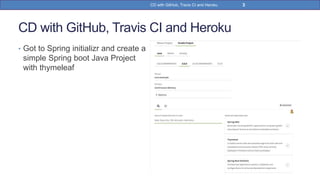
• Got to Spring initializr and create a
simple Spring boot Java Project
with thymeleaf
3CD with GitHub, Travis CI and Heroku
CD with GitHub, Travis CI and Heroku
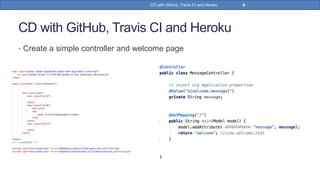
• Create a simple controller and welcome page
4CD with GitHub, Travis CI and Heroku
CD with GitHub, Travis CI and Heroku
• Run the CoontinuousDeliveryApplication class.
• Access localhost:8080
• All right, the application is running.
5CD with GitHub, Travis CI and Heroku
CD with GitHub, Travis CI and Heroku
• Add a simple .travis.yml file and submit the project to github
• Make sure that .travis.yml file is in the root of github repository
6CD with GitHub, Travis CI and Heroku
CD with GitHub, Travis CI and Heroku
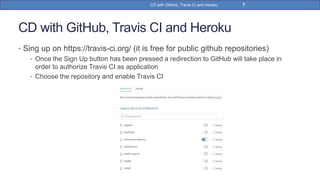
• Sing up on https://travis-ci.org/ (it is free for public github repositories)
• Once the Sign Up button has been pressed a redirection to GitHub will take place in
order to authorize Travis CI as application
• Choose the repository and enable Travis CI
7CD with GitHub, Travis CI and Heroku
CD with GitHub, Travis CI and Heroku
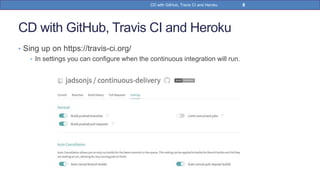
• Sing up on https://travis-ci.org/
• In settings you can configure when the continuous integration will run.
8CD with GitHub, Travis CI and Heroku
CD with GitHub, Travis CI and Heroku
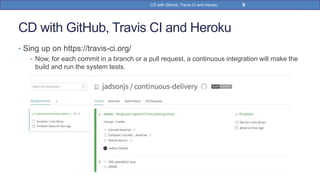
• Sing up on https://travis-ci.org/
• Now, for each commit in a branch or a pull request, a continuous integration will make the
build and run the system tests.
9CD with GitHub, Travis CI and Heroku
CD with GitHub, Travis CI and Heroku
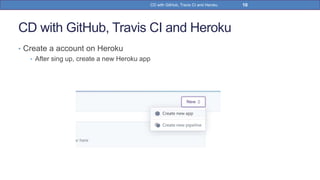
• Create a account on Heroku
• After sing up, create a new Heroku app
10CD with GitHub, Travis CI and Heroku
CD with GitHub, Travis CI and Heroku
• Create a account on Heroku
• Choose application name
11CD with GitHub, Travis CI and Heroku
CD with GitHub, Travis CI and Heroku
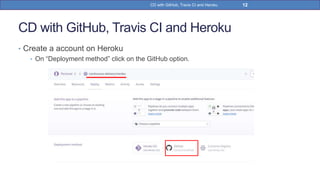
• Create a account on Heroku
• On “Deployment method” click on the GitHub option.
12CD with GitHub, Travis CI and Heroku
CD with GitHub, Travis CI and Heroku
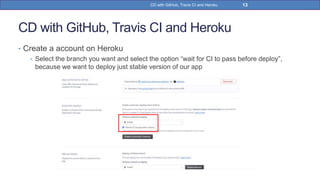
• Create a account on Heroku
• Select the branch you want and select the option “wait for CI to pass before deploy”,
because we want to deploy just stable version of our app
13CD with GitHub, Travis CI and Heroku
CD with GitHub, Travis CI and Heroku
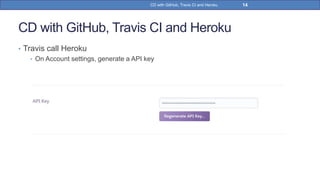
• Travis call Heroku
• On Account settings, generate a API key
14CD with GitHub, Travis CI and Heroku
CD with GitHub, Travis CI and Heroku
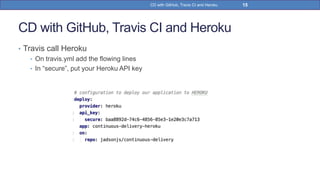
• Travis call Heroku
• On travis.yml add the flowing lines
• In “secure”, put your Heroku API key
15CD with GitHub, Travis CI and Heroku
CD with GitHub, Travis CI and Heroku
• Travis call Heroku
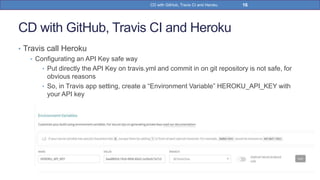
• Configurating an API Key safe way
• Put directly the API Key on travis.yml and commit in on git repository is not safe, for
obvious reasons
• So, in Travis app setting, create a “Environment Variable” HEROKU_API_KEY with
your API key
16CD with GitHub, Travis CI and Heroku
CD with GitHub, Travis CI and Heroku
• Travis call Heroku
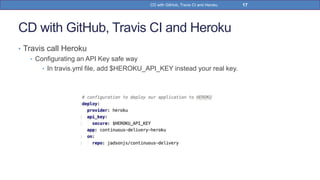
• Configurating an API Key safe way
• In travis.yml file, add $HEROKU_API_KEY instead your real key.
17CD with GitHub, Travis CI and Heroku
CD with GitHub, Travis CI and Heroku
• Travis call Heroku
• Create a Heroku Dyno (optional)
• The containers used at Heroku are called “dynos.”
• Create a file Procfile in the root of your project with the content:
• A Procfile is a text file, that defines process types and explicitly declares what
command should be executed to start your app.
• A Heroku app’s “web” process type is special: it’s the only process type that can
receive external HTTP traffic from Heroku’s routers.
• This tells Heroku to initialize a web java container and execute the jar file (Spring
boot jar).
18CD with GitHub, Travis CI and Heroku
CD with GitHub, Travis CI and Heroku
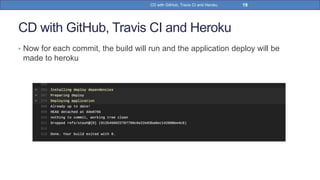
• Now for each commit, the build will run and the application deploy will be
made to heroku
19CD with GitHub, Travis CI and Heroku
CD with GitHub, Travis CI and Heroku
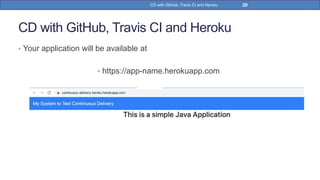
• Your application will be available at
• https://app-name.herokuapp.com
20CD with GitHub, Travis CI and Heroku
References
• Chen, L. Continuous Delivery: Overcoming adoption challenges. 2017
• https://www.mkyong.com/spring-boot/spring-boot-hello-world-example-thymeleaf/
• https://www.vogella.com/tutorials/TravisCi/article.html
• https://medium.com/swlh/continuous-everything-automatic-deployments-to-heroku-
with-travis-ci-770eb36b4b01
• https://codeburst.io/ci-cd-with-github-travis-ci-and-heroku-e088a24f32ef
• https://devcenter.heroku.com/articles/procfile
21CD with GitHub, Travis CI and Heroku
22CD with GitHub, Travis CI and Heroku
https://br.linkedin.com/in/jadsonjs
https://github.com/jadsonjs
https://pt.slideshare.net/jadsonjs
jadsonjs@gmail.com

Cd with Github Travis CI and Heroku

  • 1.
  • 2.
    CD with GitHub,Travis CI and Heroku • Introduction to Continuous Delivery with GitHub, Travis Ci and Heroku • “Continuous Delivery (CD) is a software engineering approach in which teams keep producing valuable software in short cycles and ensure that the software can be reliably released at any time” (Chen, L., 2017). 2CD with GitHub, Travis CI and Heroku
  • 3.
    CD with GitHub,Travis CI and Heroku • Got to Spring initializr and create a simple Spring boot Java Project with thymeleaf 3CD with GitHub, Travis CI and Heroku
  • 4.
    CD with GitHub,Travis CI and Heroku • Create a simple controller and welcome page 4CD with GitHub, Travis CI and Heroku
  • 5.
    CD with GitHub,Travis CI and Heroku • Run the CoontinuousDeliveryApplication class. • Access localhost:8080 • All right, the application is running. 5CD with GitHub, Travis CI and Heroku
  • 6.
    CD with GitHub,Travis CI and Heroku • Add a simple .travis.yml file and submit the project to github • Make sure that .travis.yml file is in the root of github repository 6CD with GitHub, Travis CI and Heroku
  • 7.
    CD with GitHub,Travis CI and Heroku • Sing up on https://travis-ci.org/ (it is free for public github repositories) • Once the Sign Up button has been pressed a redirection to GitHub will take place in order to authorize Travis CI as application • Choose the repository and enable Travis CI 7CD with GitHub, Travis CI and Heroku
  • 8.
    CD with GitHub,Travis CI and Heroku • Sing up on https://travis-ci.org/ • In settings you can configure when the continuous integration will run. 8CD with GitHub, Travis CI and Heroku
  • 9.
    CD with GitHub,Travis CI and Heroku • Sing up on https://travis-ci.org/ • Now, for each commit in a branch or a pull request, a continuous integration will make the build and run the system tests. 9CD with GitHub, Travis CI and Heroku
  • 10.
    CD with GitHub,Travis CI and Heroku • Create a account on Heroku • After sing up, create a new Heroku app 10CD with GitHub, Travis CI and Heroku
  • 11.
    CD with GitHub,Travis CI and Heroku • Create a account on Heroku • Choose application name 11CD with GitHub, Travis CI and Heroku
  • 12.
    CD with GitHub,Travis CI and Heroku • Create a account on Heroku • On “Deployment method” click on the GitHub option. 12CD with GitHub, Travis CI and Heroku
  • 13.
    CD with GitHub,Travis CI and Heroku • Create a account on Heroku • Select the branch you want and select the option “wait for CI to pass before deploy”, because we want to deploy just stable version of our app 13CD with GitHub, Travis CI and Heroku
  • 14.
    CD with GitHub,Travis CI and Heroku • Travis call Heroku • On Account settings, generate a API key 14CD with GitHub, Travis CI and Heroku
  • 15.
    CD with GitHub,Travis CI and Heroku • Travis call Heroku • On travis.yml add the flowing lines • In “secure”, put your Heroku API key 15CD with GitHub, Travis CI and Heroku
  • 16.
    CD with GitHub,Travis CI and Heroku • Travis call Heroku • Configurating an API Key safe way • Put directly the API Key on travis.yml and commit in on git repository is not safe, for obvious reasons • So, in Travis app setting, create a “Environment Variable” HEROKU_API_KEY with your API key 16CD with GitHub, Travis CI and Heroku
  • 17.
    CD with GitHub,Travis CI and Heroku • Travis call Heroku • Configurating an API Key safe way • In travis.yml file, add $HEROKU_API_KEY instead your real key. 17CD with GitHub, Travis CI and Heroku
  • 18.
    CD with GitHub,Travis CI and Heroku • Travis call Heroku • Create a Heroku Dyno (optional) • The containers used at Heroku are called “dynos.” • Create a file Procfile in the root of your project with the content: • A Procfile is a text file, that defines process types and explicitly declares what command should be executed to start your app. • A Heroku app’s “web” process type is special: it’s the only process type that can receive external HTTP traffic from Heroku’s routers. • This tells Heroku to initialize a web java container and execute the jar file (Spring boot jar). 18CD with GitHub, Travis CI and Heroku
  • 19.
    CD with GitHub,Travis CI and Heroku • Now for each commit, the build will run and the application deploy will be made to heroku 19CD with GitHub, Travis CI and Heroku
  • 20.
    CD with GitHub,Travis CI and Heroku • Your application will be available at • https://app-name.herokuapp.com 20CD with GitHub, Travis CI and Heroku
  • 21.
    References • Chen, L.Continuous Delivery: Overcoming adoption challenges. 2017 • https://www.mkyong.com/spring-boot/spring-boot-hello-world-example-thymeleaf/ • https://www.vogella.com/tutorials/TravisCi/article.html • https://medium.com/swlh/continuous-everything-automatic-deployments-to-heroku- with-travis-ci-770eb36b4b01 • https://codeburst.io/ci-cd-with-github-travis-ci-and-heroku-e088a24f32ef • https://devcenter.heroku.com/articles/procfile 21CD with GitHub, Travis CI and Heroku
  • 22.
    22CD with GitHub,Travis CI and Heroku https://br.linkedin.com/in/jadsonjs https://github.com/jadsonjs https://pt.slideshare.net/jadsonjs jadsonjs@gmail.com