BOHSBOHS-Series
Ergonomics Training Module
2

IAOH - 2013

INTRODUCTION
3

IAOH - 2013

What is Ergonomics?
Ergo =
“work”

nomics

=

“laws or rules ”

Ergonomics = “the laws of work”
OSHA defines ergonomics as: “the
science of designing the job to fit the
worker, instead of forcing the worker to fit
the job”.
4

IAOH - 2013

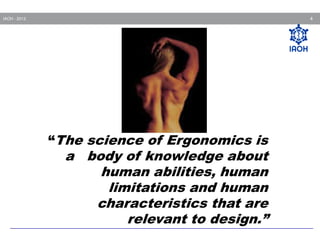
“The science of Ergonomics is

a body of knowledge about
human abilities, human
limitations and human
characteristics that are
relevant to design.”
5

IAOH - 2013

Goals Of Ergonomics
Provide a safe and healthful working
environment engineered to the capabilities
of the human body
Increase efficiency and productivity by
reducing fatigue.
Prevention of Occupational injury & illness.
Work quality improvement.
6

IAOH - 2013

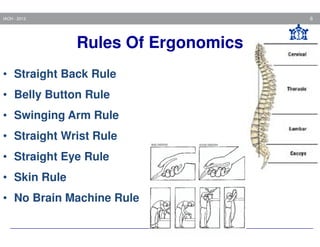
Rules Of Ergonomics
• Straight Back Rule
• Belly Button Rule
• Swinging Arm Rule
• Straight Wrist Rule
• Straight Eye Rule
• Skin Rule
• No Brain Machine Rule
IAOH - 2013

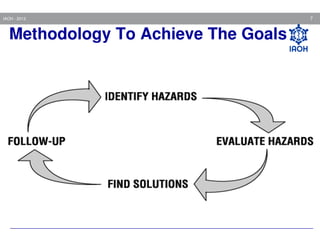
Methodology To Achieve The Goals

7
8

IAOH - 2013

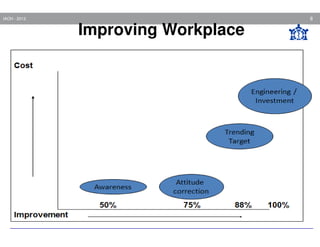
Improving Workplace
9

IAOH - 2013

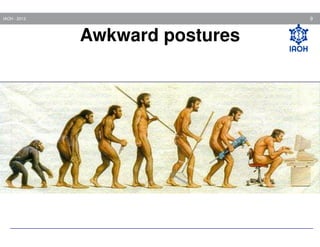
Awkward postures
10

IAOH - 2013

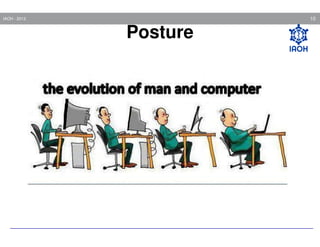
Posture
Posture
11

IAOH - 2013

There are no “right” or
“correct” ways to sit, stand or
lift....
However, there are more and
less demanding ways!
12

IAOH - 2013

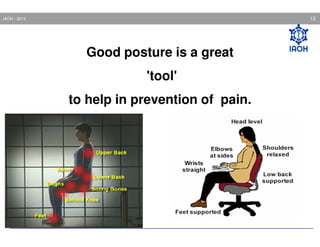
Good posture is a great
'tool'
to help in prevention of pain.
13

IAOH - 2013

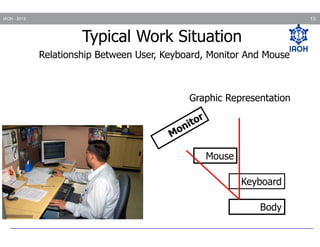
Typical Work Situation
Relationship Between User, Keyboard, Monitor And Mouse

Graphic Representation

Mouse
Keyboard
Body
14

IAOH - 2013

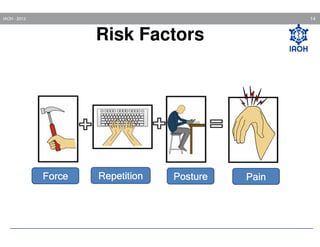
Risk Factors

Force

Repetition

Posture

Pain
15

IAOH - 2013

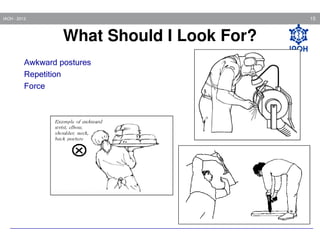
What Should I Look For?
Awkward postures
Repetition
Force

15
16

IAOH - 2013

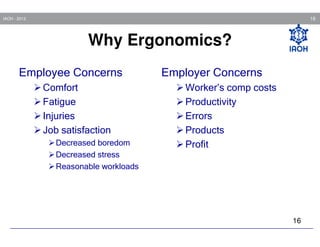
Why Ergonomics?
Employee Concerns
Comfort
Fatigue
Injuries
Job satisfaction
Decreased boredom
Decreased stress
Reasonable workloads

Employer Concerns
Worker’s comp costs
Productivity
Errors
Products
Profit

16
17

IAOH - 2013

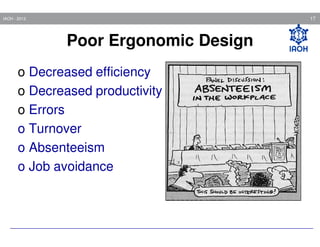
Poor Ergonomic Design
o Decreased efficiency
o Decreased productivity
o Errors
o Turnover
o Absenteeism
o Job avoidance
18

IAOH - 2013

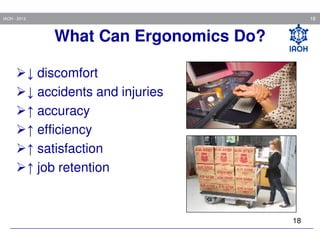
What Can Ergonomics Do?
↓ discomfort
↓ accidents and injuries
↑ accuracy
↑ efficiency
↑ satisfaction
↑ job retention

18
19

IAOH - 2013

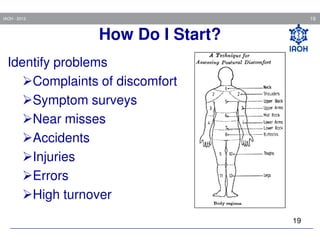
How Do I Start?
Identify problems
Complaints of discomfort
Symptom surveys
Near misses
Accidents
Injuries
Errors
High turnover
19
20

IAOH - 2013

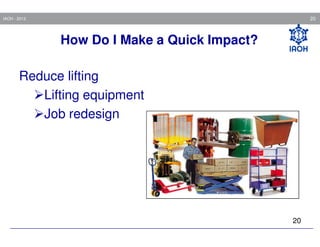
How Do I Make a Quick Impact?
Reduce lifting
Lifting equipment
Job redesign

20
21

IAOH - 2013

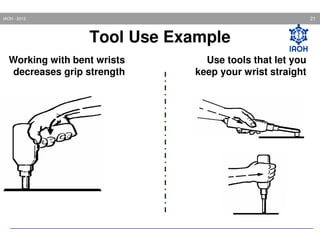
Tool Use Example
Working with bent wrists
decreases grip strength

Use tools that let you
keep your wrist straight
22

IAOH - 2013

OFFICE ERGONOMICS
23

IAOH - 2013

Office Comprises
Chair
Table
Computer
Other items like- files, phone, etc.
IAOH - 2013

24

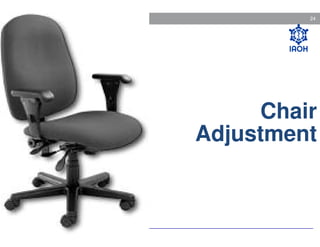
Chair
Adjustment
25

IAOH - 2013

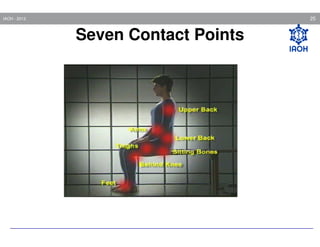
Seven Contact Points
26

IAOH - 2013

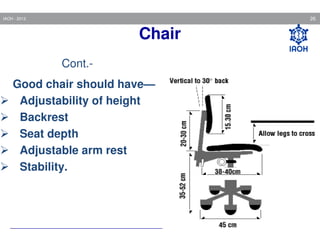
Chair
Cont.Good chair should have—
Adjustability of height
Backrest
Seat depth
Adjustable arm rest
Stability.
27

IAOH - 2013

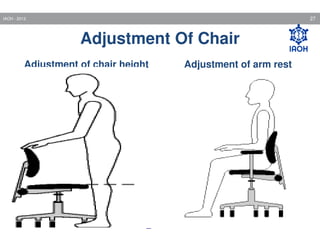
Adjustment Of Chair
Adjustment of chair height

Adjustment of arm rest
28

IAOH - 2013

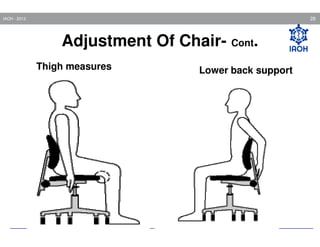
Adjustment Of Chair- Cont.
Thigh measures

Lower back support
IAOH - 2013

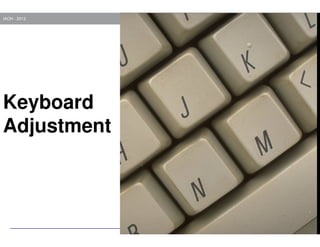
Keyboard
Adjustment

29
30

IAOH - 2013

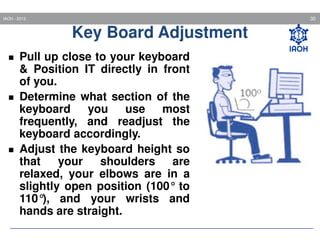
Key Board Adjustment
Pull up close to your keyboard
& Position IT directly in front
of you.
Determine what section of the
keyboard you use most
frequently, and readjust the
keyboard accordingly.
Adjust the keyboard height so
that
your
shoulders
are
relaxed, your elbows are in a
slightly open position (100° to
110° and your wrists and
),
hands are straight.
IAOH - 2013

31
32

IAOH - 2013

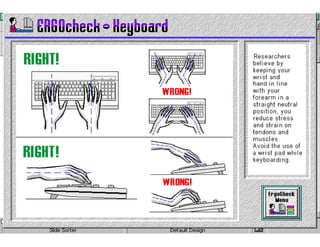
Key Board Trays
Best height for keyboard is generally –at
elbow height or lower.
Tray should hold keyboard as well as
mouse.
33

IAOH - 2013

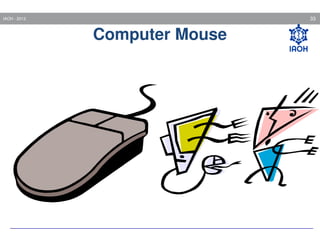
Computer Mouse
34

IAOH - 2013

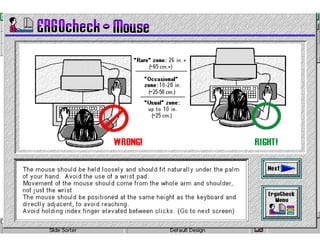
Computer Mouse Hazardous
Generally while using the mouse, person
stretching the arm outwards and forwards to hold
it there with unsupported forearm as long as they
are using the mouse.
35

IAOH - 2013

Cont.-

Computer Mouse Hazardous

This posture caused Pain –
on top of the hand,
around the wrist
Along the forearm and elbow
Numbness and tingling in the thumb & index
finger
May develop the carpel tunnel syndrome
Soreness and fatigue by putting extra load on the
muscles of upper back & shoulder
36

IAOH - 2013

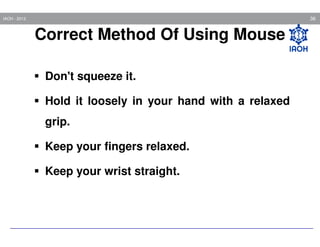
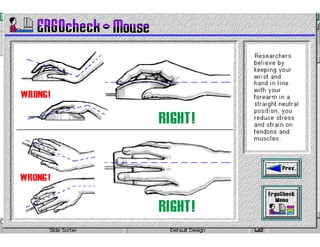
Correct Method Of Using Mouse
Don't squeeze it.
Hold it loosely in your hand with a relaxed
grip.
Keep your fingers relaxed.
Keep your wrist straight.
IAOH - 2013

37
IAOH - 2013

38
39

IAOH - 2013

Monitor
Adjustment
40

IAOH - 2013

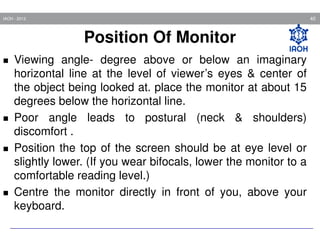
Position Of Monitor
Viewing angle- degree above or below an imaginary
horizontal line at the level of viewer’s eyes & center of
the object being looked at. place the monitor at about 15
degrees below the horizontal line.
Poor angle leads to postural (neck & shoulders)
discomfort .
Position the top of the screen should be at eye level or
slightly lower. (If you wear bifocals, lower the monitor to a
comfortable reading level.)
Centre the monitor directly in front of you, above your
keyboard.
IAOH - 2013

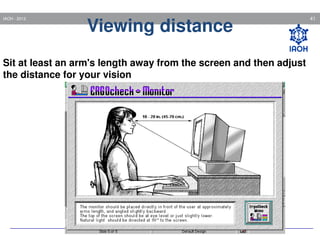
Viewing distance

Sit at least an arm's length away from the screen and then adjust
the distance for your vision

41
IAOH - 2013

42
IAOH - 2013

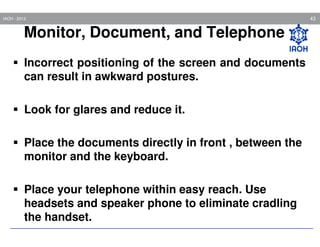
Monitor, Document, and Telephone
Incorrect positioning of the screen and documents
can result in awkward postures.
Look for glares and reduce it.
Place the documents directly in front , between the
monitor and the keyboard.
Place your telephone within easy reach. Use
headsets and speaker phone to eliminate cradling
the handset.

43
IAOH - 2013

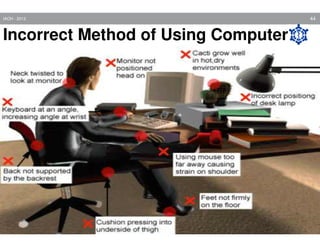
Incorrect Method of Using Computer

44
IAOH - 2013

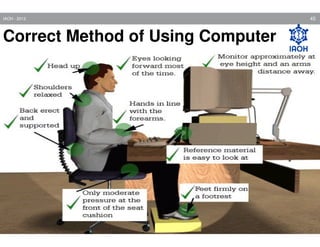
Correct Method of Using Computer

45
46

IAOH - 2013

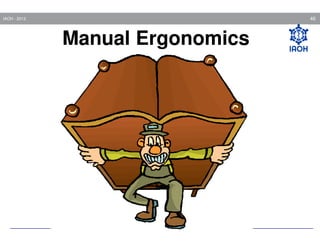
Manual Ergonomics
47

IAOH - 2013

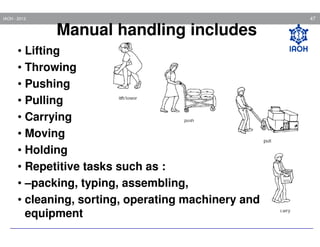
Manual handling includes
• Lifting
• Throwing
• Pushing
• Pulling
• Carrying
• Moving
• Holding
• Repetitive tasks such as :
• –packing, typing, assembling,
• cleaning, sorting, operating machinery and
equipment
48

IAOH - 2013

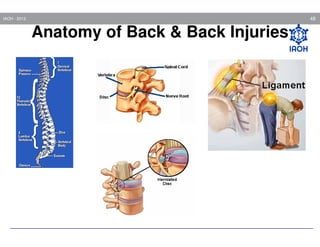
Anatomy of Back & Back Injuries

Knowing what
causes back injuries
can help you prevent
them.
49

IAOH - 2013

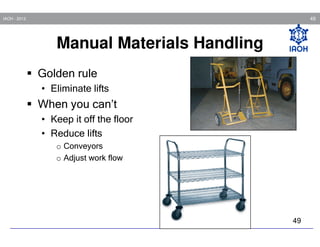
Manual Materials Handling
Golden rule
• Eliminate lifts

When you can’t
• Keep it off the floor
• Reduce lifts
o Conveyors
o Adjust work flow

49
50

IAOH - 2013

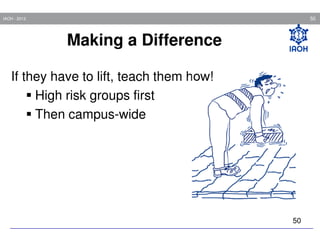
Making a Difference
If they have to lift, teach them how!
High risk groups first
Then campus-wide

50
51

IAOH - 2013

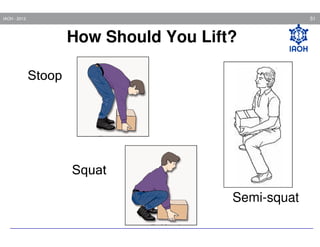
How Should You Lift?
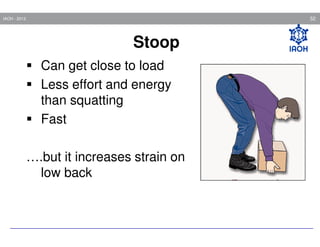
Stoop

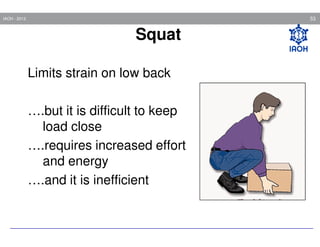
Squat
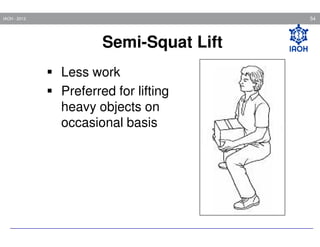
Semi-squat
52

IAOH - 2013

Stoop
Can get close to load
Less effort and energy
than squatting
Fast
….but it increases strain on
low back
53

IAOH - 2013

Squat
Limits strain on low back
….but it is difficult to keep
load close
….requires increased effort
and energy
….and it is inefficient
54

IAOH - 2013

Semi-Squat Lift
Less work
Preferred for lifting
heavy objects on
occasional basis
55

IAOH - 2013

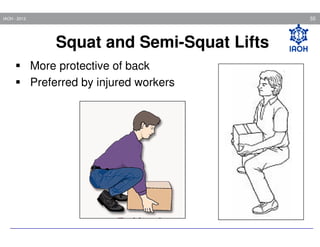
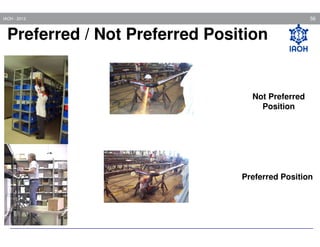
Squat and Semi-Squat Lifts
More protective of back
Preferred by injured workers
56

IAOH - 2013

Preferred / Not Preferred Position

Not Preferred
Position

Preferred Position
57

IAOH - 2013

MUSCULO SKELETAL DISORDERS
(WMSDS)
58

IAOH - 2013

Musculo Skeletal Disorders
Also known as:
Cumulative Trauma Disorders (CTDs)
Repetitive Strain Injuries (RSIs)
Overuse injuries
Soft tissue injuries
59

IAOH - 2013

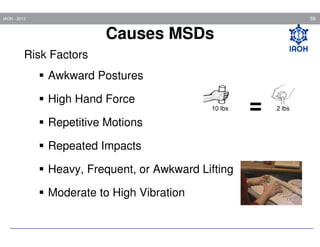
Causes MSDs
Risk Factors
Awkward Postures
High Hand Force
Repetitive Motions
Repeated Impacts
Heavy, Frequent, or Awkward Lifting
Moderate to High Vibration

=
60

IAOH - 2013

Risk Factors
Risk of injury depends upon:
Duration of exposure (how long)
Frequency of exposure (how often)
Intensity of exposure (how much)
Combinations of risk factors
61

IAOH - 2013

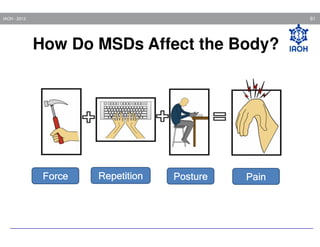
How Do MSDs Affect the Body?

Force

Repetition

Posture

Pain
62

IAOH - 2013

Musculoskeletal Disorders (MSDs)
Carpal tunnel
syndrome
Epicondylitis
(Tennis elbow)

Rotator cuff tendonitis
De Quervains'
disease
Trigger finger

Synovitis

Low back pain

Muscle strains

Disc Herniation

Raynaud's
phenomenon
Sciatica
63

IAOH - 2013

Symptoms of MSDs
Discomfort
Pain
Numbness
Tingling
Burning
Swelling
Change in color
Tightness, loss of flexibility
64

IAOH - 2013

Stages of Progression
• Early Stage-The body aches and feels tired at work,
but symptoms disappear during time away from work.
The injury will heal completely if dealt with properly at
this early stage.
• Intermediate Stage-The injured area aches and
feels weak near start of work. Work is more difficult to
do. The injury will still heal completely if dealt with
properly.
• Late Stage-The injured area aches and feels weak
even at rest. Sleep is affected. Even light duties are
very difficult.
65

IAOH - 2013

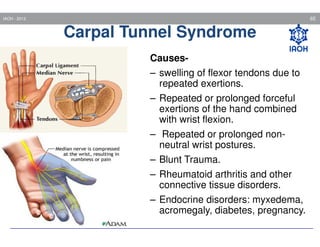
Carpal Tunnel Syndrome
Causes– swelling of flexor tendons due to
repeated exertions.
– Repeated or prolonged forceful
exertions of the hand combined
with wrist flexion.
– Repeated or prolonged nonneutral wrist postures.
– Blunt Trauma.
– Rheumatoid arthritis and other
connective tissue disorders.
– Endocrine disorders: myxedema,
acromegaly, diabetes, pregnancy.
66

IAOH - 2013

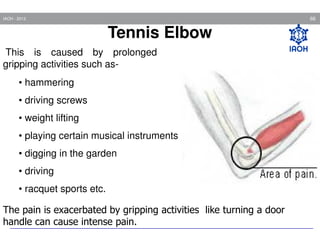
Tennis Elbow
This is caused by prolonged
gripping activities such as• hammering
• driving screws
• weight lifting
• playing certain musical instruments
• digging in the garden
• driving
• racquet sports etc.
The pain is exacerbated by gripping activities like turning a door
handle can cause intense pain.
67

IAOH - 2013

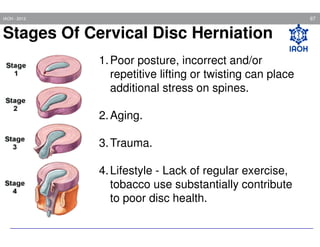
Stages Of Cervical Disc Herniation
1. Poor posture, incorrect and/or
repetitive lifting or twisting can place
additional stress on spines.
2. Aging.
3. Trauma.
4. Lifestyle - Lack of regular exercise,
tobacco use substantially contribute
to poor disc health.
68

IAOH - 2013

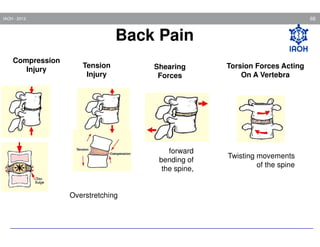
Back Pain
Compression
Injury

Tension
Injury

Shearing
Forces

forward
bending of
the spine,

Overstretching

Torsion Forces Acting
On A Vertebra

Twisting movements
of the spine
69

IAOH - 2013

Common causes of back-pain
•
•
•
•
•
•
•
•

Accidents and injuries
Twist and sprains
Improper working postures
Lifting heavy weights
Prolonged working in same posture
Fatigue and tiredness
Infections and diseases
Pregnancy
70

IAOH - 2013

Prevention & Control of Ergonomic
Risk Conditions
Engineering controls
Work practice controls
Administrative controls
71

IAOH - 2013

Eye Strain While Working On VDT
Experienced as –
Burning
Tightness
Sharp or dull pains
Watering
Blurring
Double vision
Headache etc.
72

IAOH - 2013

Eye Strain While Working On VDT
FactorsGlare– light source shining directly into the eyes e.g.
ceiling lights, bright. windows etc.
The luminance (brightness) difference between what is
being looked at and its immediate environment
The distance between the eye and screen and document
The readability of screen and document
The workers vision and his or her corrective lenses
73

IAOH - 2013

Prevention Of Eye Strain
Watch out for glare .
Follow “20/20/20 rule” means every twenty minutes, look
twenty feet away for twenty seconds.
It may be due to dryness of eyes. Lowering the monitor.
looking downward– more of eye surface will be covered by
the eyelids and eyes blinks more leads more lubrication.
Keep the proper distance and angle between eyes and
monitor.
74

IAOH - 2013

Cont.-

Prevention Of Eye Strain

Peoples who needs bifocal glass often experiences sore
neck and shoulder because they have to tip their heads
back to see the computer screen. Other options for them
like—
Progressive addition lenses (PAL)– For persons
working long hours with computers the PAL is the
choice.
Wearing contact lenses
75

IAOH - 2013

What you can do?

• Recognize and report symptoms
• Get involved in ergonomics
76

IAOH - 2013

Symptom Recognition and Reporting
Report symptoms if:
Pain is persistent, severe or worsening
Pain radiates
Symptoms include numbness or tingling
Symptoms keep you from sleeping at
night
77

IAOH - 2013

Key Points To Remember
Ergonomics can help you on your job
MSDs can happen in jobs with risk factors
Risk factors can be reduced and MSDs
prevented
Reporting symptoms early is important
You can help your company put ergonomics
changes into place
78

IAOH - 2013

Thumb Rules To Prevent MSDS
Use moderate postures for individual joints
Don’t use too much force
Break for 4-5 min. for every hour spent at workstation to
ease muscle aches, eye strain & stress. Vary the tasks.
Break up the keyboard task work by doing other job.
Look away from the screen & focus your eyes on an object
far away time to time.
Relax your muscles, stretch & change position.
79

IAOH - 2013

Ergonomic
Exercise
80

IAOH - 2013

Reason For Stretch At Work
Reduce muscle tension & stress, increase
alertness, improve circulation and productivity.
Reduction in day to day tiredness.
To feel better
81

IAOH - 2013

Stretch At Work
Stretches must be performed slowly and carefully. They
shouldn’t be painful. If they are painful, stop and consult
doctor.
Make slow movements- avoid rapid or jerky movements.
Hold the stretch for at least 5-7 seconds.
Stretch frequently, especially when sitting or in other
constrained environments.
IAOH - 2013

82

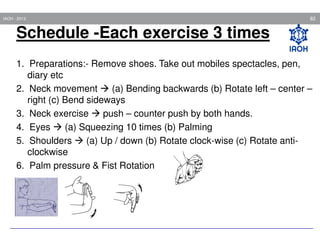
Schedule -Each exercise 3 times
1. Preparations:- Remove shoes. Take out mobiles spectacles, pen,
diary etc
2. Neck movement
(a) Bending backwards (b) Rotate left – center –
right (c) Bend sideways
3. Neck exercise
push – counter push by both hands.
4. Eyes
(a) Squeezing 10 times (b) Palming
5. Shoulders
(a) Up / down (b) Rotate clock-wise (c) Rotate anticlockwise
6. Palm pressure & Fist Rotation
83

IAOH - 2013

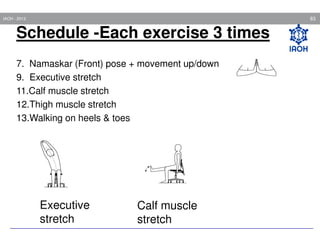
Schedule -Each exercise 3 times
7. Namaskar (Front) pose + movement up/down
9. Executive stretch
11.Calf muscle stretch
12.Thigh muscle stretch
13.Walking on heels & toes

Executive
stretch

Calf muscle
stretch
84

IAOH - 2013

Thank you
Have a Nice Day

BOHS_Occupational Health_ Ergonomics

  • 1.
  • 2.
  • 3.
    3 IAOH - 2013 Whatis Ergonomics? Ergo = “work” nomics = “laws or rules ” Ergonomics = “the laws of work” OSHA defines ergonomics as: “the science of designing the job to fit the worker, instead of forcing the worker to fit the job”.
  • 4.
    4 IAOH - 2013 “Thescience of Ergonomics is a body of knowledge about human abilities, human limitations and human characteristics that are relevant to design.”
  • 5.
    5 IAOH - 2013 GoalsOf Ergonomics Provide a safe and healthful working environment engineered to the capabilities of the human body Increase efficiency and productivity by reducing fatigue. Prevention of Occupational injury & illness. Work quality improvement.
  • 6.
    6 IAOH - 2013 RulesOf Ergonomics • Straight Back Rule • Belly Button Rule • Swinging Arm Rule • Straight Wrist Rule • Straight Eye Rule • Skin Rule • No Brain Machine Rule
  • 7.
    IAOH - 2013 MethodologyTo Achieve The Goals 7
  • 8.
  • 9.
  • 10.
  • 11.
    11 IAOH - 2013 Thereare no “right” or “correct” ways to sit, stand or lift.... However, there are more and less demanding ways!
  • 12.
    12 IAOH - 2013 Goodposture is a great 'tool' to help in prevention of pain.
  • 13.
    13 IAOH - 2013 TypicalWork Situation Relationship Between User, Keyboard, Monitor And Mouse Graphic Representation Mouse Keyboard Body
  • 14.
    14 IAOH - 2013 RiskFactors Force Repetition Posture Pain
  • 15.
    15 IAOH - 2013 WhatShould I Look For? Awkward postures Repetition Force 15
  • 16.
    16 IAOH - 2013 WhyErgonomics? Employee Concerns Comfort Fatigue Injuries Job satisfaction Decreased boredom Decreased stress Reasonable workloads Employer Concerns Worker’s comp costs Productivity Errors Products Profit 16
  • 17.
    17 IAOH - 2013 PoorErgonomic Design o Decreased efficiency o Decreased productivity o Errors o Turnover o Absenteeism o Job avoidance
  • 18.
    18 IAOH - 2013 WhatCan Ergonomics Do? ↓ discomfort ↓ accidents and injuries ↑ accuracy ↑ efficiency ↑ satisfaction ↑ job retention 18
  • 19.
    19 IAOH - 2013 HowDo I Start? Identify problems Complaints of discomfort Symptom surveys Near misses Accidents Injuries Errors High turnover 19
  • 20.
    20 IAOH - 2013 HowDo I Make a Quick Impact? Reduce lifting Lifting equipment Job redesign 20
  • 21.
    21 IAOH - 2013 ToolUse Example Working with bent wrists decreases grip strength Use tools that let you keep your wrist straight
  • 22.
  • 23.
    23 IAOH - 2013 OfficeComprises Chair Table Computer Other items like- files, phone, etc.
  • 24.
  • 25.
    25 IAOH - 2013 SevenContact Points
  • 26.
    26 IAOH - 2013 Chair Cont.Goodchair should have— Adjustability of height Backrest Seat depth Adjustable arm rest Stability.
  • 27.
    27 IAOH - 2013 AdjustmentOf Chair Adjustment of chair height Adjustment of arm rest
  • 28.
    28 IAOH - 2013 AdjustmentOf Chair- Cont. Thigh measures Lower back support
  • 29.
  • 30.
    30 IAOH - 2013 KeyBoard Adjustment Pull up close to your keyboard & Position IT directly in front of you. Determine what section of the keyboard you use most frequently, and readjust the keyboard accordingly. Adjust the keyboard height so that your shoulders are relaxed, your elbows are in a slightly open position (100° to 110° and your wrists and ), hands are straight.
  • 31.
  • 32.
    32 IAOH - 2013 KeyBoard Trays Best height for keyboard is generally –at elbow height or lower. Tray should hold keyboard as well as mouse.
  • 33.
  • 34.
    34 IAOH - 2013 ComputerMouse Hazardous Generally while using the mouse, person stretching the arm outwards and forwards to hold it there with unsupported forearm as long as they are using the mouse.
  • 35.
    35 IAOH - 2013 Cont.- ComputerMouse Hazardous This posture caused Pain – on top of the hand, around the wrist Along the forearm and elbow Numbness and tingling in the thumb & index finger May develop the carpel tunnel syndrome Soreness and fatigue by putting extra load on the muscles of upper back & shoulder
  • 36.
    36 IAOH - 2013 CorrectMethod Of Using Mouse Don't squeeze it. Hold it loosely in your hand with a relaxed grip. Keep your fingers relaxed. Keep your wrist straight.
  • 37.
  • 38.
  • 39.
  • 40.
    40 IAOH - 2013 PositionOf Monitor Viewing angle- degree above or below an imaginary horizontal line at the level of viewer’s eyes & center of the object being looked at. place the monitor at about 15 degrees below the horizontal line. Poor angle leads to postural (neck & shoulders) discomfort . Position the top of the screen should be at eye level or slightly lower. (If you wear bifocals, lower the monitor to a comfortable reading level.) Centre the monitor directly in front of you, above your keyboard.
  • 41.
    IAOH - 2013 Viewingdistance Sit at least an arm's length away from the screen and then adjust the distance for your vision 41
  • 42.
  • 43.
    IAOH - 2013 Monitor,Document, and Telephone Incorrect positioning of the screen and documents can result in awkward postures. Look for glares and reduce it. Place the documents directly in front , between the monitor and the keyboard. Place your telephone within easy reach. Use headsets and speaker phone to eliminate cradling the handset. 43
  • 44.
    IAOH - 2013 IncorrectMethod of Using Computer 44
  • 45.
    IAOH - 2013 CorrectMethod of Using Computer 45
  • 46.
  • 47.
    47 IAOH - 2013 Manualhandling includes • Lifting • Throwing • Pushing • Pulling • Carrying • Moving • Holding • Repetitive tasks such as : • –packing, typing, assembling, • cleaning, sorting, operating machinery and equipment
  • 48.
    48 IAOH - 2013 Anatomyof Back & Back Injuries Knowing what causes back injuries can help you prevent them.
  • 49.
    49 IAOH - 2013 ManualMaterials Handling Golden rule • Eliminate lifts When you can’t • Keep it off the floor • Reduce lifts o Conveyors o Adjust work flow 49
  • 50.
    50 IAOH - 2013 Makinga Difference If they have to lift, teach them how! High risk groups first Then campus-wide 50
  • 51.
    51 IAOH - 2013 HowShould You Lift? Stoop Squat Semi-squat
  • 52.
    52 IAOH - 2013 Stoop Canget close to load Less effort and energy than squatting Fast ….but it increases strain on low back
  • 53.
    53 IAOH - 2013 Squat Limitsstrain on low back ….but it is difficult to keep load close ….requires increased effort and energy ….and it is inefficient
  • 54.
    54 IAOH - 2013 Semi-SquatLift Less work Preferred for lifting heavy objects on occasional basis
  • 55.
    55 IAOH - 2013 Squatand Semi-Squat Lifts More protective of back Preferred by injured workers
  • 56.
    56 IAOH - 2013 Preferred/ Not Preferred Position Not Preferred Position Preferred Position
  • 57.
    57 IAOH - 2013 MUSCULOSKELETAL DISORDERS (WMSDS)
  • 58.
    58 IAOH - 2013 MusculoSkeletal Disorders Also known as: Cumulative Trauma Disorders (CTDs) Repetitive Strain Injuries (RSIs) Overuse injuries Soft tissue injuries
  • 59.
    59 IAOH - 2013 CausesMSDs Risk Factors Awkward Postures High Hand Force Repetitive Motions Repeated Impacts Heavy, Frequent, or Awkward Lifting Moderate to High Vibration =
  • 60.
    60 IAOH - 2013 RiskFactors Risk of injury depends upon: Duration of exposure (how long) Frequency of exposure (how often) Intensity of exposure (how much) Combinations of risk factors
  • 61.
    61 IAOH - 2013 HowDo MSDs Affect the Body? Force Repetition Posture Pain
  • 62.
    62 IAOH - 2013 MusculoskeletalDisorders (MSDs) Carpal tunnel syndrome Epicondylitis (Tennis elbow) Rotator cuff tendonitis De Quervains' disease Trigger finger Synovitis Low back pain Muscle strains Disc Herniation Raynaud's phenomenon Sciatica
  • 63.
    63 IAOH - 2013 Symptomsof MSDs Discomfort Pain Numbness Tingling Burning Swelling Change in color Tightness, loss of flexibility
  • 64.
    64 IAOH - 2013 Stagesof Progression • Early Stage-The body aches and feels tired at work, but symptoms disappear during time away from work. The injury will heal completely if dealt with properly at this early stage. • Intermediate Stage-The injured area aches and feels weak near start of work. Work is more difficult to do. The injury will still heal completely if dealt with properly. • Late Stage-The injured area aches and feels weak even at rest. Sleep is affected. Even light duties are very difficult.
  • 65.
    65 IAOH - 2013 CarpalTunnel Syndrome Causes– swelling of flexor tendons due to repeated exertions. – Repeated or prolonged forceful exertions of the hand combined with wrist flexion. – Repeated or prolonged nonneutral wrist postures. – Blunt Trauma. – Rheumatoid arthritis and other connective tissue disorders. – Endocrine disorders: myxedema, acromegaly, diabetes, pregnancy.
  • 66.
    66 IAOH - 2013 TennisElbow This is caused by prolonged gripping activities such as• hammering • driving screws • weight lifting • playing certain musical instruments • digging in the garden • driving • racquet sports etc. The pain is exacerbated by gripping activities like turning a door handle can cause intense pain.
  • 67.
    67 IAOH - 2013 StagesOf Cervical Disc Herniation 1. Poor posture, incorrect and/or repetitive lifting or twisting can place additional stress on spines. 2. Aging. 3. Trauma. 4. Lifestyle - Lack of regular exercise, tobacco use substantially contribute to poor disc health.
  • 68.
    68 IAOH - 2013 BackPain Compression Injury Tension Injury Shearing Forces forward bending of the spine, Overstretching Torsion Forces Acting On A Vertebra Twisting movements of the spine
  • 69.
    69 IAOH - 2013 Commoncauses of back-pain • • • • • • • • Accidents and injuries Twist and sprains Improper working postures Lifting heavy weights Prolonged working in same posture Fatigue and tiredness Infections and diseases Pregnancy
  • 70.
    70 IAOH - 2013 Prevention& Control of Ergonomic Risk Conditions Engineering controls Work practice controls Administrative controls
  • 71.
    71 IAOH - 2013 EyeStrain While Working On VDT Experienced as – Burning Tightness Sharp or dull pains Watering Blurring Double vision Headache etc.
  • 72.
    72 IAOH - 2013 EyeStrain While Working On VDT FactorsGlare– light source shining directly into the eyes e.g. ceiling lights, bright. windows etc. The luminance (brightness) difference between what is being looked at and its immediate environment The distance between the eye and screen and document The readability of screen and document The workers vision and his or her corrective lenses
  • 73.
    73 IAOH - 2013 PreventionOf Eye Strain Watch out for glare . Follow “20/20/20 rule” means every twenty minutes, look twenty feet away for twenty seconds. It may be due to dryness of eyes. Lowering the monitor. looking downward– more of eye surface will be covered by the eyelids and eyes blinks more leads more lubrication. Keep the proper distance and angle between eyes and monitor.
  • 74.
    74 IAOH - 2013 Cont.- PreventionOf Eye Strain Peoples who needs bifocal glass often experiences sore neck and shoulder because they have to tip their heads back to see the computer screen. Other options for them like— Progressive addition lenses (PAL)– For persons working long hours with computers the PAL is the choice. Wearing contact lenses
  • 75.
    75 IAOH - 2013 Whatyou can do? • Recognize and report symptoms • Get involved in ergonomics
  • 76.
    76 IAOH - 2013 SymptomRecognition and Reporting Report symptoms if: Pain is persistent, severe or worsening Pain radiates Symptoms include numbness or tingling Symptoms keep you from sleeping at night
  • 77.
    77 IAOH - 2013 KeyPoints To Remember Ergonomics can help you on your job MSDs can happen in jobs with risk factors Risk factors can be reduced and MSDs prevented Reporting symptoms early is important You can help your company put ergonomics changes into place
  • 78.
    78 IAOH - 2013 ThumbRules To Prevent MSDS Use moderate postures for individual joints Don’t use too much force Break for 4-5 min. for every hour spent at workstation to ease muscle aches, eye strain & stress. Vary the tasks. Break up the keyboard task work by doing other job. Look away from the screen & focus your eyes on an object far away time to time. Relax your muscles, stretch & change position.
  • 79.
  • 80.
    80 IAOH - 2013 ReasonFor Stretch At Work Reduce muscle tension & stress, increase alertness, improve circulation and productivity. Reduction in day to day tiredness. To feel better
  • 81.
    81 IAOH - 2013 StretchAt Work Stretches must be performed slowly and carefully. They shouldn’t be painful. If they are painful, stop and consult doctor. Make slow movements- avoid rapid or jerky movements. Hold the stretch for at least 5-7 seconds. Stretch frequently, especially when sitting or in other constrained environments.
  • 82.
    IAOH - 2013 82 Schedule-Each exercise 3 times 1. Preparations:- Remove shoes. Take out mobiles spectacles, pen, diary etc 2. Neck movement (a) Bending backwards (b) Rotate left – center – right (c) Bend sideways 3. Neck exercise push – counter push by both hands. 4. Eyes (a) Squeezing 10 times (b) Palming 5. Shoulders (a) Up / down (b) Rotate clock-wise (c) Rotate anticlockwise 6. Palm pressure & Fist Rotation
  • 83.
    83 IAOH - 2013 Schedule-Each exercise 3 times 7. Namaskar (Front) pose + movement up/down 9. Executive stretch 11.Calf muscle stretch 12.Thigh muscle stretch 13.Walking on heels & toes Executive stretch Calf muscle stretch
  • 84.
    84 IAOH - 2013 Thankyou Have a Nice Day