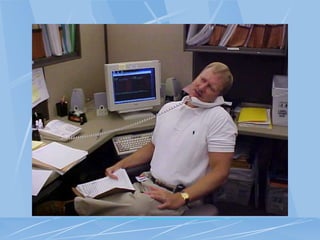
ERGONOMICS FOR
THE
21ST CENTURY
OFFICE OF RISK MANAGEMENT
LOSS PREVENTION UNIT
PRE-TEST
What is ergonomics?
What are MSDs?
What are symptoms of MSD?
How can I evaluate my workplace?
What are some ergonomic solutions?
COURSE OBJECTIVES
Define ergonomics
Establish ergonomics in the
workplace
Introduce basic skills in the
recognition & control of
occupational ergonomic
hazards
Introduce ergonomic
exercises.
PROGRAM GOAL
To minimize injuries due to chronic
physical and psychological stresses,
while maximizing productivity and
efficiency
ERGONOMICS DEFINED
Ergonomics is the science
of fitting the job to the
worker.
BIOMECHANICS
The science of measuring the
amount of force put on the
muscles and joints of people when
working in different positions.
BIOMECHANICS CONT.
STATIC - Holding one object or body
part in one position for an extended
period. EX. Standing or sitting in a
parking booth or at a microscope.
BIOMECHANICS CONT.
DYNAMIC - An activity created by the
rhythmic contraction and relaxation of
the muscles. EX. Walking
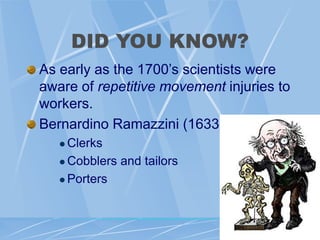
DID YOU KNOW?
As early as the 1700’s scientists were
aware of repetitive movement injuries to
workers.
Bernardino Ramazzini (1633-1714)
 Clerks
 Cobblers and tailors
 Porters
ERGONOMIC STUDY
AREAS
WORKERS - what they bring to the job
TOOLS - what they bring to the worker
ERGONOMIC STUDY
AREAS
TASKS - what the worker must do
ENVIRONMENT- the conditions
surrounding the worker and the tool
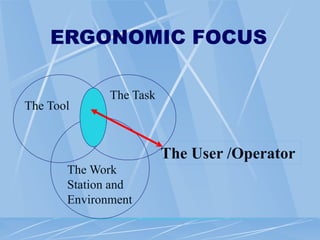
ERGONOMIC FOCUS
The Tool
The Task
The Work
Station and
Environment
The User /Operator
RESULTING INJURIES
ARE CALLED:
Cumulative Trauma Disorders (CTD),
Or
Repetitive Strain Injuries (RSI),
Or
Musculoskeletal Disorders (MSD)
HOW SERIOUS ARE
MSD
MSD account for:
 1/3 of all lost day injuries each year
 These injuries cost business $15-20 billion
in worker’s compensation each year
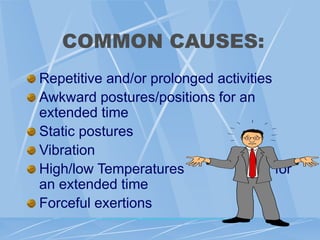
COMMON CAUSES:
Repetitive and/or prolonged activities
Awkward postures/positions for an
extended time
Static postures
Vibration
High/low Temperatures for
an extended time
Forceful exertions
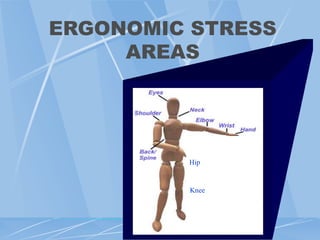
ERGONOMIC STRESS
AREAS
Knee
Hip
SIGNS OF MSD
Decreased range of
motion
Loss of function
Deformity
Cramping
Loss of color
Decreased grip
strength
Loss of balance
Swelling
Redness
SYMPTOMS OF MSD
Muscle fatigue or pain
Aching
Burning
Numbness
Stiffness
Tingling
EXAMPLES OF MSD
TENDONITIS- An inflammation of the tendon.
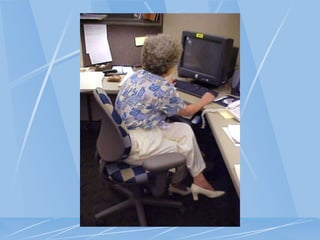
Typically occurs in the shoulder, wrist, hands,
or elbow.
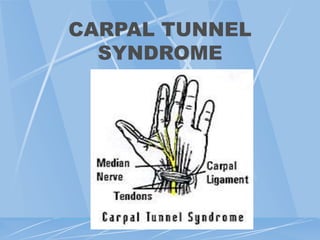
CARPAL TUNNEL SYNDROME- Irritation of
the median nerve, which runs through a bony
channel in the wrist called the carpal tunnel.
Usually results from excessive flexing or
twisting of the wrist.
CARPAL TUNNEL
SYNDROME
MSD CONT.
TRIGGER FINGER SYNDROME- Tendons in
the fingers become inflamed, causing pain,
swelling, and a loss of dexterity.
EYE STRAIN - The eyes become strained as
a result of poor lighting, glare or viewing from
awkward positions.
MSD CONT.
HAND/ARM VIBRATION SYNDROME-
Tingling, numbness, blanching, loss of
dexterity in the hand/arm
MUSCLE STRAIN – Pain in muscles
VIDEO
WHAT CAN WE DO?
Administrative controls
Work practice controls
Engineering controls
ADMINISTRATIVE
CONTROLS
Employee rotation/job task expansion
Physical adjustments to the work pace
Redesign of work methods
Alternative tasks
Breaks
WORK PRACTICE
CONTROLS
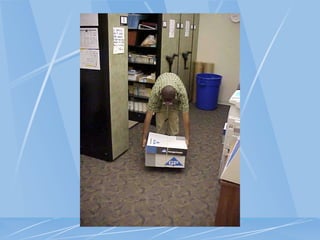
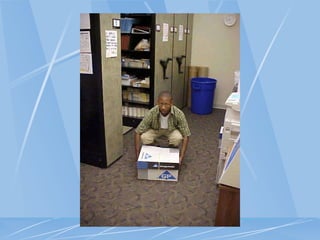
Safe & proper work techniques &
procedures
Training
Physical conditioning period
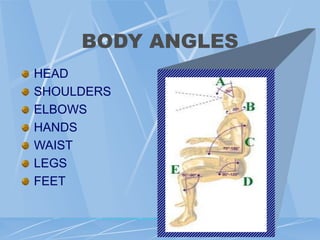
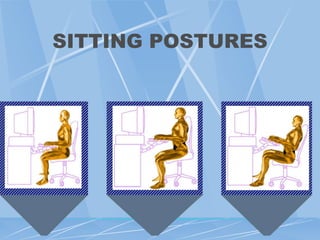
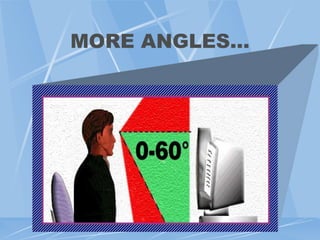
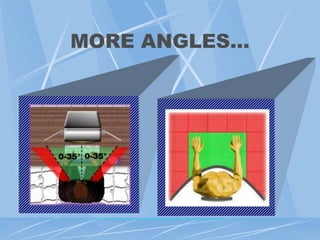
POSTURE & ANGLES
Whether your tasks are performed while
sitting or standing, always maintain
proper posture & angles--and avoid:
Awkward positions, and
Extreme reaches for materials
BODY ANGLES
HEAD
SHOULDERS
ELBOWS
HANDS
WAIST
LEGS
FEET
SITTING POSTURES
MORE ANGLES…
MORE ANGLES…
ENGINEERING
CONTROLS
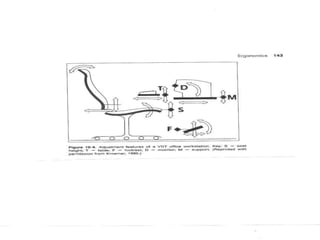
Workstations
Tools/equipment
Facilities
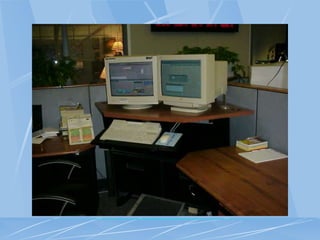
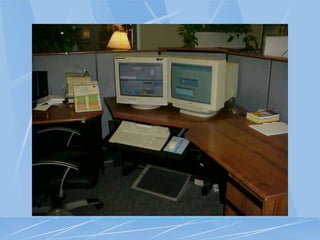
WORKSTATIONS
The objective is to:
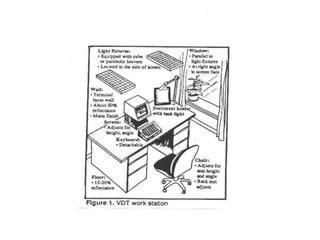
Fit the workstation to the employee
Reduce awkward positions
This can be done by using two methods:
WORKSTATIONS CONT.
Standard Way
 Adjustable
workstation
 Adjustable chair
 Foot rests
 Adjustable
monitor
 Document holder
Innovative Way
 Cut legs off
 Add blocks
 Build foot rest
 Thick book
 Build platform
TOOLS
Use of Force or of grip-strength
 Longer/shorter and thicker/thinner handles
Repetitive motion
 Ratcheting mechanism or gears
 Power tools
 Electric stapler
 Electric knife
 Spring-loaded returns
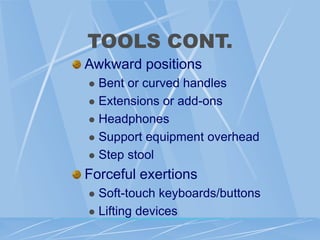
TOOLS CONT.
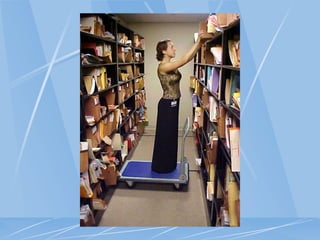
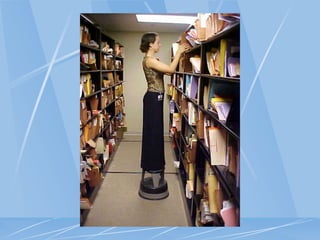
Awkward positions
 Bent or curved handles
 Extensions or add-ons
 Headphones
 Support equipment overhead
 Step stool
Forceful exertions
 Soft-touch keyboards/buttons
 Lifting devices
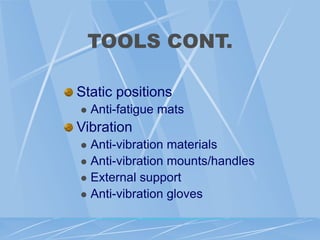
TOOLS CONT.
Static positions
 Anti-fatigue mats
Vibration
 Anti-vibration materials
 Anti-vibration mounts/handles
 External support
 Anti-vibration gloves
FACILITIES
Lighting/glare
FACILITIES
Temperature
FACILITIES
Noise
EXERCISES &
STRETCHES
These are exercises or stretches that can
be performed at your workstation,
home, just about anywhere.
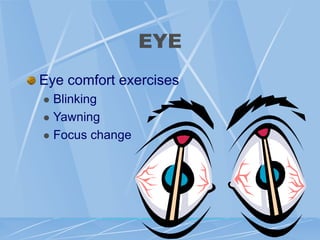
EYE
Eye comfort exercises
 Blinking
 Yawning
 Focus change
EYE
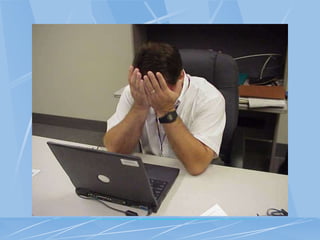
Palming
While seated, brace elbows on the edge
of the desk
Let weight fall forward
Cup hands over eyes and close eyes
Inhale slowly through nose & hold for 4
seconds
Continue deep breathing for 15-30
seconds
EYE
Movements
Close eyes and slowly & gently move
eyes up to the ceiling, then slowly down
to the floor
Repeat 3 times
Close eyes and slowly & gently move
eyes to the left, then slowly to the right
Repeat 3 times
NECK STRETCH
Tilt ear towards shoulder
Reach up and touch top of head with
palm to hold in tilted position
Hold 5-10 seconds. Repeat 2-3 times
(come out of stretch slowly)
Reverse side and repeat
Pec Corner Stretch
Stand at a corner about a foot away from the
wall with forearms on opposite sides of the
corner. One foot should be forward.
Elbows should be at slightly below shoulder
height
Keep abdominals tight to avoid arching back
Lean gently towards corner by bending the
front knee until a stretch is felt in front of the
chest.
Hold 5-10 seconds. Repeat 2-3 times
Overhead Reach
Take a deep breathe and reach up over
head with both arms.
Hold 5-10 seconds
Exhale and lower slowly
Repeat 2-3 times
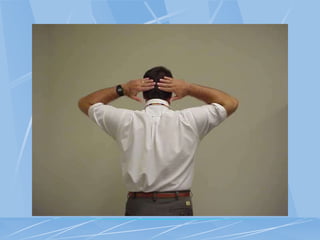
Shoulder Pinch
Place arms behind head being careful
not to press hand into head
Relax shoulders, and squeeze shoulder
blades together while keeping shoulders
back and down
Hold 5-10 seconds. Repeat 2-3 times
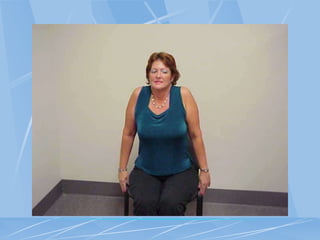
Shoulder Shrug
Sitting up straight, slowly bring
shoulders up toward your ears.
Hold positions 5-10 seconds
Then bring the shoulders down and hold
Repeat 2-3 times
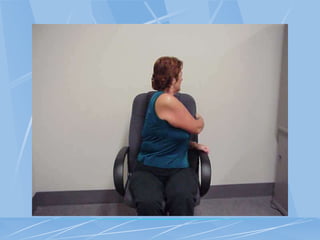
Chair Rotation Stretch
Sit in chair and place feet flat on floor
Reach across your body and grab the
back of the chair
Pull gently to increase stretch in mid
back
Hold 5-10 seconds. Repeat 5 times
Repeat on other side
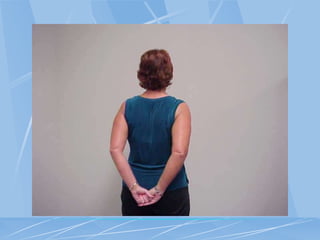
Arms Behind Back
Stretch
Hold hands behind back and grasp
hands together
Pull shoulder blades back and down
Hold 5 seconds. Repeat 5 times
Thoracic Spine
Extension Stretch
Lie on your back with a pillow under
your knees. Place a firmly rolled towel
under your shoulder blades across your
upper back
Raise arms up as you inhale
Lower arms as you exhale, and hold a
couple of seconds
Do this 5 times
Prop Ups or Press Ups
Lie on stomach and either prop up on
forearms or if wrists are not compromised,
press up through hands.
Let stomach sag, and allow back to arch
without using back muscles.
If propped on elbows, hold 5-10 seconds.
Repeat 5 times
If on hands, press up and down slowly 10
times
Foot Rotations
While sitting upright, slowly rotate each
foot from the ankles 3 times in one
direction
Then rotate 3 in the opposite direction
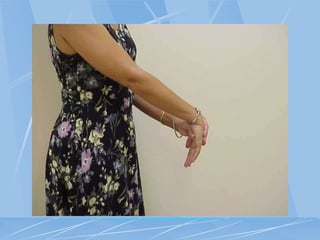
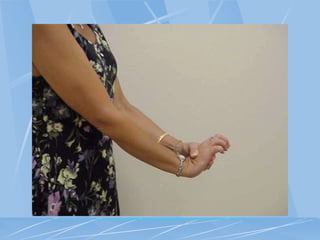
Wrist Flexed & Extended
Hold arm straight at waist height
With fingers of other hand, gently press down
above the knuckles, bending wrist down. (DO
NOT hold at the fingers to push down.)
Hold 5-10 seconds and repeat 2-3 times
For extending, hold onto palm of hand and
stretch wrist back. (DO NOT pull on fingers.)
Hold 5-10 seconds and repeat 2-3 times.
Finger Massage
VERY gently, massage the fingers of
each hand individually.
Move toward the nail gently.
Massage the space between your
fingers to widen and relax
Finger Squeeze
Squeeze a foam block OR the edge of
your desk firmly with all fingers
Hold for 3 seconds
Relax your grip
ERGONOMICS
PROGRAM
Essential elements:
 Management Leadership and employee
participation
 Hazard information and reporting
 Job Hazard Analysis and Control
 Training
 MSD Management
 Program evaluation
ERGONOMICS POST TEST
What three types of controls can we implement as solutions for
ergonomic problems?
ERGONOMICS POST TEST
What three types of controls can we implement as solutions for
ergonomic problems?
List three (3) examples of environmental conditions that affect
employees.
ERGONOMICS POST TEST
What three types of controls can we implement as solutions for
ergonomic problems?
List three (3) examples of environmental conditions that affect
employees.
Posture is not important in regards to ergonomics. T or F
ERGONOMICS POST TEST
What three types of controls can we implement as solutions for
ergonomic problems?
List three (3) examples of environmental conditions that affect
employees.
Posture is not important in regards to ergonomics. T or F
What does MSD stand for?
ERGONOMICS POST TEST
What three types of controls can we implement as solutions for
ergonomic problems?
List three (3) examples of environmental conditions that affect
employees.
Posture is not important in regards to ergonomics. T or F
What does MSD stand for?
Two examples of MSDs are, Tendonitis and Carpal Tunnel
Syndrome. T or F
ERGONOMICS POST TEST
What is ergonomics?
ERGONOMICS POST TEST
What is ergonomics?
List three (3) signs of MSD.
ERGONOMICS POST TEST
What is ergonomics?
List three (3) signs of MSD.
Ergonomics study areas include the worker and tools. T or F
ERGONOMICS POST TEST
What is ergonomics?
List three (3) signs of MSD.
Ergonomics study areas include the worker and tools.
When focusing on the tool, the task and the environment you
are trying to find the best combination for the worker
(user/operator). T or F
ERGONOMICS POST TEST
What is ergonomics?
List three (3) signs of MSD.
Ergonomics study areas include the worker and tools. T or F
When focusing on the tool, the task and the environment you
are trying to find the best combination for the worker
(user/operator). T or F
How can I evaluate my workplace?
QUESTIONS

ergonomics-training power point presentation

  • 1.
    ERGONOMICS FOR THE 21ST CENTURY OFFICEOF RISK MANAGEMENT LOSS PREVENTION UNIT
  • 2.
    PRE-TEST What is ergonomics? Whatare MSDs? What are symptoms of MSD? How can I evaluate my workplace? What are some ergonomic solutions?
  • 3.
    COURSE OBJECTIVES Define ergonomics Establishergonomics in the workplace Introduce basic skills in the recognition & control of occupational ergonomic hazards Introduce ergonomic exercises.
  • 4.
    PROGRAM GOAL To minimizeinjuries due to chronic physical and psychological stresses, while maximizing productivity and efficiency
  • 5.
    ERGONOMICS DEFINED Ergonomics isthe science of fitting the job to the worker.
  • 6.
    BIOMECHANICS The science ofmeasuring the amount of force put on the muscles and joints of people when working in different positions.
  • 7.
    BIOMECHANICS CONT. STATIC -Holding one object or body part in one position for an extended period. EX. Standing or sitting in a parking booth or at a microscope.
  • 8.
    BIOMECHANICS CONT. DYNAMIC -An activity created by the rhythmic contraction and relaxation of the muscles. EX. Walking
  • 9.
    DID YOU KNOW? Asearly as the 1700’s scientists were aware of repetitive movement injuries to workers. Bernardino Ramazzini (1633-1714)  Clerks  Cobblers and tailors  Porters
  • 10.
    ERGONOMIC STUDY AREAS WORKERS -what they bring to the job TOOLS - what they bring to the worker
  • 11.
    ERGONOMIC STUDY AREAS TASKS -what the worker must do ENVIRONMENT- the conditions surrounding the worker and the tool
  • 12.
    ERGONOMIC FOCUS The Tool TheTask The Work Station and Environment The User /Operator
  • 13.
    RESULTING INJURIES ARE CALLED: CumulativeTrauma Disorders (CTD), Or Repetitive Strain Injuries (RSI), Or Musculoskeletal Disorders (MSD)
  • 14.
    HOW SERIOUS ARE MSD MSDaccount for:  1/3 of all lost day injuries each year  These injuries cost business $15-20 billion in worker’s compensation each year
  • 15.
    COMMON CAUSES: Repetitive and/orprolonged activities Awkward postures/positions for an extended time Static postures Vibration High/low Temperatures for an extended time Forceful exertions
  • 16.
  • 17.
    SIGNS OF MSD Decreasedrange of motion Loss of function Deformity Cramping Loss of color Decreased grip strength Loss of balance Swelling Redness
  • 18.
    SYMPTOMS OF MSD Musclefatigue or pain Aching Burning Numbness Stiffness Tingling
  • 19.
    EXAMPLES OF MSD TENDONITIS-An inflammation of the tendon. Typically occurs in the shoulder, wrist, hands, or elbow. CARPAL TUNNEL SYNDROME- Irritation of the median nerve, which runs through a bony channel in the wrist called the carpal tunnel. Usually results from excessive flexing or twisting of the wrist.
  • 20.
  • 21.
    MSD CONT. TRIGGER FINGERSYNDROME- Tendons in the fingers become inflamed, causing pain, swelling, and a loss of dexterity. EYE STRAIN - The eyes become strained as a result of poor lighting, glare or viewing from awkward positions.
  • 22.
    MSD CONT. HAND/ARM VIBRATIONSYNDROME- Tingling, numbness, blanching, loss of dexterity in the hand/arm MUSCLE STRAIN – Pain in muscles
  • 23.
  • 24.
    WHAT CAN WEDO? Administrative controls Work practice controls Engineering controls
  • 25.
    ADMINISTRATIVE CONTROLS Employee rotation/job taskexpansion Physical adjustments to the work pace Redesign of work methods Alternative tasks Breaks
  • 26.
    WORK PRACTICE CONTROLS Safe &proper work techniques & procedures Training Physical conditioning period
  • 29.
    POSTURE & ANGLES Whetheryour tasks are performed while sitting or standing, always maintain proper posture & angles--and avoid: Awkward positions, and Extreme reaches for materials
  • 30.
  • 31.
  • 32.
  • 33.
  • 39.
  • 40.
    WORKSTATIONS The objective isto: Fit the workstation to the employee Reduce awkward positions This can be done by using two methods:
  • 41.
    WORKSTATIONS CONT. Standard Way Adjustable workstation  Adjustable chair  Foot rests  Adjustable monitor  Document holder Innovative Way  Cut legs off  Add blocks  Build foot rest  Thick book  Build platform
  • 45.
    TOOLS Use of Forceor of grip-strength  Longer/shorter and thicker/thinner handles Repetitive motion  Ratcheting mechanism or gears  Power tools  Electric stapler  Electric knife  Spring-loaded returns
  • 46.
    TOOLS CONT. Awkward positions Bent or curved handles  Extensions or add-ons  Headphones  Support equipment overhead  Step stool Forceful exertions  Soft-touch keyboards/buttons  Lifting devices
  • 49.
    TOOLS CONT. Static positions Anti-fatigue mats Vibration  Anti-vibration materials  Anti-vibration mounts/handles  External support  Anti-vibration gloves
  • 50.
  • 52.
  • 53.
  • 54.
    EXERCISES & STRETCHES These areexercises or stretches that can be performed at your workstation, home, just about anywhere.
  • 55.
    EYE Eye comfort exercises Blinking  Yawning  Focus change
  • 56.
    EYE Palming While seated, braceelbows on the edge of the desk Let weight fall forward Cup hands over eyes and close eyes Inhale slowly through nose & hold for 4 seconds Continue deep breathing for 15-30 seconds
  • 58.
    EYE Movements Close eyes andslowly & gently move eyes up to the ceiling, then slowly down to the floor Repeat 3 times Close eyes and slowly & gently move eyes to the left, then slowly to the right Repeat 3 times
  • 59.
    NECK STRETCH Tilt eartowards shoulder Reach up and touch top of head with palm to hold in tilted position Hold 5-10 seconds. Repeat 2-3 times (come out of stretch slowly) Reverse side and repeat
  • 61.
    Pec Corner Stretch Standat a corner about a foot away from the wall with forearms on opposite sides of the corner. One foot should be forward. Elbows should be at slightly below shoulder height Keep abdominals tight to avoid arching back Lean gently towards corner by bending the front knee until a stretch is felt in front of the chest. Hold 5-10 seconds. Repeat 2-3 times
  • 62.
    Overhead Reach Take adeep breathe and reach up over head with both arms. Hold 5-10 seconds Exhale and lower slowly Repeat 2-3 times
  • 63.
    Shoulder Pinch Place armsbehind head being careful not to press hand into head Relax shoulders, and squeeze shoulder blades together while keeping shoulders back and down Hold 5-10 seconds. Repeat 2-3 times
  • 65.
    Shoulder Shrug Sitting upstraight, slowly bring shoulders up toward your ears. Hold positions 5-10 seconds Then bring the shoulders down and hold Repeat 2-3 times
  • 67.
    Chair Rotation Stretch Sitin chair and place feet flat on floor Reach across your body and grab the back of the chair Pull gently to increase stretch in mid back Hold 5-10 seconds. Repeat 5 times Repeat on other side
  • 69.
    Arms Behind Back Stretch Holdhands behind back and grasp hands together Pull shoulder blades back and down Hold 5 seconds. Repeat 5 times
  • 71.
    Thoracic Spine Extension Stretch Lieon your back with a pillow under your knees. Place a firmly rolled towel under your shoulder blades across your upper back Raise arms up as you inhale Lower arms as you exhale, and hold a couple of seconds Do this 5 times
  • 72.
    Prop Ups orPress Ups Lie on stomach and either prop up on forearms or if wrists are not compromised, press up through hands. Let stomach sag, and allow back to arch without using back muscles. If propped on elbows, hold 5-10 seconds. Repeat 5 times If on hands, press up and down slowly 10 times
  • 73.
    Foot Rotations While sittingupright, slowly rotate each foot from the ankles 3 times in one direction Then rotate 3 in the opposite direction
  • 74.
    Wrist Flexed &Extended Hold arm straight at waist height With fingers of other hand, gently press down above the knuckles, bending wrist down. (DO NOT hold at the fingers to push down.) Hold 5-10 seconds and repeat 2-3 times For extending, hold onto palm of hand and stretch wrist back. (DO NOT pull on fingers.) Hold 5-10 seconds and repeat 2-3 times.
  • 77.
    Finger Massage VERY gently,massage the fingers of each hand individually. Move toward the nail gently. Massage the space between your fingers to widen and relax
  • 78.
    Finger Squeeze Squeeze afoam block OR the edge of your desk firmly with all fingers Hold for 3 seconds Relax your grip
  • 79.
    ERGONOMICS PROGRAM Essential elements:  ManagementLeadership and employee participation  Hazard information and reporting  Job Hazard Analysis and Control  Training  MSD Management  Program evaluation
  • 80.
    ERGONOMICS POST TEST Whatthree types of controls can we implement as solutions for ergonomic problems?
  • 81.
    ERGONOMICS POST TEST Whatthree types of controls can we implement as solutions for ergonomic problems? List three (3) examples of environmental conditions that affect employees.
  • 82.
    ERGONOMICS POST TEST Whatthree types of controls can we implement as solutions for ergonomic problems? List three (3) examples of environmental conditions that affect employees. Posture is not important in regards to ergonomics. T or F
  • 83.
    ERGONOMICS POST TEST Whatthree types of controls can we implement as solutions for ergonomic problems? List three (3) examples of environmental conditions that affect employees. Posture is not important in regards to ergonomics. T or F What does MSD stand for?
  • 84.
    ERGONOMICS POST TEST Whatthree types of controls can we implement as solutions for ergonomic problems? List three (3) examples of environmental conditions that affect employees. Posture is not important in regards to ergonomics. T or F What does MSD stand for? Two examples of MSDs are, Tendonitis and Carpal Tunnel Syndrome. T or F
  • 85.
  • 86.
    ERGONOMICS POST TEST Whatis ergonomics? List three (3) signs of MSD.
  • 87.
    ERGONOMICS POST TEST Whatis ergonomics? List three (3) signs of MSD. Ergonomics study areas include the worker and tools. T or F
  • 88.
    ERGONOMICS POST TEST Whatis ergonomics? List three (3) signs of MSD. Ergonomics study areas include the worker and tools. When focusing on the tool, the task and the environment you are trying to find the best combination for the worker (user/operator). T or F
  • 89.
    ERGONOMICS POST TEST Whatis ergonomics? List three (3) signs of MSD. Ergonomics study areas include the worker and tools. T or F When focusing on the tool, the task and the environment you are trying to find the best combination for the worker (user/operator). T or F How can I evaluate my workplace?
  • 90.