Ergonomics
Dr Ganesh BR
Ergonomics
Definition: The study of fitting the task to the
human.
Goal: Prevent musculoskeletal disorders by
surveying the workplace, take preventive steps,
relying on employee input and addressing problems
early.
Topics:
 Musculoskeletal Disorders (MSDs)
 Recognizing signs and symptoms of MSDs and how
to report.
 Common Causes of MSDs
 Computer Ergonomics
 Safe Lifting Principles
Introduction
MSD Injuries in general
VDT/Computer Workstations
Back Safety
Musculoskeletal Disorders
Caused by overuse or repetition involving:
Muscles
Nerves
Tendons
Ligaments
 Joints
 Spinal Disks
Cartilage
MSD Symptoms & Signs
Symptoms should be
reported to your
supervisor early:
 Muscle Fatigue
 Aching
 Burning
 Numbness
 Stiffness
 Tingling
Adjusting the way you
work removes stress. If
injured you could
develop a MSD.
 Signs should be
reported
immediately:
 Decreased range of
motion
 Decreased grip
strength
 Loss of function
 Loss of balance
 Deformity
 Swelling
 Cramping
 Redness
 Color loss
Common Causes Of MSDs
Lifting- continuously lifting and
moving
Repetitive motion (factors: angle,
alignment, force, length of time without break)-
keying and using the mouse
Contact stress- hammering
Extreme force- tightening objects
Vibration- drilling
Awkward postures- pulling carts
Why Worry ?
Musculoskeletal Ergonomic
Injuries are the fastest-growing
category (accounting for 1.8
million annual Work Related
Musculoskeletal Disorders Up
600% over last 11 years (MSDs).
$9 billion total injury cost / year
& $29 K / case compensation
claim cost
More lost workdays for MSDs
(ave. = 30 days for a Carpal
Tunnel injury)
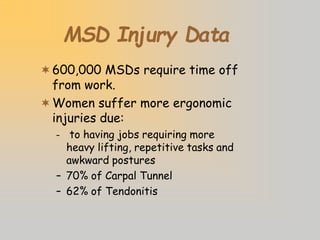
MSD Injury Data
600,000 MSDs require time off
from work.
Women suffer more ergonomic
injuries due:
– to having jobs requiring more
heavy lifting, repetitive tasks and
awkward postures
– 70% of Carpal Tunnel
– 62% of Tendonitis
CTD Injury Factors
Lesions to tendons of the neck, back,
shoulders, arms, wrists or hands
Primary causes:
– Repetitive movements over long
periods of time
– Awkward postures
– Use of excessive forces
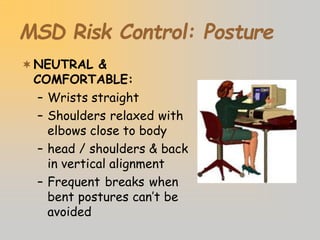
MSD Risk Control: Posture
NEUTRAL &
COMFORTABLE:
– Wrists straight
– Shoulders relaxed with
elbows close to body
– head / shoulders & back
in vertical alignment
– Frequent breaks when
bent postures can’t be
avoided
Ergonomic Alignment
Carpal Tunnel Syndrome
Occurs with repetitive motion of hands &
wrists--especially with high force levels,
compression of nerves and tendons
MSD Risk Control:
Repetition
Eliminate unnecessary tasks /
movements by redesigning procedures
and workstations
Take short, frequent breaks
Alternate tasks and processes to use
different muscle groups
Computer Workstation
Facts
Routine PC user is defined as spending 20
hours or more per week working at a
computer.
Studies of PC users have not shown a risk
of eye damage...although fatigue is very
possible.
NIOSH studies have not indicated a
radiation hazard nor pregnancy risk from
PC usage.
Workers using bi/tri-focal glasses before
beginning PC use may need special purpose
glasses for computer work.
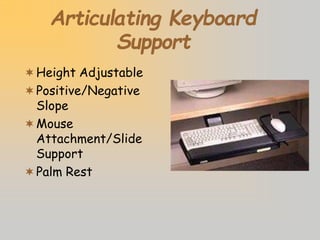
Articulating Keyboard
Support
Height Adjustable
Positive/Negative
Slope
Mouse
Attachment/Slide
Support
Palm Rest
Palm Rests
 No medical evidence that they reduce RSI
injuries...As they work for some, but not for others
 Usage Guidelines:
– Buy rest that is even with top of keyboard
– Material should be “medium-soft” (foam--gel mix) so foam
doesn’t break down. AVOID hard plastic types
– DON’T leave wrists on rest...which compresses carpal
tunnel. Palm rest instead.
– Changing typing habits more critical than wrist support
– MOST APPROPRIATELY USED TO REST HANDS
DURING PAUSE IN TYPING
 LEARN TO TYPE CORRECTLY WITH “FLOATING
WRISTS” FIRST!!!
Ergonomic chairs
Adjustable back
height and angle
Adjustable arm rests
Adjustable height
Five star base
Alternative Pointing Devices
 Track-balls
 “Scrolling” Mouse
 “Touch pad mouse”
 Cordless mouse
Unsatisfactory
Workstation“Design”
 Reaching for mouse
 Monitor too low
 Keyboard too high,
wrists bent
 Chair too high, feet
should be flat on the
floor or on a foot rest
 Document holder too
far back
 No arms on the chair
 Bad posture, leaning
forward
Satisfactory Workstation
“Design”
•Use head sets for frequent
phone use.
• Monitor at eye level.
•Keep wrists straight, arms
close to body, and at a right
angle.
• Mouse on support next to keyboard.
• Document holder near monitor.
• Foot rest used if feet do not touch
the floor.
• Fully adjustable computer task chair.
VDT Ergonomics Summary
Good ergonomic design of processes
and furniture DOES improve
personnel comfort, health, morale,
and productivity.
It’s critical to seek prompt medical
aid for symptoms of ergonomic stress
/ CTDs
Back Injury Facts
Back injuries account for nearly 20% of all
injuries in the workplace
8 out of 10 Americans will suffer a back
injury at sometime in their life
Back injuries account for 93 million lost
work days each year-2nd only to the
common cold
Worker’s compensation costs of up to $20
billion each year
Back injuries increase with age, fitness
level and weight
Common Causes
Reaching and lifting
Trying to lift too much weight
Twisting and
bending while
lifting
Common Causes
Continued…
Carrying awkward objects
Working in
awkward positions
Sitting or standing too long
Working On Ladders
Balancing
Overhead work
Materials
movement
Use Of Tools
Pinch grip
End-on-end grip
Lowering The Risk Of
Injury
Engineering
ProperEquipm
ent
Administrative
ProperStaffing
W
orkpractice
G
oodw
orkhabits
C
ontrol
3
types
Engineering Controls
Supply proper
equipment i.e.
ergonomically designed
tools
Maintain equipment i.e.
lubricate and repair
Administrative Controls
Assure adequate
staffing
Purchase proper
equipment
Rotate “heavy” or
repetitive jobs
Work Practice Controls
Proper lifting techniques
Good postures
Alternate repetitive tasks
Use breaks to divide up “heavy” work
Stretching/exercise
Proper Lifting
Techniques
Step One
Test the load to get
an indication as to
how heavy the
object is.
Proper Lifting Techniques
Step Two
Stand close to the load
with your feet spread
apart about shoulder
width, with one foot
slightly in front of the
other for balance.
Proper Lifting
Techniques
Step Three
Squat down bending
at the knees (not
your waist). Keep
your back straight.
Proper Lifting Techniques
Step Four
Get a firm grasp of
the object before
beginning the lift.
Proper Lifting Techniques
Step Five
Begin slowly lifting with
your legs by
straightening them.
NEVER twist your body
during this step.
Proper Lifting Techniques
Step Six
Once the lift is complete,
keep the load close to
your body to prevent
straining the lower back.
If you must turn while
carrying the load, turn
using your feet-not your
torso.
Proper Lifting Techniques
Step Seven
To place the
object below the
level of your
waist, follow the
same procedures
in reverse order.
Alternatives To Lifting
For difficult lifting tasks, keep these options
in mind:
Ask a co-
worker for
help.
Alternatives To Lifting:
Use a cart but keep this in mind;
Pushing a load is easier on the back
than pulling.
When pushing a cart:
Stay close to the
load
Don’t lean forward
Use both arms
Alternatives To Lifting
If you must pull the cart:
Face the object
squarely, with one foot
at least 12 inches in
front of the other
Keep your back
straight
Bend your knees
slightly and pull in a
smooth motion.
Safety Tips For Lifting
Don’t lift objects over your head
Don’t twist your body when lifting
or setting an object down
Don’t reach over an obstacle to lift
a load. Move whatever is in the way
or go around it.
Pace yourself to avoid fatigue when
doing heavy work for a long period
of time.
Back Safety Summary
Avoid Lifting and Bending Whenever You
Can
Use carts, dolleys and
other lifting devices
Ask for assistance
Place objects off of the
floor and store in the
body’s “neutral” zone
Practice Safe Lifting Techniques!!
What you can do…
Look at the risk factors you encounter at home and
at work – think ergonomics. Ask yourself:
 “What awkward postures do I encounter?”
 “Can I readjust sitting/standing positions to
maintain neutral postures?”
 “Do I use excess force on my job? If so, how can
I reduce or eliminate that force?”
 “When lifting is required, am I following the right
steps to lift correctly?”
 “Do I have any other ideas to make my work
space or tasks more ergonomically comfortable?”
Remember…
Always report any signs/symptoms of
Musculoskeletal Disorders, and any other
ergonomic concerns to your supervisor
immediately.
You may contact EH&S 275-3241 for more
information, or access our website
www.safety.rochester.edu

ergonomics[1].pptx

  • 1.
  • 2.
    Ergonomics Definition: The studyof fitting the task to the human. Goal: Prevent musculoskeletal disorders by surveying the workplace, take preventive steps, relying on employee input and addressing problems early. Topics:  Musculoskeletal Disorders (MSDs)  Recognizing signs and symptoms of MSDs and how to report.  Common Causes of MSDs  Computer Ergonomics  Safe Lifting Principles
  • 3.
    Introduction MSD Injuries ingeneral VDT/Computer Workstations Back Safety
  • 4.
    Musculoskeletal Disorders Caused byoveruse or repetition involving: Muscles Nerves Tendons Ligaments  Joints  Spinal Disks Cartilage
  • 5.
    MSD Symptoms &Signs Symptoms should be reported to your supervisor early:  Muscle Fatigue  Aching  Burning  Numbness  Stiffness  Tingling Adjusting the way you work removes stress. If injured you could develop a MSD.  Signs should be reported immediately:  Decreased range of motion  Decreased grip strength  Loss of function  Loss of balance  Deformity  Swelling  Cramping  Redness  Color loss
  • 6.
    Common Causes OfMSDs Lifting- continuously lifting and moving Repetitive motion (factors: angle, alignment, force, length of time without break)- keying and using the mouse Contact stress- hammering Extreme force- tightening objects Vibration- drilling Awkward postures- pulling carts
  • 7.
    Why Worry ? MusculoskeletalErgonomic Injuries are the fastest-growing category (accounting for 1.8 million annual Work Related Musculoskeletal Disorders Up 600% over last 11 years (MSDs). $9 billion total injury cost / year & $29 K / case compensation claim cost More lost workdays for MSDs (ave. = 30 days for a Carpal Tunnel injury)
  • 8.
    MSD Injury Data 600,000MSDs require time off from work. Women suffer more ergonomic injuries due: – to having jobs requiring more heavy lifting, repetitive tasks and awkward postures – 70% of Carpal Tunnel – 62% of Tendonitis
  • 9.
    CTD Injury Factors Lesionsto tendons of the neck, back, shoulders, arms, wrists or hands Primary causes: – Repetitive movements over long periods of time – Awkward postures – Use of excessive forces
  • 10.
    MSD Risk Control:Posture NEUTRAL & COMFORTABLE: – Wrists straight – Shoulders relaxed with elbows close to body – head / shoulders & back in vertical alignment – Frequent breaks when bent postures can’t be avoided
  • 11.
  • 12.
    Carpal Tunnel Syndrome Occurswith repetitive motion of hands & wrists--especially with high force levels, compression of nerves and tendons
  • 13.
    MSD Risk Control: Repetition Eliminateunnecessary tasks / movements by redesigning procedures and workstations Take short, frequent breaks Alternate tasks and processes to use different muscle groups
  • 14.
    Computer Workstation Facts Routine PCuser is defined as spending 20 hours or more per week working at a computer. Studies of PC users have not shown a risk of eye damage...although fatigue is very possible. NIOSH studies have not indicated a radiation hazard nor pregnancy risk from PC usage. Workers using bi/tri-focal glasses before beginning PC use may need special purpose glasses for computer work.
  • 15.
  • 16.
    Palm Rests  Nomedical evidence that they reduce RSI injuries...As they work for some, but not for others  Usage Guidelines: – Buy rest that is even with top of keyboard – Material should be “medium-soft” (foam--gel mix) so foam doesn’t break down. AVOID hard plastic types – DON’T leave wrists on rest...which compresses carpal tunnel. Palm rest instead. – Changing typing habits more critical than wrist support – MOST APPROPRIATELY USED TO REST HANDS DURING PAUSE IN TYPING  LEARN TO TYPE CORRECTLY WITH “FLOATING WRISTS” FIRST!!!
  • 17.
    Ergonomic chairs Adjustable back heightand angle Adjustable arm rests Adjustable height Five star base
  • 18.
    Alternative Pointing Devices Track-balls  “Scrolling” Mouse  “Touch pad mouse”  Cordless mouse
  • 19.
    Unsatisfactory Workstation“Design”  Reaching formouse  Monitor too low  Keyboard too high, wrists bent  Chair too high, feet should be flat on the floor or on a foot rest  Document holder too far back  No arms on the chair  Bad posture, leaning forward
  • 20.
    Satisfactory Workstation “Design” •Use headsets for frequent phone use. • Monitor at eye level. •Keep wrists straight, arms close to body, and at a right angle. • Mouse on support next to keyboard. • Document holder near monitor. • Foot rest used if feet do not touch the floor. • Fully adjustable computer task chair.
  • 21.
    VDT Ergonomics Summary Goodergonomic design of processes and furniture DOES improve personnel comfort, health, morale, and productivity. It’s critical to seek prompt medical aid for symptoms of ergonomic stress / CTDs
  • 22.
    Back Injury Facts Backinjuries account for nearly 20% of all injuries in the workplace 8 out of 10 Americans will suffer a back injury at sometime in their life Back injuries account for 93 million lost work days each year-2nd only to the common cold Worker’s compensation costs of up to $20 billion each year Back injuries increase with age, fitness level and weight
  • 23.
    Common Causes Reaching andlifting Trying to lift too much weight Twisting and bending while lifting
  • 24.
    Common Causes Continued… Carrying awkwardobjects Working in awkward positions Sitting or standing too long
  • 25.
  • 26.
    Use Of Tools Pinchgrip End-on-end grip
  • 27.
    Lowering The RiskOf Injury Engineering ProperEquipm ent Administrative ProperStaffing W orkpractice G oodw orkhabits C ontrol 3 types
  • 28.
    Engineering Controls Supply proper equipmenti.e. ergonomically designed tools Maintain equipment i.e. lubricate and repair
  • 29.
    Administrative Controls Assure adequate staffing Purchaseproper equipment Rotate “heavy” or repetitive jobs
  • 30.
    Work Practice Controls Properlifting techniques Good postures Alternate repetitive tasks Use breaks to divide up “heavy” work Stretching/exercise
  • 31.
    Proper Lifting Techniques Step One Testthe load to get an indication as to how heavy the object is.
  • 32.
    Proper Lifting Techniques StepTwo Stand close to the load with your feet spread apart about shoulder width, with one foot slightly in front of the other for balance.
  • 33.
    Proper Lifting Techniques Step Three Squatdown bending at the knees (not your waist). Keep your back straight.
  • 34.
    Proper Lifting Techniques StepFour Get a firm grasp of the object before beginning the lift.
  • 35.
    Proper Lifting Techniques StepFive Begin slowly lifting with your legs by straightening them. NEVER twist your body during this step.
  • 36.
    Proper Lifting Techniques StepSix Once the lift is complete, keep the load close to your body to prevent straining the lower back. If you must turn while carrying the load, turn using your feet-not your torso.
  • 37.
    Proper Lifting Techniques StepSeven To place the object below the level of your waist, follow the same procedures in reverse order.
  • 38.
    Alternatives To Lifting Fordifficult lifting tasks, keep these options in mind: Ask a co- worker for help.
  • 39.
    Alternatives To Lifting: Usea cart but keep this in mind; Pushing a load is easier on the back than pulling. When pushing a cart: Stay close to the load Don’t lean forward Use both arms
  • 40.
    Alternatives To Lifting Ifyou must pull the cart: Face the object squarely, with one foot at least 12 inches in front of the other Keep your back straight Bend your knees slightly and pull in a smooth motion.
  • 41.
    Safety Tips ForLifting Don’t lift objects over your head Don’t twist your body when lifting or setting an object down Don’t reach over an obstacle to lift a load. Move whatever is in the way or go around it. Pace yourself to avoid fatigue when doing heavy work for a long period of time.
  • 42.
    Back Safety Summary AvoidLifting and Bending Whenever You Can Use carts, dolleys and other lifting devices Ask for assistance Place objects off of the floor and store in the body’s “neutral” zone Practice Safe Lifting Techniques!!
  • 43.
    What you cando… Look at the risk factors you encounter at home and at work – think ergonomics. Ask yourself:  “What awkward postures do I encounter?”  “Can I readjust sitting/standing positions to maintain neutral postures?”  “Do I use excess force on my job? If so, how can I reduce or eliminate that force?”  “When lifting is required, am I following the right steps to lift correctly?”  “Do I have any other ideas to make my work space or tasks more ergonomically comfortable?”
  • 44.
    Remember… Always report anysigns/symptoms of Musculoskeletal Disorders, and any other ergonomic concerns to your supervisor immediately. You may contact EH&S 275-3241 for more information, or access our website www.safety.rochester.edu