BEYOND THE VLOG
    Why VIDEO Matters

   with Joey Fortman
@JoeyFortman
•   Why Video Matters?
          SEO
•              Puts ‘face’ behind the
               brand.
    • More engaging
    • People do business with people they
      ‘like’ or feel they can ‘relate’ to.
•              Reach Prospects
    • Video into e-mail marketing increases
      clickthru by over 96% (Implix)
    • People do business with people
      they ‘like’ or feel they can
      ‘relate’ to.
• Video
              Video SEO
          boosts conversion rates   by an
  average of 9%.
  (Internet Retailer, October 2010)

• Products that have videos are 95% more
  likely to be bought.(Internet Retailer,
  April 2010)

• Video adds two minutes to visitors' stays
  on retail sites.(Comscore, August 2010)

• Video increases the likelihood of a
  front-page Google search result by 96%
  with proper page optimization.(Forrester,
  January 2010)
Do you have CONTENT?
• How-To’s / Tips & Tricks
• Brand Awareness
• Video
 Testimonials/Reviews/Intervie
 ws
  • Creates credibility.
• Contests
• About the Team
• Events
How-To’s / Tips & Tricks
    • DIY, fashion haul, etc
Brand Awareness
     • Video intro about yourself
       (homepage)


Video Testimonials Reviews & Interviews
  • Interviews / personal reviews -
    authors, inventors, celebrities: book
    reviews, product review

  • Video Testimonial from someone other
    than yourself about you/your product
Contests
  • Great for SEO with time on site
  • Site Scavenger Hunts
  • Twitter/Facebook/Pinterest/YouTube
    Giveaways
  • Do a video to explain a contest
About The Team
• Employee/writer/contributer/reader/etc
  of the month

• Could make it a feature or one time.
  Make it long with a collage or each
  separately
Events
• Did you do a press event & want to
 impress the agency who invited you?
• Did your blog/biz do a charity
 event & you want to highlight it
• Did you cover something in the area
 that you specialize in (hyperlocal)
• These are AWESOME if you’re dying
 to break into travel experiences!
Things to Think About
• Equipment
   • Video Cam, Cell Phone,
    Webcam
• Sound
   • Music Beds, sound effects
• Subjects
   • Spokesperson, Kids, You,
• Production
   • Who will produce your
    videos?
WHO will produce it?
• In-House
    • iMovie, Final Cut, Windows
      Movie Maker, YouTube
• Professional/Production Company
• Bloggers, Fans, Friends
    • Testimonials/Reviews
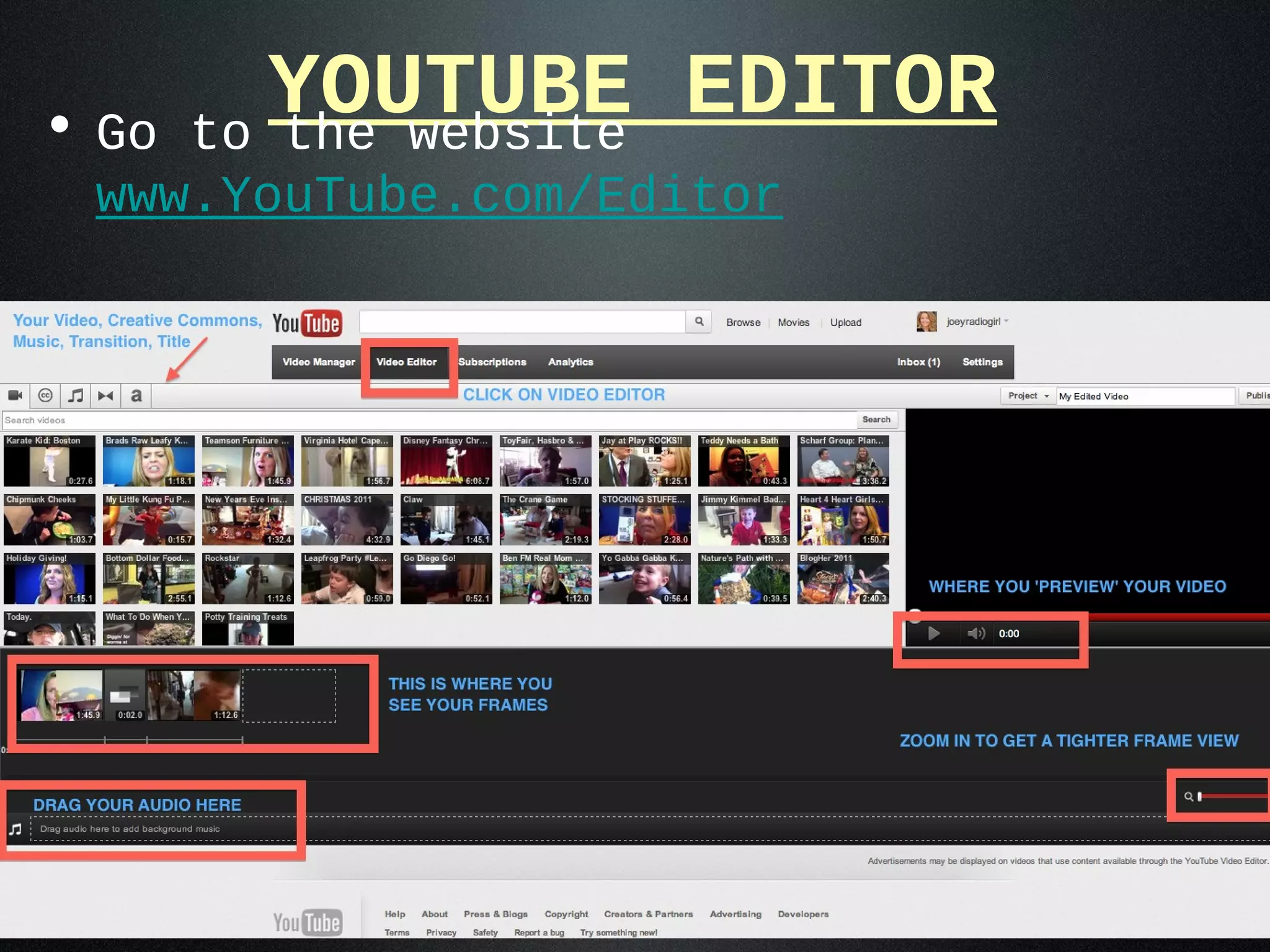
• Go
          YOUTUBE EDITOR
       to the website
 www.YouTube.com/Editor
Video Terms
•   Tilt (up/down)
•   Pan (side/side)
•   Backlight
•   Over The Shoulder Shot
•   Wide Shot
•   Two Shot
•   Medium Shot
•   Close Up
•   Reversal
•   Lower Third
•   Cutaway
•   B Roll
•   Pre-Post Roll
•   Jump Cuts
•   Interview
Types of Video
• Raw: Amateur/Candid
   • Un-edited footage
• Produced:
  Professional/Investment
   • Edited video
   • Cutaways, closeups,
     branding
• Live: Experienced
   • Sites like Ustream or
     Stickam
RULES for
      Video
•Introduction
•Sound
•Lighting
•Dress
•Shot
•Subjects
INTRODUCTION
• Who are you?    Why are you there?
    • ‘I’m ____ and welcome to my website!
      Today we’re going to talk about
      ____.’’

• BE CATCHY! Grab their attention.
    • Start with a shot then fade to you
Sound
• MINIMIZE background noise: kids, music,
  conversation, tv
     • Sometimes you just can’t control it. That’s when you
       find a way to have fun with it.

• USE a MICROPHONE when possible
     • It can make or break your video. If you’re covering
       an event with your iphone and no mic?   Might as well
       not even do it... sound is so bad!

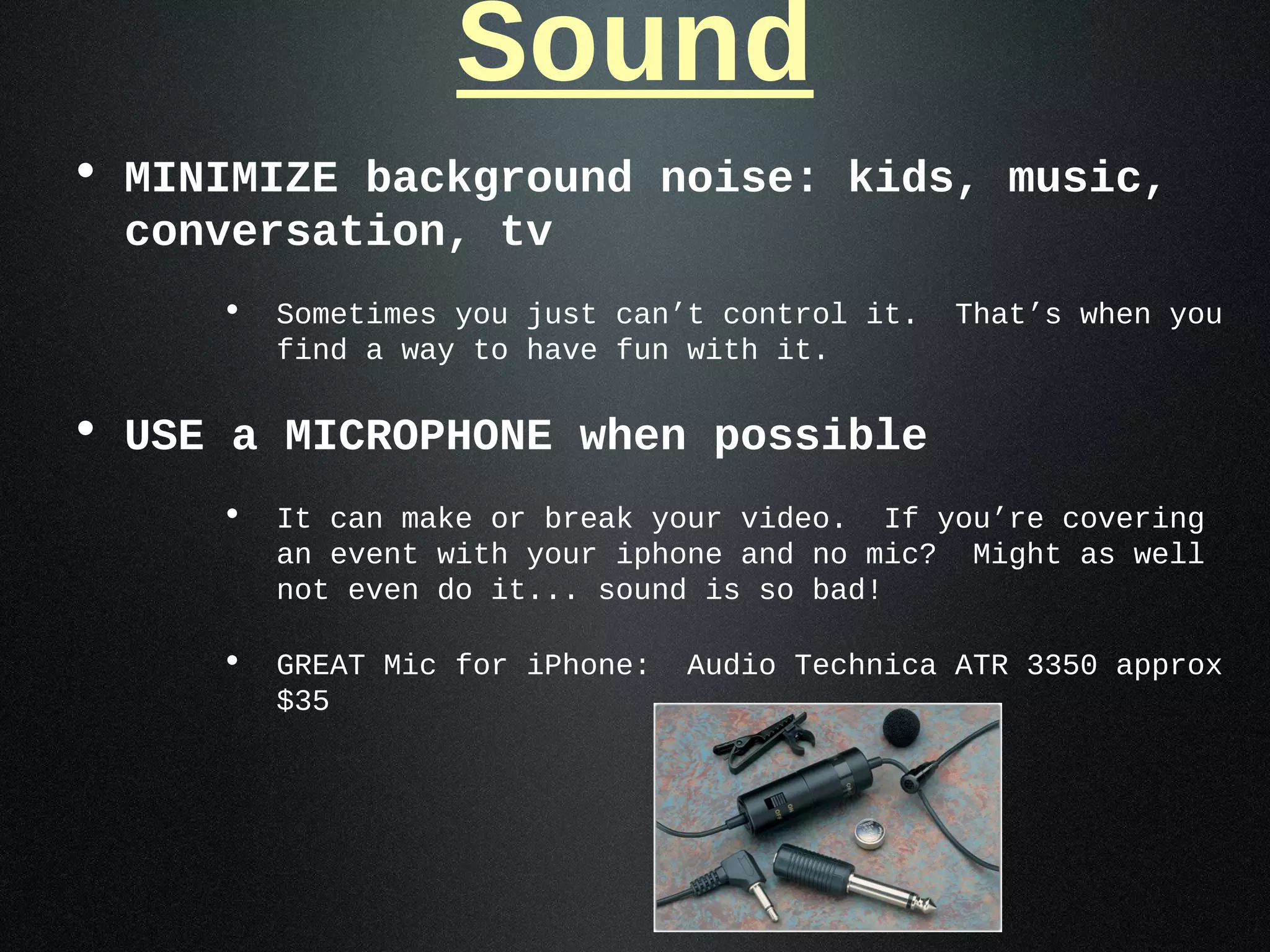
     • GREAT Mic for iPhone: Audio Technica ATR 3350 approx
       $35
Lighting
• More is BETTER
• Outside (when possible)
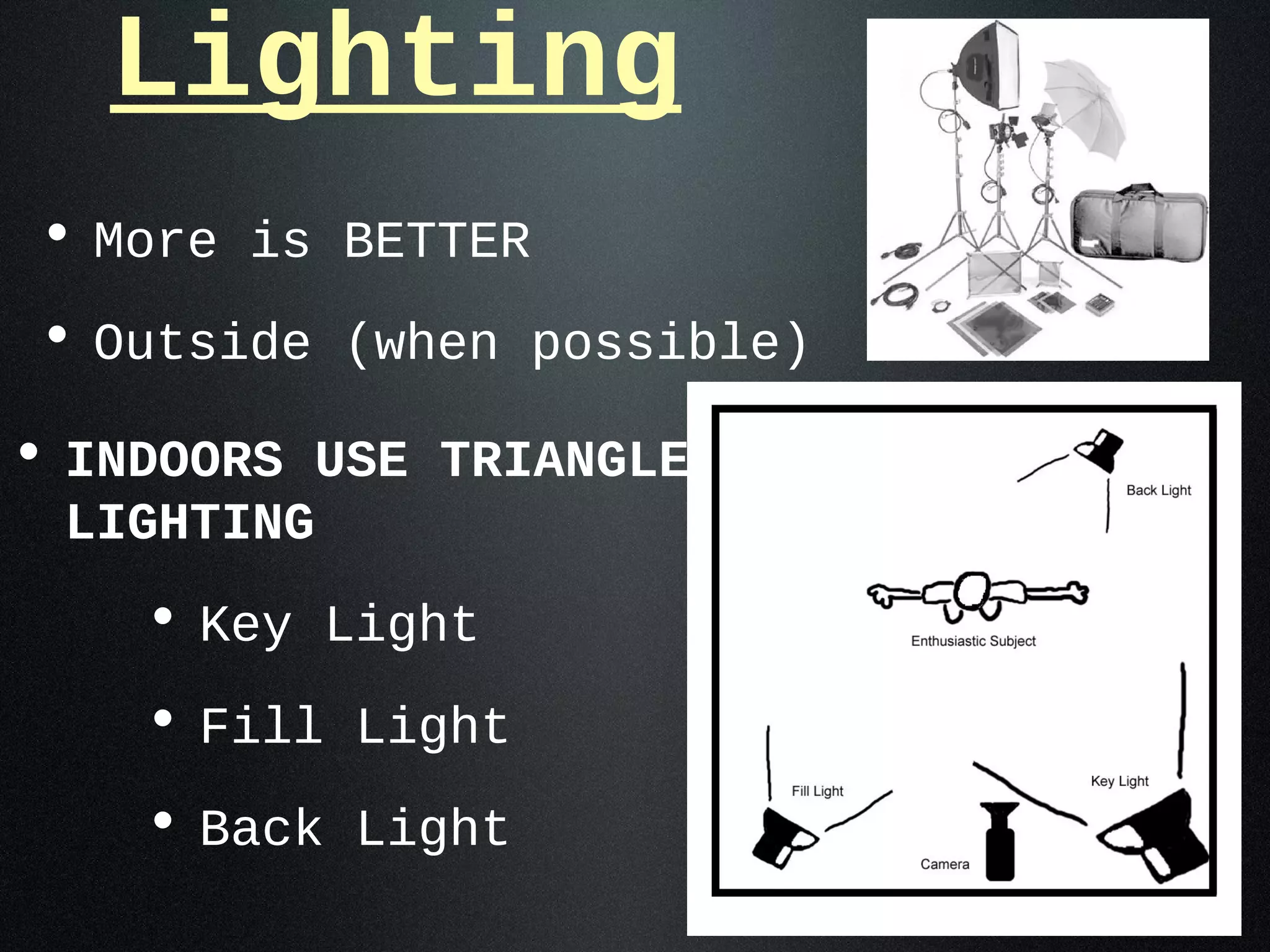
• INDOORS USE TRIANGLE
 LIGHTING
    • Key Light
    • Fill Light
    • Back Light
Dress
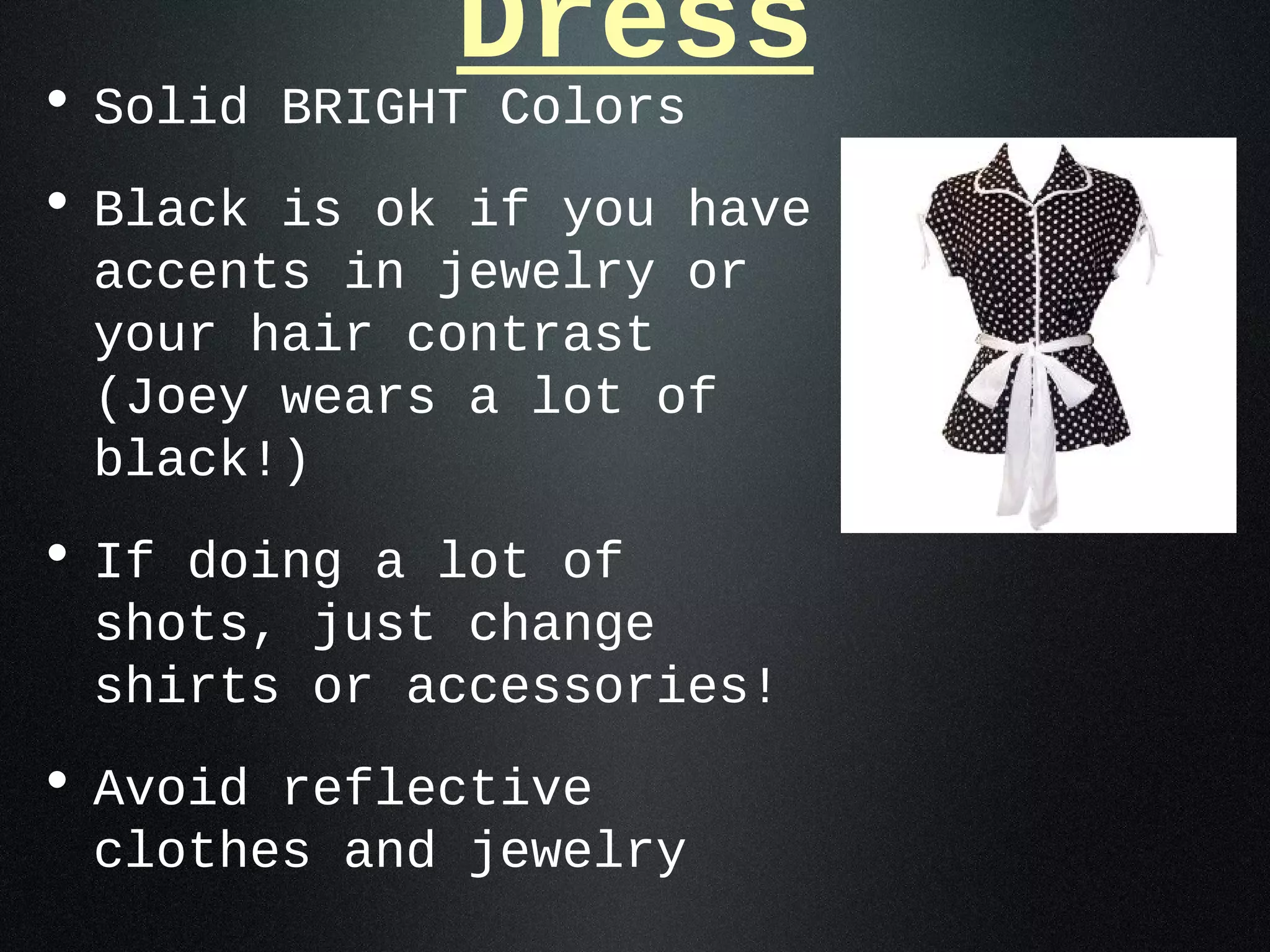
• Solid BRIGHT Colors
• Black is ok if you have
 accents in jewelry or
 your hair contrast
 (Joey wears a lot of
 black!)
• If doing a lot of
 shots, just change
 shirts or accessories!
• Avoid reflective
 clothes and jewelry
Shot
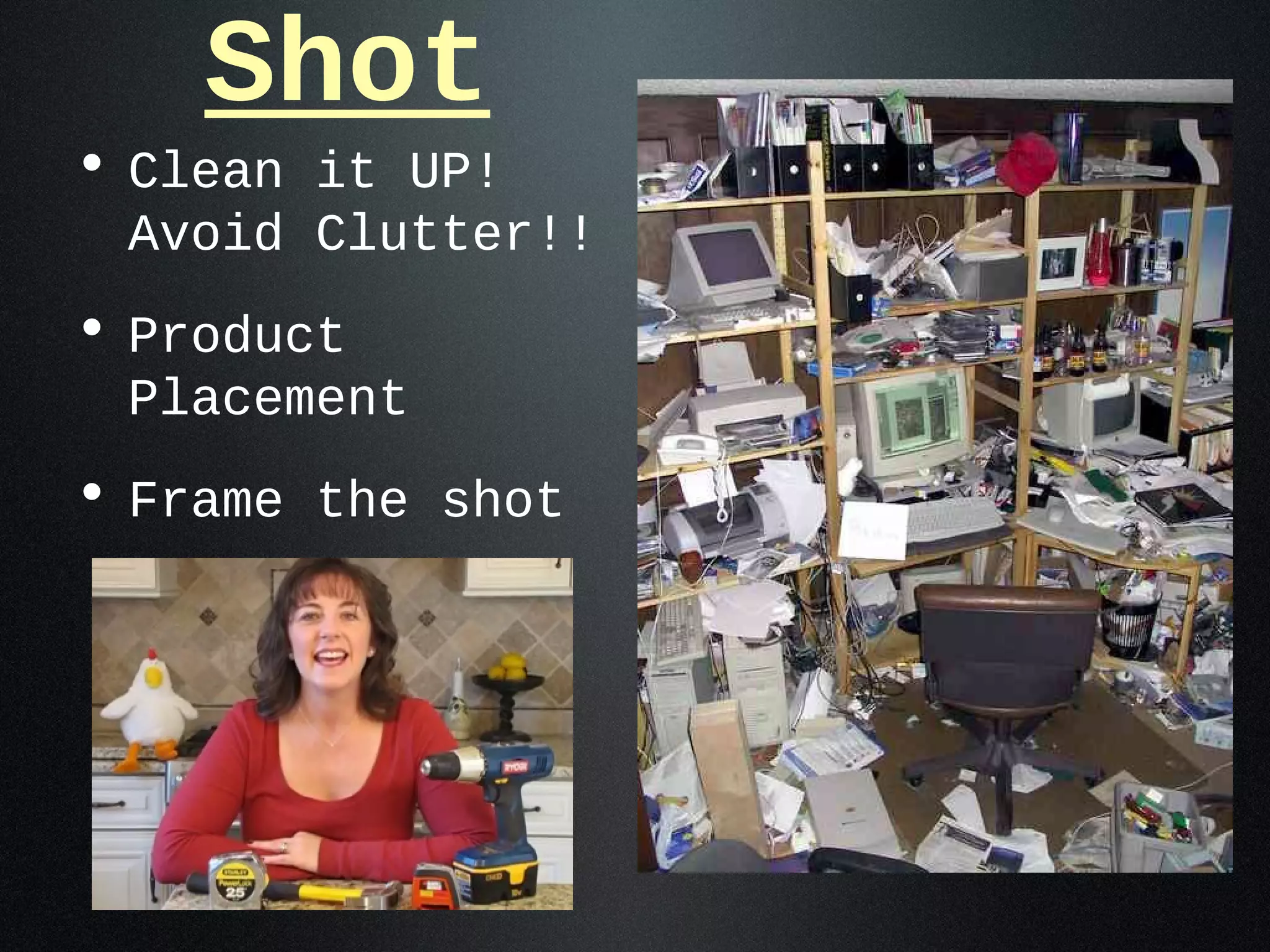
• Clean it UP!
 Avoid Clutter!!
• Product
 Placement
• Frame the shot
Subjects
• Be prepared! Cue Cards.
• When filming children: COACH
 them!
• Be energetic & passionate
 about what you’re talking
 about.
Unedited-Raw Video
• Keep it short!   :30 seconds -
 1:00 max
• Shoot, Review, Shoot x 2 =
 pick best
    • Use cue cards if needed!
Edited Video
• Keep it short! 2:00 or less
   • Only have :10 to make that
     first impression & keep
     your audience.
• 1st frame: LOGO & website
• Pacing: Don’t drag!!!
• Use transitions
    • Avoid jumpcuts
Editing Software
• Mac: I Movie, App for
 iPad/iPhone
• Final Cut x ($300.00)
• PC Adobe Premiere   (elements -
 $100)
• Desktop/web camera: Camtasia
 $99
Where to Put Your
•   Posting: YouTube,Video
                     Vimeo

     • PRO: Free, Views count for YouTube SEO
     • CON: YouTube gets SEO credit-not your
       site.

• Hosting: BrightCove, Wistia, Kaltura
     • PRO: Better quality & analytics:    Video
       sitemapping

     • CON: Cost for hosting ($100 month)
     • Fees involved
• Things to Think About:
     • Pinterest!    Pinning Videos on site HELPS!
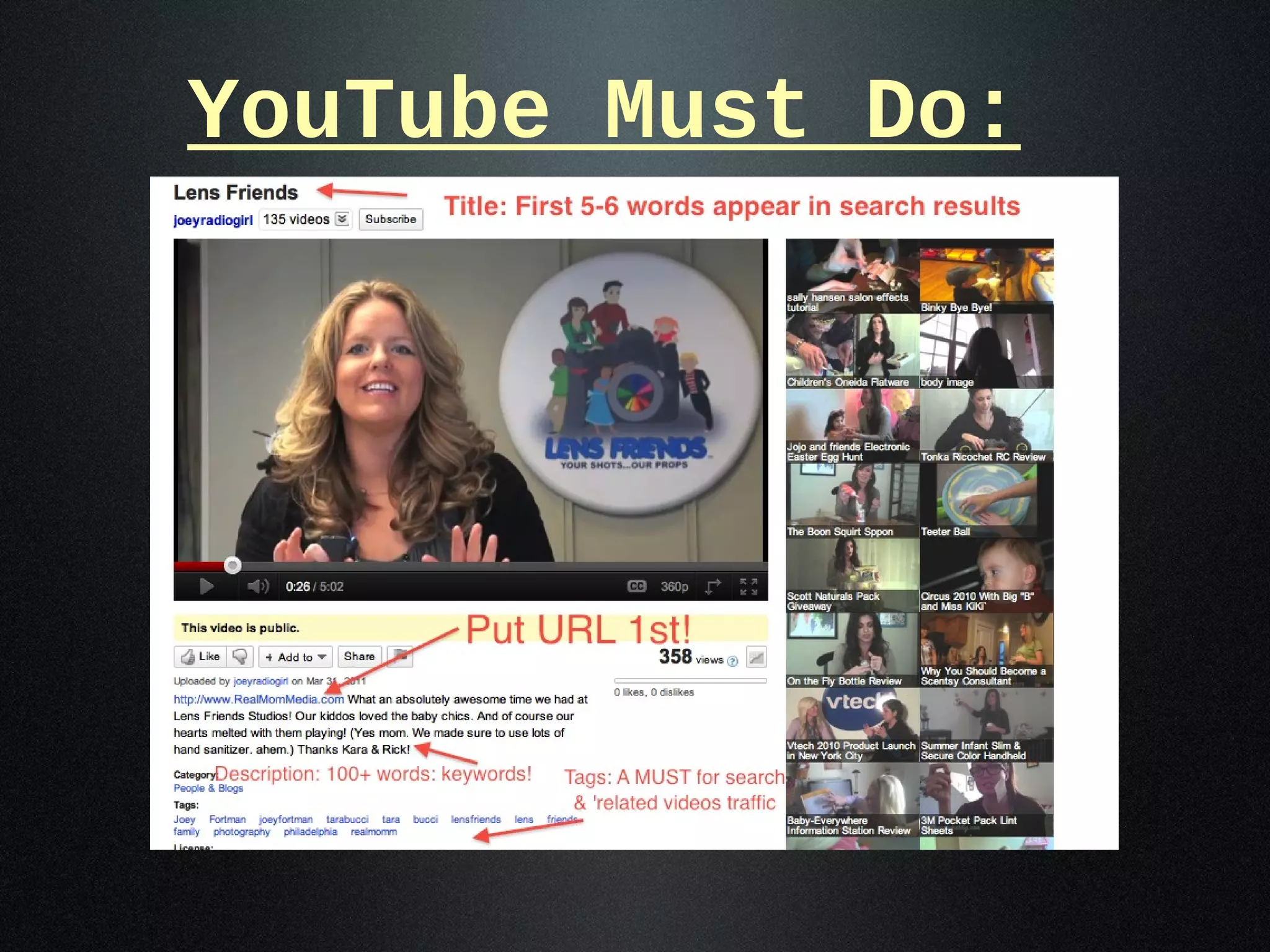
YouTube Must Do:
Social Media & Video
• YouTube: Engage the community
•
                Tips
  Facebook:    Use video on pages & walls
   • VIDEO ranks #1 in FB algorithms
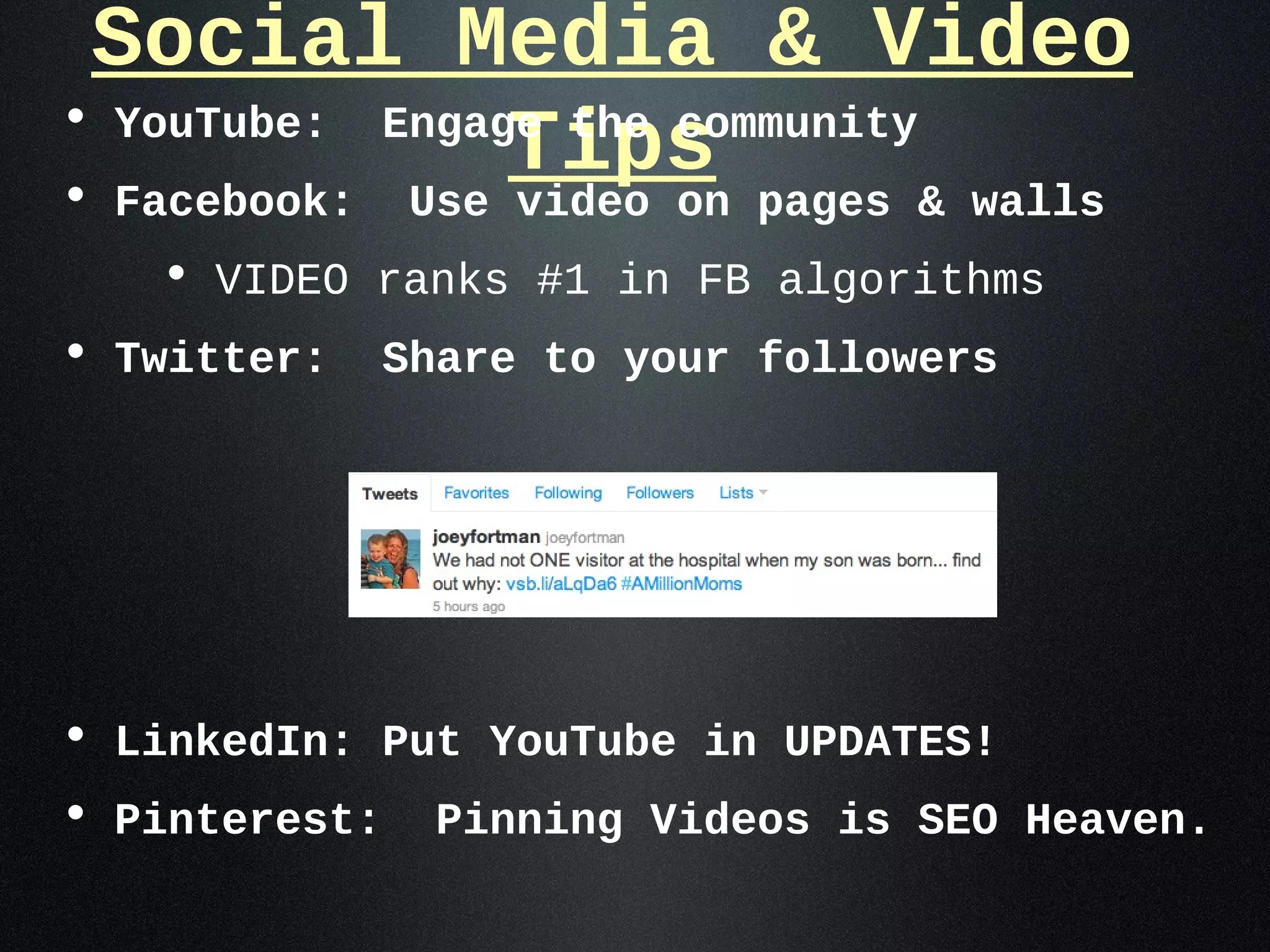
• Twitter:    Share to your followers


• LinkedIn: Put YouTube in UPDATES!
• Pinterest: Pinning Videos is SEO Heaven.
Video & Securing Press
• DON’T pitch your business
    • They’re media companies-they’ll pitch you back!
• If you have the budget-Pay for Play!
      • 10! Show, Better Philly, Talk Philly
• Pitch BENEFITS of your service.
• Look for an EMOTIONAL hook.
• Be a ‘LOCAL EXPERT’
• WHY VIDEO?
    • When you pitch-the producer has something to
      ‘see’.   Personality, Appearance, Relevancy
Monetizing Your Video
• Product Placement
• Video Reviews
• Producing ‘welcome
 videos’ for small
 businesses
• Event Coverage
• Social Media Consulting
   • Teach clients how to
     use it
• Creative Branding
Resources
• Lynda.com
  • $25/mo. $37.50 w/exercises*
  • $250 year $375 premium*
• iTunes
  • iPad/iPhone: iMovie app $5
     • Film Director, Vibop
• Classes
  • Apple stores
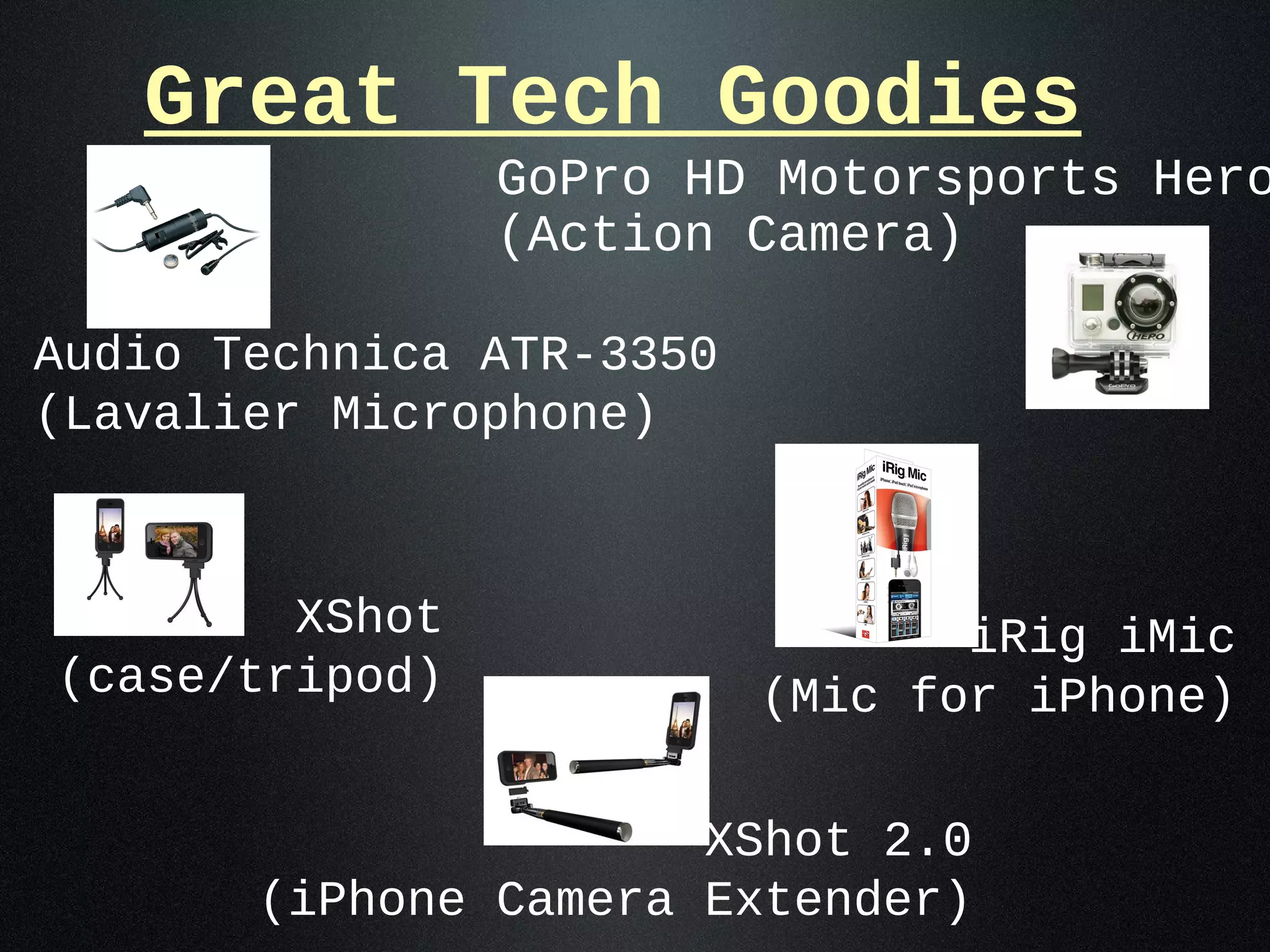
Great Tech Goodies
                GoPro HD Motorsports Hero
                (Action Camera)

Audio Technica ATR-3350
(Lavalier Microphone)


        XShot                    iRig iMic
(case/tripod)             (Mic for iPhone)

                      XShot 2.0
       (iPhone Camera Extender)

Beyond the Vlog - Why Video Matters

  • 1.
    BEYOND THE VLOG Why VIDEO Matters with Joey Fortman @JoeyFortman
  • 2.
    Why Video Matters? SEO • Puts ‘face’ behind the brand. • More engaging • People do business with people they ‘like’ or feel they can ‘relate’ to. • Reach Prospects • Video into e-mail marketing increases clickthru by over 96% (Implix) • People do business with people they ‘like’ or feel they can ‘relate’ to.
  • 3.
    • Video Video SEO boosts conversion rates by an average of 9%. (Internet Retailer, October 2010) • Products that have videos are 95% more likely to be bought.(Internet Retailer, April 2010) • Video adds two minutes to visitors' stays on retail sites.(Comscore, August 2010) • Video increases the likelihood of a front-page Google search result by 96% with proper page optimization.(Forrester, January 2010)
  • 4.
    Do you haveCONTENT? • How-To’s / Tips & Tricks • Brand Awareness • Video Testimonials/Reviews/Intervie ws • Creates credibility. • Contests • About the Team • Events
  • 5.
    How-To’s / Tips& Tricks • DIY, fashion haul, etc Brand Awareness • Video intro about yourself (homepage) Video Testimonials Reviews & Interviews • Interviews / personal reviews - authors, inventors, celebrities: book reviews, product review • Video Testimonial from someone other than yourself about you/your product
  • 6.
    Contests •Great for SEO with time on site • Site Scavenger Hunts • Twitter/Facebook/Pinterest/YouTube Giveaways • Do a video to explain a contest About The Team • Employee/writer/contributer/reader/etc of the month • Could make it a feature or one time. Make it long with a collage or each separately
  • 7.
    Events • Did youdo a press event & want to impress the agency who invited you? • Did your blog/biz do a charity event & you want to highlight it • Did you cover something in the area that you specialize in (hyperlocal) • These are AWESOME if you’re dying to break into travel experiences!
  • 8.
    Things to ThinkAbout • Equipment • Video Cam, Cell Phone, Webcam • Sound • Music Beds, sound effects • Subjects • Spokesperson, Kids, You, • Production • Who will produce your videos?
  • 9.
    WHO will produceit? • In-House • iMovie, Final Cut, Windows Movie Maker, YouTube • Professional/Production Company • Bloggers, Fans, Friends • Testimonials/Reviews
  • 10.
    • Go YOUTUBE EDITOR to the website www.YouTube.com/Editor
  • 11.
    Video Terms • Tilt (up/down) • Pan (side/side) • Backlight • Over The Shoulder Shot • Wide Shot • Two Shot • Medium Shot • Close Up • Reversal • Lower Third • Cutaway • B Roll • Pre-Post Roll • Jump Cuts • Interview
  • 12.
    Types of Video •Raw: Amateur/Candid • Un-edited footage • Produced: Professional/Investment • Edited video • Cutaways, closeups, branding • Live: Experienced • Sites like Ustream or Stickam
  • 13.
    RULES for Video •Introduction •Sound •Lighting •Dress •Shot •Subjects
  • 14.
    INTRODUCTION • Who areyou? Why are you there? • ‘I’m ____ and welcome to my website! Today we’re going to talk about ____.’’ • BE CATCHY! Grab their attention. • Start with a shot then fade to you
  • 15.
    Sound • MINIMIZE backgroundnoise: kids, music, conversation, tv • Sometimes you just can’t control it. That’s when you find a way to have fun with it. • USE a MICROPHONE when possible • It can make or break your video. If you’re covering an event with your iphone and no mic? Might as well not even do it... sound is so bad! • GREAT Mic for iPhone: Audio Technica ATR 3350 approx $35
  • 16.
    Lighting • More isBETTER • Outside (when possible) • INDOORS USE TRIANGLE LIGHTING • Key Light • Fill Light • Back Light
  • 17.
    Dress • Solid BRIGHTColors • Black is ok if you have accents in jewelry or your hair contrast (Joey wears a lot of black!) • If doing a lot of shots, just change shirts or accessories! • Avoid reflective clothes and jewelry
  • 18.
    Shot • Clean itUP! Avoid Clutter!! • Product Placement • Frame the shot
  • 19.
    Subjects • Be prepared!Cue Cards. • When filming children: COACH them! • Be energetic & passionate about what you’re talking about.
  • 20.
    Unedited-Raw Video • Keepit short! :30 seconds - 1:00 max • Shoot, Review, Shoot x 2 = pick best • Use cue cards if needed!
  • 21.
    Edited Video • Keepit short! 2:00 or less • Only have :10 to make that first impression & keep your audience. • 1st frame: LOGO & website • Pacing: Don’t drag!!! • Use transitions • Avoid jumpcuts
  • 22.
    Editing Software • Mac:I Movie, App for iPad/iPhone • Final Cut x ($300.00) • PC Adobe Premiere (elements - $100) • Desktop/web camera: Camtasia $99
  • 23.
    Where to PutYour • Posting: YouTube,Video Vimeo • PRO: Free, Views count for YouTube SEO • CON: YouTube gets SEO credit-not your site. • Hosting: BrightCove, Wistia, Kaltura • PRO: Better quality & analytics: Video sitemapping • CON: Cost for hosting ($100 month) • Fees involved • Things to Think About: • Pinterest! Pinning Videos on site HELPS!
  • 24.
  • 25.
    Social Media &Video • YouTube: Engage the community • Tips Facebook: Use video on pages & walls • VIDEO ranks #1 in FB algorithms • Twitter: Share to your followers • LinkedIn: Put YouTube in UPDATES! • Pinterest: Pinning Videos is SEO Heaven.
  • 26.
    Video & SecuringPress • DON’T pitch your business • They’re media companies-they’ll pitch you back! • If you have the budget-Pay for Play! • 10! Show, Better Philly, Talk Philly • Pitch BENEFITS of your service. • Look for an EMOTIONAL hook. • Be a ‘LOCAL EXPERT’ • WHY VIDEO? • When you pitch-the producer has something to ‘see’. Personality, Appearance, Relevancy
  • 27.
    Monetizing Your Video •Product Placement • Video Reviews • Producing ‘welcome videos’ for small businesses • Event Coverage • Social Media Consulting • Teach clients how to use it • Creative Branding
  • 28.
    Resources • Lynda.com • $25/mo. $37.50 w/exercises* • $250 year $375 premium* • iTunes • iPad/iPhone: iMovie app $5 • Film Director, Vibop • Classes • Apple stores
  • 29.
    Great Tech Goodies GoPro HD Motorsports Hero (Action Camera) Audio Technica ATR-3350 (Lavalier Microphone) XShot iRig iMic (case/tripod) (Mic for iPhone) XShot 2.0 (iPhone Camera Extender)

Editor's Notes

  • #5 HOW TO: diy, expert BRAND AWARENESS: Who are you? What do you do? CONTESTS: Do a video for a prize - Example: Imagination Movers EVENTS: Did you cover an event? Did you HOST an event?
  • #8 *I get invited all the time to cover events and a big reason is because I do video. Now, if it’s something that my family gets to enjoy like an ‘experience’ then I do it for free...(experience).
  • #9 EQUIPMENT: How will you make pictures? SOUND: music, announce, sound effects, on-camera sound SUBJECT: Who will “front” your videos (be your subject-kids, spokesperson, friends, you?) PRODUCTION: Will you edit your content or go from camera to web?
  • #10 YOU DO IT: TIME!!
  • #13 Raw: Amateur Produced: Pro - Invested time and/or money into the product. Live: Better have experience!!! Catches your flaws.....
  • #24 content management - PINTEREST!!
  • #26 YOUTUBE: Subscribe to other channels, accept friend invites (not spam), actively ‘like’, +1, add others to your playlists FACEBOOK: Don’t upload directly to FB-use YouTube to embed or share (better SEO) TWITTER: TEASE!! “Make dinner tonite in 5 minutes! LINK-URL shortened-bit.ly