Introducing…

YOUTUBE MARKETING
      2012


                   Oscarlyn T. Babasa
About Me
• Graduate in Proclesia International Inc.
• Worked as Instructor in Proclesia.
• Worked in Lexorsoft
• Worked in Defense Nutrition, LLC. as
  Marketing Assistant and Online Media
• Social Media Marketing Assistant for the Total
  Marketing Expert
Why does Youtube Matter?
• Youtube will be necessary to stay ahead of the
  curve for both search and traffic.
• Youtube is the #4 ranked site in the world for
  traffic; other video sites are rapidly climbing the
  rankings
• Video traffic will make up 90% of all web traffic
  by the end of 2013 (published research study)
• There are 48 hours of video uploaded to
  Youtube every minute of the day
YouTube Traffic – WOW!!!
• Over 800 million unique users visit YouTube each month
• Over 4 billion hours of video are watched each month on
  YouTube
• 72 hours of video are uploaded to YouTube every minute
• 70% of YouTube traffic comes from outside the US
• YouTube is localized in 43 countries and across 60 languages
• In 2011, YouTube had more than 1 trillion views or around
  140 views for every person on Earth
YouTube and Mobile
• Traffic from mobile devices tripled in 2011
• More than 20% of global YouTube views come
  from mobile devices
• 3 hours of video is uploaded per minute to
  YouTube from mobile
  devices
• YouTube is available
• on 350 million devices
Video + Social = Real Value
• 500 years of YouTube video are watched every day on
  Facebook, and over 700 YouTube videos are shared on
  Twitter each minute
• 100 million people take a social action on YouTube (likes,
  shares, comments, etc) every week
• More than 50% of videos on YouTube have been rated or
  include comments from the community
• Millions of videos are favorited every day
• Clicks on the ‘like’ or ‘dislike’ button on YouTube have
  doubled since the start of 2011. For every ‘dislike,’ we get 10
  ‘likes’- people like to tell other people about the stuff they
  love.
YouTube SEO - Overview
Your video will perform well in YouTube based on three key
points:
   1. Tagging vs. Description
   2. Calls-to-Action
   3. Slick Theme

•Proper tagging and keyword usage are the most important influences for
organic search ranking of channels.
•The video itself will rely heavily on the text in the description more than
anything else

•Adding in simple call-to-actions will help increase traffic and pick-up on
social networking sites

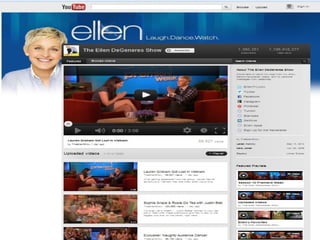
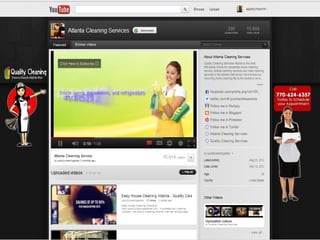
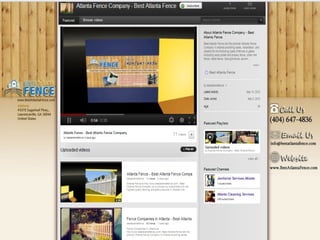
•Your channel should look similar to the company website
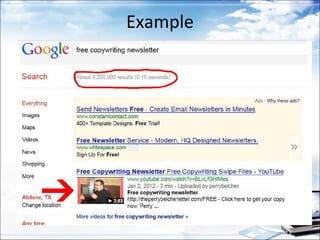
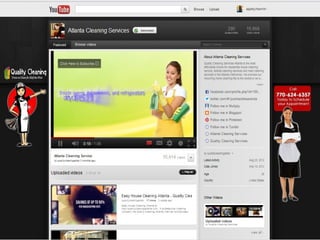
Example
YouTube Channel Optimization
Every business you own needs to have its
own Youtube channel. A channel is your
private space to upload, organize and share
your videos through Youtube. Channels are
FREE, you just create a Youtube account
and then name your channel whatever you
want (typically business name or keyword of
your niche/product.)
You should think of your youtube
       channel in this context:

•Your Channel is the homepage/index of a
website.
•Your Vidoes are the individual "pages" of
your website
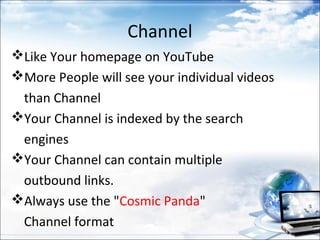
Channel
Like Your homepage on YouTube
More People will see your individual videos
 than Channel
Your Channel is indexed by the search
 engines
Your Channel can contain multiple
 outbound links.
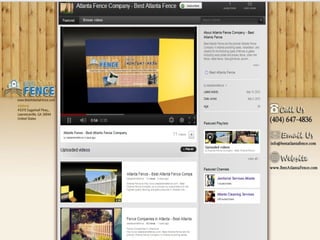
Always use the "Cosmic Panda"
 Channel format
Channel Settings
Title – Include your company name in the title
Visibility – Check the blip to make your channel visible
E-Mail Location – Check the box so others can find your channel via e-mail

Channel Tags – This is the most important part of channel optimization
Choose 3-5 keywords you want to target for your channel. Make sure
these keywords are the same ones you use on your website and that they
are relevant to your business

Separate each keyword using quotation marks.
It should look like this:
“Atlanta Foot Pain”, “Atlanta Heel Pain”, “Atlanta Arch Support”
Channels - Profile
1. Use your business name for the name
2. Use the exact URL to your website under the website section —
   this will be the only “followable link” you can obtain through
   YouTube
3. In your channel description, summarize the content of the
   channel, and include a link to your company’s Facebook or
   Twitter page (note - these will be “nofollow links”)
4. In the About Me section, it is important to give a brief
   description of the company using the targeted keywords
5. All other sections of the profile are great to have, but they will
   not help optimize the channel in any way.
Channel Themes & Colors
• No impact on the optimization
• Choose a theme and colors that are
  similar to your website
Channels – Videos/Playlists
1.Always select the “My Uploaded Videos”
  option in the featured content box
2.Always set one of your videos as the featured
  video
3.Check the box to play your featured video
  automatically
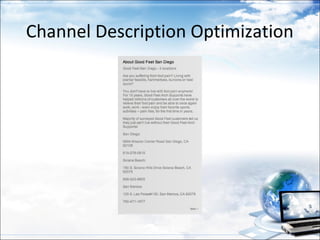
Channel Description Optimization
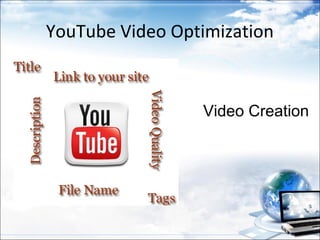
YouTube Video Optimization


                 Video Creation
What is your vidoes purpose?
• To build your personal brand
• To build your websites readership
• To capture a lead
• To make a direct sale
• To sell an affiliate product
• Open box buy: You buy product and then film
  yourself opening the box when you get it
• Reviews
• Training videos
NEVER DO A VIDEO WITHOUT A CALL
TO ACTION - WITHOUT ONE YOU ARE
JUST WASTING TIME AND BANDWIDTH
Video Sequence
•   Intro and branding
•   Tell them what in it for then
•   Give Value
•   Recap with a conclusion
•   Advise them of what to do
•   Call to action ...read , buy or lead
•   Drag out the end
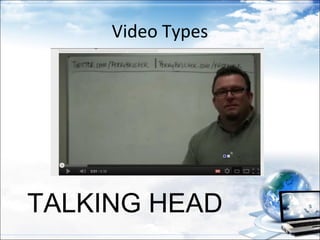
Video Types


TALKING HEAD
Video Types

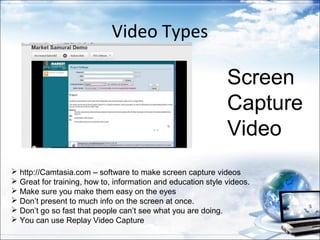
                                                              Screen
                                                              Capture
                                                              Video
 http://Camtasia.com – software to make screen capture videos
 Great for training, how to, information and education style videos.
 Make sure you make them easy on the eyes
 Don’t present to much info on the screen at once.
 Don’t go so fast that people can’t see what you are doing.
 You can use Replay Video Capture
Video Types

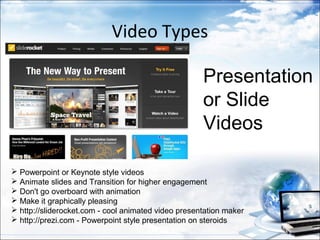
                                                     Presentation
                                                     or Slide
                                                     Videos

 Powerpoint or Keynote style videos
 Animate slides and Transition for higher engagement
 Don't go overboard with animation
 Make it graphically pleasing
 http://sliderocket.com - cool animated video presentation maker
 http://prezi.com - Powerpoint style presentation on steroids
Video Types

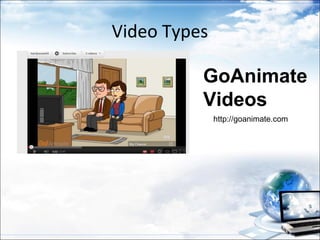
          GoAnimate
          Videos
              http://goanimate.com
Video Listing Optimization
Video Title
• Use main keywords in your title twice if at all
  possible
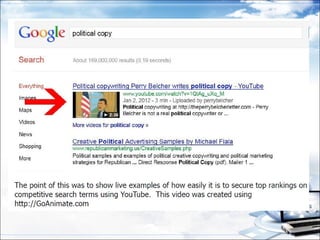
  Example: “Political copywriting Perry Belcher writes
  Political copy”
• Put your Company name in the Title
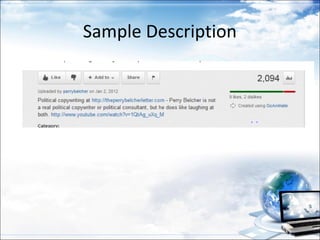
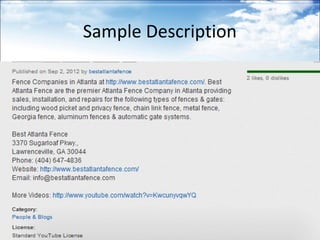
Video Description
•   The description text is critical !

•   Don’t list your URL first – everyone does this
•   Place your main keyword first
•   Then URL to site or page
•   Then description of the video
•   Work in your main keyword into the description once more if at all
    possible
•   Trick: Have video transcribed and paste transcript text into description
    box
•   At the end of description paste the naked URL to the YouTube video
•   This takes advantage of the video scrapers that will steal your video.
    This way you still get link juice to your video if it’s scraped
•   “Local Must-Do” -- Create a “citation” (Name, Address, Ph#, and URL)
    back to business
Why the link at the beginning?
The reason I suggest putting the URL at the
beginning of part of the video description….

YouTube features a rollover-style description
viewer

This means that anything not in the first line of
the video description will be covered up unless
the viewer clicks to read more.
Sample Description
Sample Description
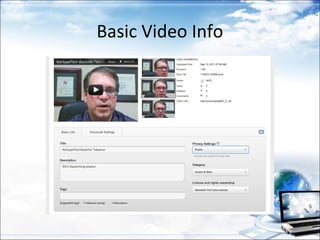
Basic Video Info
Tag Ripping
• Adding highly searched “tags” to your video with no
  research needed.
• Find highest ranking videos on your keyword
• Scroll down to their tags
• Copy tags
• Paste tags into your tags section of your video listing
  page.
• Do this for top 2 or 3 videos
• Remove duplicate tags
• Exploiting Youtube Tags – create 1 crazy world in all
  video
Video File Naming
• Change the name of your video file to your
  main keyword before you upload to YouTube.
• Use dashes for spaces or cram them together.
• Keyword-phrase.mov or keywordphrase.mov
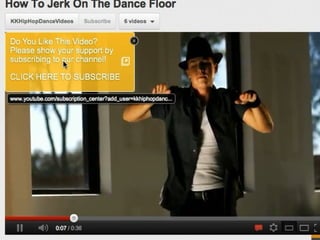
Keyword In Annotation
• Nobody does this
• Annotations are part of video search algorithms
• Annotation is a “text bubble” displayed in the
  video
• Use your main Keyword inside your videos
  annotation.
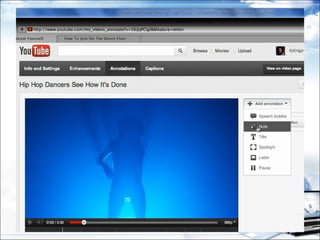
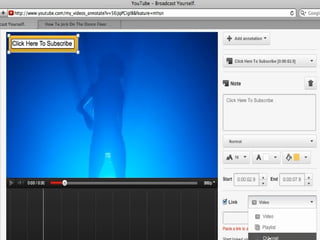
• You can add annotations via your video editing
  page inside your YouTube ac-count.
• Annotation how to video:
  http://www.youtube.com/watch?
  v=O46Lfz4ekH0
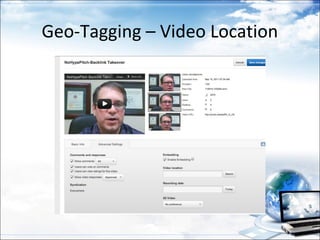
Geo-Tagging – Video Location
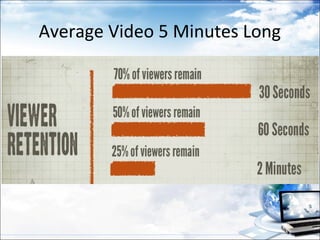
Average Video 5 Minutes Long
Videos: Broadcasting and Sharing Options


• Privacy – Set to public
• License – Select the standard YouTube license
• Comments – Allow
• Comment Voting – Allow
• Video Responses – Allow
• Ratings – Allow
• Embedding – Allow
• Syndication – Allow
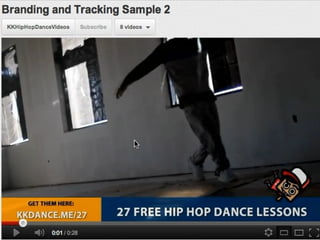
Branding and Tracking
3 Proven Video Formulas That You Can
                Use
• Video Ad - within the first 10 seconds of your
  video , run a little Video Ad
• The CutOff - right when you get to the most
  important part of the video, stop and say "You've
  got to go to this web site to see the rest"
• Freemium - Show them only something basic in
  the video...then tell them they can go to your
  website to see the advanced version of the video
WHICH OF THESE FORMULAS DROVE
THE MOST PEOPLE TO A WEBSITE???
FREEMIUM
5 Minute Video SEO
You can use the Push Button
SEO method on your videos with
great success. Fiverr.com is my
secret weapon for his video
ranking. Use highest rated
vendors you can find for each
service. Send all links back to
your video NOT your website.
This gives more SEO power to
both your video AND your site.
5 Minute Video SEO

•   Video Site Submission
•   Social Bookmarking
•   Backlink Pyramid
•   Link Wheel
•   Article Submission
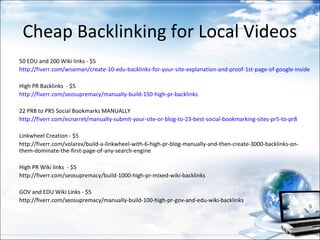
Cheap Backlinking for Local Videos
50 EDU and 200 Wiki links - $5
http://fiverr.com/wiseman/create-10-edu-backlinks-for-your-site-explanation-and-proof-1st-page-of-google-inside

High PR Backlinks - $5
http://fiverr.com/seosupremacy/manually-build-150-high-pr-backlinks

22 PR8 to PR5 Social Bookmarks MANUALLY
http://fiverr.com/ecnarret/manually-submit-your-site-or-blog-to-23-best-social-bookmarking-sites-pr5-to-pr8

Linkwheel Creation - $5
http://fiverr.com/volarex/build-a-linkwheel-with-6-high-pr-blog-manually-and-then-create-3000-backlinks-on-
them-dominate-the-first-page-of-any-search-engine

High PR Wiki links - $5
http://fiverr.com/seosupremacy/build-1000-high-pr-mixed-wiki-backlinks

GOV and EDU Wiki Links - $5
http://fiverr.com/seosupremacy/manually-build-100-high-pr-gov-and-edu-wiki-backlinks
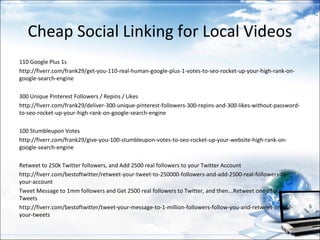
Cheap Social Linking for Local Videos
110 Google Plus 1s
http://fiverr.com/frank29/get-you-110-real-human-google-plus-1-votes-to-seo-rocket-up-your-high-rank-on-
google-search-engine

300 Unique Pinterest Followers / Repins / Likes
http://fiverr.com/frank29/deliver-300-unique-pinterest-followers-300-repins-and-300-likes-without-password-
to-seo-rocket-up-your-high-rank-on-google-search-engine

100 Stumbleupon Votes
http://fiverr.com/frank29/give-you-100-stumbleupon-votes-to-seo-rocket-up-your-website-high-rank-on-
google-search-engine

Retweet to 250k Twitter followers, and Add 2500 real followers to your Twitter Account
http://fiverr.com/bestoftwitter/retweet-your-tweet-to-250000-followers-and-add-2500-real-followers-to-
your-account
Tweet Message to 1mm followers and Get 2500 real followers to Twitter, and then...Retweet one of our
Tweets
http://fiverr.com/bestoftwitter/tweet-your-message-to-1-million-followers-follow-you-and-retweet-one-of-
your-tweets

Youtube Marketing 2012

  • 1.
    Introducing… YOUTUBE MARKETING 2012 Oscarlyn T. Babasa
  • 2.
    About Me • Graduatein Proclesia International Inc. • Worked as Instructor in Proclesia. • Worked in Lexorsoft • Worked in Defense Nutrition, LLC. as Marketing Assistant and Online Media • Social Media Marketing Assistant for the Total Marketing Expert
  • 3.
    Why does YoutubeMatter? • Youtube will be necessary to stay ahead of the curve for both search and traffic. • Youtube is the #4 ranked site in the world for traffic; other video sites are rapidly climbing the rankings • Video traffic will make up 90% of all web traffic by the end of 2013 (published research study) • There are 48 hours of video uploaded to Youtube every minute of the day
  • 4.
    YouTube Traffic –WOW!!! • Over 800 million unique users visit YouTube each month • Over 4 billion hours of video are watched each month on YouTube • 72 hours of video are uploaded to YouTube every minute • 70% of YouTube traffic comes from outside the US • YouTube is localized in 43 countries and across 60 languages • In 2011, YouTube had more than 1 trillion views or around 140 views for every person on Earth
  • 5.
    YouTube and Mobile •Traffic from mobile devices tripled in 2011 • More than 20% of global YouTube views come from mobile devices • 3 hours of video is uploaded per minute to YouTube from mobile devices • YouTube is available • on 350 million devices
  • 6.
    Video + Social= Real Value • 500 years of YouTube video are watched every day on Facebook, and over 700 YouTube videos are shared on Twitter each minute • 100 million people take a social action on YouTube (likes, shares, comments, etc) every week • More than 50% of videos on YouTube have been rated or include comments from the community • Millions of videos are favorited every day • Clicks on the ‘like’ or ‘dislike’ button on YouTube have doubled since the start of 2011. For every ‘dislike,’ we get 10 ‘likes’- people like to tell other people about the stuff they love.
  • 7.
    YouTube SEO -Overview Your video will perform well in YouTube based on three key points: 1. Tagging vs. Description 2. Calls-to-Action 3. Slick Theme •Proper tagging and keyword usage are the most important influences for organic search ranking of channels. •The video itself will rely heavily on the text in the description more than anything else •Adding in simple call-to-actions will help increase traffic and pick-up on social networking sites •Your channel should look similar to the company website
  • 8.
  • 12.
    YouTube Channel Optimization Everybusiness you own needs to have its own Youtube channel. A channel is your private space to upload, organize and share your videos through Youtube. Channels are FREE, you just create a Youtube account and then name your channel whatever you want (typically business name or keyword of your niche/product.)
  • 13.
    You should thinkof your youtube channel in this context: •Your Channel is the homepage/index of a website. •Your Vidoes are the individual "pages" of your website
  • 14.
    Channel Like Your homepageon YouTube More People will see your individual videos than Channel Your Channel is indexed by the search engines Your Channel can contain multiple outbound links. Always use the "Cosmic Panda" Channel format
  • 18.
    Channel Settings Title –Include your company name in the title Visibility – Check the blip to make your channel visible E-Mail Location – Check the box so others can find your channel via e-mail Channel Tags – This is the most important part of channel optimization Choose 3-5 keywords you want to target for your channel. Make sure these keywords are the same ones you use on your website and that they are relevant to your business Separate each keyword using quotation marks. It should look like this: “Atlanta Foot Pain”, “Atlanta Heel Pain”, “Atlanta Arch Support”
  • 19.
    Channels - Profile 1.Use your business name for the name 2. Use the exact URL to your website under the website section — this will be the only “followable link” you can obtain through YouTube 3. In your channel description, summarize the content of the channel, and include a link to your company’s Facebook or Twitter page (note - these will be “nofollow links”) 4. In the About Me section, it is important to give a brief description of the company using the targeted keywords 5. All other sections of the profile are great to have, but they will not help optimize the channel in any way.
  • 20.
    Channel Themes &Colors • No impact on the optimization • Choose a theme and colors that are similar to your website
  • 23.
    Channels – Videos/Playlists 1.Alwaysselect the “My Uploaded Videos” option in the featured content box 2.Always set one of your videos as the featured video 3.Check the box to play your featured video automatically
  • 24.
  • 25.
  • 26.
    What is yourvidoes purpose? • To build your personal brand • To build your websites readership • To capture a lead • To make a direct sale • To sell an affiliate product • Open box buy: You buy product and then film yourself opening the box when you get it • Reviews • Training videos
  • 27.
    NEVER DO AVIDEO WITHOUT A CALL TO ACTION - WITHOUT ONE YOU ARE JUST WASTING TIME AND BANDWIDTH
  • 28.
    Video Sequence • Intro and branding • Tell them what in it for then • Give Value • Recap with a conclusion • Advise them of what to do • Call to action ...read , buy or lead • Drag out the end
  • 29.
  • 30.
    Video Types Screen Capture Video  http://Camtasia.com – software to make screen capture videos  Great for training, how to, information and education style videos.  Make sure you make them easy on the eyes  Don’t present to much info on the screen at once.  Don’t go so fast that people can’t see what you are doing.  You can use Replay Video Capture
  • 31.
    Video Types Presentation or Slide Videos  Powerpoint or Keynote style videos  Animate slides and Transition for higher engagement  Don't go overboard with animation  Make it graphically pleasing  http://sliderocket.com - cool animated video presentation maker  http://prezi.com - Powerpoint style presentation on steroids
  • 32.
    Video Types GoAnimate Videos http://goanimate.com
  • 33.
  • 34.
    Video Title • Usemain keywords in your title twice if at all possible Example: “Political copywriting Perry Belcher writes Political copy” • Put your Company name in the Title
  • 35.
    Video Description • The description text is critical ! • Don’t list your URL first – everyone does this • Place your main keyword first • Then URL to site or page • Then description of the video • Work in your main keyword into the description once more if at all possible • Trick: Have video transcribed and paste transcript text into description box • At the end of description paste the naked URL to the YouTube video • This takes advantage of the video scrapers that will steal your video. This way you still get link juice to your video if it’s scraped • “Local Must-Do” -- Create a “citation” (Name, Address, Ph#, and URL) back to business
  • 36.
    Why the linkat the beginning? The reason I suggest putting the URL at the beginning of part of the video description…. YouTube features a rollover-style description viewer This means that anything not in the first line of the video description will be covered up unless the viewer clicks to read more.
  • 37.
  • 38.
  • 39.
  • 40.
    Tag Ripping • Addinghighly searched “tags” to your video with no research needed. • Find highest ranking videos on your keyword • Scroll down to their tags • Copy tags • Paste tags into your tags section of your video listing page. • Do this for top 2 or 3 videos • Remove duplicate tags • Exploiting Youtube Tags – create 1 crazy world in all video
  • 41.
    Video File Naming •Change the name of your video file to your main keyword before you upload to YouTube. • Use dashes for spaces or cram them together. • Keyword-phrase.mov or keywordphrase.mov
  • 42.
    Keyword In Annotation •Nobody does this • Annotations are part of video search algorithms • Annotation is a “text bubble” displayed in the video • Use your main Keyword inside your videos annotation. • You can add annotations via your video editing page inside your YouTube ac-count. • Annotation how to video: http://www.youtube.com/watch? v=O46Lfz4ekH0
  • 46.
  • 47.
    Average Video 5Minutes Long
  • 49.
    Videos: Broadcasting andSharing Options • Privacy – Set to public • License – Select the standard YouTube license • Comments – Allow • Comment Voting – Allow • Video Responses – Allow • Ratings – Allow • Embedding – Allow • Syndication – Allow
  • 50.
  • 53.
    3 Proven VideoFormulas That You Can Use • Video Ad - within the first 10 seconds of your video , run a little Video Ad • The CutOff - right when you get to the most important part of the video, stop and say "You've got to go to this web site to see the rest" • Freemium - Show them only something basic in the video...then tell them they can go to your website to see the advanced version of the video
  • 54.
    WHICH OF THESEFORMULAS DROVE THE MOST PEOPLE TO A WEBSITE???
  • 55.
  • 56.
    5 Minute VideoSEO You can use the Push Button SEO method on your videos with great success. Fiverr.com is my secret weapon for his video ranking. Use highest rated vendors you can find for each service. Send all links back to your video NOT your website. This gives more SEO power to both your video AND your site.
  • 57.
    5 Minute VideoSEO • Video Site Submission • Social Bookmarking • Backlink Pyramid • Link Wheel • Article Submission
  • 58.
    Cheap Backlinking forLocal Videos 50 EDU and 200 Wiki links - $5 http://fiverr.com/wiseman/create-10-edu-backlinks-for-your-site-explanation-and-proof-1st-page-of-google-inside High PR Backlinks - $5 http://fiverr.com/seosupremacy/manually-build-150-high-pr-backlinks 22 PR8 to PR5 Social Bookmarks MANUALLY http://fiverr.com/ecnarret/manually-submit-your-site-or-blog-to-23-best-social-bookmarking-sites-pr5-to-pr8 Linkwheel Creation - $5 http://fiverr.com/volarex/build-a-linkwheel-with-6-high-pr-blog-manually-and-then-create-3000-backlinks-on- them-dominate-the-first-page-of-any-search-engine High PR Wiki links - $5 http://fiverr.com/seosupremacy/build-1000-high-pr-mixed-wiki-backlinks GOV and EDU Wiki Links - $5 http://fiverr.com/seosupremacy/manually-build-100-high-pr-gov-and-edu-wiki-backlinks
  • 59.
    Cheap Social Linkingfor Local Videos 110 Google Plus 1s http://fiverr.com/frank29/get-you-110-real-human-google-plus-1-votes-to-seo-rocket-up-your-high-rank-on- google-search-engine 300 Unique Pinterest Followers / Repins / Likes http://fiverr.com/frank29/deliver-300-unique-pinterest-followers-300-repins-and-300-likes-without-password- to-seo-rocket-up-your-high-rank-on-google-search-engine 100 Stumbleupon Votes http://fiverr.com/frank29/give-you-100-stumbleupon-votes-to-seo-rocket-up-your-website-high-rank-on- google-search-engine Retweet to 250k Twitter followers, and Add 2500 real followers to your Twitter Account http://fiverr.com/bestoftwitter/retweet-your-tweet-to-250000-followers-and-add-2500-real-followers-to- your-account Tweet Message to 1mm followers and Get 2500 real followers to Twitter, and then...Retweet one of our Tweets http://fiverr.com/bestoftwitter/tweet-your-message-to-1-million-followers-follow-you-and-retweet-one-of- your-tweets