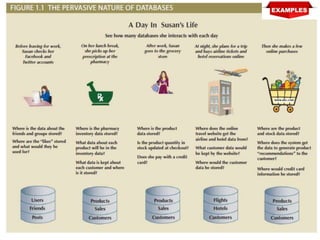
 Chapter 1
 Database Systems
ISBN-13: 978-1337627900
ISBN-10: 1337627909
Buy Book Amazon.com URL
Modified by:
Usman Tariq, PhD
Associate Professor, PSAU
Office ☎ 00966 11 588 8386
Learning Objectives
 In this chapter, you will learn:
• The difference between data and information in the
context of Data Science
• What a database is, the various types of databases, and
why they are valuable assets for decision making
• The importance of database design
• How modern databases evolved from file systems
2
Learning Objectives
 In this chapter, you will learn:
• About flaws in file system data management
• The main components of the database system
• The main functions of a database management system
(DBMS)
3
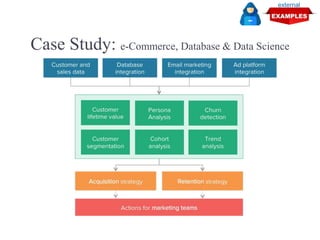
Case Study: e-Commerce, Database & Data Science
external
Understanding data science and Database [1/2]
external
Understanding data science and Database [2/2]
external
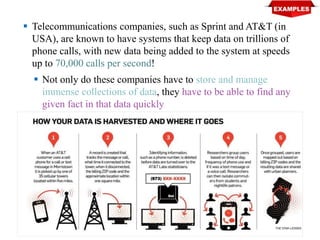
 Telecommunications companies, such as Sprint and AT&T (in
USA), are known to have systems that keep data on trillions of
phone calls, with new data being added to the system at speeds
up to 70,000 calls per second!
 Not only do these companies have to store and manage
immense collections of data, they have to be able to find any
given fact in that data quickly
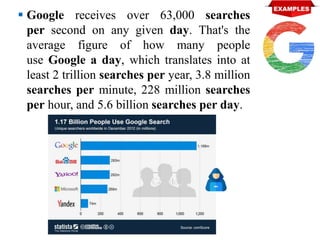
 Google receives over 63,000 searches
per second on any given day. That's the
average figure of how many people
use Google a day, which translates into at
least 2 trillion searches per year, 3.8 million
searches per minute, 228 million searches
per hour, and 5.6 billion searches per day.
How can businesses (retail, service, Govt. etc.) process this much data?
How can they store it all, and then quickly retrieve just the facts that
decision makers want to know, just when they want to know it?
How many relationships are in your data?
What is the level of complexity in your data?
How often do the data change?
How often does your application query the data?
How often does your application query the relationship underlying the
data?
How often do your users update the data?
How often do your users update the logic in the data?
How critical is your Application in a disaster scenario?
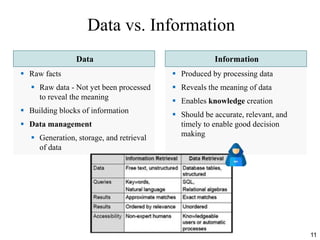
Data vs. Information
Data Information
 Raw facts
 Raw data - Not yet been processed
to reveal the meaning
 Building blocks of information
 Data management
 Generation, storage, and retrieval
of data
 Produced by processing data
 Reveals the meaning of data
 Enables knowledge creation
 Should be accurate, relevant, and
timely to enable good decision
making
11
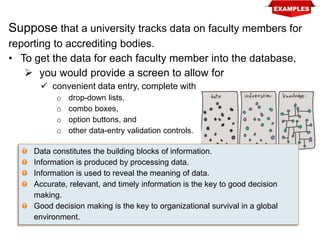
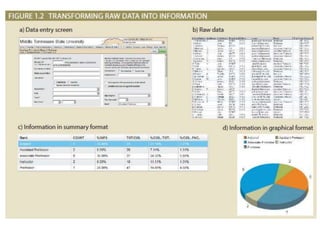
Suppose that a university tracks data on faculty members for
reporting to accrediting bodies.
• To get the data for each faculty member into the database,
 you would provide a screen to allow for
 convenient data entry, complete with
o drop-down lists,
o combo boxes,
o option buttons, and
o other data-entry validation controls.
Data constitutes the building blocks of information.
Information is produced by processing data.
Information is used to reveal the meaning of data.
Accurate, relevant, and timely information is the key to good decision
making.
Good decision making is the key to organizational survival in a global
environment.
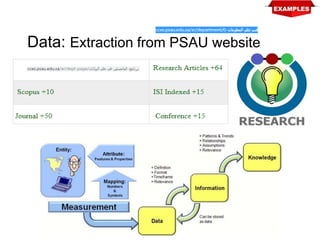
Data: Extraction from PSAU website
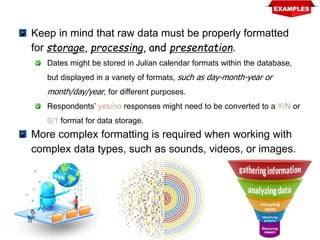
Keep in mind that raw data must be properly formatted
for storage, processing, and presentation.
Dates might be stored in Julian calendar formats within the database,
but displayed in a variety of formats, such as day-month-year or
month/day/year, for different purposes.
Respondents’ yes/no responses might need to be converted to a Y/N or
0/1 format for data storage.
More complex formatting is required when working with
complex data types, such as sounds, videos, or images.
Key Learnt Points
 Data constitutes the building blocks
of information.
 Information is produced by
processing data.
 Information is used to reveal the
meaning of data.
 Accurate, relevant, and timely
information is the key to good
decision making.
 Good decision making is the key to
organizational survival in a global
environment.
A key characteristic of knowledge is
that “new” knowledge can be
derived from “old” knowledge.
Database
 Shared, integrated computer
structure that stores a collection of:
 End-user data - Raw facts of interest to end
user
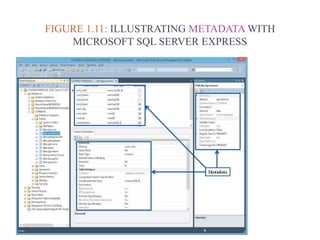
 Metadata: Data about data, which the end-
user data are integrated and managed
 Describe data characteristics and
relationships
17
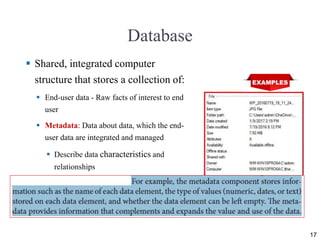
FIGURE 1.11: ILLUSTRATING METADATA WITH
MICROSOFT SQL SERVER EXPRESS
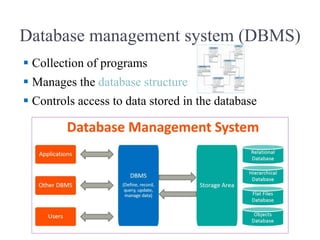
Database management system (DBMS)
 Collection of programs
 Manages the database structure
 Controls access to data stored in the database
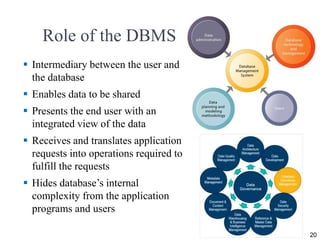
Role of the DBMS
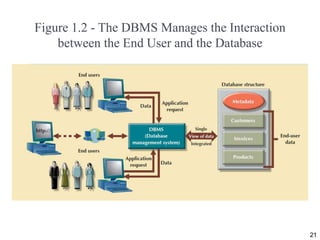
 Intermediary between the user and
the database
 Enables data to be shared
 Presents the end user with an
integrated view of the data
 Receives and translates application
requests into operations required to
fulfill the requests
 Hides database’s internal
complexity from the application
programs and users
20
Figure 1.2 - The DBMS Manages the Interaction
between the End User and the Database
21
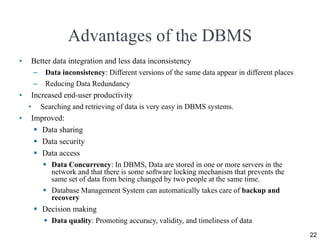
Advantages of the DBMS
• Better data integration and less data inconsistency
– Data inconsistency: Different versions of the same data appear in different places
– Reducing Data Redundancy
• Increased end-user productivity
• Searching and retrieving of data is very easy in DBMS systems.
• Improved:
 Data sharing
 Data security
 Data access
 Data Concurrency: In DBMS, Data are stored in one or more servers in the
network and that there is some software locking mechanism that prevents the
same set of data from being changed by two people at the same time.
 Database Management System can automatically takes care of backup and
recovery
 Decision making
 Data quality: Promoting accuracy, validity, and timeliness of data
22
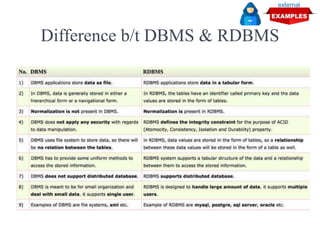
Difference b/t DBMS & RDBMS
external
Choosing the Right Database [1/2]
i. First and foremost, you must understand how your
database will be used under the scope of the
requirements of your project.
ii. With one kind of database, you will only
fulfill some of your database needs.
iii. Performance comes only after you’ve successfully
matched all your database needs individually with
the right kind of database.
iv. There’s always a tradeoff between consistency,
availability and partition tolerance.
Choosing the Right Database [2/2]
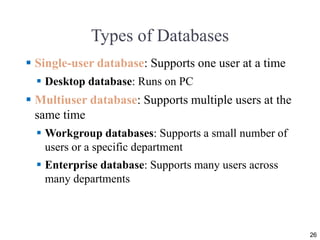
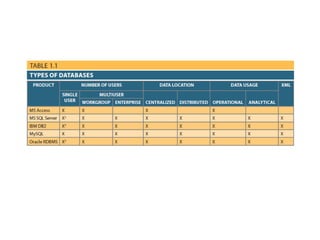
Types of Databases
 Single-user database: Supports one user at a time
 Desktop database: Runs on PC
 Multiuser database: Supports multiple users at the
same time
 Workgroup databases: Supports a small number of
users or a specific department
 Enterprise database: Supports many users across
many departments
26
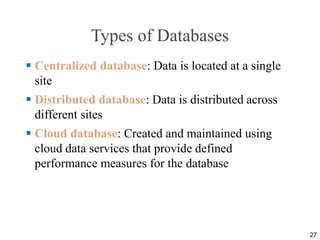
Types of Databases
 Centralized database: Data is located at a single
site
 Distributed database: Data is distributed across
different sites
 Cloud database: Created and maintained using
cloud data services that provide defined
performance measures for the database
27
Types of Databases
 General-purpose databases: Contains a wide
variety of data used in multiple disciplines
 Discipline-specific databases: Contains data
focused on specific subject areas
28
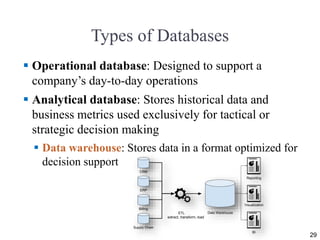
Types of Databases
 Operational database: Designed to support a
company’s day-to-day operations
 Analytical database: Stores historical data and
business metrics used exclusively for tactical or
strategic decision making
 Data warehouse: Stores data in a format optimized for
decision support
29
extract, transform, load
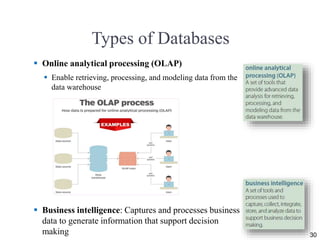
Types of Databases
 Online analytical processing (OLAP)
 Enable retrieving, processing, and modeling data from the
data warehouse
 Business intelligence: Captures and processes business
data to generate information that support decision
making 30
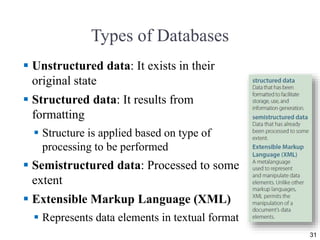
Types of Databases
 Unstructured data: It exists in their
original state
 Structured data: It results from
formatting
 Structure is applied based on type of
processing to be performed
 Semistructured data: Processed to some
extent
 Extensible Markup Language (XML)
 Represents data elements in textual format
31
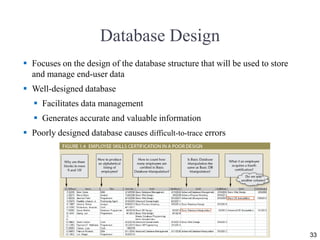
Database Design
 Focuses on the design of the database structure that will be used to store
and manage end-user data
 Well-designed database
 Facilitates data management
 Generates accurate and valuable information
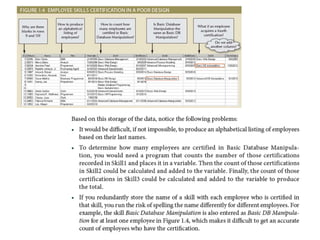
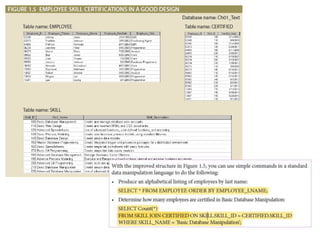
 Poorly designed database causes difficult-to-trace errors
33
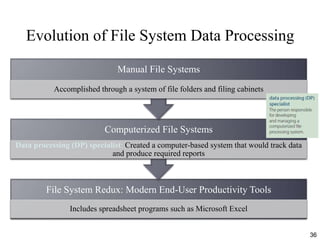
Evolution of File System Data Processing
File System Redux: Modern End-User Productivity Tools
Includes spreadsheet programs such as Microsoft Excel
Computerized File Systems
Data processing (DP) specialist: Created a computer-based system that would track data
and produce required reports
Manual File Systems
Accomplished through a system of file folders and filing cabinets
36
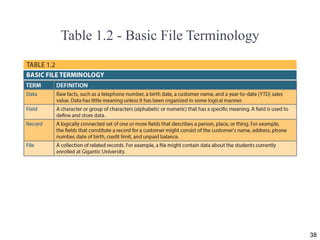
Table 1.2 - Basic File Terminology
38
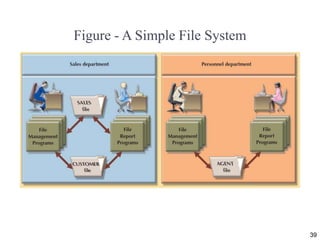
Figure - A Simple File System
39
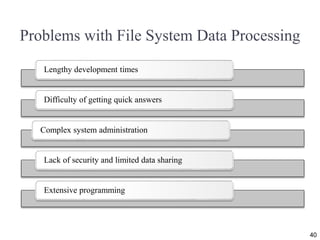
Problems with File System Data Processing
40
Lengthy development times
Difficulty of getting quick answers
Complex system administration
Lack of security and limited data sharing
Extensive programming
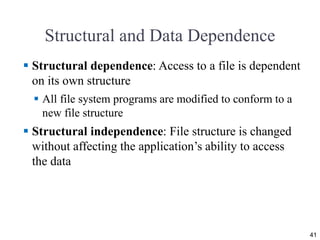
Structural and Data Dependence
 Structural dependence: Access to a file is dependent
on its own structure
 All file system programs are modified to conform to a
new file structure
 Structural independence: File structure is changed
without affecting the application’s ability to access
the data
41
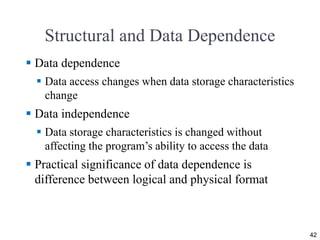
Structural and Data Dependence
 Data dependence
 Data access changes when data storage characteristics
change
 Data independence
 Data storage characteristics is changed without
affecting the program’s ability to access the data
 Practical significance of data dependence is
difference between logical and physical format
42
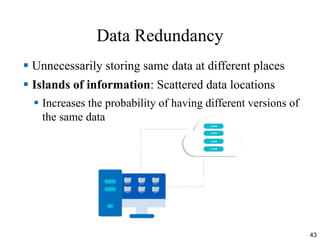
Data Redundancy
 Unnecessarily storing same data at different places
 Islands of information: Scattered data locations
 Increases the probability of having different versions of
the same data
43
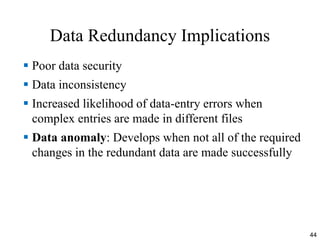
Data Redundancy Implications
 Poor data security
 Data inconsistency
 Increased likelihood of data-entry errors when
complex entries are made in different files
 Data anomaly: Develops when not all of the required
changes in the redundant data are made successfully
44
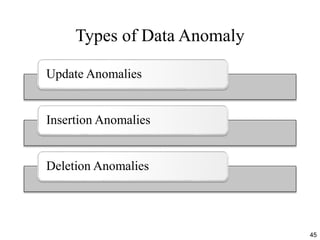
Types of Data Anomaly
Update Anomalies
Insertion Anomalies
Deletion Anomalies
45
Lack of Design and Data-Modeling Skills
 Evident despite the availability of multiple personal
productivity tools being available
 Data-modeling skills is vital in the data design
process
 Good data modeling facilitates communication
between the designer, user, and the developer
46
Database Systems
 Logically related data stored in a single logical data
repository
 Physically distributed among multiple storage facilities
• DBMS eliminates most of file system’s problems
 Current generation DBMS software:
– Stores data structures, relationships between structures, and
access paths
– Defines, stores, and manages all access paths and
components
47
Figure 1.9 - Contrasting Database and File Systems [1/2]
48
Figure 1.10 - The Database System Environment [1/2]
49
Figure 1.10 - The Database System Environment [2/2]
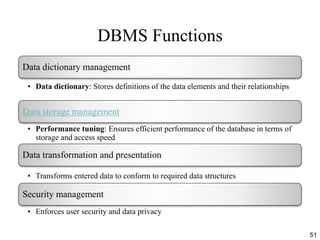
DBMS Functions
51
Data dictionary management
• Data dictionary: Stores definitions of the data elements and their relationships
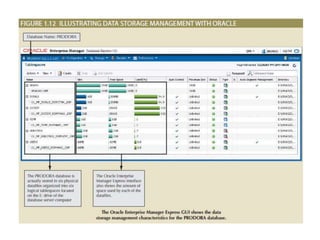
Data storage management
• Performance tuning: Ensures efficient performance of the database in terms of
storage and access speed
Data transformation and presentation
• Transforms entered data to conform to required data structures
Security management
• Enforces user security and data privacy
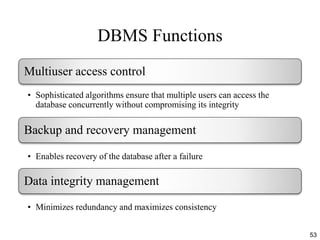
DBMS Functions
53
Multiuser access control
• Sophisticated algorithms ensure that multiple users can access the
database concurrently without compromising its integrity
Backup and recovery management
• Enables recovery of the database after a failure
Data integrity management
• Minimizes redundancy and maximizes consistency
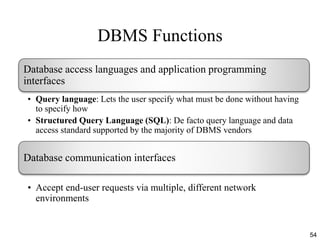
DBMS Functions
54
Database access languages and application programming
interfaces
• Query language: Lets the user specify what must be done without having
to specify how
• Structured Query Language (SQL): De facto query language and data
access standard supported by the majority of DBMS vendors
Database communication interfaces
• Accept end-user requests via multiple, different network
environments
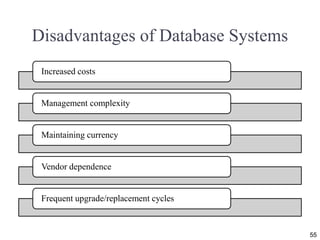
Disadvantages of Database Systems
55
Increased costs
Management complexity
Maintaining currency
Vendor dependence
Frequent upgrade/replacement cycles
56
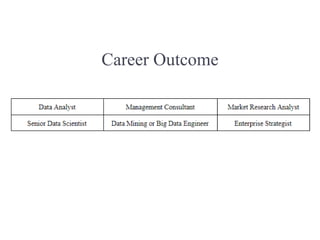
Career Outcome

Database Systems

  • 1.
     Chapter 1 Database Systems ISBN-13: 978-1337627900 ISBN-10: 1337627909 Buy Book Amazon.com URL Modified by: Usman Tariq, PhD Associate Professor, PSAU Office ☎ 00966 11 588 8386
  • 2.
    Learning Objectives  Inthis chapter, you will learn: • The difference between data and information in the context of Data Science • What a database is, the various types of databases, and why they are valuable assets for decision making • The importance of database design • How modern databases evolved from file systems 2
  • 3.
    Learning Objectives  Inthis chapter, you will learn: • About flaws in file system data management • The main components of the database system • The main functions of a database management system (DBMS) 3
  • 5.
    Case Study: e-Commerce,Database & Data Science external
  • 6.
    Understanding data scienceand Database [1/2] external
  • 7.
    Understanding data scienceand Database [2/2] external
  • 8.
     Telecommunications companies,such as Sprint and AT&T (in USA), are known to have systems that keep data on trillions of phone calls, with new data being added to the system at speeds up to 70,000 calls per second!  Not only do these companies have to store and manage immense collections of data, they have to be able to find any given fact in that data quickly
  • 9.
     Google receivesover 63,000 searches per second on any given day. That's the average figure of how many people use Google a day, which translates into at least 2 trillion searches per year, 3.8 million searches per minute, 228 million searches per hour, and 5.6 billion searches per day.
  • 10.
    How can businesses(retail, service, Govt. etc.) process this much data? How can they store it all, and then quickly retrieve just the facts that decision makers want to know, just when they want to know it? How many relationships are in your data? What is the level of complexity in your data? How often do the data change? How often does your application query the data? How often does your application query the relationship underlying the data? How often do your users update the data? How often do your users update the logic in the data? How critical is your Application in a disaster scenario?
  • 11.
    Data vs. Information DataInformation  Raw facts  Raw data - Not yet been processed to reveal the meaning  Building blocks of information  Data management  Generation, storage, and retrieval of data  Produced by processing data  Reveals the meaning of data  Enables knowledge creation  Should be accurate, relevant, and timely to enable good decision making 11
  • 12.
    Suppose that auniversity tracks data on faculty members for reporting to accrediting bodies. • To get the data for each faculty member into the database,  you would provide a screen to allow for  convenient data entry, complete with o drop-down lists, o combo boxes, o option buttons, and o other data-entry validation controls. Data constitutes the building blocks of information. Information is produced by processing data. Information is used to reveal the meaning of data. Accurate, relevant, and timely information is the key to good decision making. Good decision making is the key to organizational survival in a global environment.
  • 14.
  • 15.
    Keep in mindthat raw data must be properly formatted for storage, processing, and presentation. Dates might be stored in Julian calendar formats within the database, but displayed in a variety of formats, such as day-month-year or month/day/year, for different purposes. Respondents’ yes/no responses might need to be converted to a Y/N or 0/1 format for data storage. More complex formatting is required when working with complex data types, such as sounds, videos, or images.
  • 16.
    Key Learnt Points Data constitutes the building blocks of information.  Information is produced by processing data.  Information is used to reveal the meaning of data.  Accurate, relevant, and timely information is the key to good decision making.  Good decision making is the key to organizational survival in a global environment. A key characteristic of knowledge is that “new” knowledge can be derived from “old” knowledge.
  • 17.
    Database  Shared, integratedcomputer structure that stores a collection of:  End-user data - Raw facts of interest to end user  Metadata: Data about data, which the end- user data are integrated and managed  Describe data characteristics and relationships 17
  • 18.
    FIGURE 1.11: ILLUSTRATINGMETADATA WITH MICROSOFT SQL SERVER EXPRESS
  • 19.
    Database management system(DBMS)  Collection of programs  Manages the database structure  Controls access to data stored in the database
  • 20.
    Role of theDBMS  Intermediary between the user and the database  Enables data to be shared  Presents the end user with an integrated view of the data  Receives and translates application requests into operations required to fulfill the requests  Hides database’s internal complexity from the application programs and users 20
  • 21.
    Figure 1.2 -The DBMS Manages the Interaction between the End User and the Database 21
  • 22.
    Advantages of theDBMS • Better data integration and less data inconsistency – Data inconsistency: Different versions of the same data appear in different places – Reducing Data Redundancy • Increased end-user productivity • Searching and retrieving of data is very easy in DBMS systems. • Improved:  Data sharing  Data security  Data access  Data Concurrency: In DBMS, Data are stored in one or more servers in the network and that there is some software locking mechanism that prevents the same set of data from being changed by two people at the same time.  Database Management System can automatically takes care of backup and recovery  Decision making  Data quality: Promoting accuracy, validity, and timeliness of data 22
  • 23.
    Difference b/t DBMS& RDBMS external
  • 24.
    Choosing the RightDatabase [1/2] i. First and foremost, you must understand how your database will be used under the scope of the requirements of your project. ii. With one kind of database, you will only fulfill some of your database needs. iii. Performance comes only after you’ve successfully matched all your database needs individually with the right kind of database. iv. There’s always a tradeoff between consistency, availability and partition tolerance.
  • 25.
    Choosing the RightDatabase [2/2]
  • 26.
    Types of Databases Single-user database: Supports one user at a time  Desktop database: Runs on PC  Multiuser database: Supports multiple users at the same time  Workgroup databases: Supports a small number of users or a specific department  Enterprise database: Supports many users across many departments 26
  • 27.
    Types of Databases Centralized database: Data is located at a single site  Distributed database: Data is distributed across different sites  Cloud database: Created and maintained using cloud data services that provide defined performance measures for the database 27
  • 28.
    Types of Databases General-purpose databases: Contains a wide variety of data used in multiple disciplines  Discipline-specific databases: Contains data focused on specific subject areas 28
  • 29.
    Types of Databases Operational database: Designed to support a company’s day-to-day operations  Analytical database: Stores historical data and business metrics used exclusively for tactical or strategic decision making  Data warehouse: Stores data in a format optimized for decision support 29 extract, transform, load
  • 30.
    Types of Databases Online analytical processing (OLAP)  Enable retrieving, processing, and modeling data from the data warehouse  Business intelligence: Captures and processes business data to generate information that support decision making 30
  • 31.
    Types of Databases Unstructured data: It exists in their original state  Structured data: It results from formatting  Structure is applied based on type of processing to be performed  Semistructured data: Processed to some extent  Extensible Markup Language (XML)  Represents data elements in textual format 31
  • 33.
    Database Design  Focuseson the design of the database structure that will be used to store and manage end-user data  Well-designed database  Facilitates data management  Generates accurate and valuable information  Poorly designed database causes difficult-to-trace errors 33
  • 36.
    Evolution of FileSystem Data Processing File System Redux: Modern End-User Productivity Tools Includes spreadsheet programs such as Microsoft Excel Computerized File Systems Data processing (DP) specialist: Created a computer-based system that would track data and produce required reports Manual File Systems Accomplished through a system of file folders and filing cabinets 36
  • 38.
    Table 1.2 -Basic File Terminology 38
  • 39.
    Figure - ASimple File System 39
  • 40.
    Problems with FileSystem Data Processing 40 Lengthy development times Difficulty of getting quick answers Complex system administration Lack of security and limited data sharing Extensive programming
  • 41.
    Structural and DataDependence  Structural dependence: Access to a file is dependent on its own structure  All file system programs are modified to conform to a new file structure  Structural independence: File structure is changed without affecting the application’s ability to access the data 41
  • 42.
    Structural and DataDependence  Data dependence  Data access changes when data storage characteristics change  Data independence  Data storage characteristics is changed without affecting the program’s ability to access the data  Practical significance of data dependence is difference between logical and physical format 42
  • 43.
    Data Redundancy  Unnecessarilystoring same data at different places  Islands of information: Scattered data locations  Increases the probability of having different versions of the same data 43
  • 44.
    Data Redundancy Implications Poor data security  Data inconsistency  Increased likelihood of data-entry errors when complex entries are made in different files  Data anomaly: Develops when not all of the required changes in the redundant data are made successfully 44
  • 45.
    Types of DataAnomaly Update Anomalies Insertion Anomalies Deletion Anomalies 45
  • 46.
    Lack of Designand Data-Modeling Skills  Evident despite the availability of multiple personal productivity tools being available  Data-modeling skills is vital in the data design process  Good data modeling facilitates communication between the designer, user, and the developer 46
  • 47.
    Database Systems  Logicallyrelated data stored in a single logical data repository  Physically distributed among multiple storage facilities • DBMS eliminates most of file system’s problems  Current generation DBMS software: – Stores data structures, relationships between structures, and access paths – Defines, stores, and manages all access paths and components 47
  • 48.
    Figure 1.9 -Contrasting Database and File Systems [1/2] 48
  • 49.
    Figure 1.10 -The Database System Environment [1/2] 49
  • 50.
    Figure 1.10 -The Database System Environment [2/2]
  • 51.
    DBMS Functions 51 Data dictionarymanagement • Data dictionary: Stores definitions of the data elements and their relationships Data storage management • Performance tuning: Ensures efficient performance of the database in terms of storage and access speed Data transformation and presentation • Transforms entered data to conform to required data structures Security management • Enforces user security and data privacy
  • 53.
    DBMS Functions 53 Multiuser accesscontrol • Sophisticated algorithms ensure that multiple users can access the database concurrently without compromising its integrity Backup and recovery management • Enables recovery of the database after a failure Data integrity management • Minimizes redundancy and maximizes consistency
  • 54.
    DBMS Functions 54 Database accesslanguages and application programming interfaces • Query language: Lets the user specify what must be done without having to specify how • Structured Query Language (SQL): De facto query language and data access standard supported by the majority of DBMS vendors Database communication interfaces • Accept end-user requests via multiple, different network environments
  • 55.
    Disadvantages of DatabaseSystems 55 Increased costs Management complexity Maintaining currency Vendor dependence Frequent upgrade/replacement cycles
  • 56.
  • 57.