Multimedia Database
Management System
(MDBMS)
Requirement of Multimedia DBMS
• Large and new topics for research
• Many opening research topics– from
the data model, to storage to efficiency
of MDBMS.
• Persistence
• Privacy
• Integrity control
• Recovery
• Query Support
MDBMS
Presentation focuses on:
• General Overview of MDBMS
- Definition
- Characteristics of MDBMS
- Tasks of MDBMS
- Data Structure of MDBMS.
- MDBMS Design
- Operations on MDBMS.
- MDBMS Architectures
• Advantages of MDBMS
• Applications.
• Research Topics
• References.
MDBMS Overview
• Multimedia Data:
defines as many kinds of media—images,
video, audio, graphics, hypertext,
hypermedia, and other abstract data types.
• Multimedia Object:
a multimedia document or presentation
containing one or more multimedia data.
Overview (continued)
• Multimedia Database:
defines as a database containing one or
more multimedia object.
What is Multimedia data?
• It is not the conventional
alphanumerical data.
• Data Types:
1. Text
2. Image
3. Audio
4. Video.
Why Multimedia Data?
• The information provided by multimedia
data explains more than what a
conventional data explains.
What is Multimedia DBMS?
• A multimedia database management
system (MM DBMS) is a framework that
manages different types of data
potentially represented in a wide
diversity of formats.
• It can also do operations on these
multimedia data.
Characteristics of MDBMS
• Large object size
• Synchronous delivery of multimedia
objects
• Multimedia objects may have
embedded timing constraints
• Multimedia object composed of multiple
components
Characteristics (continued)
• Queries are not text or numeric based,
but Content-based
• Most multimedia transactions are long
and requires long processing and
retrieval time
• Multimedia Object presentation is very
important.
How data is stored in MMDBMS?
• The Multimedia data can be stored in 3
parts.
• They are
1. Raw Data
2. Registering Data
3. Descriptive Data
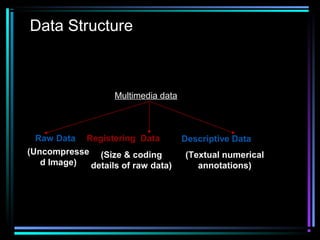
Data Structure
Multimedia data
Raw Data Registering Data Descriptive Data
(Uncompresse
d Image)
(Size & coding
details of raw data)
(Textual numerical
annotations)
• Descriptive Data
Information about content and structure
• Registering Data
Data necessary for interpretation and
identification i.e. Format.
• Raw Data
Unformatted Information Content i.e.
pixels.
Main Tasks of MDBMS
• Enforce data independence—physical
and logical level
• Organize, classify and query multimedia
data
• Support abstract data analysis for
searching engine
Tasks of MDBMS (continued)
• Support asynchronous requests and
operations
• Provide cost effective storage
management scheme
• Ensure data integrity constraints
• Provide basic operations as supported
by traditional databases—insert, delete,
search and update.
Tasks of MDMS (Continued)
MDBMS also has to support:
• Composition and decomposition of
Multimedia objects
• Security and intellectual property
protection
• Concurrency control and locking
mechanism
• Recovery
• Indexing and clustering
Operations on Multimedia Data
• The operations are
1. Input
2. Output
3. Modification
4. Deletion
5. Comparison
6. Evaluation
Input & Output
• Input
1. Data will be written to the database.
2. RAW and Registering data is
mandatory.
3. Descriptive data is optional.
• Output
Reads the data from database as per
the registering data.
Modifying & Deleting
• Modification
Changing of RAW, Registering and
descriptive data.
• Deleting
Removes the entry from database.
Comparison & Evaluation
• Comparison
1.Search and Retrieval of stored data.
2.Pattern Matching Technique is used.
• Evaluation
1.Generation of descriptive data from
Raw and registering data.
MDBMS Design
Approaches:
• File system – Not flexible, scalability
• Relational DBMS—No Content-based
indexing or query support and
Embedding new functions and types into
RDBMS.
• OODBMS—Binary Large Objects
(BLOB).
• Design from the scratch—Time
consuming.
⇒ OODBMS
Multimedia OODBMS
Implementation difficulties (e.g.
Concurrency control) due to:
• Lack of control over OODBMS
• MDBMS requirements—Quality of
Service, Synchronization, and
Networking
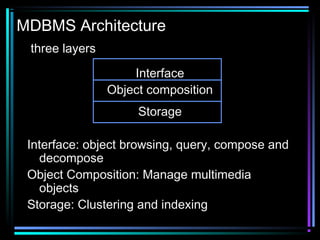
MDBMS Architecture
three layers
Interface
Object composition
Storage
Interface: object browsing, query, compose and
decompose
Object Composition: Manage multimedia
objects
Storage: Clustering and indexing
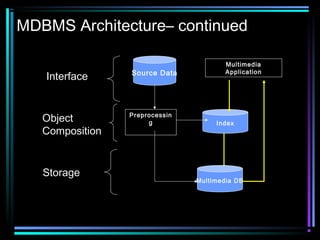
MDBMS Architecture– continued
Multimedia DB
Source Data
Preprocessin
g Index
Multimedia
Application
Interface
Object
Composition
Storage
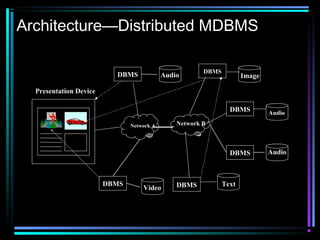
Architecture—Distributed MDBMS
Network A Network B
Presentation Device
AudioDBMS Image
Audio
Audio
Text
Video
DBMS DBMS
DBMS
DBMS
DBMS
Advantage of MDBMS
Multimedia Application: playback and
production (Script Language).
• Flexibility of script language
• Shared script and data structure
• Reuse of Multimedia objects
• Reduce data redundancy
• Data independences– physical and logical
• Improve Search and Retrieval
• Optimized storage
Advantages(continued..)
• efficient access
• complex search is also possible
• transaction protected multiuser mode
• recovery
Applications
• Libraries
• Educational Institutions
• Reverse Image searching
• Web albums

Multimedia db system

  • 1.
  • 2.
    Requirement of MultimediaDBMS • Large and new topics for research • Many opening research topics– from the data model, to storage to efficiency of MDBMS. • Persistence • Privacy • Integrity control • Recovery • Query Support
  • 3.
    MDBMS Presentation focuses on: •General Overview of MDBMS - Definition - Characteristics of MDBMS - Tasks of MDBMS - Data Structure of MDBMS. - MDBMS Design - Operations on MDBMS. - MDBMS Architectures
  • 4.
    • Advantages ofMDBMS • Applications. • Research Topics • References.
  • 5.
    MDBMS Overview • MultimediaData: defines as many kinds of media—images, video, audio, graphics, hypertext, hypermedia, and other abstract data types. • Multimedia Object: a multimedia document or presentation containing one or more multimedia data.
  • 6.
    Overview (continued) • MultimediaDatabase: defines as a database containing one or more multimedia object.
  • 7.
    What is Multimediadata? • It is not the conventional alphanumerical data. • Data Types: 1. Text 2. Image 3. Audio 4. Video.
  • 8.
    Why Multimedia Data? •The information provided by multimedia data explains more than what a conventional data explains.
  • 9.
    What is MultimediaDBMS? • A multimedia database management system (MM DBMS) is a framework that manages different types of data potentially represented in a wide diversity of formats. • It can also do operations on these multimedia data.
  • 10.
    Characteristics of MDBMS •Large object size • Synchronous delivery of multimedia objects • Multimedia objects may have embedded timing constraints • Multimedia object composed of multiple components
  • 11.
    Characteristics (continued) • Queriesare not text or numeric based, but Content-based • Most multimedia transactions are long and requires long processing and retrieval time • Multimedia Object presentation is very important.
  • 12.
    How data isstored in MMDBMS? • The Multimedia data can be stored in 3 parts. • They are 1. Raw Data 2. Registering Data 3. Descriptive Data
  • 13.
    Data Structure Multimedia data RawData Registering Data Descriptive Data (Uncompresse d Image) (Size & coding details of raw data) (Textual numerical annotations)
  • 14.
    • Descriptive Data Informationabout content and structure • Registering Data Data necessary for interpretation and identification i.e. Format. • Raw Data Unformatted Information Content i.e. pixels.
  • 15.
    Main Tasks ofMDBMS • Enforce data independence—physical and logical level • Organize, classify and query multimedia data • Support abstract data analysis for searching engine
  • 16.
    Tasks of MDBMS(continued) • Support asynchronous requests and operations • Provide cost effective storage management scheme • Ensure data integrity constraints • Provide basic operations as supported by traditional databases—insert, delete, search and update.
  • 17.
    Tasks of MDMS(Continued) MDBMS also has to support: • Composition and decomposition of Multimedia objects • Security and intellectual property protection • Concurrency control and locking mechanism • Recovery • Indexing and clustering
  • 18.
    Operations on MultimediaData • The operations are 1. Input 2. Output 3. Modification 4. Deletion 5. Comparison 6. Evaluation
  • 19.
    Input & Output •Input 1. Data will be written to the database. 2. RAW and Registering data is mandatory. 3. Descriptive data is optional. • Output Reads the data from database as per the registering data.
  • 20.
    Modifying & Deleting •Modification Changing of RAW, Registering and descriptive data. • Deleting Removes the entry from database.
  • 21.
    Comparison & Evaluation •Comparison 1.Search and Retrieval of stored data. 2.Pattern Matching Technique is used. • Evaluation 1.Generation of descriptive data from Raw and registering data.
  • 22.
    MDBMS Design Approaches: • Filesystem – Not flexible, scalability • Relational DBMS—No Content-based indexing or query support and Embedding new functions and types into RDBMS. • OODBMS—Binary Large Objects (BLOB). • Design from the scratch—Time consuming.
  • 23.
    ⇒ OODBMS Multimedia OODBMS Implementationdifficulties (e.g. Concurrency control) due to: • Lack of control over OODBMS • MDBMS requirements—Quality of Service, Synchronization, and Networking
  • 24.
    MDBMS Architecture three layers Interface Objectcomposition Storage Interface: object browsing, query, compose and decompose Object Composition: Manage multimedia objects Storage: Clustering and indexing
  • 25.
    MDBMS Architecture– continued MultimediaDB Source Data Preprocessin g Index Multimedia Application Interface Object Composition Storage
  • 26.
    Architecture—Distributed MDBMS Network ANetwork B Presentation Device AudioDBMS Image Audio Audio Text Video DBMS DBMS DBMS DBMS DBMS
  • 27.
    Advantage of MDBMS MultimediaApplication: playback and production (Script Language). • Flexibility of script language • Shared script and data structure • Reuse of Multimedia objects • Reduce data redundancy • Data independences– physical and logical • Improve Search and Retrieval • Optimized storage
  • 28.
    Advantages(continued..) • efficient access •complex search is also possible • transaction protected multiuser mode • recovery
  • 29.
    Applications • Libraries • EducationalInstitutions • Reverse Image searching • Web albums