“Automated Deployment and Configuration
Engines. Ansible”
Alberto Molina Coballes
Teacher at IES Gonzalo Nazareno @alberto_molina
alb.molina@gmail.com
Table of Contents
• Introduction
• Open Source Configuration Management Software:
Puppet, Chef, Salt and Ansible
• Getting started with ansible
• Inventory files, playbooks and modules
• Ansible and docker
• Examples
• Exercises
• References
• Ansible Doc: docs.ansible.com
Server Deployments
Traditional server deployment
• Server provisioning:
• Server acquisition or virtual machine creation
• OS installation and configuration
• Services installation and configuration
• Security settings
• Application Deployment
• Document everything is the key to efficient
troubleshooting
• Expected to live for years
• Scale up (RAM or CPU) implies a server halt
• In server clusters this process is usually automated
with the help of shell scripts
Modern server deployment
• Server provisioning from a base image or template
• Extensive use of configuration management
software:
• OS configuration
• Service installation and configuration
• Security settings
• System upgrades
• Application Deployment from a testing environment,
identical to the production one
• Scale out is preferred over scale up
• Not expected to live for years
Paradigm change (Infrastructure as Code)
Use your infrastructure just as your software:
• Use revision control software like git or
subversion
• Use a good text editor (No, notepad or nano
aren’t) : vim or emacs or even something like
atom or sublime text 2
• Everything must be readable and with comments
• Use a configuration management software
• Devops … What’s that?
Automatic deployment and configuration of short-
lived servers
• Automatic deployment and configuration is an
option using classical servers (virtual or not)
• It becomes mandatory using short-lived servers
• Short-lived servers are common in cloud
computing:
• Scale out
• Variable number of servers depending on
demand
• Automatic deployment and configuration of new
servers is done when needed
• Servers are destroyed if no longer required
Open Source Configuration
Management Software
Configuration Management Software (cms)
• Automation software used for system administrator
tasks
• Standarizes resource configuration and
management:
• Provisioning
• Management
• Release management
• Patch management
• Security
• One example: Heartbleed
Idempotence
“Property of certain operations in mathematics and
computer science, that can be applied multiple
times without changing the result beyond the initial
application”
• Term used in cms to explain the key difference
between them and classical use of shell scripts
• A cms recipe can be safely re-run any number of
times, and at each run it will come to desired state
Example: Idempotence
• Let’s see an example of idempotence on ansible
Chef
• Developed by OpsCode
• Pull architecture: Master server, agents in managed
nodes and a controller node
• Agents are configured to check the master
periodically and apply changes if needed
• Initial release: 2009
• Cookbooks and recipes
• Based on ruby
• Lots of cookbooks available
Puppet
• Developed by Puppet Labs
• Pull architecture
• Initial release: 2005
• Based on ruby
• Uses its own declarative language
• Manifests
• Puppet forge
• Possibly the most widely used
Salt (SaltStack)
• Developed by SaltStack Inc
• Master and minions connected with ZeroMQ
• Initial release: 2011
• Easy to install
• Based on python
• Uses YAML as declarative language and Jinja2 for
templates
Ansible
• Developed by Ansible Inc
• Initial release: 2012
• Push architecture
• Easy to install
• Based on python
• Playboks: Declaration of deployments and
configurations in YAML
• Easy to learn
Chef example: Installing apache2 with chef-solo
# mkdir –p chef/{cookbooks,data_bags,nodes,roles,site-cookbooks}
# cd chef
# git init .
# git submodule add https://github.com/opscode-cookbooks/apt.git cookbooks/apt
# git submodule add https://github.com/opscode-cookbooks/apache2.git
cookbooks/apache2
# git submodule add https://github.com/opscode-cookbooks/iptables.git
cookbooks/iptables
# git submodule add https://github.com/opscode-cookbooks/logrotate.git
cookbooks/logrotate
# echo ‘file_cache_path "/root/chef-solo“’ > solo.rb
# echo ‘cookbook_path "/root/chef-repo/cookbooks“’ >> solo.rb
# echo ‘{ "run_list": [ "recipe[apt]", "recipe[apache2]" ] }’ > web.json
# chef-solo -c solo.rb -j web.json
Puppet example: Installing apache2
• At master, create the file apache2/manifests/init.pp
• Add a webserver node at nodes.pp
class apache2 {
Package[‘apache package’] -> Service[‘apache service’]
package { ‘apache package’:
ensure => installed,
name => “apache2”,
}
service {‘apache service’:
ensure => running,
name => “apache2”,
}
}
node ‘webserver.example.com’ {
include apache2
}
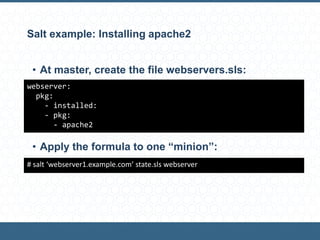
Salt example: Installing apache2
• At master, create the file webservers.sls:
• Initial release: 2012
• Push architecture
• Easy to install
• Apply the formula to one “minion”:
webserver:
pkg:
- installed:
- pkg:
- apache2
# salt ‘webserver1.example.com’ state.sls webserver
Ansible example: Installing apache2
[webservers]
webserver.example.com
---
- name Apache installation
hosts: webservers
tasks:
- name: Ensure apache2 is installed
apt: pkg=apache2
$ ansible-playbook webservers.yml
• Edit inventory file and add the host webserver:
• Edit the file webservers.yml:
• Execute de playbook:
Why ansible?
• Chef and puppet have a significant learning curve
• Small and with few dependences
• Easy to install
• Easy to learn
• Push architecture without agents
• Uses YAML for playbooks and jinja2 for templates
• Very active community
• Closer to typical sysadmin tools
• Salt would be a good option too
Getting started with ansible
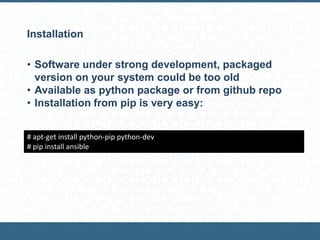
Installation
• Software under strong development, packaged
version on your system could be too old
• Available as python package or from github repo
• Installation from pip is very easy:
# apt-get install python-pip python-dev
# pip install ansible
SSH
• Ansible communicates with remote machines over
ssh.
• You need to configure passwordless ssh access to
remote machines
• Exercise: Configure a remote server to access using
ssh public key with passphrase
Inventory files, playbooks
and modules
Inventory files
• INI file with a list of servers
• Servers can be grouped
• Default inventory file is /etc/ansible/hosts
mail.example.com
[webservers]
foo.example.com
bar.example.com
[dbservers]
one.example.com
two.example.com
three.example.com
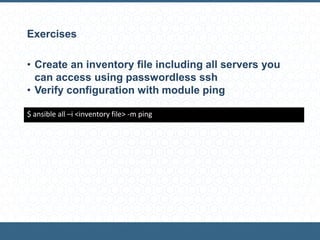
Exercises
• Create an inventory file including all servers you
can access using passwordless ssh
• Verify configuration with module ping
$ ansible all –i <inventory file> -m ping
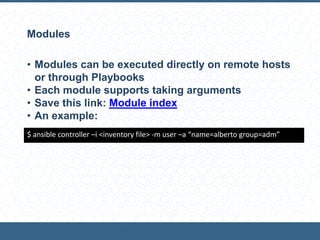
Modules
• Modules can be executed directly on remote hosts
or through Playbooks
• Each module supports taking arguments
• Save this link: Module index
• An example:
$ ansible controller –i <inventory file> -m user –a “name=alberto group=adm”
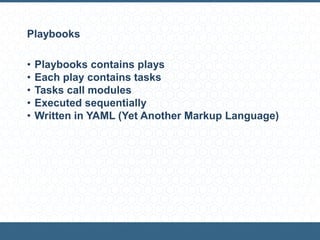
Playbooks
• Playbooks contains plays
• Each play contains tasks
• Tasks call modules
• Executed sequentially
• Written in YAML (Yet Another Markup Language)
Roadmap
• Ansible is easy to learn, learn it on the job
• Install it, configure the inventory file and practice
• Note: It’s recommended a YAML parser integrated
into your text editor
• When you become familiar with modules:
• Handlers for triggers
• Variables: Jinja2, facts, …
• Conditionals
• Loops
• Roles
• Best practices
Examples
Examples
• https://github.com/ansible/ansible-examples
• https://github.com/openstack-ansible
• https://github.com/albertomolina/Curso-SAD
Ansible and docker
Ansible and docker
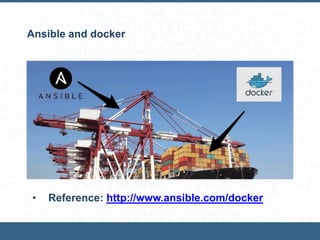
• Reference: http://www.ansible.com/docker
Ansible and docker
• With ansible you can manage your docker images
on remote servers
• With ansible you can manage your docker
containers on remote servers
Alternatively
• You can define Dockerfiles that install ansible,
clone a repository and executes an ansible
playbook
Managing docker images with ansible
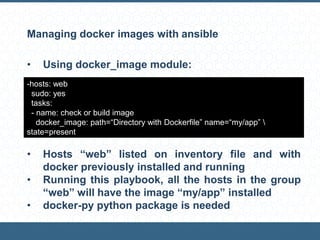
• Using docker_image module:
• Hosts “web” listed on inventory file and with
docker previously installed and running
• Running this playbook, all the hosts in the group
“web” will have the image “my/app” installed
• docker-py python package is needed
-hosts: web
sudo: yes
tasks:
- name: check or build image
docker_image: path=“Directory with Dockerfile” name=“my/app” 
state=present
Ansible playbooks inside a Dockerfile
• All configuration is done by ansible
• Dockerfile:
FROM ubuntu
MAINTAINER yourname
RUN apt-get -y update
RUN apt-get install -y python-yaml python-jinja2 git
RUN git clone http://github.com/ansible/ansible.git /tmp/ansible
WORKDIR /tmp/ansible
ENV PATH /tmp/ansible/bin:/sbin:/usr/sbin:/usr/bin
ENV ANSIBLE_LIBRARY /tmp/ansible/library
ENV PYTHONPATH /tmp/ansible/lib:$PYTHON_PATH
RUN git clone http://github.com/yourusername/yourrepo.git /tmp/example
ADD inventory /etc/ansible/hosts
WORKDIR /tmp/examples
RUN ansible-playbook site.yml -c local
EXPOSE 22 3000
ENTRYPOINT [“/usr/bin/foo”]
Exercises
Exercises
1. Create a playbook for for install nginx on Debian
or Ubuntu
2. Create a playbook for the LAMP stack
3. Deploy a minimal PHP application
4. Docker:
1. Build with ansible a minimal docker image with
nginx using the Dockerfile example from last
session
2. Start with ansible a container based on last
image
3. Create a Dockerfile to call an ansible playbook
that installs nginx. Build it with docker
command
Thanks
Alberto Molina Coballes
Teacher at IES Gonzalo Nazareno @alberto_molina
alb.molina@gmail.com

Automated Deployment and Configuration Engines. Ansible

  • 1.
    “Automated Deployment andConfiguration Engines. Ansible” Alberto Molina Coballes Teacher at IES Gonzalo Nazareno @alberto_molina alb.molina@gmail.com
  • 2.
    Table of Contents •Introduction • Open Source Configuration Management Software: Puppet, Chef, Salt and Ansible • Getting started with ansible • Inventory files, playbooks and modules • Ansible and docker • Examples • Exercises • References • Ansible Doc: docs.ansible.com
  • 3.
  • 4.
    Traditional server deployment •Server provisioning: • Server acquisition or virtual machine creation • OS installation and configuration • Services installation and configuration • Security settings • Application Deployment • Document everything is the key to efficient troubleshooting • Expected to live for years • Scale up (RAM or CPU) implies a server halt • In server clusters this process is usually automated with the help of shell scripts
  • 5.
    Modern server deployment •Server provisioning from a base image or template • Extensive use of configuration management software: • OS configuration • Service installation and configuration • Security settings • System upgrades • Application Deployment from a testing environment, identical to the production one • Scale out is preferred over scale up • Not expected to live for years
  • 6.
    Paradigm change (Infrastructureas Code) Use your infrastructure just as your software: • Use revision control software like git or subversion • Use a good text editor (No, notepad or nano aren’t) : vim or emacs or even something like atom or sublime text 2 • Everything must be readable and with comments • Use a configuration management software • Devops … What’s that?
  • 7.
    Automatic deployment andconfiguration of short- lived servers • Automatic deployment and configuration is an option using classical servers (virtual or not) • It becomes mandatory using short-lived servers • Short-lived servers are common in cloud computing: • Scale out • Variable number of servers depending on demand • Automatic deployment and configuration of new servers is done when needed • Servers are destroyed if no longer required
  • 8.
  • 9.
    Configuration Management Software(cms) • Automation software used for system administrator tasks • Standarizes resource configuration and management: • Provisioning • Management • Release management • Patch management • Security • One example: Heartbleed
  • 10.
    Idempotence “Property of certainoperations in mathematics and computer science, that can be applied multiple times without changing the result beyond the initial application” • Term used in cms to explain the key difference between them and classical use of shell scripts • A cms recipe can be safely re-run any number of times, and at each run it will come to desired state
  • 11.
    Example: Idempotence • Let’ssee an example of idempotence on ansible
  • 12.
    Chef • Developed byOpsCode • Pull architecture: Master server, agents in managed nodes and a controller node • Agents are configured to check the master periodically and apply changes if needed • Initial release: 2009 • Cookbooks and recipes • Based on ruby • Lots of cookbooks available
  • 13.
    Puppet • Developed byPuppet Labs • Pull architecture • Initial release: 2005 • Based on ruby • Uses its own declarative language • Manifests • Puppet forge • Possibly the most widely used
  • 14.
    Salt (SaltStack) • Developedby SaltStack Inc • Master and minions connected with ZeroMQ • Initial release: 2011 • Easy to install • Based on python • Uses YAML as declarative language and Jinja2 for templates
  • 15.
    Ansible • Developed byAnsible Inc • Initial release: 2012 • Push architecture • Easy to install • Based on python • Playboks: Declaration of deployments and configurations in YAML • Easy to learn
  • 16.
    Chef example: Installingapache2 with chef-solo # mkdir –p chef/{cookbooks,data_bags,nodes,roles,site-cookbooks} # cd chef # git init . # git submodule add https://github.com/opscode-cookbooks/apt.git cookbooks/apt # git submodule add https://github.com/opscode-cookbooks/apache2.git cookbooks/apache2 # git submodule add https://github.com/opscode-cookbooks/iptables.git cookbooks/iptables # git submodule add https://github.com/opscode-cookbooks/logrotate.git cookbooks/logrotate # echo ‘file_cache_path "/root/chef-solo“’ > solo.rb # echo ‘cookbook_path "/root/chef-repo/cookbooks“’ >> solo.rb # echo ‘{ "run_list": [ "recipe[apt]", "recipe[apache2]" ] }’ > web.json # chef-solo -c solo.rb -j web.json
  • 17.
    Puppet example: Installingapache2 • At master, create the file apache2/manifests/init.pp • Add a webserver node at nodes.pp class apache2 { Package[‘apache package’] -> Service[‘apache service’] package { ‘apache package’: ensure => installed, name => “apache2”, } service {‘apache service’: ensure => running, name => “apache2”, } } node ‘webserver.example.com’ { include apache2 }
  • 18.
    Salt example: Installingapache2 • At master, create the file webservers.sls: • Initial release: 2012 • Push architecture • Easy to install • Apply the formula to one “minion”: webserver: pkg: - installed: - pkg: - apache2 # salt ‘webserver1.example.com’ state.sls webserver
  • 19.
    Ansible example: Installingapache2 [webservers] webserver.example.com --- - name Apache installation hosts: webservers tasks: - name: Ensure apache2 is installed apt: pkg=apache2 $ ansible-playbook webservers.yml • Edit inventory file and add the host webserver: • Edit the file webservers.yml: • Execute de playbook:
  • 20.
    Why ansible? • Chefand puppet have a significant learning curve • Small and with few dependences • Easy to install • Easy to learn • Push architecture without agents • Uses YAML for playbooks and jinja2 for templates • Very active community • Closer to typical sysadmin tools • Salt would be a good option too
  • 21.
  • 22.
    Installation • Software understrong development, packaged version on your system could be too old • Available as python package or from github repo • Installation from pip is very easy: # apt-get install python-pip python-dev # pip install ansible
  • 23.
    SSH • Ansible communicateswith remote machines over ssh. • You need to configure passwordless ssh access to remote machines • Exercise: Configure a remote server to access using ssh public key with passphrase
  • 24.
  • 25.
    Inventory files • INIfile with a list of servers • Servers can be grouped • Default inventory file is /etc/ansible/hosts mail.example.com [webservers] foo.example.com bar.example.com [dbservers] one.example.com two.example.com three.example.com
  • 26.
    Exercises • Create aninventory file including all servers you can access using passwordless ssh • Verify configuration with module ping $ ansible all –i <inventory file> -m ping
  • 27.
    Modules • Modules canbe executed directly on remote hosts or through Playbooks • Each module supports taking arguments • Save this link: Module index • An example: $ ansible controller –i <inventory file> -m user –a “name=alberto group=adm”
  • 28.
    Playbooks • Playbooks containsplays • Each play contains tasks • Tasks call modules • Executed sequentially • Written in YAML (Yet Another Markup Language)
  • 29.
    Roadmap • Ansible iseasy to learn, learn it on the job • Install it, configure the inventory file and practice • Note: It’s recommended a YAML parser integrated into your text editor • When you become familiar with modules: • Handlers for triggers • Variables: Jinja2, facts, … • Conditionals • Loops • Roles • Best practices
  • 30.
  • 31.
  • 32.
  • 33.
    Ansible and docker •Reference: http://www.ansible.com/docker
  • 34.
    Ansible and docker •With ansible you can manage your docker images on remote servers • With ansible you can manage your docker containers on remote servers Alternatively • You can define Dockerfiles that install ansible, clone a repository and executes an ansible playbook
  • 35.
    Managing docker imageswith ansible • Using docker_image module: • Hosts “web” listed on inventory file and with docker previously installed and running • Running this playbook, all the hosts in the group “web” will have the image “my/app” installed • docker-py python package is needed -hosts: web sudo: yes tasks: - name: check or build image docker_image: path=“Directory with Dockerfile” name=“my/app” state=present
  • 36.
    Ansible playbooks insidea Dockerfile • All configuration is done by ansible • Dockerfile: FROM ubuntu MAINTAINER yourname RUN apt-get -y update RUN apt-get install -y python-yaml python-jinja2 git RUN git clone http://github.com/ansible/ansible.git /tmp/ansible WORKDIR /tmp/ansible ENV PATH /tmp/ansible/bin:/sbin:/usr/sbin:/usr/bin ENV ANSIBLE_LIBRARY /tmp/ansible/library ENV PYTHONPATH /tmp/ansible/lib:$PYTHON_PATH RUN git clone http://github.com/yourusername/yourrepo.git /tmp/example ADD inventory /etc/ansible/hosts WORKDIR /tmp/examples RUN ansible-playbook site.yml -c local EXPOSE 22 3000 ENTRYPOINT [“/usr/bin/foo”]
  • 37.
  • 38.
    Exercises 1. Create aplaybook for for install nginx on Debian or Ubuntu 2. Create a playbook for the LAMP stack 3. Deploy a minimal PHP application 4. Docker: 1. Build with ansible a minimal docker image with nginx using the Dockerfile example from last session 2. Start with ansible a container based on last image 3. Create a Dockerfile to call an ansible playbook that installs nginx. Build it with docker command
  • 39.
    Thanks Alberto Molina Coballes Teacherat IES Gonzalo Nazareno @alberto_molina alb.molina@gmail.com