#OktoCampus
Workshop
Ansible
$> whoami
● Cédric DELGEHIER
● Ops @scalair
● Poor slide designer (sorry)
● Python lover
● Father of two wise children
Ansible : Introduction
● How to manage the installation, the update and
the configuration of all my servers ?
Ansible : Introduction
Variants : I use scripts, « for loop » or synchronized terminal
Ansible : Introduction
Where is the problem ?
Scripts are :
● Hard to maintain
● Boring in heterogeneous environments
● Not idempotent natively
I hope: centralized, versioned, documented, easy to read for a new colleague
An idempotent operation is one that has no additional effect if it is called more than once with the same input parameters
*
Ansible : Introduction
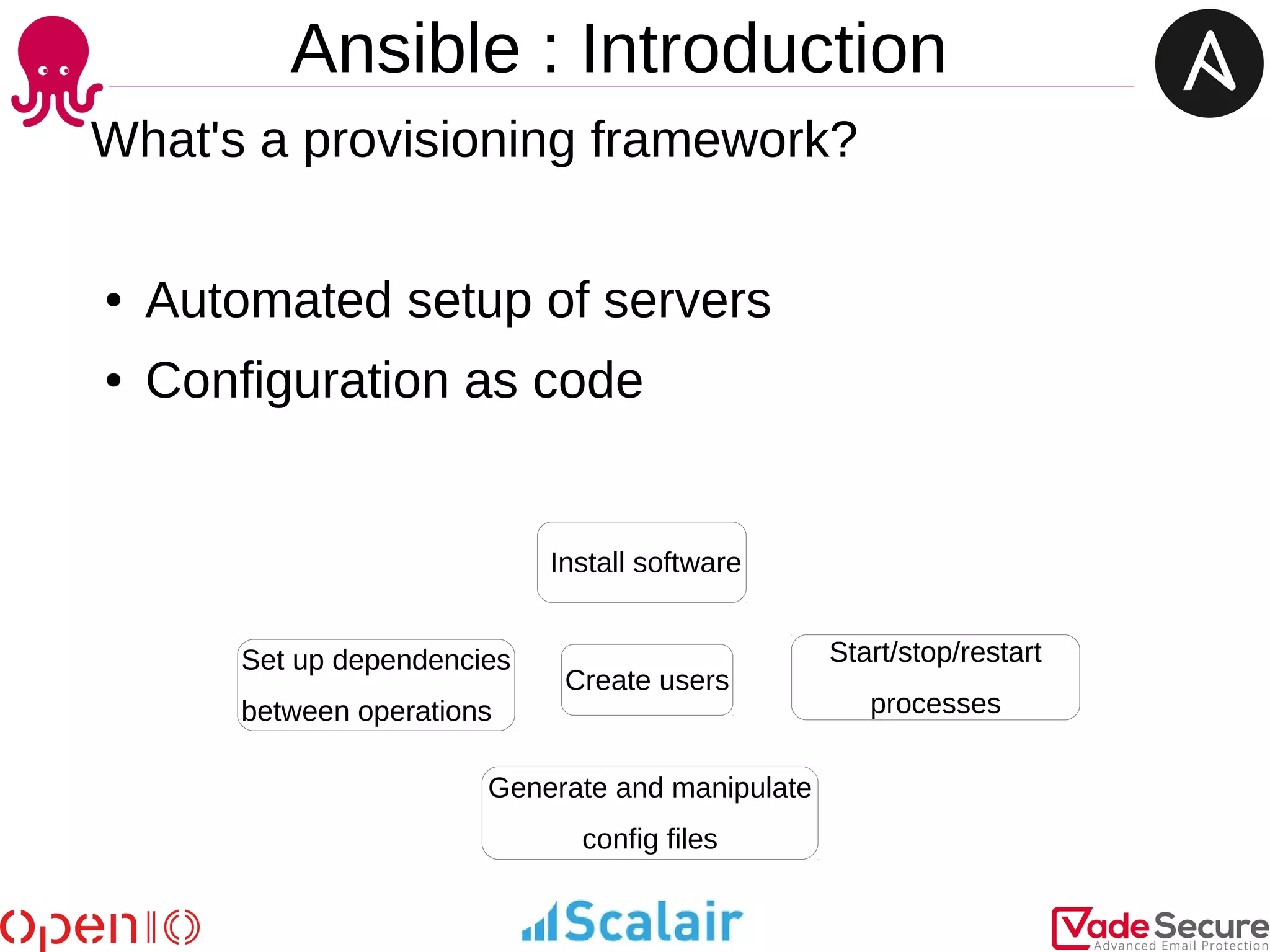
What's a provisioning framework?
● Automated setup of servers
● Configuration as code
Create users
Install software
Generate and manipulate
config files
Start/stop/restart
processes
Set up dependencies
between operations
Ansible : Introduction
Ansible
● Ansible is based on Python
● Standard SSH to connect to managed servers/nodes
● Push-based system
● Agentless operation
● No central server, no special software on managed nodes
● Facts from each node used for state-full decisions
● Idempotent ConfigMgmt tool (like others)
● Extend with custom modules, use any language which can return JSON
● Inventory from various datasource, return as JSON
An idempotent operation is one that has no additional effect if it is called more than once with the same input parameters
Ansible
● Ansible is similar to Chef, Puppet or Salt
● Shared purpose – solve tasks for CfgMgmt, provisioning, deployment, etc.
● Ansible may be simplest and easiest configuration management tool to start
● Chef, Puppet, Salt are great tools as well, may be more complex to start with, steeper
learning curve, etc.
● The absence of an agent allows it to manage more than servers (network or storage
equipment)
● It supports managing major cloud devices (AWS, RackSpace, Digital Ocean,
OpenStack) through a collection of modules which are available
Ansible
LAB
Setup
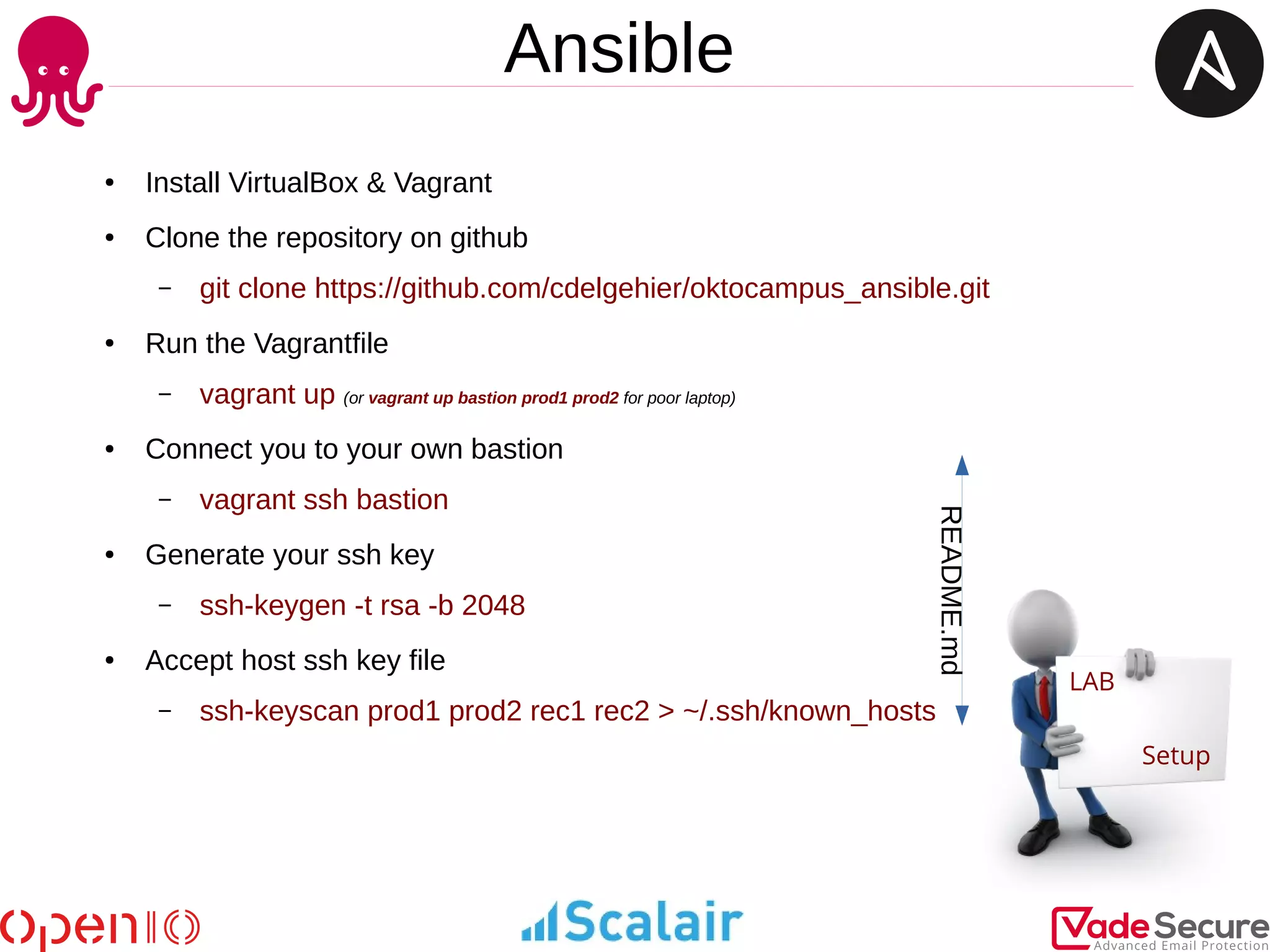
● Install VirtualBox & Vagrant
● Clone the repository on github
– git clone https://github.com/cdelgehier/oktocampus_ansible.git
● Run the Vagrantfile
– vagrant up (or vagrant up bastion prod1 prod2 for poor laptop)
● Connect you to your own bastion
– vagrant ssh bastion
● Generate your ssh key
– ssh-keygen -t rsa -b 2048
● Accept host ssh key file
– ssh-keyscan prod1 prod2 rec1 rec2 > ~/.ssh/known_hosts
README.md
Ansible : Ad Hoc mode
● You don't have to create an elaborate set of tasks just to perform simple operations
on your nodes
● An ad-hoc command consists of two parameters; the host group that defines on what
machines to run the task against and the Ansible module to run
ansible <group> -m <module>
$> ansible prod -m ping
$> ansible prod -m command -a 'whoami'
$> ansible prod -m setup
$> ansible prod -a 'hostnamectl'
-m command is by default
$> ansible all -a '/sbin/reboot' --forks=10
$> ansible recette -m user -a 'name=georges password=okto'
$> ansible alll -m yum -a 'name=nginx state=installed'
$> ansible alll -m service -a 'name=nginx state=started'
$> ansible all –list-hosts
$> ansible localhost -m debug -a 'var=groups.keys()'
Ansible
LAB
Part 1
In Ad Hoc only and with the manual
http://docs.ansible.com/ansible/list_of_all_modules.html
or with the ansible-doc commande
Try :
● To install a package (with yum) named epel-release then another named cowsay
● To run the command coway with moooo in argument
● Try add a user john which one is a member of the okto group
● Create a gzip archive of /etc/shadow into /tmp
Ansible
LAB
Part 1
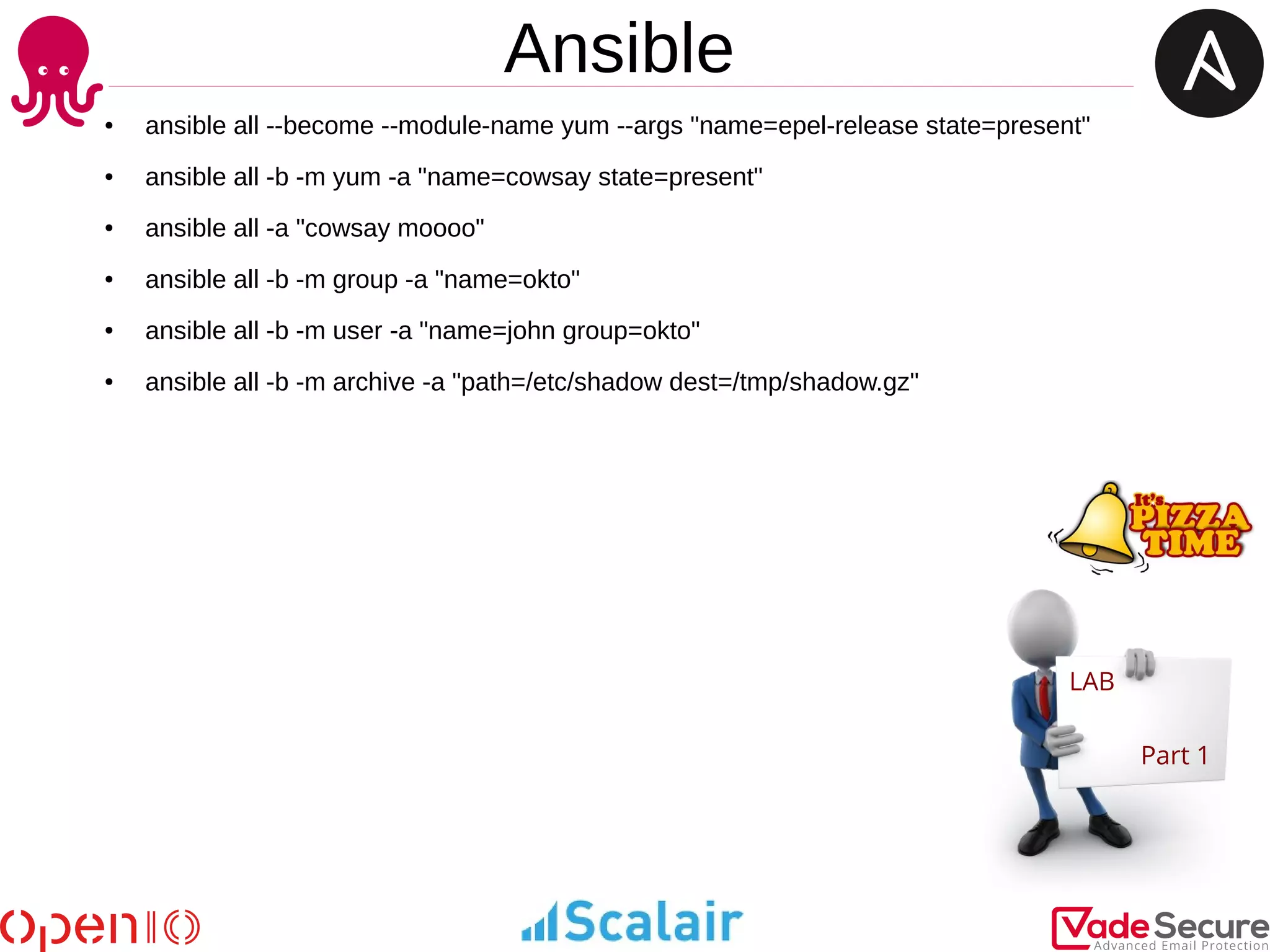
● ansible all --become --module-name yum --args "name=epel-release state=present"
● ansible all -b -m yum -a "name=cowsay state=present"
● ansible all -a "cowsay moooo"
● ansible all -b -m group -a "name=okto"
● ansible all -b -m user -a "name=john group=okto"
● ansible all -b -m archive -a "path=/etc/shadow dest=/tmp/shadow.gz"
Ansible
Ansible : concepts
Ansible : concepts
● Modules : accomplish dedicated Tasks (set values, use templates)
● Tasks : execute Module specific parameters, variables, etc.
● Variables : configuration-wide, Playbook/Roles specific vars
● Facts : gather information about the target system
● Handlers : like Tasks but usually get called by another Task
● Roles : group related Tasks, encapsulate data to accomplish Task
● Files : files directory contains files copied over to target
● Templates : Jinja2 format with placeholders to insert variables
● Vault : encrypt sensible data
● Plays : are lists of Tasks wich apply to hosts / host groups
● Playbooks : YAML formatted files orchestrate steps sequentially
● Inventory : a combination of a hosts and groups
Ansible : concepts
.
|-- ansible.cfg #ansible config file
|-- inventory.ini #hosts file
`-- roles #roles directory
`-- role1 #a role directory
|-- defaults
| `-- main.yml #defaults values
|-- files #files directory
| `-- myfile.cfg
|-- handlers #handlers directory
| `-- main.yml
|-- tasks
| `-- main.yml #task file
|-- templates
| `-- mytemplate.conf.j2 #template file
`-- vars
`-- main.yml #variable file
A minimal top level directory would contain files and directories such as:
Ansible : Inventory
[prod]
prod1
10.0.15.21
[recette]
rec[1:2]
[jira]
{{ jira_ip }}
Inventory files are simple text files which describe
your servers
IP Addresses or DNS Names, grouped by names
Inventory files can take advantage of variables
and enumerations
Ansible : Playbooks
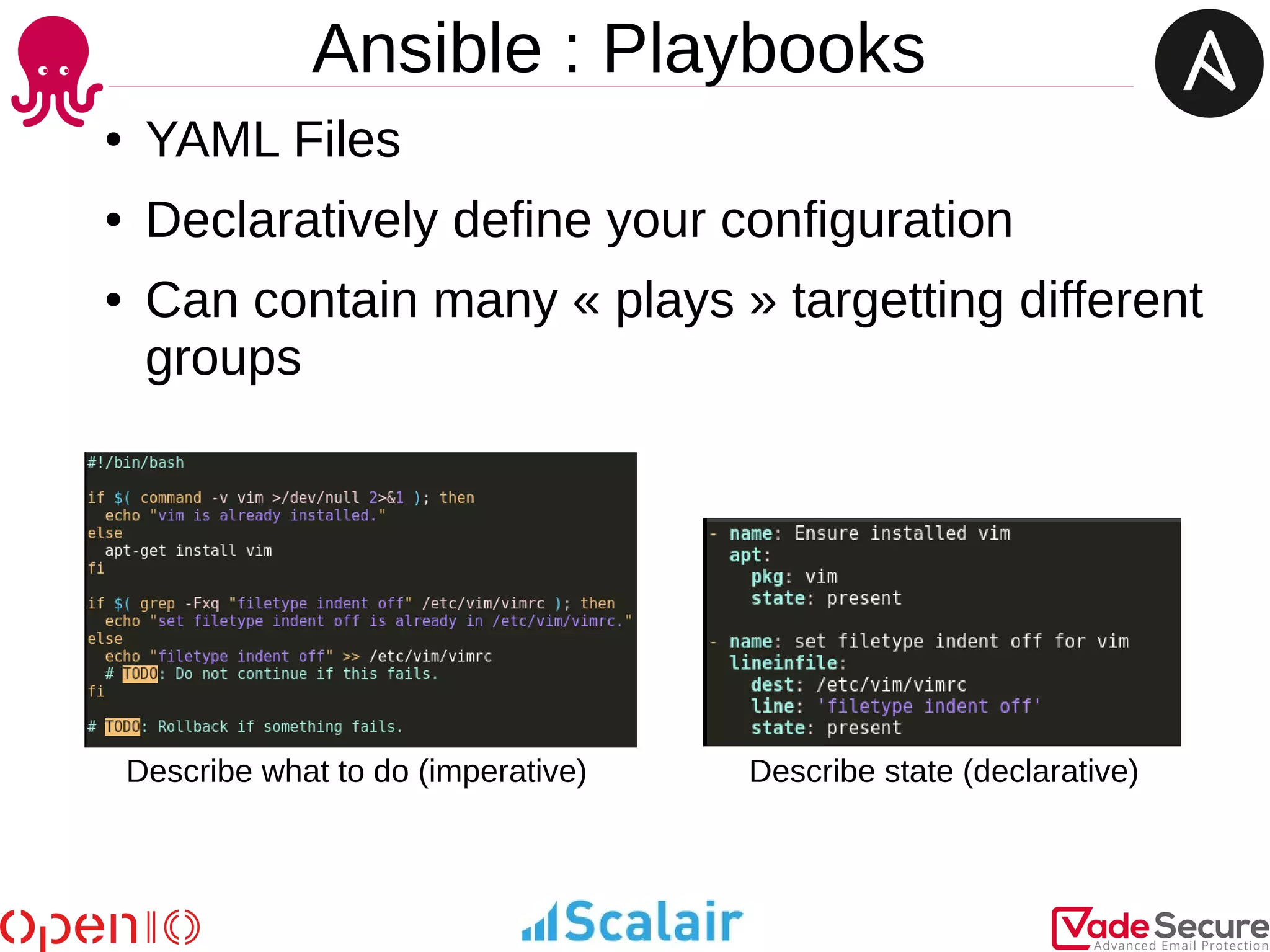
● YAML Files
● Declaratively define your configuration
● Can contain many « plays » targetting different
groups
Describe state (declarative)Describe what to do (imperative)
Ansible : Playbooks
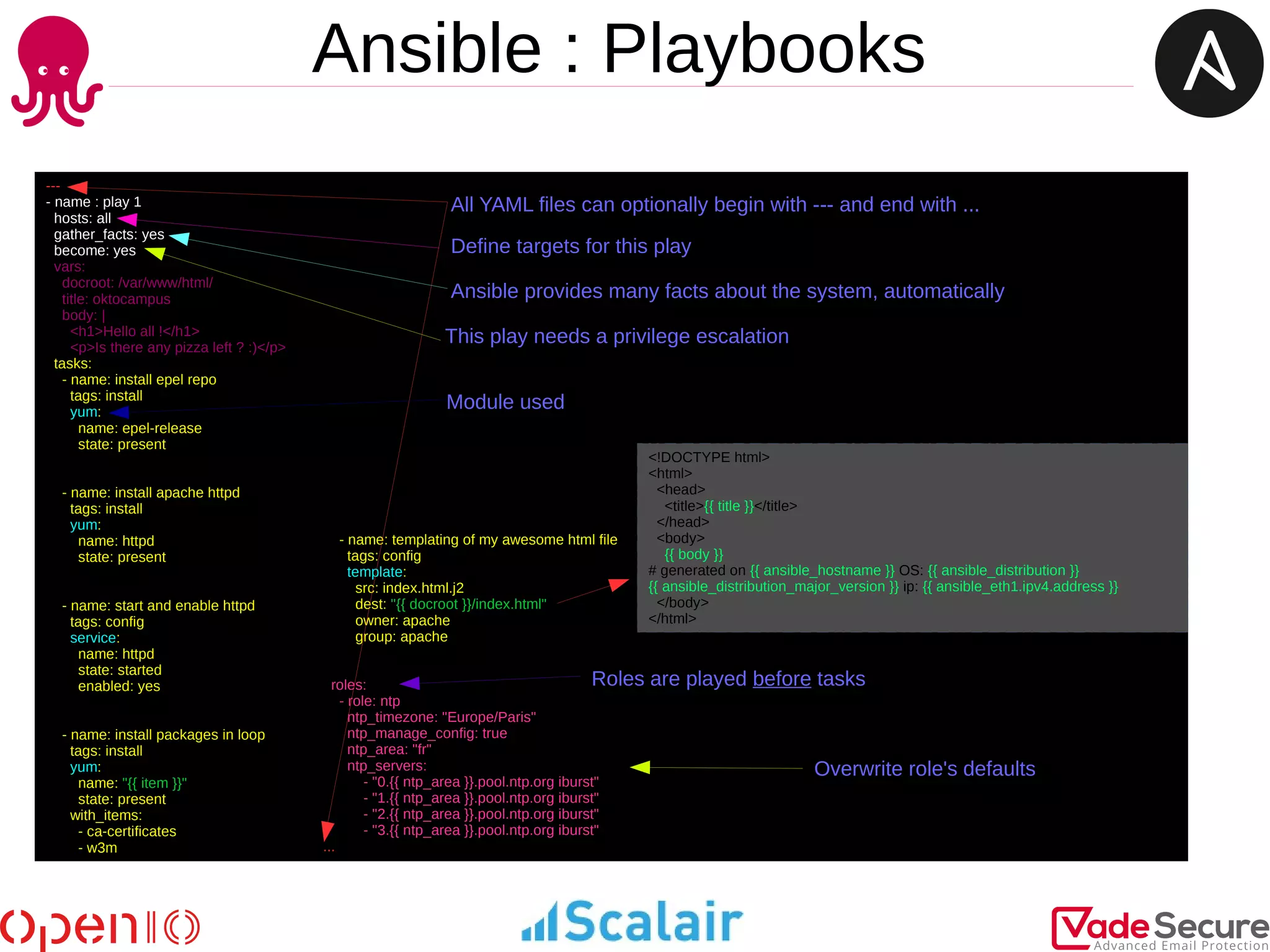
---
- name : play 1
hosts: all
gather_facts: yes
become: yes
vars:
docroot: /var/www/html/
title: oktocampus
body: |
<h1>Hello all !</h1>
<p>Is there any pizza left ? :)</p>
tasks:
- name: install epel repo
tags: install
yum:
name: epel-release
state: present
- name: install apache httpd
tags: install
yum:
name: httpd
state: present
- name: start and enable httpd
tags: config
service:
name: httpd
state: started
enabled: yes
- name: install packages in loop
tags: install
yum:
name: "{{ item }}"
state: present
with_items:
- ca-certificates
- w3m
- name: templating of my awesome html file
tags: config
template:
src: index.html.j2
dest: "{{ docroot }}/index.html"
owner: apache
group: apache
roles:
- role: ntp
ntp_timezone: "Europe/Paris"
ntp_manage_config: true
ntp_area: "fr"
ntp_servers:
- "0.{{ ntp_area }}.pool.ntp.org iburst"
- "1.{{ ntp_area }}.pool.ntp.org iburst"
- "2.{{ ntp_area }}.pool.ntp.org iburst"
- "3.{{ ntp_area }}.pool.ntp.org iburst"
...
All YAML files can optionally begin with --- and end with ...
Define targets for this play
Ansible provides many facts about the system, automatically
This play needs a privilege escalation
Roles are played before tasks
Overwrite role's defaults
Module used
<!DOCTYPE html>
<html>
<head>
<title>{{ title }}</title>
</head>
<body>
{{ body }}
# generated on {{ ansible_hostname }} OS: {{ ansible_distribution }}
{{ ansible_distribution_major_version }} ip: {{ ansible_eth1.ipv4.address }}
</body>
</html>
Ansible : Roles
$> ansible-galaxy init ntp
$> tree ntp
ntp
|-- defaults
| `-- main.yml
|-- files
|-- handlers
| `-- main.yml
|-- meta
| `-- main.yml
|-- README.md
|-- tasks
| `-- main.yml
|-- templates
| |-- ntp.conf.j2
| `-- timezone.j2
|-- tests
| |-- inventory
| `-- test.yml
`-- vars
|-- Debian.yml
|-- FreeBSD.yml
|-- main.yml
`-- RedHat.yml
Creation of a role folder
Variables customizable by the user
Variables specific to the role
Set of tests
---
- name: include distribution or OS Family variable
include_vars: "{{ item }}"
with_first_found:
- "{{ ansible_distribution }}.yml"
- "{{ ansible_os_family }}.yml"
- name: Ensure NTP-related packages are installed.
tags: install
package:
name: "{{ item }}"
state: present
with_items:
- ntp
- tzdata
- name: Set timezone
tags: config
timezone:
name: "{{ ntp_timezone }}"
- name: Ensure NTP is running and enabled as configured.
tags: config
service:
name: "{{ ntp_daemon }}"
state: started
enabled: yes
when: ntp_enabled
- name: Ensure NTP is stopped and disabled as configured.
tags: config
service:
name: "{{ ntp_daemon }}"
state: stopped
enabled: no
when: not ntp_enabled
- name: Generate ntp.conf file
tags: config
template:
src: ntp.conf.j2
dest: /etc/ntp.conf
notify: restart ntp
when: ntp_manage_config
...
---
ntp_enabled: true
ntp_timezone: "Etc/UTC"
ntp_manage_config: false
ntp_area: ""
ntp_servers:
- "0.{{ ntp_area }}.pool.ntp.org iburst"
- "1.{{ ntp_area }}.pool.ntp.org iburst"
- "2.{{ ntp_area }}.pool.ntp.org iburst"
ntp_restrict:
- "127.0.0.1"
- "::1"
...
---
ntp_daemon: ntpd
...
---
ntp_daemon: ntp
...
Ansible : Best practices
● Create a consistency in :
– Tagging
– Naming of tasks|variables|plays|roles
– Enforce the style with a pre-commit hook
● Separate tags and playbooks that have the purpose of installing and
provisioning
● Prefix role variables with role name
● Use native YAML syntax for your plays: Vertical reading is easier
● Use the run command modules (shell/command/script/raw) as a last
resort
Ansible : Best practices
● Don’t just start services -- use sanity/smoke tests
● Consider writing a module when your play is full of shell module
● Consider writing a filter when jinja hinders the readibility
Ansible
LAB
Part 2
In a playbook only and with the manual
http://docs.ansible.com/ansible/list_of_all_modules.html
or with the ansible-doc commande
Try :
● To write a playbook which check if salt is in the uri http://locahost
● Same idea but the pattern have to be different for the groups [prod] and [recette]
Ansible
LAB
Part 2
$> cat site.yml
---
- name : play 1
hosts: all
gather_facts: yes
become: yes
#vars:
# pattern: salt
Tasks:
- name: Get content page
uri:
url: http://localhost
return_content: yes
register: webpage
- name: Fail if {{ pattern }} is not in the page content
fail:
msg: "No >>> {{ pattern }} <<< in this page"
when: "pattern not in webpage.content"
#when: "ansible_hostname not in webpage.content"
...
$> cat inventory
[prod]
prod1
prod2
[recette]
rec[1:2]
[prod:vars]
pattern=pizza
[recette:vars]
pattern=salt
Ansible : Security
● Ansible can use a vaulted variable that lives in
an otherwise ‘clear text’ YAML file.
This is useful on github/lab
Ansible : Docker for CI
● « Trust is the essential reason why we need
continuous integration. »
● With Docker and a CI tool, we can do checks
on each git commit on our roles
Ansible : Docker for CI
Example : vsftpd from bertvv
The role to test
Files witness
Add a user Alice
Built PoC based on geerlingguy.apache
Ansible : Docker for CI
Bats: Bash Automated Testing System
functional tests on the container
Ansible : Docker for CI
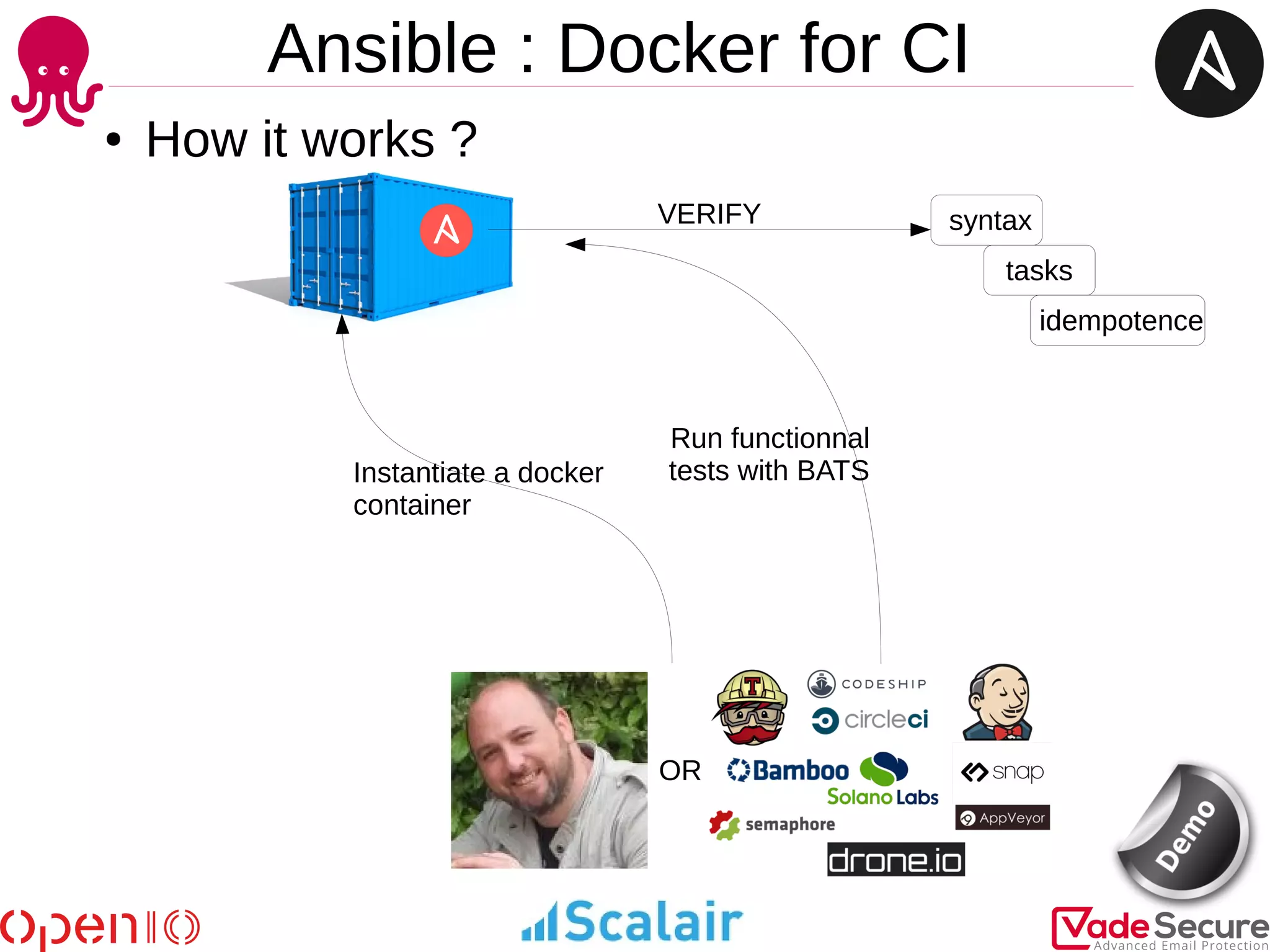
● How it works ?
OR
syntax
tasks
idempotence
VERIFY
Instantiate a docker
container
Run functionnal
tests with BATS
Ansible : Next
● Dynamical inventories
● Modules
● Filters
Ansible
● Contact :
– cdelgehier@scalair.fr
– #ansible
– @JackNemrod
● Lab :
● https://github.com/cdelgehier/oktocampus_ansible
● Sources :
● http://blog.octo.com/administrer-son-parc-avec-du-shell
● https://viuz.com/2014/02/18/yves-morieux-bcg-6-regles-de-simplicite-au-travail/
● http://www.kianmeng.org/2017/01/using-ansible-lint-with-gits-pre-commit.html
● http://lesaventuresdeyannigdanslemondeit.blogspot.fr/2016/05/ecriture-de-filtre-ansible.html
● https://bertvv.github.io/presentation-cfgmgmtcamp2017/

#OktoCampus - Workshop : An introduction to Ansible

  • 1.
  • 2.
    $> whoami ● CédricDELGEHIER ● Ops @scalair ● Poor slide designer (sorry) ● Python lover ● Father of two wise children
  • 3.
    Ansible : Introduction ●How to manage the installation, the update and the configuration of all my servers ?
  • 4.
    Ansible : Introduction Variants: I use scripts, « for loop » or synchronized terminal
  • 5.
    Ansible : Introduction Whereis the problem ? Scripts are : ● Hard to maintain ● Boring in heterogeneous environments ● Not idempotent natively I hope: centralized, versioned, documented, easy to read for a new colleague An idempotent operation is one that has no additional effect if it is called more than once with the same input parameters *
  • 6.
  • 7.
    Ansible : Introduction What'sa provisioning framework? ● Automated setup of servers ● Configuration as code Create users Install software Generate and manipulate config files Start/stop/restart processes Set up dependencies between operations
  • 8.
  • 9.
    Ansible ● Ansible isbased on Python ● Standard SSH to connect to managed servers/nodes ● Push-based system ● Agentless operation ● No central server, no special software on managed nodes ● Facts from each node used for state-full decisions ● Idempotent ConfigMgmt tool (like others) ● Extend with custom modules, use any language which can return JSON ● Inventory from various datasource, return as JSON An idempotent operation is one that has no additional effect if it is called more than once with the same input parameters
  • 10.
    Ansible ● Ansible issimilar to Chef, Puppet or Salt ● Shared purpose – solve tasks for CfgMgmt, provisioning, deployment, etc. ● Ansible may be simplest and easiest configuration management tool to start ● Chef, Puppet, Salt are great tools as well, may be more complex to start with, steeper learning curve, etc. ● The absence of an agent allows it to manage more than servers (network or storage equipment) ● It supports managing major cloud devices (AWS, RackSpace, Digital Ocean, OpenStack) through a collection of modules which are available
  • 11.
    Ansible LAB Setup ● Install VirtualBox& Vagrant ● Clone the repository on github – git clone https://github.com/cdelgehier/oktocampus_ansible.git ● Run the Vagrantfile – vagrant up (or vagrant up bastion prod1 prod2 for poor laptop) ● Connect you to your own bastion – vagrant ssh bastion ● Generate your ssh key – ssh-keygen -t rsa -b 2048 ● Accept host ssh key file – ssh-keyscan prod1 prod2 rec1 rec2 > ~/.ssh/known_hosts README.md
  • 12.
    Ansible : AdHoc mode ● You don't have to create an elaborate set of tasks just to perform simple operations on your nodes ● An ad-hoc command consists of two parameters; the host group that defines on what machines to run the task against and the Ansible module to run ansible <group> -m <module> $> ansible prod -m ping $> ansible prod -m command -a 'whoami' $> ansible prod -m setup $> ansible prod -a 'hostnamectl' -m command is by default $> ansible all -a '/sbin/reboot' --forks=10 $> ansible recette -m user -a 'name=georges password=okto' $> ansible alll -m yum -a 'name=nginx state=installed' $> ansible alll -m service -a 'name=nginx state=started' $> ansible all –list-hosts $> ansible localhost -m debug -a 'var=groups.keys()'
  • 13.
    Ansible LAB Part 1 In AdHoc only and with the manual http://docs.ansible.com/ansible/list_of_all_modules.html or with the ansible-doc commande Try : ● To install a package (with yum) named epel-release then another named cowsay ● To run the command coway with moooo in argument ● Try add a user john which one is a member of the okto group ● Create a gzip archive of /etc/shadow into /tmp
  • 14.
    Ansible LAB Part 1 ● ansibleall --become --module-name yum --args "name=epel-release state=present" ● ansible all -b -m yum -a "name=cowsay state=present" ● ansible all -a "cowsay moooo" ● ansible all -b -m group -a "name=okto" ● ansible all -b -m user -a "name=john group=okto" ● ansible all -b -m archive -a "path=/etc/shadow dest=/tmp/shadow.gz"
  • 15.
  • 16.
  • 17.
    Ansible : concepts ●Modules : accomplish dedicated Tasks (set values, use templates) ● Tasks : execute Module specific parameters, variables, etc. ● Variables : configuration-wide, Playbook/Roles specific vars ● Facts : gather information about the target system ● Handlers : like Tasks but usually get called by another Task ● Roles : group related Tasks, encapsulate data to accomplish Task ● Files : files directory contains files copied over to target ● Templates : Jinja2 format with placeholders to insert variables ● Vault : encrypt sensible data ● Plays : are lists of Tasks wich apply to hosts / host groups ● Playbooks : YAML formatted files orchestrate steps sequentially ● Inventory : a combination of a hosts and groups
  • 18.
    Ansible : concepts . |--ansible.cfg #ansible config file |-- inventory.ini #hosts file `-- roles #roles directory `-- role1 #a role directory |-- defaults | `-- main.yml #defaults values |-- files #files directory | `-- myfile.cfg |-- handlers #handlers directory | `-- main.yml |-- tasks | `-- main.yml #task file |-- templates | `-- mytemplate.conf.j2 #template file `-- vars `-- main.yml #variable file A minimal top level directory would contain files and directories such as:
  • 19.
    Ansible : Inventory [prod] prod1 10.0.15.21 [recette] rec[1:2] [jira] {{jira_ip }} Inventory files are simple text files which describe your servers IP Addresses or DNS Names, grouped by names Inventory files can take advantage of variables and enumerations
  • 20.
    Ansible : Playbooks ●YAML Files ● Declaratively define your configuration ● Can contain many « plays » targetting different groups Describe state (declarative)Describe what to do (imperative)
  • 21.
    Ansible : Playbooks --- -name : play 1 hosts: all gather_facts: yes become: yes vars: docroot: /var/www/html/ title: oktocampus body: | <h1>Hello all !</h1> <p>Is there any pizza left ? :)</p> tasks: - name: install epel repo tags: install yum: name: epel-release state: present - name: install apache httpd tags: install yum: name: httpd state: present - name: start and enable httpd tags: config service: name: httpd state: started enabled: yes - name: install packages in loop tags: install yum: name: "{{ item }}" state: present with_items: - ca-certificates - w3m - name: templating of my awesome html file tags: config template: src: index.html.j2 dest: "{{ docroot }}/index.html" owner: apache group: apache roles: - role: ntp ntp_timezone: "Europe/Paris" ntp_manage_config: true ntp_area: "fr" ntp_servers: - "0.{{ ntp_area }}.pool.ntp.org iburst" - "1.{{ ntp_area }}.pool.ntp.org iburst" - "2.{{ ntp_area }}.pool.ntp.org iburst" - "3.{{ ntp_area }}.pool.ntp.org iburst" ... All YAML files can optionally begin with --- and end with ... Define targets for this play Ansible provides many facts about the system, automatically This play needs a privilege escalation Roles are played before tasks Overwrite role's defaults Module used <!DOCTYPE html> <html> <head> <title>{{ title }}</title> </head> <body> {{ body }} # generated on {{ ansible_hostname }} OS: {{ ansible_distribution }} {{ ansible_distribution_major_version }} ip: {{ ansible_eth1.ipv4.address }} </body> </html>
  • 22.
    Ansible : Roles $>ansible-galaxy init ntp $> tree ntp ntp |-- defaults | `-- main.yml |-- files |-- handlers | `-- main.yml |-- meta | `-- main.yml |-- README.md |-- tasks | `-- main.yml |-- templates | |-- ntp.conf.j2 | `-- timezone.j2 |-- tests | |-- inventory | `-- test.yml `-- vars |-- Debian.yml |-- FreeBSD.yml |-- main.yml `-- RedHat.yml Creation of a role folder Variables customizable by the user Variables specific to the role Set of tests --- - name: include distribution or OS Family variable include_vars: "{{ item }}" with_first_found: - "{{ ansible_distribution }}.yml" - "{{ ansible_os_family }}.yml" - name: Ensure NTP-related packages are installed. tags: install package: name: "{{ item }}" state: present with_items: - ntp - tzdata - name: Set timezone tags: config timezone: name: "{{ ntp_timezone }}" - name: Ensure NTP is running and enabled as configured. tags: config service: name: "{{ ntp_daemon }}" state: started enabled: yes when: ntp_enabled - name: Ensure NTP is stopped and disabled as configured. tags: config service: name: "{{ ntp_daemon }}" state: stopped enabled: no when: not ntp_enabled - name: Generate ntp.conf file tags: config template: src: ntp.conf.j2 dest: /etc/ntp.conf notify: restart ntp when: ntp_manage_config ... --- ntp_enabled: true ntp_timezone: "Etc/UTC" ntp_manage_config: false ntp_area: "" ntp_servers: - "0.{{ ntp_area }}.pool.ntp.org iburst" - "1.{{ ntp_area }}.pool.ntp.org iburst" - "2.{{ ntp_area }}.pool.ntp.org iburst" ntp_restrict: - "127.0.0.1" - "::1" ... --- ntp_daemon: ntpd ... --- ntp_daemon: ntp ...
  • 23.
    Ansible : Bestpractices ● Create a consistency in : – Tagging – Naming of tasks|variables|plays|roles – Enforce the style with a pre-commit hook ● Separate tags and playbooks that have the purpose of installing and provisioning ● Prefix role variables with role name ● Use native YAML syntax for your plays: Vertical reading is easier ● Use the run command modules (shell/command/script/raw) as a last resort
  • 24.
    Ansible : Bestpractices ● Don’t just start services -- use sanity/smoke tests ● Consider writing a module when your play is full of shell module ● Consider writing a filter when jinja hinders the readibility
  • 25.
    Ansible LAB Part 2 In aplaybook only and with the manual http://docs.ansible.com/ansible/list_of_all_modules.html or with the ansible-doc commande Try : ● To write a playbook which check if salt is in the uri http://locahost ● Same idea but the pattern have to be different for the groups [prod] and [recette]
  • 26.
    Ansible LAB Part 2 $> catsite.yml --- - name : play 1 hosts: all gather_facts: yes become: yes #vars: # pattern: salt Tasks: - name: Get content page uri: url: http://localhost return_content: yes register: webpage - name: Fail if {{ pattern }} is not in the page content fail: msg: "No >>> {{ pattern }} <<< in this page" when: "pattern not in webpage.content" #when: "ansible_hostname not in webpage.content" ... $> cat inventory [prod] prod1 prod2 [recette] rec[1:2] [prod:vars] pattern=pizza [recette:vars] pattern=salt
  • 27.
    Ansible : Security ●Ansible can use a vaulted variable that lives in an otherwise ‘clear text’ YAML file. This is useful on github/lab
  • 28.
    Ansible : Dockerfor CI ● « Trust is the essential reason why we need continuous integration. » ● With Docker and a CI tool, we can do checks on each git commit on our roles
  • 29.
  • 30.
    Ansible : Dockerfor CI Example : vsftpd from bertvv The role to test Files witness Add a user Alice Built PoC based on geerlingguy.apache
  • 31.
    Ansible : Dockerfor CI Bats: Bash Automated Testing System functional tests on the container
  • 32.
    Ansible : Dockerfor CI ● How it works ? OR syntax tasks idempotence VERIFY Instantiate a docker container Run functionnal tests with BATS
  • 33.
    Ansible : Next ●Dynamical inventories ● Modules ● Filters
  • 34.
  • 35.
    ● Contact : –cdelgehier@scalair.fr – #ansible – @JackNemrod ● Lab : ● https://github.com/cdelgehier/oktocampus_ansible ● Sources : ● http://blog.octo.com/administrer-son-parc-avec-du-shell ● https://viuz.com/2014/02/18/yves-morieux-bcg-6-regles-de-simplicite-au-travail/ ● http://www.kianmeng.org/2017/01/using-ansible-lint-with-gits-pre-commit.html ● http://lesaventuresdeyannigdanslemondeit.blogspot.fr/2016/05/ecriture-de-filtre-ansible.html ● https://bertvv.github.io/presentation-cfgmgmtcamp2017/