Chef Fundamentals
training@opscode.com
Copyright (C) 2013 Opscode, Inc.
Introductions
Nathen Harvey
• Technical Community Manager at Opscode
• Co-host of the Food Fight Show Podcast
• @nathenharvey
Webinar Objectives and Style
Multi-week Webinar Series
• After completing of this webinar series you will be
able to
• Automate common infrastructure tasks with Chef
• Describe Chef’s architecture
• Describe Chef’s various tools
• Apply Chef’s primitives to solve your problems
How to learn Chef
• You bring the domain expertise about your business
and problems
• Chef provides a framework for solving those
problems
• Our job is to work together to teach you how to
express solutions to your problems with Chef
Chef is a Language
• Learning Chef is like learning the basics of a
language
• 80% fluency will be reached very quickly
• The remaining 20% just takes practice
• The best way to learn Chef is to use Chef
Questions & Answers
• I’ll post objectives at the beginning of a section
• Ask questions in the chat window when they come to
you
• We’ll answer as many questions as we can at the
end of the session
• The webinar will be recorded and you’ll be able to
watch the recording again.
Agenda
Topics
• Overview of Chef
• Workstation Setup
• Test Node Setup
• Dissecting your first Chef run
• Introducing the Node object
• Writing your first cookbook
Topics
• Setting attributes, cookbook metadata, templates
• Idempotency, notifications, template variables
• Roles
• Using community cookbooks
• Further Resources
Overview of Chef
Lesson Objectives
• After completing the lesson, you will be able to
• Describe how Chef thinks about Infrastructure Automation
• Define the following terms:
• Node
• Resource
• Recipe
• Cookbook
• Run List
• Roles
• Search
Complexity

http://www.flickr.com/photos/michaelheiss/3090102907/
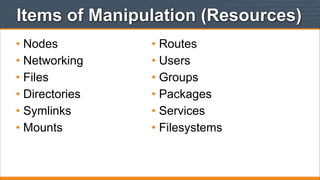
Items of Manipulation (Resources)
• Nodes
• Networking
• Files
• Directories
• Symlinks
• Mounts

• Routes
• Users
• Groups
• Packages
• Services
• Filesystems
A tale of growth...
Application
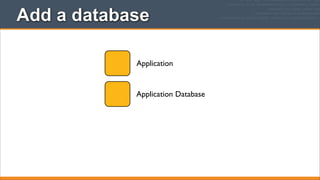
Add a database
Application

Application Database
Make database redundant
Application

App Databases
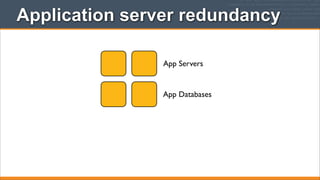
Application server redundancy
App Servers

App Databases
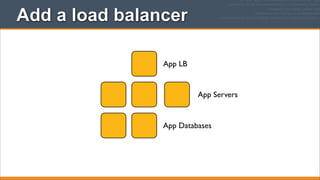
Add a load balancer
App LB

App Servers

App Databases
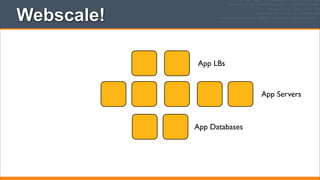
Webscale!
App LBs

App Servers

App Databases
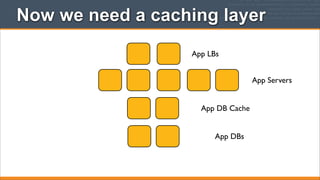
Now we need a caching layer
App LBs
App Servers
App DB Cache
App DBs
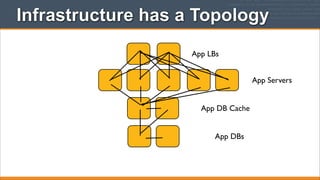
Infrastructure has a Topology
App LBs
App Servers
App DB Cache
App DBs
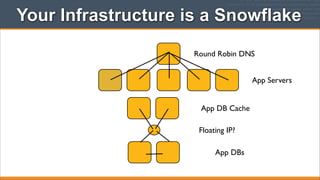
Your Infrastructure is a Snowflake
Round Robin DNS
App Servers
App DB Cache
Floating IP?
App DBs
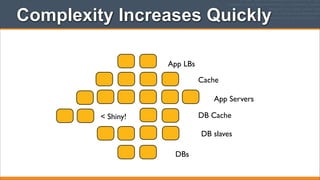
Complexity Increases Quickly
App LBs
Cache
App Servers
DB Cache

< Shiny!

DB slaves
DBs
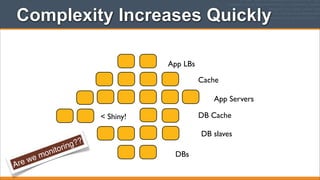
Complexity Increases Quickly
App LBs
Cache
App Servers
DB Cache

< Shiny!

A

we
re

nito
mo

g??
rin

DB slaves
DBs
Chef Solves This Problem
™

• But you already
guessed that, didn’t
you?
Managing Complexity
• Organizations
• Environments
• Roles
• Nodes
• Recipes
• Cookbooks
• Search
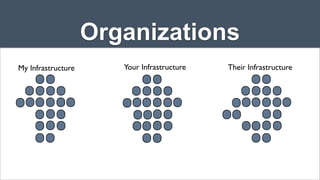
Organizations
My Infrastructure

Your Infrastructure

Their Infrastructure
Organizations
• Completely independent tenants of Enterprise Chef
• Share nothing with other organizations
• May represent different
• Companies
• Business Units
• Departments
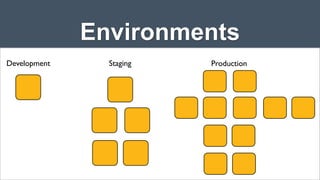
Environments
Development

Staging

Production
Environments
• Model the life-stages of your applications
• Every Organization starts with a single environment
• Environments to reflect your patterns and workflow
• Development
• Test
• Staging
• Production
• etc.
Environments Define Policy
• Environments may include data attributes necessary
for configuring your infrastructure
• The URL of your payment service’s API
• The location of your package repository
• The version of the Chef configuration files that
should be used
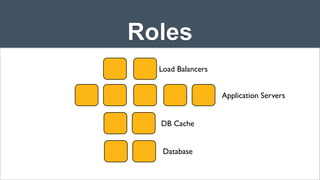
Roles
Load Balancers
Application Servers
DB Cache
Database
Roles
• Roles represent the types of servers in your
infrastructure
• Load Balancer
• Application Server
• Database Cache
• Database
• Monitoring
Roles Define Policy
• Roles may include a list of Chef configuration files
that should be applied.
• We call this list a Run List
• Roles may include data attributes necessary for
configuring your infrastructure
• The port that the application server listens on
• A list of applications that should be deployed
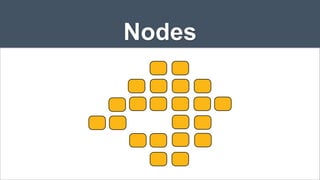
Nodes
Nodes
• Nodes represent the servers in your infrastructure
• Nodes may represent physical servers or virtual
servers
• Nodes may represent hardware that you own or may
represent compute instances in a public or private
cloud
Node
• Each Node will
• belong to one Organization
• belong to one Environment
• have zero or more Roles
Nodes Adhere to Policy
• An application, the chef-client, runs on each node
• chef-client will
• gather current system configuration
• download the desired system configuration from
the Chef server
• configure the node such that it adheres to the
policy
Chef is Infrastructure as Code

http://www.flickr.com/photos/louisb/4555295187/

• Programmatically
provision and
configure components
• Treat like any other
code base
• Reconstruct business
from code repository,
data backup, and bare
metal resources.
Configuration Code
• Chef ensures each Node complies with the policy
• Policy is determined by the configurations included
in each Node’s run list
• Reduce management complexity through abstraction
• Store the configuration of your infrastructure in
version control
Delcaritive Interface to Resources
• You define the policy in your Chef configuration
• Your policy states what state each resource should
be in, but not how to get there
• Chef-client will pull the policy from the Chef Server
and enforce the policy on the Node
Resources
• A Resource represents a piece of the system and its
desired state
• A package that should be installed
• A service that should be running
• A file that should be generated
• A cron job that should be configured
• A user that should be managed
• and more
Resources in Recipes
• Resources are the fundamental building blocks of
Chef configuration
• Resources are gathered into Recipes
• Recipes ensure the system is in the desired state
Recipes
• Configuration files that describe resources and their
desired state
• Recipes can:
• Install and configure software components
• Manage files
• Deploy applications
• Execute other recipes
• and more
Recipes
package "apache2"
template "/etc/apache2/apache2.conf" do
source "apache2.conf.erb"
owner "root"
group "root"
mode "0644"
variables(:allow_override => "All")
notifies :reload, "service[apache2]"
end
service "apache2" do
action [:enable,:start]
supports :reload => true
end
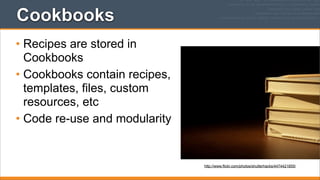
Cookbooks
• Recipes are stored in
Cookbooks
• Cookbooks contain recipes,
templates, files, custom
resources, etc
• Code re-use and modularity

http://www.flickr.com/photos/shutterhacks/4474421855/
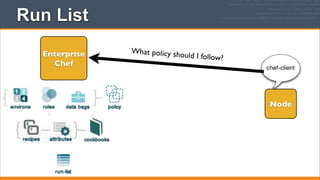
Run List
Enterprise
Chef

What policy sho
uld

I follow?
chef-client

Node
Run List
Enterprise
Chef

What policy sho
uld

I follow?
chef-client

Node

“recipe[ntp::client]”
“recipe[users]”
“role[webserver]”
Run List
Enterprise
Chef

What policy sho
uld

I follow?
chef-client

“recipe[ntp::client]”
“recipe[users]”
“role[webserver]”
Run Lists Specifies Policy
• The Run List is a collection of policies that the Node
should follow.
• Chef-client obtains the Run List from the Chef
Server
• Chef-client ensures the Node complies with the
policy in the Run List
Search
• Search for nodes with Roles
• Find Topology Data
• IP addresses
• Hostnames
• FQDNs

http://www.flickr.com/photos/kathycsus/2686772625
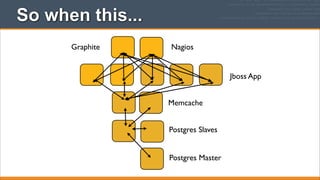
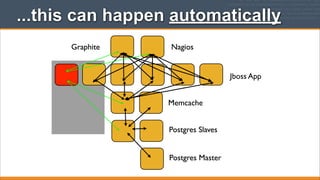
So when this...
Graphite

Nagios

Jboss App
Memcache
Postgres Slaves
Postgres Master
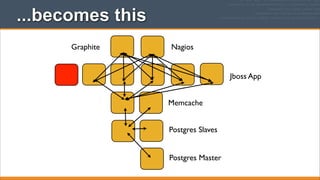
...becomes this
Graphite

Nagios

Jboss App
Memcache
Postgres Slaves
Postgres Master
...this can happen automatically
Graphite

Nagios

Jboss App
Memcache
Postgres Slaves
Postgres Master
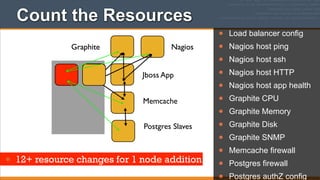
Count the Resources
Graphite

Nagios
Jboss App
Memcache
Postgres Slaves

• 12+ resource changes for 1 node addition

•
•
•
•
•
•
•
•
•
•
•

Load balancer config
Nagios host ping
Nagios host ssh
Nagios host HTTP
Nagios host app health
Graphite CPU
Graphite Memory
Graphite Disk
Graphite SNMP
Memcache firewall
Postgres firewall
Postgres authZ config
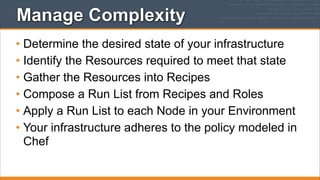
Manage Complexity
• Determine the desired state of your infrastructure
• Identify the Resources required to meet that state
• Gather the Resources into Recipes
• Compose a Run List from Recipes and Roles
• Apply a Run List to each Node in your Environment
• Your infrastructure adheres to the policy modeled in
Chef
Configuration Drift
• Configuration Drift happens when:
• Your infrastructure requirements change
• The configuration of a server falls out of policy
• Chef makes it easy to manage
• Model the new requirements in your Chef
configuration files
• Run the chef-client to enforce your policies
Recap
• In today’s webinar, we have
• Described how Chef thinks about Infrastructure Automation
• Defined the following terms:
• Node
• Resource
• Recipe
• Cookbook
• Run List
• Roles
• Search
What Questions Do You Have?
Nathen Harvey
Technical Community Manager, Opscode
nharvey@opscode.com
@nathenharvey

Chef Fundamentals Training Series Module 1: Overview of Chef

  • 1.
  • 2.
  • 3.
    Nathen Harvey • TechnicalCommunity Manager at Opscode • Co-host of the Food Fight Show Podcast • @nathenharvey
  • 4.
  • 5.
    Multi-week Webinar Series •After completing of this webinar series you will be able to • Automate common infrastructure tasks with Chef • Describe Chef’s architecture • Describe Chef’s various tools • Apply Chef’s primitives to solve your problems
  • 6.
    How to learnChef • You bring the domain expertise about your business and problems • Chef provides a framework for solving those problems • Our job is to work together to teach you how to express solutions to your problems with Chef
  • 7.
    Chef is aLanguage • Learning Chef is like learning the basics of a language • 80% fluency will be reached very quickly • The remaining 20% just takes practice • The best way to learn Chef is to use Chef
  • 8.
    Questions & Answers •I’ll post objectives at the beginning of a section • Ask questions in the chat window when they come to you • We’ll answer as many questions as we can at the end of the session • The webinar will be recorded and you’ll be able to watch the recording again.
  • 9.
  • 10.
    Topics • Overview ofChef • Workstation Setup • Test Node Setup • Dissecting your first Chef run • Introducing the Node object • Writing your first cookbook
  • 11.
    Topics • Setting attributes,cookbook metadata, templates • Idempotency, notifications, template variables • Roles • Using community cookbooks • Further Resources
  • 12.
  • 13.
    Lesson Objectives • Aftercompleting the lesson, you will be able to • Describe how Chef thinks about Infrastructure Automation • Define the following terms: • Node • Resource • Recipe • Cookbook • Run List • Roles • Search
  • 14.
  • 15.
    Items of Manipulation(Resources) • Nodes • Networking • Files • Directories • Symlinks • Mounts • Routes • Users • Groups • Packages • Services • Filesystems
  • 16.
    A tale ofgrowth... Application
  • 17.
  • 18.
  • 19.
    Application server redundancy AppServers App Databases
  • 20.
    Add a loadbalancer App LB App Servers App Databases
  • 21.
  • 22.
    Now we needa caching layer App LBs App Servers App DB Cache App DBs
  • 23.
    Infrastructure has aTopology App LBs App Servers App DB Cache App DBs
  • 24.
    Your Infrastructure isa Snowflake Round Robin DNS App Servers App DB Cache Floating IP? App DBs
  • 25.
    Complexity Increases Quickly AppLBs Cache App Servers DB Cache < Shiny! DB slaves DBs
  • 26.
    Complexity Increases Quickly AppLBs Cache App Servers DB Cache < Shiny! A we re nito mo g?? rin DB slaves DBs
  • 27.
    Chef Solves ThisProblem ™ • But you already guessed that, didn’t you?
  • 28.
    Managing Complexity • Organizations •Environments • Roles • Nodes • Recipes • Cookbooks • Search
  • 29.
  • 30.
    Organizations • Completely independenttenants of Enterprise Chef • Share nothing with other organizations • May represent different • Companies • Business Units • Departments
  • 31.
  • 32.
    Environments • Model thelife-stages of your applications • Every Organization starts with a single environment • Environments to reflect your patterns and workflow • Development • Test • Staging • Production • etc.
  • 33.
    Environments Define Policy •Environments may include data attributes necessary for configuring your infrastructure • The URL of your payment service’s API • The location of your package repository • The version of the Chef configuration files that should be used
  • 34.
  • 35.
    Roles • Roles representthe types of servers in your infrastructure • Load Balancer • Application Server • Database Cache • Database • Monitoring
  • 36.
    Roles Define Policy •Roles may include a list of Chef configuration files that should be applied. • We call this list a Run List • Roles may include data attributes necessary for configuring your infrastructure • The port that the application server listens on • A list of applications that should be deployed
  • 37.
  • 38.
    Nodes • Nodes representthe servers in your infrastructure • Nodes may represent physical servers or virtual servers • Nodes may represent hardware that you own or may represent compute instances in a public or private cloud
  • 39.
    Node • Each Nodewill • belong to one Organization • belong to one Environment • have zero or more Roles
  • 40.
    Nodes Adhere toPolicy • An application, the chef-client, runs on each node • chef-client will • gather current system configuration • download the desired system configuration from the Chef server • configure the node such that it adheres to the policy
  • 41.
    Chef is Infrastructureas Code http://www.flickr.com/photos/louisb/4555295187/ • Programmatically provision and configure components • Treat like any other code base • Reconstruct business from code repository, data backup, and bare metal resources.
  • 42.
    Configuration Code • Chefensures each Node complies with the policy • Policy is determined by the configurations included in each Node’s run list • Reduce management complexity through abstraction • Store the configuration of your infrastructure in version control
  • 43.
    Delcaritive Interface toResources • You define the policy in your Chef configuration • Your policy states what state each resource should be in, but not how to get there • Chef-client will pull the policy from the Chef Server and enforce the policy on the Node
  • 44.
    Resources • A Resourcerepresents a piece of the system and its desired state • A package that should be installed • A service that should be running • A file that should be generated • A cron job that should be configured • A user that should be managed • and more
  • 45.
    Resources in Recipes •Resources are the fundamental building blocks of Chef configuration • Resources are gathered into Recipes • Recipes ensure the system is in the desired state
  • 46.
    Recipes • Configuration filesthat describe resources and their desired state • Recipes can: • Install and configure software components • Manage files • Deploy applications • Execute other recipes • and more
  • 47.
    Recipes package "apache2" template "/etc/apache2/apache2.conf"do source "apache2.conf.erb" owner "root" group "root" mode "0644" variables(:allow_override => "All") notifies :reload, "service[apache2]" end service "apache2" do action [:enable,:start] supports :reload => true end
  • 48.
    Cookbooks • Recipes arestored in Cookbooks • Cookbooks contain recipes, templates, files, custom resources, etc • Code re-use and modularity http://www.flickr.com/photos/shutterhacks/4474421855/
  • 49.
    Run List Enterprise Chef What policysho uld I follow? chef-client Node
  • 50.
    Run List Enterprise Chef What policysho uld I follow? chef-client Node “recipe[ntp::client]” “recipe[users]” “role[webserver]”
  • 51.
    Run List Enterprise Chef What policysho uld I follow? chef-client “recipe[ntp::client]” “recipe[users]” “role[webserver]”
  • 52.
    Run Lists SpecifiesPolicy • The Run List is a collection of policies that the Node should follow. • Chef-client obtains the Run List from the Chef Server • Chef-client ensures the Node complies with the policy in the Run List
  • 53.
    Search • Search fornodes with Roles • Find Topology Data • IP addresses • Hostnames • FQDNs http://www.flickr.com/photos/kathycsus/2686772625
  • 54.
    So when this... Graphite Nagios JbossApp Memcache Postgres Slaves Postgres Master
  • 55.
  • 56.
    ...this can happenautomatically Graphite Nagios Jboss App Memcache Postgres Slaves Postgres Master
  • 57.
    Count the Resources Graphite Nagios JbossApp Memcache Postgres Slaves • 12+ resource changes for 1 node addition • • • • • • • • • • • Load balancer config Nagios host ping Nagios host ssh Nagios host HTTP Nagios host app health Graphite CPU Graphite Memory Graphite Disk Graphite SNMP Memcache firewall Postgres firewall Postgres authZ config
  • 58.
    Manage Complexity • Determinethe desired state of your infrastructure • Identify the Resources required to meet that state • Gather the Resources into Recipes • Compose a Run List from Recipes and Roles • Apply a Run List to each Node in your Environment • Your infrastructure adheres to the policy modeled in Chef
  • 59.
    Configuration Drift • ConfigurationDrift happens when: • Your infrastructure requirements change • The configuration of a server falls out of policy • Chef makes it easy to manage • Model the new requirements in your Chef configuration files • Run the chef-client to enforce your policies
  • 60.
    Recap • In today’swebinar, we have • Described how Chef thinks about Infrastructure Automation • Defined the following terms: • Node • Resource • Recipe • Cookbook • Run List • Roles • Search
  • 61.
    What Questions DoYou Have? Nathen Harvey Technical Community Manager, Opscode nharvey@opscode.com @nathenharvey