


Reproducible and Portable
Work Environments with
Vagrant and Chef
About Me
• 33 years old, almost married
• From Karlsruhe, Germany
• Studied Computer Science
• Hobbies: guitar, climbing,
cycling, travel, photography
• Works in Phnom Penh for 3 months
• Working with TYPO3
Outline
• Motivation
• Introducing Vagrant & Chef

• Vagrant „Hands-On“
• Advanced usage
Motivation
• Internal project
• Estimated development time ~2 years
• Approx. 15 developers
• 2-day sprints, every second week
• 4 developers per sprint
Motivation
Observations
• Setting up dev environment takes > 1 day
– More than ½ of the sprint time!

• Developers spent too much time on setup
• Always needed physical server for testing
Solution: Vagrant Boxes
Provisioning 2 virtual machines...
• ...each with an extended LAMP stack*)

• ...with 4 different projects
takes less than 15 minutes

*) including RabbitMQ, Solr, Git, Composer, tons of PHP modules...
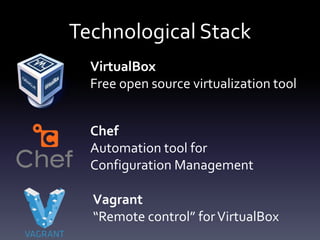
Technological Stack
VirtualBox
Free open source virtualization tool
Chef
Automation tool for
Configuration Management

Vagrant
“Remote control” for VirtualBox
What is Vagrant?
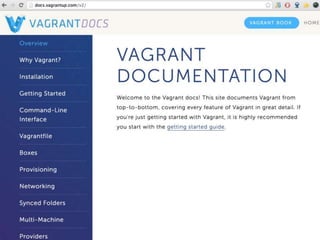
• Building tool for portable work environments
• Tool for distributing work environments
• Written in Ruby
• Open Source
• Build upon well-established tools
Vagrant Components
• Vagrant Box
• Vagrantfile
• Provisioners
• Providers
Vagrant Boxes
• Pre-installed base images
• Used as base layer for all further provisioning
• Many different boxes available online:
The Vagrantfile
• Marks root directory of Vagrant project
• Describes what Vagrant box to use

• Describes settings of box (e.g. network)
• Triggers the provisioning of box (using Chef)
Provisioners
• Configures your Vagrant box by
– Installing packages and software
– Configuration and starting of services

• Multiple provisioners available
• Run once the box is booted
Providers
• Describe in which virtualization environment

to provision your machines
• Multiple providers available
– VirtualBox
– VMWare
– Amazon AWS
What is Chef?
• Configuration Management automation tool
• Written in Ruby

• „Code your desired system state“
• Put system state into version control

• Relies on a client / server architecture
– Or use chef solo without a server
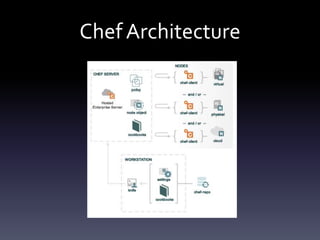
Chef Architecture
Chef Architecture
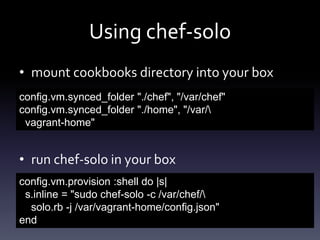
Using chef-solo
• mount cookbooks directory into your box
config.vm.synced_folder "./chef", "/var/chef"
config.vm.synced_folder "./home", "/var/
vagrant-home"

• run chef-solo in your box
config.vm.provision :shell do |s|
s.inline = "sudo chef-solo -c /var/chef/
solo.rb -j /var/vagrant-home/config.json"
end
The solo.rb File
• Define some paths:
file_cache_path "/var/chef-cache"
cookbook_path ["/var/chef/cookbooks”]
data_bag_path "/var/chef/data_bags"
role_path "/var/chef/roles"
The config.json File
• Define cookbook runlist:
{"run_list" : ["recipe[cookbook_name]"]}

• Further configuration in config.json
overwrites defaults in cookbooks
node['key1']['key2']
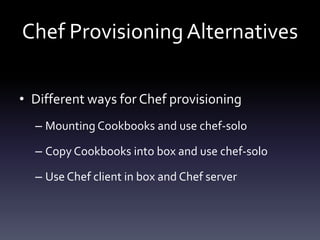
Chef Provisioning Alternatives
• Different ways for Chef provisioning
– Mounting Cookbooks and use chef-solo

– Copy Cookbooks into box and use chef-solo
– Use Chef client in box and Chef server
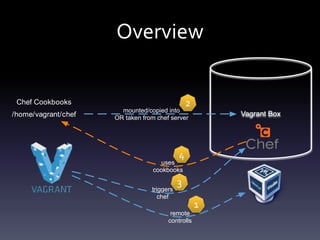
Overview
2

Chef Cookbooks
/home/vagrant/chef

mounted/copied into
OR taken from chef server

Vagrant Box

4

uses
cookbooks
triggers
chef

3

remote
controlls

1
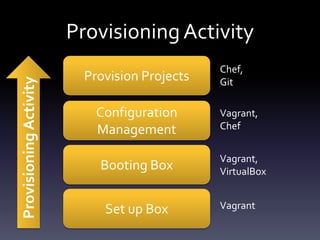
Provisioning Activity

Provisioning Activity
Provision Projects

Configuration
Management
Booting Box
Set up Box

Chef,
Git
Vagrant,
Chef
Vagrant,
VirtualBox
Vagrant
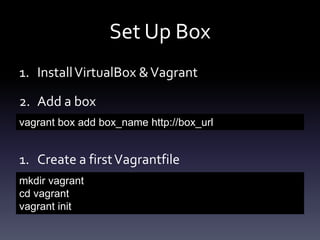
Set Up Box
1. Install VirtualBox & Vagrant
2. Add a box
vagrant box add box_name http://box_url

1. Create a first Vagrantfile
mkdir vagrant
cd vagrant
vagrant init
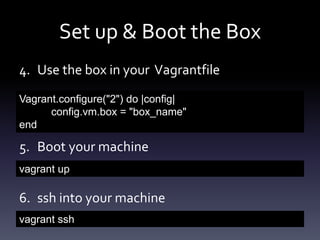
Set up & Boot the Box
4. Use the box in your Vagrantfile
Vagrant.configure("2") do |config|
config.vm.box = "box_name"
end

5. Boot your machine
vagrant up

6. ssh into your machine
vagrant ssh
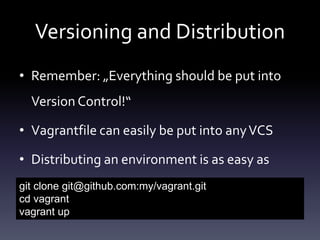
Versioning and Distribution
• Remember: „Everything should be put into
Version Control!“
• Vagrantfile can easily be put into any VCS
• Distributing an environment is as easy as
git clone git@github.com:my/vagrant.git
cd vagrant
vagrant up
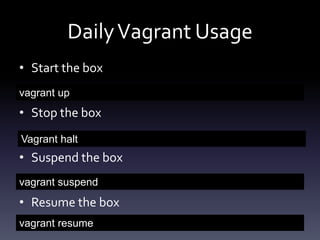
Daily Vagrant Usage
• Start the box
vagrant up

• Stop the box
Vagrant halt

• Suspend the box
vagrant suspend

• Resume the box
vagrant resume
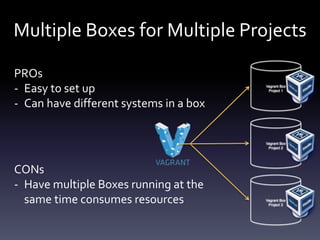
Multiple Boxes for Multiple Projects
PROs
- Easy to set up
- Can have different systems in a box

Vagrant Box
Project 1

Vagrant Box
Project 2

CONs
- Have multiple Boxes running at the
same time consumes resources

Vagrant Box
Project 3
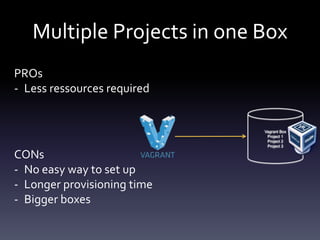
Multiple Projects in one Box
PROs
- Less ressources required

Vagrant Box
Project 1
Project 2
Project 3

CONs
- No easy way to set up
- Longer provisioning time
- Bigger boxes
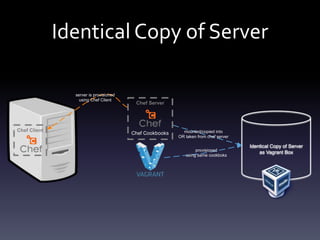
Identical Copy of Server
server is provisioned
using Chef Client

Chef Client

Chef Server

Chef Cookbooks

mounted/copied into
OR taken from chef server
provisioned
using same cookboks

Identical Copy of Server
as Vagrant Box
Vagrant & Chef for CI / CD

• Set up the whole deployment chain locally
• Use tools like Jenkins inside your boxes
• Provision the projects on Jenkins with Chef
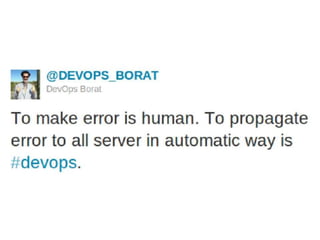
DevOps
• Tools like Vagrant and Chef bring Developers
and system operators closer together

• Learn from each other
• Use each other‘s tools for problem solving
Summary
• Vagrant is a great tool for portable boxes
• Chef can help you manage your configuration
• „Infrastructure as Code“
• Same environment on dev and live system
• DevOps brings devs and admins together

Vagrant and Chef on FOSSASIA 2014

  • 1.
    Reproducible and Portable WorkEnvironments with Vagrant and Chef
  • 2.
    About Me • 33years old, almost married • From Karlsruhe, Germany • Studied Computer Science • Hobbies: guitar, climbing, cycling, travel, photography • Works in Phnom Penh for 3 months • Working with TYPO3
  • 4.
    Outline • Motivation • IntroducingVagrant & Chef • Vagrant „Hands-On“ • Advanced usage
  • 6.
    Motivation • Internal project •Estimated development time ~2 years • Approx. 15 developers • 2-day sprints, every second week • 4 developers per sprint
  • 7.
    Motivation Observations • Setting updev environment takes > 1 day – More than ½ of the sprint time! • Developers spent too much time on setup • Always needed physical server for testing
  • 8.
    Solution: Vagrant Boxes Provisioning2 virtual machines... • ...each with an extended LAMP stack*) • ...with 4 different projects takes less than 15 minutes *) including RabbitMQ, Solr, Git, Composer, tons of PHP modules...
  • 9.
    Technological Stack VirtualBox Free opensource virtualization tool Chef Automation tool for Configuration Management Vagrant “Remote control” for VirtualBox
  • 11.
    What is Vagrant? •Building tool for portable work environments • Tool for distributing work environments • Written in Ruby • Open Source • Build upon well-established tools
  • 12.
    Vagrant Components • VagrantBox • Vagrantfile • Provisioners • Providers
  • 13.
    Vagrant Boxes • Pre-installedbase images • Used as base layer for all further provisioning • Many different boxes available online:
  • 14.
    The Vagrantfile • Marksroot directory of Vagrant project • Describes what Vagrant box to use • Describes settings of box (e.g. network) • Triggers the provisioning of box (using Chef)
  • 15.
    Provisioners • Configures yourVagrant box by – Installing packages and software – Configuration and starting of services • Multiple provisioners available • Run once the box is booted
  • 16.
    Providers • Describe inwhich virtualization environment to provision your machines • Multiple providers available – VirtualBox – VMWare – Amazon AWS
  • 18.
    What is Chef? •Configuration Management automation tool • Written in Ruby • „Code your desired system state“ • Put system state into version control • Relies on a client / server architecture – Or use chef solo without a server
  • 19.
  • 20.
  • 22.
    Using chef-solo • mountcookbooks directory into your box config.vm.synced_folder "./chef", "/var/chef" config.vm.synced_folder "./home", "/var/ vagrant-home" • run chef-solo in your box config.vm.provision :shell do |s| s.inline = "sudo chef-solo -c /var/chef/ solo.rb -j /var/vagrant-home/config.json" end
  • 23.
    The solo.rb File •Define some paths: file_cache_path "/var/chef-cache" cookbook_path ["/var/chef/cookbooks”] data_bag_path "/var/chef/data_bags" role_path "/var/chef/roles"
  • 24.
    The config.json File •Define cookbook runlist: {"run_list" : ["recipe[cookbook_name]"]} • Further configuration in config.json overwrites defaults in cookbooks node['key1']['key2']
  • 25.
    Chef Provisioning Alternatives •Different ways for Chef provisioning – Mounting Cookbooks and use chef-solo – Copy Cookbooks into box and use chef-solo – Use Chef client in box and Chef server
  • 26.
    Overview 2 Chef Cookbooks /home/vagrant/chef mounted/copied into ORtaken from chef server Vagrant Box 4 uses cookbooks triggers chef 3 remote controlls 1
  • 28.
    Provisioning Activity Provisioning Activity ProvisionProjects Configuration Management Booting Box Set up Box Chef, Git Vagrant, Chef Vagrant, VirtualBox Vagrant
  • 29.
    Set Up Box 1.Install VirtualBox & Vagrant 2. Add a box vagrant box add box_name http://box_url 1. Create a first Vagrantfile mkdir vagrant cd vagrant vagrant init
  • 30.
    Set up &Boot the Box 4. Use the box in your Vagrantfile Vagrant.configure("2") do |config| config.vm.box = "box_name" end 5. Boot your machine vagrant up 6. ssh into your machine vagrant ssh
  • 31.
    Versioning and Distribution •Remember: „Everything should be put into Version Control!“ • Vagrantfile can easily be put into any VCS • Distributing an environment is as easy as git clone git@github.com:my/vagrant.git cd vagrant vagrant up
  • 32.
    Daily Vagrant Usage •Start the box vagrant up • Stop the box Vagrant halt • Suspend the box vagrant suspend • Resume the box vagrant resume
  • 34.
    Multiple Boxes forMultiple Projects PROs - Easy to set up - Can have different systems in a box Vagrant Box Project 1 Vagrant Box Project 2 CONs - Have multiple Boxes running at the same time consumes resources Vagrant Box Project 3
  • 35.
    Multiple Projects inone Box PROs - Less ressources required Vagrant Box Project 1 Project 2 Project 3 CONs - No easy way to set up - Longer provisioning time - Bigger boxes
  • 36.
    Identical Copy ofServer server is provisioned using Chef Client Chef Client Chef Server Chef Cookbooks mounted/copied into OR taken from chef server provisioned using same cookboks Identical Copy of Server as Vagrant Box
  • 37.
    Vagrant & Cheffor CI / CD • Set up the whole deployment chain locally • Use tools like Jenkins inside your boxes • Provision the projects on Jenkins with Chef
  • 38.
    DevOps • Tools likeVagrant and Chef bring Developers and system operators closer together • Learn from each other • Use each other‘s tools for problem solving
  • 41.
    Summary • Vagrant isa great tool for portable boxes • Chef can help you manage your configuration • „Infrastructure as Code“ • Same environment on dev and live system • DevOps brings devs and admins together