Getting Started with Ansible
Jake Jackson
Partner Engineer
@thedoubl3j everywhere - irc, twitter, github etc
Share your automation story
1. How did you get started with Ansible?
I had a school project that asked us to go and find OSS that we
thought was interesting and I found ansible.
2. How long have you been using it?
3+ years
3. What's your favorite thing to do when you use Ansible?
Automation of meaningless tasks, most lineinfile config changes.
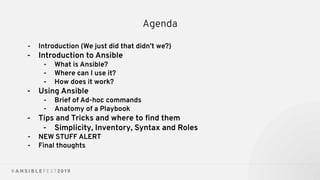
Agenda
- Introduction (We just did that didn’t we?)

- Introduction to Ansible
- What is Ansible?
- Where can I use it?
- How does it work?
- Using Ansible
- Brief of Ad-hoc commands
- Anatomy of a Playbook
- Tips and Tricks and where to find them
- Simplicity, Inventory, Syntax and Roles
- NEW STUFF ALERT
- Final thoughts
Ansible Intro
WHAT IS ANSIBLE AUTOMATION?
● The Ansible project is an open source community sponsored by Red
Hat. It’s also a simple automation language that perfectly describes IT
application environments in Ansible Playbooks.
● Ansible Engine is a supported product built from the Ansible
community project.
● Ansible Tower is an enterprise framework for controlling, securing,
managing and extending your Ansible automation (community or
engine) with a UI and RESTful API.
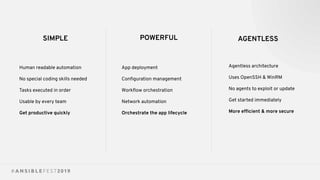
SIMPLE POWERFUL AGENTLESS
Human readable automation
No special coding skills needed
Tasks executed in order
Usable by every team
Get productive quickly
App deployment
Configuration management
Workflow orchestration
Network automation
Orchestrate the app lifecycle
Agentless architecture
Uses OpenSSH & WinRM
No agents to exploit or update
Get started immediately
More efficient & more secure
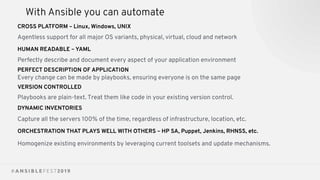
With Ansible you can automate
CROSS PLATFORM – Linux, Windows, UNIX
Agentless support for all major OS variants, physical, virtual, cloud and network
HUMAN READABLE – YAML
Perfectly describe and document every aspect of your application environment
PERFECT DESCRIPTION OF APPLICATION
Every change can be made by playbooks, ensuring everyone is on the same page
VERSION CONTROLLED
Playbooks are plain-text. Treat them like code in your existing version control.
DYNAMIC INVENTORIES
Capture all the servers 100% of the time, regardless of infrastructure, location, etc.
ORCHESTRATION THAT PLAYS WELL WITH OTHERS – HP SA, Puppet, Jenkins, RHNSS, etc.
Homogenize existing environments by leveraging current toolsets and update mechanisms.
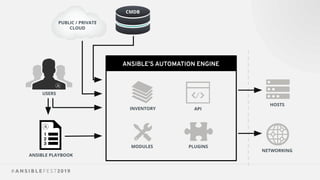
ANSIBLE’S AUTOMATION ENGINE
ANSIBLE PLAYBOOK
PUBLIC / PRIVATE
CLOUD
CMDB
USERS
INVENTORY
HOSTS
NETWORKING
PLUGINS
API
MODULES
ANSIBLE’S AUTOMATION ENGINE
ANSIBLE PLAYBOOK
PUBLIC / PRIVATE
CLOUD
CMDB
USERS
INVENTORY
HOSTS
NETWORKING
PLUGINS
API
MODULES
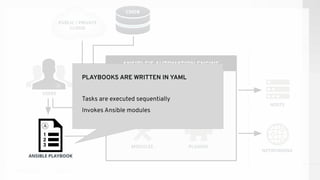
ANSIBLE PLAYBOOK
Tasks are executed sequentially
Invokes Ansible modules
PLAYBOOKS ARE WRITTEN IN YAML
ANSIBLE’S AUTOMATION ENGINE
ANSIBLE PLAYBOOK
PUBLIC / PRIVATE
CLOUD
CMDB
USERS
INVENTORY
HOSTS
NETWORKING
PLUGINS
API
MODULES
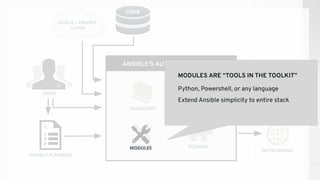
MODULES ARE “TOOLS IN THE TOOLKIT”
Python, Powershell, or any language
Extend Ansible simplicity to entire stack
MODULES
ANSIBLE’S AUTOMATION ENGINE
ANSIBLE PLAYBOOK
PUBLIC / PRIVATE
CLOUD
CMDB
USERS
INVENTORY
HOSTS
NETWORKING
PLUGINS
API
MODULES
INVENTORY
[web]
webserver1.example.com
webserver2.example.com
[db]
dbserver1.example.com
ANSIBLE’S AUTOMATION ENGINE
ANSIBLE PLAYBOOK
PUBLIC / PRIVATE
CLOUD
CMDB
USERS
INVENTORY
HOSTS
NETWORKING
PLUGINS
API
MODULES
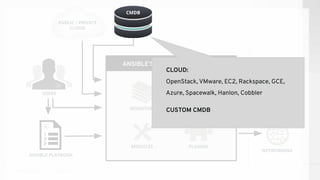
CMDB
CLOUD:
OpenStack, VMware, EC2, Rackspace, GCE,
Azure, Spacewalk, Hanlon, Cobbler
CUSTOM CMDB
ANSIBLE’S AUTOMATION ENGINE
ANSIBLE PLAYBOOK
PUBLIC / PRIVATE
CLOUD
CMDB
USERS
INVENTORY
HOSTS
NETWORKING
PLUGINS
API
MODULES
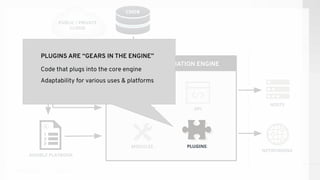
PLUGINS ARE “GEARS IN THE ENGINE”
Code that plugs into the core engine
Adaptability for various uses & platforms
PLUGINS
Using Ansible
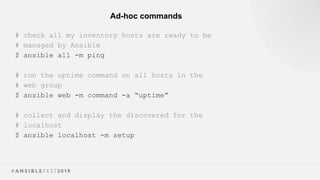
Ad-hoc commands
# check all my inventory hosts are ready to be
# managed by Ansible
$ ansible all -m ping
# run the uptime command on all hosts in the
# web group
$ ansible web -m command -a “uptime”
# collect and display the discovered for the
# localhost
$ ansible localhost -m setup
Ad-hoc example
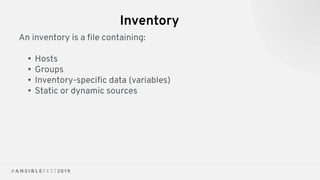
Inventory
An inventory is a file containing:
• Hosts
• Groups
• Inventory-specific data (variables)
• Static or dynamic sources
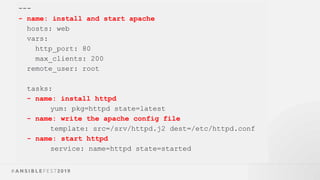
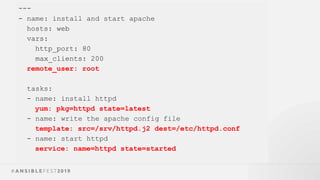
Playbooks
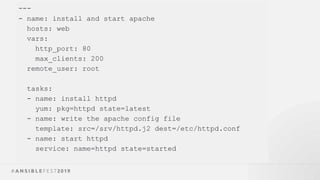
---
- name: install and start apache
hosts: web
vars:
http_port: 80
max_clients: 200
remote_user: root
tasks:
- name: install httpd
yum: pkg=httpd state=latest
- name: write the apache config file
template: src=/srv/httpd.j2 dest=/etc/httpd.conf
- name: start httpd
service: name=httpd state=started
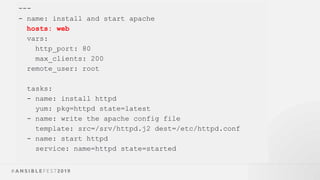
---
- name: install and start apache
hosts: web
vars:
http_port: 80
max_clients: 200
remote_user: root
tasks:
- name: install httpd
yum: pkg=httpd state=latest
- name: write the apache config file
template: src=/srv/httpd.j2 dest=/etc/httpd.conf
- name: start httpd
service: name=httpd state=started
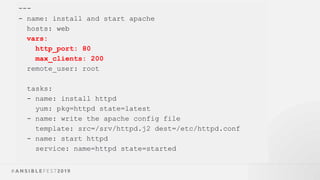
---
- name: install and start apache
hosts: web
vars:
http_port: 80
max_clients: 200
remote_user: root
tasks:
- name: install httpd
yum: pkg=httpd state=latest
- name: write the apache config file
template: src=/srv/httpd.j2 dest=/etc/httpd.conf
- name: start httpd
service: name=httpd state=started
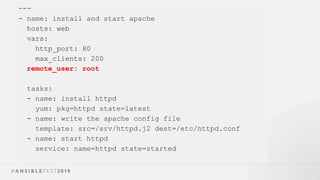
---
- name: install and start apache
hosts: web
vars:
http_port: 80
max_clients: 200
remote_user: root
tasks:
- name: install httpd
yum: pkg=httpd state=latest
- name: write the apache config file
template: src=/srv/httpd.j2 dest=/etc/httpd.conf
- name: start httpd
service: name=httpd state=started
---
- name: install and start apache
hosts: web
vars:
http_port: 80
max_clients: 200
remote_user: root
tasks:
- name: install httpd
yum: pkg=httpd state=latest
- name: write the apache config file
template: src=/srv/httpd.j2 dest=/etc/httpd.conf
- name: start httpd
service: name=httpd state=started
---
- name: install and start apache
hosts: web
vars:
http_port: 80
max_clients: 200
remote_user: root
tasks:
- name: install httpd
yum: pkg=httpd state=latest
- name: write the apache config file
template: src=/srv/httpd.j2 dest=/etc/httpd.conf
- name: start httpd
service: name=httpd state=started
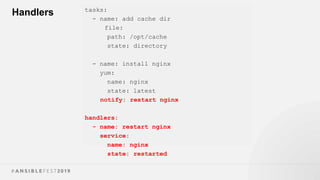
Handlers tasks:
- name: add cache dir
file:
path: /opt/cache
state: directory
- name: install nginx
yum:
name: nginx
state: latest
notify: restart nginx
handlers:
- name: restart nginx
service:
name: nginx
state: restarted
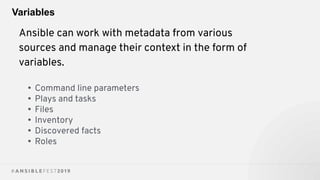
Variables
Ansible can work with metadata from various
sources and manage their context in the form of
variables.
• Command line parameters
• Plays and tasks
• Files
• Inventory
• Discovered facts
• Roles
Tips/Best Practices
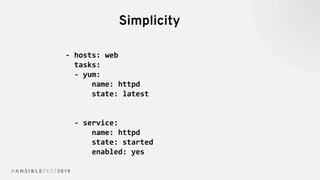
Simplicity
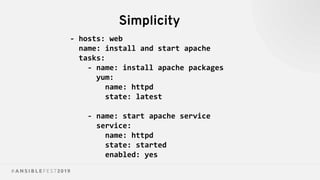
Simplicity
- hosts: web
tasks:
- yum:
name: httpd
state: latest
- service:
name: httpd
state: started
enabled: yes
Simplicity
- hosts: web
name: install and start apache
tasks:
- name: install apache packages
yum:
name: httpd
state: latest
- name: start apache service
service:
name: httpd
state: started
enabled: yes
Naming Example
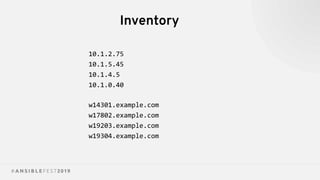
Inventory
10.1.2.75
10.1.5.45
10.1.4.5
10.1.0.40
w14301.example.com
w17802.example.com
w19203.example.com
w19304.example.com
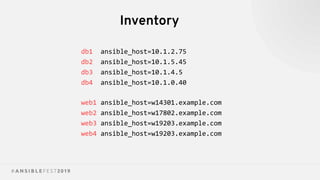
Inventory
db1 ansible_host=10.1.2.75
db2 ansible_host=10.1.5.45
db3 ansible_host=10.1.4.5
db4 ansible_host=10.1.0.40
web1 ansible_host=w14301.example.com
web2 ansible_host=w17802.example.com
web3 ansible_host=w19203.example.com
web4 ansible_host=w19203.example.com
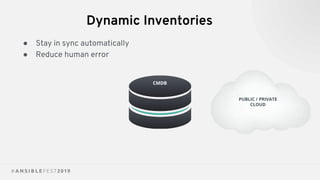
Dynamic Inventories
● Stay in sync automatically
● Reduce human error
PUBLIC / PRIVATE
CLOUD
CMDB
YAML Syntax
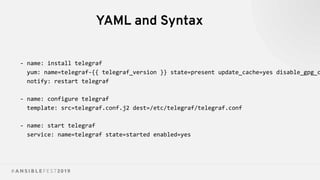
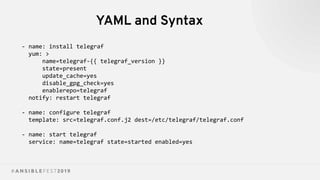
YAML and Syntax
- name: install telegraf
yum: name=telegraf-{{ telegraf_version }} state=present update_cache=yes disable_gpg_c
notify: restart telegraf
- name: configure telegraf
template: src=telegraf.conf.j2 dest=/etc/telegraf/telegraf.conf
- name: start telegraf
service: name=telegraf state=started enabled=yes
YAML and Syntax
- name: install telegraf
yum: >
name=telegraf-{{ telegraf_version }}
state=present
update_cache=yes
disable_gpg_check=yes
enablerepo=telegraf
notify: restart telegraf
- name: configure telegraf
template: src=telegraf.conf.j2 dest=/etc/telegraf/telegraf.conf
- name: start telegraf
service: name=telegraf state=started enabled=yes
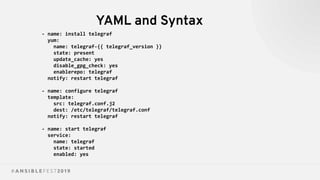
YAML and Syntax
- name: install telegraf
yum:
name: telegraf-{{ telegraf_version }}
state: present
update_cache: yes
disable_gpg_check: yes
enablerepo: telegraf
notify: restart telegraf
- name: configure telegraf
template:
src: telegraf.conf.j2
dest: /etc/telegraf/telegraf.conf
notify: restart telegraf
- name: start telegraf
service:
name: telegraf
state: started
enabled: yes
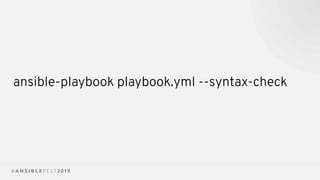
ansible-playbook playbook.yml --syntax-check
Roles
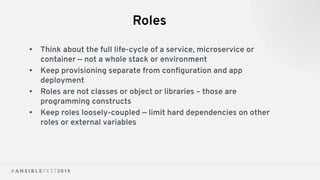
Roles
• Think about the full life-cycle of a service, microservice or
container — not a whole stack or environment
• Keep provisioning separate from configuration and app
deployment
• Roles are not classes or object or libraries – those are
programming constructs
• Keep roles loosely-coupled — limit hard dependencies on other
roles or external variables
Variable Precedence
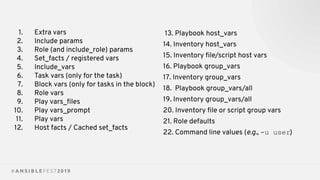
The order in which the same variable from
different sources will override each other.
1. Extra vars
2. Include params
3. Role (and include_role) params
4. Set_facts / registered vars
5. Include_vars
6. Task vars (only for the task)
7. Block vars (only for tasks in the block)
8. Role vars
9. Play vars_files
10. Play vars_prompt
11. Play vars
12. Host facts / Cached set_facts
13. Playbook host_vars
14. Inventory host_vars
15. Inventory file/script host vars
16. Playbook group_vars
17. Inventory group_vars
18. Playbook group_vars/all
19. Inventory group_vars/all
20. Inventory file or script group vars
21. Role defaults
22. Command line values (e.g., -u user)
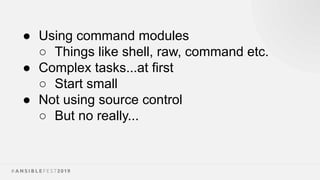
Things to Avoid
● Using command modules
○ Things like shell, raw, command etc.
● Complex tasks...at first
○ Start small
● Not using source control
○ But no really...
New stuff!
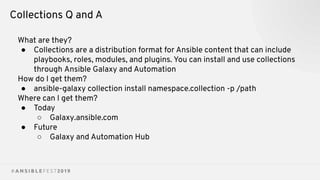
Collections Q and A
What are they?
● Collections are a distribution format for Ansible content that can include
playbooks, roles, modules, and plugins. You can install and use collections
through Ansible Galaxy and Automation
How do I get them?
● ansible-galaxy collection install namespace.collection -p /path
Where can I get them?
● Today
○ Galaxy.ansible.com
● Future
○ Galaxy and Automation Hub
COMPLEXITY KILLS PRODUCTIVITY
That's not just a marketing slogan. We really mean it
and believe that. We strive to reduce complexity in
how we've designed Ansible tools and encourage you
to do the same. Strive for simplification in what you
automate.
OPTIMIZE FOR READABILITY
If done properly, it can be the documentation of your
workflow automation.
THINK DECLARATIVELY
Ansible is a desired state engine by design. If you're
trying to "write code" in your plays and roles, you're
setting yourself up for failure. Our YAML-based
playbooks were never meant to be for programming.
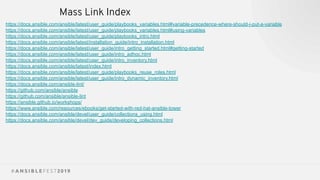
Mass Link Index
https://docs.ansible.com/ansible/latest/user_guide/playbooks_variables.html#variable-precedence-where-should-i-put-a-variable
https://docs.ansible.com/ansible/latest/user_guide/playbooks_variables.html#using-variables
https://docs.ansible.com/ansible/latest/user_guide/playbooks_intro.html
https://docs.ansible.com/ansible/latest/installation_guide/intro_installation.html
https://docs.ansible.com/ansible/latest/user_guide/intro_getting_started.html#getting-started
https://docs.ansible.com/ansible/latest/user_guide/intro_adhoc.html
https://docs.ansible.com/ansible/latest/user_guide/intro_inventory.html
https://docs.ansible.com/ansible/latest/index.html
https://docs.ansible.com/ansible/latest/user_guide/playbooks_reuse_roles.html
https://docs.ansible.com/ansible/latest/user_guide/intro_dynamic_inventory.html
https://docs.ansible.com/ansible-lint/
https://github.com/ansible/ansible
https://github.com/ansible/ansible-lint
https://ansible.github.io/workshops/
https://www.ansible.com/resources/ebooks/get-started-with-red-hat-ansible-tower
https://docs.ansible.com/ansible/devel/user_guide/collections_using.html
https://docs.ansible.com/ansible/devel/dev_guide/developing_collections.html

Getting Started with Ansible - Jake.pdf