Ansible 101
Jeff Geerling
Ansible St. Louis Meetup - July 8, 2015
Who am I?
• Jeff Geerling (geerlingguy)
• Technical Architect, Acquia
• Owner, Midwestern Mac LLC
• Dev (mainly), Ops
Ansible for DevOps
• On LeanPub
• Nearly complete!
• 50% off: http://bit.ly/ansible-stl
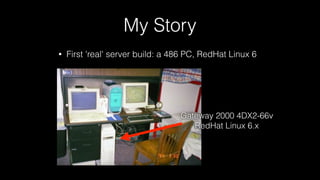
My Story
• First 'real' server build: a 486 PC, RedHat Linux 6
Gateway 2000 4DX2-66v
RedHat Linux 6.x
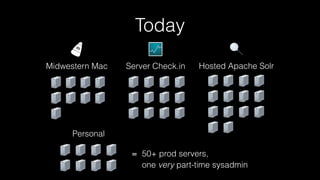
Today
Midwestern Mac Server Check.in Hosted Apache Solr
Personal
= 50+ prod servers,

one very part-time sysadmin
• “Configuration management for humans.”
• Uses SSH
• Secure, fast, simple
• 300+ built-in modules
• Don't need configuration management to manage
your configuration management.
• “Configuration management for humans.”
• Uses SSH
• Secure, fast, simple
• 300+ built-in modules
• Don't need configuration management to manage
your configuration management.
	
  ___________	
  	
  
<	
  And	
  cows!	
  >	
  
	
  -­‐-­‐-­‐-­‐-­‐-­‐-­‐-­‐-­‐-­‐-­‐	


  ^__^	


  (oo)_______	


  (__)	


  )/	


  ||-­‐-­‐-­‐-­‐w	
  |	


  ||	


  ||
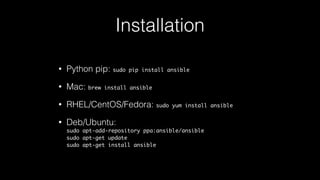
Installation
• Python pip: sudo pip install ansible
• Mac: brew install ansible
• RHEL/CentOS/Fedora: sudo yum install ansible
• Deb/Ubuntu:

sudo apt-add-repository ppa:ansible/ansible

sudo apt-get update

sudo apt-get install ansible
Ansible 101
1. Inventory: Describe your infrastructure
2. Ad-Hoc commands: Run one-off tasks
3. Playbooks: "Infrastructure as code"
4. Roles: Encapsulate configuration
http://robmyers.org/cc-ironies/no_flash_photography_sign/
Please help me avoid the

Xenon Death Flash
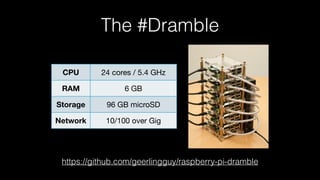
• 6-node Raspberry Pi cluster
CPU 24 cores / 5.4 GHz
RAM 6 GB
Storage 96 GB microSD
Network 10/100 over Gig
https://github.com/geerlingguy/raspberry-pi-dramble
The #Dramble
Inventory
[balancer]
10.0.1.60
[webservers]
10.0.1.61
10.0.1.62
10.0.1.63
10.0.1.64
[database]
10.0.1.65
[dramble:children]
balancer
webservers
database
[dramble:vars]
ansible_ssh_user=pi
• INI-syntax (can also use YAML and dynamic sources)
• Default location: /etc/ansible/hosts (can override with -i)
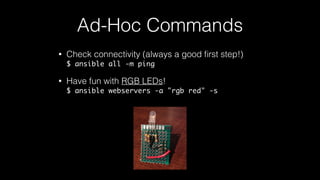
• Check connectivity (always a good first step!)

$ ansible all -m ping
• Have fun with RGB LEDs!

$ ansible webservers -a "rgb red" -s
Ad-Hoc Commands
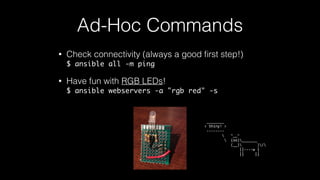
• Check connectivity (always a good first step!)

$ ansible all -m ping
• Have fun with RGB LEDs!

$ ansible webservers -a "rgb red" -s
Ad-Hoc Commands
	
  ________	
  
<	
  Shiny!	
  >	
  
	
  -­‐-­‐-­‐-­‐-­‐-­‐-­‐-­‐	


  ^__^	


  (oo)_______	


  (__)	


  )/	


  ||-­‐-­‐-­‐-­‐w	
  |	


  ||	


  ||
Demo
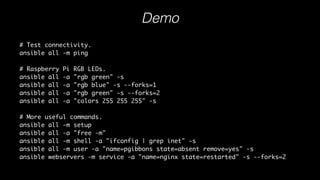
# Test connectivity.
ansible all -m ping
# Raspberry Pi RGB LEDs.
ansible all -a "rgb green" -s
ansible all -a "rgb blue" -s --forks=1
ansible all -a "rgb green" -s --forks=2
ansible all -a "colors 255 255 255" -s
# More useful commands.
ansible all -m setup
ansible all -a "free -m"
ansible all -m shell -a "ifconfig | grep inet" -s
ansible all -m user -a "name=pgibbons state=absent remove=yes" -s
ansible webservers -m service -a "name=nginx state=restarted" -s --forks=2
Download playbook examples
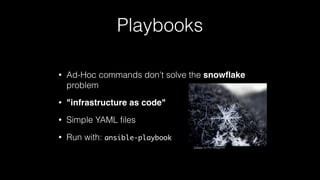
Playbooks
• Ad-Hoc commands don't solve the snowflake
problem
• "infrastructure as code"
• Simple YAML files
• Run with: ansible-playbook
Unique, by Pen Waggener
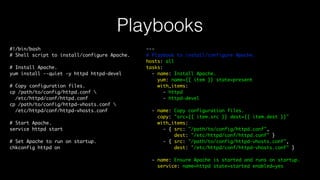
Playbooks
#!/bin/bash
# Shell script to install/configure Apache.
# Install Apache.
yum install --quiet -y httpd httpd-devel
# Copy configuration files.
cp /path/to/config/httpd.conf 
/etc/httpd/conf/httpd.conf
cp /path/to/config/httpd-vhosts.conf 
/etc/httpd/conf/httpd-vhosts.conf
# Start Apache.
service httpd start
# Set Apache to run on startup.
chkconfig httpd on
Playbooks
#!/bin/bash
# Shell script to install/configure Apache.
# Install Apache.
yum install --quiet -y httpd httpd-devel
# Copy configuration files.
cp /path/to/config/httpd.conf 
/etc/httpd/conf/httpd.conf
cp /path/to/config/httpd-vhosts.conf 
/etc/httpd/conf/httpd-vhosts.conf
# Start Apache.
service httpd start
# Set Apache to run on startup.
chkconfig httpd on
---
# Playbook to install/configure Apache.
hosts: all
tasks:
- name: Install Apache.
yum: name={{ item }} state=present
with_items:
- httpd
- httpd-devel
- name: Copy configuration files.
copy: "src={{ item.src }} dest={{ item.dest }}"
with_items:
- { src: "/path/to/config/httpd.conf",
dest: "/etc/httpd/conf/httpd.conf" }
- { src: "/path/to/config/httpd-vhosts.conf",
dest: "/etc/httpd/conf/httpd-vhosts.conf" }
- name: Ensure Apache is started and runs on startup.
service: name=httpd state=started enabled=yes
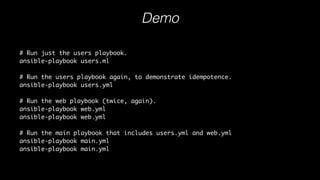
Demo
# Run just the users playbook.
ansible-playbook users.ml
# Run the users playbook again, to demonstrate idempotence.
ansible-playbook users.yml
# Run the web playbook (twice, again).
ansible-playbook web.yml
# Run the main playbook that includes users.yml and web.yml
ansible-playbook main.yml
Download playbook examples
Roles
• Like: Libraries, packages, config bundles
• Encapsulate configuration in smaller, reusable
chunks
• 4,000+ contributed roles on Ansible Galaxy
• To create: ansible-galaxy init [role-name]
Demo
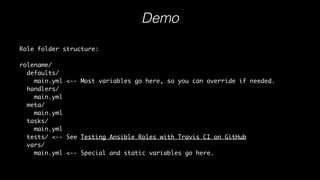
Role folder structure:
rolename/
defaults/
main.yml <-- Most variables go here, so you can override if needed.
handlers/
main.yml
meta/
main.yml
tasks/
main.yml
tests/ <-- See Testing Ansible Roles with Travis CI on GitHub
vars/
main.yml <-- Special and static variables go here.
Download playbook examples
More Ansible
• Ansible Tower, Jenkins integration, CI
• Docker integration
• AWS, DigitalOcean, Rackspace, Softlayer, Linode, etc.
• Notifications
• Rolling updates
• Ansible Vault
• etc...
More Ansible
• Ansible Tower, Jenkins integration, CI
• Docker integration
• AWS, DigitalOcean, Rackspace, Softlayer, Linode, etc.
• Notifications
• Rolling updates
• Ansible Vault
• etc...
	
  ______________________________	
  
<	
  Follow	
  @AnsiBull	
  on	
  Twitter!	
  >	
  
	
  -­‐-­‐-­‐-­‐-­‐-­‐-­‐-­‐-­‐-­‐-­‐-­‐-­‐-­‐-­‐-­‐-­‐-­‐-­‐-­‐-­‐-­‐-­‐-­‐-­‐-­‐-­‐-­‐-­‐-­‐	


  ^__^	


  (oo)_______	


  (__)	


  )/	


  ||-­‐-­‐-­‐-­‐w	
  |	


  ||	


  ||
More Resources
• Ansible documentation
• Ansible Vagrant examples
• Ansible for DevOps
• 50% off: http://bit.ly/ansible-stl
• Raspberry Pi Dramble
• Example playbook from this presentation

Ansible 101 - Presentation at Ansible STL Meetup

  • 1.
    Ansible 101 Jeff Geerling AnsibleSt. Louis Meetup - July 8, 2015
  • 2.
    Who am I? •Jeff Geerling (geerlingguy) • Technical Architect, Acquia • Owner, Midwestern Mac LLC • Dev (mainly), Ops
  • 3.
    Ansible for DevOps •On LeanPub • Nearly complete! • 50% off: http://bit.ly/ansible-stl
  • 4.
    My Story • First'real' server build: a 486 PC, RedHat Linux 6 Gateway 2000 4DX2-66v RedHat Linux 6.x
  • 5.
    Today Midwestern Mac ServerCheck.in Hosted Apache Solr Personal = 50+ prod servers,
 one very part-time sysadmin
  • 6.
    • “Configuration managementfor humans.” • Uses SSH • Secure, fast, simple • 300+ built-in modules • Don't need configuration management to manage your configuration management.
  • 7.
    • “Configuration managementfor humans.” • Uses SSH • Secure, fast, simple • 300+ built-in modules • Don't need configuration management to manage your configuration management.  ___________     <  And  cows!  >    -­‐-­‐-­‐-­‐-­‐-­‐-­‐-­‐-­‐-­‐-­‐                        ^__^                        (oo)_______                          (__)              )/                                  ||-­‐-­‐-­‐-­‐w  |                                  ||          ||
  • 8.
    Installation • Python pip:sudo pip install ansible • Mac: brew install ansible • RHEL/CentOS/Fedora: sudo yum install ansible • Deb/Ubuntu:
 sudo apt-add-repository ppa:ansible/ansible
 sudo apt-get update
 sudo apt-get install ansible
  • 9.
    Ansible 101 1. Inventory:Describe your infrastructure 2. Ad-Hoc commands: Run one-off tasks 3. Playbooks: "Infrastructure as code" 4. Roles: Encapsulate configuration
  • 10.
  • 11.
    • 6-node RaspberryPi cluster CPU 24 cores / 5.4 GHz RAM 6 GB Storage 96 GB microSD Network 10/100 over Gig https://github.com/geerlingguy/raspberry-pi-dramble The #Dramble
  • 12.
  • 13.
    • Check connectivity(always a good first step!)
 $ ansible all -m ping • Have fun with RGB LEDs!
 $ ansible webservers -a "rgb red" -s Ad-Hoc Commands
  • 14.
    • Check connectivity(always a good first step!)
 $ ansible all -m ping • Have fun with RGB LEDs!
 $ ansible webservers -a "rgb red" -s Ad-Hoc Commands  ________   <  Shiny!  >    -­‐-­‐-­‐-­‐-­‐-­‐-­‐-­‐                        ^__^                        (oo)_______                          (__)              )/                                  ||-­‐-­‐-­‐-­‐w  |                                  ||          ||
  • 15.
    Demo # Test connectivity. ansibleall -m ping # Raspberry Pi RGB LEDs. ansible all -a "rgb green" -s ansible all -a "rgb blue" -s --forks=1 ansible all -a "rgb green" -s --forks=2 ansible all -a "colors 255 255 255" -s # More useful commands. ansible all -m setup ansible all -a "free -m" ansible all -m shell -a "ifconfig | grep inet" -s ansible all -m user -a "name=pgibbons state=absent remove=yes" -s ansible webservers -m service -a "name=nginx state=restarted" -s --forks=2 Download playbook examples
  • 16.
    Playbooks • Ad-Hoc commandsdon't solve the snowflake problem • "infrastructure as code" • Simple YAML files • Run with: ansible-playbook Unique, by Pen Waggener
  • 17.
    Playbooks #!/bin/bash # Shell scriptto install/configure Apache. # Install Apache. yum install --quiet -y httpd httpd-devel # Copy configuration files. cp /path/to/config/httpd.conf /etc/httpd/conf/httpd.conf cp /path/to/config/httpd-vhosts.conf /etc/httpd/conf/httpd-vhosts.conf # Start Apache. service httpd start # Set Apache to run on startup. chkconfig httpd on
  • 18.
    Playbooks #!/bin/bash # Shell scriptto install/configure Apache. # Install Apache. yum install --quiet -y httpd httpd-devel # Copy configuration files. cp /path/to/config/httpd.conf /etc/httpd/conf/httpd.conf cp /path/to/config/httpd-vhosts.conf /etc/httpd/conf/httpd-vhosts.conf # Start Apache. service httpd start # Set Apache to run on startup. chkconfig httpd on --- # Playbook to install/configure Apache. hosts: all tasks: - name: Install Apache. yum: name={{ item }} state=present with_items: - httpd - httpd-devel - name: Copy configuration files. copy: "src={{ item.src }} dest={{ item.dest }}" with_items: - { src: "/path/to/config/httpd.conf", dest: "/etc/httpd/conf/httpd.conf" } - { src: "/path/to/config/httpd-vhosts.conf", dest: "/etc/httpd/conf/httpd-vhosts.conf" } - name: Ensure Apache is started and runs on startup. service: name=httpd state=started enabled=yes
  • 19.
    Demo # Run justthe users playbook. ansible-playbook users.ml # Run the users playbook again, to demonstrate idempotence. ansible-playbook users.yml # Run the web playbook (twice, again). ansible-playbook web.yml ansible-playbook web.yml # Run the main playbook that includes users.yml and web.yml ansible-playbook main.yml ansible-playbook main.yml Download playbook examples
  • 20.
    Roles • Like: Libraries,packages, config bundles • Encapsulate configuration in smaller, reusable chunks • 4,000+ contributed roles on Ansible Galaxy • To create: ansible-galaxy init [role-name]
  • 21.
    Demo Role folder structure: rolename/ defaults/ main.yml<-- Most variables go here, so you can override if needed. handlers/ main.yml meta/ main.yml tasks/ main.yml tests/ <-- See Testing Ansible Roles with Travis CI on GitHub vars/ main.yml <-- Special and static variables go here. Download playbook examples
  • 22.
    More Ansible • AnsibleTower, Jenkins integration, CI • Docker integration • AWS, DigitalOcean, Rackspace, Softlayer, Linode, etc. • Notifications • Rolling updates • Ansible Vault • etc...
  • 23.
    More Ansible • AnsibleTower, Jenkins integration, CI • Docker integration • AWS, DigitalOcean, Rackspace, Softlayer, Linode, etc. • Notifications • Rolling updates • Ansible Vault • etc...  ______________________________   <  Follow  @AnsiBull  on  Twitter!  >    -­‐-­‐-­‐-­‐-­‐-­‐-­‐-­‐-­‐-­‐-­‐-­‐-­‐-­‐-­‐-­‐-­‐-­‐-­‐-­‐-­‐-­‐-­‐-­‐-­‐-­‐-­‐-­‐-­‐-­‐                        ^__^                        (oo)_______                          (__)              )/                                  ||-­‐-­‐-­‐-­‐w  |                                  ||          ||
  • 24.
    More Resources • Ansibledocumentation • Ansible Vagrant examples • Ansible for DevOps • 50% off: http://bit.ly/ansible-stl • Raspberry Pi Dramble • Example playbook from this presentation