The technology........
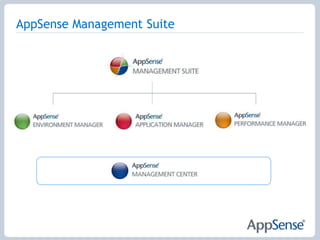
AppSense Management Suite
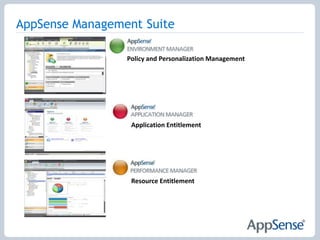
AppSense Management SuitePolicy and Personalization ManagementApplication EntitlementResource Entitlement
Personalization and Policy Management Provide the best user experience across all delivery mechanisms
Ensure the fastest user logon and desktop set up times
Eliminate profile corruption and support calls
Reduce time spent maintaining the user environment Personalization StreamingReduce logon times by streaming user personalization settings throughout their session on demand.Application-Level Personalization Personalization settings are managed and streamed on a per application basis.  Applications can now be upgraded or swapped out with no impact to the user.OS and Application Feature LockdownUsing an intuitive ‘spytool’ feature, items such as menus, application features and network access can be disabled or removed within minutes without the need for intensive scripting or registry hacking.  User Profile MigrationEnable rapid desktop migrations by moving users to new delivery mechanisms without having to recreate personalization settings.
Personalization AnalysisInteractive reports and graphs provide visibility into personalization activity across the enterprise.  Personalization analysis identifies trends, showing how often applications are personalized.Personalization RollbackReduce support costs, time to repair damaged profiles and preserve user personalization settings by ‘rolling back’ to a previous known good profile on a per application or user basis.  Offline ModePersonalization data is stored in a virtual cache within the user’s desktop and remains available to disconnected users. The user now has a fully portable, follow-me personality, which is re-synchronized with the latest, centralized settings when the user comes back online.
Rules and ActionsDefine events that are used to implement business policies. Rule examples include “when user X logs on to the desktop with an IP address of Y”, “when a user opens an application named Y” or for complete flexible control, any combination of multiple conditions.  Actions resulting from these rules include file, folder, registry, ADM, drive and printer mappings. Self HealingAutomatically self heal files, folders, registry keys, services and processes, application and system components in real time to prevent user introduced changes or actions from compromising system integrity. AppSense Configuration TemplatesAppSense Environment Manager is able to import an unlimited number of configuration files and use these policies in combination.  A selection of Configuration Templates, such as default Outlook Profile, MS Office feature lockdown and XP Control Panel Item Removal are available from www.myappsense.com.  This Template Library is maintained and updated frequently.
Application EntitlementProtect the environment from unauthorised applications and code
Reduce the need to maintain, re-build or re-image
Eliminate time consuming lists and scripts
Ensure compliance with Microsoft licensingTrusted Ownership 	Protect the system without complex lists and constant management. Only code installed and owned by ‘trusted owners’ is allowed to execute.  The trusted owners list can be extended to suit any environment or content directory infrastructure. End Point Analysis 	Identify all executable files on a target device and quickly group the files into authorized and unauthorized.  Configurations can be deployed to a user, group of users, machine, group of machines. 	Application Network Access Control	Control network access without complex controls such as routers, switches and firewalls. Connections include access to UNC paths (including all files & folders on that drive), servers, IP addresses, URL’s, devices & FTP locations.   Policy can be tailored to dynamically change based on user or device properties.
Passive Monitoring	Monitor application usage without preventing users from running applications. Passive monitoring can be managed on a per user, device or group basis, providing an extremely useful tool to accurately track user behavior prior to implementation or to understand application usage for software license management.Digital Signatures	Assign SHA-1 digital signatures to applications and files to ensure application integrity.  Modified or spoofed applications are prevented from executing.  White & Black List Configurations	Lists can be used in conjunction with Trusted Ownership to control known applications which pass the NTFS owner check such as administrator owned tools like cmd or ftp.  Or, create white lists to guarantee only known and trusted applications can execute on a system.
Self Authorizing UsersUsers can authorize their own applications without relying on IT.  An audit details information such as application name, time and date of execution and device.  A copy of the application can be taken and stored centrally for examination.Application Limits & Time Restrictions	Control the number of application instances and at what times it can be run.  Also enforce licensing models by controlling application access on a per device basis.Extensive File Support	In addition to controlling .exe files, scripts, batch and registry files are also controlled.  Digital signatures can also be applied to scripts to ensure content remains unaltered. AppSense Configuration TemplatesTake full advantage of pre-built corporate policy best practice by importing AppSense Configuration Templates.  AppSense Application Manager is able to import an unlimited number of configuration files and use these in combination.  A selection of templates such as ‘common prohibited item’s or ‘End Point Analysis’ is available from www.myappsense.com.  This Template Library is maintained and updated frequently.
System Resource Entitlement Ensure a optimal and consistentquality of service
Application response times are optimized according to business policy
Dramatically increase server capacity, number of users and applications
Significantly reduce per user TCO	Disk I/O Resource Management	Prevent I/O Request Packet (IRP) bottlenecks from impacting critical applications by dynamically prioritizing IRP’s. Named applications have priority disk access, preventing them being held in a queue behind less important application IRP’s.CPU Smart Scheduler™Allocate CPU resource  to applications by assigning a relative share to the user or application. For instance, an application assigned a share factor higher than another application will receive higher priority access to the CPU when there is contention.	Thread Throttling™CPU thread throttling policies will automatically trigger when the system is heavily loaded and apply gradual throttling to any runaway threads within each process.Physical Memory ControlAutomatically trim physical memory consumption based on application events and states, such as application startup, idle, minimized and in the background.  Releasing RAM back to the operating system enables a significant increase in user density or application instances.
	Virtual Memory OptimizationOptimizing the way Dynamic Link Libraries (DLLs) are loaded reduces virtual memory overheads and system paging is significantly reduced. Optimized DLLs are stored in a separate cache and loaded dynamically, leaving the original applications intact.	Virtual Memory LimitsUser memory limits restrict the amount of virtual memory utilized. Users can be warned, or prevented from launching additional applications. Application memory limits can also be applied to individual applications giving greater control over virtual memory consumption.	CPU Application Limits	Define hard processor limits to control an applications access to the CPU. For example, an application limit of 70% ensures it cannot use more than 70% of the CPU.	CPU Reservations	Ensure applications are guaranteed CPU resource.  For example, an application allocated 20% of CPU will get priority access to the CPU while it is using 20% or less of the CPU.
Processor Affinity Assignment	On multiprocessor systems policies can bind specific users and applications to processors allowing mission critical applications to run exclusively on a dedicated CPU.Statistical Analysis and Reporting	Report on CPU, Memory and Disk usage at the process level on a per user or application basis. Tabular reports and graphs are used to report on defined events to show resource consumption and optimization. AppSense Configuration Templates 	Take full advantage of pre-built corporate policy best practice by importing AppSense Configuration Templates.  AppSense Performance Manager is able to import an unlimited number of resource policy configuration policies and use these policies in combination. A selection of Policy Templates, such as “BoostOffice” to prioritize resources to the MS Office application set, is available from www.myappsense.com.  This Template Library is maintained and updated frequently.
	Managing The User EnvironmentProven enterprise scalabilityCentralized management of user environmentProvides visibility in the user environmentEnsure continuous communication and fail over  capabilities

AppSense Product Deck

  • 1.
    The technology........
  • 2.
  • 3.
    AppSense Management SuitePolicyand Personalization ManagementApplication EntitlementResource Entitlement
  • 4.
    Personalization and PolicyManagement Provide the best user experience across all delivery mechanisms
  • 5.
    Ensure the fastestuser logon and desktop set up times
  • 6.
  • 7.
    Reduce time spentmaintaining the user environment Personalization StreamingReduce logon times by streaming user personalization settings throughout their session on demand.Application-Level Personalization Personalization settings are managed and streamed on a per application basis. Applications can now be upgraded or swapped out with no impact to the user.OS and Application Feature LockdownUsing an intuitive ‘spytool’ feature, items such as menus, application features and network access can be disabled or removed within minutes without the need for intensive scripting or registry hacking. User Profile MigrationEnable rapid desktop migrations by moving users to new delivery mechanisms without having to recreate personalization settings.
  • 8.
    Personalization AnalysisInteractive reportsand graphs provide visibility into personalization activity across the enterprise. Personalization analysis identifies trends, showing how often applications are personalized.Personalization RollbackReduce support costs, time to repair damaged profiles and preserve user personalization settings by ‘rolling back’ to a previous known good profile on a per application or user basis. Offline ModePersonalization data is stored in a virtual cache within the user’s desktop and remains available to disconnected users. The user now has a fully portable, follow-me personality, which is re-synchronized with the latest, centralized settings when the user comes back online.
  • 9.
    Rules and ActionsDefineevents that are used to implement business policies. Rule examples include “when user X logs on to the desktop with an IP address of Y”, “when a user opens an application named Y” or for complete flexible control, any combination of multiple conditions. Actions resulting from these rules include file, folder, registry, ADM, drive and printer mappings. Self HealingAutomatically self heal files, folders, registry keys, services and processes, application and system components in real time to prevent user introduced changes or actions from compromising system integrity. AppSense Configuration TemplatesAppSense Environment Manager is able to import an unlimited number of configuration files and use these policies in combination. A selection of Configuration Templates, such as default Outlook Profile, MS Office feature lockdown and XP Control Panel Item Removal are available from www.myappsense.com. This Template Library is maintained and updated frequently.
  • 10.
    Application EntitlementProtect theenvironment from unauthorised applications and code
  • 11.
    Reduce the needto maintain, re-build or re-image
  • 12.
    Eliminate time consuminglists and scripts
  • 13.
    Ensure compliance withMicrosoft licensingTrusted Ownership Protect the system without complex lists and constant management. Only code installed and owned by ‘trusted owners’ is allowed to execute. The trusted owners list can be extended to suit any environment or content directory infrastructure. End Point Analysis Identify all executable files on a target device and quickly group the files into authorized and unauthorized. Configurations can be deployed to a user, group of users, machine, group of machines.  Application Network Access Control Control network access without complex controls such as routers, switches and firewalls. Connections include access to UNC paths (including all files & folders on that drive), servers, IP addresses, URL’s, devices & FTP locations. Policy can be tailored to dynamically change based on user or device properties.
  • 14.
    Passive Monitoring Monitor applicationusage without preventing users from running applications. Passive monitoring can be managed on a per user, device or group basis, providing an extremely useful tool to accurately track user behavior prior to implementation or to understand application usage for software license management.Digital Signatures Assign SHA-1 digital signatures to applications and files to ensure application integrity. Modified or spoofed applications are prevented from executing. White & Black List Configurations Lists can be used in conjunction with Trusted Ownership to control known applications which pass the NTFS owner check such as administrator owned tools like cmd or ftp. Or, create white lists to guarantee only known and trusted applications can execute on a system.
  • 15.
    Self Authorizing UsersUserscan authorize their own applications without relying on IT. An audit details information such as application name, time and date of execution and device. A copy of the application can be taken and stored centrally for examination.Application Limits & Time Restrictions Control the number of application instances and at what times it can be run. Also enforce licensing models by controlling application access on a per device basis.Extensive File Support In addition to controlling .exe files, scripts, batch and registry files are also controlled. Digital signatures can also be applied to scripts to ensure content remains unaltered. AppSense Configuration TemplatesTake full advantage of pre-built corporate policy best practice by importing AppSense Configuration Templates.  AppSense Application Manager is able to import an unlimited number of configuration files and use these in combination.  A selection of templates such as ‘common prohibited item’s or ‘End Point Analysis’ is available from www.myappsense.com.  This Template Library is maintained and updated frequently.
  • 16.
    System Resource EntitlementEnsure a optimal and consistentquality of service
  • 17.
    Application response timesare optimized according to business policy
  • 18.
    Dramatically increase servercapacity, number of users and applications
  • 19.
    Significantly reduce peruser TCO Disk I/O Resource Management Prevent I/O Request Packet (IRP) bottlenecks from impacting critical applications by dynamically prioritizing IRP’s. Named applications have priority disk access, preventing them being held in a queue behind less important application IRP’s.CPU Smart Scheduler™Allocate CPU resource to applications by assigning a relative share to the user or application. For instance, an application assigned a share factor higher than another application will receive higher priority access to the CPU when there is contention. Thread Throttling™CPU thread throttling policies will automatically trigger when the system is heavily loaded and apply gradual throttling to any runaway threads within each process.Physical Memory ControlAutomatically trim physical memory consumption based on application events and states, such as application startup, idle, minimized and in the background. Releasing RAM back to the operating system enables a significant increase in user density or application instances.
  • 20.
    Virtual Memory OptimizationOptimizingthe way Dynamic Link Libraries (DLLs) are loaded reduces virtual memory overheads and system paging is significantly reduced. Optimized DLLs are stored in a separate cache and loaded dynamically, leaving the original applications intact. Virtual Memory LimitsUser memory limits restrict the amount of virtual memory utilized. Users can be warned, or prevented from launching additional applications. Application memory limits can also be applied to individual applications giving greater control over virtual memory consumption. CPU Application Limits Define hard processor limits to control an applications access to the CPU. For example, an application limit of 70% ensures it cannot use more than 70% of the CPU. CPU Reservations Ensure applications are guaranteed CPU resource. For example, an application allocated 20% of CPU will get priority access to the CPU while it is using 20% or less of the CPU.
  • 21.
    Processor Affinity Assignment Onmultiprocessor systems policies can bind specific users and applications to processors allowing mission critical applications to run exclusively on a dedicated CPU.Statistical Analysis and Reporting Report on CPU, Memory and Disk usage at the process level on a per user or application basis. Tabular reports and graphs are used to report on defined events to show resource consumption and optimization. AppSense Configuration Templates Take full advantage of pre-built corporate policy best practice by importing AppSense Configuration Templates. AppSense Performance Manager is able to import an unlimited number of resource policy configuration policies and use these policies in combination. A selection of Policy Templates, such as “BoostOffice” to prioritize resources to the MS Office application set, is available from www.myappsense.com. This Template Library is maintained and updated frequently.
  • 22.
    Managing The UserEnvironmentProven enterprise scalabilityCentralized management of user environmentProvides visibility in the user environmentEnsure continuous communication and fail over capabilities
  • 23.
    Active Directory Authentication Tightintegration with existing Microsoft Active Directory ensures all managed devices are authenticated before communications are established. Client Communications Agent (CCA) The CCA securely handles all communications between device and Management Server, adding the device to the correct deployment group, managing package installations and collecting and transferring audit data. Automatic Client Registration New devices automatically registers itself with the Management Server via the CCA. The properties of the device are used to automatically add it to the correct deployment group and automatically deploy the correct policy.  Reporting An interactive set of reports are used monitor and audit user environment actions. Flexible options enable customization to show specific information, enabling forward planning and a move away from a reactive management approach.
  • 24.
    Role-based Access Control Granularcontrol of access rights on all objects such as deployment groups, packages, reports and alerts. Management Server Administrative users can be granted different access rights to each object on a per user or group basis. Secure Web-based Communications Built on WinHTTP, BITS and IIS technologies, data transfer and communications between the Management Server and device are securely managed across HTTPS or HTTP protocols.Watchdog Agent Should an AppSense agent stop unexpectedly or become unstable, the Watchdog will automatically audit the detected error and if configured, raise and alert and take corrective actions to restart the agent.
  • 25.
    Configuration Check-out Process Supportmultiple administrators simultaneously opening or editing configurations. Once an administrator is granted access (via role based access control), already open configurations can be opened as read only. Metadata tags can be added as a description to a configuration.Management Server Configuration The Management Server installation provides the configuration of the Microsoft IIS and SQL Server. If configuration conflict arises during configuration, repair functions are presented. Support reports can be generated for AppSense Technical Services to initiate your case.Failover Support The CCA supports multiple Management Server URL’s. Should the link to the current Management Server fail, the CCA will re-connect to a different server allowing for full failover support and continue communications between the end point and the Management Center.
  • 26.
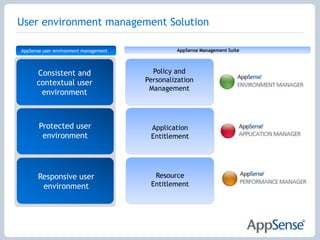
    User environment managementSolutionAppSense Management SuiteAppSense user environment managementPolicy and PersonalizationManagementConsistent and contextual user environmentProtected user environmentApplication EntitlementResource EntitlementResponsive user environment
  • 27.
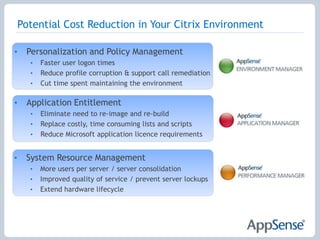
    Potential Cost Reductionin Your Citrix EnvironmentPersonalization and Policy ManagementFaster user logon timesReduce profile corruption & support call remediationCut time spent maintaining the environmentApplication Entitlement
  • 28.
    Eliminate need tore-image and re-build
  • 29.
    Replace costly, timeconsuming lists and scripts
  • 30.
    Reduce Microsoft applicationlicence requirements
  • 31.
  • 32.
    More users perserver / server consolidation
  • 33.
    Improved quality ofservice / prevent server lockups
  • 34.
    Extend hardware lifecycleContactInfo:Jason McGeoughRegional ManagerJason.McGeough@appsense.com

Editor's Notes

  • #22 During good times, cost reduction is not always top of mind for many organizations. However, during economic downturn or recessions, we hear the request to “do more with less” from management way more frequently. Many Citrix customers are not aware of the optional cost savings that you have within your environments today. Cost savings will vary from organization to organization, but I can safely assume that many of you in the audience have opportunity to save your company money through infrastructure cost savings, improved automation and management, user productivity savings, and IT staff efficiencies. Here are just a few cost savings associated with user environment management. Faster logon times Reduce profile corruption Fewer “gold” images to manage Avoid unused licenses Increase the number of Citrix users per server Avoid support and end user impact for server lockup issues(70-90 seconds)