Introduction to VirtualizationKhairil Anwar JusohKeselamatan ICTUniversiti Sains Malaysiakhairil@usm.my
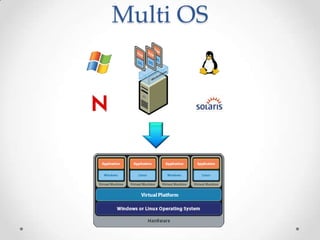
What is Virtualization?Defines it as an abstraction layer that decouples the physical hardware from the operating system to deliver greater IT resource utilization and flexabilityAllows multiple Operating Systems to run on a single box if neededIsolation of one computing resource from the othersVM (Virtual Machine) originally defined as "an efficient, isolated duplicate of a real machine"
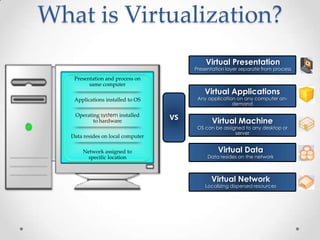
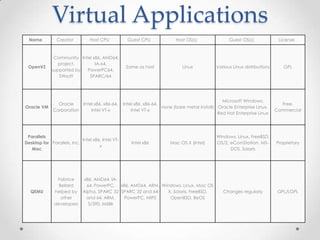
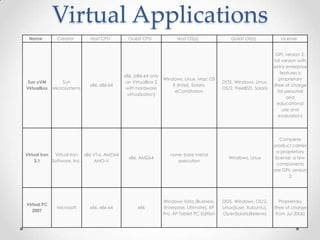
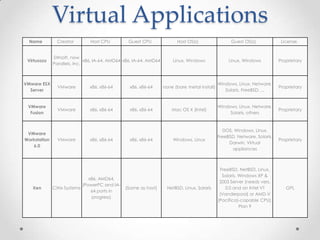
What is Virtualization?Virtual PresentationPresentation layer separate from processPresentation and process on same computerApplications installed to OSOperating system installed to hardwareData resides on local computerNetwork assigned to specific locationVirtual ApplicationsAny application on any computer on-demandVSVirtual MachineOS can be assigned to any desktop or serverVirtual DataData resides on the networkVirtual NetworkLocalizing dispersed resources
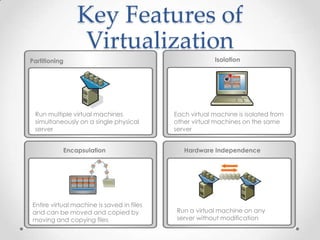
Key Features of VirtualizationIsolationPartitioningRun multiple virtual machines simultaneously on a single physical serverEach virtual machine is isolated from other virtual machines on the same server Hardware IndependenceEncapsulation Entire virtual machine is saved in files and can be moved and copied by moving and copying filesRun a virtual machine on any server without modification
Strengths of VirtualizationVMs are isolated and secure from the Host server and other VMs.  A better solution than having 5 services on 1 server.Most offer the ability to take a snapshot and revert if needed. Useful for testing and bailing yourself out of an issue.It is easy to get a server with 4 procs and 4GB+ of memory now and that will make it easy to have 4 separate VMs that have enough horsepower.Less Servers, Less Power, Less Space, Less Cost.Run multiple OSes on a single server if needed
Weaknesses of VirtualizationNot as fast as a native install of the OSHyper-V and VMWare ESX have closed this gap a great deal thoughIf the host server fails, you will lose all VMsIt is important to make the host server redundant as possible (power supplies, RAID5, etc)Perception issue of this being a new untested technology If you don’t have control over the issue you might not be able to move forwardMight be perceived as emulationIn reality it behaves exactly like an actual server
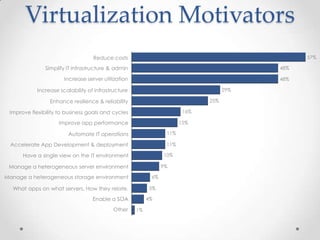
Virtualization Motivators57%Reduce costsSimplify IT infrastructure & admin48%Increase server utilization48%29%Increase scalability of infrastructure25%Enhance resilience & reliability16%Improve flexibility to business goals and cyclesImprove app performance15%11%Automate IT operationsAccelerate App Development & deployment11%10%Have a single view on the IT environment9%Manage a heterogeneous server environmentManage a heterogeneous storage environment6%What apps on what servers. How they relate. 5%Enable a SOA4%Other1%
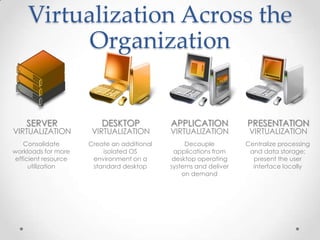
Virtualization Across the OrganizationdesktopVirtualizationapplicationVirtualizationpresentationVirtualizationDecouple applications from desktop operating systems and deliver on demandCentralize processing and data storage; present the user interface locallyCreate an additional isolated OS environment on a standard desktopserverVirtualizationConsolidate workloads for more efficient resource utilization
ServerVirtualization
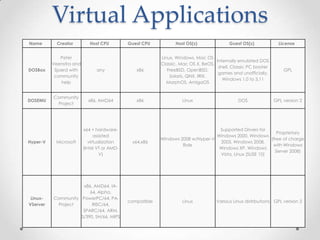
Server VirtualizationServer virtualization is a hot topic.Encapsulate OS and present “virtual hardware”.Run many OS on single hardware platform.Consolidate underutilized servers.VMware, Microsoft, Citrix (Xen).Architectural Differences.
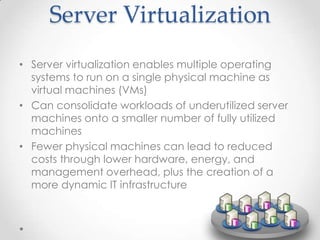
Server VirtualizationServer virtualization enables multiple operating systems to run on a single physical machine as virtual machines (VMs)Can consolidate workloads of underutilized server machines onto a smaller number of fully utilized machinesFewer physical machines can lead to reduced costs through lower hardware, energy, and management overhead, plus the creation of a more dynamic IT infrastructure
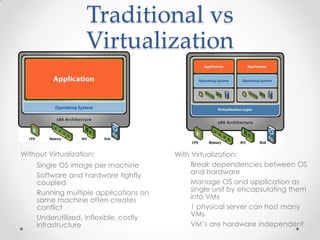
Traditional vs VirtualizationWith Virtualization:
Break dependencies between OS and hardware
Manage OS and application as single unit by encapsulating them into VMs
1 physical server can host many VMs
VM’s are hardware independent
Without Virtualization:
Single OS image per machine
Software and hardware tightly coupled
Running multiple applications on same machine often creates conflict
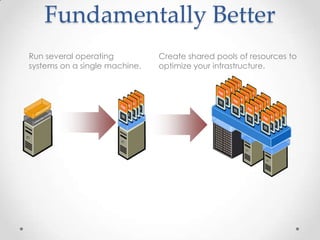
Underutilized, inflexible, costly infrastructureFundamentally Better Run several operating systems on a single machine. Create shared pools of resources to optimize your infrastructure.
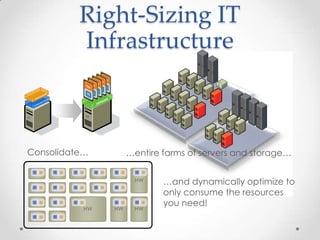
Right-Sizing IT InfrastructureHWHWHWHWHWHWConsolidate…HWHWHWHWHWHWHWHWHWHWHWHW…entire farms of servers and storage……and dynamically optimize to only consume the resources  you need!
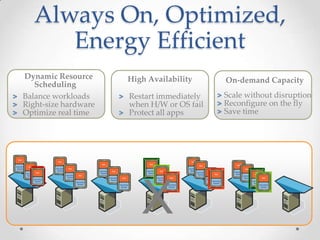
Always On, Optimized, Energy EfficientDynamic Resource SchedulingHigh Availability On-demand Capacity Scale without disruption Reconfigure on the fly Save timeRestart immediately when H/W or OS failProtect all appsBalance workloadsRight-size hardwareOptimize real timeX
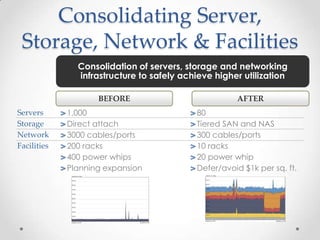
Consolidating Server, Storage, Network & FacilitiesConsolidation of servers, storage and networking infrastructure to safely achieve higher utilizationBEFORE AFTER 1,000Direct attach3000 cables/ports200 racks400 power whipsPlanning expansion80Tiered SAN and NAS300 cables/ports10 racks20 power whipDefer/avoid $1k per sq. ft.ServersStorageNetworkFacilities
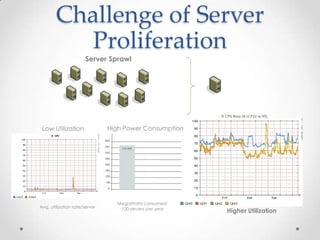
Challenge of Server Proliferation % CPU Busy (8 LCPVs w/HT) 800700725 MW6005004003002001000MegaWatts consumed:                        100 servers per yearHigher Utilization Server SprawlLow Utilization High Power Consumption Avg. utilization rate/server
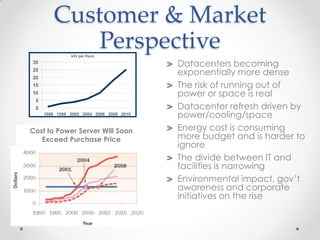
Customer & Market Perspective Datacenters becoming exponentially more denseThe risk of running out of power or space is realDatacenter refresh driven by power/cooling/spaceEnergy cost is consuming more budget and is harder to ignoreThe divide between IT and facilities is narrowingEnvironmental impact, gov’t awareness and corporate initiatives on the riseCost to Power Server Will Soon Exceed Purchase Price
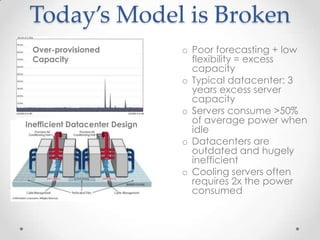
Today’s Model is Broken Over-provisioned CapacityPoor forecasting + low flexibility = excess capacityTypical datacenter: 3 years excess server capacity Servers consume >50% of average power when idle Datacenters are outdated and hugely inefficientCooling servers often requires 2x the power consumedInefficient Datacenter Design
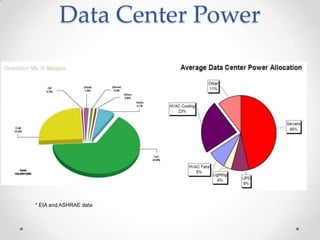
Data Center Power* EIA and ASHRAE data
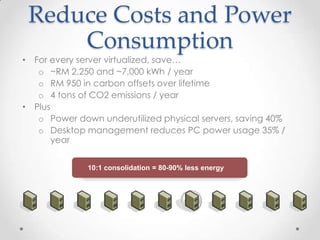
Reduce Costs and Power Consumption10:1 consolidation = 80-90% less energyFor every server virtualized, save…~RM 2,250 and ~7,000 kWh / yearRM 950 in carbon offsets over lifetime4 tons of CO2 emissions / yearPlusPower down underutilized physical servers, saving 40%Desktop management reduces PC power usage 35% / year
DesktopVirtualization
Multi OS
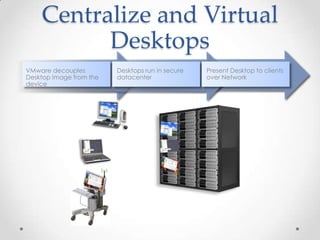
Centralize and Virtual DesktopsVMware decouples Desktop image from the deviceDesktops run in secure datacenterPresent Desktop to clients over Network
BenefitBenefit:Configure and test desktops and servers in virtual machines before deploying them to productionTest new multi-tier applications, service packs, application updates, and OS patches on a single PCHost legacy applications within virtual machines, facilitating OS migrations and eliminating the need to port legacy applicationsDevelop and test applications on multiple operating systems on a single PCConnect virtual machines to simulate and test multi-tier systemsUse multiple snapshots and debugging support to facilitate testingDemo or multi-tier configurations on a single laptop in a repeatable, reliable mannerPackage and deploy classroom materials in virtual machinesAllow students to experiment with multiple operating systems, applications and tools in secure, isolated virtual machinesConfigure virtual machines to “undo” all changes at shutdown
ApplicationVirtualization
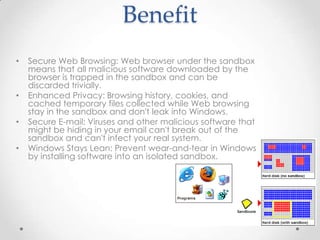
Application VirtualizationSelf-contained package (exe, layer)Microsoft Word 2007.exeSeparation from OS and Application2000, XP, Vista, Server 2003 and 2008Sandboxing of file and registry writesOnline and offline deliveryLike desktop imaging at the app level
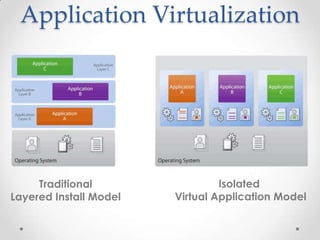
Application VirtualizationIsolated Virtual Application ModelTraditionalLayered Install Model
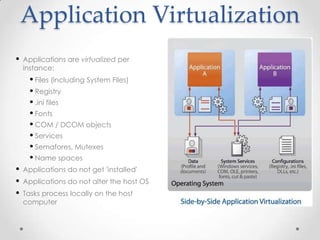
Application VirtualizationApplications are virtualized per instance:
Files (including System Files)
Registry
.ini files
Fonts
COM / DCOM objects
Services
Semafores, Mutexes
Name spaces
Applications do not get 'installed'
Applications do not alter the host OS
Tasks process locally on the host computerApplication VirtualizationBenefit:Data can be centralized in one location to improve security and availabilityManagement costs can be reduced by only having to manage a single copy of the application on the serverMore basic terminal hardware and thin clients can be used in placed of complete desktop systems, helping lower costsBandwidth can be used more effectively, leading to potential performance improvementsDeploy applications that integrate seamlessly with the user’s local desktop. Provide access to centrally managed Windows desktops. Enable remote access for existing “WAN-unfriendly” applicationsHighly secure applications and data within the data center—no need to worry about lost laptops
Application VirtualizationDisadvantages:Different way of troubleshootingNot all application’s can be virtualized:Applications that are using drivers (such as antivirus, VPN, printer)Applications which are directly integrated in the OS (like IE, OS security updates)Applications with hardware dependancyApplication licensing which is machine specificApplication virtualization technologyMicrosoft Softgrid
PresentationVirtualization
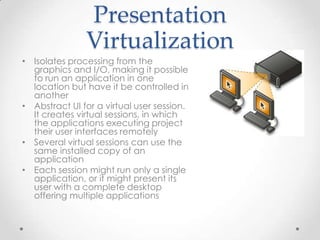
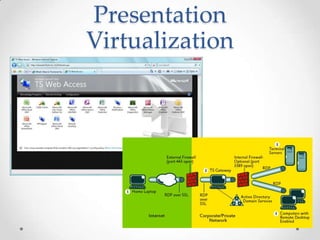
Presentation VirtualizationIsolates processing from the graphics and I/O, making it possible to run an application in one location but have it be controlled in anotherAbstract UI for a virtual user session. It creates virtual sessions, in which the applications executing project their user interfaces remotelySeveral virtual sessions can use the same installed copy of an applicationEach session might run only a single application, or it might present its user with a complete desktop offering multiple applications

Introduction to virtualization

  • 1.
    Introduction to VirtualizationKhairilAnwar JusohKeselamatan ICTUniversiti Sains Malaysiakhairil@usm.my
  • 2.
    What is Virtualization?Definesit as an abstraction layer that decouples the physical hardware from the operating system to deliver greater IT resource utilization and flexabilityAllows multiple Operating Systems to run on a single box if neededIsolation of one computing resource from the othersVM (Virtual Machine) originally defined as "an efficient, isolated duplicate of a real machine"
  • 3.
    What is Virtualization?VirtualPresentationPresentation layer separate from processPresentation and process on same computerApplications installed to OSOperating system installed to hardwareData resides on local computerNetwork assigned to specific locationVirtual ApplicationsAny application on any computer on-demandVSVirtual MachineOS can be assigned to any desktop or serverVirtual DataData resides on the networkVirtual NetworkLocalizing dispersed resources
  • 4.
    Key Features ofVirtualizationIsolationPartitioningRun multiple virtual machines simultaneously on a single physical serverEach virtual machine is isolated from other virtual machines on the same server Hardware IndependenceEncapsulation Entire virtual machine is saved in files and can be moved and copied by moving and copying filesRun a virtual machine on any server without modification
  • 5.
    Strengths of VirtualizationVMsare isolated and secure from the Host server and other VMs. A better solution than having 5 services on 1 server.Most offer the ability to take a snapshot and revert if needed. Useful for testing and bailing yourself out of an issue.It is easy to get a server with 4 procs and 4GB+ of memory now and that will make it easy to have 4 separate VMs that have enough horsepower.Less Servers, Less Power, Less Space, Less Cost.Run multiple OSes on a single server if needed
  • 6.
    Weaknesses of VirtualizationNotas fast as a native install of the OSHyper-V and VMWare ESX have closed this gap a great deal thoughIf the host server fails, you will lose all VMsIt is important to make the host server redundant as possible (power supplies, RAID5, etc)Perception issue of this being a new untested technology If you don’t have control over the issue you might not be able to move forwardMight be perceived as emulationIn reality it behaves exactly like an actual server
  • 7.
    Virtualization Motivators57%Reduce costsSimplifyIT infrastructure & admin48%Increase server utilization48%29%Increase scalability of infrastructure25%Enhance resilience & reliability16%Improve flexibility to business goals and cyclesImprove app performance15%11%Automate IT operationsAccelerate App Development & deployment11%10%Have a single view on the IT environment9%Manage a heterogeneous server environmentManage a heterogeneous storage environment6%What apps on what servers. How they relate. 5%Enable a SOA4%Other1%
  • 8.
    Virtualization Across theOrganizationdesktopVirtualizationapplicationVirtualizationpresentationVirtualizationDecouple applications from desktop operating systems and deliver on demandCentralize processing and data storage; present the user interface locallyCreate an additional isolated OS environment on a standard desktopserverVirtualizationConsolidate workloads for more efficient resource utilization
  • 9.
  • 10.
    Server VirtualizationServer virtualizationis a hot topic.Encapsulate OS and present “virtual hardware”.Run many OS on single hardware platform.Consolidate underutilized servers.VMware, Microsoft, Citrix (Xen).Architectural Differences.
  • 11.
    Server VirtualizationServer virtualizationenables multiple operating systems to run on a single physical machine as virtual machines (VMs)Can consolidate workloads of underutilized server machines onto a smaller number of fully utilized machinesFewer physical machines can lead to reduced costs through lower hardware, energy, and management overhead, plus the creation of a more dynamic IT infrastructure
  • 12.
  • 13.
  • 14.
    Manage OS andapplication as single unit by encapsulating them into VMs
  • 15.
    1 physical servercan host many VMs
  • 16.
  • 17.
  • 18.
    Single OS imageper machine
  • 19.
    Software and hardwaretightly coupled
  • 20.
    Running multiple applicationson same machine often creates conflict
  • 21.
    Underutilized, inflexible, costlyinfrastructureFundamentally Better Run several operating systems on a single machine. Create shared pools of resources to optimize your infrastructure.
  • 22.
    Right-Sizing IT InfrastructureHWHWHWHWHWHWConsolidate…HWHWHWHWHWHWHWHWHWHWHWHW…entirefarms of servers and storage……and dynamically optimize to only consume the resources you need!
  • 23.
    Always On, Optimized,Energy EfficientDynamic Resource SchedulingHigh Availability On-demand Capacity Scale without disruption Reconfigure on the fly Save timeRestart immediately when H/W or OS failProtect all appsBalance workloadsRight-size hardwareOptimize real timeX
  • 24.
    Consolidating Server, Storage,Network & FacilitiesConsolidation of servers, storage and networking infrastructure to safely achieve higher utilizationBEFORE AFTER 1,000Direct attach3000 cables/ports200 racks400 power whipsPlanning expansion80Tiered SAN and NAS300 cables/ports10 racks20 power whipDefer/avoid $1k per sq. ft.ServersStorageNetworkFacilities
  • 25.
    Challenge of ServerProliferation % CPU Busy (8 LCPVs w/HT) 800700725 MW6005004003002001000MegaWatts consumed: 100 servers per yearHigher Utilization Server SprawlLow Utilization High Power Consumption Avg. utilization rate/server
  • 26.
    Customer & MarketPerspective Datacenters becoming exponentially more denseThe risk of running out of power or space is realDatacenter refresh driven by power/cooling/spaceEnergy cost is consuming more budget and is harder to ignoreThe divide between IT and facilities is narrowingEnvironmental impact, gov’t awareness and corporate initiatives on the riseCost to Power Server Will Soon Exceed Purchase Price
  • 27.
    Today’s Model isBroken Over-provisioned CapacityPoor forecasting + low flexibility = excess capacityTypical datacenter: 3 years excess server capacity Servers consume >50% of average power when idle Datacenters are outdated and hugely inefficientCooling servers often requires 2x the power consumedInefficient Datacenter Design
  • 28.
    Data Center Power*EIA and ASHRAE data
  • 29.
    Reduce Costs andPower Consumption10:1 consolidation = 80-90% less energyFor every server virtualized, save…~RM 2,250 and ~7,000 kWh / yearRM 950 in carbon offsets over lifetime4 tons of CO2 emissions / yearPlusPower down underutilized physical servers, saving 40%Desktop management reduces PC power usage 35% / year
  • 30.
  • 31.
  • 32.
    Centralize and VirtualDesktopsVMware decouples Desktop image from the deviceDesktops run in secure datacenterPresent Desktop to clients over Network
  • 33.
    BenefitBenefit:Configure and testdesktops and servers in virtual machines before deploying them to productionTest new multi-tier applications, service packs, application updates, and OS patches on a single PCHost legacy applications within virtual machines, facilitating OS migrations and eliminating the need to port legacy applicationsDevelop and test applications on multiple operating systems on a single PCConnect virtual machines to simulate and test multi-tier systemsUse multiple snapshots and debugging support to facilitate testingDemo or multi-tier configurations on a single laptop in a repeatable, reliable mannerPackage and deploy classroom materials in virtual machinesAllow students to experiment with multiple operating systems, applications and tools in secure, isolated virtual machinesConfigure virtual machines to “undo” all changes at shutdown
  • 34.
  • 35.
    Application VirtualizationSelf-contained package(exe, layer)Microsoft Word 2007.exeSeparation from OS and Application2000, XP, Vista, Server 2003 and 2008Sandboxing of file and registry writesOnline and offline deliveryLike desktop imaging at the app level
  • 36.
    Application VirtualizationIsolated VirtualApplication ModelTraditionalLayered Install Model
  • 37.
  • 38.
  • 39.
  • 40.
  • 41.
  • 42.
    COM / DCOMobjects
  • 43.
  • 44.
  • 45.
  • 46.
    Applications do notget 'installed'
  • 47.
    Applications do notalter the host OS
  • 48.
    Tasks process locallyon the host computerApplication VirtualizationBenefit:Data can be centralized in one location to improve security and availabilityManagement costs can be reduced by only having to manage a single copy of the application on the serverMore basic terminal hardware and thin clients can be used in placed of complete desktop systems, helping lower costsBandwidth can be used more effectively, leading to potential performance improvementsDeploy applications that integrate seamlessly with the user’s local desktop. Provide access to centrally managed Windows desktops. Enable remote access for existing “WAN-unfriendly” applicationsHighly secure applications and data within the data center—no need to worry about lost laptops
  • 49.
    Application VirtualizationDisadvantages:Different wayof troubleshootingNot all application’s can be virtualized:Applications that are using drivers (such as antivirus, VPN, printer)Applications which are directly integrated in the OS (like IE, OS security updates)Applications with hardware dependancyApplication licensing which is machine specificApplication virtualization technologyMicrosoft Softgrid
  • 50.
  • 51.
    Presentation VirtualizationIsolates processingfrom the graphics and I/O, making it possible to run an application in one location but have it be controlled in anotherAbstract UI for a virtual user session. It creates virtual sessions, in which the applications executing project their user interfaces remotelySeveral virtual sessions can use the same installed copy of an applicationEach session might run only a single application, or it might present its user with a complete desktop offering multiple applications