Footprinting, Discovery &
Profiling Applications
Enterprise footprints
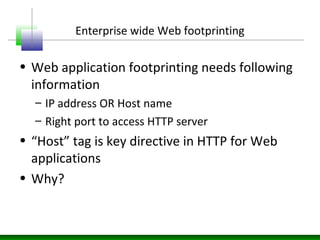
Enterprise wide Web footprinting
• Web application footprinting needs following
information
– IP address OR Host name
– Right port to access HTTP server
• “Host” tag is key directive in HTTP for Web
applications
• Why?
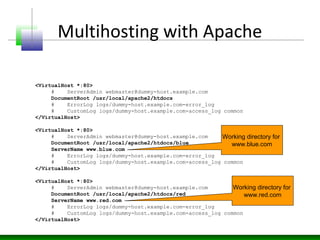
Multihosting with Apache
• Apache’s httpd.conf
<VirtualHost *:80>
# ServerAdmin webmaster@dummy-host.example.com
DocumentRoot /usr/local/apache2/htdocs
# ErrorLog logs/dummy-host.example.com-error_log
# CustomLog logs/dummy-host.example.com-access_log common
</VirtualHost>
<VirtualHost *:80>
# ServerAdmin webmaster@dummy-host.example.com
DocumentRoot /usr/local/apache2/htdocs/blue
ServerName www.blue.com
# ErrorLog logs/dummy-host.example.com-error_log
# CustomLog logs/dummy-host.example.com-access_log common
</VirtualHost>
<VirtualHost *:80>
# ServerAdmin webmaster@dummy-host.example.com
DocumentRoot /usr/local/apache2/htdocs/red
ServerName www.red.com
# ErrorLog logs/dummy-host.example.com-error_log
# CustomLog logs/dummy-host.example.com-access_log common
</VirtualHost>
Working directory for
www.blue.com
Working directory for
www.red.com
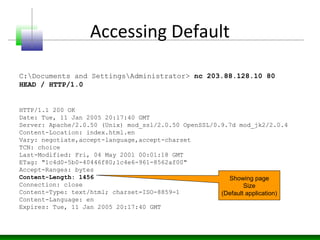
Accessing Default
HTTP/1.1 200 OK
Date: Tue, 11 Jan 2005 20:17:40 GMT
Server: Apache/2.0.50 (Unix) mod_ssl/2.0.50 OpenSSL/0.9.7d mod_jk2/2.0.4
Content-Location: index.html.en
Vary: negotiate,accept-language,accept-charset
TCN: choice
Last-Modified: Fri, 04 May 2001 00:01:18 GMT
ETag: "1c4d0-5b0-40446f80;1c4e6-961-8562af00"
Accept-Ranges: bytes
Content-Length: 1456
Connection: close
Content-Type: text/html; charset=ISO-8859-1
Content-Language: en
Expires: Tue, 11 Jan 2005 20:17:40 GMT
C:Documents and SettingsAdministrator> nc 203.88.128.10 80
HEAD / HTTP/1.0
Showing page
Size
(Default application)
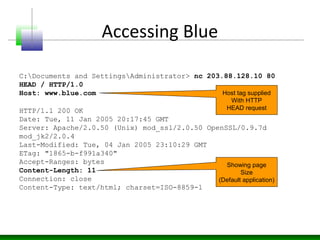
Accessing Blue
HTTP/1.1 200 OK
Date: Tue, 11 Jan 2005 20:17:45 GMT
Server: Apache/2.0.50 (Unix) mod_ssl/2.0.50 OpenSSL/0.9.7d
mod_jk2/2.0.4
Last-Modified: Tue, 04 Jan 2005 23:10:29 GMT
ETag: "1865-b-f991a340"
Accept-Ranges: bytes
Content-Length: 11
Connection: close
Content-Type: text/html; charset=ISO-8859-1
C:Documents and SettingsAdministrator> nc 203.88.128.10 80
HEAD / HTTP/1.0
Host: www.blue.com
Showing page
Size
(Default application)
Host tag supplied
With HTTP
HEAD request
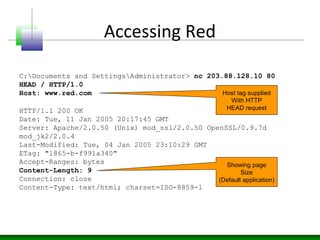
Accessing Red
HTTP/1.1 200 OK
Date: Tue, 11 Jan 2005 20:17:45 GMT
Server: Apache/2.0.50 (Unix) mod_ssl/2.0.50 OpenSSL/0.9.7d
mod_jk2/2.0.4
Last-Modified: Tue, 04 Jan 2005 23:10:29 GMT
ETag: "1865-b-f991a340"
Accept-Ranges: bytes
Content-Length: 9
Connection: close
Content-Type: text/html; charset=ISO-8859-1
C:Documents and SettingsAdministrator> nc 203.88.128.10 80
HEAD / HTTP/1.0
Host: www.red.com
Showing page
Size
(Default application)
Host tag supplied
With HTTP
HEAD request
Identifying Name Servers - Whois
C:Program FilesGnuWin32bin>jwhois -h whois.arin.net 203.88.128.10
[Querying whois.arin.net]
[whois.arin.net]
OrgName: XYZ corp
OrgID: XYZC
Address: 101 First Avenue
City: NYC
StateProv: NY
PostalCode: 94089
Country: US
NetRange: 203.88.128.0 – 203.88.128.255
CIDR: 203.88.128.0/20
NetName: XYZC-4
NetHandle: NET-203-88-128-0-1
Parent: NET-203-0-0-0-0
NetType: Direct Allocation
NameServer: ns1.xyz.com
NameServer: ns2.xyz.com
Comment:
RegDate: 2003-07-17
Updated: 2003-07-17
OrgTechHandle: NA098-ARIN
OrgTechName: Netblock Admin
OrgTechPhone: +1-212-999-9999
OrgTechEmail: netblockadmin@xyz.com
# ARIN WHOIS database, last updated 2005-01-10 19:10
# Enter ? for additional hints on searching ARIN's WHOIS database.
C:Program FilesGnuWin32bin>
Name Servers
For
IP address
Query PTR on name server
C:Documents and SettingsAdministrator>nslookup
Default Server: ns1.icenet.net
Address: 203.88.128.7
> server ns1.xyz.com
Default Server: [203.88.128.250]
Address: 203.88.128.250
> 203.88.128.10
Server: [203.88.128.250]
Address: 203.88.128.250
Name: www.blue.com
Address: 192.168.7.50
> set type=PTR
> 203.88.128.10
Server: [203.88.128.250]
Address: 203.88.128.250
10.128.88.203.in-addr.arpa name = www.blue.com
10.128.88.203.in-addr.arpa name = www.red.com
>
Bingo!
We have it
Running it to Query
Name Server
Setting the target
Name Server
Passing IP
Address
Setting PTR
As query Type
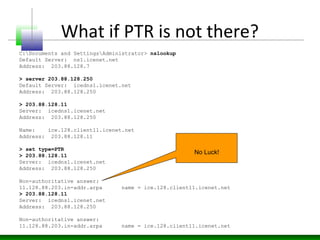
What if PTR is not there?
C:Documents and SettingsAdministrator> nslookup
Default Server: ns1.icenet.net
Address: 203.88.128.7
> server 203.88.128.250
Default Server: icedns1.icenet.net
Address: 203.88.128.250
> 203.88.128.11
Server: icedns1.icenet.net
Address: 203.88.128.250
Name: ice.128.client11.icenet.net
Address: 203.88.128.11
> set type=PTR
> 203.88.128.11
Server: icedns1.icenet.net
Address: 203.88.128.250
Non-authoritative answer:
11.128.88.203.in-addr.arpa name = ice.128.client11.icenet.net
> 203.88.128.11
Server: icedns1.icenet.net
Address: 203.88.128.250
Non-authoritative answer:
11.128.88.203.in-addr.arpa name = ice.128.client11.icenet.net
No Luck!
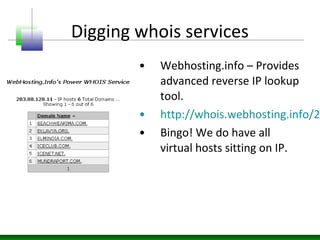
Digging whois services
• Webhosting.info – Provides
advanced reverse IP lookup
tool.
• http://whois.webhosting.info/2
• Bingo! We do have all
virtual hosts sitting on IP.
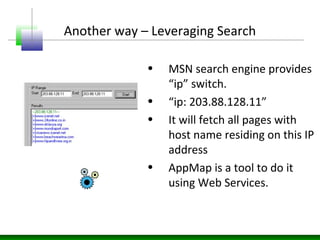
Another way – Leveraging Search
• MSN search engine provides
“ip” switch.
• “ip: 203.88.128.11”
• It will fetch all pages with
host name residing on this IP
address
• AppMap is a tool to do it
using Web Services.
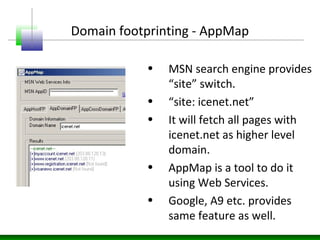
Domain footprinting - AppMap
• MSN search engine provides
“site” switch.
• “site: icenet.net”
• It will fetch all pages with
icenet.net as higher level
domain.
• AppMap is a tool to do it
using Web Services.
• Google, A9 etc. provides
same feature as well.
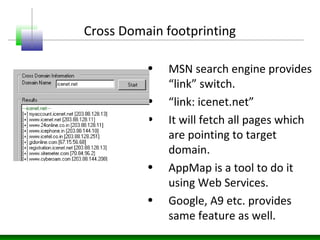
Cross Domain footprinting
• MSN search engine provides
“link” switch.
• “link: icenet.net”
• It will fetch all pages which
are pointing to target
domain.
• AppMap is a tool to do it
using Web Services.
• Google, A9 etc. provides
same feature as well.
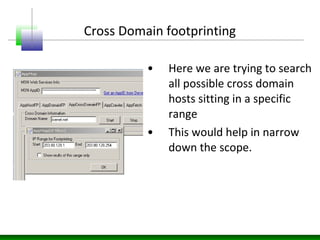
Cross Domain footprinting
• Here we are trying to search
all possible cross domain
hosts sitting in a specific
range
• This would help in narrow
down the scope.
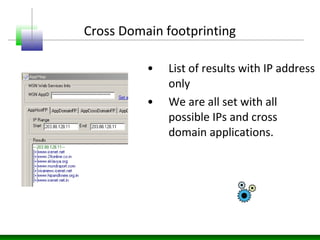
Cross Domain footprinting
• List of results with IP address
only
• We are all set with all
possible IPs and cross
domain applications.
Advantages of techniques
• Footprinting helps in scoping out the activities
• Host, Domain and Cross domain targets would
help in taking the stock of all assets.
• Tools like AppMap can be handy during
assessment.
• At the end we have list of IP address mapped
to all hosts running on it with their linkages as
well.
Enterprise App’s fingerprints
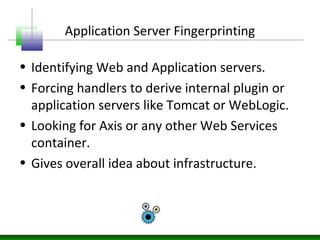
Application Server Fingerprinting
• Identifying Web and Application servers.
• Forcing handlers to derive internal plugin or
application servers like Tomcat or WebLogic.
• Looking for Axis or any other Web Services
container.
• Gives overall idea about infrastructure.
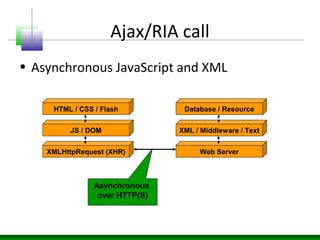
Ajax/RIA call
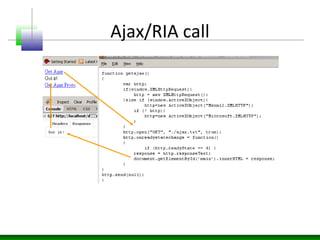
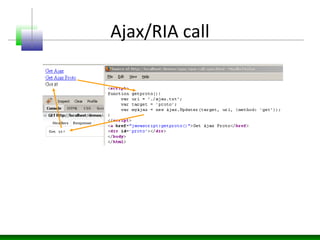
• Asynchronous JavaScript and XML
HTML / CSS / Flash
JS / DOM
XMLHttpRequest (XHR)
Database / Resource
XML / Middleware / Text
Web Server
Asynchronous
over HTTP(S)
Ajax/RIA call
Ajax/RIA call
Fingerprinting
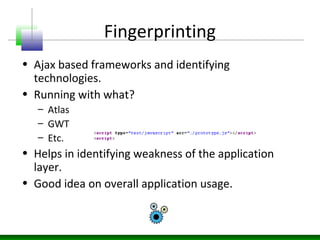
• Ajax based frameworks and identifying
technologies.
• Running with what?
– Atlas
– GWT
– Etc.
• Helps in identifying weakness of the application
layer.
• Good idea on overall application usage.
Fingerprinting
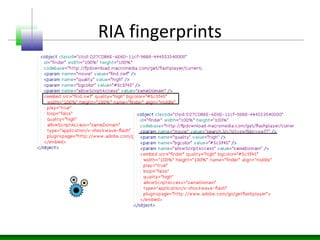
• Fingerprinting RIA components running with
Flash.
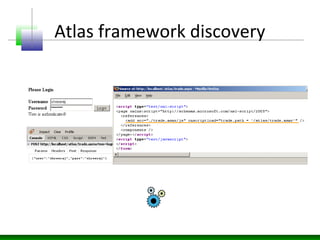
• Atlas script discovery and hidden entry points
identification.
• Scanning for other frameworks.
RIA fingerprints
Atlas framework discovery
Discovery
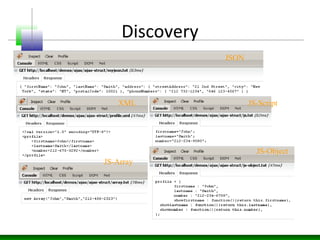
• Ajax running with various different structures.
• Developers are adding various different calls and
methods for it.
• JavaScript can talk with back end sources.
• Mashups application talking with various sources.
• It has significant security impact.
• JSON, Array, JS-Object etc.
• Identifying and Discovery of structures.
Discovery
JSON
XML JS-Script
JS-Array
JS-Object
Enterprise Asset Profiling
Defining Enterprise Assets
• Web applications are having list of assets
• Each of these application asset can be looked as
resource as well
• Web application assets are having entry point to
the application
• One of the objectives is to identify list of assets
with their entry points
Enterprise 2.0 Assets
• It can be front end JavaScript or RIA
component
• XML Services can be running in the back end
• Web Services over SOAP can be critical assets
• Hidden calls can help in getting these next
generation resources
Entry points
• Entry points – Using them one can talk with an
application
– Querystring
– Forms
– Java applet
– Object
– Web Services
– Etc.
• Each of these entry points can be attacked by an
attacker.
Entry point and impact
• Each of the entry points has their own impact on
the application
• Entry point may be hitting internal database or
application logic.
• Depending on how entry point is handled by
application defines its security.
• If entry point is not well guarded and vulnerable
than one can exploit the hole.
• Let’s look at its trail.
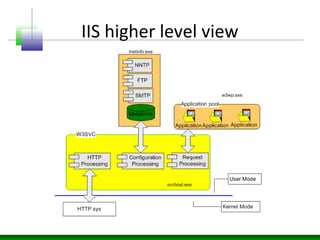
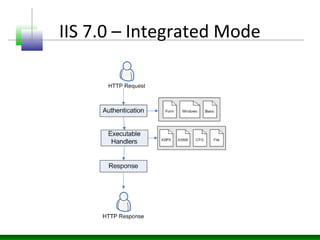
IIS higher level view
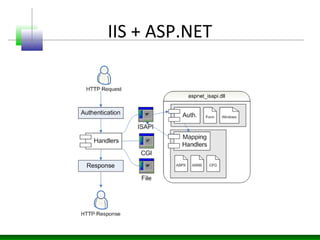
IIS + ASP.NET
IIS 7.0 – Integrated Mode
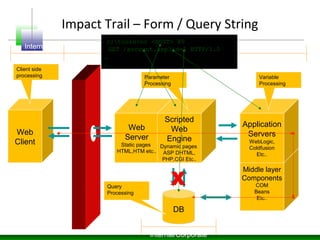
Impact Trail – Form / Query String
Web
Server
Static pages
HTML,HTM etc..
Web
Client
Scripted
Web
Engine
Dynamic pages
ASP DHTML,
PHP,CGI Etc..
DB
X
Middle layer
Components
COM
Beans
Etc..
Application
Servers
WebLogic,
Coldfusion
Etc..
Internet DMZ Trusted
Internal/Corporate
Parameter
Processing
Variable
Processing
Query
Processing
Client side
processing
c:tools>nc <HOST> 80
GET /account.asp?id=5 HTTP/1.0
…
…
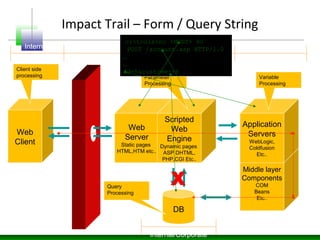
Impact Trail – Form / Query String
Web
Server
Static pages
HTML,HTM etc..
Web
Client
Scripted
Web
Engine
Dynamic pages
ASP DHTML,
PHP,CGI Etc..
DB
X
Middle layer
Components
COM
Beans
Etc..
Application
Servers
WebLogic,
Coldfusion
Etc..
Internet DMZ Trusted
Internal/Corporate
Parameter
Processing
Variable
Processing
Query
Processing
Client side
processing
c:tools>nc <HOST> 80
POST /account.asp HTTP/1.0
…
…
Id=5&customer=6
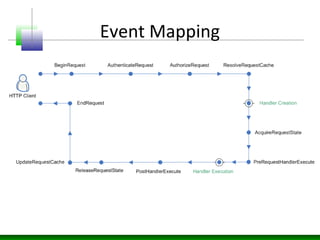
Event Mapping
Profiling
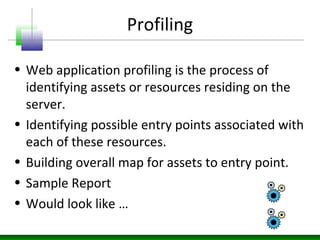
• Web application profiling is the process of
identifying assets or resources residing on the
server.
• Identifying possible entry points associated with
each of these resources.
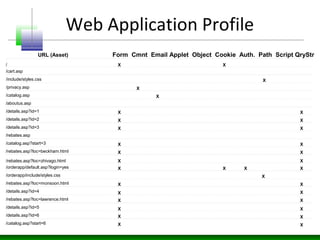
• Building overall map for assets to entry point.
• Sample Report
• Would look like …
Web Application Profile
/
/cart.asp
/include/styles.css
/privacy.asp
/catalog.asp
/details.asp?id=1
/aboutus.asp
/rebates.asp
/details.asp?id=2
/details.asp?id=3
/catalog.asp?start=3
/rebates.asp?loc=beckham.html
/rebates.asp?loc=zhivago.html
/orderapp/default.asp?login=yes
/rebates.asp?loc=monsoon.html
/orderapp/include/styles.css
/details.asp?id=4
/rebates.asp?loc=lawrence.html
/details.asp?id=5
/details.asp?id=6
/catalog.asp?start=6
URL (Asset) Form Cmnt Email Applet Object Cookie Auth. Path Script QryStr
X
X
X
X
X
X
X
X
X
X
X
X
X
X
X
X
X X
X
X
X
X
X
X
X
X
X
X
X
X
X
X
X
X
Web 2.0 Dimension
• Ajax resources
• RIA and Silverlight components
• It needs to mapped as well
• Very critical step to do Web 2.0 crawling
• Need to do JavaScript traversing and dynamic
execution
• Different approach is required
Crawling
• Web crawling is the method of collecting all
possible resources from the application
• Crawlers look for “href” and collect them.
• Recursively make HTTP request and collect
responses the server
• Local copy of HTML page can be saved.
• Running different patterns on HTML page can
help in identifying entry points
Crawling challenges
• Dynamic page creation through JavaScript
using Ajax.
• DOM events are managing the application
layer.
• DOM is having clear context.
• Protocol driven crawling is not possible
without loading page in the browser.
Ajax driven site
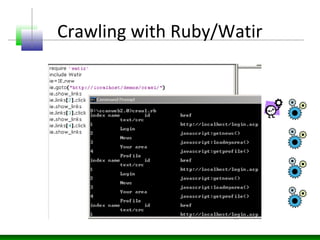
Crawling with Ruby/Watir
Profiling leads to
• Now having complete profile map we are in
position to define attack vectors
• Query string can be tested for SQL injection
• Applet for de-compilation
• Objects for reverse engineering
• Parameters for file inputs
• Cookie for session hijacking
• Attacks, Audit and Assessment – Blackbox…
Conclusion

Applciation footprinting, discovery and enumeration

  • 1.
  • 2.
  • 3.
    Enterprise wide Webfootprinting • Web application footprinting needs following information – IP address OR Host name – Right port to access HTTP server • “Host” tag is key directive in HTTP for Web applications • Why?
  • 4.
    Multihosting with Apache •Apache’s httpd.conf <VirtualHost *:80> # ServerAdmin webmaster@dummy-host.example.com DocumentRoot /usr/local/apache2/htdocs # ErrorLog logs/dummy-host.example.com-error_log # CustomLog logs/dummy-host.example.com-access_log common </VirtualHost> <VirtualHost *:80> # ServerAdmin webmaster@dummy-host.example.com DocumentRoot /usr/local/apache2/htdocs/blue ServerName www.blue.com # ErrorLog logs/dummy-host.example.com-error_log # CustomLog logs/dummy-host.example.com-access_log common </VirtualHost> <VirtualHost *:80> # ServerAdmin webmaster@dummy-host.example.com DocumentRoot /usr/local/apache2/htdocs/red ServerName www.red.com # ErrorLog logs/dummy-host.example.com-error_log # CustomLog logs/dummy-host.example.com-access_log common </VirtualHost> Working directory for www.blue.com Working directory for www.red.com
  • 5.
    Accessing Default HTTP/1.1 200OK Date: Tue, 11 Jan 2005 20:17:40 GMT Server: Apache/2.0.50 (Unix) mod_ssl/2.0.50 OpenSSL/0.9.7d mod_jk2/2.0.4 Content-Location: index.html.en Vary: negotiate,accept-language,accept-charset TCN: choice Last-Modified: Fri, 04 May 2001 00:01:18 GMT ETag: "1c4d0-5b0-40446f80;1c4e6-961-8562af00" Accept-Ranges: bytes Content-Length: 1456 Connection: close Content-Type: text/html; charset=ISO-8859-1 Content-Language: en Expires: Tue, 11 Jan 2005 20:17:40 GMT C:Documents and SettingsAdministrator> nc 203.88.128.10 80 HEAD / HTTP/1.0 Showing page Size (Default application)
  • 6.
    Accessing Blue HTTP/1.1 200OK Date: Tue, 11 Jan 2005 20:17:45 GMT Server: Apache/2.0.50 (Unix) mod_ssl/2.0.50 OpenSSL/0.9.7d mod_jk2/2.0.4 Last-Modified: Tue, 04 Jan 2005 23:10:29 GMT ETag: "1865-b-f991a340" Accept-Ranges: bytes Content-Length: 11 Connection: close Content-Type: text/html; charset=ISO-8859-1 C:Documents and SettingsAdministrator> nc 203.88.128.10 80 HEAD / HTTP/1.0 Host: www.blue.com Showing page Size (Default application) Host tag supplied With HTTP HEAD request
  • 7.
    Accessing Red HTTP/1.1 200OK Date: Tue, 11 Jan 2005 20:17:45 GMT Server: Apache/2.0.50 (Unix) mod_ssl/2.0.50 OpenSSL/0.9.7d mod_jk2/2.0.4 Last-Modified: Tue, 04 Jan 2005 23:10:29 GMT ETag: "1865-b-f991a340" Accept-Ranges: bytes Content-Length: 9 Connection: close Content-Type: text/html; charset=ISO-8859-1 C:Documents and SettingsAdministrator> nc 203.88.128.10 80 HEAD / HTTP/1.0 Host: www.red.com Showing page Size (Default application) Host tag supplied With HTTP HEAD request
  • 8.
    Identifying Name Servers- Whois C:Program FilesGnuWin32bin>jwhois -h whois.arin.net 203.88.128.10 [Querying whois.arin.net] [whois.arin.net] OrgName: XYZ corp OrgID: XYZC Address: 101 First Avenue City: NYC StateProv: NY PostalCode: 94089 Country: US NetRange: 203.88.128.0 – 203.88.128.255 CIDR: 203.88.128.0/20 NetName: XYZC-4 NetHandle: NET-203-88-128-0-1 Parent: NET-203-0-0-0-0 NetType: Direct Allocation NameServer: ns1.xyz.com NameServer: ns2.xyz.com Comment: RegDate: 2003-07-17 Updated: 2003-07-17 OrgTechHandle: NA098-ARIN OrgTechName: Netblock Admin OrgTechPhone: +1-212-999-9999 OrgTechEmail: netblockadmin@xyz.com # ARIN WHOIS database, last updated 2005-01-10 19:10 # Enter ? for additional hints on searching ARIN's WHOIS database. C:Program FilesGnuWin32bin> Name Servers For IP address
  • 9.
    Query PTR onname server C:Documents and SettingsAdministrator>nslookup Default Server: ns1.icenet.net Address: 203.88.128.7 > server ns1.xyz.com Default Server: [203.88.128.250] Address: 203.88.128.250 > 203.88.128.10 Server: [203.88.128.250] Address: 203.88.128.250 Name: www.blue.com Address: 192.168.7.50 > set type=PTR > 203.88.128.10 Server: [203.88.128.250] Address: 203.88.128.250 10.128.88.203.in-addr.arpa name = www.blue.com 10.128.88.203.in-addr.arpa name = www.red.com > Bingo! We have it Running it to Query Name Server Setting the target Name Server Passing IP Address Setting PTR As query Type
  • 10.
    What if PTRis not there? C:Documents and SettingsAdministrator> nslookup Default Server: ns1.icenet.net Address: 203.88.128.7 > server 203.88.128.250 Default Server: icedns1.icenet.net Address: 203.88.128.250 > 203.88.128.11 Server: icedns1.icenet.net Address: 203.88.128.250 Name: ice.128.client11.icenet.net Address: 203.88.128.11 > set type=PTR > 203.88.128.11 Server: icedns1.icenet.net Address: 203.88.128.250 Non-authoritative answer: 11.128.88.203.in-addr.arpa name = ice.128.client11.icenet.net > 203.88.128.11 Server: icedns1.icenet.net Address: 203.88.128.250 Non-authoritative answer: 11.128.88.203.in-addr.arpa name = ice.128.client11.icenet.net No Luck!
  • 11.
    Digging whois services •Webhosting.info – Provides advanced reverse IP lookup tool. • http://whois.webhosting.info/2 • Bingo! We do have all virtual hosts sitting on IP.
  • 12.
    Another way –Leveraging Search • MSN search engine provides “ip” switch. • “ip: 203.88.128.11” • It will fetch all pages with host name residing on this IP address • AppMap is a tool to do it using Web Services.
  • 13.
    Domain footprinting -AppMap • MSN search engine provides “site” switch. • “site: icenet.net” • It will fetch all pages with icenet.net as higher level domain. • AppMap is a tool to do it using Web Services. • Google, A9 etc. provides same feature as well.
  • 14.
    Cross Domain footprinting •MSN search engine provides “link” switch. • “link: icenet.net” • It will fetch all pages which are pointing to target domain. • AppMap is a tool to do it using Web Services. • Google, A9 etc. provides same feature as well.
  • 15.
    Cross Domain footprinting •Here we are trying to search all possible cross domain hosts sitting in a specific range • This would help in narrow down the scope.
  • 16.
    Cross Domain footprinting •List of results with IP address only • We are all set with all possible IPs and cross domain applications.
  • 17.
    Advantages of techniques •Footprinting helps in scoping out the activities • Host, Domain and Cross domain targets would help in taking the stock of all assets. • Tools like AppMap can be handy during assessment. • At the end we have list of IP address mapped to all hosts running on it with their linkages as well.
  • 18.
  • 19.
    Application Server Fingerprinting •Identifying Web and Application servers. • Forcing handlers to derive internal plugin or application servers like Tomcat or WebLogic. • Looking for Axis or any other Web Services container. • Gives overall idea about infrastructure.
  • 20.
    Ajax/RIA call • AsynchronousJavaScript and XML HTML / CSS / Flash JS / DOM XMLHttpRequest (XHR) Database / Resource XML / Middleware / Text Web Server Asynchronous over HTTP(S)
  • 21.
  • 22.
  • 23.
    Fingerprinting • Ajax basedframeworks and identifying technologies. • Running with what? – Atlas – GWT – Etc. • Helps in identifying weakness of the application layer. • Good idea on overall application usage.
  • 24.
    Fingerprinting • Fingerprinting RIAcomponents running with Flash. • Atlas script discovery and hidden entry points identification. • Scanning for other frameworks.
  • 25.
  • 26.
  • 27.
    Discovery • Ajax runningwith various different structures. • Developers are adding various different calls and methods for it. • JavaScript can talk with back end sources. • Mashups application talking with various sources. • It has significant security impact. • JSON, Array, JS-Object etc. • Identifying and Discovery of structures.
  • 28.
  • 29.
  • 30.
    Defining Enterprise Assets •Web applications are having list of assets • Each of these application asset can be looked as resource as well • Web application assets are having entry point to the application • One of the objectives is to identify list of assets with their entry points
  • 31.
    Enterprise 2.0 Assets •It can be front end JavaScript or RIA component • XML Services can be running in the back end • Web Services over SOAP can be critical assets • Hidden calls can help in getting these next generation resources
  • 32.
    Entry points • Entrypoints – Using them one can talk with an application – Querystring – Forms – Java applet – Object – Web Services – Etc. • Each of these entry points can be attacked by an attacker.
  • 33.
    Entry point andimpact • Each of the entry points has their own impact on the application • Entry point may be hitting internal database or application logic. • Depending on how entry point is handled by application defines its security. • If entry point is not well guarded and vulnerable than one can exploit the hole. • Let’s look at its trail.
  • 34.
  • 35.
  • 36.
    IIS 7.0 –Integrated Mode
  • 37.
    Impact Trail –Form / Query String Web Server Static pages HTML,HTM etc.. Web Client Scripted Web Engine Dynamic pages ASP DHTML, PHP,CGI Etc.. DB X Middle layer Components COM Beans Etc.. Application Servers WebLogic, Coldfusion Etc.. Internet DMZ Trusted Internal/Corporate Parameter Processing Variable Processing Query Processing Client side processing c:tools>nc <HOST> 80 GET /account.asp?id=5 HTTP/1.0 … …
  • 38.
    Impact Trail –Form / Query String Web Server Static pages HTML,HTM etc.. Web Client Scripted Web Engine Dynamic pages ASP DHTML, PHP,CGI Etc.. DB X Middle layer Components COM Beans Etc.. Application Servers WebLogic, Coldfusion Etc.. Internet DMZ Trusted Internal/Corporate Parameter Processing Variable Processing Query Processing Client side processing c:tools>nc <HOST> 80 POST /account.asp HTTP/1.0 … … Id=5&customer=6
  • 39.
  • 40.
    Profiling • Web applicationprofiling is the process of identifying assets or resources residing on the server. • Identifying possible entry points associated with each of these resources. • Building overall map for assets to entry point. • Sample Report • Would look like …
  • 41.
  • 42.
    Web 2.0 Dimension •Ajax resources • RIA and Silverlight components • It needs to mapped as well • Very critical step to do Web 2.0 crawling • Need to do JavaScript traversing and dynamic execution • Different approach is required
  • 43.
    Crawling • Web crawlingis the method of collecting all possible resources from the application • Crawlers look for “href” and collect them. • Recursively make HTTP request and collect responses the server • Local copy of HTML page can be saved. • Running different patterns on HTML page can help in identifying entry points
  • 44.
    Crawling challenges • Dynamicpage creation through JavaScript using Ajax. • DOM events are managing the application layer. • DOM is having clear context. • Protocol driven crawling is not possible without loading page in the browser.
  • 45.
  • 46.
  • 47.
    Profiling leads to •Now having complete profile map we are in position to define attack vectors • Query string can be tested for SQL injection • Applet for de-compilation • Objects for reverse engineering • Parameters for file inputs • Cookie for session hijacking • Attacks, Audit and Assessment – Blackbox…
  • 48.