




Android Programming


     Lesson 13

Android Animation
    NGUYEN The Linh
Android Programming


Contents


       1   Property Animation

       2   Drawable Animation

       3   View Animation


                         2
Android Programming


Android Animation


            Property Animation


                    3
Android Programming


Property Animation

 Animating with ValueAnimator
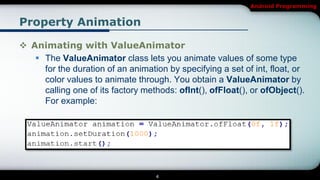
    The ValueAnimator class lets you animate values of some type
     for the duration of an animation by specifying a set of int, float, or
     color values to animate through. You obtain a ValueAnimator by
     calling one of its factory methods: ofInt(), ofFloat(), or ofObject().
     For example:


                                   4
Android Programming


Property Animation

 Animating with ValueAnimator
    The previous code snippets, however, has no real effect on an
     object, because the ValueAnimator does not operate on objects
     or properties directly.

    You do this by defining listeners in the ValueAnimator to
     appropriately handle important events during the animation's
     lifespan, such as frame updates.


                                 5
Android Programming


Property Animation

 Animating with ValueAnimator
    When implementing the listeners, you can obtain the calculated
     value for that specific frame refresh by calling
     getAnimatedValue()

    Animator.AnimatorListener
       • onAnimationStart() - Called when the animation starts.

       • onAnimationEnd() - Called when the animation ends.

       • onAnimationRepeat() - Called when the animation repeats itself.

                                      6
Android Programming


Property Animation

 Animating with ValueAnimator
    Animator.AnimatorListener
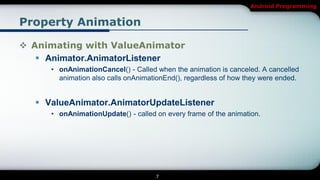
     • onAnimationCancel() - Called when the animation is canceled. A cancelled
       animation also calls onAnimationEnd(), regardless of how they were ended.


   ValueAnimator.AnimatorUpdateListener
     • onAnimationUpdate() - called on every frame of the animation.


                                    7
Android Programming


Property Animation

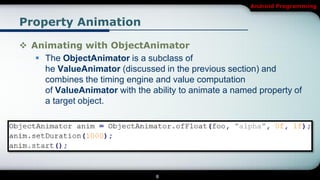
 Animating with ObjectAnimator
    The ObjectAnimator is a subclass of
     he ValueAnimator (discussed in the previous section) and
     combines the timing engine and value computation
     of ValueAnimator with the ability to animate a named property of
     a target object.


                                 8
Android Programming


Property Animation

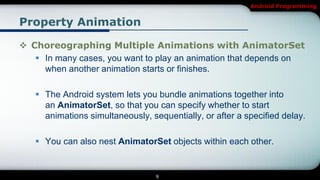
 Choreographing Multiple Animations with AnimatorSet
    In many cases, you want to play an animation that depends on
     when another animation starts or finishes.

    The Android system lets you bundle animations together into
     an AnimatorSet, so that you can specify whether to start
     animations simultaneously, sequentially, or after a specified delay.

    You can also nest AnimatorSet objects within each other.


                                  9
Android Programming


Property Animation

 Choreographing Multiple Animations with AnimatorSet


                         10
Android Programming


Property Animation

 Choreographing Multiple Animations with AnimatorSet
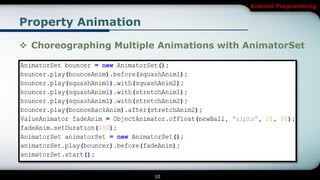
    1. Plays bounceAnim.

   2. Plays squashAnim1, squashAnim2, stretchAnim1,
    and stretchAnim2 at the same time.

   3. Plays bounceBackAnim.

   4. Plays fadeAnim.


                               11
Android Programming


Property Animation

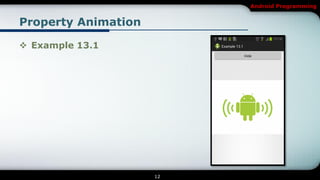
 Example 13.1


                     12
Android Programming


Android Animation


           Drawable Animation


                    13
Android Programming


Drawable Animation

 Drawable animation lets you load a series of Drawable
  resources one after another to create an animation.

 This is a traditional animation in the sense that it is created
  with a sequence of different images, played in order, like a
  roll of film


 The AnimationDrawable class is the basis for Drawable
  animations.

                               14
Android Programming


Drawable Animation

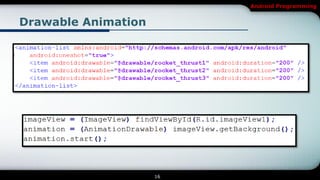
 While you can define the frames of an animation in your
  code, using the AnimationDrawable class API, it's more
  simply accomplished with a single XML file that lists the
  frames that compose the animation.

 The XML file for this kind of animation belongs in
  the res/drawable/ directory of your Android project.


                             15
Android Programming


Drawable Animation


                     16
Android Programming


Drawable Animation

 Example 13.2


                     17
Android Programming


Android Animation


             View Animation


                    18
Android Programming


View Animation

 You can use the view animation system to perform tweened
  animation on Views.

 Tween animation calculates the animation with information
  such as the start point, end point, size, rotation, and
  other common aspects of an animation.


                            19
Android Programming


View Animation

 There are two types of animations that you can do with the
  view animation framework:

    Tween animation: Creates an animation by performing a series of
     transformations on a single image with an Animation

    Frame animation: or creates an animation by showing a
     sequence of images in order with an AnimationDrawable.


                               20
Android Programming


View Animation

 The animation XML file belongs in the res/anim/ directory
  of your Android project.

 The file must have a single root element: this will be either a
  single <alpha>, <scale>, <translate>, <rotate>,
  interpolator element, or<set> element that holds groups of
  these elements (which may include another <set>).


                              21
Android Programming


View Animation

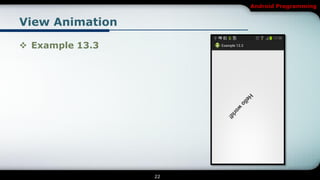
 Example 13.3


                 22
Android Programming

[Android] Android Animation

  • 1.
    Android Programming Lesson 13 Android Animation NGUYEN The Linh
  • 2.
    Android Programming Contents 1 Property Animation 2 Drawable Animation 3 View Animation 2
  • 3.
  • 4.
    Android Programming Property Animation Animating with ValueAnimator  The ValueAnimator class lets you animate values of some type for the duration of an animation by specifying a set of int, float, or color values to animate through. You obtain a ValueAnimator by calling one of its factory methods: ofInt(), ofFloat(), or ofObject(). For example: 4
  • 5.
    Android Programming Property Animation Animating with ValueAnimator  The previous code snippets, however, has no real effect on an object, because the ValueAnimator does not operate on objects or properties directly.  You do this by defining listeners in the ValueAnimator to appropriately handle important events during the animation's lifespan, such as frame updates. 5
  • 6.
    Android Programming Property Animation Animating with ValueAnimator  When implementing the listeners, you can obtain the calculated value for that specific frame refresh by calling getAnimatedValue()  Animator.AnimatorListener • onAnimationStart() - Called when the animation starts. • onAnimationEnd() - Called when the animation ends. • onAnimationRepeat() - Called when the animation repeats itself. 6
  • 7.
    Android Programming Property Animation Animating with ValueAnimator  Animator.AnimatorListener • onAnimationCancel() - Called when the animation is canceled. A cancelled animation also calls onAnimationEnd(), regardless of how they were ended.  ValueAnimator.AnimatorUpdateListener • onAnimationUpdate() - called on every frame of the animation. 7
  • 8.
    Android Programming Property Animation Animating with ObjectAnimator  The ObjectAnimator is a subclass of he ValueAnimator (discussed in the previous section) and combines the timing engine and value computation of ValueAnimator with the ability to animate a named property of a target object. 8
  • 9.
    Android Programming Property Animation Choreographing Multiple Animations with AnimatorSet  In many cases, you want to play an animation that depends on when another animation starts or finishes.  The Android system lets you bundle animations together into an AnimatorSet, so that you can specify whether to start animations simultaneously, sequentially, or after a specified delay.  You can also nest AnimatorSet objects within each other. 9
  • 10.
    Android Programming Property Animation Choreographing Multiple Animations with AnimatorSet 10
  • 11.
    Android Programming Property Animation Choreographing Multiple Animations with AnimatorSet  1. Plays bounceAnim.  2. Plays squashAnim1, squashAnim2, stretchAnim1, and stretchAnim2 at the same time.  3. Plays bounceBackAnim.  4. Plays fadeAnim. 11
  • 12.
  • 13.
  • 14.
    Android Programming Drawable Animation Drawable animation lets you load a series of Drawable resources one after another to create an animation.  This is a traditional animation in the sense that it is created with a sequence of different images, played in order, like a roll of film  The AnimationDrawable class is the basis for Drawable animations. 14
  • 15.
    Android Programming Drawable Animation While you can define the frames of an animation in your code, using the AnimationDrawable class API, it's more simply accomplished with a single XML file that lists the frames that compose the animation.  The XML file for this kind of animation belongs in the res/drawable/ directory of your Android project. 15
  • 16.
  • 17.
  • 18.
  • 19.
    Android Programming View Animation You can use the view animation system to perform tweened animation on Views.  Tween animation calculates the animation with information such as the start point, end point, size, rotation, and other common aspects of an animation. 19
  • 20.
    Android Programming View Animation There are two types of animations that you can do with the view animation framework:  Tween animation: Creates an animation by performing a series of transformations on a single image with an Animation  Frame animation: or creates an animation by showing a sequence of images in order with an AnimationDrawable. 20
  • 21.
    Android Programming View Animation The animation XML file belongs in the res/anim/ directory of your Android project.  The file must have a single root element: this will be either a single <alpha>, <scale>, <translate>, <rotate>, interpolator element, or<set> element that holds groups of these elements (which may include another <set>). 21
  • 22.
  • 23.