Qt Quick – GUI programming with QML
            SERIOUS ABOUT SOFTWARE
Timo Strömmer, Jan 4, 2011
                                      1
Previous day quick quizz
 •   What are the ways to lay out items?

 •   What is the purpose of id property

 •   Which colors are visible in following:


                                              2
Contents – Day 2
 •   Dynamic object management
      • Inline components
      • Dynamic loading

 •   Building fluid user interfaces
      • Animations
      • States and transitions

 •   User interaction
      • Mouse and key
      • Interactive containers
Contents – Day 2
 •   Adding data to GUI
      • Data models
      • Views
      • Delegates


                          4
Component and script files, dynamic object loading

STRUCTURING QML
PROGRAMS

                                                     5
QML components
 •    Refresher from yesterday


       FunWithQML
     extends Rectancle


                                 6
Component files
 •   The import statement can be used to
     reference QML files in other directories

      • Single file import

      • Directory import


 •   Imported directory can be scoped


                                                7
Script files
 •   The import statement also works with
     JavaScript

      • Can import files, not directories

      • Must have the as qualifier


                                            8
Property scopes
 •   Properties of components are visible to
     child components

      • But, considered bad practice
                                   RedRect.qml
      Main.qml


                                                 9
Property scopes
 •   Instead, each component should provide
     an API of it’s own


                                              10
Script scopes
 •   Same scoping rules apply to scripts in
     external JavaScript files

      • i.e. same as replacing the function call with the
         script

      • Again, not good practice as it makes the
         program quite confusing


                                                            11
JavaScript scoping
 •   If script function declares variables with
     same name, the script variable is used


                                  getText uses local variable
                                    run uses inherited one


                                                                12
Inline components
 •   Components can be declared inline

      • Component element

      • Useful for small or private components
           • For example data model delegates

      • Loader can be used to create instances
           • Loader inherits Item

           • Can be used to load components from web


 •   Example in ComponentLoader directory


                                                       13
Dynamic loading
 •   In addition to Loader, components can be
     loaded dynamically via script code

      • Qt.createComponent loads a Component
           • File or URL as parameter

      • component.createObject creates an instance of
        the loaded component

           • Parent object as parameter

      • Qt.createQmlObject can be used to create QML
        objects from arbitrary string data


 •   Example in ScriptComponents directory

                                                        14
Overview of QML animations

BUILDING FLUID GUI


                             15
Animations overview
 •   Animation changes a property gradually
     over a time period

      • Brings the ”fluidness” into the UI

 •   Different types for different scenarios

 •   Supports grouping and nesting


                                               16
Animation basics
 •   All animations inherit from Animation base
     component

      • Basic properties (just like Item for GUI)

 •   Properties for declarative use:

      • running, paused, loops, alwaysRunToEnd

 •   Can also be used imperatively:

      • start, stop, pause, resume, restart, complete


                                                        17
Animation types
 •   Property value sources

 •   Behavioral

 •   Standalone

 •   Signal handlers

 •   State transitions


                              18
Animation types
 •   Property value source animation is run as
     soon as the target object is created

      • Animation provides the property value

      • Animation on Property syntax
           • Starts at from or current value

           • Ends at to

           • Lasts duration milliseconds


                                                 19
Animation types
 •   Behavioral animation

      • Default animation that is run when property
         changes

      • Behavior on Property syntax


      • No from or to needed, since old and new values
         come from the property change


                                                         20
Animation types
 •   Standalone animations are created as any
     other QML object

      • Attached to target object
            • Affects a property or properties

            • from optional, to mandatory

      • Need to be explicitly started


                                                 21
Animation types
 •   Signal handler animation is quite similar to
     standalone animation

      • Start is triggered by the signal

      • Otherwise same rules
            • Needs to be bound to target and property

            • from optional, to mandatory


 •   More about state transitions in later slides


                                                         22
Animation types
 •   Example code in AnimationExamples
     directory

      • Uses NumberAnimation for various scenarios


                                                     23
Animation objects
 •   The actual animation is built from
     animation objects

      • PropertyAnimation and it’s derivatives
            • NumberAnimation, SmoothedAnimation,
              ColorAnimation, RotationAnimation, SpringAnimation

      • Grouping and nesting
            • SequentialAnimation, ParallelAnimation,
              PauseAnimation

      • GUI layout changes
            • AnchorAnimation, ParentAnimation


                                                                   24
Animation grouping
 •   Animations can be grouped to build more
     complex scenarios

      • SequentialAnimation is a list of animations that
         is run one at a time

      • ParallelAnimation is a list of animations that is
         run simultaneously

      • PauseAnimation is used to insert delays into
         sequential animations


                                                            25
Animation grouping
 •   Sequential and parallel animations can be
     nested

      • For example, a parallel animation may contain
         multiple sequential animations


 •   Example in AnimationGrouping directory

      • Also uses ColorAnimation


                                                        26
GUI states and animated state transitions

BUILDING FLUID GUI


                                            27
GUI states
 •   A state represents a snapshot of a GUI
                  Click on
                   ”Edit”


                     Mouse on
                     file name


                                              28
GUI states
 •   States are usually applicable at many
     levels, regardless of problem complexity

      • i.e. whole program vs. small trinket

 •   Transitions between states

      • Response to user interaction or other events

      • Many transitions may be run parallel

      • May be animated with QML


                                                       29
GUI states in QML
 •   State framework built into QML:

      • Every GUI Item has a state property, default
         state and a list of states

            • States are identified by name, default has no name

      • Each State object inherits properties from
         default state and declares the differences

            • PropertyChanges element

      • A state may inherit properties from another
         state instead of the default

            • extend property


                                                                   30
GUI states
 •   Only one state is active at a time

      • So, only properties from default and changes
         from active state are in use

      • State can be activated via script or with the help
         of when binding


 •   Example in SimpleState directory


                                                             31
State transitions
 •   The transitions between states are declared
     separately from the states

      • List of transitions under the Item

      • Quite similar to ParallelAnimation
            • Although, doesn’t inherit Animation


 •   Example in SimpleStateTransition directory


                                                    32
State transitions
 •   All transitions are applied by default

      • Can be scoped with from and to
            • Both are bound to state name

      • Transition overrides Behavior on <property>

 •   Transition animations are run in parallel

      • Can be wrapped into SequentialAnimation

      • Transition reversible flag might be needed
            • Runs sequential animations in reverse order


                                                            33
State examples
 •   SequentialTransition directory

      • Transitions quizz

 •   Mapping the AnimationGrouping example
     into state framework

      • StateExample directory


                                             34
Advanced animation topics

BUILDING FLUID GUI


                            35
Layout animations
 •   The anchors of GUI Items can be changed
     while application is running

      • AnchorChanges element within a state
           • Re-anchors the item to another valid target

      • AnchorAnimation can be applied to state
        transitions list to animate the changes

           • Animates position and dimensions


 •   Some quirks involved

      • Example in AnchorAnimations directory


                                                           36
Layout animations
 •   In addition to anchor changes, the parent-
     child relationship of items can be changed

      • ParentChange element within a state
           • Changes the parent of an item

           • Optionally also the coordinates, size and transform

      • New relative coordinates

      • Requires re-anchoring within new parent

 •   Example in ParentChange directory


                                                                   37
More animation objects
 •   RotationAnimation for angles

      • Configurable rotation direction

      • Uses shortest path by default
            • i.e. instead of going back from 359 to 0


 •   SmoothedAnimation for movement

      • For example translations

      • Can use velocity instead of duration
            • So speed doesn’t depend on distance moved

      • Easing curve built in

                                                          38
More animation objects
 •   SpringAnimation for spring-like movement

      • spring, damping and mass

 •   Some examples in TransformAnimations
     directory

      • Although, note that these animations are not in
         any way restricted to transformations


                                                          39
Easing curves
 •   Property and anchor animations may have
     an easing curve

      • Results in non-linear property change

      • Quite a lot of pre-defined curves
            • Check PropertyAnimation.easing.type for details


 •   Quick task:

      • Open AnimationGrouping example and add
         some easing curves


                                                                40
Script hooks
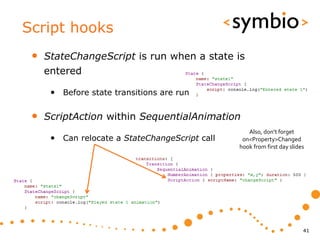
 •   StateChangeScript is run when a state is
     entered

      • Before state transitions are run

 •   ScriptAction within SequentialAnimation
                                                   Also, don’t forget
      • Can relocate a StateChangeScript call    on<Property>Changed
                                                hook from first day slides


                                                                         41
Animation actions
 •   ScriptAction can also run without states

      • Use script property instead of scriptName


 •   PropertyAction changes a property without
     performing animations

      • For example bool flags, z-value etc.


                                                    42
Animation notes
 •   Transformations (especially rotation) may
     produce jagged lines (aliasing)

      • Each Item has smooth property for anti-aliasing

 •   Smoothing is expensive operation

      • Might be good idea to try disabling smoothing
         for the duration of animations


                                              See also ClockExample


                                                                      43
Handling mouse and keyboard input

USER INTERACTION


                                    44
Mouse and key events
 •   Mouse and keys are handled via events

      • MouseEvent contains position and button
         combination

            • Posted to Item under cursor

      • KeyEvent contains key that was pressed
            • Posted to Item, which has the active focus

      • If item doesn’t handle it, event goes to parent
            • When accepted properties is set to true, the event
              propagation will stop

      • Events are signal parameters


                                                                   45
Mouse input
 •   MouseArea element has already been used
     in most of the examples

      • Works for desktop and mobile devices
            • Although, some signals will not be portable

      • pressed property
            • Any mouse button (pressedButtons for filtering)

            • Finger-press on touch screen

      • Position of events:
            • mouseX and mouseY properties

            • mouse signal parameter


                                                                46
Mouse drag
 •   MouseArea can make an item draggable

      • Works with mouse and touch

 •   Draggable items may contain children with
     mouse handling of their own

      • The child items must be children of the
         MouseArea that declares dragging

            • MouseArea inherits Item, so may contain child items

            • drag.filterChildren property


 •   Example in MouseDrag directory

                                                                    47
Keyboard input
 •   Each Item supports keyboard input

      • Keys and KeyNavigation attached properties
            • Keys.on<Key>Pressed signals

            • KeyNavigation.up / down / left / right properties

      • Key events arrive to item with activeFocus
            • Can be forwarded to other items

            • Ignored if none of items is focused

      • Setting focus property to true to get focus


                                                                  48
Keyboard input
 •   FocusScope element can create focus
     groups

      • Needed for re-usable components
            • Internals of component are not visible

      • Invisible item, similarly as MouseArea
            • One item within each FocusScope may have focus

            • Item within the FocusScope, which has focus gets key
              events


 •   Example in KeyboardFocus directory


                                                                     49
Flickable element
 •   Scrollable container for other elements

      • Drag or flick to scroll

      • Scrollbars not built-in
            • ScrollBar example available in QML documentation


        contentWidth

           height
             width


                     contentHeight

                                                                 50
Flickable element
 •   Flickable mouse events

      • Drag events are intercepted by the flickable

      • Mouse clicks go to children
            • Similarly as MouseArea with drag enabled

      • Control via interactive and pressDelay properties

 •   Example in FlickableExample directory

      • Also contains StateChangeScript and
         PropertyAction examples


                                                            51
Flipable element
 •   Flipable is a two-sided container

      • Card with front and back items

      • Must use Rotation transform to see the back
           • Either via x or y axis, z won’t help

           • Will not go upside-down via x-axis rotation

      • States and transitions not pre-implemented
           • Use for example RotationAnimation for transition


 •   Example in FlipExample directory


                                                                52
Models, views and delegates

DISPLAYING DATA


                              53
Data elements
 •   Data elements are divided into three parts

      • Model contains the data
            • Each data element has a role

      • View defines the layout for the data elements
            • Pre-defined views: ListView, GridView and PathView

      • Delegate displays a single model element
            • Any Item-based component works


                                                                   54
Data models
 •   ListModel for list of data elements

      • Define ListElement objects in QML code
           • ListElement consists of roles, not properties

           • Syntax is similar to QML properties (name: value)

           • But, cannot have scripts or bindings as value

      • Add JavaScript objects dynamically
           • Any dictionary-based (name: value) object will work

           • Works also with nested data structures


                                                                   55
Data models
 •   ListModel is manipulated via script code

      • append, insert, move, remove, clear

      • get, set, setProperty

      • Changes to model are automatically reflected in
         the view(s) which display the model

            • Although, changes via WorkerScript need sync


 •   Example in SimpleDataModel directory


                                                             56
Data models
 •   Other model types

      • XmlListModel for mapping XML-data (for
        example from web services) into QML view

           • Uses XPath queries within list elements (XmlRole)

      • FolderListModel from QtLabs experimental
           • Displays local file system contents

      • VisualItemModel for GUI Items

      • VisualDataModel
           • Can visualize Qt/C++ tree models

           • May share GUI delegates across views


                                                                 57
Data views
 •   QML has three views

      • ListView displays it’s contents in a list
            • Each element gets a row or column of its own

            • Compare to Row or Column positioners

      • GridView is two-dimensional representation
            • Compare with Grid positioner

      • PathView can be used to build 2-dimensional
         paths where elements travel


                                                             58
Path view
 •   The PathView component declares a path
     on which the model elements travel

      • Path consists of path segments
           • PathLine, PathQuad, PathCubic          (10,10)             (110,10)

           • Start and end point + control points

      • Each segment may have path attributes
                                                              (60,80)
           • Interpolated values forwarded to delegate


 •   Example in PhotoExample directory


                                                                                   59
Data view notes
 •   Note the lack of tree view

      • Probably not good for small screens

 •   Repeater was used in earlier example

      • Not a view, but can work with model and
         delegate

           • Or directly with GUI Items


                                                  60
Data views
 •   Interaction with views

      • List and grid views inherint from Flickable
            • Content can be scrolled (no scrollbars though)

      • Path view uses drag and flick to move the items
         around the path

      • Delegates may implement mouse handlers
            • Same rules as with Flickable nested mouse areas


                                                                61
GUI delegates
 •   A delegate component maps a model entry
     into a GUI Item

      • In VisualItemModel each entry is GUI item

 •   Delegate objects are created and destroyed
     by the view as needed

      • Saves resources with lots of items
            • Remember dynamic object management slides at
              beginning of this day

      • Cannot be used to store any state


                                                             62
GUI delegates
 •   The delegate may access the list model
     roles by name

      • If role name is ambiguous, use model attached
         property

      • Special index role also available

 •   See delegate code examples from
     SimpleDataModel and PhotoExample


                                                        63
View selection
 •   Each view has currentIndex property

      • ListView and GridView have currentItem

      • Represents the selected element

 •   View has highlight delegate

      • Draws something under the current item

      • Highlight moves with SmoothedAnimation
           • Can be customized with highlightFollowsCurrentItem


 •   Example in ViewHighlight directory

                                                                  64
Adding states and transitions

FLUID GUI EXERCISES


                                65
States and transitions
 •   Replace one of the original colors with a
     button, which flips the color list over and
     reveals more colors


                                                   66
States and transitions
 •   Add an area to left side, which slides in
     when mouse is clicked on it

      • Slides back when clicked again


                                                 67
Implementing a model and view

DATA MODEL EXERCISE


                                68
Data model exercise
 •   Add a ListModel to the central
     area of day 1 exercise

      • Fill with random names
            • Generator example in
                 CourseDay2/ListArea.qml

      • Add selection support to model

      • When a color on right side is
         clicked, tag the name with that
         color

            • Fade-in / fade-out the tag rectangle


                                                     69
70

QtQuick Day 2

  • 1.
    Qt Quick –GUI programming with QML SERIOUS ABOUT SOFTWARE Timo Strömmer, Jan 4, 2011 1
  • 2.
    Previous day quickquizz • What are the ways to lay out items? • What is the purpose of id property • Which colors are visible in following: 2
  • 3.
    Contents – Day2 • Dynamic object management • Inline components • Dynamic loading • Building fluid user interfaces • Animations • States and transitions • User interaction • Mouse and key • Interactive containers
  • 4.
    Contents – Day2 • Adding data to GUI • Data models • Views • Delegates 4
  • 5.
    Component and scriptfiles, dynamic object loading STRUCTURING QML PROGRAMS 5
  • 6.
    QML components • Refresher from yesterday FunWithQML extends Rectancle 6
  • 7.
    Component files • The import statement can be used to reference QML files in other directories • Single file import • Directory import • Imported directory can be scoped 7
  • 8.
    Script files • The import statement also works with JavaScript • Can import files, not directories • Must have the as qualifier 8
  • 9.
    Property scopes • Properties of components are visible to child components • But, considered bad practice RedRect.qml Main.qml 9
  • 10.
    Property scopes • Instead, each component should provide an API of it’s own 10
  • 11.
    Script scopes • Same scoping rules apply to scripts in external JavaScript files • i.e. same as replacing the function call with the script • Again, not good practice as it makes the program quite confusing 11
  • 12.
    JavaScript scoping • If script function declares variables with same name, the script variable is used getText uses local variable run uses inherited one 12
  • 13.
    Inline components • Components can be declared inline • Component element • Useful for small or private components • For example data model delegates • Loader can be used to create instances • Loader inherits Item • Can be used to load components from web • Example in ComponentLoader directory 13
  • 14.
    Dynamic loading • In addition to Loader, components can be loaded dynamically via script code • Qt.createComponent loads a Component • File or URL as parameter • component.createObject creates an instance of the loaded component • Parent object as parameter • Qt.createQmlObject can be used to create QML objects from arbitrary string data • Example in ScriptComponents directory 14
  • 15.
    Overview of QMLanimations BUILDING FLUID GUI 15
  • 16.
    Animations overview • Animation changes a property gradually over a time period • Brings the ”fluidness” into the UI • Different types for different scenarios • Supports grouping and nesting 16
  • 17.
    Animation basics • All animations inherit from Animation base component • Basic properties (just like Item for GUI) • Properties for declarative use: • running, paused, loops, alwaysRunToEnd • Can also be used imperatively: • start, stop, pause, resume, restart, complete 17
  • 18.
    Animation types • Property value sources • Behavioral • Standalone • Signal handlers • State transitions 18
  • 19.
    Animation types • Property value source animation is run as soon as the target object is created • Animation provides the property value • Animation on Property syntax • Starts at from or current value • Ends at to • Lasts duration milliseconds 19
  • 20.
    Animation types • Behavioral animation • Default animation that is run when property changes • Behavior on Property syntax • No from or to needed, since old and new values come from the property change 20
  • 21.
    Animation types • Standalone animations are created as any other QML object • Attached to target object • Affects a property or properties • from optional, to mandatory • Need to be explicitly started 21
  • 22.
    Animation types • Signal handler animation is quite similar to standalone animation • Start is triggered by the signal • Otherwise same rules • Needs to be bound to target and property • from optional, to mandatory • More about state transitions in later slides 22
  • 23.
    Animation types • Example code in AnimationExamples directory • Uses NumberAnimation for various scenarios 23
  • 24.
    Animation objects • The actual animation is built from animation objects • PropertyAnimation and it’s derivatives • NumberAnimation, SmoothedAnimation, ColorAnimation, RotationAnimation, SpringAnimation • Grouping and nesting • SequentialAnimation, ParallelAnimation, PauseAnimation • GUI layout changes • AnchorAnimation, ParentAnimation 24
  • 25.
    Animation grouping • Animations can be grouped to build more complex scenarios • SequentialAnimation is a list of animations that is run one at a time • ParallelAnimation is a list of animations that is run simultaneously • PauseAnimation is used to insert delays into sequential animations 25
  • 26.
    Animation grouping • Sequential and parallel animations can be nested • For example, a parallel animation may contain multiple sequential animations • Example in AnimationGrouping directory • Also uses ColorAnimation 26
  • 27.
    GUI states andanimated state transitions BUILDING FLUID GUI 27
  • 28.
    GUI states • A state represents a snapshot of a GUI Click on ”Edit” Mouse on file name 28
  • 29.
    GUI states • States are usually applicable at many levels, regardless of problem complexity • i.e. whole program vs. small trinket • Transitions between states • Response to user interaction or other events • Many transitions may be run parallel • May be animated with QML 29
  • 30.
    GUI states inQML • State framework built into QML: • Every GUI Item has a state property, default state and a list of states • States are identified by name, default has no name • Each State object inherits properties from default state and declares the differences • PropertyChanges element • A state may inherit properties from another state instead of the default • extend property 30
  • 31.
    GUI states • Only one state is active at a time • So, only properties from default and changes from active state are in use • State can be activated via script or with the help of when binding • Example in SimpleState directory 31
  • 32.
    State transitions • The transitions between states are declared separately from the states • List of transitions under the Item • Quite similar to ParallelAnimation • Although, doesn’t inherit Animation • Example in SimpleStateTransition directory 32
  • 33.
    State transitions • All transitions are applied by default • Can be scoped with from and to • Both are bound to state name • Transition overrides Behavior on <property> • Transition animations are run in parallel • Can be wrapped into SequentialAnimation • Transition reversible flag might be needed • Runs sequential animations in reverse order 33
  • 34.
    State examples • SequentialTransition directory • Transitions quizz • Mapping the AnimationGrouping example into state framework • StateExample directory 34
  • 35.
  • 36.
    Layout animations • The anchors of GUI Items can be changed while application is running • AnchorChanges element within a state • Re-anchors the item to another valid target • AnchorAnimation can be applied to state transitions list to animate the changes • Animates position and dimensions • Some quirks involved • Example in AnchorAnimations directory 36
  • 37.
    Layout animations • In addition to anchor changes, the parent- child relationship of items can be changed • ParentChange element within a state • Changes the parent of an item • Optionally also the coordinates, size and transform • New relative coordinates • Requires re-anchoring within new parent • Example in ParentChange directory 37
  • 38.
    More animation objects • RotationAnimation for angles • Configurable rotation direction • Uses shortest path by default • i.e. instead of going back from 359 to 0 • SmoothedAnimation for movement • For example translations • Can use velocity instead of duration • So speed doesn’t depend on distance moved • Easing curve built in 38
  • 39.
    More animation objects • SpringAnimation for spring-like movement • spring, damping and mass • Some examples in TransformAnimations directory • Although, note that these animations are not in any way restricted to transformations 39
  • 40.
    Easing curves • Property and anchor animations may have an easing curve • Results in non-linear property change • Quite a lot of pre-defined curves • Check PropertyAnimation.easing.type for details • Quick task: • Open AnimationGrouping example and add some easing curves 40
  • 41.
    Script hooks • StateChangeScript is run when a state is entered • Before state transitions are run • ScriptAction within SequentialAnimation Also, don’t forget • Can relocate a StateChangeScript call on<Property>Changed hook from first day slides 41
  • 42.
    Animation actions • ScriptAction can also run without states • Use script property instead of scriptName • PropertyAction changes a property without performing animations • For example bool flags, z-value etc. 42
  • 43.
    Animation notes • Transformations (especially rotation) may produce jagged lines (aliasing) • Each Item has smooth property for anti-aliasing • Smoothing is expensive operation • Might be good idea to try disabling smoothing for the duration of animations See also ClockExample 43
  • 44.
    Handling mouse andkeyboard input USER INTERACTION 44
  • 45.
    Mouse and keyevents • Mouse and keys are handled via events • MouseEvent contains position and button combination • Posted to Item under cursor • KeyEvent contains key that was pressed • Posted to Item, which has the active focus • If item doesn’t handle it, event goes to parent • When accepted properties is set to true, the event propagation will stop • Events are signal parameters 45
  • 46.
    Mouse input • MouseArea element has already been used in most of the examples • Works for desktop and mobile devices • Although, some signals will not be portable • pressed property • Any mouse button (pressedButtons for filtering) • Finger-press on touch screen • Position of events: • mouseX and mouseY properties • mouse signal parameter 46
  • 47.
    Mouse drag • MouseArea can make an item draggable • Works with mouse and touch • Draggable items may contain children with mouse handling of their own • The child items must be children of the MouseArea that declares dragging • MouseArea inherits Item, so may contain child items • drag.filterChildren property • Example in MouseDrag directory 47
  • 48.
    Keyboard input • Each Item supports keyboard input • Keys and KeyNavigation attached properties • Keys.on<Key>Pressed signals • KeyNavigation.up / down / left / right properties • Key events arrive to item with activeFocus • Can be forwarded to other items • Ignored if none of items is focused • Setting focus property to true to get focus 48
  • 49.
    Keyboard input • FocusScope element can create focus groups • Needed for re-usable components • Internals of component are not visible • Invisible item, similarly as MouseArea • One item within each FocusScope may have focus • Item within the FocusScope, which has focus gets key events • Example in KeyboardFocus directory 49
  • 50.
    Flickable element • Scrollable container for other elements • Drag or flick to scroll • Scrollbars not built-in • ScrollBar example available in QML documentation contentWidth height width contentHeight 50
  • 51.
    Flickable element • Flickable mouse events • Drag events are intercepted by the flickable • Mouse clicks go to children • Similarly as MouseArea with drag enabled • Control via interactive and pressDelay properties • Example in FlickableExample directory • Also contains StateChangeScript and PropertyAction examples 51
  • 52.
    Flipable element • Flipable is a two-sided container • Card with front and back items • Must use Rotation transform to see the back • Either via x or y axis, z won’t help • Will not go upside-down via x-axis rotation • States and transitions not pre-implemented • Use for example RotationAnimation for transition • Example in FlipExample directory 52
  • 53.
    Models, views anddelegates DISPLAYING DATA 53
  • 54.
    Data elements • Data elements are divided into three parts • Model contains the data • Each data element has a role • View defines the layout for the data elements • Pre-defined views: ListView, GridView and PathView • Delegate displays a single model element • Any Item-based component works 54
  • 55.
    Data models • ListModel for list of data elements • Define ListElement objects in QML code • ListElement consists of roles, not properties • Syntax is similar to QML properties (name: value) • But, cannot have scripts or bindings as value • Add JavaScript objects dynamically • Any dictionary-based (name: value) object will work • Works also with nested data structures 55
  • 56.
    Data models • ListModel is manipulated via script code • append, insert, move, remove, clear • get, set, setProperty • Changes to model are automatically reflected in the view(s) which display the model • Although, changes via WorkerScript need sync • Example in SimpleDataModel directory 56
  • 57.
    Data models • Other model types • XmlListModel for mapping XML-data (for example from web services) into QML view • Uses XPath queries within list elements (XmlRole) • FolderListModel from QtLabs experimental • Displays local file system contents • VisualItemModel for GUI Items • VisualDataModel • Can visualize Qt/C++ tree models • May share GUI delegates across views 57
  • 58.
    Data views • QML has three views • ListView displays it’s contents in a list • Each element gets a row or column of its own • Compare to Row or Column positioners • GridView is two-dimensional representation • Compare with Grid positioner • PathView can be used to build 2-dimensional paths where elements travel 58
  • 59.
    Path view • The PathView component declares a path on which the model elements travel • Path consists of path segments • PathLine, PathQuad, PathCubic (10,10) (110,10) • Start and end point + control points • Each segment may have path attributes (60,80) • Interpolated values forwarded to delegate • Example in PhotoExample directory 59
  • 60.
    Data view notes • Note the lack of tree view • Probably not good for small screens • Repeater was used in earlier example • Not a view, but can work with model and delegate • Or directly with GUI Items 60
  • 61.
    Data views • Interaction with views • List and grid views inherint from Flickable • Content can be scrolled (no scrollbars though) • Path view uses drag and flick to move the items around the path • Delegates may implement mouse handlers • Same rules as with Flickable nested mouse areas 61
  • 62.
    GUI delegates • A delegate component maps a model entry into a GUI Item • In VisualItemModel each entry is GUI item • Delegate objects are created and destroyed by the view as needed • Saves resources with lots of items • Remember dynamic object management slides at beginning of this day • Cannot be used to store any state 62
  • 63.
    GUI delegates • The delegate may access the list model roles by name • If role name is ambiguous, use model attached property • Special index role also available • See delegate code examples from SimpleDataModel and PhotoExample 63
  • 64.
    View selection • Each view has currentIndex property • ListView and GridView have currentItem • Represents the selected element • View has highlight delegate • Draws something under the current item • Highlight moves with SmoothedAnimation • Can be customized with highlightFollowsCurrentItem • Example in ViewHighlight directory 64
  • 65.
    Adding states andtransitions FLUID GUI EXERCISES 65
  • 66.
    States and transitions • Replace one of the original colors with a button, which flips the color list over and reveals more colors 66
  • 67.
    States and transitions • Add an area to left side, which slides in when mouse is clicked on it • Slides back when clicked again 67
  • 68.
    Implementing a modeland view DATA MODEL EXERCISE 68
  • 69.
    Data model exercise • Add a ListModel to the central area of day 1 exercise • Fill with random names • Generator example in CourseDay2/ListArea.qml • Add selection support to model • When a color on right side is clicked, tag the name with that color • Fade-in / fade-out the tag rectangle 69
  • 70.