Image Analysis Using Python
Jerlyn Manohar
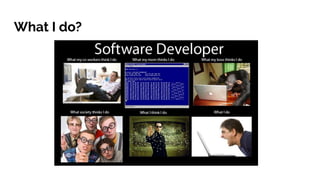
What I do?
No, seriously...
➔ I code to provide smart solutions for 2D and 3D photo-realistic image processing
➔ I also code to manage and maintain over thousands of digital assets
➔ I steal answers from StackOverflow and Reddit
➔ I’m responsible for testing latest tools and plug-ins and decide if they should be
integrated into the workflow or not
➔ I drink coffee, too
Why is Python used E-V-E-R-Y-W-H-E-R-E?
It’s because of these reasons:
➔ Code readability
➔ Quick to develop
➔ Straightforward syntax
➔ Beginner-friendly
➔ Supportive community
➔ Seamless interaction with other web-scripting languages like Javascript, HTML5,
jQuery, etc.
What are Python’s applications?
➔ Web Development (Flask, Bottle, Django frameworks)
➔ Machine Learning (scikit-learn, Tensorflow, keras)
➔ Data analysis & visualization (numpy, matplotlib, pandas)
➔ Desktop applications (PyQt, Tkinter, wxPython)
➔ Game development (Pygame, kivy)
➔ Image processing (OpenCV, ImageIO, PIL)
➔ ...many more!
Setting up Python environment
Step 2: Check if Python environment is set up properly
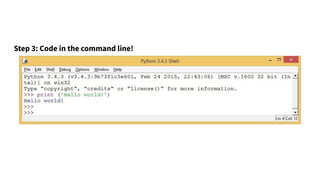
Step 3: Code in the command line!
Python data types
Data type is an attribute of data that tells the interpreter how the user intends to use it.
Python supports several data types.
➔ Integers: An integer is a whole number that can be positive, negative, or zero.
➔ Floating numbers: The <float> type in Python designates a floating-point number.
<float> values are specified with a decimal point.
➔ Complex numbers: Complex numbers are specified as <real part>+<imaginary
part>j.
➔ String: Strings are sequences of character data. The string type in Python is called
<str>. String literals may be delimited using either single or double quotes.
➔ Boolean Values: Objects of Boolean type may have one of two values, True or
False.
Data collection types
There are four ways to store collected data in Python. They are:
➔ List: A list is a collection which is ordered and changeable. In Python lists are
written with square brackets. Elements in a list can be accessed by their index.
➔ Tuple: A tuple is a collection which is ordered and unchangeable. In Python tuples
are written with round brackets. Elements inside a tuple can be accessed by writing
their index inside square brackets.
➔ Set: A set is a collection which is unordered and unindexed. In Python sets are
written with curly brackets. You cannot access items in a set by referring to an index
but can loop through the set items using a for loop, or ask if a specified value is
present in a set, by using the in keyword.
➔ Dictionary : A dictionary is a collection which is unordered, changeable and
indexed. In Python dictionaries are written with curly brackets, and they have keys
and values. You can access the items of a dictionary by referring to its key name,
inside square brackets, or by the get method.
Conditions
➔ If...else: Python supports the usual logical conditions from mathematics. Equal to
(==), greater than (>), lesser than (<), etc can be easily checked for using the if - elif -
else syntax.
Loops
➔ For Loop: The for loop is used to iterate over a sequence.
➔ While Loop: The while loop is used to iterate over a sequence as long as a condition
is true [10]
. However, the break statement can stop the loop even while the
condition is true.
Functions
A function is a block of code that runs only when it is called. In Python, functions can be
written using the ‘def’ keyword.
Exception Handling
When an error occurs, Python stops execution of the code and generates an error
message. Using the try...except statements, the error message can be ‘handled’ by
making the error more user-readable.
User Inputs
➔ Use keyword input() to get input from user
Programming Exercise - 1
Write a program to add, subtract, multiply, and divide two numbers based on the input
choice chosen.
(Advanced: Add, subtract, multiply, and divide as many numbers as the user desires)
Introduction to Digital Image Processing
➔ Modern technology has enable advanced ways of manipulating multidimensional
images
➔ There are basically 3 ways to manipulate any image.
➔ Image Processing: image in → image out
➔ Image Analysis: image in → measurements out
➔ Image Understanding: image in → high-level description out
➔ We’re going to focus on 2D medical image analysis over the course of this session
today.
What are images?
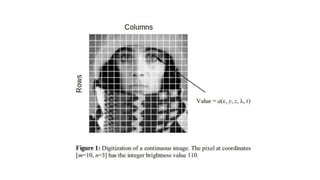
➔ An image is a function of two variables a(x,y) where a is the amplitude and (x,y) is
its co-ordinate position
➔ A digital image is represented by a[m,n]
➔ Images are made of sub-images called regions/region-of-interests/ROIs
➔ Mathematically, an image is a 2-dimensional array of rows and columns
How can I work with medical images?
➔ The amount of medical imaging data that is available to us is overwhelming.
➔ To extract any meaningful information from a medical image, it is important to use
the proper tools and understand how to process a digital image
➔ Python offers multiple packages or libraries that help with image processing:
Numpy(to work with arrays), Matplotlib(to plot images), ImageIO(to load image
data), SciPy(to perform image operations)
What should I know about images?
➔ N-dimensional images are stacks of arrays
Manipulating medical images with Python
➔ Step 1: Download the necessary python libraries using native package installer
pip. We’ll be using numpy, imageio, matplotlib, and scipy throughout this exercise.
➔ Step 2: Have the medical image source ready. Preferably DICOM images.
➔ Step 3: View the image and make an educated guess on how to process the image
➔ Step 4: Use masks and filters to find out your ROI
➔ Step 5: Measure your ROIs
Let’s get started!
➔ Like discussed, each picture element or pixel is going to have an intensity value
and a location.
➔ To process images, you can perform various operations on the pixel values of the
image
➔ Histogram can calculate the number of pixels at each intensity value
Histogram
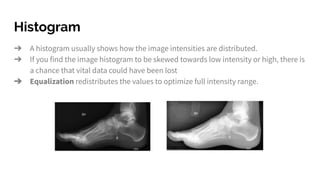
➔ A histogram usually shows how the image intensities are distributed.
➔ If you find the image histogram to be skewed towards low intensity or high, there is
a chance that vital data could have been lost
➔ Equalization redistributes the values to optimize full intensity range.
Image masks
➔ Masks are used to highlight certain parts of an image and hide the rest
➔ In medical image processing, it is commonly used to separate background
How to create masks?
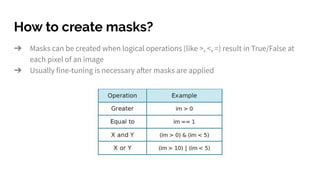
➔ Masks can be created when logical operations (like >, <, =) result in True/False at
each pixel of an image
➔ Usually fine-tuning is necessary after masks are applied
Tuning masks
➔ Masks are almost never perfect.
➔ It’s important to fine tune them by means of dilation, erotion, or filling up holes to
get a clean mask.
Filters
➔ Filters are used to either suppress the higher frequencies in an image (e.g.
smoothing filter) or enhancing the lower frequencies in an image (e.g. sharpening
filter)
How do filters work?
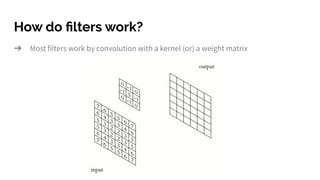
➔ Most filters work by convolution with a kernel (or) a weight matrix
Various filter functions
➔ Sharpening filter: central pixel of weight matrix is higher than the surrounding
pixel
➔ Smoothening filter: surrounding pixels of central pixel are in the same local
neighbourhood
➔ Mean (or) Uniform filter: all pixels of an image are the average values of its
neighbours
➔ Median filter: the central pixels of an image are replaced with the medial values of
its neighbours
➔ Maximum filter: the central pixels of an image are replaced with the maximum
values of its neighbours
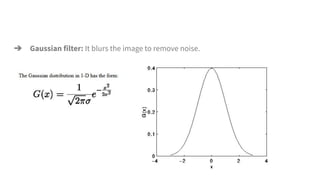
➔ Gaussian filter: It blurs the image to remove noise.
Feature/edge detection
➔ Edges: sharp changes in intensity along an axis
Sobel filters
➔ To enhance edges in an image
➔ The magnitudes of the sobel filter can be gotten by combining horizontal and
vertical data by calculating distance
Image segmentation
➔ Robust image segmentation is an entire research domain, but the simple principle
is to leverage intensity and location information to differentiate objects of interest
from the background.
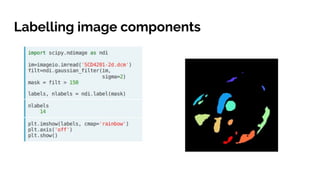
Labelling image components
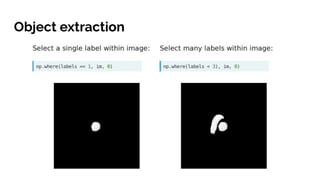
Object extraction
Measuring intensity
➔ Object histograms prove to be very useful in understanding segmentation.
➔ SciPy measurement functions allow you to tailor measurements to specific sets of
pixels
➔
Morphological measurement
➔ Multiple ways to morphologically measure an image ROI. Some of them are:
➔ Spatial extent: product of space occupied by each element and the total number
of array elements
➔ Distance transformation: Calculating the euclidean distance
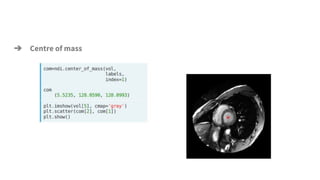
➔ Centre of mass
Thank You
You can mail me at jerlynmanohar@gmail.com for questions on python, for
mentorship on projects in image/video processing, GUI programming, automation,
database management, web development, and for lectures/talks on software
development & readme-driven development.

Image analysis using python

  • 1.
    Image Analysis UsingPython Jerlyn Manohar
  • 2.
  • 3.
    No, seriously... ➔ Icode to provide smart solutions for 2D and 3D photo-realistic image processing ➔ I also code to manage and maintain over thousands of digital assets ➔ I steal answers from StackOverflow and Reddit ➔ I’m responsible for testing latest tools and plug-ins and decide if they should be integrated into the workflow or not ➔ I drink coffee, too
  • 4.
    Why is Pythonused E-V-E-R-Y-W-H-E-R-E?
  • 5.
    It’s because ofthese reasons: ➔ Code readability ➔ Quick to develop ➔ Straightforward syntax ➔ Beginner-friendly ➔ Supportive community ➔ Seamless interaction with other web-scripting languages like Javascript, HTML5, jQuery, etc.
  • 6.
    What are Python’sapplications? ➔ Web Development (Flask, Bottle, Django frameworks) ➔ Machine Learning (scikit-learn, Tensorflow, keras) ➔ Data analysis & visualization (numpy, matplotlib, pandas) ➔ Desktop applications (PyQt, Tkinter, wxPython) ➔ Game development (Pygame, kivy) ➔ Image processing (OpenCV, ImageIO, PIL) ➔ ...many more!
  • 7.
    Setting up Pythonenvironment
  • 8.
    Step 2: Checkif Python environment is set up properly
  • 9.
    Step 3: Codein the command line!
  • 10.
    Python data types Datatype is an attribute of data that tells the interpreter how the user intends to use it. Python supports several data types. ➔ Integers: An integer is a whole number that can be positive, negative, or zero. ➔ Floating numbers: The <float> type in Python designates a floating-point number. <float> values are specified with a decimal point. ➔ Complex numbers: Complex numbers are specified as <real part>+<imaginary part>j. ➔ String: Strings are sequences of character data. The string type in Python is called <str>. String literals may be delimited using either single or double quotes. ➔ Boolean Values: Objects of Boolean type may have one of two values, True or False.
  • 11.
    Data collection types Thereare four ways to store collected data in Python. They are: ➔ List: A list is a collection which is ordered and changeable. In Python lists are written with square brackets. Elements in a list can be accessed by their index. ➔ Tuple: A tuple is a collection which is ordered and unchangeable. In Python tuples are written with round brackets. Elements inside a tuple can be accessed by writing their index inside square brackets.
  • 12.
    ➔ Set: Aset is a collection which is unordered and unindexed. In Python sets are written with curly brackets. You cannot access items in a set by referring to an index but can loop through the set items using a for loop, or ask if a specified value is present in a set, by using the in keyword. ➔ Dictionary : A dictionary is a collection which is unordered, changeable and indexed. In Python dictionaries are written with curly brackets, and they have keys and values. You can access the items of a dictionary by referring to its key name, inside square brackets, or by the get method.
  • 13.
    Conditions ➔ If...else: Pythonsupports the usual logical conditions from mathematics. Equal to (==), greater than (>), lesser than (<), etc can be easily checked for using the if - elif - else syntax.
  • 14.
    Loops ➔ For Loop:The for loop is used to iterate over a sequence. ➔ While Loop: The while loop is used to iterate over a sequence as long as a condition is true [10] . However, the break statement can stop the loop even while the condition is true.
  • 15.
    Functions A function isa block of code that runs only when it is called. In Python, functions can be written using the ‘def’ keyword.
  • 16.
    Exception Handling When anerror occurs, Python stops execution of the code and generates an error message. Using the try...except statements, the error message can be ‘handled’ by making the error more user-readable.
  • 17.
    User Inputs ➔ Usekeyword input() to get input from user
  • 18.
    Programming Exercise -1 Write a program to add, subtract, multiply, and divide two numbers based on the input choice chosen. (Advanced: Add, subtract, multiply, and divide as many numbers as the user desires)
  • 19.
    Introduction to DigitalImage Processing ➔ Modern technology has enable advanced ways of manipulating multidimensional images ➔ There are basically 3 ways to manipulate any image. ➔ Image Processing: image in → image out ➔ Image Analysis: image in → measurements out ➔ Image Understanding: image in → high-level description out ➔ We’re going to focus on 2D medical image analysis over the course of this session today.
  • 20.
    What are images? ➔An image is a function of two variables a(x,y) where a is the amplitude and (x,y) is its co-ordinate position ➔ A digital image is represented by a[m,n] ➔ Images are made of sub-images called regions/region-of-interests/ROIs ➔ Mathematically, an image is a 2-dimensional array of rows and columns
  • 22.
    How can Iwork with medical images? ➔ The amount of medical imaging data that is available to us is overwhelming.
  • 23.
    ➔ To extractany meaningful information from a medical image, it is important to use the proper tools and understand how to process a digital image ➔ Python offers multiple packages or libraries that help with image processing: Numpy(to work with arrays), Matplotlib(to plot images), ImageIO(to load image data), SciPy(to perform image operations)
  • 24.
    What should Iknow about images? ➔ N-dimensional images are stacks of arrays
  • 25.
    Manipulating medical imageswith Python ➔ Step 1: Download the necessary python libraries using native package installer pip. We’ll be using numpy, imageio, matplotlib, and scipy throughout this exercise. ➔ Step 2: Have the medical image source ready. Preferably DICOM images. ➔ Step 3: View the image and make an educated guess on how to process the image ➔ Step 4: Use masks and filters to find out your ROI ➔ Step 5: Measure your ROIs Let’s get started!
  • 26.
    ➔ Like discussed,each picture element or pixel is going to have an intensity value and a location. ➔ To process images, you can perform various operations on the pixel values of the image ➔ Histogram can calculate the number of pixels at each intensity value
  • 27.
    Histogram ➔ A histogramusually shows how the image intensities are distributed. ➔ If you find the image histogram to be skewed towards low intensity or high, there is a chance that vital data could have been lost ➔ Equalization redistributes the values to optimize full intensity range.
  • 28.
    Image masks ➔ Masksare used to highlight certain parts of an image and hide the rest ➔ In medical image processing, it is commonly used to separate background
  • 29.
    How to createmasks? ➔ Masks can be created when logical operations (like >, <, =) result in True/False at each pixel of an image ➔ Usually fine-tuning is necessary after masks are applied
  • 30.
    Tuning masks ➔ Masksare almost never perfect. ➔ It’s important to fine tune them by means of dilation, erotion, or filling up holes to get a clean mask.
  • 31.
    Filters ➔ Filters areused to either suppress the higher frequencies in an image (e.g. smoothing filter) or enhancing the lower frequencies in an image (e.g. sharpening filter)
  • 32.
    How do filterswork? ➔ Most filters work by convolution with a kernel (or) a weight matrix
  • 33.
    Various filter functions ➔Sharpening filter: central pixel of weight matrix is higher than the surrounding pixel ➔ Smoothening filter: surrounding pixels of central pixel are in the same local neighbourhood ➔ Mean (or) Uniform filter: all pixels of an image are the average values of its neighbours ➔ Median filter: the central pixels of an image are replaced with the medial values of its neighbours ➔ Maximum filter: the central pixels of an image are replaced with the maximum values of its neighbours
  • 34.
    ➔ Gaussian filter:It blurs the image to remove noise.
  • 35.
    Feature/edge detection ➔ Edges:sharp changes in intensity along an axis
  • 36.
    Sobel filters ➔ Toenhance edges in an image
  • 37.
    ➔ The magnitudesof the sobel filter can be gotten by combining horizontal and vertical data by calculating distance
  • 38.
    Image segmentation ➔ Robustimage segmentation is an entire research domain, but the simple principle is to leverage intensity and location information to differentiate objects of interest from the background.
  • 40.
  • 41.
  • 43.
    Measuring intensity ➔ Objecthistograms prove to be very useful in understanding segmentation. ➔ SciPy measurement functions allow you to tailor measurements to specific sets of pixels
  • 44.
  • 45.
    Morphological measurement ➔ Multipleways to morphologically measure an image ROI. Some of them are: ➔ Spatial extent: product of space occupied by each element and the total number of array elements ➔ Distance transformation: Calculating the euclidean distance
  • 46.
  • 47.
    Thank You You canmail me at jerlynmanohar@gmail.com for questions on python, for mentorship on projects in image/video processing, GUI programming, automation, database management, web development, and for lectures/talks on software development & readme-driven development.