Fragments In Android
SlideMake.com
1
Introduction to Fragments in Android
Fragments are a fundamental component
of Android applications.
Fragments represent a portion of the user
interface or behavior in an activity.
They can be combined and reused across
multiple activities.
2
Benefits of Using Fragments
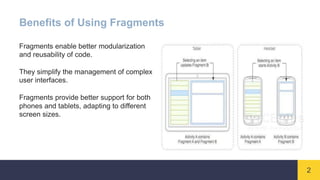
Fragments enable better modularization
and reusability of code.
They simplify the management of complex
user interfaces.
Fragments provide better support for both
phones and tablets, adapting to different
screen sizes.
3
Lifecycle of Fragments
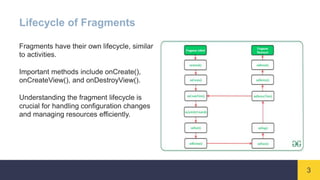
Fragments have their own lifecycle, similar
to activities.
Important methods include onCreate(),
onCreateView(), and onDestroyView().
Understanding the fragment lifecycle is
crucial for handling configuration changes
and managing resources efficiently.
4
Fragment Transactions
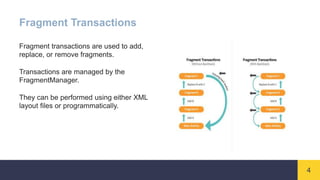
Fragment transactions are used to add,
replace, or remove fragments.
Transactions are managed by the
FragmentManager.
They can be performed using either XML
layout files or programmatically.
5
Communication between Fragments
Fragments can communicate with each
other through their associated activity.
Communication can be achieved by
defining interfaces in the fragments and
implementing them in the activity.
Another approach is to use shared
ViewModels or LiveData objects.
6
Fragment Backstack
Fragments can be added to the backstack,
allowing users to navigate back to previous
fragments.
Backstack management is done using the
addToBackStack() method.
The backstack can be accessed and
manipulated through the
FragmentManager.
7
Fragment Navigation
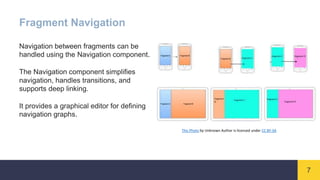
Navigation between fragments can be
handled using the Navigation component.
The Navigation component simplifies
navigation, handles transitions, and
supports deep linking.
It provides a graphical editor for defining
navigation graphs.
This Photo by Unknown Author is licensed under CC BY-SA
8
Fragment Best Practices
Avoid nesting fragments too deeply to
prevent complex and confusing UI
hierarchies.
Ensure proper fragment lifecycle
management to avoid memory leaks.
Use the support library's Fragment class for
better compatibility across different Android
versions.
9
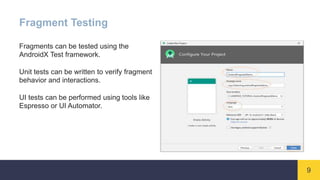
Fragment Testing
Fragments can be tested using the
AndroidX Test framework.
Unit tests can be written to verify fragment
behavior and interactions.
UI tests can be performed using tools like
Espresso or UI Automator.
10
Summary
Fragments are a crucial aspect of Android
development.
They offer modularity, reusability, and
better UI management.
Understanding fragment lifecycle,
transactions, and communication is
essential for building robust and flexible
Android applications.

Fragments In Android.pptx

  • 1.
  • 2.
    1 Introduction to Fragmentsin Android Fragments are a fundamental component of Android applications. Fragments represent a portion of the user interface or behavior in an activity. They can be combined and reused across multiple activities.
  • 3.
    2 Benefits of UsingFragments Fragments enable better modularization and reusability of code. They simplify the management of complex user interfaces. Fragments provide better support for both phones and tablets, adapting to different screen sizes.
  • 4.
    3 Lifecycle of Fragments Fragmentshave their own lifecycle, similar to activities. Important methods include onCreate(), onCreateView(), and onDestroyView(). Understanding the fragment lifecycle is crucial for handling configuration changes and managing resources efficiently.
  • 5.
    4 Fragment Transactions Fragment transactionsare used to add, replace, or remove fragments. Transactions are managed by the FragmentManager. They can be performed using either XML layout files or programmatically.
  • 6.
    5 Communication between Fragments Fragmentscan communicate with each other through their associated activity. Communication can be achieved by defining interfaces in the fragments and implementing them in the activity. Another approach is to use shared ViewModels or LiveData objects.
  • 7.
    6 Fragment Backstack Fragments canbe added to the backstack, allowing users to navigate back to previous fragments. Backstack management is done using the addToBackStack() method. The backstack can be accessed and manipulated through the FragmentManager.
  • 8.
    7 Fragment Navigation Navigation betweenfragments can be handled using the Navigation component. The Navigation component simplifies navigation, handles transitions, and supports deep linking. It provides a graphical editor for defining navigation graphs. This Photo by Unknown Author is licensed under CC BY-SA
  • 9.
    8 Fragment Best Practices Avoidnesting fragments too deeply to prevent complex and confusing UI hierarchies. Ensure proper fragment lifecycle management to avoid memory leaks. Use the support library's Fragment class for better compatibility across different Android versions.
  • 10.
    9 Fragment Testing Fragments canbe tested using the AndroidX Test framework. Unit tests can be written to verify fragment behavior and interactions. UI tests can be performed using tools like Espresso or UI Automator.
  • 11.
    10 Summary Fragments are acrucial aspect of Android development. They offer modularity, reusability, and better UI management. Understanding fragment lifecycle, transactions, and communication is essential for building robust and flexible Android applications.