Android Animation Theory
Siva Ramakrishna
Agenda
❖Overview
❖Animation Systems
❖Details of each System
❖References
Overview
❖Android provides variety of APIs to animate UI elements and create
custom 2D and 3D graphics.
❖The presentation details about the available techniques to create
different animations using different systems provided by android.
Animation Systems
Android provides the following 3 different animation systems.
❖Property Animation
❖View Animation
❖Drawable Animation
Property Animation
❖Introduced in Android 3.0 version.
❖Allows to animate property of any object including the one which is not
visible to the user.
❖Allows to animate on custom types as well.
❖Extensible.
How it works?
❖Modifies the property value of an object over a specified period of time.
❖Property of an object is nothing but the field in an object.
❖To animate, specify the below things.
❖what property value you want to change over a time. Ex: object’s position
❖duration of the animation
❖range of values
continued...
Property animation system lets you define the following things.
❖ Duration
➢ Duration of the animation.
❖ Time Interpolation
➢ How the property value should be changed over the time. Its a fn of time.
❖ Repeat Count and behavior
➢ whether to repeat the animation or not and also the behavior of the animation.
❖ Animator Sets
example
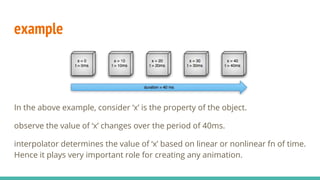
In the above example, consider ‘x’ is the property of the object.
observe the value of ‘x’ changes over the period of 40ms.
interpolator determines the value of ‘x’ based on linear or nonlinear fn of time.
Hence it plays very important role for creating any animation.
ValueAnimator
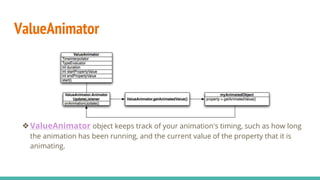
❖ValueAnimator object keeps track of your animation's timing, such as how long
the animation has been running, and the current value of the property that it is
animating.
ValueAnimator
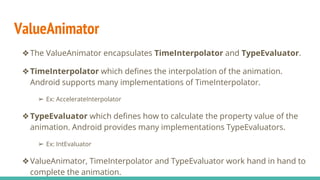
❖The ValueAnimator encapsulates TimeInterpolator and TypeEvaluator.
❖TimeInterpolator which defines the interpolation of the animation.
Android supports many implementations of TimeInterpolator.
➢ Ex: AccelerateInterpolator
❖TypeEvaluator which defines how to calculate the property value of the
animation. Android provides many implementations TypeEvaluators.
➢ Ex: IntEvaluator
❖ValueAnimator, TimeInterpolator and TypeEvaluator work hand in hand to
complete the animation.
Utility classes
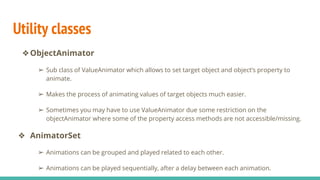
❖ObjectAnimator
➢ Sub class of ValueAnimator which allows to set target object and object’s property to
animate.
➢ Makes the process of animating values of target objects much easier.
➢ Sometimes you may have to use ValueAnimator due some restriction on the
objectAnimator where some of the property access methods are not accessible/missing.
❖ AnimatorSet
➢ Animations can be grouped and played related to each other.
➢ Animations can be played sequentially, after a delay between each animation.
View Animation
❖Can be used to perform the tweened animation on the views.
❖A tween animation can perform series of
transformations(position,size,rotation and transparency) on the content of
the view object. Ex: if you have a textview, you can move,rotate, shrink and
grow the size.
❖Animation can be defined either in XML file or in code. XML file is more
readable and reusable.
❖Animation instructions defines the transformation you want to occur,
animation duration, when to occur.
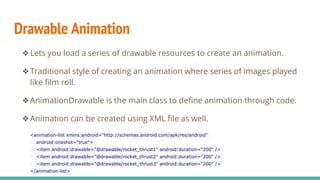
Drawable Animation
❖Lets you load a series of drawable resources to create an animation.
❖Traditional style of creating an animation where series of images played
like film roll.
❖AnimationDrawable is the main class to define animation through code.
❖Animation can be created using XML file as well.
<animation-list xmlns:android="http://schemas.android.com/apk/res/android"
android:oneshot="true">
<item android:drawable="@drawable/rocket_thrust1" android:duration="200" />
<item android:drawable="@drawable/rocket_thrust2" android:duration="200" />
<item android:drawable="@drawable/rocket_thrust3" android:duration="200" />
</animation-list>
Property Animation vs View Animation
❖View Animation only allows
➢ to animate view objects. Non-view objects can not animated using this system.
➢ Only few aspects of the view can be animated like size, rotation, transparency.
➢ Original object of the view will not be changed.
❖ Using Property Animation all the above limitation can be removed as it is
more modular.
❖However, View Animation system takes less setup time and required less
code to be written.
References and Resources
❖For defining animation in an XML file. Refer
http://developer.android.com/guide/topics/resources/animation-
resource.html
❖Refer API Demo Sample(animation package) for examples.
❖http://developer.android.com/guide/topics/graphics/overview.html
❖http://android-developers.blogspot.in/2011/05/introducing-
viewpropertyanimator.html

Android animation theory

  • 1.
  • 2.
  • 3.
    Overview ❖Android provides varietyof APIs to animate UI elements and create custom 2D and 3D graphics. ❖The presentation details about the available techniques to create different animations using different systems provided by android.
  • 4.
    Animation Systems Android providesthe following 3 different animation systems. ❖Property Animation ❖View Animation ❖Drawable Animation
  • 5.
    Property Animation ❖Introduced inAndroid 3.0 version. ❖Allows to animate property of any object including the one which is not visible to the user. ❖Allows to animate on custom types as well. ❖Extensible.
  • 6.
    How it works? ❖Modifiesthe property value of an object over a specified period of time. ❖Property of an object is nothing but the field in an object. ❖To animate, specify the below things. ❖what property value you want to change over a time. Ex: object’s position ❖duration of the animation ❖range of values
  • 7.
    continued... Property animation systemlets you define the following things. ❖ Duration ➢ Duration of the animation. ❖ Time Interpolation ➢ How the property value should be changed over the time. Its a fn of time. ❖ Repeat Count and behavior ➢ whether to repeat the animation or not and also the behavior of the animation. ❖ Animator Sets
  • 8.
    example In the aboveexample, consider ‘x’ is the property of the object. observe the value of ‘x’ changes over the period of 40ms. interpolator determines the value of ‘x’ based on linear or nonlinear fn of time. Hence it plays very important role for creating any animation.
  • 9.
    ValueAnimator ❖ValueAnimator object keepstrack of your animation's timing, such as how long the animation has been running, and the current value of the property that it is animating.
  • 10.
    ValueAnimator ❖The ValueAnimator encapsulatesTimeInterpolator and TypeEvaluator. ❖TimeInterpolator which defines the interpolation of the animation. Android supports many implementations of TimeInterpolator. ➢ Ex: AccelerateInterpolator ❖TypeEvaluator which defines how to calculate the property value of the animation. Android provides many implementations TypeEvaluators. ➢ Ex: IntEvaluator ❖ValueAnimator, TimeInterpolator and TypeEvaluator work hand in hand to complete the animation.
  • 11.
    Utility classes ❖ObjectAnimator ➢ Subclass of ValueAnimator which allows to set target object and object’s property to animate. ➢ Makes the process of animating values of target objects much easier. ➢ Sometimes you may have to use ValueAnimator due some restriction on the objectAnimator where some of the property access methods are not accessible/missing. ❖ AnimatorSet ➢ Animations can be grouped and played related to each other. ➢ Animations can be played sequentially, after a delay between each animation.
  • 12.
    View Animation ❖Can beused to perform the tweened animation on the views. ❖A tween animation can perform series of transformations(position,size,rotation and transparency) on the content of the view object. Ex: if you have a textview, you can move,rotate, shrink and grow the size. ❖Animation can be defined either in XML file or in code. XML file is more readable and reusable. ❖Animation instructions defines the transformation you want to occur, animation duration, when to occur.
  • 13.
    Drawable Animation ❖Lets youload a series of drawable resources to create an animation. ❖Traditional style of creating an animation where series of images played like film roll. ❖AnimationDrawable is the main class to define animation through code. ❖Animation can be created using XML file as well. <animation-list xmlns:android="http://schemas.android.com/apk/res/android" android:oneshot="true"> <item android:drawable="@drawable/rocket_thrust1" android:duration="200" /> <item android:drawable="@drawable/rocket_thrust2" android:duration="200" /> <item android:drawable="@drawable/rocket_thrust3" android:duration="200" /> </animation-list>
  • 14.
    Property Animation vsView Animation ❖View Animation only allows ➢ to animate view objects. Non-view objects can not animated using this system. ➢ Only few aspects of the view can be animated like size, rotation, transparency. ➢ Original object of the view will not be changed. ❖ Using Property Animation all the above limitation can be removed as it is more modular. ❖However, View Animation system takes less setup time and required less code to be written.
  • 15.
    References and Resources ❖Fordefining animation in an XML file. Refer http://developer.android.com/guide/topics/resources/animation- resource.html ❖Refer API Demo Sample(animation package) for examples. ❖http://developer.android.com/guide/topics/graphics/overview.html ❖http://android-developers.blogspot.in/2011/05/introducing- viewpropertyanimator.html