An Introduction to
Data Visualization
@NUPURANDWORLD
www.nupurandworld.com
Introduction
Your data is only as good as your ability to understand and communicate it.
Simply filling out a table with a set of numbers and calling it a day won’t do you or your team much good.
You need to be able to understand and effectively communicate the story behind those numbers.
The best way to tell a story with your data is by visualizing it using a graph, a chart, or some other
visualization. Data visualization will help you uncover patterns, correlations, and outliers. It’ll help you
communicate insights to your boss, your team, or your company. It’ll help you make the data-backed
decisions you need to be great at your job.
It’s critical that you choose the right method of visualizing your data for any given data set. You would
never choose a pie chart to show trends over time, for example; and you would never choose a line graph to
show parts of a whole.
But it’s more than that: If your data is misrepresented or presented ineffectively, you and your team will
lose out on key insights and understandings – which hurts both your message and your reputation.
What is data
visualization
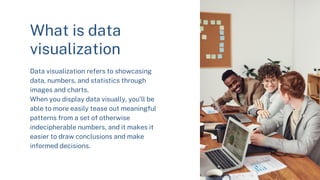
Data visualization refers to showcasing
data, numbers, and statistics through
images and charts.
When you display data visually, you’ll be
able to more easily tease out meaningful
patterns from a set of otherwise
indecipherable numbers, and it makes it
easier to draw conclusions and make
informed decisions.
The numbers may go up and down and up and down over short periods of time, but if
you look at the larger picture, you’ll see that search volume is trending steadily
upward.
Data visualization is especially helpful when you’re presenting data to others. It’s
much easier for people to understand data when it’s presented visually – which
makes it easier to make yoru point or persuade someone, too. Marketers can use data
visualization to showcase the results of a campaign; scientists can use it to predict
illness outbreaks; farmers can use it to map out agricultural trends.
You can also use data visualization to display part-to-whole data, ranking,
correlation, geographical distribution, deviation, timelines, and scale. The purpose of
data visualization can be to simplify and showcase results or to explore trends and
try to discover something new within a set of data.
What is data visualization
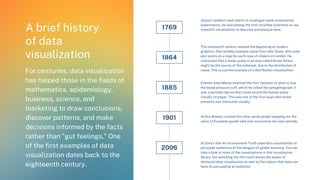
A brief history
of data
visualization
For centuries, data visualization
has helped those in the fields of
mathematics, epidemiology,
business, science, and
marketing to draw conclusions,
discover patterns, and make
decisions informed by the facts
rather than "gut feelings." One
of the first examples of data
visualization dates back to the
eighteenth century.
1769
Johann Lambert used charts to catalogue water evaporation
experiments. He was among the first recorded scientists to use
scientific visualization to describe and analyze data.
The nineteenth century marked the beginning of modern
graphics. One notable example came from John Snow, who used
plot points on a map for each case of cholera in London. He
concluded that a water pump in an area called Broad Street
might be the source of the outbreak, due to the distribution of
cases. This is a prime example of a distribution visualization.
Etienne Jules Marey invented the first iteration of what is now
the blood pressure cuff, which he called the sphygmograph. It
was a portable device that could record the human pulse
visually on paper. This was one of the first ways that blood
pressure was measured visually.
Arthur Bowley created this time-series graph mapping out the
value of European goods sold over successive ten year periods.
Al Gore’s film An Inconvenient Truth used data visualization to
persuade audiences of the dangers of global warming. You can
take a look at more of the visualizations in this visualization
library, but watching the film itself shows the power of
animated data visualization as well as the impact that data can
have on persuading an audience.
1864
1885
1901
2006
Why is data visualization important?
Data visualization is important in identifying trends, answering questions, proving theories, and -- if
you’re creating them for a business -- in showcasing your brand. When you visualize your data, you can
more easily see numbers in context and understand how they relate to one another.
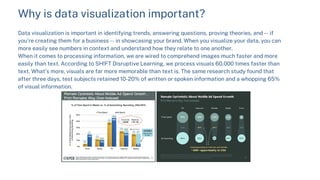
When it comes to processing information, we are wired to comprehend images much faster and more
easily than text. According to SH!FT Disruptive Learning, we process visuals 60,000 times faster than
text. What’s more, visuals are far more memorable than text is. The same research study found that
after three days, test subjects retained 10-20% of written or spoken information and a whopping 65%
of visual information.
Why Data Visualization is Important to Showcase Metrics and
Reports
Data visualization improves the impact and recall of your
message or argument. Have you ever attended a presentation
where someone else’s presentation stood out to you thanks to
its clear representation of data? We’re willing to bet many of
you had.
We said it before, and we’ll say it again: Accurate visualization
of data can make or break a business presentation.
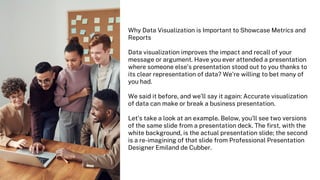
Let’s take a look at an example. Below, you’ll see two versions
of the same slide from a presentation deck. The first, with the
white background, is the actual presentation slide; the second
is a re-imagining of that slide from Professional Presentation
Designer Emiland de Cubber.
How to visualize
data effectively
Original. It comes from a primary source. If the data you find is on
Wikipedia or in a news article, track down the original data so you can
spot any potential flaws, low sample sizes, or biased questionnaires.
Where and how are you getting your data?
If you don’t have any data yet, you’ll need to think carefully about where
you’re getting it. Are you gathering yourself, or are you getting it from
someone else?
If you’re gathering it yourself, be sure you’re using the right methodology
to write and launch your surveys. To learn how to use online surveys
effectively, download our free ebook, How to Use Online Surveys in Your
Marketing.
If you’re collecting your own data, you’ll need to make sure you collect
enough of it for the results to be statistically significant. Here’s a
refresher on statistical significance from a marketing standpoint if you
need one.
If you’re sourcing your data from a third party, it’s very, very important
that it’s coming from a reliable source. What makes a good data source? A
good data source is:
Comprehensive. It doesn’t leave questions unanswered, and it provides
enough information for viewers to get the big picture and any
appropriate context. In short, it tells the full story.
Current. The world changes quickly, so your data needs to be one or
two years old at most – unless it’s on a topic that hasn’t changed in a
long time. Use your discretion here.
Reliable. You’ve verified that the source you chose was relevant,
legitimate, and as unbiased as possible. You’ve asked yourself who
collected the research and whether they have credentials, when it was
last updated, and whether the organization hosting the information
has a purpose or agenda that could make the data biased.
If you’re not sure where to find good data,
here’s a helpful guide on where to find good
data and how to vet it properly.
Once you do have the data aggregated, you
can start thinking about how you might
present it.
What story does the data tell?
For many people, the hardest part of
visualizing data is looking at the raw numbers
and figuring out how to use them to tell a story.
In order to visualize your data properly, the
first thing you need to do is tease out what’s
significant about your data.
Oftentimes, it’s helpful to start with your goal
metric. What is the primary question you’re
trying to answer? What is it that your team,
your readers, or your audience is most curious
about?
For example, let’s say my goal is to increase
the number of subscribers to my business
blog. My primary metric, then would be
number of subscribers over time. (I can smell
a time-series visualization coming, but we’ll
get to that in a second.)
In this case, I’d add subscriber calls-to-action
and lead flows to my business’ blog, website,
social media accounts … anywhere I’d like to
drive subscribers. Then, over a period of time
that I choose, I’ll track the number of people
who subscribe to the blog and the number of
people who unsubscribe from my blog over
that period of time. I might be measuring a
number of other metrics like blog traffic,
leads, social shares, and time on page, but
because my goal is cumulative subscribers,
that number is the most important piece of
data to put into a visualization for my
purposes.
Data types, relationships, and
visualization formats
4 Data Types
1) Quantitative
Quantitative data can be counted or measured, and all values are numerical.
2) Discrete
Discrete data is numerical data with a finite number of possible values. (For example, the number of employees
in an office.)
3) Continuous
Continuous data is measured and has a value that lies within a range. (For example, rainfall in a year.)
4) Categorical
Categorical data can be sorted according to group or category. (For example, types of products sold.)
Data visualization tools
There are many different tools and data visualization software that you can use at varying levels of
expertise to analyze and present data. Here are a few favorites:
Microsoft Excel
This is the most common tool for data visualization. Excel allows you to sort and analyze data, then
create data visualizations using the chart wizard. To learn more about using Excel, check out these
resources here and here.
Statista
Statista is a database of studies, statistics, and forecasts that provides market data for
presentations.
HubSpot Research
This free website allows you to make your own presentation using the latest marketing and sales
statistics and charts.
Google Trends
Google Trends is a free tool from Google that shows search history of certain topics and keywords
over time. You can create custom trend graphs of keywords by region, country, or area and select any
time range.
SocialMention
SocialMention lets you monitor user-generated content mentions online. This is a great tool to
measure and show brand awareness and engagement.
Data visualization tools
Infogr.am
Infogram is a tool to create infographics and charts. It is ideal for those with little design experience
to create and customize infographics. Alternatively, you can download some simple, pre-made
infographics templates here.
Photoshop & Illustrator
For more advanced designers, you can use Adobe Photoshop and Adobe Illustrator to create beautiful
and more elaborate data visualizations. These are a great option to create long form infographics and
brand visualizations.
Canva
Canva is a really easy-to-use free tool with a new charts feature for creating simple pie charts, bar
graphs, and more in any sized template. This is a great option for creating presentations, infographics,
and social images.
Tableau
Tableau offers sophisticated data visualization and integrations with data visualization software like
Excel, which helps you easily make raw data into beautiful visuals.
Google Charts or Google Sheets
Google Charts lets you embed graphs and charts onto a web page. It is an API tool that lets you create
custom graphs and charts with the option to animate them for a more dynamic visualization. Google
Sheets (Google’s version of PowerPoint) is a good option for creating simple charts and graphs like you
would in Excel.

An Introduction to Data Visualization

  • 1.
    An Introduction to DataVisualization @NUPURANDWORLD www.nupurandworld.com
  • 2.
    Introduction Your data isonly as good as your ability to understand and communicate it. Simply filling out a table with a set of numbers and calling it a day won’t do you or your team much good. You need to be able to understand and effectively communicate the story behind those numbers. The best way to tell a story with your data is by visualizing it using a graph, a chart, or some other visualization. Data visualization will help you uncover patterns, correlations, and outliers. It’ll help you communicate insights to your boss, your team, or your company. It’ll help you make the data-backed decisions you need to be great at your job. It’s critical that you choose the right method of visualizing your data for any given data set. You would never choose a pie chart to show trends over time, for example; and you would never choose a line graph to show parts of a whole. But it’s more than that: If your data is misrepresented or presented ineffectively, you and your team will lose out on key insights and understandings – which hurts both your message and your reputation.
  • 3.
    What is data visualization Datavisualization refers to showcasing data, numbers, and statistics through images and charts. When you display data visually, you’ll be able to more easily tease out meaningful patterns from a set of otherwise indecipherable numbers, and it makes it easier to draw conclusions and make informed decisions.
  • 4.
    The numbers maygo up and down and up and down over short periods of time, but if you look at the larger picture, you’ll see that search volume is trending steadily upward. Data visualization is especially helpful when you’re presenting data to others. It’s much easier for people to understand data when it’s presented visually – which makes it easier to make yoru point or persuade someone, too. Marketers can use data visualization to showcase the results of a campaign; scientists can use it to predict illness outbreaks; farmers can use it to map out agricultural trends. You can also use data visualization to display part-to-whole data, ranking, correlation, geographical distribution, deviation, timelines, and scale. The purpose of data visualization can be to simplify and showcase results or to explore trends and try to discover something new within a set of data. What is data visualization
  • 5.
    A brief history ofdata visualization For centuries, data visualization has helped those in the fields of mathematics, epidemiology, business, science, and marketing to draw conclusions, discover patterns, and make decisions informed by the facts rather than "gut feelings." One of the first examples of data visualization dates back to the eighteenth century. 1769 Johann Lambert used charts to catalogue water evaporation experiments. He was among the first recorded scientists to use scientific visualization to describe and analyze data. The nineteenth century marked the beginning of modern graphics. One notable example came from John Snow, who used plot points on a map for each case of cholera in London. He concluded that a water pump in an area called Broad Street might be the source of the outbreak, due to the distribution of cases. This is a prime example of a distribution visualization. Etienne Jules Marey invented the first iteration of what is now the blood pressure cuff, which he called the sphygmograph. It was a portable device that could record the human pulse visually on paper. This was one of the first ways that blood pressure was measured visually. Arthur Bowley created this time-series graph mapping out the value of European goods sold over successive ten year periods. Al Gore’s film An Inconvenient Truth used data visualization to persuade audiences of the dangers of global warming. You can take a look at more of the visualizations in this visualization library, but watching the film itself shows the power of animated data visualization as well as the impact that data can have on persuading an audience. 1864 1885 1901 2006
  • 6.
    Why is datavisualization important? Data visualization is important in identifying trends, answering questions, proving theories, and -- if you’re creating them for a business -- in showcasing your brand. When you visualize your data, you can more easily see numbers in context and understand how they relate to one another. When it comes to processing information, we are wired to comprehend images much faster and more easily than text. According to SH!FT Disruptive Learning, we process visuals 60,000 times faster than text. What’s more, visuals are far more memorable than text is. The same research study found that after three days, test subjects retained 10-20% of written or spoken information and a whopping 65% of visual information.
  • 7.
    Why Data Visualizationis Important to Showcase Metrics and Reports Data visualization improves the impact and recall of your message or argument. Have you ever attended a presentation where someone else’s presentation stood out to you thanks to its clear representation of data? We’re willing to bet many of you had. We said it before, and we’ll say it again: Accurate visualization of data can make or break a business presentation. Let’s take a look at an example. Below, you’ll see two versions of the same slide from a presentation deck. The first, with the white background, is the actual presentation slide; the second is a re-imagining of that slide from Professional Presentation Designer Emiland de Cubber.
  • 8.
  • 9.
    Original. It comesfrom a primary source. If the data you find is on Wikipedia or in a news article, track down the original data so you can spot any potential flaws, low sample sizes, or biased questionnaires. Where and how are you getting your data? If you don’t have any data yet, you’ll need to think carefully about where you’re getting it. Are you gathering yourself, or are you getting it from someone else? If you’re gathering it yourself, be sure you’re using the right methodology to write and launch your surveys. To learn how to use online surveys effectively, download our free ebook, How to Use Online Surveys in Your Marketing. If you’re collecting your own data, you’ll need to make sure you collect enough of it for the results to be statistically significant. Here’s a refresher on statistical significance from a marketing standpoint if you need one. If you’re sourcing your data from a third party, it’s very, very important that it’s coming from a reliable source. What makes a good data source? A good data source is:
  • 10.
    Comprehensive. It doesn’tleave questions unanswered, and it provides enough information for viewers to get the big picture and any appropriate context. In short, it tells the full story. Current. The world changes quickly, so your data needs to be one or two years old at most – unless it’s on a topic that hasn’t changed in a long time. Use your discretion here. Reliable. You’ve verified that the source you chose was relevant, legitimate, and as unbiased as possible. You’ve asked yourself who collected the research and whether they have credentials, when it was last updated, and whether the organization hosting the information has a purpose or agenda that could make the data biased.
  • 11.
    If you’re notsure where to find good data, here’s a helpful guide on where to find good data and how to vet it properly. Once you do have the data aggregated, you can start thinking about how you might present it. What story does the data tell? For many people, the hardest part of visualizing data is looking at the raw numbers and figuring out how to use them to tell a story. In order to visualize your data properly, the first thing you need to do is tease out what’s significant about your data. Oftentimes, it’s helpful to start with your goal metric. What is the primary question you’re trying to answer? What is it that your team, your readers, or your audience is most curious about? For example, let’s say my goal is to increase the number of subscribers to my business blog. My primary metric, then would be number of subscribers over time. (I can smell a time-series visualization coming, but we’ll get to that in a second.) In this case, I’d add subscriber calls-to-action and lead flows to my business’ blog, website, social media accounts … anywhere I’d like to drive subscribers. Then, over a period of time that I choose, I’ll track the number of people who subscribe to the blog and the number of people who unsubscribe from my blog over that period of time. I might be measuring a number of other metrics like blog traffic, leads, social shares, and time on page, but because my goal is cumulative subscribers, that number is the most important piece of data to put into a visualization for my purposes.
  • 12.
    Data types, relationships,and visualization formats 4 Data Types 1) Quantitative Quantitative data can be counted or measured, and all values are numerical. 2) Discrete Discrete data is numerical data with a finite number of possible values. (For example, the number of employees in an office.) 3) Continuous Continuous data is measured and has a value that lies within a range. (For example, rainfall in a year.) 4) Categorical Categorical data can be sorted according to group or category. (For example, types of products sold.)
  • 13.
    Data visualization tools Thereare many different tools and data visualization software that you can use at varying levels of expertise to analyze and present data. Here are a few favorites: Microsoft Excel This is the most common tool for data visualization. Excel allows you to sort and analyze data, then create data visualizations using the chart wizard. To learn more about using Excel, check out these resources here and here. Statista Statista is a database of studies, statistics, and forecasts that provides market data for presentations. HubSpot Research This free website allows you to make your own presentation using the latest marketing and sales statistics and charts. Google Trends Google Trends is a free tool from Google that shows search history of certain topics and keywords over time. You can create custom trend graphs of keywords by region, country, or area and select any time range. SocialMention SocialMention lets you monitor user-generated content mentions online. This is a great tool to measure and show brand awareness and engagement.
  • 14.
    Data visualization tools Infogr.am Infogramis a tool to create infographics and charts. It is ideal for those with little design experience to create and customize infographics. Alternatively, you can download some simple, pre-made infographics templates here. Photoshop & Illustrator For more advanced designers, you can use Adobe Photoshop and Adobe Illustrator to create beautiful and more elaborate data visualizations. These are a great option to create long form infographics and brand visualizations. Canva Canva is a really easy-to-use free tool with a new charts feature for creating simple pie charts, bar graphs, and more in any sized template. This is a great option for creating presentations, infographics, and social images. Tableau Tableau offers sophisticated data visualization and integrations with data visualization software like Excel, which helps you easily make raw data into beautiful visuals. Google Charts or Google Sheets Google Charts lets you embed graphs and charts onto a web page. It is an API tool that lets you create custom graphs and charts with the option to animate them for a more dynamic visualization. Google Sheets (Google’s version of PowerPoint) is a good option for creating simple charts and graphs like you would in Excel.