Visual Analytics Best
     Practices

                     Sasha Pasulka
  Senior Manager, Product Marketing
     spasulka@tableausoftware.com
                          #tableau8
What is Visual
Analytics?
“Visual analytics is the representation
and presentation of data that exploits
our visual perception abilities in order
to amplify cognition.”
                         - Andy Kirk, author of “Data
                         Visualization: a successful design
                         process”
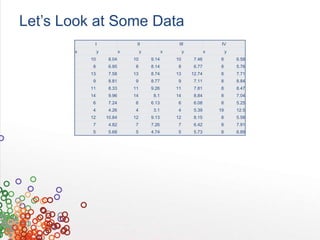
Let’s Look at Some Data
            I                    II                  III                  IV
       x        y           x        y          x        y           x        y
           10        8.04       10       9.14       10        7.46       8        6.58
           8         6.95       8        8.14       8         6.77       8        5.76
           13        7.58       13       8.74       13       12.74       8        7.71
           9         8.81       9        8.77       9         7.11       8        8.84
           11        8.33       11       9.26       11        7.81       8        8.47
           14        9.96       14        8.1       14        8.84       8        7.04
           6         7.24       6        6.13       6         6.08       8        5.25
           4         4.26       4         3.1       4         5.39       19       12.5
           12       10.84       12       9.13       12        8.15       8        5.56
           7         4.82       7        7.26       7         6.42       8        7.91
           5         5.68       5        4.74       5         5.73       8        6.89
Let’s Look at Some Data
            I                    II                    III                       IV
       x        y           x        y          x         y           x              y
           10        8.04       10       9.14        10        7.46              8             6.58
           8         6.95       8        8.14         8        6.77              8             5.76
           13        7.58       13       8.74        13       12.74              8             7.71
           9         8.81       9        8.77         9        7.11              8             8.84
           11        8.33       11       9.26        11        7.81              8             8.47
           14        9.96       14        8.1        14        8.84              8             7.04
           6         7.24       6        6.13         6        6.08              8             5.25
           4         4.26       4         3.1         4        5.39          19                12.5
           12       10.84       12       9.13        12        8.15              8             5.56
           7         4.82       7        7.26         7        6.42              8             7.91
           5         5.68       5        4.74         5        5.73              8             6.89


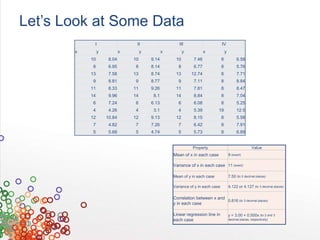
                                                              Property                                    Value
                                                    Mean of x in each case               9 (exact)

                                                    Variance of x in each case 11 (exact)

                                                    Mean of y in each case               7.50 (to 2 decimal places)

                                                    Variance of y in each case           4.122 or 4.127 (to 3 decimal places)

                                                    Correlation between x and
                                                                              0.816 (to 3 decimal places)
                                                    y in each case

                                                    Linear regression line in            y = 3.00 + 0.500x (to 2 and 3
                                                    each case                            decimal places, respectively)
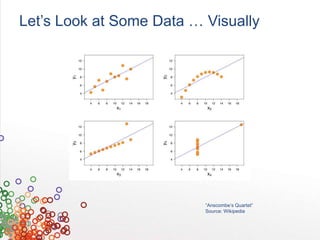
Let’s Look at Some Data … Visually


                          “Anscombe’s Quartet”
                          Source: Wikipedia
Agenda
1. Human Perception and Cognition
2. Visual Analysis Cycle
3. Visualization Best Practices
Human Perception &
Cognition
Humans Are Slow at Mental Math
               34
             X 72
       ------------------
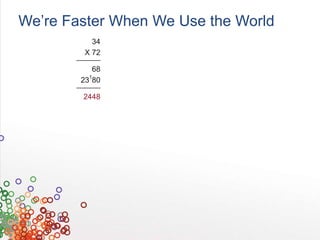
We’re Faster When We Use the World
               34
             X 72
       ------------------

             68
            1
          23 80
       ------------------

            2448
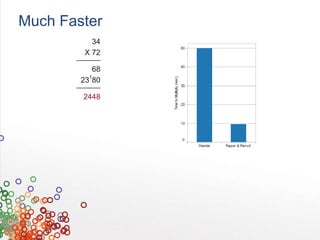
Much Faster
               34
             X 72
       ------------------

             68
            1
          23 80
       ------------------

            2448
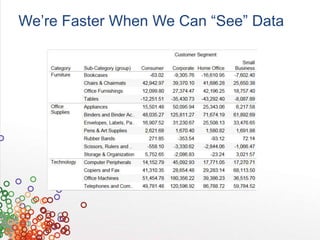
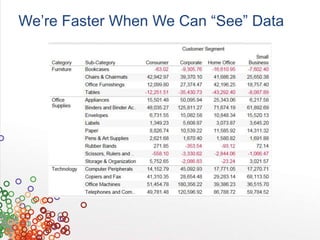
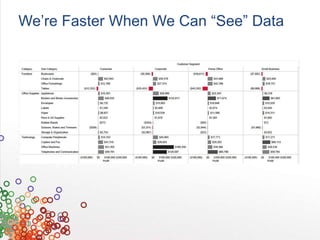
We’re Faster When We Can “See” Data
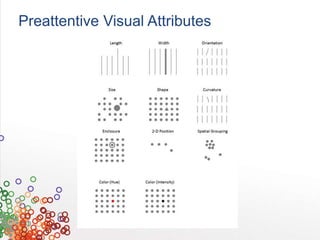
Preattentive Visual Attributes
Visual Interruptions Make People Slow
The Cycle of Visual
Analysis
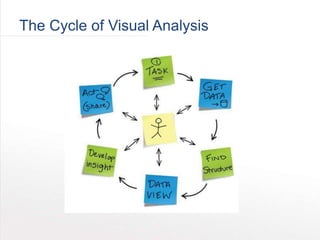
The Cycle of Visual Analysis
Supporting the Cycle

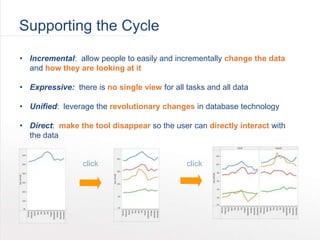
• Incremental: allow people to easily and incrementally change the data
  and how they are looking at it

• Expressive: there is no single view for all tasks and all data

• Unified: leverage the revolutionary changes in database technology

• Direct: make the tool disappear so the user can directly interact with
  the data


                 click                        click
Visualization Best
Practices
Best Practices Overview
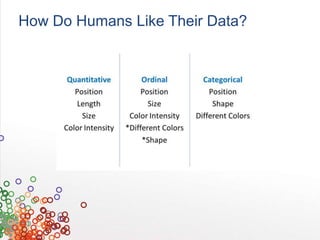
1.   Representing data for humans
2.   Color
3.   Maps
4.   Creating dashboards
Types of Data
•   Qualitative (nominal / categorical)
    •   Arizona, New York, Texas
    •   Sarah, John, Maria
    •   Coors, Bud Light, Stella Artois

•   Qualitative (ordinal)
    •   Gold, silver, bronze
    •   Excellent health, good health, poor health
    •   Love it, like it, hate it

•   Quantitative
    •   Weight (10 lbs, 20 lbs, 5000 lbs)
    •   Cost ($50, $100, $0.05)
    •   Discount (5%, 10%, 12.8%)
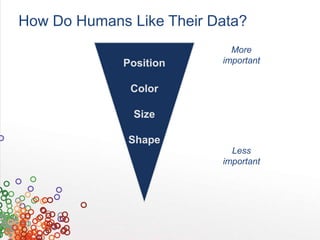
How Do Humans Like Their Data?
                            More
             Position     important


              Color

               Size

              Shape
                            Less
                          important
How Do Humans Like Their Data?

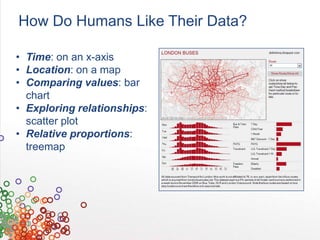
• Time: on an x-axis
• Location: on a map
• Comparing values: bar
  chart
• Exploring relationships:
  scatter plot
• Relative proportions:
  treemap
How Do Humans Like Their Data?
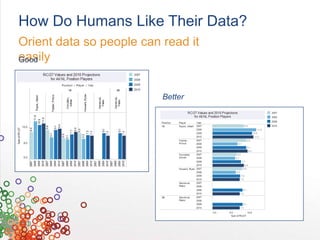
Orient data so people can read it
easily
Good


                          Better
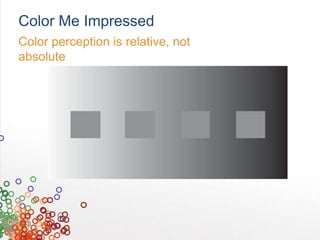
Color Me Impressed
Color perception is relative, not
absolute
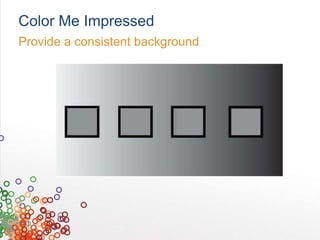
Color Me Impressed
Provide a consistent background
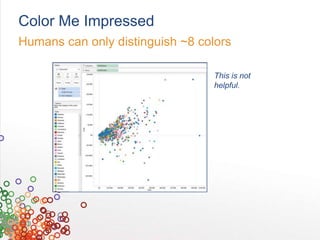
Color Me Impressed
Humans can only distinguish ~8 colors

                                  This is not
                                  helpful.
Color Me Impressed
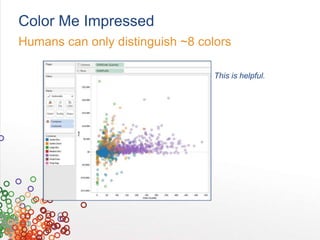
Humans can only distinguish ~8 colors

                                  This is helpful.
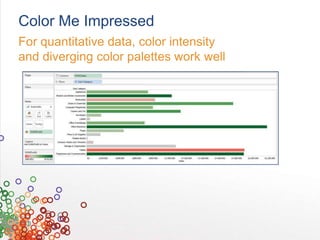
Color Me Impressed
For quantitative data, color intensity
and diverging color palettes work well
Mapping to Insight
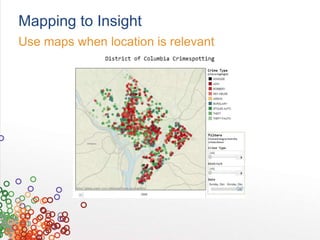
Use maps when location is relevant
Mapping to Insight
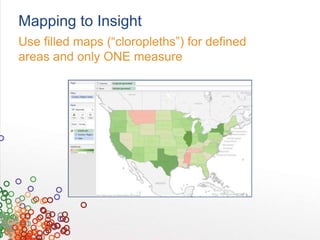
Use filled maps (“cloropleths”) for defined
areas and only ONE measure
Mapping to Insight
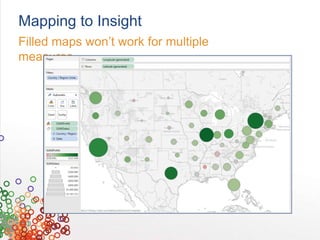
Filled maps won’t work for multiple
measures
Mapping to Insight
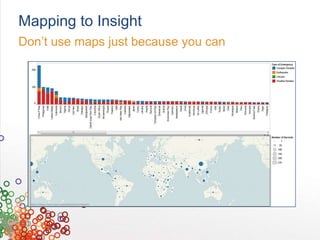
Don’t use maps just because you can
Mapping to Insight
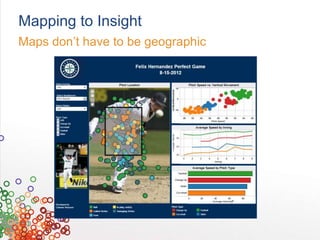
Maps don’t have to be geographic
Mapping to Insight
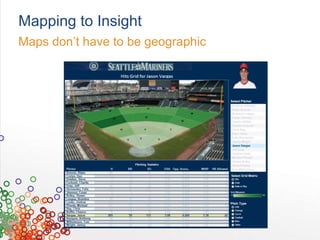
Maps don’t have to be geographic
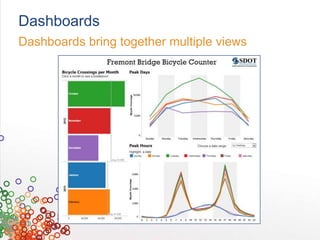
Dashboards
Dashboards bring together multiple views
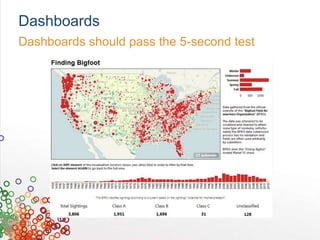
Dashboards
Dashboards should pass the 5-second test
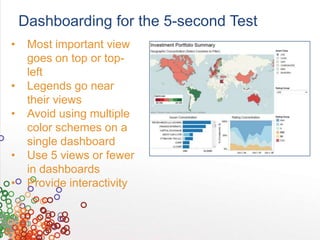
Dashboarding for the 5-second Test
•    Most important view
     goes on top or top-
     left
•    Legends go near
     their views
•    Avoid using multiple
     color schemes on a
     single dashboard
•    Use 5 views or fewer
     in dashboards
•    Provide interactivity
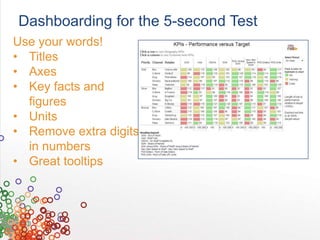
Dashboarding for the 5-second Test
Use your words!
• Titles
• Axes
• Key facts and
  figures
• Units
• Remove extra digits
  in numbers
• Great tooltips
Visual Analytics Best Practices

Visual Analytics Best Practices

  • 1.
    Visual Analytics Best Practices Sasha Pasulka Senior Manager, Product Marketing spasulka@tableausoftware.com #tableau8
  • 4.
  • 5.
    “Visual analytics isthe representation and presentation of data that exploits our visual perception abilities in order to amplify cognition.” - Andy Kirk, author of “Data Visualization: a successful design process”
  • 6.
    Let’s Look atSome Data I II III IV x y x y x y x y 10 8.04 10 9.14 10 7.46 8 6.58 8 6.95 8 8.14 8 6.77 8 5.76 13 7.58 13 8.74 13 12.74 8 7.71 9 8.81 9 8.77 9 7.11 8 8.84 11 8.33 11 9.26 11 7.81 8 8.47 14 9.96 14 8.1 14 8.84 8 7.04 6 7.24 6 6.13 6 6.08 8 5.25 4 4.26 4 3.1 4 5.39 19 12.5 12 10.84 12 9.13 12 8.15 8 5.56 7 4.82 7 7.26 7 6.42 8 7.91 5 5.68 5 4.74 5 5.73 8 6.89
  • 7.
    Let’s Look atSome Data I II III IV x y x y x y x y 10 8.04 10 9.14 10 7.46 8 6.58 8 6.95 8 8.14 8 6.77 8 5.76 13 7.58 13 8.74 13 12.74 8 7.71 9 8.81 9 8.77 9 7.11 8 8.84 11 8.33 11 9.26 11 7.81 8 8.47 14 9.96 14 8.1 14 8.84 8 7.04 6 7.24 6 6.13 6 6.08 8 5.25 4 4.26 4 3.1 4 5.39 19 12.5 12 10.84 12 9.13 12 8.15 8 5.56 7 4.82 7 7.26 7 6.42 8 7.91 5 5.68 5 4.74 5 5.73 8 6.89 Property Value Mean of x in each case 9 (exact) Variance of x in each case 11 (exact) Mean of y in each case 7.50 (to 2 decimal places) Variance of y in each case 4.122 or 4.127 (to 3 decimal places) Correlation between x and 0.816 (to 3 decimal places) y in each case Linear regression line in y = 3.00 + 0.500x (to 2 and 3 each case decimal places, respectively)
  • 8.
    Let’s Look atSome Data … Visually “Anscombe’s Quartet” Source: Wikipedia
  • 9.
    Agenda 1. Human Perceptionand Cognition 2. Visual Analysis Cycle 3. Visualization Best Practices
  • 10.
  • 11.
    Humans Are Slowat Mental Math 34 X 72 ------------------
  • 12.
    We’re Faster WhenWe Use the World 34 X 72 ------------------ 68 1 23 80 ------------------ 2448
  • 13.
    Much Faster 34 X 72 ------------------ 68 1 23 80 ------------------ 2448
  • 14.
    We’re Faster WhenWe Can “See” Data
  • 15.
    We’re Faster WhenWe Can “See” Data
  • 16.
    We’re Faster WhenWe Can “See” Data
  • 17.
  • 18.
  • 19.
  • 20.
    The Cycle ofVisual Analysis
  • 21.
    The Cycle ofVisual Analysis
  • 22.
    Supporting the Cycle •Incremental: allow people to easily and incrementally change the data and how they are looking at it • Expressive: there is no single view for all tasks and all data • Unified: leverage the revolutionary changes in database technology • Direct: make the tool disappear so the user can directly interact with the data click click
  • 23.
  • 24.
    Best Practices Overview 1. Representing data for humans 2. Color 3. Maps 4. Creating dashboards
  • 25.
    Types of Data • Qualitative (nominal / categorical) • Arizona, New York, Texas • Sarah, John, Maria • Coors, Bud Light, Stella Artois • Qualitative (ordinal) • Gold, silver, bronze • Excellent health, good health, poor health • Love it, like it, hate it • Quantitative • Weight (10 lbs, 20 lbs, 5000 lbs) • Cost ($50, $100, $0.05) • Discount (5%, 10%, 12.8%)
  • 26.
    How Do HumansLike Their Data?
  • 27.
    How Do HumansLike Their Data? More Position important Color Size Shape Less important
  • 28.
    How Do HumansLike Their Data? • Time: on an x-axis • Location: on a map • Comparing values: bar chart • Exploring relationships: scatter plot • Relative proportions: treemap
  • 29.
    How Do HumansLike Their Data? Orient data so people can read it easily Good Better
  • 30.
    Color Me Impressed Colorperception is relative, not absolute
  • 31.
    Color Me Impressed Providea consistent background
  • 32.
    Color Me Impressed Humanscan only distinguish ~8 colors This is not helpful.
  • 33.
    Color Me Impressed Humanscan only distinguish ~8 colors This is helpful.
  • 34.
    Color Me Impressed Forquantitative data, color intensity and diverging color palettes work well
  • 35.
    Mapping to Insight Usemaps when location is relevant
  • 36.
    Mapping to Insight Usefilled maps (“cloropleths”) for defined areas and only ONE measure
  • 37.
    Mapping to Insight Filledmaps won’t work for multiple measures
  • 38.
    Mapping to Insight Don’tuse maps just because you can
  • 39.
    Mapping to Insight Mapsdon’t have to be geographic
  • 40.
    Mapping to Insight Mapsdon’t have to be geographic
  • 41.
  • 42.
  • 43.
    Dashboarding for the5-second Test • Most important view goes on top or top- left • Legends go near their views • Avoid using multiple color schemes on a single dashboard • Use 5 views or fewer in dashboards • Provide interactivity
  • 44.
    Dashboarding for the5-second Test Use your words! • Titles • Axes • Key facts and figures • Units • Remove extra digits in numbers • Great tooltips

Editor's Notes

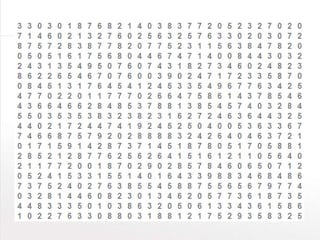
  • #3 I like to start these sessions off with a game I call “count the nines.” So, count the nines. Raise your hand when you think you know how many nines there are on here. [pause] In fact, just go ahead and shout it out. If you know how many nines are on here, shout out the answer. [pause]
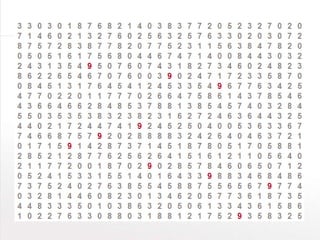
  • #4 NOW count the nines. How many nines do you see? Raise your hand when you know.
  • #5 So what is visual analytics? THAT’s visual analytics.
  • #6 Those are really fancy words for what you just experienced. Humans can see visual patterns very well, but only when the patterns really play to a human’s strengths.
  • #7 Let’s see another example. Here’s some data. The are 4 sets of data here, each with 11 sets of x-y coordinates. For the purposes of this exercise, let’s assume the x data represents, in millions, the net sales of a single retail store over the course of a month. Let’s say the y data represents, in millions, the total profit from that store. So we’re looking here at a set of points that represent profit by sales, where each point is a single store. The four data sets represent regions, say, West, Central, South and East. Let’s say you’re a manager responsible for maximizing profit at these stores. What’s your move? [pause for 10 seconds, let people try to say smart things ]
  • #8 OK, OK, so you’d typically have a bit more information than that when you’re making a decision. So now let’s look at some more information about these data sets. Maybe we can learn something about them from their means, or their variances. When we’re crunching numbers, we rely a lot on things like means and variances. And probably looking at correlation or doing a linear regression would help, too. It turns out that these four data sets all have the same means, the same variances, the same x-y correlations, and even boil down to an identical linear regression. So … what’s your move? [Pause for 10 seconds or so]
  • #9 Here are these same four data sets, plotted visually, with trend lines. Now, what’s your move? [Let the audience make some suggestions. You can chime in with things like, “Yeah, you might want to talk to the manager of the outlier in set 3 and see what she’s doing right” or “You might want to talk to the managers of some of the stores in set 4 and see why their profits are underperforming compared to stores with similar sales.”]What other pieces of information might you want? [Let them make suggestions, and if necessary you can chime in with things like “You might want to see how many orders each store is producing, or what categories of product they’re selling most, or how frequently they offer discounts.”]It would be nice to be able to encode some of that information on these graphs, like maybe have a larger circle for stores that offer, on average, larger discounts, or to be able to quickly split this data up to show sales by product category by store. Like, maybe with just one click. And then it would be nice to be able to share this view with your individual store managers, with just a couple of clicks. And it would be nice to have that view you shared update with real-time data, so those store managers could see day-by-day how their stores were performing compared to their peers, and interact with that live data to understand why their stores are succeeding or lagging. So that they are each empowered to explore the information they need to meet and exceed their profit goals. That’s what Tableau does.
  • #12 Humans are slow at mental math. We’re not designed to manipulate complex numbers in our heads. Go ahead and try to solve this multiplication problem in your head.
  • #13 If we give you a pencil and paper, all of a sudden this problem becomes a lot easier to solve. How much easier?
  • #14 About 5 times easier. It takes educated people an average of 50 seconds to solve this problem in their head. Give them the right tools, and suddenly it’s solved in just under 10 seconds.
  • #15 Which product subcategory is the most unprofitable?
  • #16 Which product subcategory is the most unprofitable?
  • #17 Now … which product subcategory is the most unprofitable?
  • #18 Preattentive attributes are information we can process visually almost immediately, before sending the information to the attention processing parts of our brain. This is information we process and understand almost unconsciously. These are generally the best ways to present data, because we can see these patterns without thinking too hard. If you have time/Internet/sound, show this video: http://www.youtube.com/watch?feature=player_detailpage&v=wnvoZxe95bo
  • #19 Show Jock’s interruption video
  • #20 Show Jock’s interruption video. If you have time and an internet connection, this YouTube video is great, too: http://www.youtube.com/watch?feature=player_detailpage&v=vBPG_OBgTWg
  • #22 Visual analysis isn’t just looking at a chart, or using colors – it’s an entire lifecycle that includes identifying and getting your data, establishing the structure of that data, choosing the best way to visualize that data, drawing conclusions or insight from those visualizations, and then getting buy-in around any conclusions supported by that data, which means you have to be able to tell a compelling story succinctly. And to help a team benefit from visual analysis, you need to support the whole cycle of visual analysis.
  • #46 The key words are are see, understand, and people. Tableau builds software for people, not specialists. We believe anyone should be able to harness the power of data. That’s our mission.