

Prepared by:
Radwan Rushdi Mohammad
Supervisor: Brwa Shwany
Photoshop CC
INTRODUCTION:
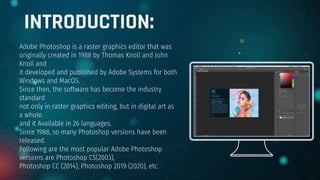
Adobe Photoshop is a raster graphics editor that was
originally created in 1988 by Thomas Knoll and John
Knoll and
it developed and published by Adobe Systems for both
Windows and MacOS.
Since then, the software has become the industry
standard
not only in raster graphics editing, but in digital art as
a whole.
and it Available in 26 languages.
Since 1988, so many Photoshop versions have been
released.
Following are the most popular Adobe Photoshop
versions are Photoshop CS(2003),
Photoshop CC (2014), Photoshop 2019 (2020), etc.
Photoshop CC :
One of the basic elements of Adobe Photoshop is the menu bar, located at the very top of tAdobe
Photoshop CC is the Creative Cloud version of Photoshop, available by subscription.
It is considered to be the professional-level version of the Photoshop family of products.
Photoshop CC is available together with Photoshop Lightroom, or as part of a larger Creative Cloud
subscription.
Photoshop CC is an advanced imaging software used by designers, web professionals, video editors, and
photographers
to alter or manipulate digital images. Photoshop is primarily used to edit 2D images,
although it does offer some 3D image editing functionality.
Photoshop includes image analysis functionality, and can be used to prepare images for use online or in-
print.he program. The menu bar is used to open and save files, adjust the canvas size, access some of
the editing tools, open and close various windows, and more.
Menu
bar
One of the basic elements of Adobe
Photoshop is the menu bar, located at the
very top of the program. The menu bar is
used to open and save files, adjust the
canvas size, access some of the editing
tools, open and close various windows, and
more.
Menu bar
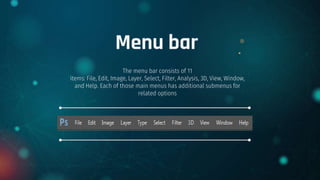
The menu bar consists of 11
items: File, Edit, Image, Layer, Select, Filter, Analysis, 3D, View, Window,
and Help. Each of those main menus has additional submenus for
related options
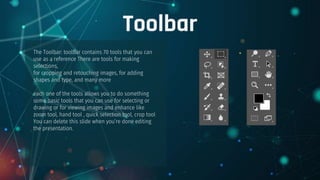
Toolbar
The Toolbar: toolbar contains 70 tools that you can
use as a reference There are tools for making
selections,
for cropping and retouching images, for adding
shapes and type, and many more
each one of the tools allows you to do something
some basic tools that you can use for selecting or
drawing or for viewing images and enhance like
zoom tool, hand tool , quick selection tool, crop tool
You can delete this slide when you’re done editing
the presentation.
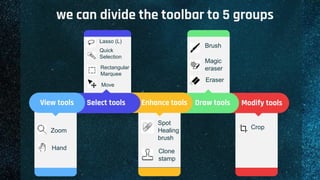
we can divide the toolbar to 5 groups
Modify tools
Draw tools
Enhance tools
Select tools
View tools
Hand
Zoom
Spot
Healing
brush
Quick
Selection
Rectangular
Marquee
Brush
Move
Lasso (L)
Magic
eraser
Eraser
Clone
stamp
Crop
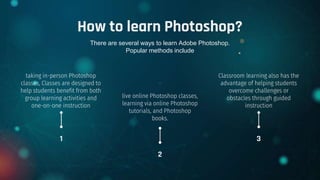
How to learn Photoshop?
taking in-person Photoshop
classes, Classes are designed to
help students benefit from both
group learning activities and
one-on-one instruction
Classroom learning also has the
advantage of helping students
overcome challenges or
obstacles through guided
instruction
.
live online Photoshop classes,
learning via online Photoshop
tutorials, and Photoshop
books.
1 3
2
There are several ways to learn Adobe Photoshop.
Popular methods include
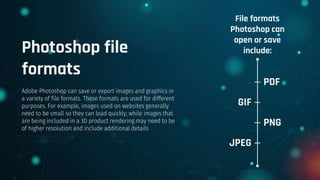
File formats
Photoshop can
open or save
include:
PDF
GIF
PNG
JPEG
Photoshop file
formats
Adobe Photoshop can save or export images and graphics in
a variety of file formats. These formats are used for different
purposes. For example, images used on websites generally
need to be small so they can load quickly; while images that
are being included in a 3D product rendering may need to be
of higher resolution and include additional details

Photoshop CC

  • 1.
    Prepared by: Radwan RushdiMohammad Supervisor: Brwa Shwany Photoshop CC
  • 2.
    INTRODUCTION: Adobe Photoshop isa raster graphics editor that was originally created in 1988 by Thomas Knoll and John Knoll and it developed and published by Adobe Systems for both Windows and MacOS. Since then, the software has become the industry standard not only in raster graphics editing, but in digital art as a whole. and it Available in 26 languages. Since 1988, so many Photoshop versions have been released. Following are the most popular Adobe Photoshop versions are Photoshop CS(2003), Photoshop CC (2014), Photoshop 2019 (2020), etc.
  • 3.
    Photoshop CC : Oneof the basic elements of Adobe Photoshop is the menu bar, located at the very top of tAdobe Photoshop CC is the Creative Cloud version of Photoshop, available by subscription. It is considered to be the professional-level version of the Photoshop family of products. Photoshop CC is available together with Photoshop Lightroom, or as part of a larger Creative Cloud subscription. Photoshop CC is an advanced imaging software used by designers, web professionals, video editors, and photographers to alter or manipulate digital images. Photoshop is primarily used to edit 2D images, although it does offer some 3D image editing functionality. Photoshop includes image analysis functionality, and can be used to prepare images for use online or in- print.he program. The menu bar is used to open and save files, adjust the canvas size, access some of the editing tools, open and close various windows, and more.
  • 4.
    Menu bar One of thebasic elements of Adobe Photoshop is the menu bar, located at the very top of the program. The menu bar is used to open and save files, adjust the canvas size, access some of the editing tools, open and close various windows, and more.
  • 5.
    Menu bar The menubar consists of 11 items: File, Edit, Image, Layer, Select, Filter, Analysis, 3D, View, Window, and Help. Each of those main menus has additional submenus for related options
  • 6.
    Toolbar The Toolbar: toolbarcontains 70 tools that you can use as a reference There are tools for making selections, for cropping and retouching images, for adding shapes and type, and many more each one of the tools allows you to do something some basic tools that you can use for selecting or drawing or for viewing images and enhance like zoom tool, hand tool , quick selection tool, crop tool You can delete this slide when you’re done editing the presentation.
  • 7.
    we can dividethe toolbar to 5 groups Modify tools Draw tools Enhance tools Select tools View tools Hand Zoom Spot Healing brush Quick Selection Rectangular Marquee Brush Move Lasso (L) Magic eraser Eraser Clone stamp Crop
  • 8.
    How to learnPhotoshop? taking in-person Photoshop classes, Classes are designed to help students benefit from both group learning activities and one-on-one instruction Classroom learning also has the advantage of helping students overcome challenges or obstacles through guided instruction . live online Photoshop classes, learning via online Photoshop tutorials, and Photoshop books. 1 3 2 There are several ways to learn Adobe Photoshop. Popular methods include
  • 9.
    File formats Photoshop can openor save include: PDF GIF PNG JPEG Photoshop file formats Adobe Photoshop can save or export images and graphics in a variety of file formats. These formats are used for different purposes. For example, images used on websites generally need to be small so they can load quickly; while images that are being included in a 3D product rendering may need to be of higher resolution and include additional details