Difference between
Adobe Illustrator
and Photoshop
ILLUSTRATOR VS
PHOTOSHOP
Adobe Illustrator and Photoshop are two of
the most popular software programs used in
the design industry. It might’ve confused you
at least once which one of the two you
should use when starting a new project. In
this article, we address the key differences
between the two. But before going further,
let’s look at the two kinds of 2D graphics,
namely Raster and Vector Graphics because
these two software’s foundation is based on
them.
VECTOR GRAPHICS
Vector Graphics consist of
points connected by lines and
curves, similar to the “connect
the dots” activities you may
have done as a kid. Vector
Graphics are not made up of
pixels that make them
independent of Image
Resolution. They’re used
primarily for Print Media,
where graphics with large
dimensions are required. The
most commonly used file type
is SVG or Scalable Vector
Graphics, compatible with all
devices.
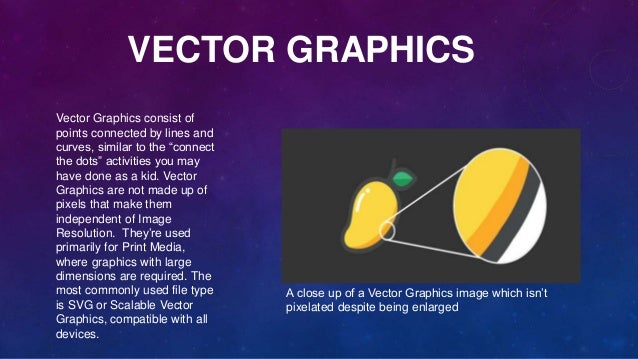
A close up of a Vector Graphics image which isn’t
pixelated despite being enlarged
Adobe Illustrator is regarded as the most powerful tool for creating Vector Graphics, and other
options include InkScape for Linux and even Figma.
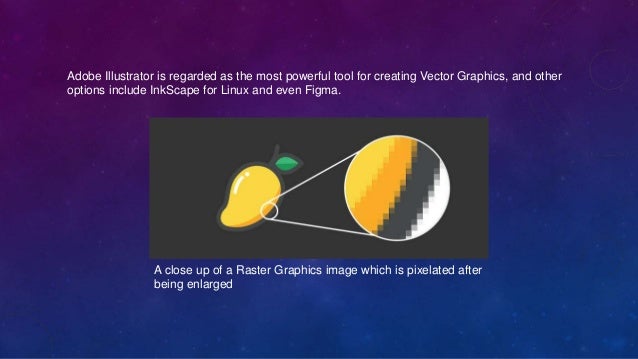
A close up of a Raster Graphics image which is pixelated after
being enlarged
RASTER GRAPHICS
Raster graphics are made up of pixels. Every pixel uses a specific color to produce an image.
When an image is zoomed in or enlarged, pixels appear as tiny squares on a graph paper or
canvas. When you take a photo with your phone or scan a document into your computer, the
image gets saved as a JPEG. JPEG is the most popular format for saving Raster Graphics.
DIFFERENCES BETWEEN ILLUSTRATOR AND
PHOTOSHOP
Adobe Photoshop Adobe Illustrator
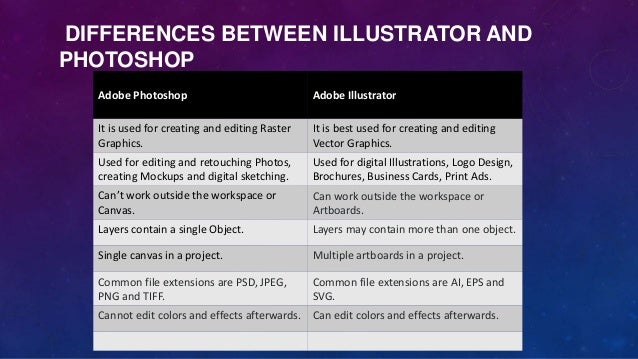
It is used for creating and editing Raster
Graphics.
It is best used for creating and editing
Vector Graphics.
Used for editing and retouching Photos,
creating Mockups and digital sketching.
Used for digital Illustrations, Logo Design,
Brochures, Business Cards, Print Ads.
Can’t work outside the workspace or
Canvas.
Can work outside the workspace or
Artboards.
Layers contain a single Object. Layers may contain more than one object.
Single canvas in a project. Multiple artboards in a project.
Common file extensions are PSD, JPEG,
PNG and TIFF.
Common file extensions are AI, EPS and
SVG.
Cannot edit colors and effects afterwards. Can edit colors and effects afterwards.
Adobe Photoshop Adobe Illustrator
Useful for art based coloring,
shadowing and shading.
Useful for precise and accurate
designs.
Raster Graphics lose their quality
when scaled up or down.
Vector graphics do not lose their
quality when scaled up or down.
Plenty of filters and image editing
tools.
Limited number of filters.
Great for adding special effects. Gives better print output.
Suggested Read:
•Introduction to User Interface Design

Difference between Adobe Illustrator and Photoshop

  • 1.
  • 2.
    ILLUSTRATOR VS PHOTOSHOP Adobe Illustratorand Photoshop are two of the most popular software programs used in the design industry. It might’ve confused you at least once which one of the two you should use when starting a new project. In this article, we address the key differences between the two. But before going further, let’s look at the two kinds of 2D graphics, namely Raster and Vector Graphics because these two software’s foundation is based on them.
  • 3.
    VECTOR GRAPHICS Vector Graphicsconsist of points connected by lines and curves, similar to the “connect the dots” activities you may have done as a kid. Vector Graphics are not made up of pixels that make them independent of Image Resolution. They’re used primarily for Print Media, where graphics with large dimensions are required. The most commonly used file type is SVG or Scalable Vector Graphics, compatible with all devices. A close up of a Vector Graphics image which isn’t pixelated despite being enlarged
  • 4.
    Adobe Illustrator isregarded as the most powerful tool for creating Vector Graphics, and other options include InkScape for Linux and even Figma. A close up of a Raster Graphics image which is pixelated after being enlarged
  • 5.
    RASTER GRAPHICS Raster graphicsare made up of pixels. Every pixel uses a specific color to produce an image. When an image is zoomed in or enlarged, pixels appear as tiny squares on a graph paper or canvas. When you take a photo with your phone or scan a document into your computer, the image gets saved as a JPEG. JPEG is the most popular format for saving Raster Graphics.
  • 6.
    DIFFERENCES BETWEEN ILLUSTRATORAND PHOTOSHOP Adobe Photoshop Adobe Illustrator It is used for creating and editing Raster Graphics. It is best used for creating and editing Vector Graphics. Used for editing and retouching Photos, creating Mockups and digital sketching. Used for digital Illustrations, Logo Design, Brochures, Business Cards, Print Ads. Can’t work outside the workspace or Canvas. Can work outside the workspace or Artboards. Layers contain a single Object. Layers may contain more than one object. Single canvas in a project. Multiple artboards in a project. Common file extensions are PSD, JPEG, PNG and TIFF. Common file extensions are AI, EPS and SVG. Cannot edit colors and effects afterwards. Can edit colors and effects afterwards.
  • 7.
    Adobe Photoshop AdobeIllustrator Useful for art based coloring, shadowing and shading. Useful for precise and accurate designs. Raster Graphics lose their quality when scaled up or down. Vector graphics do not lose their quality when scaled up or down. Plenty of filters and image editing tools. Limited number of filters. Great for adding special effects. Gives better print output. Suggested Read: •Introduction to User Interface Design