Java Programming: From Problem Analysis to Program Design, 5e Chapter 4 Control Structures I: Selection
Chapter Objectives Learn about control structures Examine relational and logical operators Explore how to form and evaluate logical (Boolean) expressions Learn how to use the selection control structures  if ,  if … else , and  switch  in a program Java Programming: From Problem Analysis to Program Design, 5e
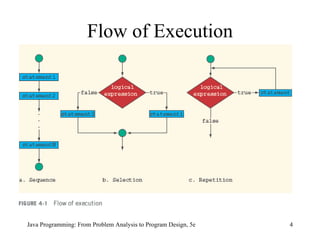
Control Structures Three methods of processing a program In sequence Branching Looping Branch:  altering the flow of program execution by making a selection or choice Loop: altering the flow of program execution by repetition of statement(s) Java Programming: From Problem Analysis to Program Design, 5e
Flow of Execution Java Programming: From Problem Analysis to Program Design, 5e
Relational Operators Relational operator Allows you to make comparisons in a program Binary operator Condition is represented by a logical expression in Java Logical expression: expression that has a value of either true or false Java Programming: From Problem Analysis to Program Design, 5e
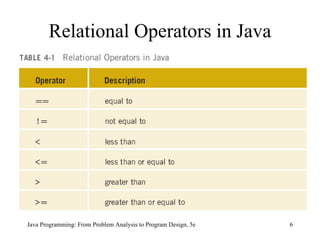
Relational Operators in Java Java Programming: From Problem Analysis to Program Design, 5e
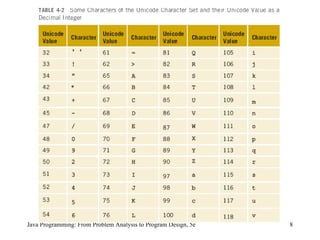
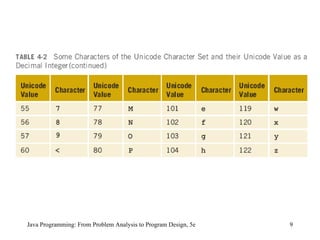
Relational Operators and Primitive Data Types Can be used with integral and floating-point data types Can be used with the char data type Unicode collating sequence Java Programming: From Problem Analysis to Program Design, 5e
Java Programming: From Problem Analysis to Program Design, 5e
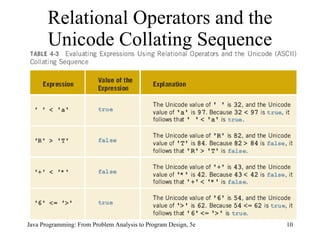
Relational Operators and the Unicode Collating Sequence Java Programming: From Problem Analysis to Program Design, 5e
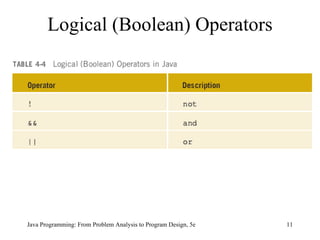
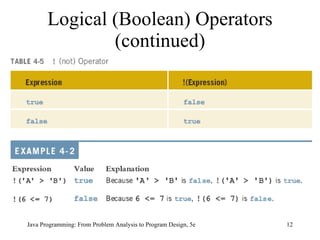
Logical (Boolean) Operators Java Programming: From Problem Analysis to Program Design, 5e
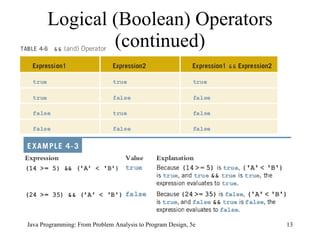
Logical (Boolean) Operators (continued) Java Programming: From Problem Analysis to Program Design, 5e
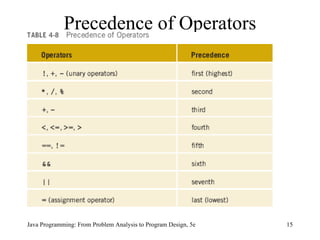
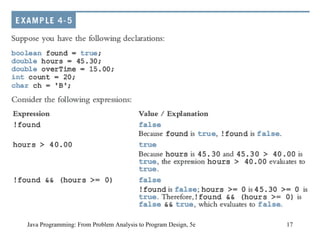
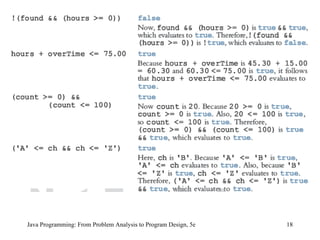
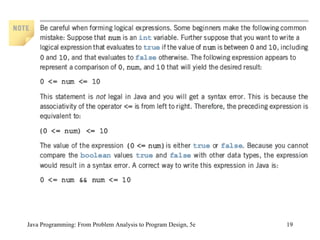
Precedence of Operators Java Programming: From Problem Analysis to Program Design, 5e
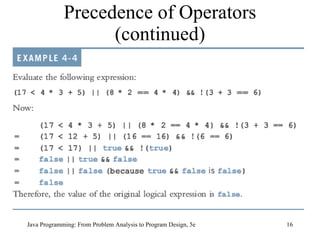
Precedence of Operators (continued) Java Programming: From Problem Analysis to Program Design, 5e
Java Programming: From Problem Analysis to Program Design, 5e
Selection One-way selection Two-way selection Compound (block of) statements Multiple selections (nested if) Conditional operator switch  structures Java Programming: From Problem Analysis to Program Design, 5e
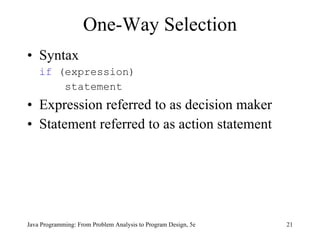
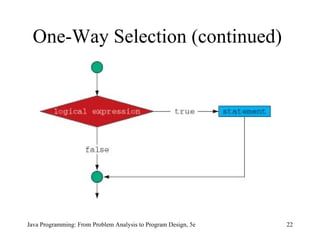
One-Way Selection Syntax if  (expression)   statement Expression referred to as decision maker Statement referred to as action statement Java Programming: From Problem Analysis to Program Design, 5e
One-Way Selection (continued) Java Programming: From Problem Analysis to Program Design, 5e
Example 4-7 //Program to determine the absolute value of an integer import  javax.swing.JOptionPane; public class  AbsoluteValue { public static void  main(String[] args) { int  number; int  temp; String numString; numString = JOptionPane.showInputDialog ("Enter an integer:");  //Line 1 number = Integer.parseInt(numString);  //Line 2 temp = number;  //Line 3 One-Way Selection (continued) Java Programming: From Problem Analysis to Program Design, 5e
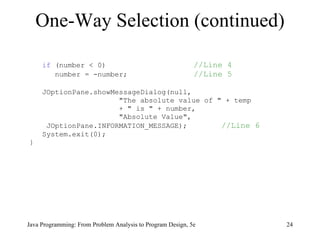
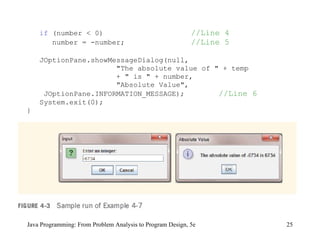
if  (number < 0)    //Line 4 number = -number;    //Line 5 JOptionPane.showMessageDialog(null, &quot;The absolute value of &quot; + temp + &quot; is &quot; + number, &quot;Absolute Value&quot;, JOptionPane.INFORMATION_MESSAGE);   //Line 6 System.exit(0); } One-Way Selection (continued) Java Programming: From Problem Analysis to Program Design, 5e
if  (number < 0)    //Line 4 number = -number;    //Line 5 JOptionPane.showMessageDialog(null, &quot;The absolute value of &quot; + temp + &quot; is &quot; + number, &quot;Absolute Value&quot;, JOptionPane.INFORMATION_MESSAGE);   //Line 6 System.exit(0); } Java Programming: From Problem Analysis to Program Design, 5e
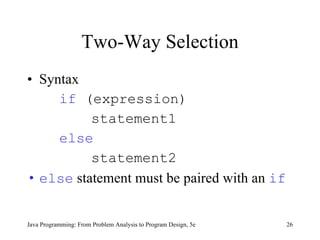
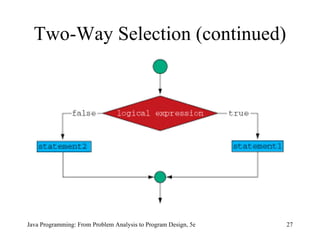
Two-Way Selection Syntax if  (expression)   statement1 else   statement2 else  statement must be paired with an  if Java Programming: From Problem Analysis to Program Design, 5e
Two-Way Selection (continued) Java Programming: From Problem Analysis to Program Design, 5e
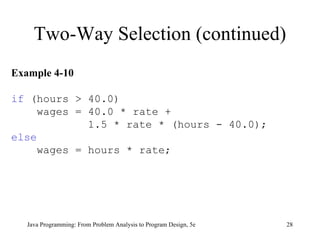
Two-Way Selection (continued) Java Programming: From Problem Analysis to Program Design, 5e Example 4-10 if  (hours > 40.0) wages = 40.0 * rate +  1.5 * rate * (hours - 40.0);  else wages = hours * rate;
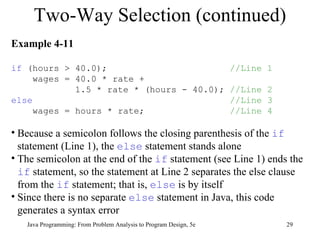
Two-Way Selection (continued) Java Programming: From Problem Analysis to Program Design, 5e Example 4-11 if  (hours > 40.0);  //Line 1 wages = 40.0 * rate +  1.5 * rate * (hours - 40.0);  //Line 2 else   //Line 3 wages = hours * rate;  //Line 4 Because a semicolon follows the closing parenthesis of the  if  statement (Line 1), the  else  statement stands alone  The semicolon at the end of the  if  statement (see Line 1) ends the  if  statement, so the statement at Line 2 separates the else clause from the  if  statement; that is,  else  is by itself  Since there is no separate  else  statement in Java, this code generates a syntax error
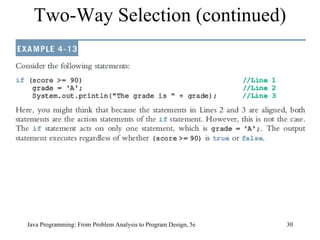
Two-Way Selection (continued) Java Programming: From Problem Analysis to Program Design, 5e
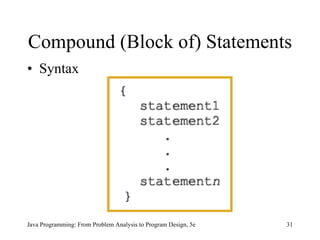
Compound (Block of) Statements Syntax Java Programming: From Problem Analysis to Program Design, 5e
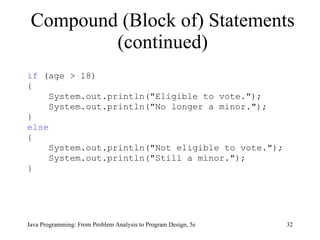
Compound (Block of) Statements (continued) if  (age > 18) { System.out.println(&quot;Eligible to vote.&quot;); System.out.println(&quot;No longer a minor.&quot;); }  else { System.out.println(&quot;Not eligible to vote.&quot;); System.out.println(&quot;Still a minor.&quot;); } Java Programming: From Problem Analysis to Program Design, 5e
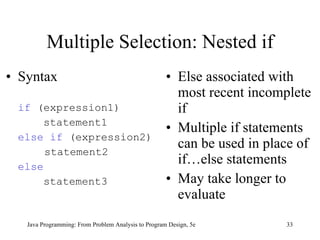
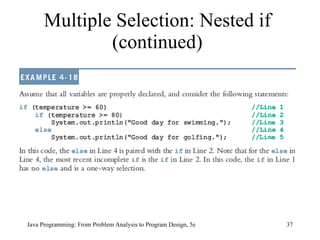
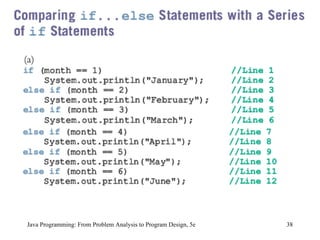
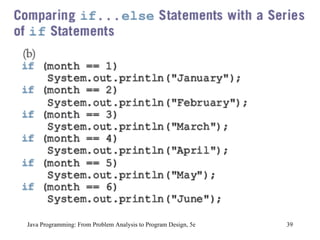
Multiple Selection: Nested if Syntax if  (expression1)   statement1 else if  (expression2)   statement2 else   statement3 Else associated with most recent incomplete if Multiple if statements can be used in place of if…else statements May take longer to evaluate Java Programming: From Problem Analysis to Program Design, 5e
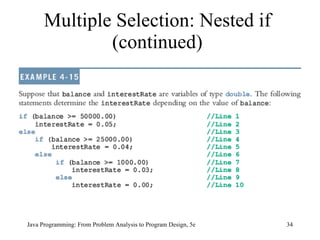
Multiple Selection: Nested if (continued) Java Programming: From Problem Analysis to Program Design, 5e
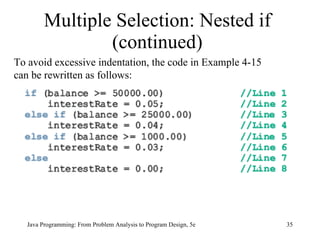
Multiple Selection: Nested if (continued) Java Programming: From Problem Analysis to Program Design, 5e To avoid excessive indentation, the code in Example 4-15 can be rewritten as follows:
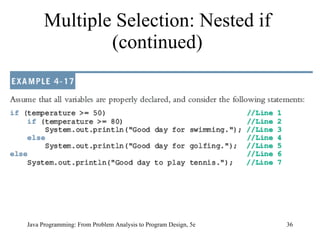
Multiple Selection: Nested if (continued) Java Programming: From Problem Analysis to Program Design, 5e
Java Programming: From Problem Analysis to Program Design, 5e
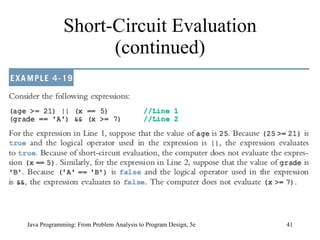
Definition:  a process in which the computer evaluates a logical expression from left to right and stops as soon as the value of the expression is known Short-Circuit Evaluation Java Programming: From Problem Analysis to Program Design, 5e
Short-Circuit Evaluation (continued) Java Programming: From Problem Analysis to Program Design, 5e
Java Programming: From Problem Analysis to Program Design, 5e
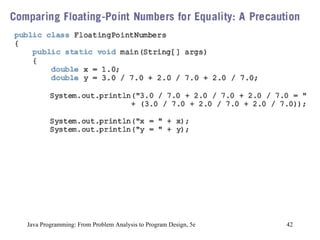
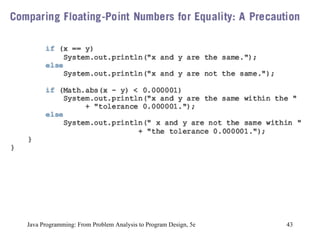
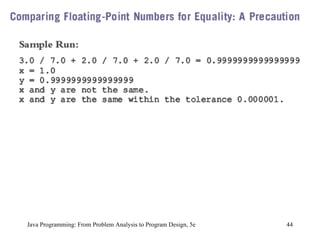
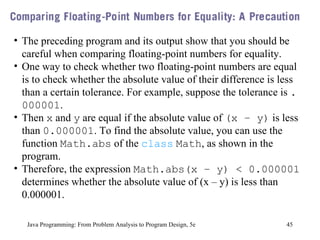
Java Programming: From Problem Analysis to Program Design, 5e The preceding program and its output show that you should be careful when comparing floating-point numbers for equality.  One way to check whether two floating-point numbers are equal is to check whether the absolute value of their difference is less than a certain tolerance. For example, suppose the tolerance is  .000001 .  Then  x  and  y  are equal if the absolute value of  (x – y)  is less than  0.000001 . To find the absolute value, you can use the function  Math.abs  of the  class   Math , as shown in the program.  Therefore, the expression  Math.abs(x – y) < 0.000001  determines whether the absolute value of (x – y) is less than 0.000001.
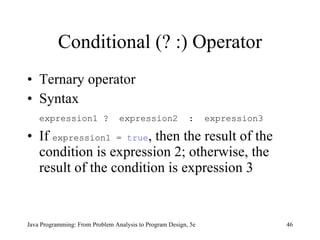
Conditional (? :) Operator Ternary operator Syntax expression1 ?  expression2  :  expression3 If  expression1 =  true , then the result of the condition is expression 2; otherwise, the result of the condition is expression 3 Java Programming: From Problem Analysis to Program Design, 5e
Java Programming: From Problem Analysis to Program Design, 5e
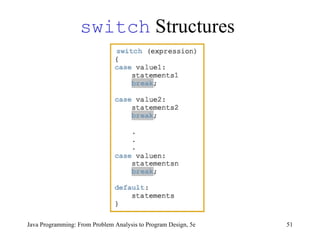
switch  Structures Java Programming: From Problem Analysis to Program Design, 5e
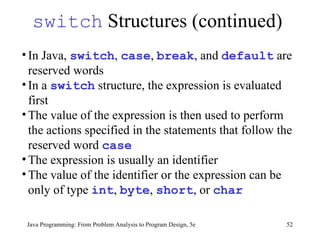
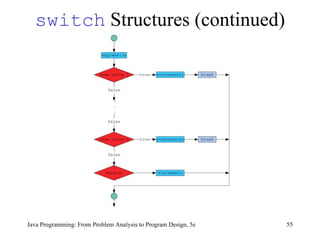
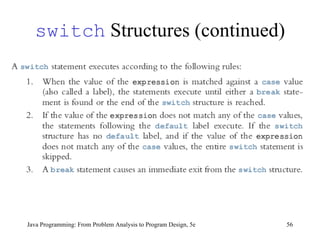
switch  Structures (continued) Java Programming: From Problem Analysis to Program Design, 5e In Java,  switch ,  case ,  break , and  default  are reserved words  In a  switch  structure, the expression is evaluated first The value of the expression is then used to perform the actions specified in the statements that follow the reserved word  case   The expression is usually an identifier  The value of the identifier or the expression can be only of type  int ,  byte ,  short , or  char
switch  Structures (continued) Java Programming: From Problem Analysis to Program Design, 5e The expression is sometimes called the selector; its value determines which statements are selected for execution  A particular  case  value must appear only once One or more statements may follow a  case  label, so you do not need to use braces to turn multiple statements into a single compound statement
switch  Structures (continued) Java Programming: From Problem Analysis to Program Design, 5e The  break  statement may or may not appear after each  statements1 ,  statements2 , ...,  statementsn A  switch  structure may or may not have the  default  label
switch  Structures (continued) Java Programming: From Problem Analysis to Program Design, 5e
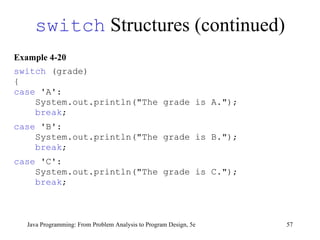
Example 4-20 switch  (grade) { case  'A':  System.out.println(&quot;The grade is A.&quot;); break ; case  'B':  System.out.println(&quot;The grade is B.&quot;); break ; case  'C':  System.out.println(&quot;The grade is C.&quot;); break ; switch  Structures (continued) Java Programming: From Problem Analysis to Program Design, 5e
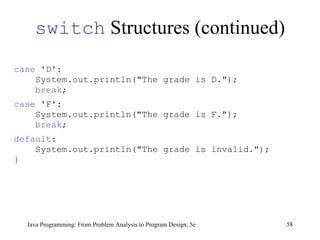
case  'D':  System.out.println(&quot;The grade is D.&quot;); break ; case  'F':  System.out.println(&quot;The grade is F.&quot;); break ; default :  System.out.println(&quot;The grade is invalid.&quot;); } switch  Structures (continued) Java Programming: From Problem Analysis to Program Design, 5e
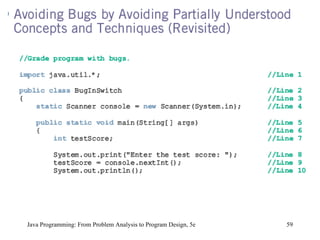
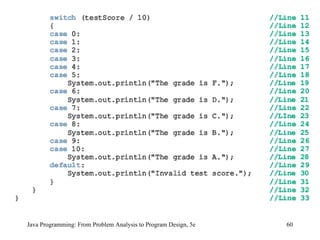
Java Programming: From Problem Analysis to Program Design, 5e
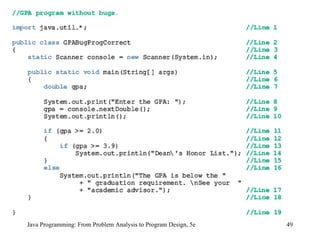
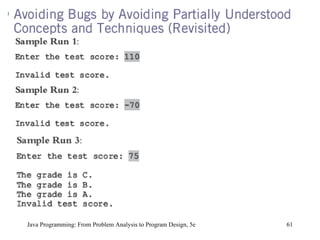
Java Programming: From Problem Analysis to Program Design, 5e To output results correctly, the  switch  structure must include a  break  statement after each  println  statement, except the last  println  statement.
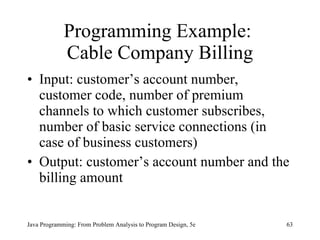
Programming Example:  Cable Company Billing Input: customer’s account number, customer code, number of premium channels to which customer subscribes, number of basic service connections (in case of business customers) Output: customer’s account number and the billing amount Java Programming: From Problem Analysis to Program Design, 5e
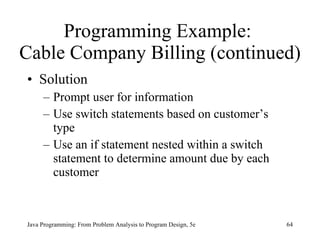
Programming Example:  Cable Company Billing (continued) Solution  Prompt user for information Use switch statements based on customer’s type Use an if statement nested within a switch statement to determine amount due by each customer Java Programming: From Problem Analysis to Program Design, 5e
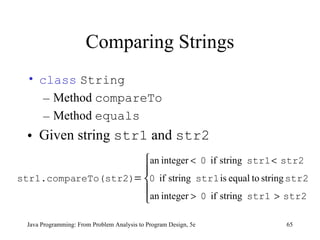
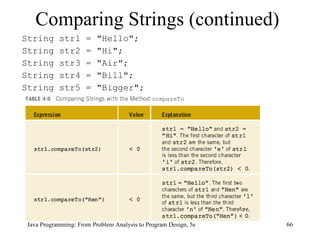
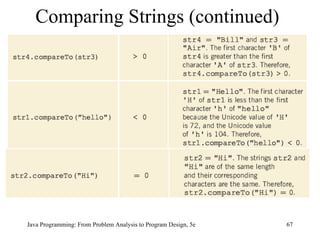
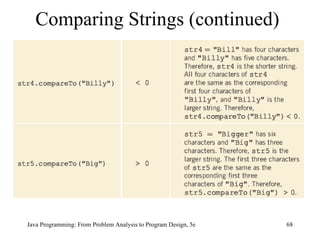
Comparing Strings class   String   Method  compareTo Method  equals Given string  str1  and  str2 Java Programming: From Problem Analysis to Program Design, 5e
Comparing Strings (continued) String str1 = &quot;Hello&quot;; String str2 = &quot;Hi&quot;; String str3 = &quot;Air&quot;; String str4 = &quot;Bill&quot;; String str5 = &quot;Bigger&quot;; Java Programming: From Problem Analysis to Program Design, 5e
Comparing Strings (continued) Java Programming: From Problem Analysis to Program Design, 5e
Chapter Summary Control structures are used to process programs Logical expressions and order of precedence of operators are used in expressions If statements if … else  statements switch  structures Proper syntax for using control statements Compare strings  Java Programming: From Problem Analysis to Program Design, 5e

9781111530532 ppt ch04

  • 1.
    Java Programming: FromProblem Analysis to Program Design, 5e Chapter 4 Control Structures I: Selection
  • 2.
    Chapter Objectives Learnabout control structures Examine relational and logical operators Explore how to form and evaluate logical (Boolean) expressions Learn how to use the selection control structures if , if … else , and switch in a program Java Programming: From Problem Analysis to Program Design, 5e
  • 3.
    Control Structures Threemethods of processing a program In sequence Branching Looping Branch: altering the flow of program execution by making a selection or choice Loop: altering the flow of program execution by repetition of statement(s) Java Programming: From Problem Analysis to Program Design, 5e
  • 4.
    Flow of ExecutionJava Programming: From Problem Analysis to Program Design, 5e
  • 5.
    Relational Operators Relationaloperator Allows you to make comparisons in a program Binary operator Condition is represented by a logical expression in Java Logical expression: expression that has a value of either true or false Java Programming: From Problem Analysis to Program Design, 5e
  • 6.
    Relational Operators inJava Java Programming: From Problem Analysis to Program Design, 5e
  • 7.
    Relational Operators andPrimitive Data Types Can be used with integral and floating-point data types Can be used with the char data type Unicode collating sequence Java Programming: From Problem Analysis to Program Design, 5e
  • 8.
    Java Programming: FromProblem Analysis to Program Design, 5e
  • 9.
    Java Programming: FromProblem Analysis to Program Design, 5e
  • 10.
    Relational Operators andthe Unicode Collating Sequence Java Programming: From Problem Analysis to Program Design, 5e
  • 11.
    Logical (Boolean) OperatorsJava Programming: From Problem Analysis to Program Design, 5e
  • 12.
    Logical (Boolean) Operators(continued) Java Programming: From Problem Analysis to Program Design, 5e
  • 13.
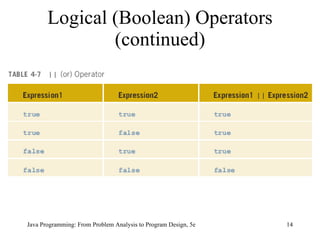
    Logical (Boolean) Operators(continued) Java Programming: From Problem Analysis to Program Design, 5e
  • 14.
    Logical (Boolean) Operators(continued) Java Programming: From Problem Analysis to Program Design, 5e
  • 15.
    Precedence of OperatorsJava Programming: From Problem Analysis to Program Design, 5e
  • 16.
    Precedence of Operators(continued) Java Programming: From Problem Analysis to Program Design, 5e
  • 17.
    Java Programming: FromProblem Analysis to Program Design, 5e
  • 18.
    Java Programming: FromProblem Analysis to Program Design, 5e
  • 19.
    Java Programming: FromProblem Analysis to Program Design, 5e
  • 20.
    Selection One-way selectionTwo-way selection Compound (block of) statements Multiple selections (nested if) Conditional operator switch structures Java Programming: From Problem Analysis to Program Design, 5e
  • 21.
    One-Way Selection Syntaxif (expression) statement Expression referred to as decision maker Statement referred to as action statement Java Programming: From Problem Analysis to Program Design, 5e
  • 22.
    One-Way Selection (continued)Java Programming: From Problem Analysis to Program Design, 5e
  • 23.
    Example 4-7 //Programto determine the absolute value of an integer import javax.swing.JOptionPane; public class AbsoluteValue { public static void main(String[] args) { int number; int temp; String numString; numString = JOptionPane.showInputDialog (&quot;Enter an integer:&quot;); //Line 1 number = Integer.parseInt(numString); //Line 2 temp = number; //Line 3 One-Way Selection (continued) Java Programming: From Problem Analysis to Program Design, 5e
  • 24.
    if (number< 0) //Line 4 number = -number; //Line 5 JOptionPane.showMessageDialog(null, &quot;The absolute value of &quot; + temp + &quot; is &quot; + number, &quot;Absolute Value&quot;, JOptionPane.INFORMATION_MESSAGE); //Line 6 System.exit(0); } One-Way Selection (continued) Java Programming: From Problem Analysis to Program Design, 5e
  • 25.
    if (number< 0) //Line 4 number = -number; //Line 5 JOptionPane.showMessageDialog(null, &quot;The absolute value of &quot; + temp + &quot; is &quot; + number, &quot;Absolute Value&quot;, JOptionPane.INFORMATION_MESSAGE); //Line 6 System.exit(0); } Java Programming: From Problem Analysis to Program Design, 5e
  • 26.
    Two-Way Selection Syntaxif (expression) statement1 else statement2 else statement must be paired with an if Java Programming: From Problem Analysis to Program Design, 5e
  • 27.
    Two-Way Selection (continued)Java Programming: From Problem Analysis to Program Design, 5e
  • 28.
    Two-Way Selection (continued)Java Programming: From Problem Analysis to Program Design, 5e Example 4-10 if (hours > 40.0) wages = 40.0 * rate + 1.5 * rate * (hours - 40.0); else wages = hours * rate;
  • 29.
    Two-Way Selection (continued)Java Programming: From Problem Analysis to Program Design, 5e Example 4-11 if (hours > 40.0); //Line 1 wages = 40.0 * rate + 1.5 * rate * (hours - 40.0); //Line 2 else //Line 3 wages = hours * rate; //Line 4 Because a semicolon follows the closing parenthesis of the if statement (Line 1), the else statement stands alone The semicolon at the end of the if statement (see Line 1) ends the if statement, so the statement at Line 2 separates the else clause from the if statement; that is, else is by itself Since there is no separate else statement in Java, this code generates a syntax error
  • 30.
    Two-Way Selection (continued)Java Programming: From Problem Analysis to Program Design, 5e
  • 31.
    Compound (Block of)Statements Syntax Java Programming: From Problem Analysis to Program Design, 5e
  • 32.
    Compound (Block of)Statements (continued) if (age > 18) { System.out.println(&quot;Eligible to vote.&quot;); System.out.println(&quot;No longer a minor.&quot;); } else { System.out.println(&quot;Not eligible to vote.&quot;); System.out.println(&quot;Still a minor.&quot;); } Java Programming: From Problem Analysis to Program Design, 5e
  • 33.
    Multiple Selection: Nestedif Syntax if (expression1) statement1 else if (expression2) statement2 else statement3 Else associated with most recent incomplete if Multiple if statements can be used in place of if…else statements May take longer to evaluate Java Programming: From Problem Analysis to Program Design, 5e
  • 34.
    Multiple Selection: Nestedif (continued) Java Programming: From Problem Analysis to Program Design, 5e
  • 35.
    Multiple Selection: Nestedif (continued) Java Programming: From Problem Analysis to Program Design, 5e To avoid excessive indentation, the code in Example 4-15 can be rewritten as follows:
  • 36.
    Multiple Selection: Nestedif (continued) Java Programming: From Problem Analysis to Program Design, 5e
  • 37.
    Multiple Selection: Nestedif (continued) Java Programming: From Problem Analysis to Program Design, 5e
  • 38.
    Java Programming: FromProblem Analysis to Program Design, 5e
  • 39.
    Java Programming: FromProblem Analysis to Program Design, 5e
  • 40.
    Definition: aprocess in which the computer evaluates a logical expression from left to right and stops as soon as the value of the expression is known Short-Circuit Evaluation Java Programming: From Problem Analysis to Program Design, 5e
  • 41.
    Short-Circuit Evaluation (continued)Java Programming: From Problem Analysis to Program Design, 5e
  • 42.
    Java Programming: FromProblem Analysis to Program Design, 5e
  • 43.
    Java Programming: FromProblem Analysis to Program Design, 5e
  • 44.
    Java Programming: FromProblem Analysis to Program Design, 5e
  • 45.
    Java Programming: FromProblem Analysis to Program Design, 5e The preceding program and its output show that you should be careful when comparing floating-point numbers for equality. One way to check whether two floating-point numbers are equal is to check whether the absolute value of their difference is less than a certain tolerance. For example, suppose the tolerance is .000001 . Then x and y are equal if the absolute value of (x – y) is less than 0.000001 . To find the absolute value, you can use the function Math.abs of the class Math , as shown in the program. Therefore, the expression Math.abs(x – y) < 0.000001 determines whether the absolute value of (x – y) is less than 0.000001.
  • 46.
    Conditional (? :)Operator Ternary operator Syntax expression1 ? expression2 : expression3 If expression1 = true , then the result of the condition is expression 2; otherwise, the result of the condition is expression 3 Java Programming: From Problem Analysis to Program Design, 5e
  • 47.
    Java Programming: FromProblem Analysis to Program Design, 5e
  • 48.
    Java Programming: FromProblem Analysis to Program Design, 5e
  • 49.
    Java Programming: FromProblem Analysis to Program Design, 5e
  • 50.
    Java Programming: FromProblem Analysis to Program Design, 5e
  • 51.
    switch StructuresJava Programming: From Problem Analysis to Program Design, 5e
  • 52.
    switch Structures(continued) Java Programming: From Problem Analysis to Program Design, 5e In Java, switch , case , break , and default are reserved words In a switch structure, the expression is evaluated first The value of the expression is then used to perform the actions specified in the statements that follow the reserved word case The expression is usually an identifier The value of the identifier or the expression can be only of type int , byte , short , or char
  • 53.
    switch Structures(continued) Java Programming: From Problem Analysis to Program Design, 5e The expression is sometimes called the selector; its value determines which statements are selected for execution A particular case value must appear only once One or more statements may follow a case label, so you do not need to use braces to turn multiple statements into a single compound statement
  • 54.
    switch Structures(continued) Java Programming: From Problem Analysis to Program Design, 5e The break statement may or may not appear after each statements1 , statements2 , ..., statementsn A switch structure may or may not have the default label
  • 55.
    switch Structures(continued) Java Programming: From Problem Analysis to Program Design, 5e
  • 56.
    switch Structures(continued) Java Programming: From Problem Analysis to Program Design, 5e
  • 57.
    Example 4-20 switch (grade) { case 'A': System.out.println(&quot;The grade is A.&quot;); break ; case 'B': System.out.println(&quot;The grade is B.&quot;); break ; case 'C': System.out.println(&quot;The grade is C.&quot;); break ; switch Structures (continued) Java Programming: From Problem Analysis to Program Design, 5e
  • 58.
    case 'D': System.out.println(&quot;The grade is D.&quot;); break ; case 'F': System.out.println(&quot;The grade is F.&quot;); break ; default : System.out.println(&quot;The grade is invalid.&quot;); } switch Structures (continued) Java Programming: From Problem Analysis to Program Design, 5e
  • 59.
    Java Programming: FromProblem Analysis to Program Design, 5e
  • 60.
    Java Programming: FromProblem Analysis to Program Design, 5e
  • 61.
    Java Programming: FromProblem Analysis to Program Design, 5e
  • 62.
    Java Programming: FromProblem Analysis to Program Design, 5e To output results correctly, the switch structure must include a break statement after each println statement, except the last println statement.
  • 63.
    Programming Example: Cable Company Billing Input: customer’s account number, customer code, number of premium channels to which customer subscribes, number of basic service connections (in case of business customers) Output: customer’s account number and the billing amount Java Programming: From Problem Analysis to Program Design, 5e
  • 64.
    Programming Example: Cable Company Billing (continued) Solution Prompt user for information Use switch statements based on customer’s type Use an if statement nested within a switch statement to determine amount due by each customer Java Programming: From Problem Analysis to Program Design, 5e
  • 65.
    Comparing Strings class String Method compareTo Method equals Given string str1 and str2 Java Programming: From Problem Analysis to Program Design, 5e
  • 66.
    Comparing Strings (continued)String str1 = &quot;Hello&quot;; String str2 = &quot;Hi&quot;; String str3 = &quot;Air&quot;; String str4 = &quot;Bill&quot;; String str5 = &quot;Bigger&quot;; Java Programming: From Problem Analysis to Program Design, 5e
  • 67.
    Comparing Strings (continued)Java Programming: From Problem Analysis to Program Design, 5e
  • 68.
    Comparing Strings (continued)Java Programming: From Problem Analysis to Program Design, 5e
  • 69.
    Chapter Summary Controlstructures are used to process programs Logical expressions and order of precedence of operators are used in expressions If statements if … else statements switch structures Proper syntax for using control statements Compare strings Java Programming: From Problem Analysis to Program Design, 5e