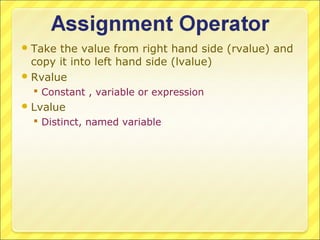
 Take the value from right hand side (rvalue) and
  copy it into left hand side (lvalue)
 Rvalue
   Constant , variable or expression
 Lvalue
   Distinct, named variable
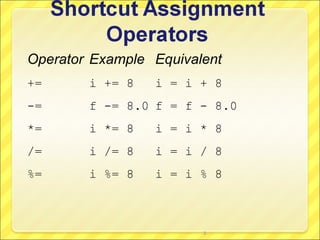
Operator Example Equivalent
+=      i += 8   i = i + 8
-=      f -= 8.0 f = f - 8.0
*=      i *= 8   i = i * 8
/=      i /= 8   i = i / 8
%=      i %= 8   i = i % 8


                        3
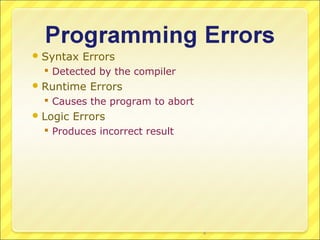
 Syntax   Errors
   Detected by the compiler
 Runtime    Errors
   Causes the program to abort
 Logic   Errors
   Produces incorrect result


                                  4
A pair of braces in a program forms a block that
groups components of a program.

     public class Test {
                                                                  Class block
       public static void main(String[] args) {
         System.out.println("Welcome to Java!");   Method block
       }
     }


                                           5
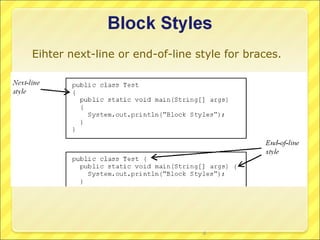
Eihter next-line or end-of-line style for braces.


                                 6
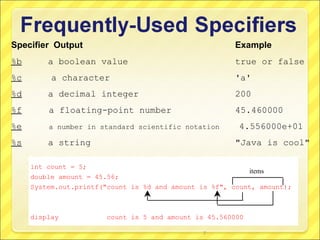
Specifier Output                                       Example
%b       a boolean value                               true or false
%c        a character                                  'a'
%d       a decimal integer                             200
%f       a floating-point number                       45.460000
%e       a number in standard scientific notation       4.556000e+01
%s       a string                                      "Java is cool"

     int count = 5;
                                                           items
     double amount = 45.56;
     System.out.printf("count is %d and amount is %f", count, amount);


     display           count is 5 and amount is 45.560000

                                               7
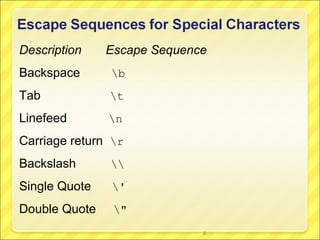
Description    Escape Sequence
Backspace      b
Tab            t
Linefeed       n
Carriage return r
Backslash      
Single Quote   '
Double Quote    "
                             8
Java in two semesters by Quentin Charatan & Aaron Kans
 The order in which the instructions were executed
  was not under your control
 Program starts by executing the first instruction in
  main method and then all executed instructions
  were in sequence
 This order of execution is restrictive and one as
  programmer need more control over the order in
  which the instructions are executed
Generates   boolean result
Evaluates relationship between
 values of the operands
  Produces TRUE if relationship is true
  Produces FALSE is relationship is untrue
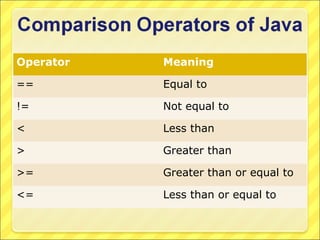
Operator   Meaning

==         Equal to

!=         Not equal to

<          Less than

>          Greater than

>=         Greater than or equal to

<=         Less than or equal to
 Whenever   we need to make choice among
  different courses of action
 Example
   A program processing requests for airline tickets
    could have following choices to make
      Display the price os seats requested
      Display a list of alternative flights
      Display a message saying that no flights are available to
       that destination
A  program that can make choices can behave
  differently each time it is run, whereas programs
  run in sequence behave the same way each time
  they are run
 Unless otherwise mentioned, program instructions
  are executed in sequence
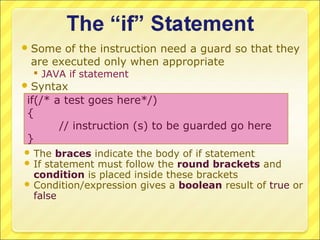
 Some of the instruction need a guard so that they
 are executed only when appropriate
   JAVA if statement
 Syntax
if(/* a test goes here*/)
{
       // instruction (s) to be guarded go here
}
 The braces indicate the body of if statement
 If statement must follow the round brackets    and
  condition is placed inside these brackets
 Condition/expression gives a boolean result of true or
  false
import java.util.Scanner;
public class Assignment1 {
      public static void main(String[] args) {
      int x = 0;
      Scanner scan = new Scanner(System.in);
      x = scan.nextInt();
      if(x%2 == 0)
      {
             System.out.println("number is even");
      }
  }
}
import java.util.Scanner;
public class Assignment1 {
   public static void main(String[] args) {
       int temperature = 0;
       Scanner scan = new Scanner(System.in);
       temperature = scan.nextInt();
       if(temperature<0)
       {
            System.out.println("its freezing");
            System.out.println("temperature is: "+temperature);
            System.out.println("Wear appropriate clothes");
        }
    }
}
 Single  – branched instructions
 The if statement provides two choices
   Execute the conditional instructions
     Condition is true
   Do not execute the conditional instructions
     Condition is false
     Do nothing
 Double  branched selection
 Alternative course of action
 Choices
   Some instructions are executed if condition is true
   Some other instructions are executed if condition is
    false
import java.util.Scanner;
public class Assignment1 {
       public static void main(String[] args) {
       int x = 0;
       Scanner scan = new Scanner(System.in);
       x = scan.nextInt();
       if(x%2 == 0)
       {
               System.out.println("number is even");
       }
       else
       {
               System.out.println("number is odd");
       }
       System.out.println(“good work");
  }
}
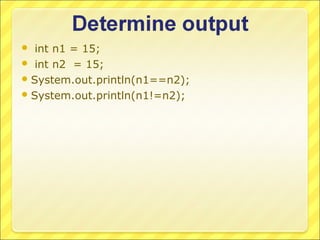
  int n1 = 15;
 int n2 = 15;
 System.out.println(n1==n2);
 System.out.println(n1!=n2);
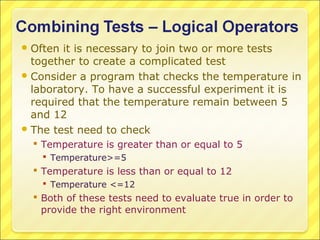
 Often it is necessary to join two or more tests
  together to create a complicated test
 Consider a program that checks the temperature in
  laboratory. To have a successful experiment it is
  required that the temperature remain between 5
  and 12
 The test need to check
   Temperature is greater than or equal to 5
    Temperature>=5
   Temperature is less than or equal to 12
    Temperature <=12
   Both of these tests need to evaluate true in order to
    provide the right environment
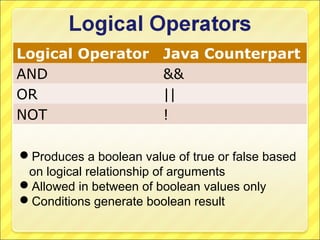
Logical Operator Java Counterpart
AND              &&
OR               ||
NOT              !

Produces a boolean value of true or false based
 on logical relationship of arguments
Allowed in between of boolean values only
Conditions generate boolean result
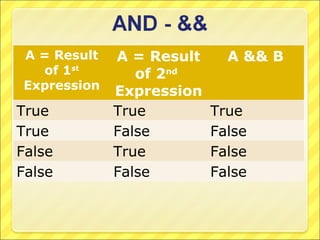
A = Result   A = Result     A && B
  of 1st        of 2nd
Expression   Expression
True         True         True
True         False        False
False        True         False
False        False        False
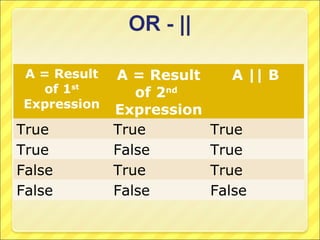
A = Result   A = Result     A || B
  of 1st        of 2nd
Expression   Expression
True         True         True
True         False        True
False        True         True
False        False        False
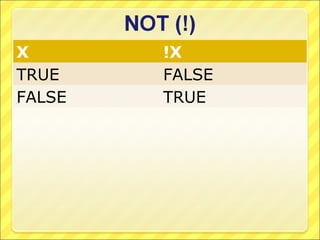
X       !X
TRUE    FALSE
FALSE   TRUE
import java.util.Scanner;
public class Assignment1 {
   public static void main(String[] args) {
       int temperature = 0;
       Scanner scan = new Scanner(System.in);
       temperature = scan.nextInt();
       if(temperature>=5 && temperature <=12)
       {
               System.out.println("environment is safe");
       }
       else
       {
               System.out.println("environment is not safe");
       }
    }
}
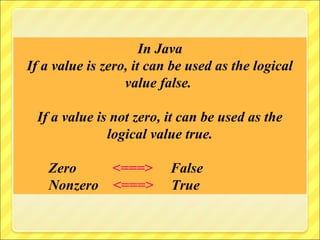
In Java
If a value is zero, it can be used as the logical
                  value false.

 If a value is not zero, it can be used as the
              logical value true.

    Zero    <===>         False
    Nonzero <===>         True
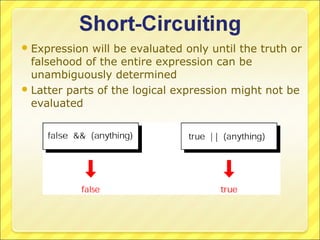
 Expression  will be evaluated only until the truth or
  falsehood of the entire expression can be
  unambiguously determined
 Latter parts of the logical expression might not be
  evaluated
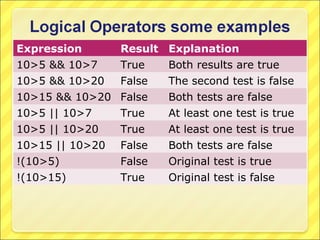
Expression       Result Explanation
10>5 && 10>7     True    Both results are true
10>5 && 10>20    False   The second test is false
10>15 && 10>20 False     Both tests are false
10>5 || 10>7     True    At least one test is true
10>5 || 10>20    True    At least one test is true
10>15 || 10>20   False   Both tests are false
!(10>5)          False   Original test is true
!(10>15)         True    Original test is false
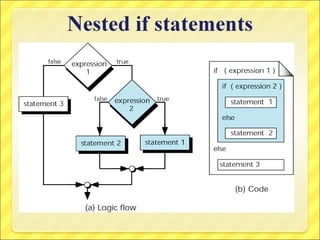
 Instructions   within if and if…else statements can
  themselves be any legal java commands
 It is also allowed that if statements contain other
  if/if-else statements
   Nesting
   Allows multiple choices to be processed
public static void main(String[] args) {
          int marks = 0;
          Scanner scan = new Scanner(System.in);
          marks = scan.nextInt();
          if(marks <100)
          {
                     if(marks>=80)
                     {
                                System.out.println("Grade = A");
                     }
                     else
                     {
                                if(marks>=60)
                                {
                                           System.out.println("Grade = B");
                                }
                                else
                                {
                                           System.out.println("Grade = F");
                                }
                     }
          }
}
public static void main(String[] args) {
          int marks = 0;
          Scanner scan = new Scanner(System.in);
          marks = scan.nextInt();
          if(marks <100)
          {
                     if(marks>=80)
                     {
                                System.out.println("Grade = A");
                     }
                    else if(marks>=60)
                    {
                              System.out.println("Grade = B");
                    }
                    else
                    {
                              System.out.println("Grade = F");
                    }

         }
}
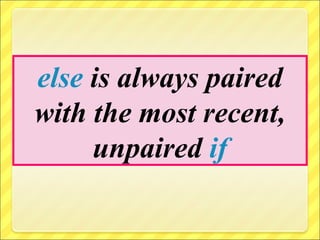
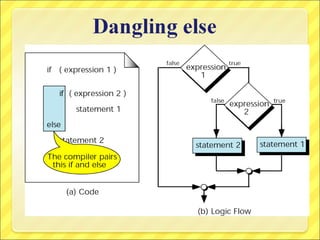
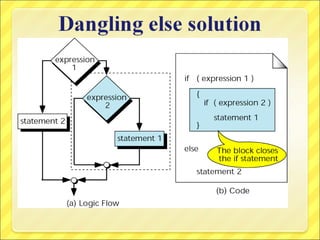
else is always paired
with the most recent,
     unpaired if
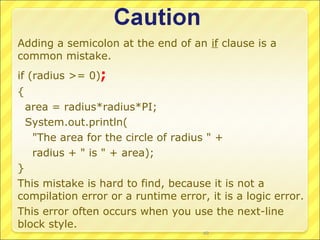
Adding a semicolon at the end of an if clause is a
common mistake.
if (radius >= 0);
{
    area = radius*radius*PI;
    System.out.println(
     "The area for the circle of radius " +
     radius + " is " + area);
}
This mistake is hard to find, because it is not a
compilation error or a runtime error, it is a logic error.
This error often occurs when you use the next-line
block style.
                                       40
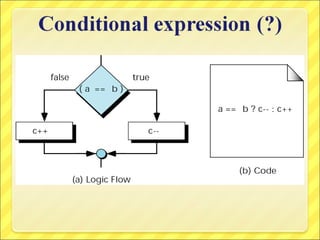
 Conditionaloperator
  Has three operands
  Boolean-exp? value0 : value1

import java.util.Scanner;
public class Assignment1
{
   public static void main(String[] args) {
      int marks = 0;
      Scanner scan = new Scanner(System.in);
      marks = scan.nextInt();
      System.out.println(marks>=50? "Pass":"Fail");
   }
}
public static void main(String[] args) {
         int value = 0;
         Scanner scan = new Scanner(System.in);
         value = scan.nextInt();
         switch(value)
         {
                  case 1:
                           System.out.println("We are in case 1");
                           break;
                  case 2:
                           System.out.println("We are in case 2");
                           break;
                  case 3:
                           System.out.println("We are in case 3");
                           break;
                  default:
                           System.out.println("We are in case default");
                           //break;
         }
}
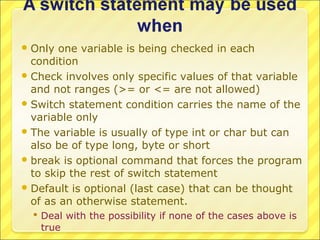
 Only  one variable is being checked in each
  condition
 Check involves only specific values of that variable
  and not ranges (>= or <= are not allowed)
 Switch statement condition carries the name of the
  variable only
 The variable is usually of type int or char but can
  also be of type long, byte or short
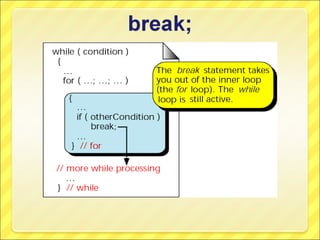
 break is optional command that forces the program
  to skip the rest of switch statement
 Default is optional (last case) that can be thought
  of as an otherwise statement.
   Deal with the possibility if none of the cases above is
    true
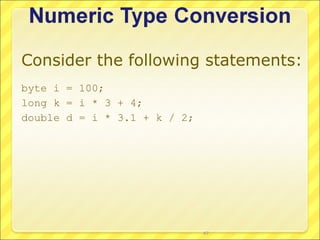
Consider the following statements:
byte i = 100;
long k = i * 3 + 4;
double d = i * 3.1 + k / 2;


                              47
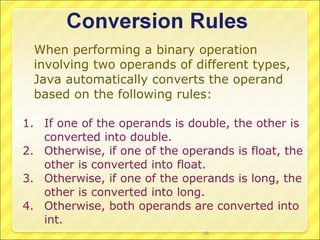
When performing a binary operation
  involving two operands of different types,
  Java automatically converts the operand
  based on the following rules:

1. If one of the operands is double, the other is
   converted into double.
2. Otherwise, if one of the operands is float, the
   other is converted into float.
3. Otherwise, if one of the operands is long, the
   other is converted into long.
4. Otherwise, both operands are converted into
   int.
                                48
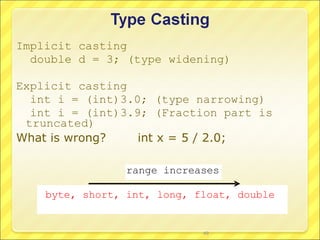
Implicit casting
  double d = 3; (type widening)

Explicit casting
  int i = (int)3.0; (type narrowing)
  int i = (int)3.9; (Fraction part is
 truncated)
What is wrong?    int x = 5 / 2.0;

                 range increases

    byte, short, int, long, float, double


                             49
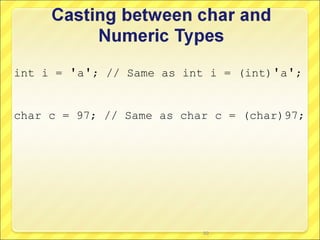
int i = 'a'; // Same as int i = (int)'a';


char c = 97; // Same as char c = (char)97;


                           50

Comp102 lec 5.1

  • 2.
     Take thevalue from right hand side (rvalue) and copy it into left hand side (lvalue)  Rvalue  Constant , variable or expression  Lvalue  Distinct, named variable
  • 3.
    Operator Example Equivalent += i += 8 i = i + 8 -= f -= 8.0 f = f - 8.0 *= i *= 8 i = i * 8 /= i /= 8 i = i / 8 %= i %= 8 i = i % 8 3
  • 4.
     Syntax Errors  Detected by the compiler  Runtime Errors  Causes the program to abort  Logic Errors  Produces incorrect result 4
  • 5.
    A pair ofbraces in a program forms a block that groups components of a program. public class Test { Class block public static void main(String[] args) { System.out.println("Welcome to Java!"); Method block } } 5
  • 6.
    Eihter next-line orend-of-line style for braces. 6
  • 7.
    Specifier Output Example %b a boolean value true or false %c a character 'a' %d a decimal integer 200 %f a floating-point number 45.460000 %e a number in standard scientific notation 4.556000e+01 %s a string "Java is cool" int count = 5; items double amount = 45.56; System.out.printf("count is %d and amount is %f", count, amount); display count is 5 and amount is 45.560000 7
  • 8.
    Description Escape Sequence Backspace b Tab t Linefeed n Carriage return r Backslash Single Quote ' Double Quote " 8
  • 9.
    Java in twosemesters by Quentin Charatan & Aaron Kans
  • 10.
     The orderin which the instructions were executed was not under your control  Program starts by executing the first instruction in main method and then all executed instructions were in sequence  This order of execution is restrictive and one as programmer need more control over the order in which the instructions are executed
  • 11.
    Generates boolean result Evaluates relationship between values of the operands  Produces TRUE if relationship is true  Produces FALSE is relationship is untrue
  • 12.
    Operator Meaning == Equal to != Not equal to < Less than > Greater than >= Greater than or equal to <= Less than or equal to
  • 14.
     Whenever we need to make choice among different courses of action  Example  A program processing requests for airline tickets could have following choices to make  Display the price os seats requested  Display a list of alternative flights  Display a message saying that no flights are available to that destination A program that can make choices can behave differently each time it is run, whereas programs run in sequence behave the same way each time they are run  Unless otherwise mentioned, program instructions are executed in sequence
  • 16.
     Some ofthe instruction need a guard so that they are executed only when appropriate  JAVA if statement  Syntax if(/* a test goes here*/) { // instruction (s) to be guarded go here }  The braces indicate the body of if statement  If statement must follow the round brackets and condition is placed inside these brackets  Condition/expression gives a boolean result of true or false
  • 17.
    import java.util.Scanner; public classAssignment1 { public static void main(String[] args) { int x = 0; Scanner scan = new Scanner(System.in); x = scan.nextInt(); if(x%2 == 0) { System.out.println("number is even"); } } }
  • 18.
    import java.util.Scanner; public classAssignment1 { public static void main(String[] args) { int temperature = 0; Scanner scan = new Scanner(System.in); temperature = scan.nextInt(); if(temperature<0) { System.out.println("its freezing"); System.out.println("temperature is: "+temperature); System.out.println("Wear appropriate clothes"); } } }
  • 19.
     Single – branched instructions  The if statement provides two choices  Execute the conditional instructions  Condition is true  Do not execute the conditional instructions  Condition is false  Do nothing
  • 20.
     Double branched selection  Alternative course of action  Choices  Some instructions are executed if condition is true  Some other instructions are executed if condition is false
  • 21.
    import java.util.Scanner; public classAssignment1 { public static void main(String[] args) { int x = 0; Scanner scan = new Scanner(System.in); x = scan.nextInt(); if(x%2 == 0) { System.out.println("number is even"); } else { System.out.println("number is odd"); } System.out.println(“good work"); } }
  • 23.
     intn1 = 15;  int n2 = 15;  System.out.println(n1==n2);  System.out.println(n1!=n2);
  • 24.
     Often itis necessary to join two or more tests together to create a complicated test  Consider a program that checks the temperature in laboratory. To have a successful experiment it is required that the temperature remain between 5 and 12  The test need to check  Temperature is greater than or equal to 5  Temperature>=5  Temperature is less than or equal to 12  Temperature <=12  Both of these tests need to evaluate true in order to provide the right environment
  • 25.
    Logical Operator JavaCounterpart AND && OR || NOT ! Produces a boolean value of true or false based on logical relationship of arguments Allowed in between of boolean values only Conditions generate boolean result
  • 26.
    A = Result A = Result A && B of 1st of 2nd Expression Expression True True True True False False False True False False False False
  • 27.
    A = Result A = Result A || B of 1st of 2nd Expression Expression True True True True False True False True True False False False
  • 28.
    X !X TRUE FALSE FALSE TRUE
  • 29.
    import java.util.Scanner; public classAssignment1 { public static void main(String[] args) { int temperature = 0; Scanner scan = new Scanner(System.in); temperature = scan.nextInt(); if(temperature>=5 && temperature <=12) { System.out.println("environment is safe"); } else { System.out.println("environment is not safe"); } } }
  • 30.
    In Java If avalue is zero, it can be used as the logical value false. If a value is not zero, it can be used as the logical value true. Zero <===> False Nonzero <===> True
  • 31.
     Expression will be evaluated only until the truth or falsehood of the entire expression can be unambiguously determined  Latter parts of the logical expression might not be evaluated
  • 32.
    Expression Result Explanation 10>5 && 10>7 True Both results are true 10>5 && 10>20 False The second test is false 10>15 && 10>20 False Both tests are false 10>5 || 10>7 True At least one test is true 10>5 || 10>20 True At least one test is true 10>15 || 10>20 False Both tests are false !(10>5) False Original test is true !(10>15) True Original test is false
  • 33.
     Instructions within if and if…else statements can themselves be any legal java commands  It is also allowed that if statements contain other if/if-else statements  Nesting  Allows multiple choices to be processed
  • 35.
    public static voidmain(String[] args) { int marks = 0; Scanner scan = new Scanner(System.in); marks = scan.nextInt(); if(marks <100) { if(marks>=80) { System.out.println("Grade = A"); } else { if(marks>=60) { System.out.println("Grade = B"); } else { System.out.println("Grade = F"); } } } }
  • 36.
    public static voidmain(String[] args) { int marks = 0; Scanner scan = new Scanner(System.in); marks = scan.nextInt(); if(marks <100) { if(marks>=80) { System.out.println("Grade = A"); } else if(marks>=60) { System.out.println("Grade = B"); } else { System.out.println("Grade = F"); } } }
  • 37.
    else is alwayspaired with the most recent, unpaired if
  • 40.
    Adding a semicolonat the end of an if clause is a common mistake. if (radius >= 0); { area = radius*radius*PI; System.out.println( "The area for the circle of radius " + radius + " is " + area); } This mistake is hard to find, because it is not a compilation error or a runtime error, it is a logic error. This error often occurs when you use the next-line block style. 40
  • 41.
     Conditionaloperator Has three operands  Boolean-exp? value0 : value1 import java.util.Scanner; public class Assignment1 { public static void main(String[] args) { int marks = 0; Scanner scan = new Scanner(System.in); marks = scan.nextInt(); System.out.println(marks>=50? "Pass":"Fail"); } }
  • 43.
    public static voidmain(String[] args) { int value = 0; Scanner scan = new Scanner(System.in); value = scan.nextInt(); switch(value) { case 1: System.out.println("We are in case 1"); break; case 2: System.out.println("We are in case 2"); break; case 3: System.out.println("We are in case 3"); break; default: System.out.println("We are in case default"); //break; } }
  • 44.
     Only one variable is being checked in each condition  Check involves only specific values of that variable and not ranges (>= or <= are not allowed)  Switch statement condition carries the name of the variable only  The variable is usually of type int or char but can also be of type long, byte or short  break is optional command that forces the program to skip the rest of switch statement  Default is optional (last case) that can be thought of as an otherwise statement.  Deal with the possibility if none of the cases above is true
  • 47.
    Consider the followingstatements: byte i = 100; long k = i * 3 + 4; double d = i * 3.1 + k / 2; 47
  • 48.
    When performing abinary operation involving two operands of different types, Java automatically converts the operand based on the following rules: 1. If one of the operands is double, the other is converted into double. 2. Otherwise, if one of the operands is float, the other is converted into float. 3. Otherwise, if one of the operands is long, the other is converted into long. 4. Otherwise, both operands are converted into int. 48
  • 49.
    Implicit casting double d = 3; (type widening) Explicit casting int i = (int)3.0; (type narrowing) int i = (int)3.9; (Fraction part is truncated) What is wrong? int x = 5 / 2.0; range increases byte, short, int, long, float, double 49
  • 50.
    int i ='a'; // Same as int i = (int)'a'; char c = 97; // Same as char c = (char)97; 50