Java Programming: From Problem Analysis to Program Design, 5e Chapter 6 Graphical User Interface (GUI) and Object-Oriented Design (OOD)
Chapter Objectives Learn about basic GUI components Explore how the GUI components  JFrame ,  JLabel ,  JTextField , and  JButton  work Become familiar with the concept of event-driven programming Java Programming: From Problem Analysis to Program Design, 5e
Chapter Objectives (continued) Discover events and event handlers Explore object-oriented design Learn how to identify objects, classes, and members of a class Java Programming: From Problem Analysis to Program Design, 5e
Graphical User Interface (GUI) Components View inputs and outputs simultaneously  One graphical window Input values in any order Change input values in window  Click on buttons to get output Java Programming: From Problem Analysis to Program Design, 5e
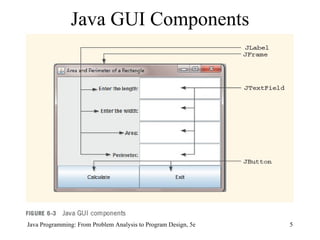
Java GUI Components Java Programming: From Problem Analysis to Program Design, 5e
Graphical User Interface (GUI) Components (continued) GUI components placed in content pane GUI components Windows Labels Text areas Buttons Java Programming: From Problem Analysis to Program Design, 5e
GUI Components Added to content pane of window Not added to window itself Pixel: picture element Java Programming: From Problem Analysis to Program Design, 5e
Windows Can be created using a  JFrame  object The class  JFrame  provides various methods to control attributes of a window Measured in pixels of height and width Attributes associated with windows Title Width Height Java Programming: From Problem Analysis to Program Design, 5e
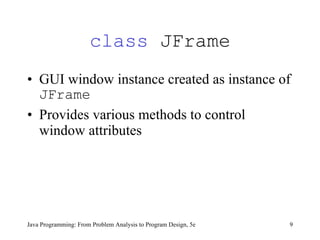
class  JFrame GUI window instance created as instance of  JFrame Provides various methods to control window attributes Java Programming: From Problem Analysis to Program Design, 5e
Methods Provided by the  class   JFrame Java Programming: From Problem Analysis to Program Design, 5e
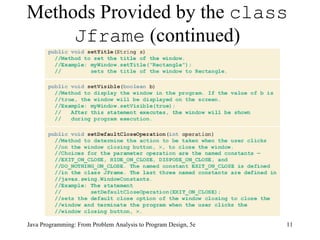
Methods Provided by the  class   Jframe  (continued) Java Programming: From Problem Analysis to Program Design, 5e
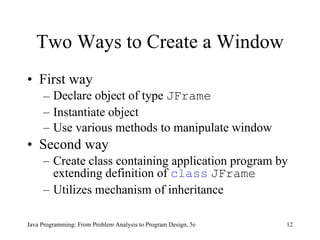
Two Ways to Create a Window First way  Declare object of type  JFrame Instantiate object Use various methods to manipulate window Second way Create class containing application program by extending definition of  class   JFrame Utilizes mechanism of inheritance Java Programming: From Problem Analysis to Program Design, 5e
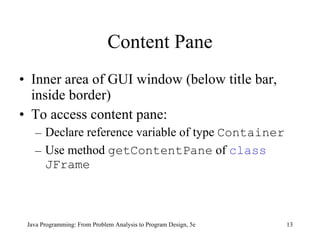
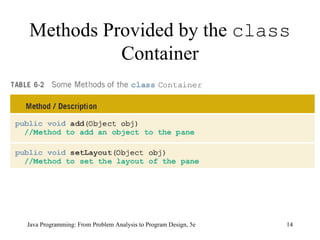
Content Pane Inner area of GUI window (below title bar, inside border) To access content pane: Declare reference variable of type  Container Use method  getContentPane  of  class   JFrame Java Programming: From Problem Analysis to Program Design, 5e
Methods Provided by the  class  Container Java Programming: From Problem Analysis to Program Design, 5e
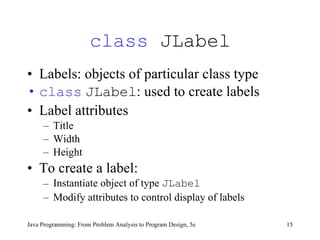
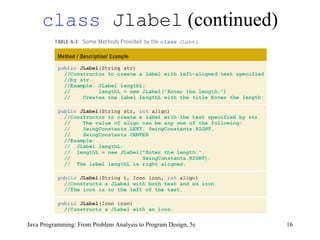
class  JLabel Labels: objects of particular class type class   JLabel : used to create labels Label attributes Title Width Height To create a label: Instantiate object of type  JLabel   Modify attributes to control display of labels  Java Programming: From Problem Analysis to Program Design, 5e
class  Jlabel  (continued) Java Programming: From Problem Analysis to Program Design, 5e
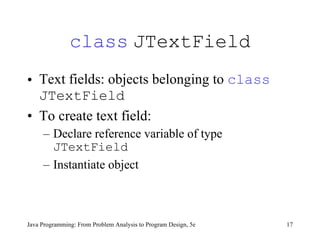
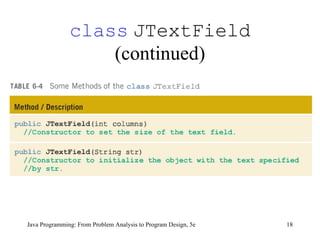
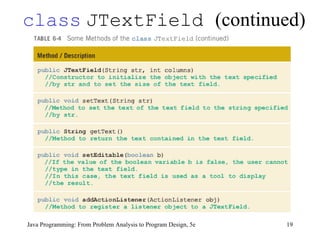
class   JTextField Text fields: objects belonging to  class   JTextField To create text field: Declare reference variable of type  JTextField Instantiate object Java Programming: From Problem Analysis to Program Design, 5e
class   JTextField  (continued) Java Programming: From Problem Analysis to Program Design, 5e
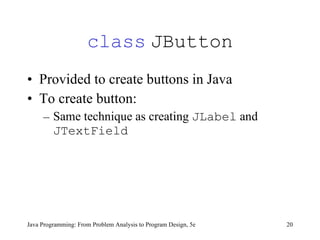
class   JButton Provided to create buttons in Java To create button: Same technique as creating  JLabel  and  JTextField Java Programming: From Problem Analysis to Program Design, 5e
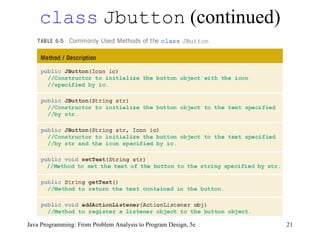
class   Jbutton  (continued) Java Programming: From Problem Analysis to Program Design, 5e
Handling an Event Action event: event created when  JButton  is clicked Event listener: object that receives message when  JButton  is clicked In Java, you must register the listener Java Programming: From Problem Analysis to Program Design, 5e
Handling an Event (continued) class  ActionListener Handles action event  Part of package  java.awt.Event The  class   ActionListener  is a special type of class (interface) Must contain  actionPerformed  method  Java Programming: From Problem Analysis to Program Design, 5e
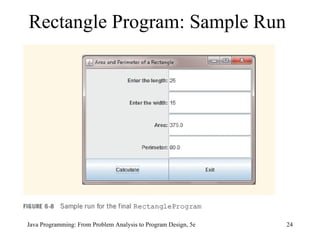
Rectangle Program: Sample Run Java Programming: From Problem Analysis to Program Design, 5e
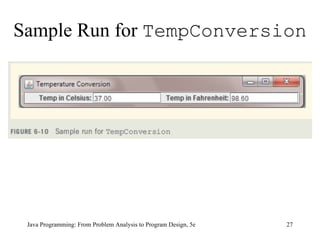
Programming Example: Temperature Conversion Input:  temperature in Fahrenheit or  Celsius  Output:  temperature in  Celsius  if input is Fahrenheit; temperature in Fahrenheit if input is  Celsius  Java Programming: From Problem Analysis to Program Design, 5e
Programming Example: Temperature Conversion (continued) Solution Create the appropriate  JLabels ,  JTextFields ,  JButtons Add them to the created content pane  Calculate the appropriate conversions when the buttons are clicked and an event is triggered Java Programming: From Problem Analysis to Program Design, 5e
Sample Run for  TempConversion Java Programming: From Problem Analysis to Program Design, 5e
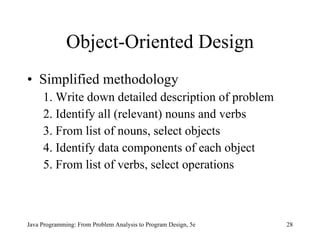
Object-Oriented Design Simplified methodology 1. Write down detailed description of problem 2. Identify all (relevant) nouns and verbs 3. From list of nouns, select objects 4. Identify data components of each object 5. From list of verbs, select operations Java Programming: From Problem Analysis to Program Design, 5e
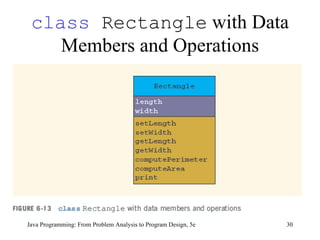
Object-Oriented Design  Example 1 Problem statement Write a program to input the length and width of a rectangle, and calculate and print the perimeter and area of the rectangle Nouns Length, width, rectangle, perimeter, area Java Programming: From Problem Analysis to Program Design, 5e
class  Rectangle  with Data Members and Operations Java Programming: From Problem Analysis to Program Design, 5e
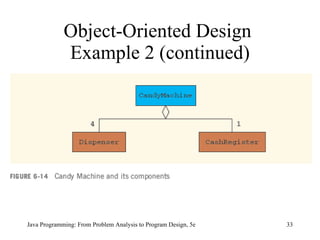
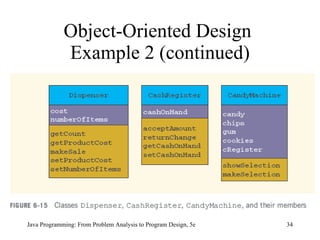
Object-Oriented Design  Example 2 An inoperable candy machine has a cash register and four dispensers to hold and release items sold by the machine The machine sells: candies, chips, gum, and cookies Write a program for this candy machine so that it can be put into operation Java Programming: From Problem Analysis to Program Design, 5e
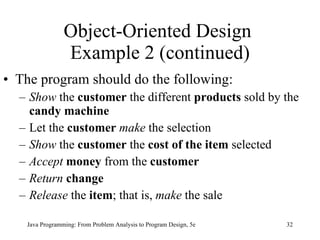
Object-Oriented Design  Example 2 (continued) The program should do the following: Show  the  customer  the different  products  sold by the  candy machine Let the  customer  make  the selection Show  the  customer  the  cost of the item  selected Accept  money  from the  customer Return  change Release  the  item ; that is,  make  the sale Java Programming: From Problem Analysis to Program Design, 5e
Object-Oriented Design  Example 2 (continued) Java Programming: From Problem Analysis to Program Design, 5e
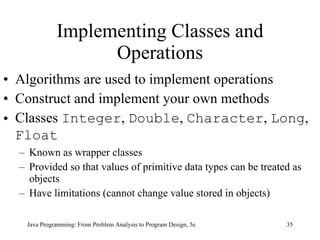
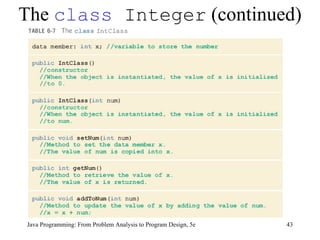
Implementing Classes and Operations Algorithms are used to implement operations Construct and implement your own methods Classes  Integer ,  Double ,  Character ,  Long ,  Float   Known as wrapper classes Provided so that values of primitive data types can be treated as objects Have limitations (cannot change value stored in objects) Java Programming: From Problem Analysis to Program Design, 5e
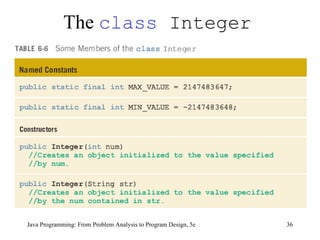
The  class  Integer Java Programming: From Problem Analysis to Program Design, 5e
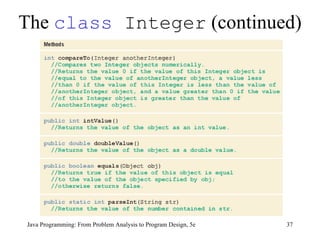
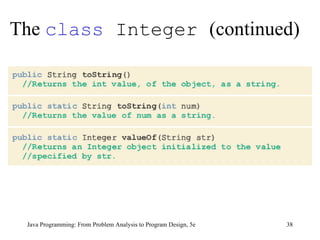
The  class  Integer  (continued) Java Programming: From Problem Analysis to Program Design, 5e
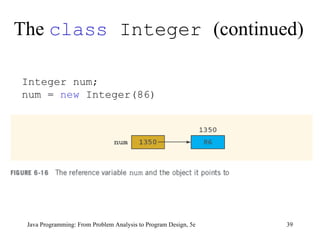
The  class  Integer  (continued) Java Programming: From Problem Analysis to Program Design, 5e Integer num;  num =  new  Integer(86)
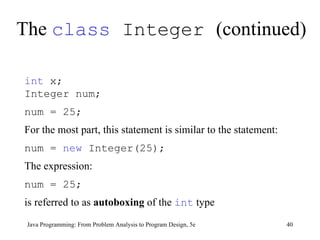
The  class  Integer  (continued) Java Programming: From Problem Analysis to Program Design, 5e int  x;  Integer num;  num = 25;   For the most part, this statement is similar to the statement:  num =  new  Integer(25);   The expression:  num = 25; is referred to as  autoboxing  of the  int  type
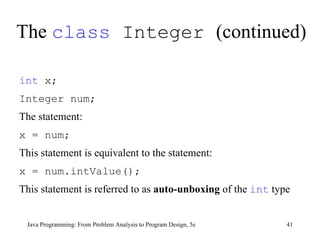
The  class  Integer  (continued) Java Programming: From Problem Analysis to Program Design, 5e int  x;  Integer num;   The statement: x = num;   This statement is equivalent to the statement: x = num.intValue();   This statement is referred to as  auto-unboxing  of the  int  type
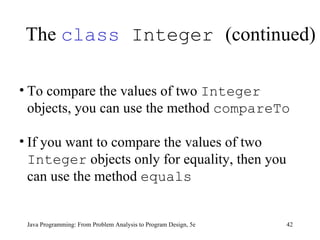
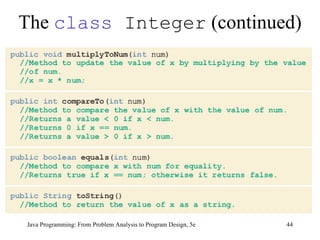
The  class  Integer  (continued) Java Programming: From Problem Analysis to Program Design, 5e To compare the values of two  Integer  objects, you can use the method  compareTo If you want to compare the values of two  Integer  objects only for equality, then you can use the method  equals
The  class  Integer  (continued) Java Programming: From Problem Analysis to Program Design, 5e
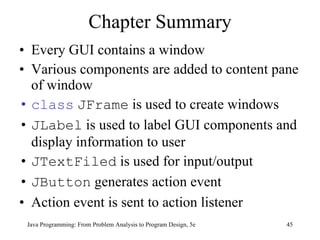
Chapter Summary Every GUI contains a window Various components are added to content pane of window class   JFrame  is used to create windows JLabel  is used to label GUI components and display information to user JTextFiled  is used for input/output JButton  generates action event Action event is sent to action listener Java Programming: From Problem Analysis to Program Design, 5e
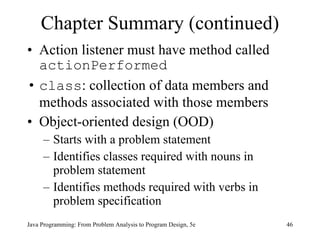
Chapter Summary (continued) Action listener must have method called  actionPerformed class : collection of data members and methods associated with those members Object-oriented design (OOD) Starts with a problem statement Identifies classes required with nouns in problem statement Identifies methods required with verbs in problem specification Java Programming: From Problem Analysis to Program Design, 5e

9781111530532 ppt ch06

  • 1.
    Java Programming: FromProblem Analysis to Program Design, 5e Chapter 6 Graphical User Interface (GUI) and Object-Oriented Design (OOD)
  • 2.
    Chapter Objectives Learnabout basic GUI components Explore how the GUI components JFrame , JLabel , JTextField , and JButton work Become familiar with the concept of event-driven programming Java Programming: From Problem Analysis to Program Design, 5e
  • 3.
    Chapter Objectives (continued)Discover events and event handlers Explore object-oriented design Learn how to identify objects, classes, and members of a class Java Programming: From Problem Analysis to Program Design, 5e
  • 4.
    Graphical User Interface(GUI) Components View inputs and outputs simultaneously One graphical window Input values in any order Change input values in window Click on buttons to get output Java Programming: From Problem Analysis to Program Design, 5e
  • 5.
    Java GUI ComponentsJava Programming: From Problem Analysis to Program Design, 5e
  • 6.
    Graphical User Interface(GUI) Components (continued) GUI components placed in content pane GUI components Windows Labels Text areas Buttons Java Programming: From Problem Analysis to Program Design, 5e
  • 7.
    GUI Components Addedto content pane of window Not added to window itself Pixel: picture element Java Programming: From Problem Analysis to Program Design, 5e
  • 8.
    Windows Can becreated using a JFrame object The class JFrame provides various methods to control attributes of a window Measured in pixels of height and width Attributes associated with windows Title Width Height Java Programming: From Problem Analysis to Program Design, 5e
  • 9.
    class JFrameGUI window instance created as instance of JFrame Provides various methods to control window attributes Java Programming: From Problem Analysis to Program Design, 5e
  • 10.
    Methods Provided bythe class JFrame Java Programming: From Problem Analysis to Program Design, 5e
  • 11.
    Methods Provided bythe class Jframe (continued) Java Programming: From Problem Analysis to Program Design, 5e
  • 12.
    Two Ways toCreate a Window First way Declare object of type JFrame Instantiate object Use various methods to manipulate window Second way Create class containing application program by extending definition of class JFrame Utilizes mechanism of inheritance Java Programming: From Problem Analysis to Program Design, 5e
  • 13.
    Content Pane Innerarea of GUI window (below title bar, inside border) To access content pane: Declare reference variable of type Container Use method getContentPane of class JFrame Java Programming: From Problem Analysis to Program Design, 5e
  • 14.
    Methods Provided bythe class Container Java Programming: From Problem Analysis to Program Design, 5e
  • 15.
    class JLabelLabels: objects of particular class type class JLabel : used to create labels Label attributes Title Width Height To create a label: Instantiate object of type JLabel Modify attributes to control display of labels Java Programming: From Problem Analysis to Program Design, 5e
  • 16.
    class Jlabel (continued) Java Programming: From Problem Analysis to Program Design, 5e
  • 17.
    class JTextField Text fields: objects belonging to class JTextField To create text field: Declare reference variable of type JTextField Instantiate object Java Programming: From Problem Analysis to Program Design, 5e
  • 18.
    class JTextField (continued) Java Programming: From Problem Analysis to Program Design, 5e
  • 19.
    class JTextField (continued) Java Programming: From Problem Analysis to Program Design, 5e
  • 20.
    class JButton Provided to create buttons in Java To create button: Same technique as creating JLabel and JTextField Java Programming: From Problem Analysis to Program Design, 5e
  • 21.
    class Jbutton (continued) Java Programming: From Problem Analysis to Program Design, 5e
  • 22.
    Handling an EventAction event: event created when JButton is clicked Event listener: object that receives message when JButton is clicked In Java, you must register the listener Java Programming: From Problem Analysis to Program Design, 5e
  • 23.
    Handling an Event(continued) class ActionListener Handles action event Part of package java.awt.Event The class ActionListener is a special type of class (interface) Must contain actionPerformed method Java Programming: From Problem Analysis to Program Design, 5e
  • 24.
    Rectangle Program: SampleRun Java Programming: From Problem Analysis to Program Design, 5e
  • 25.
    Programming Example: TemperatureConversion Input: temperature in Fahrenheit or Celsius Output: temperature in Celsius if input is Fahrenheit; temperature in Fahrenheit if input is Celsius Java Programming: From Problem Analysis to Program Design, 5e
  • 26.
    Programming Example: TemperatureConversion (continued) Solution Create the appropriate JLabels , JTextFields , JButtons Add them to the created content pane Calculate the appropriate conversions when the buttons are clicked and an event is triggered Java Programming: From Problem Analysis to Program Design, 5e
  • 27.
    Sample Run for TempConversion Java Programming: From Problem Analysis to Program Design, 5e
  • 28.
    Object-Oriented Design Simplifiedmethodology 1. Write down detailed description of problem 2. Identify all (relevant) nouns and verbs 3. From list of nouns, select objects 4. Identify data components of each object 5. From list of verbs, select operations Java Programming: From Problem Analysis to Program Design, 5e
  • 29.
    Object-Oriented Design Example 1 Problem statement Write a program to input the length and width of a rectangle, and calculate and print the perimeter and area of the rectangle Nouns Length, width, rectangle, perimeter, area Java Programming: From Problem Analysis to Program Design, 5e
  • 30.
    class Rectangle with Data Members and Operations Java Programming: From Problem Analysis to Program Design, 5e
  • 31.
    Object-Oriented Design Example 2 An inoperable candy machine has a cash register and four dispensers to hold and release items sold by the machine The machine sells: candies, chips, gum, and cookies Write a program for this candy machine so that it can be put into operation Java Programming: From Problem Analysis to Program Design, 5e
  • 32.
    Object-Oriented Design Example 2 (continued) The program should do the following: Show the customer the different products sold by the candy machine Let the customer make the selection Show the customer the cost of the item selected Accept money from the customer Return change Release the item ; that is, make the sale Java Programming: From Problem Analysis to Program Design, 5e
  • 33.
    Object-Oriented Design Example 2 (continued) Java Programming: From Problem Analysis to Program Design, 5e
  • 34.
    Object-Oriented Design Example 2 (continued) Java Programming: From Problem Analysis to Program Design, 5e
  • 35.
    Implementing Classes andOperations Algorithms are used to implement operations Construct and implement your own methods Classes Integer , Double , Character , Long , Float Known as wrapper classes Provided so that values of primitive data types can be treated as objects Have limitations (cannot change value stored in objects) Java Programming: From Problem Analysis to Program Design, 5e
  • 36.
    The class Integer Java Programming: From Problem Analysis to Program Design, 5e
  • 37.
    The class Integer (continued) Java Programming: From Problem Analysis to Program Design, 5e
  • 38.
    The class Integer (continued) Java Programming: From Problem Analysis to Program Design, 5e
  • 39.
    The class Integer (continued) Java Programming: From Problem Analysis to Program Design, 5e Integer num; num = new Integer(86)
  • 40.
    The class Integer (continued) Java Programming: From Problem Analysis to Program Design, 5e int x; Integer num; num = 25; For the most part, this statement is similar to the statement: num = new Integer(25); The expression: num = 25; is referred to as autoboxing of the int type
  • 41.
    The class Integer (continued) Java Programming: From Problem Analysis to Program Design, 5e int x; Integer num; The statement: x = num; This statement is equivalent to the statement: x = num.intValue(); This statement is referred to as auto-unboxing of the int type
  • 42.
    The class Integer (continued) Java Programming: From Problem Analysis to Program Design, 5e To compare the values of two Integer objects, you can use the method compareTo If you want to compare the values of two Integer objects only for equality, then you can use the method equals
  • 43.
    The class Integer (continued) Java Programming: From Problem Analysis to Program Design, 5e
  • 44.
    The class Integer (continued) Java Programming: From Problem Analysis to Program Design, 5e
  • 45.
    Chapter Summary EveryGUI contains a window Various components are added to content pane of window class JFrame is used to create windows JLabel is used to label GUI components and display information to user JTextFiled is used for input/output JButton generates action event Action event is sent to action listener Java Programming: From Problem Analysis to Program Design, 5e
  • 46.
    Chapter Summary (continued)Action listener must have method called actionPerformed class : collection of data members and methods associated with those members Object-oriented design (OOD) Starts with a problem statement Identifies classes required with nouns in problem statement Identifies methods required with verbs in problem specification Java Programming: From Problem Analysis to Program Design, 5e