Java Programming: From Problem
 Analysis to Program Design, 5e


             Chapter 2
       Basic Elements of Java
Chapter Objectives
• Become familiar with the basic components of a
  Java program, including methods, special
  symbols, and identifiers
• Explore primitive data types
• Discover how to use arithmetic operators
• Examine how a program evaluates arithmetic
  expressions
• Explore how mixed expressions are evaluated

Java Programming: From Problem Analysis to Program Design, 5e   2
Chapter Objectives (continued)
• Learn about type casting
• Become familiar with the String type
• Learn what an assignment statement is and what it
  does
• Discover how to input data into memory by using
  input statements
• Become familiar with the use of increment and
  decrement operators


Java Programming: From Problem Analysis to Program Design, 5e   3
Chapter Objectives (continued)
• Examine ways to output results using output
  statements
• Learn how to import packages and why they are
  necessary
• Discover how to create a Java application program
• Explore how to properly structure a program,
  including using comments to document a program


Java Programming: From Problem Analysis to Program Design, 5e   4
Introduction
• Computer program: a sequence of
  statements whose objective is to accomplish
  a task
• Programming: process of planning and
  creating a program


Java Programming: From Problem Analysis to Program Design, 5e   5
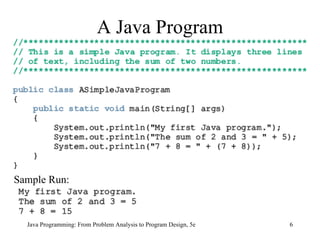
A Java Program


Sample Run:


  Java Programming: From Problem Analysis to Program Design, 5e   6
The Basics of a Java Program
• Java program: collection of classes
• There is a main method in every Java
  application program
• Token: smallest individual unit of a
  program


Java Programming: From Problem Analysis to Program Design, 5e   7
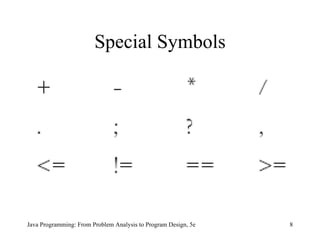
Special Symbols


Java Programming: From Problem Analysis to Program Design, 5e   8
Reserved Words (Keywords)
•   int                                           •   void
•   float                                         •   public
•   double                                        •   static
•   char                                          •   throws
                                                  •   return


Java Programming: From Problem Analysis to Program Design, 5e   9
Java Identifiers
• Names of things
• Consist of:
     –   Letters
     –   Digits
     –   The underscore character (_)
     –   The dollar sign ($)
• Must begin with a letter, underscore, or the
  dollar sign

Java Programming: From Problem Analysis to Program Design, 5e   10
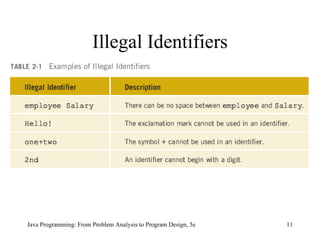
Illegal Identifiers


Java Programming: From Problem Analysis to Program Design, 5e   11
Data Types
• Data type: set of values together with a set
  of operations


Java Programming: From Problem Analysis to Program Design, 5e   12
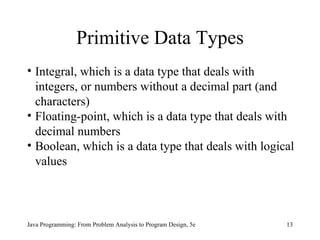
Primitive Data Types
• Integral, which is a data type that deals with
  integers, or numbers without a decimal part (and
  characters)
• Floating-point, which is a data type that deals with
  decimal numbers
• Boolean, which is a data type that deals with logical
  values


Java Programming: From Problem Analysis to Program Design, 5e   13
Integral Data Types
  • char
  • byte
  • short
  • int
  • long


Java Programming: From Problem Analysis to Program Design, 5e   14
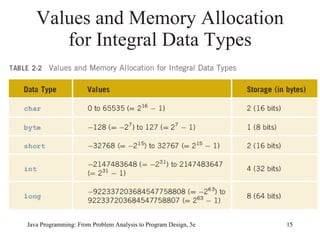
Values and Memory Allocation
      for Integral Data Types


Java Programming: From Problem Analysis to Program Design, 5e   15
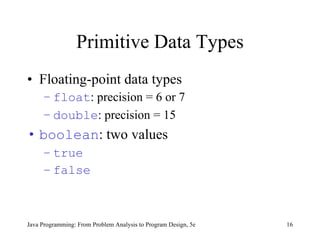
Primitive Data Types
• Floating-point data types
     – float: precision = 6 or 7
     – double: precision = 15
• boolean: two values
     – true
     – false


Java Programming: From Problem Analysis to Program Design, 5e   16
Literals (Constants)
• Integer literals, integer constants, or
  integers: 23 and -67
• Floating-point literals, floating-point
  constants, floating-point numbers: 12.34
  and 25.60
• Character literals, character constants, or
  characters: 'a' and '5'

Java Programming: From Problem Analysis to Program Design, 5e   17
Arithmetic Operators and
             Operator Precedence
•      Five arithmetic operators
     –      + addition
     –      - subtraction
     –      * multiplication
     –      / division
     –      % mod (modulus)
•      Unary operator: operator that has one operand
•      Binary operator: operator that has two operands


Java Programming: From Problem Analysis to Program Design, 5e   18
Order of Precedence
1. *              /               %           (same precedence)
2. +                   -                      (same precedence)

•      Operators in 1 have a higher precedence than
       operators in 2
•      When operators have the same level of
       precedence, operations are performed from left
       to right

Java Programming: From Problem Analysis to Program Design, 5e     19
Expressions
• Integral expressions
• Floating-point or decimal expressions
• Mixed expressions


Java Programming: From Problem Analysis to Program Design, 5e   20
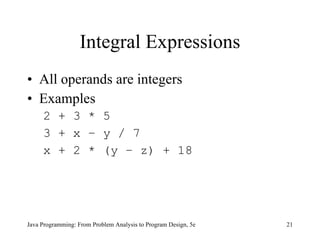
Integral Expressions
• All operands are integers
• Examples
     2 + 3 * 5
     3 + x – y / 7
     x + 2 * (y – z) + 18


Java Programming: From Problem Analysis to Program Design, 5e   21
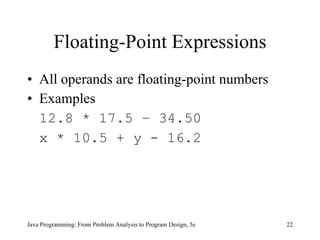
Floating-Point Expressions
• All operands are floating-point numbers
• Examples
  12.8 * 17.5 – 34.50
  x * 10.5 + y - 16.2


Java Programming: From Problem Analysis to Program Design, 5e   22
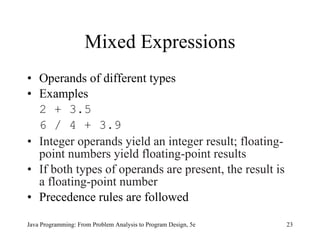
Mixed Expressions
• Operands of different types
• Examples
  2 + 3.5
  6 / 4 + 3.9
• Integer operands yield an integer result; floating-
  point numbers yield floating-point results
• If both types of operands are present, the result is
  a floating-point number
• Precedence rules are followed

Java Programming: From Problem Analysis to Program Design, 5e   23
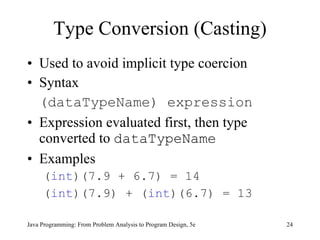
Type Conversion (Casting)
• Used to avoid implicit type coercion
• Syntax
  (dataTypeName) expression
• Expression evaluated first, then type
  converted to dataTypeName
• Examples
     (int)(7.9 + 6.7) = 14
     (int)(7.9) + (int)(6.7) = 13

Java Programming: From Problem Analysis to Program Design, 5e   24
The class String
• Used to manipulate strings
• String
     – Sequence of zero or more characters
     – Enclosed in double quotation marks
     – Null or empty strings have no characters
     – Numeric strings consist of integers or decimal
       numbers
     – Length is the number of characters in a string

Java Programming: From Problem Analysis to Program Design, 5e   25
Strings and the Operator +
• Operator + can be used to concatenate
  two strings or a string and a numeric
  value or character
• Example 2-10
  "The sum = " + 12 + 26
  -After this statement executes, the string
  assigned to str is:
  "The sum = 1226";


Java Programming: From Problem Analysis to Program Design, 5e   26
Strings and the Operator +
                  (continued)
• Consider the following statement:
    "The sum = " + (12 + 26)
• In this statement, because of the
  parentheses, you first evaluate num1 +
  num2
     – Because num1 and num2 are both int
       variables, num1 + num2 = 12 + 26 =
       38
     – After this statement executes, the string
       assigned to str is:
              "The sum = 38";

Java Programming: From Problem Analysis to Program Design, 5e   27
Input
•      Named constant
     –      Cannot be changed during program execution
     –      Declared by using the reserved word final
     –      Initialized when it is declared
•      Example 2-11
final         double CENTIMETERS_PER_INCH = 2.54;
final         int NO_OF_STUDENTS = 20;
final         char BLANK = ' ';
final         double PAY_RATE = 15.75;


    Java Programming: From Problem Analysis to Program Design, 5e   28
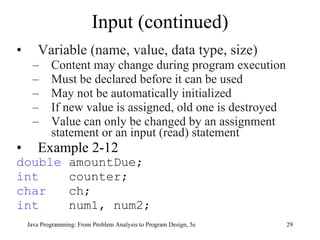
Input (continued)
•      Variable (name, value, data type, size)
     –      Content may change during program execution
     –      Must be declared before it can be used
     –      May not be automatically initialized
     –      If new value is assigned, old one is destroyed
     –      Value can only be changed by an assignment
            statement or an input (read) statement
•      Example 2-12
double             amountDue;
int                counter;
char               ch;
int                num1, num2;
    Java Programming: From Problem Analysis to Program Design, 5e   29
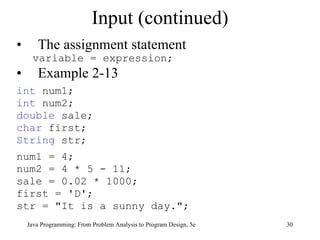
Input (continued)
•      The assignment statement
     variable = expression;
•      Example 2-13
int num1;
int num2;
double sale;
char first;
String str;
num1 = 4;
num2 = 4 * 5 - 11;
sale = 0.02 * 1000;
first = 'D';
str = "It is a sunny day.";
    Java Programming: From Problem Analysis to Program Design, 5e   30
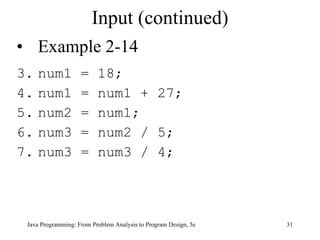
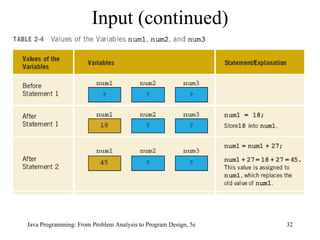
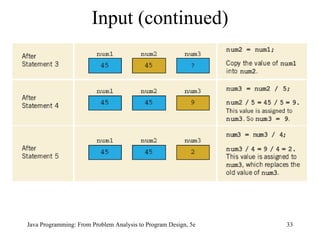
Input (continued)
• Example 2-14
3. num1             =     18;
4. num1             =     num1 + 27;
5. num2             =     num1;
6. num3             =     num2 / 5;
7. num3             =     num3 / 4;


 Java Programming: From Problem Analysis to Program Design, 5e   31
Input (continued)


Java Programming: From Problem Analysis to Program Design, 5e   32
Input (continued)


Java Programming: From Problem Analysis to Program Design, 5e   33
Input (continued)
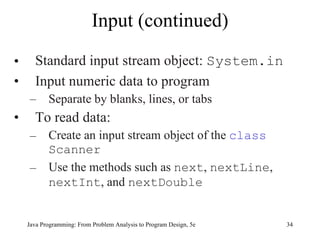
•     Standard input stream object: System.in
•     Input numeric data to program
    –      Separate by blanks, lines, or tabs
•     To read data:
    –      Create an input stream object of the class
           Scanner
    –      Use the methods such as next, nextLine,
           nextInt, and nextDouble


    Java Programming: From Problem Analysis to Program Design, 5e   34
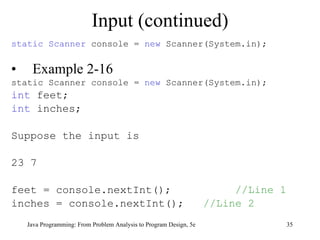
Input (continued)
static Scanner console = new Scanner(System.in);


•    Example 2-16
static Scanner console = new Scanner(System.in);
int feet;
int inches;

Suppose the input is

23 7

feet = console.nextInt();                                                //Line 1
inches = console.nextInt();                                         //Line 2
    Java Programming: From Problem Analysis to Program Design, 5e                   35
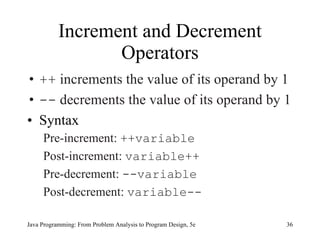
Increment and Decrement
                  Operators
• ++ increments the value of its operand by 1
• -- decrements the value of its operand by 1
• Syntax
     Pre-increment: ++variable
     Post-increment: variable++
     Pre-decrement: --variable
     Post-decrement: variable--

Java Programming: From Problem Analysis to Program Design, 5e   36
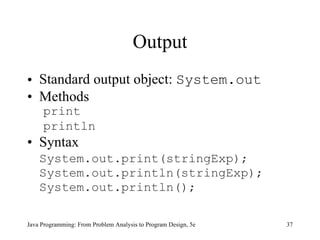
Output
• Standard output object: System.out
• Methods
     print
     println
• Syntax
    System.out.print(stringExp);
    System.out.println(stringExp);
    System.out.println();

Java Programming: From Problem Analysis to Program Design, 5e   37
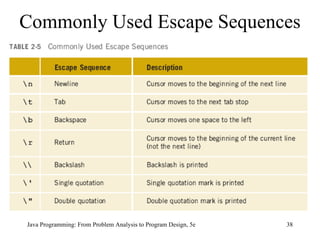
Commonly Used Escape Sequences


Java Programming: From Problem Analysis to Program Design, 5e   38
Packages, Classes, Methods, and
     the import Statement
• Package: collection of related classes
• Class: consists of methods
• Method: designed to accomplish a specific
  task


Java Programming: From Problem Analysis to Program Design, 5e   39
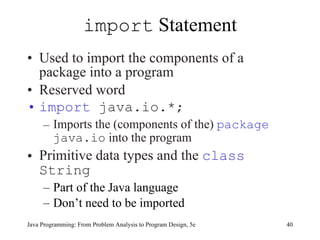
import Statement
• Used to import the components of a
  package into a program
• Reserved word
• import java.io.*;
     – Imports the (components of the) package
       java.io into the program
• Primitive data types and the class
  String
     – Part of the Java language
     – Don’t need to be imported
Java Programming: From Problem Analysis to Program Design, 5e   40
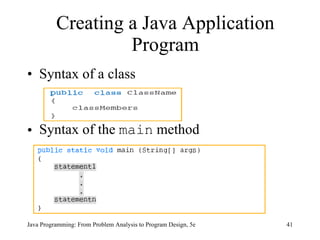
Creating a Java Application
                   Program
• Syntax of a class


• Syntax of the main method


Java Programming: From Problem Analysis to Program Design, 5e   41
Debugging: Understanding and
       Fixing Syntax Errors
• When you type a program, typos and
  unintentional syntax errors are likely to
  occur
• Therefore, when you compile a program,
  the compiler will identify the syntax error


Java Programming: From Problem Analysis to Program Design, 5e   42
Java Programming: From Problem Analysis to Program Design, 5e   43
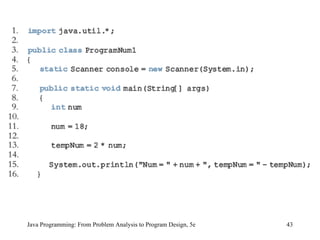
• The compiler produces the following errors:
ProgramNum.java:9: ';' expected
       int num
               ^
ProgramNum.java:16: reached end of file while parsing
   }
     ^
2 errors


   Java Programming: From Problem Analysis to Program Design, 5e   44
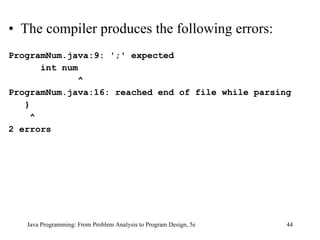
Java Programming: From Problem Analysis to Program Design, 5e   45
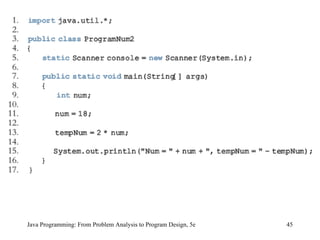
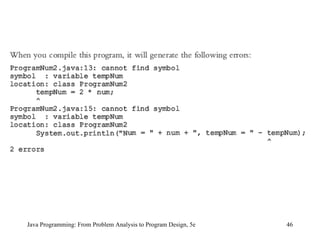
Java Programming: From Problem Analysis to Program Design, 5e   46
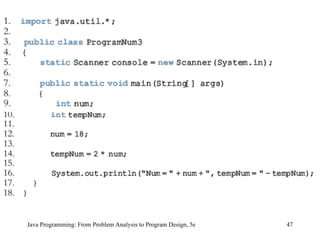
Java Programming: From Problem Analysis to Program Design, 5e   47
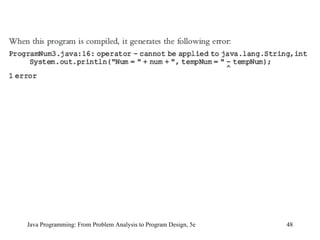
Java Programming: From Problem Analysis to Program Design, 5e   48
Java Programming: From Problem Analysis to Program Design, 5e   49
Programming Style and Form
•   Know common syntax errors and rules
•   Use blanks appropriately
•   Semicolon: statement terminator
•   Important to have well-documented code
•   Good practice to follow traditional rules for
    naming identifiers


Java Programming: From Problem Analysis to Program Design, 5e   50
Avoiding Bugs: Consistent, Proper
       Formatting and Code Walkthrough
• Java is a free-format language in the sense that programming
  instructions need not be typed in specific columns
• As you will discover, consistent and proper formatting will make
  it easier to develop, debug, and maintain programs
• Throughout the book, you will see consistent and predictable use
  of blanks, tabs, and newline characters to separate the elements of
  a program
• When you write programs, unintentional typos and errors are
  unavoidable
• The Java compiler will find the syntax rules and give some hints
  how to correct them; however, the compiler may not find logical
  (semantic) errors


                                                                  51
  Java Programming: From Problem Analysis to Program Design, 5e
Avoiding Bugs: Consistent, Proper
     Formatting and Code Walk-Through
                (continued)
• Typically, programmers try to find and fix these problems
  themselves by walking carefully through their programs
• Sometimes after multiple readings, a programmer may not be able
  to find the bug because the programmer may overlook the piece of
  the code that contains the bug and therefore may seek outside help
• If your program is properly formatted and you have used good
  names for identifiers, the person reading your program will have
  an easier time reading and debugging the program


                                                                    52
    Java Programming: From Problem Analysis to Program Design, 5e
Avoiding Bugs: Consistent, Proper
     Formatting and Code Walk-Through
                (continued)
• Before you seek outside help, you should be prepared to explain
  what your program intended to do and answer questions raised by
  the person reading your program
• The examination of your program by yourself, by another person,
  or a group of persons is a walk-through; a walk-through is helpful
  for all phases of the software development process


    Java Programming: From Problem Analysis to Program Design, 3e   53
More on Assignment Statements
variable = variable * (expression);
is equivalent to
variable *= expression;
Similarly,
variable = variable + (expression);
is equivalent to
variable += expression;


   Java Programming: From Problem Analysis to Program Design, 5e   54
Programming Examples
• Convert Length program
     – Input: length in feet and inches
     – Output: equivalent length in centimeters
• Make Change program
     – Input: change in cents
     – Output: equivalent change in half-dollars,
       quarters, dimes, nickels, and pennies


Java Programming: From Problem Analysis to Program Design, 5e   55
Chapter Summary
• Basic elements of a Java program include:
     –   The main method
     –   Reserved words
     –   Special symbols
     –   Identifiers
     –   Data types
     –   Expressions
     –   Input
     –   Output
     –   Statements
Java Programming: From Problem Analysis to Program Design, 5e   56
Chapter Summary (continued)
• To create a Java application, it is important
  to understand:
     –   Syntax rules
     –   Semantic rules
     –   How to manipulate strings and numbers
     –   How to declare variables and named constants
     –   How to receive input and display output
     –   Good programming style and form


Java Programming: From Problem Analysis to Program Design, 5e   57

9781111530532 ppt ch02

  • 1.
    Java Programming: FromProblem Analysis to Program Design, 5e Chapter 2 Basic Elements of Java
  • 2.
    Chapter Objectives • Becomefamiliar with the basic components of a Java program, including methods, special symbols, and identifiers • Explore primitive data types • Discover how to use arithmetic operators • Examine how a program evaluates arithmetic expressions • Explore how mixed expressions are evaluated Java Programming: From Problem Analysis to Program Design, 5e 2
  • 3.
    Chapter Objectives (continued) •Learn about type casting • Become familiar with the String type • Learn what an assignment statement is and what it does • Discover how to input data into memory by using input statements • Become familiar with the use of increment and decrement operators Java Programming: From Problem Analysis to Program Design, 5e 3
  • 4.
    Chapter Objectives (continued) •Examine ways to output results using output statements • Learn how to import packages and why they are necessary • Discover how to create a Java application program • Explore how to properly structure a program, including using comments to document a program Java Programming: From Problem Analysis to Program Design, 5e 4
  • 5.
    Introduction • Computer program:a sequence of statements whose objective is to accomplish a task • Programming: process of planning and creating a program Java Programming: From Problem Analysis to Program Design, 5e 5
  • 6.
    A Java Program SampleRun: Java Programming: From Problem Analysis to Program Design, 5e 6
  • 7.
    The Basics ofa Java Program • Java program: collection of classes • There is a main method in every Java application program • Token: smallest individual unit of a program Java Programming: From Problem Analysis to Program Design, 5e 7
  • 8.
    Special Symbols Java Programming:From Problem Analysis to Program Design, 5e 8
  • 9.
    Reserved Words (Keywords) • int • void • float • public • double • static • char • throws • return Java Programming: From Problem Analysis to Program Design, 5e 9
  • 10.
    Java Identifiers • Namesof things • Consist of: – Letters – Digits – The underscore character (_) – The dollar sign ($) • Must begin with a letter, underscore, or the dollar sign Java Programming: From Problem Analysis to Program Design, 5e 10
  • 11.
    Illegal Identifiers Java Programming:From Problem Analysis to Program Design, 5e 11
  • 12.
    Data Types • Datatype: set of values together with a set of operations Java Programming: From Problem Analysis to Program Design, 5e 12
  • 13.
    Primitive Data Types •Integral, which is a data type that deals with integers, or numbers without a decimal part (and characters) • Floating-point, which is a data type that deals with decimal numbers • Boolean, which is a data type that deals with logical values Java Programming: From Problem Analysis to Program Design, 5e 13
  • 14.
    Integral Data Types • char • byte • short • int • long Java Programming: From Problem Analysis to Program Design, 5e 14
  • 15.
    Values and MemoryAllocation for Integral Data Types Java Programming: From Problem Analysis to Program Design, 5e 15
  • 16.
    Primitive Data Types •Floating-point data types – float: precision = 6 or 7 – double: precision = 15 • boolean: two values – true – false Java Programming: From Problem Analysis to Program Design, 5e 16
  • 17.
    Literals (Constants) • Integerliterals, integer constants, or integers: 23 and -67 • Floating-point literals, floating-point constants, floating-point numbers: 12.34 and 25.60 • Character literals, character constants, or characters: 'a' and '5' Java Programming: From Problem Analysis to Program Design, 5e 17
  • 18.
    Arithmetic Operators and Operator Precedence • Five arithmetic operators – + addition – - subtraction – * multiplication – / division – % mod (modulus) • Unary operator: operator that has one operand • Binary operator: operator that has two operands Java Programming: From Problem Analysis to Program Design, 5e 18
  • 19.
    Order of Precedence 1.* / % (same precedence) 2. + - (same precedence) • Operators in 1 have a higher precedence than operators in 2 • When operators have the same level of precedence, operations are performed from left to right Java Programming: From Problem Analysis to Program Design, 5e 19
  • 20.
    Expressions • Integral expressions •Floating-point or decimal expressions • Mixed expressions Java Programming: From Problem Analysis to Program Design, 5e 20
  • 21.
    Integral Expressions • Alloperands are integers • Examples 2 + 3 * 5 3 + x – y / 7 x + 2 * (y – z) + 18 Java Programming: From Problem Analysis to Program Design, 5e 21
  • 22.
    Floating-Point Expressions • Alloperands are floating-point numbers • Examples 12.8 * 17.5 – 34.50 x * 10.5 + y - 16.2 Java Programming: From Problem Analysis to Program Design, 5e 22
  • 23.
    Mixed Expressions • Operandsof different types • Examples 2 + 3.5 6 / 4 + 3.9 • Integer operands yield an integer result; floating- point numbers yield floating-point results • If both types of operands are present, the result is a floating-point number • Precedence rules are followed Java Programming: From Problem Analysis to Program Design, 5e 23
  • 24.
    Type Conversion (Casting) •Used to avoid implicit type coercion • Syntax (dataTypeName) expression • Expression evaluated first, then type converted to dataTypeName • Examples (int)(7.9 + 6.7) = 14 (int)(7.9) + (int)(6.7) = 13 Java Programming: From Problem Analysis to Program Design, 5e 24
  • 25.
    The class String •Used to manipulate strings • String – Sequence of zero or more characters – Enclosed in double quotation marks – Null or empty strings have no characters – Numeric strings consist of integers or decimal numbers – Length is the number of characters in a string Java Programming: From Problem Analysis to Program Design, 5e 25
  • 26.
    Strings and theOperator + • Operator + can be used to concatenate two strings or a string and a numeric value or character • Example 2-10 "The sum = " + 12 + 26 -After this statement executes, the string assigned to str is: "The sum = 1226"; Java Programming: From Problem Analysis to Program Design, 5e 26
  • 27.
    Strings and theOperator + (continued) • Consider the following statement: "The sum = " + (12 + 26) • In this statement, because of the parentheses, you first evaluate num1 + num2 – Because num1 and num2 are both int variables, num1 + num2 = 12 + 26 = 38 – After this statement executes, the string assigned to str is: "The sum = 38"; Java Programming: From Problem Analysis to Program Design, 5e 27
  • 28.
    Input • Named constant – Cannot be changed during program execution – Declared by using the reserved word final – Initialized when it is declared • Example 2-11 final double CENTIMETERS_PER_INCH = 2.54; final int NO_OF_STUDENTS = 20; final char BLANK = ' '; final double PAY_RATE = 15.75; Java Programming: From Problem Analysis to Program Design, 5e 28
  • 29.
    Input (continued) • Variable (name, value, data type, size) – Content may change during program execution – Must be declared before it can be used – May not be automatically initialized – If new value is assigned, old one is destroyed – Value can only be changed by an assignment statement or an input (read) statement • Example 2-12 double amountDue; int counter; char ch; int num1, num2; Java Programming: From Problem Analysis to Program Design, 5e 29
  • 30.
    Input (continued) • The assignment statement variable = expression; • Example 2-13 int num1; int num2; double sale; char first; String str; num1 = 4; num2 = 4 * 5 - 11; sale = 0.02 * 1000; first = 'D'; str = "It is a sunny day."; Java Programming: From Problem Analysis to Program Design, 5e 30
  • 31.
    Input (continued) • Example2-14 3. num1 = 18; 4. num1 = num1 + 27; 5. num2 = num1; 6. num3 = num2 / 5; 7. num3 = num3 / 4; Java Programming: From Problem Analysis to Program Design, 5e 31
  • 32.
    Input (continued) Java Programming:From Problem Analysis to Program Design, 5e 32
  • 33.
    Input (continued) Java Programming:From Problem Analysis to Program Design, 5e 33
  • 34.
    Input (continued) • Standard input stream object: System.in • Input numeric data to program – Separate by blanks, lines, or tabs • To read data: – Create an input stream object of the class Scanner – Use the methods such as next, nextLine, nextInt, and nextDouble Java Programming: From Problem Analysis to Program Design, 5e 34
  • 35.
    Input (continued) static Scannerconsole = new Scanner(System.in); • Example 2-16 static Scanner console = new Scanner(System.in); int feet; int inches; Suppose the input is 23 7 feet = console.nextInt(); //Line 1 inches = console.nextInt(); //Line 2 Java Programming: From Problem Analysis to Program Design, 5e 35
  • 36.
    Increment and Decrement Operators • ++ increments the value of its operand by 1 • -- decrements the value of its operand by 1 • Syntax Pre-increment: ++variable Post-increment: variable++ Pre-decrement: --variable Post-decrement: variable-- Java Programming: From Problem Analysis to Program Design, 5e 36
  • 37.
    Output • Standard outputobject: System.out • Methods print println • Syntax System.out.print(stringExp); System.out.println(stringExp); System.out.println(); Java Programming: From Problem Analysis to Program Design, 5e 37
  • 38.
    Commonly Used EscapeSequences Java Programming: From Problem Analysis to Program Design, 5e 38
  • 39.
    Packages, Classes, Methods,and the import Statement • Package: collection of related classes • Class: consists of methods • Method: designed to accomplish a specific task Java Programming: From Problem Analysis to Program Design, 5e 39
  • 40.
    import Statement • Usedto import the components of a package into a program • Reserved word • import java.io.*; – Imports the (components of the) package java.io into the program • Primitive data types and the class String – Part of the Java language – Don’t need to be imported Java Programming: From Problem Analysis to Program Design, 5e 40
  • 41.
    Creating a JavaApplication Program • Syntax of a class • Syntax of the main method Java Programming: From Problem Analysis to Program Design, 5e 41
  • 42.
    Debugging: Understanding and Fixing Syntax Errors • When you type a program, typos and unintentional syntax errors are likely to occur • Therefore, when you compile a program, the compiler will identify the syntax error Java Programming: From Problem Analysis to Program Design, 5e 42
  • 43.
    Java Programming: FromProblem Analysis to Program Design, 5e 43
  • 44.
    • The compilerproduces the following errors: ProgramNum.java:9: ';' expected int num ^ ProgramNum.java:16: reached end of file while parsing } ^ 2 errors Java Programming: From Problem Analysis to Program Design, 5e 44
  • 45.
    Java Programming: FromProblem Analysis to Program Design, 5e 45
  • 46.
    Java Programming: FromProblem Analysis to Program Design, 5e 46
  • 47.
    Java Programming: FromProblem Analysis to Program Design, 5e 47
  • 48.
    Java Programming: FromProblem Analysis to Program Design, 5e 48
  • 49.
    Java Programming: FromProblem Analysis to Program Design, 5e 49
  • 50.
    Programming Style andForm • Know common syntax errors and rules • Use blanks appropriately • Semicolon: statement terminator • Important to have well-documented code • Good practice to follow traditional rules for naming identifiers Java Programming: From Problem Analysis to Program Design, 5e 50
  • 51.
    Avoiding Bugs: Consistent,Proper Formatting and Code Walkthrough • Java is a free-format language in the sense that programming instructions need not be typed in specific columns • As you will discover, consistent and proper formatting will make it easier to develop, debug, and maintain programs • Throughout the book, you will see consistent and predictable use of blanks, tabs, and newline characters to separate the elements of a program • When you write programs, unintentional typos and errors are unavoidable • The Java compiler will find the syntax rules and give some hints how to correct them; however, the compiler may not find logical (semantic) errors 51 Java Programming: From Problem Analysis to Program Design, 5e
  • 52.
    Avoiding Bugs: Consistent,Proper Formatting and Code Walk-Through (continued) • Typically, programmers try to find and fix these problems themselves by walking carefully through their programs • Sometimes after multiple readings, a programmer may not be able to find the bug because the programmer may overlook the piece of the code that contains the bug and therefore may seek outside help • If your program is properly formatted and you have used good names for identifiers, the person reading your program will have an easier time reading and debugging the program 52 Java Programming: From Problem Analysis to Program Design, 5e
  • 53.
    Avoiding Bugs: Consistent,Proper Formatting and Code Walk-Through (continued) • Before you seek outside help, you should be prepared to explain what your program intended to do and answer questions raised by the person reading your program • The examination of your program by yourself, by another person, or a group of persons is a walk-through; a walk-through is helpful for all phases of the software development process Java Programming: From Problem Analysis to Program Design, 3e 53
  • 54.
    More on AssignmentStatements variable = variable * (expression); is equivalent to variable *= expression; Similarly, variable = variable + (expression); is equivalent to variable += expression; Java Programming: From Problem Analysis to Program Design, 5e 54
  • 55.
    Programming Examples • ConvertLength program – Input: length in feet and inches – Output: equivalent length in centimeters • Make Change program – Input: change in cents – Output: equivalent change in half-dollars, quarters, dimes, nickels, and pennies Java Programming: From Problem Analysis to Program Design, 5e 55
  • 56.
    Chapter Summary • Basicelements of a Java program include: – The main method – Reserved words – Special symbols – Identifiers – Data types – Expressions – Input – Output – Statements Java Programming: From Problem Analysis to Program Design, 5e 56
  • 57.
    Chapter Summary (continued) •To create a Java application, it is important to understand: – Syntax rules – Semantic rules – How to manipulate strings and numbers – How to declare variables and named constants – How to receive input and display output – Good programming style and form Java Programming: From Problem Analysis to Program Design, 5e 57