Why study instruction set?
 Study of instruction set is required to write instructions in machine code that
can be recognized and executed by a central processing unit.
 The knowledge will help you write lines of code or program by which you will
be able to tell the processor, the sequence of operations to be performed.
What are we going to study?
Instruction Set
 Different types of instructions with examples
 How to use instructions in assembly language programming
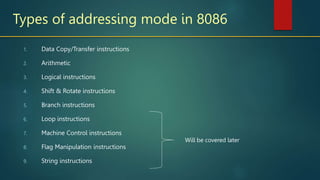
Types of addressing mode in 8086
1. Data Copy/Transfer instructions
2. Arithmetic
3. Logical instructions
4. Shift & Rotate instructions
5. Branch instructions
6. Loop instructions
7. Machine Control instructions
8. Flag Manipulation instructions
9. String instructions
Will be covered later
1: Data Copy/Transfer instructions
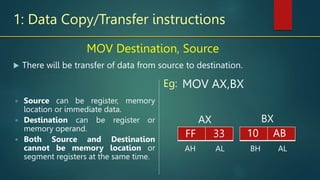
 There will be transfer of data from source to destination.
MOV Destination, Source
 Source can be register, memory
location or immediate data.
 Destination can be register or
memory operand.
 Both Source and Destination
cannot be memory location or
segment registers at the same time.
MOV AX,BX
AH AL
AX
FF 33
BX
BH AL
10 AB
Eg:
10 AB
1: Data Copy/Transfer instructions
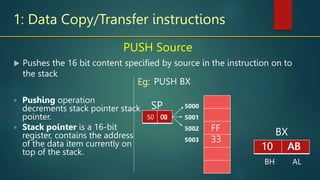
 Pushes the 16 bit content specified by source in the instruction on to
the stack
PUSH Source
 Pushing operation
decrements stack pointer stack
pointer.
 Stack pointer is a 16-bit
register, contains the address
of the data item currently on
top of the stack.
PUSH BX
SP
BX
BH AL
10 AB
Eg:
10 AB
FF
33
5000
5001
5002
5003
50
10 AB
02
01
00
1: Data Copy/Transfer instructions
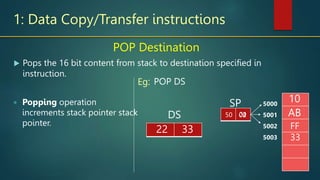
 Pops the 16 bit content from stack to destination specified in
instruction.
POP Destination
 Popping operation
increments stack pointer stack
pointer.
POP DS
SP
DS
22
Eg:
FF
33
5000
5001
5002
5003
50 02
01
00
10
AB
33
1: Data Copy/Transfer instructions
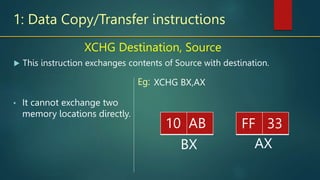
 This instruction exchanges contents of Source with destination.
XCHG Destination, Source
• It cannot exchange two
memory locations directly.
XCHG BX,AX
Eg:
AX
BX
FF 33
10 AB
1: Data Copy/Transfer instructions
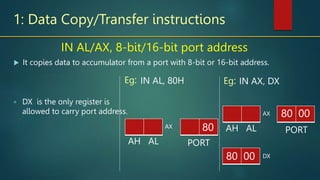
 It copies data to accumulator from a port with 8-bit or 16-bit address.
IN AL/AX, 8-bit/16-bit port address
 DX is the only register is
allowed to carry port address.
IN AL, 80H
Eg:
AH AL
AX 12
IN AX, DX
80
PORT
AH AL
AX
PORT
Eg:
DX
80 00
12 34
80 00
1: Data Copy/Transfer instructions
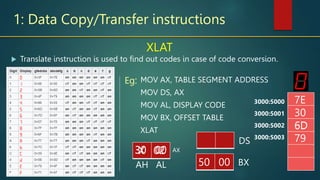
XLAT
 It translates code of the key
pressed to the
corresponding 7-segment
code.
 After execution this
instruction contents of AL
register always gets
replaced.
MOV AX, TABLE SEGMENT ADDRESS
MOV DS, AX
MOV AL, DISPLAY CODE
MOV BX, OFFSET TABLE
XLAT
Eg:
AH AL
AX
12
50 00 BX
 Translate instruction is used to find out codes in case of code conversion.
3000:5000
3000:5001
3000:5002
3000:5003
7E
30
6D
79
12
30 00
DS
6D
30 00
X 02
X
2: Arithmetic Instructions
 Addition
 Subtraction
 Increment
 Decrement
 Multiply
 Divide
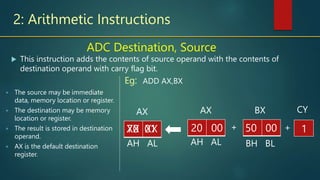
2: Arithmetic Instructions
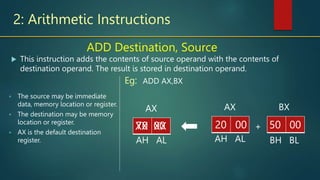
ADD Destination, Source
 The source may be immediate
data, memory location or register.
 The destination may be memory
location or register.
 AX is the default destination
register.
ADD AX,BX
Eg:
AH AL
AX
12
50 00
BX
 This instruction adds the contents of source operand with the contents of
destination operand. The result is stored in destination operand.
BH BL
+
AH AL
AX
20 00
70 00
XX XX
2: Arithmetic Instructions
ADC Destination, Source
 The source may be immediate
data, memory location or register.
 The destination may be memory
location or register.
 The result is stored in destination
operand.
 AX is the default destination
register.
ADD AX,BX
Eg:
AH AL
AX
12
50 00
BX
 This instruction adds the contents of source operand with the contents of
destination operand with carry flag bit.
BH BL
+
AH AL
AX
20 00
70 01
XX XX + 1
CY
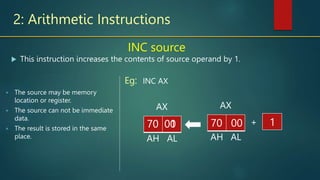
2: Arithmetic Instructions
INC source
 The source may be memory
location or register.
 The source can not be immediate
data.
 The result is stored in the same
place.
INC AX
Eg:
AH AL
AX
 This instruction increases the contents of source operand by 1.
+
AH AL
AX
70 00
70 01
70 00 1
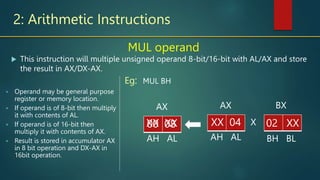
2: Arithmetic Instructions
MUL operand
 Operand may be general purpose
register or memory location.
 If operand is of 8-bit then multiply
it with contents of AL.
 If operand is of 16-bit then
multiply it with contents of AX.
 Result is stored in accumulator AX
in 8 bit operation and DX-AX in
16bit operation.
MUL BH
Eg:
AH AL
AX
 This instruction will multiple unsigned operand 8-bit/16-bit with AL/AX and store
the result in AX/DX-AX.
X
AH AL
AX
XX 04
00 08
XX XX 12
02 XX
BX
BH BL
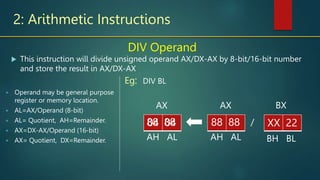
2: Arithmetic Instructions
DIV Operand
 Operand may be general purpose
register or memory location.
 AL=AX/Operand (8-bit)
 AL= Quotient, AH=Remainder.
 AX=DX-AX/Operand (16-bit)
 AX= Quotient, DX=Remainder.
DIV BL
Eg:
AH AL
AX
 This instruction will divide unsigned operand AX/DX-AX by 8-bit/16-bit number
and store the result in AX/DX-AX
/
AH AL
AX
88 88
04 04
88 88 12
XX 22
BX
BH BL
3: Bit Manipulation Instructions (LOGICAL Instructions)
 AND
 OR
 XOR
 NOT
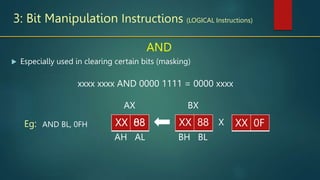
3: Bit Manipulation Instructions (LOGICAL Instructions)
AND
AND BL, 0FH
Eg:
BH BL
BX
 Especially used in clearing certain bits (masking)
X
AH AL
AX
XX 88
XX 08
XX 88 12
XX 0F
xxxx xxxx AND 0000 1111 = 0000 xxxx
Reflection Spot
You just studied about the AND operator is used to clear
certain bits. Which operator would be used to set certain bits
without effecting the other bits
Pause and write your answer in your course journal
Reflection Spot (Answer)
OR
MOV AX, 2000h
OR AX, 0008h
Eg:
xxxx xxxx OR 0000 1111 = xxxx 1111
 Used to multiply each bit in a byte/word with the corresponding bit in another
byte/word.
AH AL
AX
or
AH AL
AX
20 00
20 08
20 00 12
00 08
This sets bit 4 in the AX register
0010 0000 OR 0000 1000 = 0010 1000
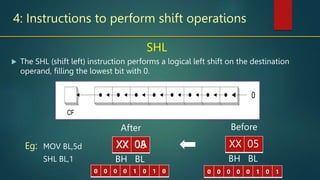
4: Instructions to perform shift operations
SHL
MOV BL,5d
SHL BL,1
Eg:
BH BL
Before
 The SHL (shift left) instruction performs a logical left shift on the destination
operand, filling the lowest bit with 0.
BH BL
After
XX 05
XX 0A
XX 05
CF
0
0 0 0 0 1 0 1 0 0 0 0 0 0 1 0 1
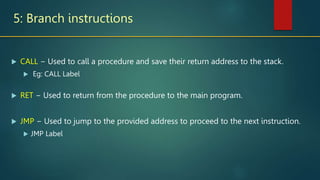
5: Branch instructions
 CALL − Used to call a procedure and save their return address to the stack.
 Eg: CALL Label
 RET − Used to return from the procedure to the main program.
 JMP − Used to jump to the provided address to proceed to the next instruction.
 JMP Label
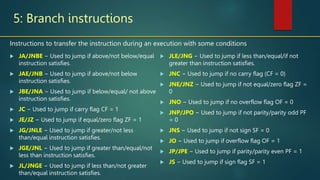
5: Branch instructions
 JA/JNBE − Used to jump if above/not below/equal
instruction satisfies.
 JAE/JNB − Used to jump if above/not below
instruction satisfies.
 JBE/JNA − Used to jump if below/equal/ not above
instruction satisfies.
 JC − Used to jump if carry flag CF = 1
 JE/JZ − Used to jump if equal/zero flag ZF = 1
 JG/JNLE − Used to jump if greater/not less
than/equal instruction satisfies.
 JGE/JNL − Used to jump if greater than/equal/not
less than instruction satisfies.
 JL/JNGE − Used to jump if less than/not greater
than/equal instruction satisfies.
 JLE/JNG − Used to jump if less than/equal/if not
greater than instruction satisfies.
 JNC − Used to jump if no carry flag (CF = 0)
 JNE/JNZ − Used to jump if not equal/zero flag ZF =
0
 JNO − Used to jump if no overflow flag OF = 0
 JNP/JPO − Used to jump if not parity/parity odd PF
= 0
 JNS − Used to jump if not sign SF = 0
 JO − Used to jump if overflow flag OF = 1
 JP/JPE − Used to jump if parity/parity even PF = 1
 JS − Used to jump if sign flag SF = 1
Instructions to transfer the instruction during an execution with some conditions
What we have learnt
 Studied 5 types of instruction set.
 How different instructions can manipulate data in different
ways.
Summery
References
 Advanced Microprocessors and Peripheral
- By K Bhurchandi, A. K. Ray
This presentation is licensed to the public
Text is available under the Creative
Commons Attribution-ShareAlike License

instruction-set-of-8086-mr-binu-joy3.ppt

  • 2.
    Why study instructionset?  Study of instruction set is required to write instructions in machine code that can be recognized and executed by a central processing unit.  The knowledge will help you write lines of code or program by which you will be able to tell the processor, the sequence of operations to be performed.
  • 3.
    What are wegoing to study? Instruction Set  Different types of instructions with examples  How to use instructions in assembly language programming
  • 4.
    Types of addressingmode in 8086 1. Data Copy/Transfer instructions 2. Arithmetic 3. Logical instructions 4. Shift & Rotate instructions 5. Branch instructions 6. Loop instructions 7. Machine Control instructions 8. Flag Manipulation instructions 9. String instructions Will be covered later
  • 5.
    1: Data Copy/Transferinstructions  There will be transfer of data from source to destination. MOV Destination, Source  Source can be register, memory location or immediate data.  Destination can be register or memory operand.  Both Source and Destination cannot be memory location or segment registers at the same time. MOV AX,BX AH AL AX FF 33 BX BH AL 10 AB Eg: 10 AB
  • 6.
    1: Data Copy/Transferinstructions  Pushes the 16 bit content specified by source in the instruction on to the stack PUSH Source  Pushing operation decrements stack pointer stack pointer.  Stack pointer is a 16-bit register, contains the address of the data item currently on top of the stack. PUSH BX SP BX BH AL 10 AB Eg: 10 AB FF 33 5000 5001 5002 5003 50 10 AB 02 01 00
  • 7.
    1: Data Copy/Transferinstructions  Pops the 16 bit content from stack to destination specified in instruction. POP Destination  Popping operation increments stack pointer stack pointer. POP DS SP DS 22 Eg: FF 33 5000 5001 5002 5003 50 02 01 00 10 AB 33
  • 8.
    1: Data Copy/Transferinstructions  This instruction exchanges contents of Source with destination. XCHG Destination, Source • It cannot exchange two memory locations directly. XCHG BX,AX Eg: AX BX FF 33 10 AB
  • 9.
    1: Data Copy/Transferinstructions  It copies data to accumulator from a port with 8-bit or 16-bit address. IN AL/AX, 8-bit/16-bit port address  DX is the only register is allowed to carry port address. IN AL, 80H Eg: AH AL AX 12 IN AX, DX 80 PORT AH AL AX PORT Eg: DX 80 00 12 34 80 00
  • 10.
    1: Data Copy/Transferinstructions XLAT  It translates code of the key pressed to the corresponding 7-segment code.  After execution this instruction contents of AL register always gets replaced. MOV AX, TABLE SEGMENT ADDRESS MOV DS, AX MOV AL, DISPLAY CODE MOV BX, OFFSET TABLE XLAT Eg: AH AL AX 12 50 00 BX  Translate instruction is used to find out codes in case of code conversion. 3000:5000 3000:5001 3000:5002 3000:5003 7E 30 6D 79 12 30 00 DS 6D 30 00 X 02 X
  • 11.
    2: Arithmetic Instructions Addition  Subtraction  Increment  Decrement  Multiply  Divide
  • 12.
    2: Arithmetic Instructions ADDDestination, Source  The source may be immediate data, memory location or register.  The destination may be memory location or register.  AX is the default destination register. ADD AX,BX Eg: AH AL AX 12 50 00 BX  This instruction adds the contents of source operand with the contents of destination operand. The result is stored in destination operand. BH BL + AH AL AX 20 00 70 00 XX XX
  • 13.
    2: Arithmetic Instructions ADCDestination, Source  The source may be immediate data, memory location or register.  The destination may be memory location or register.  The result is stored in destination operand.  AX is the default destination register. ADD AX,BX Eg: AH AL AX 12 50 00 BX  This instruction adds the contents of source operand with the contents of destination operand with carry flag bit. BH BL + AH AL AX 20 00 70 01 XX XX + 1 CY
  • 14.
    2: Arithmetic Instructions INCsource  The source may be memory location or register.  The source can not be immediate data.  The result is stored in the same place. INC AX Eg: AH AL AX  This instruction increases the contents of source operand by 1. + AH AL AX 70 00 70 01 70 00 1
  • 15.
    2: Arithmetic Instructions MULoperand  Operand may be general purpose register or memory location.  If operand is of 8-bit then multiply it with contents of AL.  If operand is of 16-bit then multiply it with contents of AX.  Result is stored in accumulator AX in 8 bit operation and DX-AX in 16bit operation. MUL BH Eg: AH AL AX  This instruction will multiple unsigned operand 8-bit/16-bit with AL/AX and store the result in AX/DX-AX. X AH AL AX XX 04 00 08 XX XX 12 02 XX BX BH BL
  • 16.
    2: Arithmetic Instructions DIVOperand  Operand may be general purpose register or memory location.  AL=AX/Operand (8-bit)  AL= Quotient, AH=Remainder.  AX=DX-AX/Operand (16-bit)  AX= Quotient, DX=Remainder. DIV BL Eg: AH AL AX  This instruction will divide unsigned operand AX/DX-AX by 8-bit/16-bit number and store the result in AX/DX-AX / AH AL AX 88 88 04 04 88 88 12 XX 22 BX BH BL
  • 17.
    3: Bit ManipulationInstructions (LOGICAL Instructions)  AND  OR  XOR  NOT
  • 18.
    3: Bit ManipulationInstructions (LOGICAL Instructions) AND AND BL, 0FH Eg: BH BL BX  Especially used in clearing certain bits (masking) X AH AL AX XX 88 XX 08 XX 88 12 XX 0F xxxx xxxx AND 0000 1111 = 0000 xxxx
  • 19.
    Reflection Spot You juststudied about the AND operator is used to clear certain bits. Which operator would be used to set certain bits without effecting the other bits Pause and write your answer in your course journal
  • 20.
    Reflection Spot (Answer) OR MOVAX, 2000h OR AX, 0008h Eg: xxxx xxxx OR 0000 1111 = xxxx 1111  Used to multiply each bit in a byte/word with the corresponding bit in another byte/word. AH AL AX or AH AL AX 20 00 20 08 20 00 12 00 08 This sets bit 4 in the AX register 0010 0000 OR 0000 1000 = 0010 1000
  • 21.
    4: Instructions toperform shift operations SHL MOV BL,5d SHL BL,1 Eg: BH BL Before  The SHL (shift left) instruction performs a logical left shift on the destination operand, filling the lowest bit with 0. BH BL After XX 05 XX 0A XX 05 CF 0 0 0 0 0 1 0 1 0 0 0 0 0 0 1 0 1
  • 22.
    5: Branch instructions CALL − Used to call a procedure and save their return address to the stack.  Eg: CALL Label  RET − Used to return from the procedure to the main program.  JMP − Used to jump to the provided address to proceed to the next instruction.  JMP Label
  • 23.
    5: Branch instructions JA/JNBE − Used to jump if above/not below/equal instruction satisfies.  JAE/JNB − Used to jump if above/not below instruction satisfies.  JBE/JNA − Used to jump if below/equal/ not above instruction satisfies.  JC − Used to jump if carry flag CF = 1  JE/JZ − Used to jump if equal/zero flag ZF = 1  JG/JNLE − Used to jump if greater/not less than/equal instruction satisfies.  JGE/JNL − Used to jump if greater than/equal/not less than instruction satisfies.  JL/JNGE − Used to jump if less than/not greater than/equal instruction satisfies.  JLE/JNG − Used to jump if less than/equal/if not greater than instruction satisfies.  JNC − Used to jump if no carry flag (CF = 0)  JNE/JNZ − Used to jump if not equal/zero flag ZF = 0  JNO − Used to jump if no overflow flag OF = 0  JNP/JPO − Used to jump if not parity/parity odd PF = 0  JNS − Used to jump if not sign SF = 0  JO − Used to jump if overflow flag OF = 1  JP/JPE − Used to jump if parity/parity even PF = 1  JS − Used to jump if sign flag SF = 1 Instructions to transfer the instruction during an execution with some conditions
  • 24.
    What we havelearnt  Studied 5 types of instruction set.  How different instructions can manipulate data in different ways. Summery
  • 25.
    References  Advanced Microprocessorsand Peripheral - By K Bhurchandi, A. K. Ray
  • 26.
    This presentation islicensed to the public Text is available under the Creative Commons Attribution-ShareAlike License