1 
x86’s instruction sets
2 
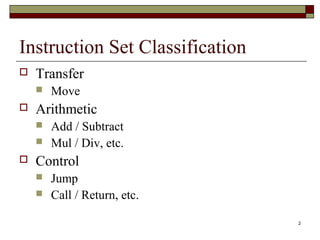
Instruction Set Classification 
 Transfer 
 Move 
 Arithmetic 
 Add / Subtract 
 Mul / Div, etc. 
 Control 
 Jump 
 Call / Return, etc.
3 
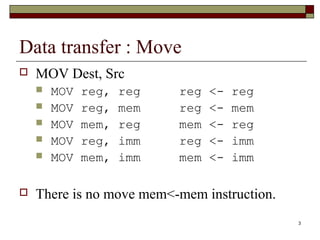
Data transfer : Move 
 MOV Dest, Src 
 MOV reg, reg reg <- reg 
 MOV reg, mem reg <- mem 
 MOV mem, reg mem <- reg 
 MOV reg, imm reg <- imm 
 MOV mem, imm mem <- imm 
 There is no move mem<-mem instruction.
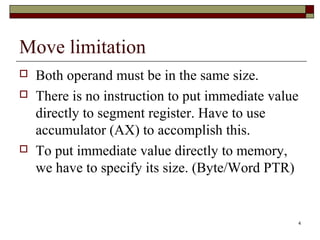
Move limitation 
 Both operand must be in the same size. 
 There is no instruction to put immediate value 
directly to segment register. Have to use 
accumulator (AX) to accomplish this. 
 To put immediate value directly to memory, 
we have to specify its size. (Byte/Word PTR) 
4
5 
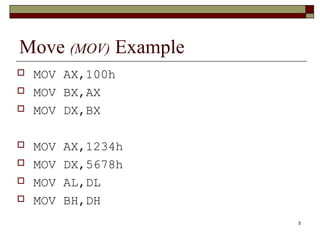
Move (MOV) Example 
 MOV AX,100h 
 MOV BX,AX 
 MOV DX,BX 
 MOV AX,1234h 
 MOV DX,5678h 
 MOV AL,DL 
 MOV BH,DH
6 
MOV Example 
 MOV AX,1000h 
 MOV [100h],AX 
 MOV BX,[100h] 
 MOV BYTE PTR [200h],10h 
 MOV WORD PTR [300h],10h 
 MOV AX,2300h 
 MOV DS,AX
7 
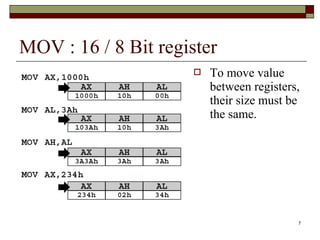
MOV : 16 / 8 Bit register 
 To move value 
between registers, 
their size must be 
the same.
8 
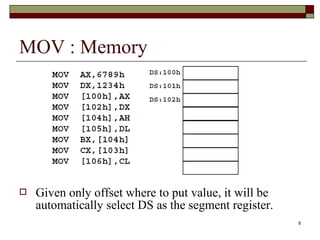
MOV : Memory 
 Given only offset where to put value, it will be 
automatically select DS as the segment register.
9 
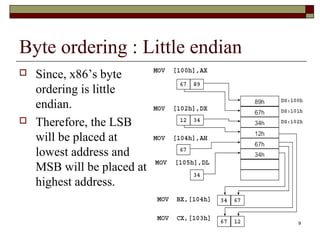
Byte ordering : Little endian 
 Since, x86’s byte 
ordering is little 
endian. 
 Therefore, the LSB 
will be placed at 
lowest address and 
MSB will be placed at 
highest address.
10 
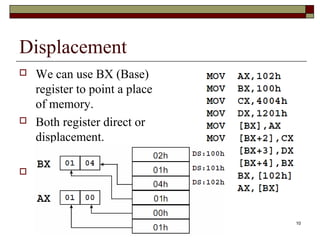
Displacement 
 We can use BX (Base) 
register to point a place 
of memory. 
 Both register direct or 
displacement. 
 AX = ?
11 
What is the result of … 
 MOV [100h] , 10h 
 Address 100 = 10h 
 What about address 101? 
 Word or Byte? 
 MOV WORD PTR [100h], 10h 
 MOV BYTE PTR [100h], 10h 
 What about MOV [100h], AX ?
12 
Status Register (Flag)
13 
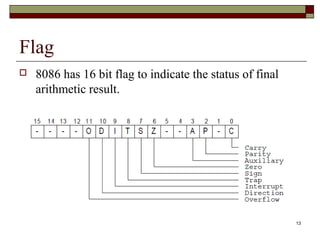
Flag 
 8086 has 16 bit flag to indicate the status of final 
arithmetic result.
14 
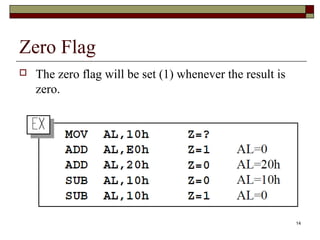
Zero Flag 
 The zero flag will be set (1) whenever the result is 
zero.
15 
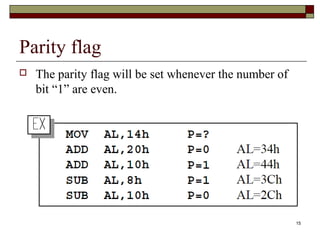
Parity flag 
 The parity flag will be set whenever the number of 
bit “1” are even.
16 
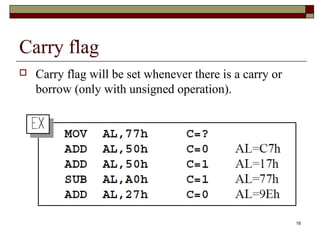
Carry flag 
 Carry flag will be set whenever there is a carry or 
borrow (only with unsigned operation).
17 
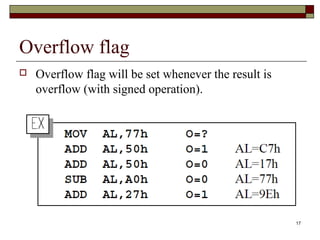
Overflow flag 
 Overflow flag will be set whenever the result is 
overflow (with signed operation).
18 
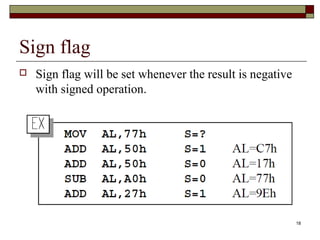
Sign flag 
 Sign flag will be set whenever the result is negative 
with signed operation.
19 
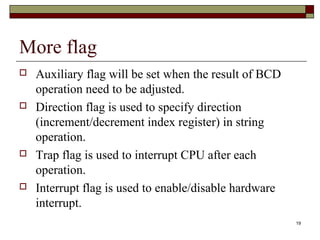
More flag 
 Auxiliary flag will be set when the result of BCD 
operation need to be adjusted. 
 Direction flag is used to specify direction 
(increment/decrement index register) in string 
operation. 
 Trap flag is used to interrupt CPU after each 
operation. 
 Interrupt flag is used to enable/disable hardware 
interrupt.
20 
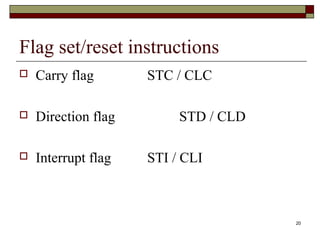
Flag set/reset instructions 
 Carry flag STC / CLC 
 Direction flag STD / CLD 
 Interrupt flag STI / CLI
21 
Arithmetic instructions
22 
Increment - Decrement 
 INC / DEC 
 INC register DEC register 
 INC memory DEC memory 
 EX. 
 INC AX 
 DEC BL 
 How can we increment a byte of memory? 
 INC ??? [100]
23 
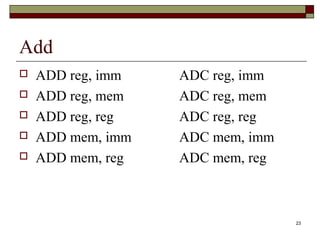
Add 
 ADD reg, imm ADC reg, imm 
 ADD reg, mem ADC reg, mem 
 ADD reg, reg ADC reg, reg 
 ADD mem, imm ADC mem, imm 
 ADD mem, reg ADC mem, reg
24 
EX. ADD 
 MOV AL, 10h 
 ADD AL, 20h ;AL = 30h 
 MOV BX, 200h ;BX = 0200h 
 MOV WORD PTR [BX], 10h 
 ADD WORD PTR [BX], 70h 
 MOV AH, 89h ;AX = 8930h 
 ADD AX, 9876h ;AX = 21A6h 
 ADC BX, 01h ;BX = 0202h ?
25 
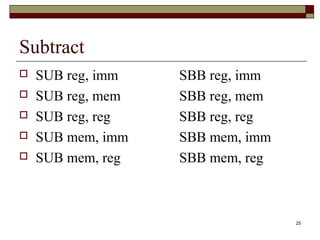
Subtract 
 SUB reg, imm SBB reg, imm 
 SUB reg, mem SBB reg, mem 
 SUB reg, reg SBB reg, reg 
 SUB mem, imm SBB mem, imm 
 SUB mem, reg SBB mem, reg
26 
Ex. SUB 
 MOV AL, 10h 
 ADD AL, 20h ;AL = 30h 
 MOV BX, 200h ;BX = 0200h 
 MOV WORD PTR [BX], 10h 
 SUB WORD PTR [BX], 70h 
 MOV AH, 89h ;AX = 8930h 
 SBB AX, 0001h ;AX = 892Eh ? 
 SBB AX, 0001h ;AX = 892Dh
27 
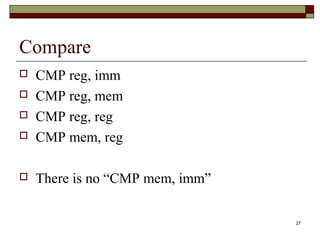
Compare 
 CMP reg, imm 
 CMP reg, mem 
 CMP reg, reg 
 CMP mem, reg 
 There is no “CMP mem, imm”
28 
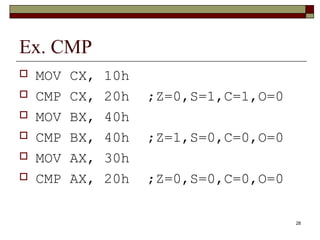
Ex. CMP 
 MOV CX, 10h 
 CMP CX, 20h ;Z=0,S=1,C=1,O=0 
 MOV BX, 40h 
 CMP BX, 40h ;Z=1,S=0,C=0,O=0 
 MOV AX, 30h 
 CMP AX, 20h ;Z=0,S=0,C=0,O=0
29 
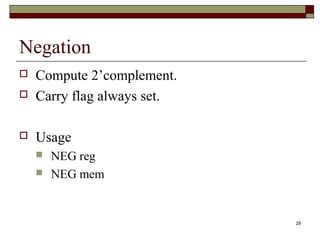
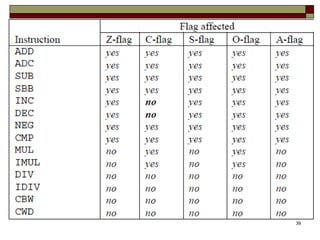
Negation 
 Compute 2’complement. 
 Carry flag always set. 
 Usage 
 NEG reg 
 NEG mem
30 
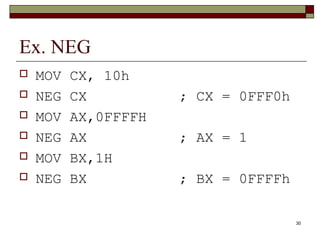
Ex. NEG 
 MOV CX, 10h 
 NEG CX ; CX = 0FFF0h 
 MOV AX,0FFFFH 
 NEG AX ; AX = 1 
 MOV BX,1H 
 NEG BX ; BX = 0FFFFh
31 
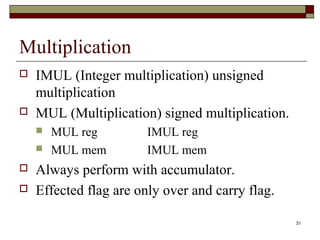
Multiplication 
 IMUL (Integer multiplication) unsigned 
multiplication 
 MUL (Multiplication) signed multiplication. 
 MUL reg IMUL reg 
 MUL mem IMUL mem 
 Always perform with accumulator. 
 Effected flag are only over and carry flag.
32 
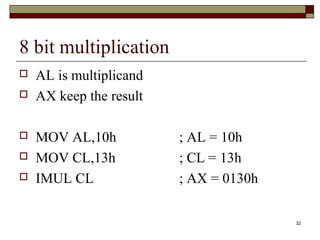
8 bit multiplication 
 AL is multiplicand 
 AX keep the result 
 MOV AL,10h ; AL = 10h 
 MOV CL,13h ; CL = 13h 
 IMUL CL ; AX = 0130h
33 
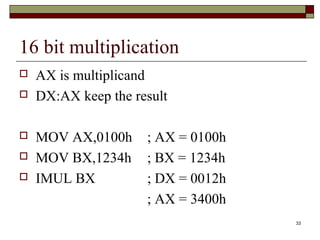
16 bit multiplication 
 AX is multiplicand 
 DX:AX keep the result 
 MOV AX,0100h ; AX = 0100h 
 MOV BX,1234h ; BX = 1234h 
 IMUL BX ; DX = 0012h 
; AX = 3400h
34 
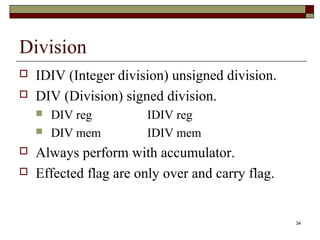
Division 
 IDIV (Integer division) unsigned division. 
 DIV (Division) signed division. 
 DIV reg IDIV reg 
 DIV mem IDIV mem 
 Always perform with accumulator. 
 Effected flag are only over and carry flag.
35 
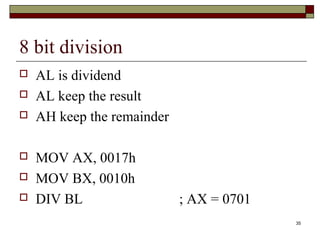
8 bit division 
 AL is dividend 
 AL keep the result 
 AH keep the remainder 
 MOV AX, 0017h 
 MOV BX, 0010h 
 DIV BL ; AX = 0701
36 
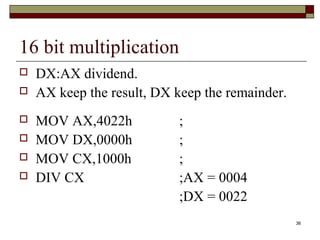
16 bit multiplication 
 DX:AX dividend. 
 AX keep the result, DX keep the remainder. 
 MOV AX,4022h ; 
 MOV DX,0000h ; 
 MOV CX,1000h ; 
 DIV CX ;AX = 0004 
;DX = 0022
37 
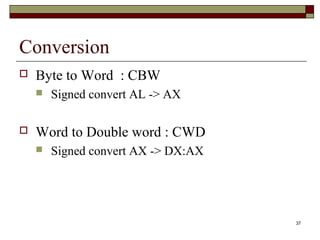
Conversion 
 Byte to Word : CBW 
 Signed convert AL -> AX 
 Word to Double word : CWD 
 Signed convert AX -> DX:AX
38 
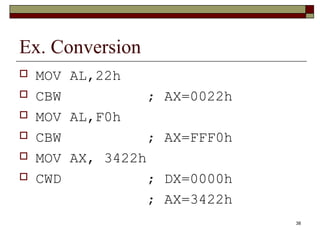
Ex. Conversion 
 MOV AL,22h 
 CBW ; AX=0022h 
 MOV AL,F0h 
 CBW ; AX=FFF0h 
 MOV AX, 3422h 
 CWD ; DX=0000h 
; AX=3422h
39
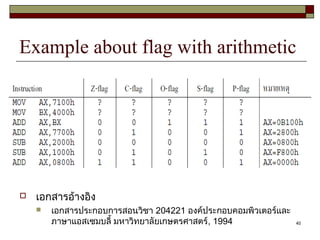
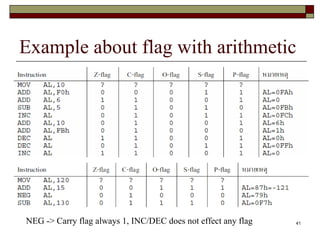
Example about flag with arithmetic 
40 
 เอกสารอ้างอิง 
 เอกสารประกอบการสอนวิชา 204221 องค์ประกอบคอมพิวเตอร์และ 
ภาษาแอสเซมบลี้ มหาวิทยาลัยเกษตรศาสตร์, 1994
Example about flag with arithmetic 
41 
NEG -> Carry flag always 1, INC/DEC does not effect any flag
42 
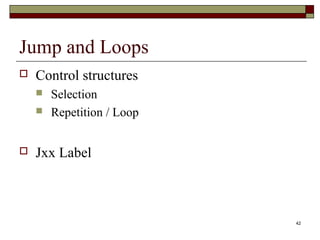
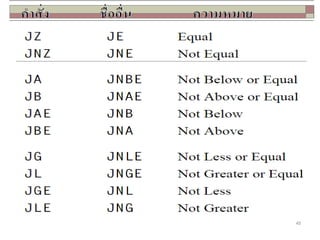
Jump and Loops 
 Control structures 
 Selection 
 Repetition / Loop 
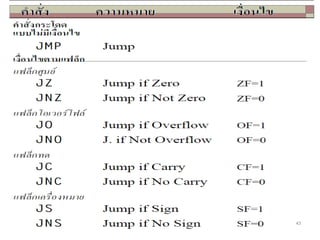
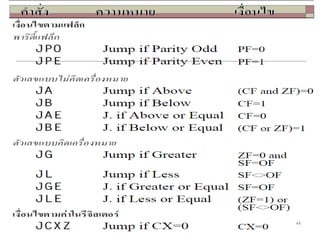
 Jxx Label
43
44
45
46 
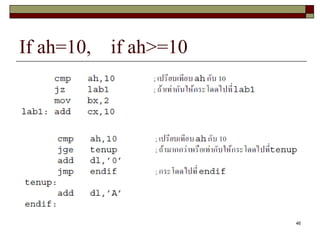
If ah=10, if ah>=10
47 
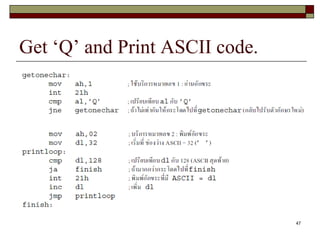
Get ‘Q’ and Print ASCII code.
48 
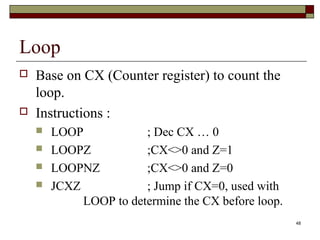
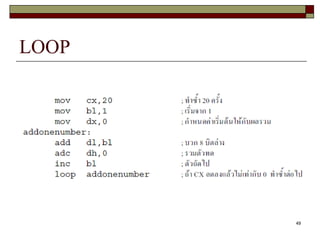
Loop 
 Base on CX (Counter register) to count the 
loop. 
 Instructions : 
 LOOP ; Dec CX … 0 
 LOOPZ ;CX<>0 and Z=1 
 LOOPNZ ;CX<>0 and Z=0 
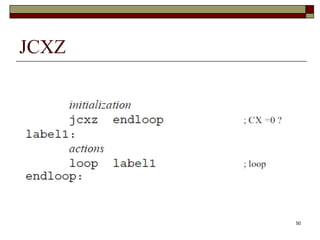
 JCXZ ; Jump if CX=0, used with 
LOOP to determine the CX before loop.
49 
LOOP
50 
JCXZ
51 
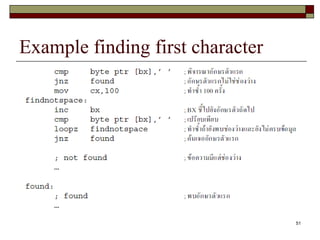
Example finding first character
52 
That’s all.

8086 instruction set

  • 1.
  • 2.
    2 Instruction SetClassification  Transfer  Move  Arithmetic  Add / Subtract  Mul / Div, etc.  Control  Jump  Call / Return, etc.
  • 3.
    3 Data transfer: Move  MOV Dest, Src  MOV reg, reg reg <- reg  MOV reg, mem reg <- mem  MOV mem, reg mem <- reg  MOV reg, imm reg <- imm  MOV mem, imm mem <- imm  There is no move mem<-mem instruction.
  • 4.
    Move limitation Both operand must be in the same size.  There is no instruction to put immediate value directly to segment register. Have to use accumulator (AX) to accomplish this.  To put immediate value directly to memory, we have to specify its size. (Byte/Word PTR) 4
  • 5.
    5 Move (MOV)Example  MOV AX,100h  MOV BX,AX  MOV DX,BX  MOV AX,1234h  MOV DX,5678h  MOV AL,DL  MOV BH,DH
  • 6.
    6 MOV Example  MOV AX,1000h  MOV [100h],AX  MOV BX,[100h]  MOV BYTE PTR [200h],10h  MOV WORD PTR [300h],10h  MOV AX,2300h  MOV DS,AX
  • 7.
    7 MOV :16 / 8 Bit register  To move value between registers, their size must be the same.
  • 8.
    8 MOV :Memory  Given only offset where to put value, it will be automatically select DS as the segment register.
  • 9.
    9 Byte ordering: Little endian  Since, x86’s byte ordering is little endian.  Therefore, the LSB will be placed at lowest address and MSB will be placed at highest address.
  • 10.
    10 Displacement We can use BX (Base) register to point a place of memory.  Both register direct or displacement.  AX = ?
  • 11.
    11 What isthe result of …  MOV [100h] , 10h  Address 100 = 10h  What about address 101?  Word or Byte?  MOV WORD PTR [100h], 10h  MOV BYTE PTR [100h], 10h  What about MOV [100h], AX ?
  • 12.
  • 13.
    13 Flag 8086 has 16 bit flag to indicate the status of final arithmetic result.
  • 14.
    14 Zero Flag  The zero flag will be set (1) whenever the result is zero.
  • 15.
    15 Parity flag  The parity flag will be set whenever the number of bit “1” are even.
  • 16.
    16 Carry flag  Carry flag will be set whenever there is a carry or borrow (only with unsigned operation).
  • 17.
    17 Overflow flag  Overflow flag will be set whenever the result is overflow (with signed operation).
  • 18.
    18 Sign flag  Sign flag will be set whenever the result is negative with signed operation.
  • 19.
    19 More flag  Auxiliary flag will be set when the result of BCD operation need to be adjusted.  Direction flag is used to specify direction (increment/decrement index register) in string operation.  Trap flag is used to interrupt CPU after each operation.  Interrupt flag is used to enable/disable hardware interrupt.
  • 20.
    20 Flag set/resetinstructions  Carry flag STC / CLC  Direction flag STD / CLD  Interrupt flag STI / CLI
  • 21.
  • 22.
    22 Increment -Decrement  INC / DEC  INC register DEC register  INC memory DEC memory  EX.  INC AX  DEC BL  How can we increment a byte of memory?  INC ??? [100]
  • 23.
    23 Add ADD reg, imm ADC reg, imm  ADD reg, mem ADC reg, mem  ADD reg, reg ADC reg, reg  ADD mem, imm ADC mem, imm  ADD mem, reg ADC mem, reg
  • 24.
    24 EX. ADD  MOV AL, 10h  ADD AL, 20h ;AL = 30h  MOV BX, 200h ;BX = 0200h  MOV WORD PTR [BX], 10h  ADD WORD PTR [BX], 70h  MOV AH, 89h ;AX = 8930h  ADD AX, 9876h ;AX = 21A6h  ADC BX, 01h ;BX = 0202h ?
  • 25.
    25 Subtract SUB reg, imm SBB reg, imm  SUB reg, mem SBB reg, mem  SUB reg, reg SBB reg, reg  SUB mem, imm SBB mem, imm  SUB mem, reg SBB mem, reg
  • 26.
    26 Ex. SUB  MOV AL, 10h  ADD AL, 20h ;AL = 30h  MOV BX, 200h ;BX = 0200h  MOV WORD PTR [BX], 10h  SUB WORD PTR [BX], 70h  MOV AH, 89h ;AX = 8930h  SBB AX, 0001h ;AX = 892Eh ?  SBB AX, 0001h ;AX = 892Dh
  • 27.
    27 Compare CMP reg, imm  CMP reg, mem  CMP reg, reg  CMP mem, reg  There is no “CMP mem, imm”
  • 28.
    28 Ex. CMP  MOV CX, 10h  CMP CX, 20h ;Z=0,S=1,C=1,O=0  MOV BX, 40h  CMP BX, 40h ;Z=1,S=0,C=0,O=0  MOV AX, 30h  CMP AX, 20h ;Z=0,S=0,C=0,O=0
  • 29.
    29 Negation Compute 2’complement.  Carry flag always set.  Usage  NEG reg  NEG mem
  • 30.
    30 Ex. NEG  MOV CX, 10h  NEG CX ; CX = 0FFF0h  MOV AX,0FFFFH  NEG AX ; AX = 1  MOV BX,1H  NEG BX ; BX = 0FFFFh
  • 31.
    31 Multiplication IMUL (Integer multiplication) unsigned multiplication  MUL (Multiplication) signed multiplication.  MUL reg IMUL reg  MUL mem IMUL mem  Always perform with accumulator.  Effected flag are only over and carry flag.
  • 32.
    32 8 bitmultiplication  AL is multiplicand  AX keep the result  MOV AL,10h ; AL = 10h  MOV CL,13h ; CL = 13h  IMUL CL ; AX = 0130h
  • 33.
    33 16 bitmultiplication  AX is multiplicand  DX:AX keep the result  MOV AX,0100h ; AX = 0100h  MOV BX,1234h ; BX = 1234h  IMUL BX ; DX = 0012h ; AX = 3400h
  • 34.
    34 Division IDIV (Integer division) unsigned division.  DIV (Division) signed division.  DIV reg IDIV reg  DIV mem IDIV mem  Always perform with accumulator.  Effected flag are only over and carry flag.
  • 35.
    35 8 bitdivision  AL is dividend  AL keep the result  AH keep the remainder  MOV AX, 0017h  MOV BX, 0010h  DIV BL ; AX = 0701
  • 36.
    36 16 bitmultiplication  DX:AX dividend.  AX keep the result, DX keep the remainder.  MOV AX,4022h ;  MOV DX,0000h ;  MOV CX,1000h ;  DIV CX ;AX = 0004 ;DX = 0022
  • 37.
    37 Conversion Byte to Word : CBW  Signed convert AL -> AX  Word to Double word : CWD  Signed convert AX -> DX:AX
  • 38.
    38 Ex. Conversion  MOV AL,22h  CBW ; AX=0022h  MOV AL,F0h  CBW ; AX=FFF0h  MOV AX, 3422h  CWD ; DX=0000h ; AX=3422h
  • 39.
  • 40.
    Example about flagwith arithmetic 40  เอกสารอ้างอิง  เอกสารประกอบการสอนวิชา 204221 องค์ประกอบคอมพิวเตอร์และ ภาษาแอสเซมบลี้ มหาวิทยาลัยเกษตรศาสตร์, 1994
  • 41.
    Example about flagwith arithmetic 41 NEG -> Carry flag always 1, INC/DEC does not effect any flag
  • 42.
    42 Jump andLoops  Control structures  Selection  Repetition / Loop  Jxx Label
  • 43.
  • 44.
  • 45.
  • 46.
    46 If ah=10,if ah>=10
  • 47.
    47 Get ‘Q’and Print ASCII code.
  • 48.
    48 Loop Base on CX (Counter register) to count the loop.  Instructions :  LOOP ; Dec CX … 0  LOOPZ ;CX<>0 and Z=1  LOOPNZ ;CX<>0 and Z=0  JCXZ ; Jump if CX=0, used with LOOP to determine the CX before loop.
  • 49.
  • 50.
  • 51.
    51 Example findingfirst character
  • 52.